Lost Aero Effects After Upgrade From Vista?

MrTissues

New member
Local time
8:43 AM
Messages
3
Hey guys. I am at my home over spring break. My parents wanted me to get their computer up to date. It was running a 64 bit Windows Vista Home Premium.

I was able to get a free copy of Windows 7 Professional 64 bit and installed that onto their computer just fine.

It runs fine, it is snappy, and much better than Vista was. However, for some reason they have lost their Aero effects. I have no idea why. Whenever I try to run the "Windows Experience Index" I get this error: "Could Not Measure Video Playback Performance."

The videocard in their Acer is a Nvidia G100 (which is a very obscure card actually). I do think I have the latest driver updates from their website, I mean I just installed it when I updated their computer this afternoon.


Any help is appreciated!
 

My Computer My Computer

At a glance

Windows 7 Professional 64 Bit
OS
Windows 7 Professional 64 Bit
You could try a couple of things:
1) Upgrade your graphics driver to the latest version.
2) Do a repair install.
Then run WEI again.
 

My Computer My Computer

At a glance

Windows 7 x64 pro/ Windows 7 x86 Pro/ XP SP3 x86
Computer Manufacturer/Model Number
Too many to describe...
OS
Windows 7 x64 pro/ Windows 7 x86 Pro/ XP SP3 x86
Hello MrTissues, welcome to Seven Forums!


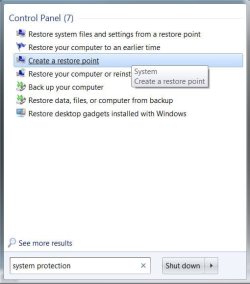
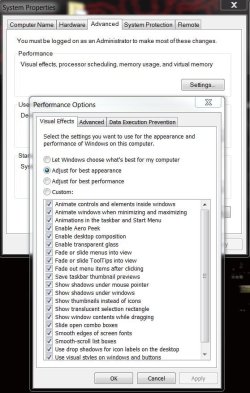
In the start menu search box type "system protection" (without the quotes) click create a restore point, at the advanced tab, select performance, settings , visual effects to see what the settings are; be sure to post back to keep us informed.

click these images to enlarge
1111.JPG11111.JPG
 

My Computer My Computer

At a glance

W 7 64-bit UltimateIntel Q9550 Yorkfield8GB Dominator 8500C5DATI : XFX 5870
Computer Manufacturer/Model Number
* BFK Customs *
OS
W 7 64-bit Ultimate
CPU
Intel Q9550 Yorkfield
Motherboard
ASUS P5Q Pro
Memory
8GB Dominator 8500C5D
Graphics Card(s)
ATI : XFX 5870
Sound Card
Realtek HD Audio 7-1
Monitor(s) Displays
1x 47" LCD HDMI & 3x 26" LCD HDMI
Screen Resolution
1920x1080P & 1920x1200
Hard Drives
1x 80GB Intel X25-M G2 SSD : 1x 500GB & 1x 640GB WD Caviar Black(s)
PSU
Corsair 620HX
Case
Cooler Master RC-690
Cooling
Tuniq Tower 120, 2x 140mm and 3x 120mm case fans
Keyboard
Microsoft 500
Mouse
Razer Diamondback 3G
Internet Speed
14 Mb/s
Other Info
1x Koutech 3Gb/s SATA HDD Hot Swap Rack
This is what my settings currently look like. Should I deselect let Windows choose for me?

capturehl.png
 

My Computer My Computer

At a glance

Windows 7 Professional 64 Bit
OS
Windows 7 Professional 64 Bit
Type aero in Start Search box to get the Aero troubleshooter which will help you work through the problems.

You can also right click the Desktop, select Personalize and see if an Aero theme is available in themes listed. Sometimes adjusting video settings will create a Custom theme which excludes Aero, or changes background or slideshow.

If not available, troubleshooter should tell you why. Keep working with display drivers until you are certain you've exhausted all possiblities. Sometimes a Vista driver must be installed in Compatibility mode. Windows Update may have one cued up in Optional Updates. Your Support Downloads website for computer model may have a customized driver.
 

My Computer My Computer

At a glance

W 7 64-bit UltimateIntel Q9550 Yorkfield8GB Dominator 8500C5DATI : XFX 5870
Computer Manufacturer/Model Number
* BFK Customs *
OS
W 7 64-bit Ultimate
CPU
Intel Q9550 Yorkfield
Motherboard
ASUS P5Q Pro
Memory
8GB Dominator 8500C5D
Graphics Card(s)
ATI : XFX 5870
Sound Card
Realtek HD Audio 7-1
Monitor(s) Displays
1x 47" LCD HDMI & 3x 26" LCD HDMI
Screen Resolution
1920x1080P & 1920x1200
Hard Drives
1x 80GB Intel X25-M G2 SSD : 1x 500GB & 1x 640GB WD Caviar Black(s)
PSU
Corsair 620HX
Case
Cooler Master RC-690
Cooling
Tuniq Tower 120, 2x 140mm and 3x 120mm case fans
Keyboard
Microsoft 500
Mouse
Razer Diamondback 3G
Internet Speed
14 Mb/s
Other Info
1x Koutech 3Gb/s SATA HDD Hot Swap Rack
Thanks for the help you guys. I re downloaded the same driver I had installed before, and reinstalled it the exact same way.

For whatever reason, it works fine now, not sure what changed.
 

My Computer My Computer

At a glance

Windows 7 Professional 64 Bit
OS
Windows 7 Professional 64 Bit
Hello again MT.


We're glad you found a solution that worked for you, thanks for the update.
 

My Computer My Computer

At a glance

W 7 64-bit UltimateIntel Q9550 Yorkfield8GB Dominator 8500C5DATI : XFX 5870
Computer Manufacturer/Model Number
* BFK Customs *
OS
W 7 64-bit Ultimate
CPU
Intel Q9550 Yorkfield
Motherboard
ASUS P5Q Pro
Memory
8GB Dominator 8500C5D
Graphics Card(s)
ATI : XFX 5870
Sound Card
Realtek HD Audio 7-1
Monitor(s) Displays
1x 47" LCD HDMI & 3x 26" LCD HDMI
Screen Resolution
1920x1080P & 1920x1200
Hard Drives
1x 80GB Intel X25-M G2 SSD : 1x 500GB & 1x 640GB WD Caviar Black(s)
PSU
Corsair 620HX
Case
Cooler Master RC-690
Cooling
Tuniq Tower 120, 2x 140mm and 3x 120mm case fans
Keyboard
Microsoft 500
Mouse
Razer Diamondback 3G
Internet Speed
14 Mb/s
Other Info
1x Koutech 3Gb/s SATA HDD Hot Swap Rack
Probably a refresh of the WEI would have sorted out aero?
 

My Computer My Computer

At a glance

Windows 7 Professional 64-bitIntel E8400 3GHzKingston PC3-10700H 4GbXFX Radeon HD 5850 BlackEd.
Computer Manufacturer/Model Number
self built
OS
Windows 7 Professional 64-bit
CPU
Intel E8400 3GHz
Motherboard
Intel DX48BT2
Memory
Kingston PC3-10700H 4Gb
Graphics Card(s)
XFX Radeon HD 5850 BlackEd.
Sound Card
Asus Xonar DG
Monitor(s) Displays
2x Samsung SM-T220HD 22"
Screen Resolution
1680x1050 on two monitors
Hard Drives
OCZ Vertex 2 120gb 3.5" (OS)
Seagate Momentus XT 500gb
Samsung F3 1Tb (games)
2x Samsung F1 1Tb
PSU
Thermaltake ToughPower 850w
Case
Thermaltake Armor
Cooling
Scythe Mugen II
Keyboard
Microsoft Comfort Curve USB
Mouse
Razer Diamondback 3G
Internet Speed
8128/443
Back
Top