lost all my firefox bookmarks :(

BigDan

New member
Local time
4:06 AM
Messages
15
My Avast virus scanner hasnt been playing nice with Firefox recently. It kept changing my default search provider from Google but that wasnt a big deal.

A few days ago it said I have problems with 3 extensions (not all FF i think). I removed the first 2 without incident. When I removed the third one the FF browser closed and when I reopened it it was a fresh install. It had the welcome messages of a new browser, all forms, bookmarks, history were gone.

Is there some way to restore some/all of my bookmarks? I've done a search in my computer and dont see any backups I made. I'm hoping there's some kinda auto bookmarking? I did find something with a .json extension, and I notice if I try to make a backup now via FF the extension on that is json, so that's something. But this file is only 2.35 kb, so that doesnt help.

Can anyone help?

Thanks!
Dan
 

My Computer My Computer

OS
Windows 7 Home Premium 64-bit

My Computer My Computer

Computer type
PC/Desktop
It is quite possible that your original Firefox profile, which contains, among other things, bookmarks, is still on your computer; however, even if it is, it may be corrupt, so that you might want to transfer, one at a time, the files in the original profile to the new one, and test before proceeding.

Here is the information about Firefox profiles:

Profile folder - Firefox - MozillaZine Knowledge Base
 

My Computer My Computer

Computer type
PC/Desktop
Computer Manufacturer/Model Number
Intel(R) Core(TM) i5-2320 CPU @ 3.00GHz (Gateway computer)
OS
Microsoft Windows 7 Home Premium 64-bit 7601 Multiprocessor Free Service Pack 1
CPU
Intel(R) Core(TM) i5-2320 CPU @ 3.00GHz
Motherboard
Gateway IPISB-VR
Memory
8.00 GB
Graphics Card(s)
Intel(R) HD Graphics
Sound Card
(1) Realtek High Definition Audio (2) Intel(R) Display Aud
Monitor(s) Displays
ViewSonic 2250 Series
Screen Resolution
1920 x 1080 x 32 bits (4294967296 colors) @ 60 Hz
Hard Drives
(1) WDC WD10EADX-22TDHB0 (2) Generic Mini SD Reader USB Device (3) Generic USB CF Reader USB Device (4) Generic USB MS Reader USB Device (5) Generic USB SD Reader USB Device (6) Generic USB xD/SM Reader USB Device (7) Seagate FreeAgent Go
Keyboard
Gateway
Mouse
Logitech
Internet Speed
20 Mbps (Theoretical.)
Antivirus
Avast
Browser
Firefox
It is quite possible that your original Firefox profile, which contains, among other things, bookmarks, is still on your computer; however, even if it is, it may be corrupt, so that you might want to transfer, one at a time, the files in the original profile to the new one, and test before proceeding.

Here is the information about Firefox profiles:

Profile folder - Firefox - MozillaZine Knowledge Base


I went to Profiles and Show Folders. I saw 3 folders under profiles. 2 were last modified 7/14 one 7/19 (today). This problem started 7/11 or 10th. I then checked the dates created, 2 were recent and one in 2012 when I bought the computer. Great.

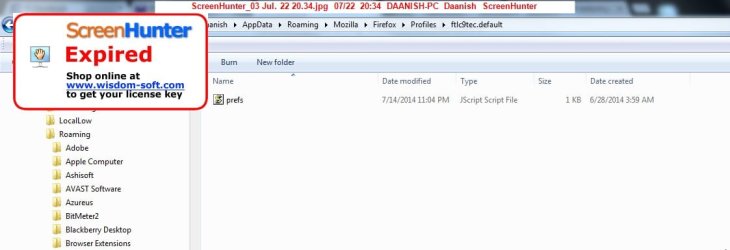
When I opened the folder created in 2012 it only have one file called prefs which is a javascript file and is 1 kb. Is there any where to go from here?

I did a Malware scan a couple days ago btw, and although it had issues in the beginning eventually it was clean.
 

My Computer My Computer

OS
Windows 7 Home Premium 64-bit
It is quite possible that your original Firefox profile, which contains, among other things, bookmarks, is still on your computer; however, even if it is, it may be corrupt, so that you might want to transfer, one at a time, the files in the original profile to the new one, and test before proceeding.

Here is the information about Firefox profiles:

Profile folder - Firefox - MozillaZine Knowledge Base


I went to Profiles and Show Folders. I saw 3 folders under profiles. 2 were last modified 7/14 one 7/19 (today). This problem started 7/11 or 10th. I then checked the dates created, 2 were recent and one in 2012 when I bought the computer. Great.

When I opened the folder created in 2012 it only have one file called prefs which is a javascript file and is 1 kb. Is there any where to go from here?

I did a Malware scan a couple days ago btw, and although it had issues in the beginning eventually it was clean.

That does not bode well at all. First of all, you were only looking at the in-use profile, not any others that may (only may) exist, and if that only showed three folders (knowing their names would certainly be useful information,) That said, I assume that there were many other non-folder entries shown in the profile, such as places.sqlite, the file that contains your current bookmarks.

So, folder names, such as bookmarkbackups? Did you look for any other Fx profiles?

Do you not regularly backup your Fx profile(s)?

What version of Fx are you using? Again, you must provide all relevant information when asking for assistance, else it is difficult, if not impossible, to help you.
 

My Computer My Computer

Computer type
PC/Desktop
Computer Manufacturer/Model Number
Intel(R) Core(TM) i5-2320 CPU @ 3.00GHz (Gateway computer)
OS
Microsoft Windows 7 Home Premium 64-bit 7601 Multiprocessor Free Service Pack 1
CPU
Intel(R) Core(TM) i5-2320 CPU @ 3.00GHz
Motherboard
Gateway IPISB-VR
Memory
8.00 GB
Graphics Card(s)
Intel(R) HD Graphics
Sound Card
(1) Realtek High Definition Audio (2) Intel(R) Display Aud
Monitor(s) Displays
ViewSonic 2250 Series
Screen Resolution
1920 x 1080 x 32 bits (4294967296 colors) @ 60 Hz
Hard Drives
(1) WDC WD10EADX-22TDHB0 (2) Generic Mini SD Reader USB Device (3) Generic USB CF Reader USB Device (4) Generic USB MS Reader USB Device (5) Generic USB SD Reader USB Device (6) Generic USB xD/SM Reader USB Device (7) Seagate FreeAgent Go
Keyboard
Gateway
Mouse
Logitech
Internet Speed
20 Mbps (Theoretical.)
Antivirus
Avast
Browser
Firefox
It is quite possible that your original Firefox profile, which contains, among other things, bookmarks, is still on your computer; however, even if it is, it may be corrupt, so that you might want to transfer, one at a time, the files in the original profile to the new one, and test before proceeding.

Here is the information about Firefox profiles:

Profile folder - Firefox - MozillaZine Knowledge Base


I went to Profiles and Show Folders. I saw 3 folders under profiles. 2 were last modified 7/14 one 7/19 (today). This problem started 7/11 or 10th. I then checked the dates created, 2 were recent and one in 2012 when I bought the computer. Great.

When I opened the folder created in 2012 it only have one file called prefs which is a javascript file and is 1 kb. Is there any where to go from here?

I did a Malware scan a couple days ago btw, and although it had issues in the beginning eventually it was clean.

That does not bode well at all. First of all, you were only looking at the in-use profile, not any others that may (only may) exist, and if that only showed three folders (knowing their names would certainly be useful information,) That said, I assume that there were many other non-folder entries shown in the profile, such as places.sqlite, the file that contains your current bookmarks.

So, folder names, such as bookmarkbackups? Did you look for any other Fx profiles?

Do you not regularly backup your Fx profile(s)?

What version of Fx are you using? Again, you must provide all relevant information when asking for assistance, else it is difficult, if not impossible, to help you.

This is the directory I looked in
C:\Users\Daanish\AppData\Roaming\Mozilla\Firefox\Profiles
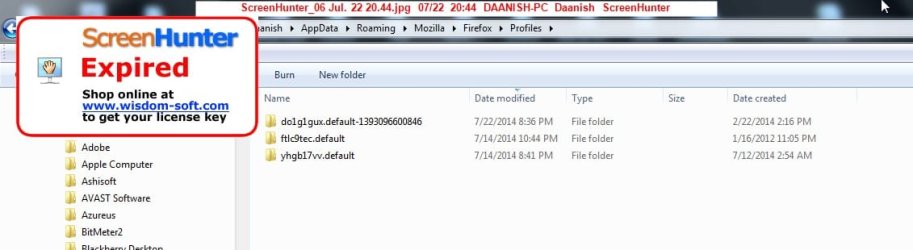
In here there are 3 folders and no files. Folder names in case they're relevant

do1g1gux.default-1393096600846 (modified today, created 2/2014, 25 MB)
ftlc9tec.default (modified 7/14, created 1/2012, 4 KB)
yhgb17vv.default (modified 7/14, created 7/12, 13.8 MB)

There's no folder called bookmarkbackups in the Profiles directory but there are in the first and third subdirectories. Same goes for places.sqlite

No I never backup Firefox. Didnt know I was supposed to. Guess I'm paying the price.

I'm using Firefox 30.0

Thanks for your help :)
 

My Computer My Computer

OS
Windows 7 Home Premium 64-bit
I hate to be the bearer of bad news, but if there are no files in the profile, then Fx simply ought not open, nor do anything whatsoever. I have no idea as to why Fx does anything under those conditions, as the file list in the help link I provided shows what the various files do, and without some of them, it does not seem to me that Fx would be able to open, much less run.

When you install (not update, install) Fx, the process creates a new profile with the required default files, some of which would seem to be necessary for anything to take place. Oh, hold on, I just reread your latest reply: What you are looking at are not folders, they are profiles! (That is a good example of why you must post all relevant information: What you had said about folders was misleading, unintentionally I'm sure, but misleading nonetheless.)

Close Firefox. Click on the Windows Start Button, enter "Run" (no quotes) in the search box, click on Run, then search for Firefox.exe, and put that in the run box; past the right-hand quotation mark, add `-p' (again, don't use the quotation marks.), click on OK. This should take you to a pop-up window that allows you to change the Fx profile to be used, one of which likely has your bookmarks, etc. The 4KB profile is useless, although perhaps it is actually being used. Try the two other profiles, open Fx, see what you find.
 

My Computer My Computer

Computer type
PC/Desktop
Computer Manufacturer/Model Number
Intel(R) Core(TM) i5-2320 CPU @ 3.00GHz (Gateway computer)
OS
Microsoft Windows 7 Home Premium 64-bit 7601 Multiprocessor Free Service Pack 1
CPU
Intel(R) Core(TM) i5-2320 CPU @ 3.00GHz
Motherboard
Gateway IPISB-VR
Memory
8.00 GB
Graphics Card(s)
Intel(R) HD Graphics
Sound Card
(1) Realtek High Definition Audio (2) Intel(R) Display Aud
Monitor(s) Displays
ViewSonic 2250 Series
Screen Resolution
1920 x 1080 x 32 bits (4294967296 colors) @ 60 Hz
Hard Drives
(1) WDC WD10EADX-22TDHB0 (2) Generic Mini SD Reader USB Device (3) Generic USB CF Reader USB Device (4) Generic USB MS Reader USB Device (5) Generic USB SD Reader USB Device (6) Generic USB xD/SM Reader USB Device (7) Seagate FreeAgent Go
Keyboard
Gateway
Mouse
Logitech
Internet Speed
20 Mbps (Theoretical.)
Antivirus
Avast
Browser
Firefox
THanks man. That opened a choose your profile list. The only profile given there was called default-1393096600846. There was no other listed there that I could change it to.

I take it that's bad news..
 

My Computer My Computer

OS
Windows 7 Home Premium 64-bit
Unless absolutely everything in your FF profile folders is totally trashed, there's a chance that you might be able to find a series of previous bookmark backups.
Look for files with a ".json" file extension that look like this:
"bookmarks-2014-07-14_xxxx.json" where the xxxx is a four-digit number.
By default, FF creates an automatic daily bookmark backup file in the profile folder.
 

My Computer My Computer

Computer type
PC/Desktop
Computer Manufacturer/Model Number
Self-Built
OS
Win10 Pro 64-bit
CPU
AMD Ryzen 7 3800X
Motherboard
Gigabyte X570 UD
Memory
32 GB Kingston DDR4-2666
Graphics Card(s)
MSI nVidia GT 710 (2GB)
Sound Card
Creative Audigy FX 5.1
Monitor(s) Displays
ViewSonic VG2439Smh 24"
Screen Resolution
1920x1080
Hard Drives
3xWD1TB; 1xSeagate 1TB... all spinning rust
PSU
EVGA 100-W1-0500-KR (500w)
Case
SilverStone PS10 (modified)
Cooling
CPU:AMD Wraith Prism. Case:3x Noctua 120mm
Keyboard
Compaq Professional PS/2
Mouse
Microsoft Basic Optical Mouse 2.0
Internet Speed
Fiber 1Gbit/sec down/up
Antivirus
Avast Free
Browser
FF, Chrome
Other Info
2x LG GH24NSC0 DVD burners, Mackie CR3 monitor speakers
I assume you mean within the C:\Users\Daanish\AppData\Roaming\Mozilla\Firefox\Profiles\ directory?

Over here I found 2 directories with a 'bookmarkbackups' subdir, those being the two of the 3 profiles I mentioned earlier. One of those 3 profiles was completely empty. The other 2 were created after the crash. I've checked the creation dates of the bookmark backup directories.

If you think there might still be hope let me know how you'd recommend proceeding. I've tried opening the bookmarks files in both notepad and firefox, neither of those have helped.
 

My Computer My Computer

OS
Windows 7 Home Premium 64-bit
THanks man. That opened a choose your profile list. The only profile given there was called default-1393096600846. There was no other listed there that I could change it to.

I take it that's bad news..

Odd that the other, smaller profile was not listed. In the Users folder, there is a file under Mozilla, profiles.ini, and I suspect that it is only listing one profile. It ought to list all three, even though the smallest one is clearly of no use.

I did misstate something yesterday: If you click on the three profiles that you found, they should open and show you what is in them, so in that sense, yes, they are folders, just not folders that you can use by themselves. As they are profiles, they can only be used by directing Fx to them. However, if you do click on them, you should be able to see what they contain.

If, in fact, either of the two larger profiles do contain a large number of both folders and files, then you may be able to create a new profile using those folders and files. Again, as I cautioned you earlier, if you do start a new profile, I would only transfer one file at a time and test the new profile, then one folder (such as bookmarkbackups) at a time.
 

My Computer My Computer

Computer type
PC/Desktop
Computer Manufacturer/Model Number
Intel(R) Core(TM) i5-2320 CPU @ 3.00GHz (Gateway computer)
OS
Microsoft Windows 7 Home Premium 64-bit 7601 Multiprocessor Free Service Pack 1
CPU
Intel(R) Core(TM) i5-2320 CPU @ 3.00GHz
Motherboard
Gateway IPISB-VR
Memory
8.00 GB
Graphics Card(s)
Intel(R) HD Graphics
Sound Card
(1) Realtek High Definition Audio (2) Intel(R) Display Aud
Monitor(s) Displays
ViewSonic 2250 Series
Screen Resolution
1920 x 1080 x 32 bits (4294967296 colors) @ 60 Hz
Hard Drives
(1) WDC WD10EADX-22TDHB0 (2) Generic Mini SD Reader USB Device (3) Generic USB CF Reader USB Device (4) Generic USB MS Reader USB Device (5) Generic USB SD Reader USB Device (6) Generic USB xD/SM Reader USB Device (7) Seagate FreeAgent Go
Keyboard
Gateway
Mouse
Logitech
Internet Speed
20 Mbps (Theoretical.)
Antivirus
Avast
Browser
Firefox
THanks man. That opened a choose your profile list. The only profile given there was called default-1393096600846. There was no other listed there that I could change it to.

I take it that's bad news..

Odd that the other, smaller profile was not listed. In the Users folder, there is a file under Mozilla, profiles.ini, and I suspect that it is only listing one profile. It ought to list all three, even though the smallest one is clearly of no use.

I did misstate something yesterday: If you click on the three profiles that you found, they should open and show you what is in them, so in that sense, yes, they are folders, just not folders that you can use by themselves. As they are profiles, they can only be used by directing Fx to them. However, if you do click on them, you should be able to see what they contain.

If, in fact, either of the two larger profiles do contain a large number of both folders and files, then you may be able to create a new profile using those folders and files. Again, as I cautioned you earlier, if you do start a new profile, I would only transfer one file at a time and test the new profile, then one folder (such as bookmarkbackups) at a time.


thanks man.

what about the fact that the 2 newer profiles were created on july 14 or after, which is after i lost the bookmarks. does that not mean the bookmarks are lost?

if its not, im sorry im not clear on what my next steps are?
 

My Computer My Computer

OS
Windows 7 Home Premium 64-bit
do1g1gux.default-1393096600846 (modified today, created 2/2014, 25 MB) :That is the largest of the three profiles, and it was created, apparently, last February; the date 2/2014 is a bit odd.

Have you clicked on that profile to see what it contains? Given its size, I would guess that is has at least a few files/folders, but as is rather small, I don't know that it is going to be of much assistance in retrieving anything.

I have one profile of only 43.7 MB, as it was used to test only one extension as I recall; my two other profiles are 130 and 265 MB. (I'm not sure why such a discrepancy.) One of the two is my default profile; I would have to close Fx and bring up the profile manager to determine which one, even though I gave them my own names. I think that my default is the larger one of those two. (Ah, so it is: I opened the profile, which showed me the name I had given it, then checked the properties, which showed the size.)

I shall not go into why I have two profiles of such differing sizes, which probably goes back a while to a very strange Fx problem, one that I finally tracked down and fixed by uninstalling Fx, then removing the entire Mozilla Firefox program folder (not the profile folder,) as there was apparently a corrupt file in that folder. Finding and fixing this was quite frustrating.
 
Last edited:

My Computer My Computer

Computer type
PC/Desktop
Computer Manufacturer/Model Number
Intel(R) Core(TM) i5-2320 CPU @ 3.00GHz (Gateway computer)
OS
Microsoft Windows 7 Home Premium 64-bit 7601 Multiprocessor Free Service Pack 1
CPU
Intel(R) Core(TM) i5-2320 CPU @ 3.00GHz
Motherboard
Gateway IPISB-VR
Memory
8.00 GB
Graphics Card(s)
Intel(R) HD Graphics
Sound Card
(1) Realtek High Definition Audio (2) Intel(R) Display Aud
Monitor(s) Displays
ViewSonic 2250 Series
Screen Resolution
1920 x 1080 x 32 bits (4294967296 colors) @ 60 Hz
Hard Drives
(1) WDC WD10EADX-22TDHB0 (2) Generic Mini SD Reader USB Device (3) Generic USB CF Reader USB Device (4) Generic USB MS Reader USB Device (5) Generic USB SD Reader USB Device (6) Generic USB xD/SM Reader USB Device (7) Seagate FreeAgent Go
Keyboard
Gateway
Mouse
Logitech
Internet Speed
20 Mbps (Theoretical.)
Antivirus
Avast
Browser
Firefox
It has 8 folder and 38 files.

Im thinking, if this is created in Feb maybe I can get something from here. Is there a way to access the bookmarks in here?

Unfortunately every single item in this folder has a creation date of 7/12/2014 or after, except extensions folder (2/2014) and compatibility file (6/2014)/
 

My Computer My Computer

OS
Windows 7 Home Premium 64-bit
It has 8 folder and 38 files.

Im thinking, if this is created in Feb maybe I can get something from here. Is there a way to access the bookmarks in here?

Unfortunately every single item in this folder has a creation date of 7/12/2014 or after, except extensions folder (2/2014) and compatibility file (6/2014)/

Are you sure that those are creation dates, not modification dates? Most Fx profile files and folders are modified just by opening Fx, so I'd not be surprised if the dates have changed since the files were created.

Again, you have given me no clues as to what files are there, but if Fx opens using that profile, I must assume that all the required files are there. Again, as you have not made it clear, I am assuming that you are actually using that profile, the only one that showed when you ran the Fx profile manager.

If my assumption is even close to being correct, you likely have a bookmarkbackups folder, which contains regular backups. If not, then, sorry, there's nothing you can do given your failure to do your own backups, unless, that is, the middle-sized profile happens to have such a folder.

Backing up and restoring bookmarks - Firefox - MozillaZine Knowledge Base
 

My Computer My Computer

Computer type
PC/Desktop
Computer Manufacturer/Model Number
Intel(R) Core(TM) i5-2320 CPU @ 3.00GHz (Gateway computer)
OS
Microsoft Windows 7 Home Premium 64-bit 7601 Multiprocessor Free Service Pack 1
CPU
Intel(R) Core(TM) i5-2320 CPU @ 3.00GHz
Motherboard
Gateway IPISB-VR
Memory
8.00 GB
Graphics Card(s)
Intel(R) HD Graphics
Sound Card
(1) Realtek High Definition Audio (2) Intel(R) Display Aud
Monitor(s) Displays
ViewSonic 2250 Series
Screen Resolution
1920 x 1080 x 32 bits (4294967296 colors) @ 60 Hz
Hard Drives
(1) WDC WD10EADX-22TDHB0 (2) Generic Mini SD Reader USB Device (3) Generic USB CF Reader USB Device (4) Generic USB MS Reader USB Device (5) Generic USB SD Reader USB Device (6) Generic USB xD/SM Reader USB Device (7) Seagate FreeAgent Go
Keyboard
Gateway
Mouse
Logitech
Internet Speed
20 Mbps (Theoretical.)
Antivirus
Avast
Browser
Firefox
I apologize if I havent given you enough information. If you could let me know what information I should give I'd be happy to do so. Detailing every file would get a bit challenging but if there's certain ones I should look out for I can do so.

In Win Explorer there's both a creation date and a modified date. Assuming those are correct, then yes the dates I gave you are creation dates.
 

My Computer My Computer

OS
Windows 7 Home Premium 64-bit
I apologize if I havent given you enough information. If you could let me know what information I should give I'd be happy to do so. Detailing every file would get a bit challenging but if there's certain ones I should look out for I can do so.

In Win Explorer there's both a creation date and a modified date. Assuming those are correct, then yes the dates I gave you are creation dates.

I specifically asked about a folder named bookmarkbackups, so, again, do you have that, and, if so, what is in it? I also gave you a link to a file on how to use that folder to restore bookmarks.
 

My Computer My Computer

Computer type
PC/Desktop
Computer Manufacturer/Model Number
Intel(R) Core(TM) i5-2320 CPU @ 3.00GHz (Gateway computer)
OS
Microsoft Windows 7 Home Premium 64-bit 7601 Multiprocessor Free Service Pack 1
CPU
Intel(R) Core(TM) i5-2320 CPU @ 3.00GHz
Motherboard
Gateway IPISB-VR
Memory
8.00 GB
Graphics Card(s)
Intel(R) HD Graphics
Sound Card
(1) Realtek High Definition Audio (2) Intel(R) Display Aud
Monitor(s) Displays
ViewSonic 2250 Series
Screen Resolution
1920 x 1080 x 32 bits (4294967296 colors) @ 60 Hz
Hard Drives
(1) WDC WD10EADX-22TDHB0 (2) Generic Mini SD Reader USB Device (3) Generic USB CF Reader USB Device (4) Generic USB MS Reader USB Device (5) Generic USB SD Reader USB Device (6) Generic USB xD/SM Reader USB Device (7) Seagate FreeAgent Go
Keyboard
Gateway
Mouse
Logitech
Internet Speed
20 Mbps (Theoretical.)
Antivirus
Avast
Browser
Firefox
When trying a search for .json in your user folder, nothing similar to bookmarks-2014-07-21_3908.json turns up?
Seems very strange that the backups would get wiped.

Edit: if some image\backup is available (ms or macrium etc) you could mount it as a drive an easily extract any .json file. Another example of the necessity and usefulness of regular imaging.
 

My Computer My Computer

Computer type
Laptop
Computer Manufacturer/Model Number
Dell \ Lenovo\ HP \ Toshiba
OS
W7, W8.1
Antivirus
MSE, Malwarebytes
Browser
FF
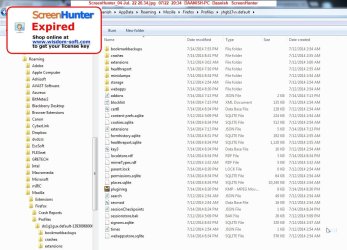
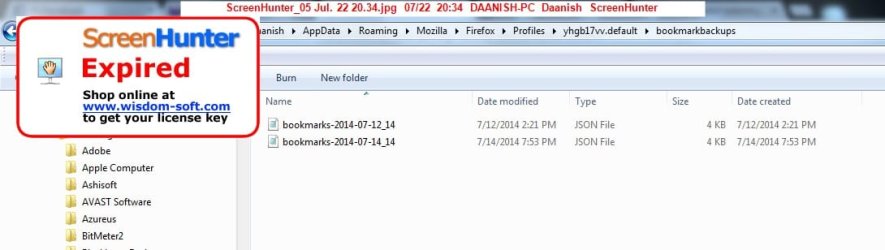
We seem to be having a misunderstanding. Evidently I havent given all the necessary information while I thought I'd answered all the questions. Let me post screenshots instead.

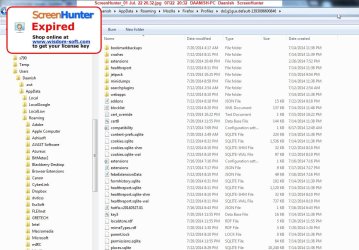
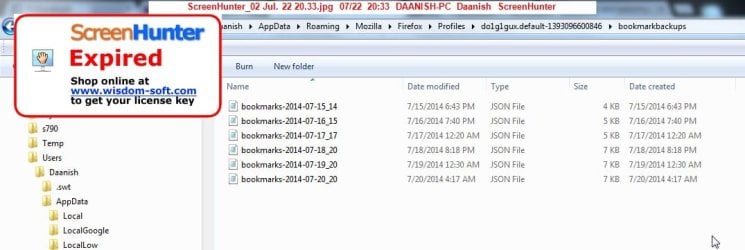
I've attached a number of pictures showing my 3 profiles and the dates these folders were created as well as last modified.

The aim was to find something from before 7/12. There was stuff that was indeed created before then, but that stuff seems to have been modified after.

I tried the link above, to restore my bookmarkbackups. I didnt think that would work because there were 2 folders that were made before 7/12/14. One is empty, the other has a bookmarkbackups directory created on 7/14. So I didnt expect much. But tried anyway. No dice.
 

Attachments

  • ScreenHunter_06 Jul. 22 20.44.jpg
    ScreenHunter_06 Jul. 22 20.44.jpg
    40.2 KB · Views: 0
  • ScreenHunter_01 Jul. 22 20.32.jpg
    ScreenHunter_01 Jul. 22 20.32.jpg
    122.1 KB · Views: 0
  • ScreenHunter_02 Jul. 22 20.33.jpg
    ScreenHunter_02 Jul. 22 20.33.jpg
    51.6 KB · Views: 0
  • ScreenHunter_03 Jul. 22 20.34.jpg
    ScreenHunter_03 Jul. 22 20.34.jpg
    38 KB · Views: 0
  • ScreenHunter_04 Jul. 22 20.34.jpg
    ScreenHunter_04 Jul. 22 20.34.jpg
    114.4 KB · Views: 0
  • ScreenHunter_05 Jul. 22 20.34.jpg
    ScreenHunter_05 Jul. 22 20.34.jpg
    39 KB · Views: 0

My Computer My Computer

OS
Windows 7 Home Premium 64-bit
Back
Top