My XP system died a couple of weeks ago, and I've spent the time since building a new system and installing Windows 7. I'm using Win7 Pro x64. A lot of things are new, of course, of course.
I'm going nuts. Especially with permission problems. Before I can get back to work, I need to get a number of my old files (on a second drive) back. My old C drive is now E. SOMEWHERE on that E drive is my old Firefox bookmarks. I've had no luck finding the .sqlite file, although there is a backup html file that I found called bookmarks.htm in applications/mozilla/firefox.
Having found it and getting it back are two different things. I gave myself access to the folder that contains the file, no prob. However, opening it either with notepad or with a browser, or even trying to copy it to the desktop fails with a permission error.
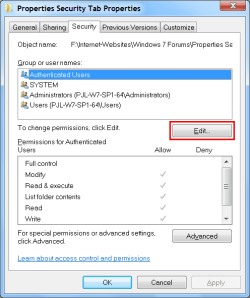
Going to the file properties->Security, I see that under "GROUP OR USER NAMES" two items: SYSTEM and some weird long thing S-1-.... with lots of numbers and dashes. At first I thought maybe it was a data error, but the fact that it's ALL numbers and dashes makes me think it's some natural XP phenomenon. Both of those users have all permissions except "Special." Dumbo (yours truly) is not listed.
Clicking on Advanced. Permissions shows the two previously mentioned users. No Dumbo. Clicking on Owner. It shows Dumbo(Dumbo-PC/Dumbo). Yay. However, none of that does me any good because I get access failures when I try to open or copy the file.
Both of the funny users have full permissions, so it's not a read-only problem.
Please tell me how to straighten this out -- I've got a lot more files than this one to try to wean back over to my new drive before I dump the old one. Also, if anybody knows an easier or better way to get my old Firefox bookmarks back, please let me know, because I'm dead without them.
I'm going nuts. Especially with permission problems. Before I can get back to work, I need to get a number of my old files (on a second drive) back. My old C drive is now E. SOMEWHERE on that E drive is my old Firefox bookmarks. I've had no luck finding the .sqlite file, although there is a backup html file that I found called bookmarks.htm in applications/mozilla/firefox.
Having found it and getting it back are two different things. I gave myself access to the folder that contains the file, no prob. However, opening it either with notepad or with a browser, or even trying to copy it to the desktop fails with a permission error.
Going to the file properties->Security, I see that under "GROUP OR USER NAMES" two items: SYSTEM and some weird long thing S-1-.... with lots of numbers and dashes. At first I thought maybe it was a data error, but the fact that it's ALL numbers and dashes makes me think it's some natural XP phenomenon. Both of those users have all permissions except "Special." Dumbo (yours truly) is not listed.
Clicking on Advanced. Permissions shows the two previously mentioned users. No Dumbo. Clicking on Owner. It shows Dumbo(Dumbo-PC/Dumbo). Yay. However, none of that does me any good because I get access failures when I try to open or copy the file.
Both of the funny users have full permissions, so it's not a read-only problem.
Please tell me how to straighten this out -- I've got a lot more files than this one to try to wean back over to my new drive before I dump the old one. Also, if anybody knows an easier or better way to get my old Firefox bookmarks back, please let me know, because I'm dead without them.
My Computer
At a glance
win 7 professional 64
- OS
- win 7 professional 64