Lost internet access. Cannot find LAN

sylther

New member
Local time
3:37 PM
Messages
2
Dear experts

Until yesterday my Windows7 desktop was running fine with an ethernet cable on a LAN network, but all of a sudden the internet stopped working. My wireless laptop and phone still work and when I hook up my laptop with the ethernet cable going into the desktop it works just fine so I know the problem is within the desktop/Windows7.

I've checked the network device drivers and according to Windows they are fine and working.

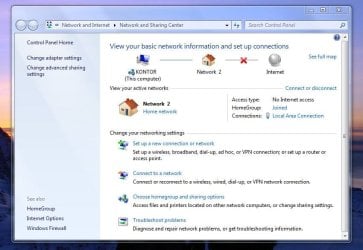
Also, I cannot find any local area network in the network settings. All I can choose is a Broadband dial up connection which makes no sense. Furthermore, there is no longer a green light coming from the ethernet insert when connecting the cable. Does this mean that Windows is not recognizing and or ignoring the cable hook-up?

I hope my description makes any sense - English is not my first language. Any feedback greatly appreciated. Thank you.
 

My Computer

OS
Windows 7 Ultimate 64 bit
I would first reset your router and see if the connection comes back or not. If not then try shutting down the PC, unplug the power cord from the back of the PC, push the start button to drain off any excess power and reboot the machine.

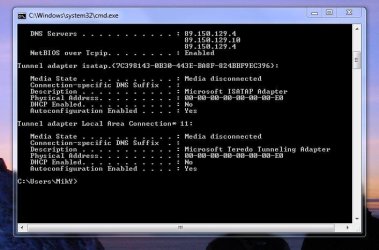
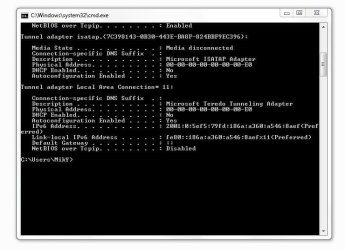
If that doesn't work than please post a screen shot of your ipconfig /all, type that into your command prompt and post the results, thanks.
 

My Computer

Computer type
PC/Desktop
Computer Manufacturer/Model Number
Home built
OS
Windows 7 Ult, Windows 8.1 Pro,
CPU
Q9650-4.275GHz, E8600 4.5GHz, E6750-3.8GHz
Motherboard
Evga 780i FTW
Memory
G.Skill PC2 9600 1200Mhz 5 5 5 15 2T
Graphics Card(s)
GTX480
Sound Card
Asus Xonar D2
Monitor(s) Displays
HannsG
Screen Resolution
1680X1050
Hard Drives
GSkill Phoenix Pro 120GB SSD
PSU
ThermalTake Toughpower 1000Watt modular
Case
ThermalTake XaserV
Cooling
Xigmatek S1283
Keyboard
Logitech G15
Mouse
Logitech G9
Internet Speed
T1
chev65, thank you for your fast reply. I've been away on holiday and have not been able to follow up.

I can now connect to the internet. But every time I boot up I have to disable and enable my LAN in order to get online. I have not been able to find a solution to this even though this seems to be a problem to many people.

Here are some screenshots - maybe they will help.

Thank you again. Any help greatly appreciated.
 

Attachments

  • LANdisabled.JPG
    LANdisabled.JPG
    49.4 KB · Views: 57
  • LANenabled.JPG
    LANenabled.JPG
    55.2 KB · Views: 43
  • NoInternetAccess.JPG
    NoInternetAccess.JPG
    68.4 KB · Views: 57
  • InternetAccess.JPG
    InternetAccess.JPG
    67.1 KB · Views: 33

My Computer

OS
Windows 7 Ultimate 64 bit
The IPv4 info isn't on those screen shots, I think you need to scroll up first.

Did you reset your router yet?
 

My Computer

Computer type
PC/Desktop
Computer Manufacturer/Model Number
Home built
OS
Windows 7 Ult, Windows 8.1 Pro,
CPU
Q9650-4.275GHz, E8600 4.5GHz, E6750-3.8GHz
Motherboard
Evga 780i FTW
Memory
G.Skill PC2 9600 1200Mhz 5 5 5 15 2T
Graphics Card(s)
GTX480
Sound Card
Asus Xonar D2
Monitor(s) Displays
HannsG
Screen Resolution
1680X1050
Hard Drives
GSkill Phoenix Pro 120GB SSD
PSU
ThermalTake Toughpower 1000Watt modular
Case
ThermalTake XaserV
Cooling
Xigmatek S1283
Keyboard
Logitech G15
Mouse
Logitech G9
Internet Speed
T1
This may sound obvious but have you tried the trouble shooter. right click the pc in the bottom right of the screen and trouble shooting option there ,sorry if this sounds obvious but some times its easy overlooked
 

My Computer

Computer Manufacturer/Model Number
Hewlett packard/p6512uk
OS
Microsoft Windows 7 Home Premium 64-bit 7600
CPU
IIx4 amd athelon 635 processor
Motherboard
FOXCONN 2AA9
Memory
2x2gb
Graphics Card(s)
ati radeon HD 5450
Sound Card
(1) Realtek High Definition Audio (2) AMD High Definition
Monitor(s) Displays
samsung lcd tv 32"
Screen Resolution
1360x 768
Hard Drives
(1) WDC WD10 01FAES-60Z2A0 SATA Disk Device (2) Maxtor OneTouch USB Device (3) ST310003 33AS USB Device (4) WD My Book 1111 USB Device
PSU
?
Cooling
air!
Keyboard
wireless hp
Mouse
wireless Hp,optical
Internet Speed
1.10mb/s
Antivirus
MSE
Browser
Firefox
Back
Top