Lost many gadgets - want to retrieve them

Nisko

New member
Member
VIP
Local time
10:27 AM
Messages
242
Something happened to my desktop. My Icons got moved around and I lost my Gadgets. Of course I have a backup and I had a lot of Gadgets that I'd hate to reinstall. There are time zones and weather for many countries. Any idea how to retrieve them? Thanks......
 

My Computer My Computer

Computer Manufacturer/Model Number
HP Pavilion KQ574AV
OS
Windows 7

My Computer My Computer

Computer type
PC/Desktop
Computer Manufacturer/Model Number
Dell XPS 420
OS
Windows 10, Home Clean Install
CPU
Intel Core2 processsor Q8200(2.33Ghz 1333FSB) Quad Core Tech
Motherboard
Dell
Memory
6 gb
Graphics Card(s)
ATI Radeon 256MB HD3650
Sound Card
Intergrated 7.1 Channel Audio
Monitor(s) Displays
Dell SP2009W 20"
Hard Drives
640 GB Serial ATA Hard drive
Cooling
Fan
Keyboard
Dell USB Keyboard
Mouse
Dell Premium Optical USB
Internet Speed
DSL 2.85
Quickest response would be can you do a System Restore to before this occurred?

With regards the Desktop icons moving about, for future reference I can recommend Jamie O'Connell's
Desktop Icon Save and Restore to manage the layout you've chosen on your desktop.

After installation, three new items are available in the desktop context menu (right-click menu): Save Desktop… , Restore Desktop and Custom Save and Restore…
This is working fine on my 64 bit System.
 

My Computer My Computer

OS
Windows 7 x64
Can't use System Restore. Too many other things would change. I have a backup - if only I knew what to restore. There must be a way.
 

My Computer My Computer

Computer Manufacturer/Model Number
HP Pavilion KQ574AV
OS
Windows 7
System Restore does not change personal documents, picutres etc. Just Windows.
 

My Computer My Computer

Computer type
PC/Desktop
Computer Manufacturer/Model Number
Dell XPS 420
OS
Windows 10, Home Clean Install
CPU
Intel Core2 processsor Q8200(2.33Ghz 1333FSB) Quad Core Tech
Motherboard
Dell
Memory
6 gb
Graphics Card(s)
ATI Radeon 256MB HD3650
Sound Card
Intergrated 7.1 Channel Audio
Monitor(s) Displays
Dell SP2009W 20"
Hard Drives
640 GB Serial ATA Hard drive
Cooling
Fan
Keyboard
Dell USB Keyboard
Mouse
Dell Premium Optical USB
Internet Speed
DSL 2.85
I have installed a number of programs that I don't want to lose. I have a backup and there has to be a way to use that backup to restore my Gadgets. Thanks........
 

My Computer My Computer

Computer Manufacturer/Model Number
HP Pavilion KQ574AV
OS
Windows 7
Hello Nisko,

It depends on what type of backup you have.

System image backup:
http://www.sevenforums.com/tutorials/24771-system-image-extract-files-using-disk-management.html

File Backup:
http://www.sevenforums.com/tutorials/648-restore-backup-user-system-files.html


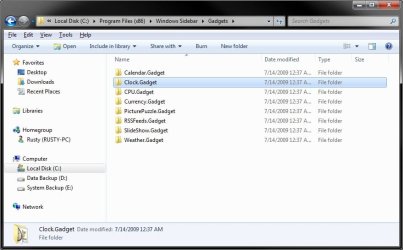
You would copy the entire gadget folder from the backup back into the same location below.


For 64-bit Windows 7
C:\Program Files (x86)\Windows Sidebar\Gadgets

and

C:\Program Files (x86)\Windows Sidebar\Shared Gadgets


For 32-bit Windows 7
C:\Program Files\Windows Sidebar\Gadgets

and

C:\Program Files\Windows Sidebar\Shared Gadgets


Example.jpg

Hope this helps,
Shawn
 

My Computer My Computer

Computer type
PC/Desktop
Computer Manufacturer/Model Number
Self built custom
OS
64-bit Windows 11 Pro for Workstations
CPU
Intel i7-8700K OC'd to 5 GHz
Motherboard
ASUS ROG Maximus XI Formula Z390
Memory
64 GB (4x16GB) G.SKILL TridentZ RGB DDR4 3600 MHz
Graphics Card(s)
ASUS ROG-STRIX-GTX1080TI-O11G-GAMING
Sound Card
Integrated
Monitor(s) Displays
2 x Samsung Odyssey G7 27"
Screen Resolution
2560x1440
Hard Drives
1TB Samsung 990 PRO M.2,
4TB Samsung 990 PRO PRO M.2,
TerraMaster F8 SSD Plus NAS
PSU
Seasonic Prime Titanium 850W
Case
Thermaltake Core P3
Cooling
Corsair Hydro H115i
Keyboard
Logitech wireless K800
Mouse
Logitech MX Master 4
Internet Speed
2 Gb/s Download and 100 Mb/s Upload
Antivirus
Malwarebyte Anti-Malware Premium
Browser
Google Chrome
Other Info
Logitech Z625 speaker system,
Logitech BRIO 4K Pro webcam,
HP Color LaserJet Pro MFP M477fdn,
APC SMART-UPS RT 1000 XL - SURT1000XLI,
Galaxy S23 Plus phone
Thanks - but one thing isn't clear: I have a complete incremental backup of my entire system - by file. Do I use the procedure you described?

Also, in the Gadgets folder, Gadgets are listed which I don't use. What do I do with them?

I looked in my file backup and there ARE Gadgets which I don't use (but used to use). What tells Windows 7 which Gadgets to use and where to put them on the Desktop? Thanks.
 
Last edited by a moderator:

My Computer My Computer

Computer Manufacturer/Model Number
HP Pavilion KQ574AV
OS
Windows 7
I have done this many times.
All you have to do is
kill sidebar.exe in taskmanager
Go to C:\Users\USERNAME\AppData\Local\Microsoft\Windows Sidebar
Delete Settings.ini
Restore the Settings.ini from your back to that sidebar folder.
Restart sidebar.exe from program files
All your settings and positions should be restored.
 

My Computer My Computer

Computer type
PC/Desktop
Computer Manufacturer/Model Number
Made by Dixon Butz
OS
Win7 Win 10, Win 8.1
CPU
AMD FX-8350, Corsair H100i
Motherboard
ASUS Crosshair V Formula-Z
Memory
16GB G.SKILL Ripjaws DDR3
Graphics Card(s)
EVGA GTX 980, EVGA GTX 860
Sound Card
Denon x4200 Dolby AMOS!
Monitor(s) Displays
65" Samsung 4K, +3 27inch
Screen Resolution
4K, 1080x3
Hard Drives
2TB Samsung hd204ui

1X Samsung 850 SSD
PSU
1000w EVGA, 2000VA UPS, 1000VA UPS and many others
Case
Lian Li
Cooling
Corsair H100i
Keyboard
Logitech K800
Mouse
Logitech Couch Mouse
Internet Speed
Gigabit!
Antivirus
Defender
Browser
Slimjet Chrome
Thanks - but one thing isn't clear: I have a complete incremental backup of my entire system - by file. Do I use the procedure you described?

Also, in the Gadgets folder, Gadgets are listed which I don't use. What do I do with them?

I looked in my file backup and there ARE Gadgets which I don't use (but used to use). What tells Windows 7 which Gadgets to use and where to put them on the Desktop? Thanks.

Copying the entire gadget folder folder from your backup, as in the screenshot above, back into your new installation is the same as installing them. Afterwards, you would just need to add the gadget to the desktop just as before.

If you have the gadget installation file, you might as well just reinstall it though instead of digging through backups to copy it back. It would be easier.
 

My Computer My Computer

Computer type
PC/Desktop
Computer Manufacturer/Model Number
Self built custom
OS
64-bit Windows 11 Pro for Workstations
CPU
Intel i7-8700K OC'd to 5 GHz
Motherboard
ASUS ROG Maximus XI Formula Z390
Memory
64 GB (4x16GB) G.SKILL TridentZ RGB DDR4 3600 MHz
Graphics Card(s)
ASUS ROG-STRIX-GTX1080TI-O11G-GAMING
Sound Card
Integrated
Monitor(s) Displays
2 x Samsung Odyssey G7 27"
Screen Resolution
2560x1440
Hard Drives
1TB Samsung 990 PRO M.2,
4TB Samsung 990 PRO PRO M.2,
TerraMaster F8 SSD Plus NAS
PSU
Seasonic Prime Titanium 850W
Case
Thermaltake Core P3
Cooling
Corsair Hydro H115i
Keyboard
Logitech wireless K800
Mouse
Logitech MX Master 4
Internet Speed
2 Gb/s Download and 100 Mb/s Upload
Antivirus
Malwarebyte Anti-Malware Premium
Browser
Google Chrome
Other Info
Logitech Z625 speaker system,
Logitech BRIO 4K Pro webcam,
HP Color LaserJet Pro MFP M477fdn,
APC SMART-UPS RT 1000 XL - SURT1000XLI,
Galaxy S23 Plus phone
and I don't have to replace the Gadget apps in C:\Program Files (x86)\Windows Sidebar\Shared Gadgets and :\Program Files\Windows Sidebar\Gadgets as described in one of the Posts above???
 

My Computer My Computer

Computer Manufacturer/Model Number
HP Pavilion KQ574AV
OS
Windows 7
Only if you do not have the gadget installation file and wanted to copy (reinstall) the gadget folder from one of those locations in your backup to that same location in your new installation to restore it.
 

My Computer My Computer

Computer type
PC/Desktop
Computer Manufacturer/Model Number
Self built custom
OS
64-bit Windows 11 Pro for Workstations
CPU
Intel i7-8700K OC'd to 5 GHz
Motherboard
ASUS ROG Maximus XI Formula Z390
Memory
64 GB (4x16GB) G.SKILL TridentZ RGB DDR4 3600 MHz
Graphics Card(s)
ASUS ROG-STRIX-GTX1080TI-O11G-GAMING
Sound Card
Integrated
Monitor(s) Displays
2 x Samsung Odyssey G7 27"
Screen Resolution
2560x1440
Hard Drives
1TB Samsung 990 PRO M.2,
4TB Samsung 990 PRO PRO M.2,
TerraMaster F8 SSD Plus NAS
PSU
Seasonic Prime Titanium 850W
Case
Thermaltake Core P3
Cooling
Corsair Hydro H115i
Keyboard
Logitech wireless K800
Mouse
Logitech MX Master 4
Internet Speed
2 Gb/s Download and 100 Mb/s Upload
Antivirus
Malwarebyte Anti-Malware Premium
Browser
Google Chrome
Other Info
Logitech Z625 speaker system,
Logitech BRIO 4K Pro webcam,
HP Color LaserJet Pro MFP M477fdn,
APC SMART-UPS RT 1000 XL - SURT1000XLI,
Galaxy S23 Plus phone
Hooray!!! That was the missing piece of the puzzle I needed to get my many Gadgets back. Thanks so much. And thanks to the other people who responded also. Every bit helps!!
 

My Computer My Computer

Computer Manufacturer/Model Number
HP Pavilion KQ574AV
OS
Windows 7
You're most welcome Nisko. I'm happy to hear that you got it sorted. :)
 

My Computer My Computer

Computer type
PC/Desktop
Computer Manufacturer/Model Number
Self built custom
OS
64-bit Windows 11 Pro for Workstations
CPU
Intel i7-8700K OC'd to 5 GHz
Motherboard
ASUS ROG Maximus XI Formula Z390
Memory
64 GB (4x16GB) G.SKILL TridentZ RGB DDR4 3600 MHz
Graphics Card(s)
ASUS ROG-STRIX-GTX1080TI-O11G-GAMING
Sound Card
Integrated
Monitor(s) Displays
2 x Samsung Odyssey G7 27"
Screen Resolution
2560x1440
Hard Drives
1TB Samsung 990 PRO M.2,
4TB Samsung 990 PRO PRO M.2,
TerraMaster F8 SSD Plus NAS
PSU
Seasonic Prime Titanium 850W
Case
Thermaltake Core P3
Cooling
Corsair Hydro H115i
Keyboard
Logitech wireless K800
Mouse
Logitech MX Master 4
Internet Speed
2 Gb/s Download and 100 Mb/s Upload
Antivirus
Malwarebyte Anti-Malware Premium
Browser
Google Chrome
Other Info
Logitech Z625 speaker system,
Logitech BRIO 4K Pro webcam,
HP Color LaserJet Pro MFP M477fdn,
APC SMART-UPS RT 1000 XL - SURT1000XLI,
Galaxy S23 Plus phone
Back
Top