
Lost wireless connection - laptop

splittingeve

New member
Local time
12:53 AM
Messages
7
System in question;
Aspire One D255E
Win7 starter, Intel 1.66, 1 GB RAM, 250 GB HDD
adapters;
Atheros AR8152/8158 PCI-E (NDIS 6.20)
Broadcom 802.11n

Hey all - connectivity issue here. My sis has the above laptop. For a year or better, she has been wirelessly connected to her local network, via a Linksys E2000 router without issue.

Rather suddenly a couple of weeks back, she found she had no connection. There were no changes to this network that I'm aware of (the users don't even know how to change settings online for said network). Several available networks show up on the list (hers and a couple of unsecured neighbors I believe). Despite full bars for her local network, clicking 'connect' has no visible effect. Nothing happens. Not like a 'failed to connect' or something similar, just...nothing.

I went through various steps such as;
- assured that fn+F2 was not the issue, wireless is enabled
- power down, wait and reboot the modem, router, and her laptop, in that order
- 'hard' reset router at power up to restore defaults
- uninstalled network adapter(s) and reinstalled - with the company site's latest drivers - they installed, and 'ready to use' appeared
- ran the various (fairly useless) Windows network diagnostics which essentially told me I hadn't selected a network...which I had...repeatedly
- Swapped out router completely with another, with the same results
- Took laptop here, to a completely different network, again with the same results
- released/renewed IP on laptop
- reset TCP/IP with 'netsh int ip reset resetlog.txt' command

The local networks I'm attempting to connect to are unsecured - no password required, etc.

So, any idea what I should try next? My experience here is rather limited, and I've run out of ideas. Thanks much for any suggestions!

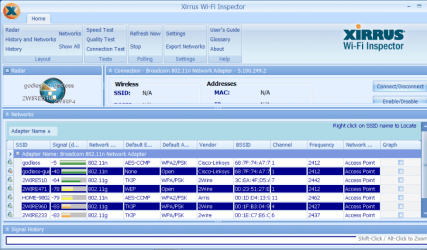
I'll attach the text results from 'ipconfig all' as well as a running screenshot of 'xirrus'.
 

Attachments
My Computer

OS
7 Starter, 32 bit
From what little I know, the wireless adapter is not working. The ipconfig is also missing the DNS Servers line, which may be because of the malfunction. It may be the adapter has went bad.
 

My Computer

Computer type
PC/Desktop
Computer Manufacturer/Model Number
Home Built Desktop By DataTech
OS
Windows 7 Ultimate X64 SP1
CPU
Intel i5-2550K, Differing ~4.4-4.8GHz No built in GPU
Motherboard
ASUS P8Z68-V PRO/GEN3
Memory
16GB G.Skill Sniper 1866MHz @ 2133MHz 2x8GB
Graphics Card(s)
ASUS GTX650TIB-DC2OC-2GD5, (650TI Boost)
Sound Card
Onboard Realtek 5-1
Monitor(s) Displays
Samsung P2570HD
Screen Resolution
1920x1080
Hard Drives
Samsung 840 Pro 256GB SSD for OS, 500GB Seagate Constellation (Enterprise drive) for Data
PSU
Corsair HX650W
Case
Inwin Dragon Rider
Cooling
Hyper 212 EVO w/two Noctua fans, push-pull, @1300 RPM
Keyboard
E-Z Eyes, bright yellow keys with large characters
Mouse
steelseries SENSEI Laser Pro Gaming
Internet Speed
48-51Mbs Mbs down, 11 Mbs up Xfinity Cable
Antivirus
Norton Internet Security 2013
Browser
IE 10, Opera, Pale Moon if needed
Other Info
4 case fans, LG BluRay-RE, ASUS DVD-RW, Mr. Fusion power supply, 1.21 gigawatts.
From what little I know, the wireless adapter is not working. The ipconfig is also missing the DNS Servers line, which may be because of the malfunction. It may be the adapter has went bad.

Yes, that's becoming more and more my thoughts as I go. Nearly a dozen forums being juggled here, and no solution. Thanks
 

My Computer

OS
7 Starter, 32 bit
It's rather strange that Xirrus shows a connection yet there is nothing at all in the ipconfig.

At the very least you should reset the entire network interface.

I see that you reset TCP/IP but this file resets everything related to networking and also flushes the DNS cache.

Unzip the file then click on it to run, your machine will reboot automatically.
 

Attachments

My Computer

Computer type
PC/Desktop
Computer Manufacturer/Model Number
Home built
OS
Windows 7 Ult, Windows 8.1 Pro,
CPU
Q9650-4.275GHz, E8600 4.5GHz, E6750-3.8GHz
Motherboard
Evga 780i FTW
Memory
G.Skill PC2 9600 1200Mhz 5 5 5 15 2T
Graphics Card(s)
GTX480
Sound Card
Asus Xonar D2
Monitor(s) Displays
HannsG
Screen Resolution
1680X1050
Hard Drives
GSkill Phoenix Pro 120GB SSD
PSU
ThermalTake Toughpower 1000Watt modular
Case
ThermalTake XaserV
Cooling
Xigmatek S1283
Keyboard
Logitech G15
Mouse
Logitech G9
Internet Speed
T1
It's rather strange that Xirrus shows a connection yet there is nothing at all in the ipconfig.

Yes, though my exp. here is limited, that certainly seemed contradictory to me(?). There's a clear strong signal that the laptop sees (more than one), but 'connect' just does nothing anymore.

At the very least you should reset the entire network interface.

I see that you reset TCP/IP but this file resets everything related to networking and also flushes the DNS cache.

Unzip the file then click on it to run, your machine will reboot automatically.

Hmmm, perhaps I could try this on her network if I am there later today, but I'd rather not toy with mine, as it's worked quite well for me. I've setup a static IP and am running servers for games, etc. and that'd be a bit of a headache to redo when I've never had an issue with this network. I'll post back results if in fact I do get over that way today. Thanks much for your assistance.
 

My Computer

OS
7 Starter, 32 bit
The file would need to be run on the machine that is having the problem in order to be effective.

You could put the file on a USB stick and take it over there in order to run it on this problem machine.
 

My Computer

Computer type
PC/Desktop
Computer Manufacturer/Model Number
Home built
OS
Windows 7 Ult, Windows 8.1 Pro,
CPU
Q9650-4.275GHz, E8600 4.5GHz, E6750-3.8GHz
Motherboard
Evga 780i FTW
Memory
G.Skill PC2 9600 1200Mhz 5 5 5 15 2T
Graphics Card(s)
GTX480
Sound Card
Asus Xonar D2
Monitor(s) Displays
HannsG
Screen Resolution
1680X1050
Hard Drives
GSkill Phoenix Pro 120GB SSD
PSU
ThermalTake Toughpower 1000Watt modular
Case
ThermalTake XaserV
Cooling
Xigmatek S1283
Keyboard
Logitech G15
Mouse
Logitech G9
Internet Speed
T1
The file would need to be run on the machine that is having the problem in order to be effective.

You could put the file on a USB stick and take it over there in order to run it on this problem machine.

Ah, my mistake - I interpreted that wrong. I actually have the mcahine here now. DLd and ran the program. Attached a new ipconfig /all result if it'll reveal anyting new. Thx much
 

Attachments

My Computer

OS
7 Starter, 32 bit
Now it appears as if the Ethernet connection is working. It was not showing anything before you ran the file.

Does the Ethernet connection work?

Although I believe we were trying to get the wireless to work?
 

My Computer

Computer type
PC/Desktop
Computer Manufacturer/Model Number
Home built
OS
Windows 7 Ult, Windows 8.1 Pro,
CPU
Q9650-4.275GHz, E8600 4.5GHz, E6750-3.8GHz
Motherboard
Evga 780i FTW
Memory
G.Skill PC2 9600 1200Mhz 5 5 5 15 2T
Graphics Card(s)
GTX480
Sound Card
Asus Xonar D2
Monitor(s) Displays
HannsG
Screen Resolution
1680X1050
Hard Drives
GSkill Phoenix Pro 120GB SSD
PSU
ThermalTake Toughpower 1000Watt modular
Case
ThermalTake XaserV
Cooling
Xigmatek S1283
Keyboard
Logitech G15
Mouse
Logitech G9
Internet Speed
T1
Now it appears as if the Ethernet connection is working. It was not showing anything before you ran the file.

Does the Ethernet connection work?

Although I believe we were trying to get the wireless to work?

Sorry, I have update other posts, and apparently not this one when someone asked me that - it works fine with a wired connection. Yes, only the wireless is an issue. Sorry this was omitted. I believe it didn't show before as it wasn't plugged in at the time(?). Whatever the reason, there's been no issue when wired.
 

My Computer

OS
7 Starter, 32 bit
What is showing up for the Broadcom NIC in Device Manager?

Is there an Anti Virus software installed on this system? If so which one?

Have you tried to unplug the Ethernet cable then try to connect wirelessly?

You mentioned in the first post that you turned off security for this wireless connection, although it looked like security was turned on in the Xirrus screen shot?

If you did a hard reset on the router then it's required that you go back into the routers wireless set up page and enable the correct security and make an SSID and password. You should also try using channel 11 because channel 1 in your area is crowded.

You need to enable security on the router WPA2 security with AES encryption, and check the security settings for this connection in Manage Wireless Connections at the Network and Sharing Center.
 

My Computer

Computer type
PC/Desktop
Computer Manufacturer/Model Number
Home built
OS
Windows 7 Ult, Windows 8.1 Pro,
CPU
Q9650-4.275GHz, E8600 4.5GHz, E6750-3.8GHz
Motherboard
Evga 780i FTW
Memory
G.Skill PC2 9600 1200Mhz 5 5 5 15 2T
Graphics Card(s)
GTX480
Sound Card
Asus Xonar D2
Monitor(s) Displays
HannsG
Screen Resolution
1680X1050
Hard Drives
GSkill Phoenix Pro 120GB SSD
PSU
ThermalTake Toughpower 1000Watt modular
Case
ThermalTake XaserV
Cooling
Xigmatek S1283
Keyboard
Logitech G15
Mouse
Logitech G9
Internet Speed
T1
What is showing up for the Broadcom NIC in Device Manager?
333h7vc.jpg


Is there an Anti Virus software installed on this system? If so which one?
She was using Windows security along with AVG

Have you tried to unplug the Ethernet cable then try to connect wirelessly?
Yes, until this morn, I hadn't actually connected via ethernet - all attempts had been while unplugged until today

You mentioned in the first post that you turned off security for this wireless connection, although it looked like security was turned on in the Xirrus screen shot?
That may well have been before I did so, I'm not quite sure. Currently, my connection 'seems' to be unsecured - but I know little about this. Both the 'godless guest' and 'godless' show security type as unsecured currently;
rbcyoo.jpg


If you did a hard reset on the router...
Ok, that part actually was done on her network, not mine, so I'll have to have a look at hers. This part may get ugly, as I don't have much experience with these settings. I pretty much entered a password on mine originally and haven't messed with it much since, other than to open a port or two for a server. But I''m heading there shortly, so I'll see what I can do! Thanks much for all the help!
 

My Computer

OS
7 Starter, 32 bit
Ok first you must have security enabled or Windows will NOT connect. And looking at the Xirrus you should also change to channel 11.

And more importantly, AVG needs to be removed completely using it's special uninstall tool.
http://www.avg.com/ww-en/utilities

The only way to connect to an unsecured network is to change over to the Public network, but you don't want to do that here.

And because her router was reset it needs to be set back up again, "SSID, password, security and encryption" or it's not going to work for her.
 

My Computer

Computer type
PC/Desktop
Computer Manufacturer/Model Number
Home built
OS
Windows 7 Ult, Windows 8.1 Pro,
CPU
Q9650-4.275GHz, E8600 4.5GHz, E6750-3.8GHz
Motherboard
Evga 780i FTW
Memory
G.Skill PC2 9600 1200Mhz 5 5 5 15 2T
Graphics Card(s)
GTX480
Sound Card
Asus Xonar D2
Monitor(s) Displays
HannsG
Screen Resolution
1680X1050
Hard Drives
GSkill Phoenix Pro 120GB SSD
PSU
ThermalTake Toughpower 1000Watt modular
Case
ThermalTake XaserV
Cooling
Xigmatek S1283
Keyboard
Logitech G15
Mouse
Logitech G9
Internet Speed
T1
Back
Top