louder please

broiyan

New member
Member
VIP
Local time
4:30 AM
Messages
107
Location
Canada
Podcast .mp3 files and YouTube streams are sometimes not loud enough for me.

Obviously the YouTube streams not at the true maximum volume when the Windows volume is at the max. and the YouTube volume is at the max. Evidence of this is that advertising is louder.

How can get true maximum audio volume?
 

My Computer My Computer

Computer Manufacturer/Model Number
mix and match
OS
Windows 7 Professional 64 bit
Motherboard
Asus MA 770 UD3
Memory
4 GB DDR2 1066
Graphics Card(s)
GeForce 8400 DVI and Analog, EGA 8400 Analog
Monitor(s) Displays
2 portrait Samsung 2243, 1 landscape Asus 222
Hard Drives
300 GB
PSU
500 Watt
Case
Antec 500 Sonata III
Keyboard
dasKeyboard USB, the original loud click version
Mouse
Logitech TrackMan Wheel
Internet Speed
DSL
Hello broiyan now I am not real sure of what you are meaning here just how is the audio being played??

If by mix and match you mean the machine is a build you have doen - desktop then why not add a sound card and a reasonable sound system.

I run on my main machine an Asus Xonar DSX card into a Logitech Z506 system it is a 5:1 surround sound system up to 150 watts peak power (a Z313 system is 50 watts full stereo and sub woofer) and seriously if they cannot hear it at full tilt over the road then I'll eat my socks!! The card costs about $80 and the sound system between $100 and $150 depending how you shop around out here plus you have a socket fr phones too if you need them.
 

My Computer My Computer

Computer type
PC/Desktop
Computer Manufacturer/Model Number
Own build (new) Desk1 / Asus ROG Win 7 / Desk2 1st build
OS
Desk1 7 Home Prem / Desk2 10 Pro / Main lap Asus ROG 10 Pro 2 laptop Toshiba 7 Pro Asus P2520 7 & 10
CPU
Desk1 i5 3750K / Laptop i7 GTX 860M / Desk2 i5 2500
Motherboard
Desk1 Asus P877-V / Desk2 Gigabyte H67 UD3H / Laptop ?
Memory
Desk1 8GB (1866) / Desk2 16GB (1333) / Laptop 8Gb DDR3
Graphics Card(s)
Desk 1& 2NVidia GTX 650 & Laptops on board Intel
Sound Card
Desk 1 & 2 -XONAR DG Realtek High Def audio Laptop
Monitor(s) Displays
Desk 1 Benq HD 2450 / Desk2 Philips 24" / Laptop 17.5"
Screen Resolution
1920x1080 D1 & D2 & Laptop 1
Hard Drives
Desk1 Samsung 120GB 830 SSD
Asus ROG 256GB 850 Pro SSD
Desk2 Samsung 840 256 SSD
Toshiba 120GB EVO
PSU
Desk 1 Corsair HX 1050/ Laptop ? / Desk 2 Corsair HX 650
Case
Desk 1 Cooler HAF XM ? Toshiba laptop / Desk2 Coolermaster
Cooling
Fans on all Desk1 -2 Desk2 - all Coolermasters 5 Laptop ?
Keyboard
Desk 1 MS Sidewinder X6 Desk 2 MS Sidewinder X 4
Mouse
Desk 1&2 - Gigabyte MS 900 gamer - laptop - Logitec wireless
Internet Speed
ADSL2+
Other Info
One other Desktop (tester) and spare Toshba laptop both with SSD's
Running Kaspersky 2016 ISS on all machines config'd identically
Logitec audio stereo systems on each machine (x3)
Canon MG5250MFC
Router/modem TP-Link running WPA2SK
It's a laptop with built-in speakers. I've had this problem with a higher-end Samsung (Intel i7) and now a lower-end Dell (Intel i3).
 

My Computer My Computer

Computer Manufacturer/Model Number
mix and match
OS
Windows 7 Professional 64 bit
Motherboard
Asus MA 770 UD3
Memory
4 GB DDR2 1066
Graphics Card(s)
GeForce 8400 DVI and Analog, EGA 8400 Analog
Monitor(s) Displays
2 portrait Samsung 2243, 1 landscape Asus 222
Hard Drives
300 GB
PSU
500 Watt
Case
Antec 500 Sonata III
Keyboard
dasKeyboard USB, the original loud click version
Mouse
Logitech TrackMan Wheel
Internet Speed
DSL
Ok well without actually hearing what the machine is playing back it is hard to advise you because as you might appreciate all of us have different levels of comfort when listening to music for example.

Personally I like it reasonably loud but not enough to annoy others around me but if I did then I would probably opting for some decent headphones.

You have to also take into consideration just how loud a laptop's speakers can be set to as most would be around 2 watts per channel and it is not that loud and the quality obviously at a premium because of the size of them. The machine I am on right now is an Asus gaming laptop and even this one is hardly what I would consider loud.

Now your machine I am assuming you have not damaged the speakers in any way and that the openings for them are not clogged with crud as a lot of folks use their laptops as literally that and not only is that bad thing to do with a laptop it also increase the ingress or exposure to fine particulates. Have you updated the drivers for the audio system not that it would necessarily make them louder but I have to ask. Another consideration is the age of the machine because speakers like any component can deteriorate over time and present with this issue.
Now I don't mean to be rude but I am assuming your hearing is ok and again none of us are getting any younger if you follow my drift and I apologise if asking will offend you.

So there are few reasons for the lack of volume that you perceive from the machine .

But on the bright sid there are a couple of checks you can do that will check out the system files and the state of your hard driv eit might well be that they need some "maintenance" so please run these.
[FONT=Arial, sans-serif]http://www.sevenforums.com/tutorials/1538-sfc-scannow-command-system-file-checker.html[/FONT]
[FONT=Arial, sans-serif]http://www.sevenforums.com/tutorials/433-disk-check.html < if necessary include the /f and /r in the command line as per Option2 [/FONT]
If you are not that familair with these then just take your time and let us know if there is any improvement or not.
 

My Computer My Computer

Computer type
PC/Desktop
Computer Manufacturer/Model Number
Own build (new) Desk1 / Asus ROG Win 7 / Desk2 1st build
OS
Desk1 7 Home Prem / Desk2 10 Pro / Main lap Asus ROG 10 Pro 2 laptop Toshiba 7 Pro Asus P2520 7 & 10
CPU
Desk1 i5 3750K / Laptop i7 GTX 860M / Desk2 i5 2500
Motherboard
Desk1 Asus P877-V / Desk2 Gigabyte H67 UD3H / Laptop ?
Memory
Desk1 8GB (1866) / Desk2 16GB (1333) / Laptop 8Gb DDR3
Graphics Card(s)
Desk 1& 2NVidia GTX 650 & Laptops on board Intel
Sound Card
Desk 1 & 2 -XONAR DG Realtek High Def audio Laptop
Monitor(s) Displays
Desk 1 Benq HD 2450 / Desk2 Philips 24" / Laptop 17.5"
Screen Resolution
1920x1080 D1 & D2 & Laptop 1
Hard Drives
Desk1 Samsung 120GB 830 SSD
Asus ROG 256GB 850 Pro SSD
Desk2 Samsung 840 256 SSD
Toshiba 120GB EVO
PSU
Desk 1 Corsair HX 1050/ Laptop ? / Desk 2 Corsair HX 650
Case
Desk 1 Cooler HAF XM ? Toshiba laptop / Desk2 Coolermaster
Cooling
Fans on all Desk1 -2 Desk2 - all Coolermasters 5 Laptop ?
Keyboard
Desk 1 MS Sidewinder X6 Desk 2 MS Sidewinder X 4
Mouse
Desk 1&2 - Gigabyte MS 900 gamer - laptop - Logitec wireless
Internet Speed
ADSL2+
Other Info
One other Desktop (tester) and spare Toshba laptop both with SSD's
Running Kaspersky 2016 ISS on all machines config'd identically
Logitec audio stereo systems on each machine (x3)
Canon MG5250MFC
Router/modem TP-Link running WPA2SK
Try clicking on the speaker icon in the notification tray, then clicking on the mixer at the bottom of the window that pops up. That will open the Volume Mixer which can be used to use the volume between various programs. Fiddle with the volume slider for your browser (there may be more than one) to see if that gives you any relief.
 

My Computer My Computer

Computer type
PC/Desktop
Computer Manufacturer/Model Number
Custom Build
OS
Win 7 Ultimate 64 bit
CPU
Intel i7-3930K
Motherboard
ASUS P9X79 WS
Memory
Kingston HyperX Genesis 32GB Kit (8x4GB Modules) 1600MHz DDR
Graphics Card(s)
MSI R7850 Twin Frozr 2GD5/OC Radeon HD 7850 2GB 256-bit GDDR
Sound Card
Asus Xonar Essence STX
Monitor(s) Displays
3x Asus VG248QE 24", Vizio 32" TV
Screen Resolution
1920 x 1080, ?
Hard Drives
Samsung 128GB 840 Pro SSD (1),
Samsung 4TB 850 EVO SSDs (4)
Samsung 4TB 850 EVO SSDs (16) external backup drives used in 2.5" hot swap bays in the computer.
PSU
Corsair HX750w
Case
Antec Two Hundred v2 (modified)
Cooling
Cooler Master GeminII S524 120mm (fan replaced with a 140mm)
Keyboard
Logitech G510s
Mouse
Logitech M525 (two in use)
Internet Speed
=< 32Mbps down, 8Mbps up
Antivirus
AVAST!, MBAM, SAS, Spybot S&D (all but MBAM free) Glary Util
Browser
IE11
Other Info
LSI 9211-8i HBA card (8 SATA III ports), 2.5" & 3.5" Hot Swap Bays, HooToo HT-CR001 PCI-E to USB 3.0 Internal Hub + 6 Slot Card Reader, and LG Model CH12LS28 BD-ROM Optical Drive. Also, ScanSnap S1500 ADF duplexing scanner, Canon 9000F flat bed scanner, Corsair SP2500 2.1 speakers, Samsung CLP 415nw laser color printer, Cyberpower PP2200SW UPS
Yep Jeannie I was assuming the member had done those adjustments but if not then I have just done a lot of typing for nothing because there is also the volume control in YouTube too eh??
 

My Computer My Computer

Computer type
PC/Desktop
Computer Manufacturer/Model Number
Own build (new) Desk1 / Asus ROG Win 7 / Desk2 1st build
OS
Desk1 7 Home Prem / Desk2 10 Pro / Main lap Asus ROG 10 Pro 2 laptop Toshiba 7 Pro Asus P2520 7 & 10
CPU
Desk1 i5 3750K / Laptop i7 GTX 860M / Desk2 i5 2500
Motherboard
Desk1 Asus P877-V / Desk2 Gigabyte H67 UD3H / Laptop ?
Memory
Desk1 8GB (1866) / Desk2 16GB (1333) / Laptop 8Gb DDR3
Graphics Card(s)
Desk 1& 2NVidia GTX 650 & Laptops on board Intel
Sound Card
Desk 1 & 2 -XONAR DG Realtek High Def audio Laptop
Monitor(s) Displays
Desk 1 Benq HD 2450 / Desk2 Philips 24" / Laptop 17.5"
Screen Resolution
1920x1080 D1 & D2 & Laptop 1
Hard Drives
Desk1 Samsung 120GB 830 SSD
Asus ROG 256GB 850 Pro SSD
Desk2 Samsung 840 256 SSD
Toshiba 120GB EVO
PSU
Desk 1 Corsair HX 1050/ Laptop ? / Desk 2 Corsair HX 650
Case
Desk 1 Cooler HAF XM ? Toshiba laptop / Desk2 Coolermaster
Cooling
Fans on all Desk1 -2 Desk2 - all Coolermasters 5 Laptop ?
Keyboard
Desk 1 MS Sidewinder X6 Desk 2 MS Sidewinder X 4
Mouse
Desk 1&2 - Gigabyte MS 900 gamer - laptop - Logitec wireless
Internet Speed
ADSL2+
Other Info
One other Desktop (tester) and spare Toshba laptop both with SSD's
Running Kaspersky 2016 ISS on all machines config'd identically
Logitec audio stereo systems on each machine (x3)
Canon MG5250MFC
Router/modem TP-Link running WPA2SK
Yep Jeannie I was assuming the member had done those adjustments but if not then I have just done a lot of typing for nothing because there is also the volume control in YouTube too eh??

Yes, in a way, there is a volume control for Youtube although it will just show up as a browser window in the mixer.

Volume Mixer.JPG

I opened up two windows with a YouTube video in each window and both will just show up as Internet Explorer (my poison browser of choice). Notice how much louder I had to set those two compared to the volume coming from my music player (the one to the left of the IE sliders).
 

My Computer My Computer

Computer type
PC/Desktop
Computer Manufacturer/Model Number
Custom Build
OS
Win 7 Ultimate 64 bit
CPU
Intel i7-3930K
Motherboard
ASUS P9X79 WS
Memory
Kingston HyperX Genesis 32GB Kit (8x4GB Modules) 1600MHz DDR
Graphics Card(s)
MSI R7850 Twin Frozr 2GD5/OC Radeon HD 7850 2GB 256-bit GDDR
Sound Card
Asus Xonar Essence STX
Monitor(s) Displays
3x Asus VG248QE 24", Vizio 32" TV
Screen Resolution
1920 x 1080, ?
Hard Drives
Samsung 128GB 840 Pro SSD (1),
Samsung 4TB 850 EVO SSDs (4)
Samsung 4TB 850 EVO SSDs (16) external backup drives used in 2.5" hot swap bays in the computer.
PSU
Corsair HX750w
Case
Antec Two Hundred v2 (modified)
Cooling
Cooler Master GeminII S524 120mm (fan replaced with a 140mm)
Keyboard
Logitech G510s
Mouse
Logitech M525 (two in use)
Internet Speed
=< 32Mbps down, 8Mbps up
Antivirus
AVAST!, MBAM, SAS, Spybot S&D (all but MBAM free) Glary Util
Browser
IE11
Other Info
LSI 9211-8i HBA card (8 SATA III ports), 2.5" & 3.5" Hot Swap Bays, HooToo HT-CR001 PCI-E to USB 3.0 Internal Hub + 6 Slot Card Reader, and LG Model CH12LS28 BD-ROM Optical Drive. Also, ScanSnap S1500 ADF duplexing scanner, Canon 9000F flat bed scanner, Corsair SP2500 2.1 speakers, Samsung CLP 415nw laser color printer, Cyberpower PP2200SW UPS
To quote from the original post: "Windows volume is at the max. and the YouTube volume is at the max". Inside the Volume Mixer, the same facts can be verified. YouTube advertising is too loud (so that proves there is nothing wrong with my hearing) and non-advertising is not loud enough.
 

My Computer My Computer

Computer Manufacturer/Model Number
mix and match
OS
Windows 7 Professional 64 bit
Motherboard
Asus MA 770 UD3
Memory
4 GB DDR2 1066
Graphics Card(s)
GeForce 8400 DVI and Analog, EGA 8400 Analog
Monitor(s) Displays
2 portrait Samsung 2243, 1 landscape Asus 222
Hard Drives
300 GB
PSU
500 Watt
Case
Antec 500 Sonata III
Keyboard
dasKeyboard USB, the original loud click version
Mouse
Logitech TrackMan Wheel
Internet Speed
DSL
Broiyan,
Is it that way with all Youtube videos? Could it be the microphone used while recording the video isn't very good thus giving you the volume issue?
 

My Computer My Computer

Computer type
Laptop
Computer Manufacturer/Model Number
Dell
OS
Windows 7 Professional 64 bit
CPU
Intel(R) Core(TM) i5-5200U CPU @ 2.20GHz
Motherboard
Dell Inc. 0THWR2
Memory
4.00 GB
Graphics Card(s)
(1) Intel(R) HD Graphics 5500
Hard Drives
ST500LM0 21-1KJ152 SCSI Disk Device
The Windows Volume Mixer mixes audio from the different sound sources on the computer in real-time, while that has its uses when multitasking, it doesn't provide the features like the graphic equaliser found on Windows Media Player, where you can use that to match the volume at each audio capability of the audio device.


Replacing the sound card on a laptop, if you want to hear "what is on the recording", can be difficult, unless you can invest in an outboard DAC (Digital-to-Analogue Converter) and new speakers with a larger dynamic range. As for total volume, like @ICIT2LOL ; says 2 Watts per channel is not much (when you are listening o something that demands a greater dynamic range). Advertisers know how to get the most out of premium audio, and that is why their trumpeting fanfair always sounds crisper and louder than anything you particularly want to listen too.


Have you tried listening to different YouTube videos and comparing the volumes with advertising volumes. I think if you watch a few blockbuster trailers on YouTube, from the past decade, then those audios should generally match volumes found in advertising. Or the audio from TEDx Talks is also example of very clear audio.


However, having said that an alternative would be to check what software is supplied from the sound chip manufacturer with your computer.


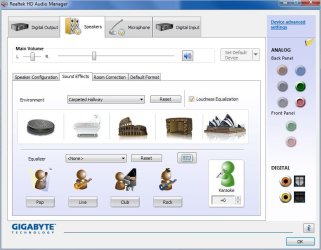
For example, at one time Realtek provided HD Audio Manager (see picture), which has graphic equaliser features, loudness equalisation and 3D environment effects. It is possible to adapt these settings to boost recording volumes dynamics to match what audio source you are listening too.

Some of the features found on Realtek's HD Audio Manager that has an effect on the total volume envelope:
Realtek HD Audio Manager.JPG
 

My Computer My Computer

Computer type
PC/Desktop
OS
Windows 7 x64, Vista x64, 8.1 smartphone
CPU
Intel E8400 65W 64-bit
Motherboard
Gigabyte EP45-UD3LR
Memory
DDR2 2 x 2GB, 1GB x 2
Graphics Card(s)
XFX Radeon HD5750
Sound Card
AMD High Definition Audio; Realtek High Definition Audio
Monitor(s) Displays
iiyama prolite X2377HDS
Screen Resolution
1920 x 1080
Hard Drives
500GB 7200 rpm Seagate ST3500413AS 16MB, 500GB 5400 rpm Toshiba MQ02ABF050H 32MB, 200GB 7200 rpm Seagate ST3200820AS 8MB, 2TB 7200 rpm Western Digital WD20EZRX 64MB
PSU
Enermax Liberty Modular
Case
Antec P193 Midi Tower
Keyboard
Mionix ZIBAL 60
Mouse
Razer USB 2.0 Diamondback Mouse or Huion Graphics Tablet
Browser
Internet Explorer, Lunascape, Firefox, Opera, Avast Safezone
Brioyan now can you give us some specs on this laptop please - even a model number would be good as there is only a desktop listed in your specs.

I am asking because I have two my travel Asus P2520 and the-main an Asus G750 ROG gamer and the difference between the two is quite noticeably obviously the ROG has better quality sound than the smaller machine, and that is probably due to a better quality speaker and sound card.

So in essence I cannot expect the sound from the smaller machine not be anything like the sound from the larger one. If you are using one of the smaller screened laptops then it follows (to me at least) the sound will come though much smaller speakers and will affect what you are listening to. The only option in that scenario would be phones.
 

My Computer My Computer

Computer type
PC/Desktop
Computer Manufacturer/Model Number
Own build (new) Desk1 / Asus ROG Win 7 / Desk2 1st build
OS
Desk1 7 Home Prem / Desk2 10 Pro / Main lap Asus ROG 10 Pro 2 laptop Toshiba 7 Pro Asus P2520 7 & 10
CPU
Desk1 i5 3750K / Laptop i7 GTX 860M / Desk2 i5 2500
Motherboard
Desk1 Asus P877-V / Desk2 Gigabyte H67 UD3H / Laptop ?
Memory
Desk1 8GB (1866) / Desk2 16GB (1333) / Laptop 8Gb DDR3
Graphics Card(s)
Desk 1& 2NVidia GTX 650 & Laptops on board Intel
Sound Card
Desk 1 & 2 -XONAR DG Realtek High Def audio Laptop
Monitor(s) Displays
Desk 1 Benq HD 2450 / Desk2 Philips 24" / Laptop 17.5"
Screen Resolution
1920x1080 D1 & D2 & Laptop 1
Hard Drives
Desk1 Samsung 120GB 830 SSD
Asus ROG 256GB 850 Pro SSD
Desk2 Samsung 840 256 SSD
Toshiba 120GB EVO
PSU
Desk 1 Corsair HX 1050/ Laptop ? / Desk 2 Corsair HX 650
Case
Desk 1 Cooler HAF XM ? Toshiba laptop / Desk2 Coolermaster
Cooling
Fans on all Desk1 -2 Desk2 - all Coolermasters 5 Laptop ?
Keyboard
Desk 1 MS Sidewinder X6 Desk 2 MS Sidewinder X 4
Mouse
Desk 1&2 - Gigabyte MS 900 gamer - laptop - Logitec wireless
Internet Speed
ADSL2+
Other Info
One other Desktop (tester) and spare Toshba laptop both with SSD's
Running Kaspersky 2016 ISS on all machines config'd identically
Logitec audio stereo systems on each machine (x3)
Canon MG5250MFC
Router/modem TP-Link running WPA2SK
...The only option in that scenario would be phones.

Or external laptop speakers (although they are becoming hard to find). That's what I'm using with my notebooks. the one I have is small enough to fit in my notebook's travel case.
 

My Computer My Computer

Computer type
PC/Desktop
Computer Manufacturer/Model Number
Custom Build
OS
Win 7 Ultimate 64 bit
CPU
Intel i7-3930K
Motherboard
ASUS P9X79 WS
Memory
Kingston HyperX Genesis 32GB Kit (8x4GB Modules) 1600MHz DDR
Graphics Card(s)
MSI R7850 Twin Frozr 2GD5/OC Radeon HD 7850 2GB 256-bit GDDR
Sound Card
Asus Xonar Essence STX
Monitor(s) Displays
3x Asus VG248QE 24", Vizio 32" TV
Screen Resolution
1920 x 1080, ?
Hard Drives
Samsung 128GB 840 Pro SSD (1),
Samsung 4TB 850 EVO SSDs (4)
Samsung 4TB 850 EVO SSDs (16) external backup drives used in 2.5" hot swap bays in the computer.
PSU
Corsair HX750w
Case
Antec Two Hundred v2 (modified)
Cooling
Cooler Master GeminII S524 120mm (fan replaced with a 140mm)
Keyboard
Logitech G510s
Mouse
Logitech M525 (two in use)
Internet Speed
=< 32Mbps down, 8Mbps up
Antivirus
AVAST!, MBAM, SAS, Spybot S&D (all but MBAM free) Glary Util
Browser
IE11
Other Info
LSI 9211-8i HBA card (8 SATA III ports), 2.5" & 3.5" Hot Swap Bays, HooToo HT-CR001 PCI-E to USB 3.0 Internal Hub + 6 Slot Card Reader, and LG Model CH12LS28 BD-ROM Optical Drive. Also, ScanSnap S1500 ADF duplexing scanner, Canon 9000F flat bed scanner, Corsair SP2500 2.1 speakers, Samsung CLP 415nw laser color printer, Cyberpower PP2200SW UPS
Yes I agree Jeannie I have seen some that are powered either by USB or mains but it is a lot more to carry around and I still think if it is a problem that phones would suffice.

What I want to know is the specs because it may be some thing very simple ie a driver??
 

My Computer My Computer

Computer type
PC/Desktop
Computer Manufacturer/Model Number
Own build (new) Desk1 / Asus ROG Win 7 / Desk2 1st build
OS
Desk1 7 Home Prem / Desk2 10 Pro / Main lap Asus ROG 10 Pro 2 laptop Toshiba 7 Pro Asus P2520 7 & 10
CPU
Desk1 i5 3750K / Laptop i7 GTX 860M / Desk2 i5 2500
Motherboard
Desk1 Asus P877-V / Desk2 Gigabyte H67 UD3H / Laptop ?
Memory
Desk1 8GB (1866) / Desk2 16GB (1333) / Laptop 8Gb DDR3
Graphics Card(s)
Desk 1& 2NVidia GTX 650 & Laptops on board Intel
Sound Card
Desk 1 & 2 -XONAR DG Realtek High Def audio Laptop
Monitor(s) Displays
Desk 1 Benq HD 2450 / Desk2 Philips 24" / Laptop 17.5"
Screen Resolution
1920x1080 D1 & D2 & Laptop 1
Hard Drives
Desk1 Samsung 120GB 830 SSD
Asus ROG 256GB 850 Pro SSD
Desk2 Samsung 840 256 SSD
Toshiba 120GB EVO
PSU
Desk 1 Corsair HX 1050/ Laptop ? / Desk 2 Corsair HX 650
Case
Desk 1 Cooler HAF XM ? Toshiba laptop / Desk2 Coolermaster
Cooling
Fans on all Desk1 -2 Desk2 - all Coolermasters 5 Laptop ?
Keyboard
Desk 1 MS Sidewinder X6 Desk 2 MS Sidewinder X 4
Mouse
Desk 1&2 - Gigabyte MS 900 gamer - laptop - Logitec wireless
Internet Speed
ADSL2+
Other Info
One other Desktop (tester) and spare Toshba laptop both with SSD's
Running Kaspersky 2016 ISS on all machines config'd identically
Logitec audio stereo systems on each machine (x3)
Canon MG5250MFC
Router/modem TP-Link running WPA2SK
Back
Top