Low disk space on Factory Image D:

Shife

New member
Local time
10:47 AM
Messages
15
Hello, I am new here and guess this is the best place to post it.

As thread title says, I am low on discspace on factory Image D:, atleast that is what the annoying popup windows says every 5 minutes.. Anyways, I have looked around inside the disc which has a total of 13.1gb of space on it, though every map/file added together doesn't even reach 3 gb of used storage.. Is it misleading or..? I have been looking around other threads about setting the recovery settings to different specs but none have worked. I am using Windows 7 Home Premium 64bit SP1, mind you that I just reinstalled Windows 7 again since the SP1 update did not work the first time. I did not have this problem before the reinstallment. How do I fix this issue? Since I have read it is crucial to have it 10-15% left on it for recovery of the system.

Any help would be appreciated, thanks!
 

My Computer My Computer

OS
Windows 7 Home Premium SP1 64bit
Hello, I am new here and guess this is the best place to post it.

As thread title says, I am low on discspace on factory Image D:, atleast that is what the annoying popup windows says every 5 minutes.. Anyways, I have looked around inside the disc which has a total of 13.1gb of space on it, though every map/file added together doesn't even reach 3 gb of used storage.. Is it misleading or..? I have been looking around other threads about setting the recovery settings to different specs but none have worked. I am using Windows 7 Home Premium 64bit SP1, mind you that I just reinstalled Windows 7 again since the SP1 update did not work the first time. I did not have this problem before the reinstallment. How do I fix this issue? Since I have read it is crucial to have it 10-15% left on it for recovery of the system.

Any help would be appreciated, thanks!

There are many reasons why more disk space is being used but not apparent including system volume info, page files, hidden files not shown in folder views, etc.
 

My Computer My Computer

Computer Manufacturer/Model Number
HP Pavillion dv-7 1005 Tx
OS
Win 8 Release candidate 8400
CPU
[email protected]
Memory
4 gigs
Graphics Card(s)
Nvidia 9600M
Sound Card
HD built-in
Monitor(s) Displays
17" Wxga
Screen Resolution
1440x900
Cooling
none
Internet Speed
45Mb down 5Mb up
your system specs do not state whether this is an OEM computer... but D: is usually the factory recovery drive, with the Operating System and all the OEM software that comes with. Your system recovery files will not be saved on this drive. You can set it not to show you low disk space in registry...

Type regedit and press [Enter]. Yes, we could have regedit from a shortcut or from the search/run box, but we need Administrator privileges to do what the next step.
Navigate to HKEY_LOCAL_MACHINE\SOFTWARE\Microsoft\Windows Search\Gathering Manager. Right-click on the key and select Permissions. Press the Advanced button, and then click the Owner tab. Select your Administrator account and then click OK.
Create a reg file with the following contents, and save it anywhere: Windows Registry Editor Version 5.00
[HKEY_LOCAL_MACHINE\\SOFTWARE\\Microsoft\\Windows\\CurrentVersion\\Policies\\Explorer]
"NoLowDiskSpaceChecks"=dword:00000001
[HKEY_LOCAL_MACHINE\\SOFTWARE\\Microsoft\\Windows Search\\Gathering Manager]
"BackOffLowDiskThresholdMB"=dword:00000000
[HKEY_LOCAL_MACHINE\\SOFTWARE\\Microsoft\\Windows Search\\Gather]
"LowDiskMinimumMBytes"=dword:00000000
Import the reg file. You can do this by:
  • Using the command prompt, typing in the full path to the file name (ex: C:\Users\you\Desktop\disable-lowdisk.reg)
  • Using the Registry Editor’s File > Import and using the horrible Vista/7 open file dialog box.
 

My Computer My Computer

Computer type
Laptop
Computer Manufacturer/Model Number
HP 17-ak0xx, dv7 3173nr
OS
Win7 Home Premium x64 W10Pro&Home
CPU
A12 9720p 4+8 TurionII M520
Motherboard
HP 3839
Memory
6GB 8GB
Graphics Card(s)
R7
Monitor(s) Displays
24" sa550
Screen Resolution
1600x900 1920x1080
Mouse
Logitechx2
Internet Speed
120Mb/s down 12up
Before you go mucking in the registry, first type "Folder Options" in Start Search box, on View tab Show Hidden files, Apply, then click on the Recovery Partition in Computer, post up a screenshot of all of the files shown.

Use Snipping Tool in Start Menu, attach file using Paper Clip in reply box.
 
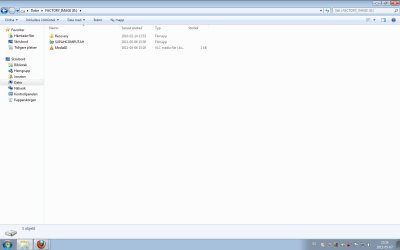
Thanks for replies so quickly, there is a picture in paper clip. Though I already have the 'Show hidden files' on since before and I cannot see it. Yes it is a OEM Windows 7 computer. Thanks for the guide how to shut it off, though it doesn't fix the problem quite much :p

Dator = Computer
It's the swedish version of Windows 7, though I can translate it if you want :)
 

Attachments

  • factoryimage.jpg
    factoryimage.jpg
    43.6 KB · Views: 209

My Computer My Computer

OS
Windows 7 Home Premium SP1 64bit
Welcome to SevenForums
Can you post a picture of disk management, that might show how much space is left in this partition and what other space you might have.
 

My Computer My Computer

Computer Manufacturer/Model Number
Gateway GT5692
OS
Windows 7 Ulti. x64
CPU
AMD Phenom 8450 triple-core 2.10 ghz
Memory
4GB
Graphics Card(s)
ATI Radion HD 3200
Monitor(s) Displays
Gateway FPD1775W
Screen Resolution
1280x720
Hard Drives
465.6613 Gibibytes
That is very interesting, what is inside the Recovery folder ?

Also what kind of machine is it ?


Thanks for replies so quickly, there is a picture in paper clip. Though I already have the 'Show hidden files' on since before and I cannot see it. Yes it is a OEM Windows 7 computer. Thanks for the guide how to shut it off, though it doesn't fix the problem quite much :p

Dator = Computer
It's the swedish version of Windows 7, though I can translate it if you want :)
 

My Computers My Computers

System One System Two

  • Computer type
    PC/Desktop
    OS
    7 X64
    CPU
    i5 8400
    Motherboard
    gigabyte b365m ds3h
    Memory
    2x8gb 3200mhz
    Hard Drives
    various
    PSU
    pure power 11 400w cm
    Case
    Coolermaster
    Cooling
    cryorig m9i
  • Computer type
    PC/Desktop
    OS
    7x64
    CPU
    g5400
    Motherboard
    ga b365m ds3h
    Memory
    8gb ddr4 2400
    PSU
    xfx pro 450w
Yes, I know what it is - how exactly the recovery application is constructed may be revealed by looking

That info may be extremely useful.
 

My Computers My Computers

System One System Two

  • Computer type
    PC/Desktop
    OS
    7 X64
    CPU
    i5 8400
    Motherboard
    gigabyte b365m ds3h
    Memory
    2x8gb 3200mhz
    Hard Drives
    various
    PSU
    pure power 11 400w cm
    Case
    Coolermaster
    Cooling
    cryorig m9i
  • Computer type
    PC/Desktop
    OS
    7x64
    CPU
    g5400
    Motherboard
    ga b365m ds3h
    Memory
    8gb ddr4 2400
    PSU
    xfx pro 450w
The two files shown besides Recovery likely don't belong there. Do you recognize these as something you saved incorrectly?
 
It looks like you have attempted to do a backup to your recovery partition. The recovery partition should not be written to.

It looks like:
"Supahcomputah" is your PC name. This would be your backup folder.
the Mediaid goes along with the file above it as part of the backup.

I don't know why but they appear to being tagged as actual media files.
 

My Computer My Computer

Computer type
PC/Desktop
Computer Manufacturer/Model Number
Own build
OS
Windows 7x64 Home Premium SP1
CPU
Intel i7 2600k
Motherboard
ASUS P8Z68 Deluxe
Memory
G.Skill Ripjaws (DDR3-1600) 2x4GB
Graphics Card(s)
Nvidia GeForce GTS 450; Intel HD Graphics 3000(GT2+)
Monitor(s) Displays
Dell Ultrasharp IPS panel U2311H, Samsung SyncMaster P2350
Screen Resolution
1920x1080
Hard Drives
Samsung 850 Pro SSD 256GB, Samsung SSD 840 120GB, Seagates 1TB Barracuda ST31000528AS x2
PSU
Seasonic M12II 520W
Case
Lian Li Lancool PC-K60
Cooling
Case: 1x120mm, 3x140mm CPU: Hyper 212+
Keyboard
Logitech MK520 (wireless)
Mouse
Logitech MK520
Internet Speed
6-7 Mbps
Antivirus
Norton Security Premium, Malwarebytes on 2 (MSE on 3rd PC)
Browser
FireFox
Other Info
Audio: Logitech Z523 2.1
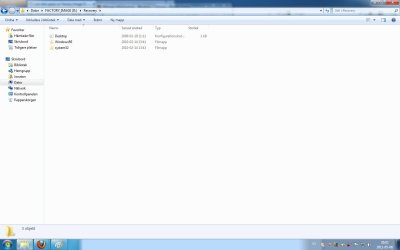
''Also what kind of machine is it ?'' built by my self using ASUS 89GTD PRO/USB3 mobo. And the Recovery folder is empty actually :S, and yes i tried to do a backup before but had to little space.

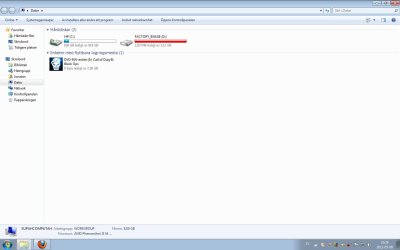
Also a screenshot of my disc management, ignore CoD would you.. :) And of what happens when I try to open the SupahComputah file. The SupahComputah is roughly translated to as a Safety Copy (Säkerhetskopian), though looking at properties for SupahComputah it says it's 0 bytes. I am puzzled by all of this :O, note that I have the option 'Show hidden files/folders' on.
 

Attachments

  • Discs.jpg
    Discs.jpg
    54 KB · Views: 45
  • Supahcomputah.jpg
    Supahcomputah.jpg
    75 KB · Views: 44

My Computer My Computer

OS
Windows 7 Home Premium SP1 64bit
VLC will associate itself with .bin files, if you let it - that's why the icon is there. Not a problem.

Try showing protected operating system files ( it's in folder options )
 

My Computers My Computers

System One System Two

  • Computer type
    PC/Desktop
    OS
    7 X64
    CPU
    i5 8400
    Motherboard
    gigabyte b365m ds3h
    Memory
    2x8gb 3200mhz
    Hard Drives
    various
    PSU
    pure power 11 400w cm
    Case
    Coolermaster
    Cooling
    cryorig m9i
  • Computer type
    PC/Desktop
    OS
    7x64
    CPU
    g5400
    Motherboard
    ga b365m ds3h
    Memory
    8gb ddr4 2400
    PSU
    xfx pro 450w
When you built your rig, did you use a old HD from a OEM manufacturer's PC. (like Dell)
 

My Computer My Computer

OS
ME/XP/Vista/Win7
Oh yes, Theog, it is a HD from a Dell OEM computer actually :)
SIW2, I'll try that.
 

My Computer My Computer

OS
Windows 7 Home Premium SP1 64bit
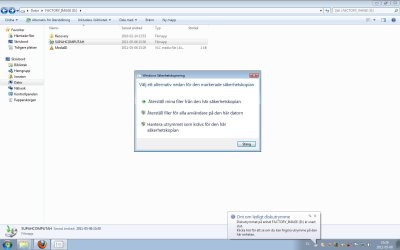
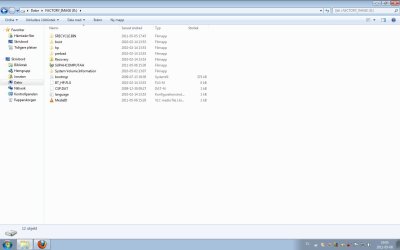
Here's the files in the Factory Image (D:) with showing protected OS files.
 

Attachments

  • Fullfactoryimage.jpg
    Fullfactoryimage.jpg
    57.4 KB · Views: 58

My Computer My Computer

OS
Windows 7 Home Premium SP1 64bit
Thanks.

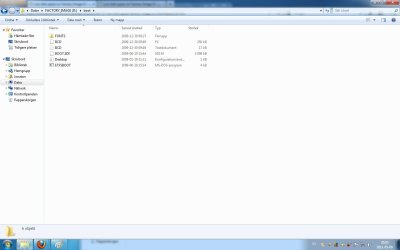
Would like to know what is inside the "Recovery" folder and boot folder.


You will be able to see the sizes then.
 

My Computers My Computers

System One System Two

  • Computer type
    PC/Desktop
    OS
    7 X64
    CPU
    i5 8400
    Motherboard
    gigabyte b365m ds3h
    Memory
    2x8gb 3200mhz
    Hard Drives
    various
    PSU
    pure power 11 400w cm
    Case
    Coolermaster
    Cooling
    cryorig m9i
  • Computer type
    PC/Desktop
    OS
    7x64
    CPU
    g5400
    Motherboard
    ga b365m ds3h
    Memory
    8gb ddr4 2400
    PSU
    xfx pro 450w
Type Disk Management in Start Search box, maximize it's window, take a Snip of the full drive map with listings showing all columns clearly.

Once you unhide System Files do you see all of the subfolders in the SupaComptah backup file which was incorrectly saved to the Recovery Partition? This alone may be what is clogging the partition, however post back the contents of the Recovery folder as requested.

http://www.ehow.com/how_6931734_make-discs-hp-compaq-computers.html
 
There you go
 

Attachments

  • Recovery.jpg
    Recovery.jpg
    45.7 KB · Views: 36
  • boot.jpg
    boot.jpg
    50.6 KB · Views: 30

My Computer My Computer

OS
Windows 7 Home Premium SP1 64bit
Disk Mgmt?

What is the reason you've saved the Recovery Partition from another computer? Why not delete it to recover the disk space once we confirm it does not hold the Active System boot files?

Your Win7 Backup Image is best saved externally in case of HD failure, but you could also keep the partition to store the backup if needed.
 
Greg,

In case you missed it - I asked to see inside those folders - curious to see how the oem have done it.

Thanks Shife.
 

My Computers My Computers

System One System Two

  • Computer type
    PC/Desktop
    OS
    7 X64
    CPU
    i5 8400
    Motherboard
    gigabyte b365m ds3h
    Memory
    2x8gb 3200mhz
    Hard Drives
    various
    PSU
    pure power 11 400w cm
    Case
    Coolermaster
    Cooling
    cryorig m9i
  • Computer type
    PC/Desktop
    OS
    7x64
    CPU
    g5400
    Motherboard
    ga b365m ds3h
    Memory
    8gb ddr4 2400
    PSU
    xfx pro 450w
Back
Top