Low disk space on Factory Image D:

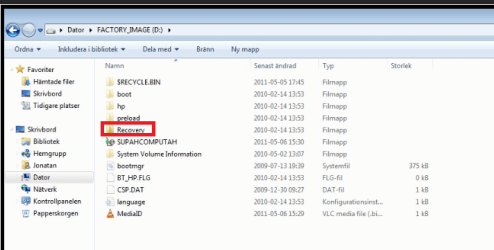
''Also what kind of machine is it ?'' built by my self using ASUS 89GTD PRO/USB3 mobo. And the Recovery folder is empty actually :S, and yes i tried to do a backup before but had to little space.

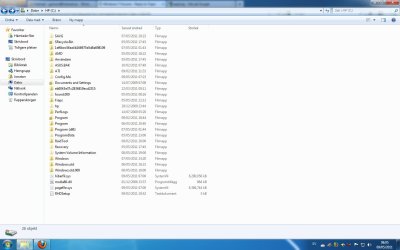
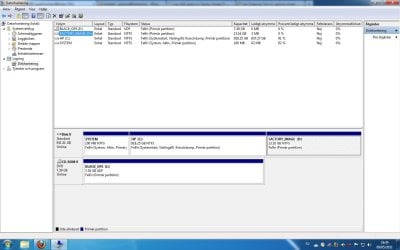
Also a screenshot of my disc management, ignore CoD would you.. :) And of what happens when I try to open the SupahComputah file. The SupahComputah is roughly translated to as a Safety Copy (Säkerhetskopian), though looking at properties for SupahComputah it says it's 0 bytes. I am puzzled by all of this :O, note that I have the option 'Show hidden files/folders' on.
"SupahComputah" is a Windows backup folder. They always read 0 bytes when they generally have GBs of backup. This along with the MediaId file is your old attempt at a backup.

Not that it matters ,C: has HP labeled on it yet you say it was a Dell? Are you trying to get an old OEM HDD, including OS, to run on a new "home made" PC?
 

My Computer My Computer

At a glance

Windows 7x64 Home Premium SP1Intel i7 2600kG.Skill Ripjaws (DDR3-1600) 2x4GBNvidia GeForce GTS 450; Intel HD Graphics 300...
Computer type
PC/Desktop
Computer Manufacturer/Model Number
Own build
OS
Windows 7x64 Home Premium SP1
CPU
Intel i7 2600k
Motherboard
ASUS P8Z68 Deluxe
Memory
G.Skill Ripjaws (DDR3-1600) 2x4GB
Graphics Card(s)
Nvidia GeForce GTS 450; Intel HD Graphics 3000(GT2+)
Monitor(s) Displays
Dell Ultrasharp IPS panel U2311H, Samsung SyncMaster P2350
Screen Resolution
1920x1080
Hard Drives
Samsung 850 Pro SSD 256GB, Samsung SSD 840 120GB, Seagates 1TB Barracuda ST31000528AS x2
PSU
Seasonic M12II 520W
Case
Lian Li Lancool PC-K60
Cooling
Case: 1x120mm, 3x140mm CPU: Hyper 212+
Keyboard
Logitech MK520 (wireless)
Mouse
Logitech MK520
Internet Speed
6-7 Mbps
Antivirus
Norton Security Premium, Malwarebytes on 2 (MSE on 3rd PC)
Browser
FireFox
Other Info
Audio: Logitech Z523 2.1
If you look in the winre folder , you will find a .wim file - possibly several - that will be a fair size.

Not sure what they have put in system32 folder - worth a look - could be a fair bit in there too.

I would like to see how they have arranged those also, if you would be so kind.


There you go


MJ,

He is not trying to do anything- he has succeeded - the o/s is perfectly fine - just the low disk space warnings are annoying him.
 

My Computers My Computers

  • At a glance

    7 X64i5 84002x8gb 3200mhz
    Computer type
    PC/Desktop
    OS
    7 X64
    CPU
    i5 8400
    Motherboard
    gigabyte b365m ds3h
    Memory
    2x8gb 3200mhz
    Hard Drives
    various
    PSU
    pure power 11 400w cm
    Case
    Coolermaster
    Cooling
    cryorig m9i
  • At a glance

    7x64g54008gb ddr4 2400
    Computer type
    PC/Desktop
    OS
    7x64
    CPU
    g5400
    Motherboard
    ga b365m ds3h
    Memory
    8gb ddr4 2400
    PSU
    xfx pro 450w
Oh yes mjf, I meant HP computer :), my mind wandered away a bit, my old old computer was a Dell.

About what greg said, I'm not that good at Windows 7 OS or any for that matter, I just thought it would override it. Is it safe to delete the content in ( D: ) and do another backup? And I don't care for external backups since I don't really care if it the OS fails some time, I just reinstall Windows 7 and see it as cleaning my computer up since it rarely happens :)

Edit: And mjf, I did reinstall Windows 7 on the HD after the computer was built for it to work properly;)
 

My Computer My Computer

At a glance

Windows 7 Home Premium SP1 64bit
OS
Windows 7 Home Premium SP1 64bit
Also SIW2, I get acces denied when trying to open WindowsRE or system32 folders even though I'm an Administrator.

Thanks for the replies so far everyone:)
 

My Computer My Computer

At a glance

Windows 7 Home Premium SP1 64bit
OS
Windows 7 Home Premium SP1 64bit
And about fiffling around in the registry, I would rather not, I've heard it sometimes make the OS break :O
 

My Computer My Computer

At a glance

Windows 7 Home Premium SP1 64bit
OS
Windows 7 Home Premium SP1 64bit
Also SIW2, I get acces denied when trying to open WindowsRE or system32 folders even though I'm an Administrator.

Thanks for the replies so far everyone:)
Windows blocks access to certain things even as administrator (probably to avoid accidental damage). Third party applications are probably the easiest way to get full access rather than going to hidden administrator.
eg. Partition wizard installed miniTool (free) has a partition explore option. It's useful to have anyway.
 

My Computer My Computer

At a glance

Windows 7x64 Home Premium SP1Intel i7 2600kG.Skill Ripjaws (DDR3-1600) 2x4GBNvidia GeForce GTS 450; Intel HD Graphics 300...
Computer type
PC/Desktop
Computer Manufacturer/Model Number
Own build
OS
Windows 7x64 Home Premium SP1
CPU
Intel i7 2600k
Motherboard
ASUS P8Z68 Deluxe
Memory
G.Skill Ripjaws (DDR3-1600) 2x4GB
Graphics Card(s)
Nvidia GeForce GTS 450; Intel HD Graphics 3000(GT2+)
Monitor(s) Displays
Dell Ultrasharp IPS panel U2311H, Samsung SyncMaster P2350
Screen Resolution
1920x1080
Hard Drives
Samsung 850 Pro SSD 256GB, Samsung SSD 840 120GB, Seagates 1TB Barracuda ST31000528AS x2
PSU
Seasonic M12II 520W
Case
Lian Li Lancool PC-K60
Cooling
Case: 1x120mm, 3x140mm CPU: Hyper 212+
Keyboard
Logitech MK520 (wireless)
Mouse
Logitech MK520
Internet Speed
6-7 Mbps
Antivirus
Norton Security Premium, Malwarebytes on 2 (MSE on 3rd PC)
Browser
FireFox
Other Info
Audio: Logitech Z523 2.1
If you will post back the Disk Management screenshot which has been repeatedly requested, we can give you the exact steps to delete the Recovery Partition which doesn't need to be on the HD since it was from another computer.

Type Disk Management in Start Search box, maximize it's window, take a Snip of the full drive map with listings showing all columns clearly.
 
You are awful keen to get him to delete things.

He might still be looking at it - last we heard he was trying to get access to some of the folders.

MJ has given a couple of suggestions.

FreeCommander usually lets you see inside interesting places - Explorer ++ and several others are also around.

FreeCommander - freeware file manager

Taking ownership would do it too.

Take Ownership Shortcut

We might also get some more great new words like this
 

My Computers My Computers

  • At a glance

    7 X64i5 84002x8gb 3200mhz
    Computer type
    PC/Desktop
    OS
    7 X64
    CPU
    i5 8400
    Motherboard
    gigabyte b365m ds3h
    Memory
    2x8gb 3200mhz
    Hard Drives
    various
    PSU
    pure power 11 400w cm
    Case
    Coolermaster
    Cooling
    cryorig m9i
  • At a glance

    7x64g54008gb ddr4 2400
    Computer type
    PC/Desktop
    OS
    7x64
    CPU
    g5400
    Motherboard
    ga b365m ds3h
    Memory
    8gb ddr4 2400
    PSU
    xfx pro 450w
Si, you should connect via TeamViewer to do a full autopsy on the Recovery Partition which doesn't belong on that computer.

I understand perfectly why you want to study these things, and it does help us run other Recov Partitions which have lost their links.

I didn't mean to get in your way, just make it clear to OP the partition does not belong there once it's clear it isn't System Active and you get what you need.
 
Greg, I'm sorry for not replying for the Disk Management since I cannot find it because my OS language is on Swedish and I don't seem to be able to download the languagepack from windows update because it's not there. I would think it's where you show all the discs, as in Start -> Computer, that I've already posted a screenshot of. If you could describe it, I should be able to find it.

Could it be this? Thanks by the way for the suggestions SIW2.
 

Attachments

  • Diskmanagement.jpg
    Diskmanagement.jpg
    82.8 KB · Views: 23

My Computer My Computer

At a glance

Windows 7 Home Premium SP1 64bit
OS
Windows 7 Home Premium SP1 64bit
Is it in Windows.old folders?
 

My Computer My Computer

At a glance

Windows 7 Home Premium SP1 64bit
OS
Windows 7 Home Premium SP1 64bit
Disk Management is where you view your partitions, delete, create and format new. I've told you twice how to get there. Let's try another way: Click Start Button, rightclick Computer, Select Manage, then Disk Management.

Maximize window, use Snipping Tool to capture drive map and listings showing all column content.
 
I do not know why you wan't to use snipping tool for it, I just used printscreen + paint. Here it is.
 

Attachments

  • Namnlös1.jpg
    Namnlös1.jpg
    98.3 KB · Views: 41

My Computer My Computer

At a glance

Windows 7 Home Premium SP1 64bit
OS
Windows 7 Home Premium SP1 64bit
If Factory Image (D) is the recovery partition imported with HD from another computer and it is no longer needed for source computer, it can be deleted after you post up the screenshot SIW2 requested of the contents of Recovery Folder here:
 

Attachments

  • Capture.PNG
    Capture.PNG
    51.5 KB · Views: 34
Greg, first of all thank you for the help. The contents of the ''Recovery'' folder is shown on page 2 together with showing ''boot'' folder. Though I tried making a back up on this computer before but it turned out not to have enough space for it. But it still took up space. Didn't have this problem before I did that. So it is safe to remove it since it's a backup? And just do another afterwards?
 

My Computer My Computer

At a glance

Windows 7 Home Premium SP1 64bit
OS
Windows 7 Home Premium SP1 64bit
Yes, you can make new backups at any time. It's best to save your Win7 backups to external or another HD in case of HD failure. If you must save it on the same HD, create a small Primary partition for that purpose at the end of the HD.

For now, you can delete the useless Recovery Partition in Disk Management, then extend Win7 partition into it's space.
Partition or Volume - Delete
Partition or Volume - Extend
 
Greg, since we delete it, don't you mean create a new partition since expanding a deleted partition is quite impossible?

Edit: Nevermind, thank you Greg.
 

My Computer My Computer

At a glance

Windows 7 Home Premium SP1 64bit
OS
Windows 7 Home Premium SP1 64bit
Thank you :)
 

My Computer My Computer

At a glance

Windows 7 Home Premium SP1 64bit
OS
Windows 7 Home Premium SP1 64bit
Back
Top