
Low fps on online games

StanicEnemy

New member
Local time
1:28 PM
Messages
24
Hello everyone I'm not sure if i opened this topic at right place:

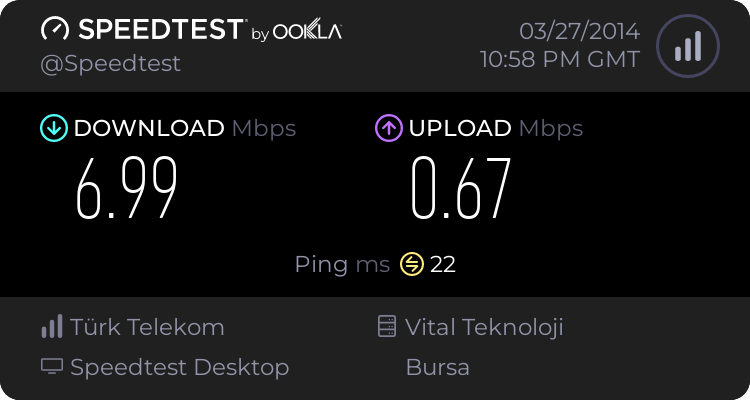
My problem is about I can play every rpg fps and etc games like that which is offline but when I play any online game mmorpg etc I am having really low fps on online games I have reinstalled windows 7 and updated all drivers and im not having fps or freeze problems on offline games even I turned everything to low settings and my friend told me you are having fps problem 'cause of your wireless internet, is it right? I am having low fps due to wireless internet?
3400552057.png


Intel(R) Core(TM)2 Duo CPU P7450 @ 2.13GHz, 2133 Mhz
ATI Mobility Radeon HD 4530
4 GB ram
DDR3
 

My Computer My Computer

Computer type
Laptop
Computer Manufacturer/Model Number
hp
OS
windows 7 x64
Define low fps, low fps as in it stutters and like your character gets stuck then warps sometimes which would be a internet issue. A fps issue would be like your game starts going slow motion/ freezing ect. As for the internet the connection seems ok, I would try playing wired via a ethernet cord and see if the issue persist. Could be like your friend said being the wireless. When it's your internet being the issue it will like skip and warp players or warp you or freeze in place every now and then but without fps drops.

Since you can play single player games I doubt it has to be a issue with graphics unless that game you play online is really demanding then it's a different story. What online games are you trying to play and what hardware is in your pc or laptop if you use a laptop. I would assume it's a laptop since I see laptop on your specs. Can you specify which hp laptop like a model should say on a sticker on the laptop somewhere if it has one.
 

My Computer My Computer

Computer type
PC/Desktop
Computer Manufacturer/Model Number
custom build
OS
Windows 10 64bit
CPU
AMD Phenom II X4 925 (Deneb)(2.8GHz) OC 3.4GHz
Motherboard
M5A78L-MLX Plus
Memory
Corsair Vengeance DDR3 4GBX2 (8192MB)
Graphics Card(s)
XFX HD 6870 1GB (OC)- 940MHz core, mem 1150MHz
Monitor(s) Displays
Vizio 26' 1920x1080 / Acer 1336x768
Screen Resolution
1920x1080 60Hz /1336x768
Hard Drives
Kingston Digital 60GB SSDNow V300/500gb HDD Western Digital 7200rpm (/WD 160GB HDD 7200rpm
PSU
CORSAIR CX600 600w
Case
AZZA Orion 202 EVO
Cooling
cooler master hyper TX3 cpu cooler
Keyboard
Razer DeathStalker
Mouse
Logitech Optical Gaming Mouse G400
Antivirus
Defualt on win 10
Browser
Firefox
Other Info
cpu is overclocked in bios
Define low fps, low fps as in it stutters and like your character gets stuck then warps sometimes which would be a internet issue. A fps issue would be like your game starts going slow motion/ freezing ect. As for the internet the connection seems ok, I would try playing wired via a ethernet cord and see if the issue persist. Could be like your friend said being the wireless. When it's your internet being the issue it will like skip and warp players or warp you or freeze in place every now and then but without fps drops.

Since you can play single player games I doubt it has to be a issue with graphics unless that game you play online is really demanding then it's a different story. What online games are you trying to play and what hardware is in your pc or laptop if you use a laptop. I would assume it's a laptop since I see laptop on your specs. Can you specify which hp laptop like a model should say on a sticker on the laptop somewhere if it has one.

Hello M1GU31 thank you for the answer.

I don't really like to play offline games but it forces me to play them since I am having fps problems on online games.

Yes it's hp laptop like you said there is a sticker on the laptop's back.

I am playing Warframe,BlackLight Retribution and Cabal online
 

My Computer My Computer

Computer type
Laptop
Computer Manufacturer/Model Number
hp
OS
windows 7 x64
download and run fraps. it will give you a current fps draw. if that dips its gpu/software related. if it doesnt its network/data pack related.
 

My Computer My Computer

Computer type
PC/Desktop
Computer Manufacturer/Model Number
Built by badgers!!!
OS
Windows 7 Ultimate x64, & Mac OS X 10.9.2
CPU
Intel Core i5 2500k
Motherboard
Asus P8z68 LE
Memory
Corsair Vengence 8gb 1866mhz
Graphics Card(s)
Nvidia GTX 770 OC
Monitor(s) Displays
2x ASUS LED 22" IPS
Screen Resolution
3840x1080
Hard Drives
240GB Crucial M500 SSD
120gb Corsair Force 3 SSD
1TB Western Digital
PSU
Corsair HX650w Modular
Case
Corsair Air 540
Cooling
Corsair H60 Push/Pull
Keyboard
Corsair K70/ Logitech G27 wheel
Mouse
Saitek R.A.T 9
Internet Speed
Too slow!
Other Info
AMD fusion E350N Home server-Windows Home Server 2011 (also made by badgers!)
2011 Macbook 2.4ghz Core2Duo, 4gb ddr3, 120gb Ocz Vertex SSD
download and run fraps. it will give you a current fps draw. if that dips its gpu/software related. if it doesnt its network/data pack related.

Hello badger906!

I just uninstalled my ati graphic driver and I got login into my game account I played with between 20-30 fps before that I was having 10 fps 5 fps, forgive me for my ignorant side but does it make any sense?
 

My Computer My Computer

Computer type
Laptop
Computer Manufacturer/Model Number
hp
OS
windows 7 x64
well 20-30fps is almost unplayable for a start so things arent looking great there.

uninstalling your graphics driver will cause windows to use its default vga one, which will explain the decrease in performance.
download and install the latest version of catalyst control centre, as well as close as many start up programs from within msconfig. (click start, type run, in thay box type msconfig hit enter. then click the startup tab and untick everything bar virus scanner)

that should help you a little bit. now as for why online games decrease, I can only persume online play in this instance is more demanding as its not only loading the game but the sever as well as sending and receiving data. I think you may have to lower game textures as well as resolution to get this to work smoothly.
 

My Computer My Computer

Computer type
PC/Desktop
Computer Manufacturer/Model Number
Built by badgers!!!
OS
Windows 7 Ultimate x64, & Mac OS X 10.9.2
CPU
Intel Core i5 2500k
Motherboard
Asus P8z68 LE
Memory
Corsair Vengence 8gb 1866mhz
Graphics Card(s)
Nvidia GTX 770 OC
Monitor(s) Displays
2x ASUS LED 22" IPS
Screen Resolution
3840x1080
Hard Drives
240GB Crucial M500 SSD
120gb Corsair Force 3 SSD
1TB Western Digital
PSU
Corsair HX650w Modular
Case
Corsair Air 540
Cooling
Corsair H60 Push/Pull
Keyboard
Corsair K70/ Logitech G27 wheel
Mouse
Saitek R.A.T 9
Internet Speed
Too slow!
Other Info
AMD fusion E350N Home server-Windows Home Server 2011 (also made by badgers!)
2011 Macbook 2.4ghz Core2Duo, 4gb ddr3, 120gb Ocz Vertex SSD
It might just be the menus isnt very well optimized...if i had £1 for everytime i'd gotten 15-20 fps in a menu(not loaded into game yet) and then loaded into the game world with very playable fps id be a little better off xD
 

My Computer My Computer

Computer type
Laptop
Computer Manufacturer/Model Number
Packard Bell
OS
Windows 7 Home Premium 64Bit
CPU
AMD A6-3420M 1.5GHZ OC - 2.0GHZ
Memory
4GB DDR3 1600MHZ
Graphics Card(s)
AMD RADEON 6520G+AMD RADEON HD7470M 1GB DDR3
Screen Resolution
1366x768
Hard Drives
500GB SATA
Internet Speed
18Mb Unlimited
Antivirus
AVAST!
Browser
MOZILLA FIREFOX
download and run fraps. it will give you a current fps draw. if that dips its gpu/software related. if it doesnt its network/data pack related.


If I'm not mistaken Fraps tends to lower the actual FPS
 

My Computer My Computer

Computer type
PC/Desktop
OS
Windows 7
download and run fraps. it will give you a current fps draw. if that dips its gpu/software related. if it doesnt its network/data pack related.


If I'm not mistaken Fraps tends to lower the actual FPS

If you start recording then yes it does. If just viewing fps then it shouldn't make a difference at all.
 

My Computer My Computer

Computer type
PC/Desktop
Computer Manufacturer/Model Number
custom build
OS
Windows 10 64bit
CPU
AMD Phenom II X4 925 (Deneb)(2.8GHz) OC 3.4GHz
Motherboard
M5A78L-MLX Plus
Memory
Corsair Vengeance DDR3 4GBX2 (8192MB)
Graphics Card(s)
XFX HD 6870 1GB (OC)- 940MHz core, mem 1150MHz
Monitor(s) Displays
Vizio 26' 1920x1080 / Acer 1336x768
Screen Resolution
1920x1080 60Hz /1336x768
Hard Drives
Kingston Digital 60GB SSDNow V300/500gb HDD Western Digital 7200rpm (/WD 160GB HDD 7200rpm
PSU
CORSAIR CX600 600w
Case
AZZA Orion 202 EVO
Cooling
cooler master hyper TX3 cpu cooler
Keyboard
Razer DeathStalker
Mouse
Logitech Optical Gaming Mouse G400
Antivirus
Defualt on win 10
Browser
Firefox
Other Info
cpu is overclocked in bios
hi everyone ive updated my graphic driver but i found something

do u think it could be work for my laptop ?

Coder Bag: Disable CPU Core Parking Utility

I don't believe it would due to you running a Dual Core CPU (Core 2 Duo) and is really only truly effective on Quad cores and above. Also you are getting fps drops in online games due to even though the server does the main grunt of the processing of the online experience. Your side still has to render more and recieve more data etc.

To be fair you're on a laptop as well and older tech too. The best advice i can give is to lower settings in game if you haven't already done so. And make sure your system is virus free. Defragged (Unless you are running an SSD of course) and clutter free :)
 

My Computer My Computer

Computer type
PC/Desktop
Computer Manufacturer/Model Number
Self Built
OS
Windows 10 Pro x64
CPU
Intel i7 2600K @ 4.4GHz
Motherboard
Asus P8Z77-V LX2
Memory
16GB Corsair Vengeance Pro DDR3 1600 MHz
Graphics Card(s)
ZOTAC GTX 1070 AMP Edition
Sound Card
Asus Xonar D2
Monitor(s) Displays
Viewsonic 24" VX2439WM LCD/LG 22" W2261VP LCD
Screen Resolution
1920x1080 DVI 1080p 16:9 on both screens
Hard Drives
1x SanDisk Extreme 120GB SSD SATA III (OS), 1x Samsung EVO 250GB SSD SATA III (Games), 1x Seagate Barracuda 1TB SATA III (Storage)
PSU
Corsair TX850W
Case
Corsair Carbide 200R
Cooling
3x 120mm Fans (Front, Bottom and Rear)
Keyboard
Roccat Isku
Mouse
Corsair M65 RGB
Internet Speed
Virgin Media 100Mb
Antivirus
Windows Defender
Browser
Firefox
Other Info
Logitech Z640 5.1 Speakers. Kingston HyperX Cloud Headset. M-Audio Oxygen 25/88 Keystation ES Midi Keyboard's

My Computer My Computer

Computer type
PC/Desktop
Computer Manufacturer/Model Number
Custom Build
OS
Windows 7 Ultimate 64-bit SP1
CPU
Intel(R) Core(TM) i3-2120 CPU @ 3.30GHz
Motherboard
ECS H61H2-M17
Memory
8.00GB Dual-Channel DDR3 @ 665MHz (9-9-9-24)
Graphics Card(s)
NVIDIA GTX 750ti 2GB
Sound Card
NVIDIA Virtual Audio Device
Monitor(s) Displays
Generic Non-PnP Monitor
Screen Resolution
1366x768
Hard Drives
2 TB SSHD
PSU
700watts
Case
X-Strike
Cooling
What's this?
Keyboard
TTesport Poseidon Z RGB (Brown edition)
Mouse
Cougar 700m
Internet Speed
300 kBps (shitty country)
Antivirus
Microsoft Security Essential
Browser
Google Chrome
Other Info
Road to Monster PC <3
Hey StanicEnemy,

I suggest that you should download Razer Gaming Booster ( Razer Game Booster Performance Boosting & Screencapture Software - Razer United States ) then run it, Optimize, And lets see what will happen.


I disagree, Stay away from things like this, "Optimizers" that claim to clean your system and boost performance tend to do the exact opposite, they also load your pc with bloatware that they claim" Cleans"., we would be needing a 15-20fps increase and i highly doubt this will bring the fps needed.
 

My Computer My Computer

Computer type
Laptop
Computer Manufacturer/Model Number
Packard Bell
OS
Windows 7 Home Premium 64Bit
CPU
AMD A6-3420M 1.5GHZ OC - 2.0GHZ
Memory
4GB DDR3 1600MHZ
Graphics Card(s)
AMD RADEON 6520G+AMD RADEON HD7470M 1GB DDR3
Screen Resolution
1366x768
Hard Drives
500GB SATA
Internet Speed
18Mb Unlimited
Antivirus
AVAST!
Browser
MOZILLA FIREFOX
Have you even tried it? I've been playing Dota 2 for 1 year having 25 FPS but now I'm having 32-35 FPS. It doesn't make your pc slow unless you try it and look for yourself. Cleaning "Junks/Trash" is a nice way too, Using CCLeaner and Defrag your pc using Defraggler. These will help you improve your FPS and also uninstalling unnecessary programs, and close not needed programs.
 

My Computer My Computer

Computer type
PC/Desktop
Computer Manufacturer/Model Number
Custom Build
OS
Windows 7 Ultimate 64-bit SP1
CPU
Intel(R) Core(TM) i3-2120 CPU @ 3.30GHz
Motherboard
ECS H61H2-M17
Memory
8.00GB Dual-Channel DDR3 @ 665MHz (9-9-9-24)
Graphics Card(s)
NVIDIA GTX 750ti 2GB
Sound Card
NVIDIA Virtual Audio Device
Monitor(s) Displays
Generic Non-PnP Monitor
Screen Resolution
1366x768
Hard Drives
2 TB SSHD
PSU
700watts
Case
X-Strike
Cooling
What's this?
Keyboard
TTesport Poseidon Z RGB (Brown edition)
Mouse
Cougar 700m
Internet Speed
300 kBps (shitty country)
Antivirus
Microsoft Security Essential
Browser
Google Chrome
Other Info
Road to Monster PC <3
game booster never helped me to get more fps.
 

My Computer My Computer

Computer type
Laptop
Computer Manufacturer/Model Number
hp
OS
windows 7 x64
Back
Top