Low processor points problem

sidereal

New member
Local time
6:32 PM
Messages
3
Dear Friends;

I ve a problem with processor points . It is so so low , 2,8 points. In this forum I see some friends have same processor and have 4,9 points. My before system was vista and it was 4.7 points for processor there.

If there is anyone who experienced this and solved the problem, pls assist me,
Waiting your comments and solutions.Thanks in advance.

MY system:
TOSHIBA A200 1-AH laptop

Processor:Intel core 2 duo T7300 2.0 GHz POINT : 2,8
Ram:2 gb POINT : 3
 

My Computer

Computer Manufacturer/Model Number
Toshiba A200-1AH
OS
win 7
CPU
INTEL COREDUO 2 T7300-2 GHZ
Memory
2 GB
Graphics Card(s)
2600 HD
Dear Friends;

I ve a problem with processor points . It is so so low , 2,8 points. In this forum I see some friends have same processor and have 4,9 points. My before system was vista and it was 4.7 points for processor there.

If there is anyone who experienced this and solved the problem, pls assist me,
Waiting your comments and solutions.Thanks in advance.

MY system:
TOSHIBA A200 1-AH laptop

Processor:Intel core 2 duo T7300 2.0 GHz POINT : 2,8
Ram:2 gb POINT : 3

I assume you mean WEI. Try just re running it to see if the number changes. if it doesnt, go into msconfig, and check to see if max cpu is checked. It shouldnt be.


Ken
 

My Computer

Computer Manufacturer/Model Number
HP Pavillion dv-7 1005 Tx
OS
Win 8 Release candidate 8400
CPU
[email protected]
Memory
4 gigs
Graphics Card(s)
Nvidia 9600M
Sound Card
HD built-in
Monitor(s) Displays
17" Wxga
Screen Resolution
1440x900
Cooling
none
Internet Speed
45Mb down 5Mb up
Old cpu, but that is low. Did you clean install or upgrade 7?
 

My Computer

Computer Manufacturer/Model Number
Sony Vaio Z46GDU
OS
Windows 7 Ultimate x86-64
CPU
[email protected] 1066MHz FSB
Motherboard
Sony branded
Memory
6GB DDR3 1066MHz
Graphics Card(s)
9300M GS 256MB Dedicated (Speed) + Intel4500MHD (Stamina)
Sound Card
Realtek HD Audio
Monitor(s) Displays
13.1' WXGA
Screen Resolution
1600x900
Hard Drives
320GB 7200RPM w/ 16MB cache
Internet Speed
1MB/s
That is indeed low. I have a 2GHz processor on a laptop with Win7 64bit and the WEI for the processor is also 4.9.
 

My Computer

Computer Manufacturer/Model Number
HP, Dell, Gateway, Toshiba - 4 laptops and 2 desktops
OS
Vista, Windows7, Mint Mate, Zorin, Windows 8
CPU
from 1.6GHz Duo to i7
Monitor(s) Displays
2x HP w2207
Hard Drives
5x HDD, 7x SSD, 12x Externals
Keyboard
with trackball - no mices
Mouse
Trackball mice
Internet Speed
DSL 6000
Dear Friends;

I ve a problem with processor points . It is so so low , 2,8 points. In this forum I see some friends have same processor and have 4,9 points. My before system was vista and it was 4.7 points for processor there.

If there is anyone who experienced this and solved the problem, pls assist me,
Waiting your comments and solutions.Thanks in advance.

MY system:
TOSHIBA A200 1-AH laptop

Processor:Intel core 2 duo T7300 2.0 GHz POINT : 2,8
Ram:2 gb POINT : 3

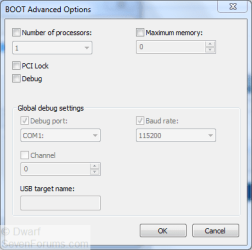
I assume you mean WEI. Try just re running it to see if the number changes. if it doesnt, go into msconfig, and check to see if max cpu is checked. It shouldnt be.


Ken

Thanks Ken for your reply, Pls can you describe how i can check the max cpu?
I entered the msconfig but cant see where max cpu is shown.
Waitng your asistance, thanks
 

My Computer

Computer Manufacturer/Model Number
Toshiba A200-1AH
OS
win 7
CPU
INTEL COREDUO 2 T7300-2 GHZ
Memory
2 GB
Graphics Card(s)
2600 HD
Boot tab, Advanced options...

Capture.PNG

Ensure that the options are as shown above.
 

My Computer

Computer type
PC/Desktop
Computer Manufacturer/Model Number
Dwarf Dwf/11/2012 r09/2013
OS
Windows 8.1 Pro RTM x64
CPU
Intel Core-i5-3570K 4-core @ 3.4GHz (Ivy Bridge) (OC 4.4GHz)
Motherboard
ASRock Z77 Extreme4-M
Memory
4 x 4GB DDR3-1600 Corsair Vengeance CMZ8GX3M2A1600C9B (16GB)
Graphics Card(s)
MSI GeForce GTX770 Gaming OC 2GB
Sound Card
Realtek High Definition on board solution (ALC 898)
Monitor(s) Displays
ViewSonic VA1912w Widescreen (VGA)
Screen Resolution
1440x900
Hard Drives
OCZ Agility 3 SSD 120GB SATA III x2 (RAID 0)
Samsung HD501LJ 500GB SATA II x2
Hitachi HDS721010CLA332 1TB SATA II
Iomega 1.5TB Ext USB 2.0
WD 2.0TB Ext USB 3.0
PSU
XFX Pro Series 850W Semi-Modular
Case
Gigabyte IF233
Cooling
1 x 120mm Front Inlet 1 x 120mm Rear Exhaust
Keyboard
Microsoft Comfort Curve Keyboard 3000 (USB)
Mouse
Microsoft Comfort Mouse 3000 for Business (USB)
Internet Speed
NetGear DG834Gv3 ADSL Modem/Router (Ethernet) ~4.0 Mb/s (O2)
Antivirus
Avast! 8.0.1497
Browser
IE 11
Other Info
Optical Drive: HL-DT-ST BD-RE BH10LS30 SATA Bluray
Lexmark S305 Printer/Scanner/Copier (USB)
WEI Score: 8.1/8.1/8.5/8.5/8.25
Asus Eee PC 1011PX Netbook (Windows 7 x86 Starter)
yes it was not checked, but i tried to see the score after checking, it doesnt effect anything.
 

My Computer

Computer Manufacturer/Model Number
Toshiba A200-1AH
OS
win 7
CPU
INTEL COREDUO 2 T7300-2 GHZ
Memory
2 GB
Graphics Card(s)
2600 HD
That has happened to me, severals time. And the problem was with the Video Card (Dell XPS M1530 - Nv.Gef.8600). The newest driver, after a clean install (195.81 (Think that is the one)), WEIed me a Score of 5.2 on my processor. What I did, is that I 'flashed' the Video Card to an older version without uninstalling the drivers, and ran my asset again.

Finally I got my WEI of 6.0, and my Video Card got its normal values.
 

My Computer

Computer Manufacturer/Model Number
Dell XPS M1530 - Lenovo Y510p
OS
Windows 8.1 (Update 1) Both Machines
CPU
Intel Core 2 Duo T8300 - 2.4GHZ & Intel Core i7 4700MQ
Memory
4GB @ 800 MHz DDR2 & 16GB @ 1600 MHz DDR3
Graphics Card(s)
Nvidia Geforce 8600m GT & 750m SLI
Sound Card
Sigmatel High Definition Audio 5.1
Monitor(s) Displays
Samsung SyncMaster 2494
Screen Resolution
1680 x 1050 (Laptop) && 1920 x 1080
Hard Drives
Hitachi 320 GB, @7200 RPM
Internet Speed
480/100 KB/s DL/UP
Browser
Opera, Palemoon, Chrome, Internet Explorer 11
Back
Top