Mac Wireles Sharing a Windows 7 Connected Printer

andersonn21

New member
Local time
12:54 AM
Messages
7
OK,

I have been struggling with this for quite some time. I've read tons of posts and articles and have gotten nowhere.

Does anyone have any idea how to get a Mac Powerbook (10.4.11) to connected to a Printer (HP Officejet 4215) that is connected to a PC (Windows 7100) through a Linksys Router (WRT54GS)?

I've got printer sharing enabled on the PC and have tried so many things that I'd rather not post everything here.

If there is anybody that knows of a surefire way to get this working, I would appreciate it :)

Steve
 

My Computer

OS
Windows 7.1
By the way, my PC is running 64 bit Win 7 and my printer is connected to my PC via USB. My laptop is wirelessly connected to my router. I am able to share files but I can't find the shared printer anywhere on my laptop :(
 

My Computer

OS
Windows 7.1
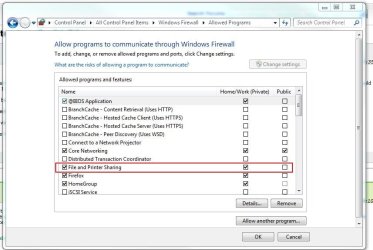
Check your firewall on Windows 7. Make sure it is allowed.
 

Attachments

  • firewall.JPG
    firewall.JPG
    57.6 KB · Views: 7,606

My Computer

Computer Manufacturer/Model Number
Built Myself
OS
Windows 7 7600.16384 x64
CPU
Intel Core i7 OC'd to 3.20 GHz
Motherboard
Gigabyte
Memory
6GB GSkillz Triple Channel DDR3 OC'd to 1600 MHz
Graphics Card(s)
Nvidia GTX 280
Sound Card
X-Fi Platinum
Monitor(s) Displays
Dual 2001FWP
Screen Resolution
1680x1050 x 2
Hard Drives
System - Dual 150GB Raptors Raid0
Doc Storage - 1TB SATA 32MB cache Samsung
TV Recordings - 1TB SATA 32MB cache Samsung
PSU
Gigawatt Antec
Case
Antec 900
Keyboard
Saitek
Mouse
logitech MX 10000
Internet Speed
30 mb/s
Are you able to print to the printer fine with the windows machine? Also, check your printers, make sure you don't have duplicates and aren't sharing one that is not being used or offline.

Check here in Windows to see your printers:
Control Panel\All Control Panel Items\Devices and Printers
 

My Computer

Computer Manufacturer/Model Number
Built Myself
OS
Windows 7 7600.16384 x64
CPU
Intel Core i7 OC'd to 3.20 GHz
Motherboard
Gigabyte
Memory
6GB GSkillz Triple Channel DDR3 OC'd to 1600 MHz
Graphics Card(s)
Nvidia GTX 280
Sound Card
X-Fi Platinum
Monitor(s) Displays
Dual 2001FWP
Screen Resolution
1680x1050 x 2
Hard Drives
System - Dual 150GB Raptors Raid0
Doc Storage - 1TB SATA 32MB cache Samsung
TV Recordings - 1TB SATA 32MB cache Samsung
PSU
Gigawatt Antec
Case
Antec 900
Keyboard
Saitek
Mouse
logitech MX 10000
Internet Speed
30 mb/s
I would assume that if I were able to share files between the two, then it would have been allowed. Nevertheless I check and yes, it is already allowed. Thank you for the quick reply.
 

My Computer

OS
Windows 7.1
Yeah I figured also, but worth a try. Did you check things on my 2nd post?
 

My Computer

Computer Manufacturer/Model Number
Built Myself
OS
Windows 7 7600.16384 x64
CPU
Intel Core i7 OC'd to 3.20 GHz
Motherboard
Gigabyte
Memory
6GB GSkillz Triple Channel DDR3 OC'd to 1600 MHz
Graphics Card(s)
Nvidia GTX 280
Sound Card
X-Fi Platinum
Monitor(s) Displays
Dual 2001FWP
Screen Resolution
1680x1050 x 2
Hard Drives
System - Dual 150GB Raptors Raid0
Doc Storage - 1TB SATA 32MB cache Samsung
TV Recordings - 1TB SATA 32MB cache Samsung
PSU
Gigawatt Antec
Case
Antec 900
Keyboard
Saitek
Mouse
logitech MX 10000
Internet Speed
30 mb/s
Yes, it is printing just fine from the PC. I checked for duplicates, nothing. I've read a lot of posts on this and haven't really seen any solid answers on how to solve this problem. Have seen a lot of people struggling with similar situations.
 

My Computer

OS
Windows 7.1
Please explain the steps you are using to make the connection between the mac to the windows machine. But in the interim try this
Gutenprint Printer Drivers- this is for the drivers
. Open the Printer Setup Utility (in the Applications/Utilities folder). Click the Add button.
2. Click the More Printers button. In the resulting Printer Browser window, make sure that the top option is set to Windows Printing and the second option is set to Network Neighborhood. You should know the name of your Windows workgroup. Double-click it to get a list nearby computers in your Windows workgroup, then double-click the computer that has the printer attached. (You may be asked for the name and password of a valid user for that computer; you can add these to your keychain to avoid future log-ins). At that point, you should see the shared printer.
At that point, you may be tempted to click the Add button . . . but don't. Look at the bottom of the dialogue box - while it's got the printer's shared name (a comment that identifies the printer model), as far as your Mac is concerned, it's a "Generic Printer". Unless you're only planning to print plain text, that won't do. Trust me.
Instead, you need to take a look at the dropdown list of Printer Models. If you see your printer listed, you're in luck. Since the driver for that might not work across Windows networks. Instead, pick the model driver for the Gimp- print driver, and (finally) click Add.
The new printer should show up in your printer list, and should work just fine (as long as you don't expect photo-quality graphics).
Compared to the fully manual process needed in OS X 10.2 and 10.3, 10.4 is semiautomatic. "Tiger" finds the shared Windows printer for you, but you still have to know which driver to use with it.
It's easier than it used to be, but for too many printers it's still not automatic enough or intuitive enough, so the Gimp-Print list of supported printers remains a vital resource
 
Last edited:

My Computer

Computer Manufacturer/Model Number
Gigabyte
OS
Windows 7 Ultimate
CPU
Intel Core(TM)2 Quad- Q9550, 2.83GHz
Motherboard
G31M-ES2L
Memory
4GB
Graphics Card(s)
ATI Radeon HD4600
Sound Card
On Board:
Monitor(s) Displays
Acer AL2223W, Acer AL1916
Screen Resolution
1680 x 1050, 1280 x 1024
Hard Drives
160GB
350GB
250GB
250GB
PSU
600W
Case
Cooler Master
Keyboard
Microsoft Laser 6000
Mouse
Logitech Optical Trackman
Internet Speed
1.5MB
Other Info
I am also running a quasar gamatron flux capacitor with twin pulse tronic phasers......jk, I have no such stuff.
Thank you Zay,

I seem to have a problem with accessing my Computer. I see my PC listed in the Printer Browser and I attempt to access it. It asks for my name and password. It doesn't seem to like my username and password, even I am entering it exactly as i do when i log in with my administrator account. I remember reading a while ago that sometimes MAC needs to add a character or something to the password like a "$" or something? I'm not sure if that applies anymore cuz that was a long time ago. Anyway, I changed my permissions in the network sharing center to not require a password to access files and printing. So at this point i enter nothing and it doesn't seem to complain, but still no printer is available.

I'm not convinced that this means it doesn't see the printer because there was another post, I think on the Apple site, that said if you don't enter anything, it won't complain about wrong username and password, it just won't list any devices.

Not sure if this is clear enough, do you follow?
 

My Computer

OS
Windows 7.1
Go back to using a password, and try this option:
You need to add the shared printer via the hidden “Advanced” printer feature in the Print & Fax preferences.
  • Open “Print & Fax” in “System Preferences”
  • Click “+” to add a new printer
  • Control-click (or right-click) on the toolbar at the top of the window and select “Customize Toolbar…”
  • Drag the “Advanced” icon to the toolbar and select “Done”
  • Click on the “Advanced” icon … and be patient … after a moment or two, you can select “Windows” from the “Type” dropdown-menu
  • Enter the SAMBA URL of the shared windows printer in the “URL” textfield:
    smb://USERNAME:PASSWORD@WINDOWSDOMAINNAME/PRINTSERVER/PRINTERSHARENAME or
    smb://USERNAME:PASSWORD@IPADDRESS/PRINTERSHARENAME
    If the shared printer does not need a password, you can use smb://USERNAME@…
  • Fill out the other fields “Name” and “Location” as you prefer
  • When printing the first time you will get prompted for your USERNAME and PASSWORD. Fill in your windows printserver username and password and enable the “Add this to your keychain” checkbox.
 

My Computer

Computer Manufacturer/Model Number
Gigabyte
OS
Windows 7 Ultimate
CPU
Intel Core(TM)2 Quad- Q9550, 2.83GHz
Motherboard
G31M-ES2L
Memory
4GB
Graphics Card(s)
ATI Radeon HD4600
Sound Card
On Board:
Monitor(s) Displays
Acer AL2223W, Acer AL1916
Screen Resolution
1680 x 1050, 1280 x 1024
Hard Drives
160GB
350GB
250GB
250GB
PSU
600W
Case
Cooler Master
Keyboard
Microsoft Laser 6000
Mouse
Logitech Optical Trackman
Internet Speed
1.5MB
Other Info
I am also running a quasar gamatron flux capacitor with twin pulse tronic phasers......jk, I have no such stuff.
Try this option as well. (In the past, I had to install ghostscript drivers, and lpr ports to get this to work)
. Install the printer drivers on your Mac.

2. Click the Apple icon and go to System Preferences > Print and Fax.

3. Under the printer list, look for the button with the plus sign and click that. This will pop up the Add printer dialog box.

4. Click IP Printer.

5. Fill the boxes using the following specs. In the items below, the values in bold represent sample names. Substitute your own computer names and printer names.

Protocol: Line Printer Daemon - LPD
Address: MyComputer
[Note: Do not add slashes. Just put the computer name. You may also use the IP address of the shared computer, but this is not recommended, specially if you use dynamic hosting or DHCP.]

Queue: MyPrinter
[Note: This is the shared name of your printer. You should find this in your Windows computer by looking at the properties of your shared printer]

Name: [The system will automatically fill this in.]

Location: Optional

Print Using: [This is where you enter your select your printer's model number. If you installed the driver beforehand, you should see it in the list. If the drivers are not available, try using Generic Postscript Printer].

6. Close and try to test print.

If this does not work out, you may try to install Gutenprint
 

My Computer

Computer Manufacturer/Model Number
Gigabyte
OS
Windows 7 Ultimate
CPU
Intel Core(TM)2 Quad- Q9550, 2.83GHz
Motherboard
G31M-ES2L
Memory
4GB
Graphics Card(s)
ATI Radeon HD4600
Sound Card
On Board:
Monitor(s) Displays
Acer AL2223W, Acer AL1916
Screen Resolution
1680 x 1050, 1280 x 1024
Hard Drives
160GB
350GB
250GB
250GB
PSU
600W
Case
Cooler Master
Keyboard
Microsoft Laser 6000
Mouse
Logitech Optical Trackman
Internet Speed
1.5MB
Other Info
I am also running a quasar gamatron flux capacitor with twin pulse tronic phasers......jk, I have no such stuff.
Well, I tired your first suggestion. As soon as I tried a test print, the Printer status window immediately displayed an error NT_FAILED_UNSUCCESSFUL. Then I attempted your second suggestion and it has a similar result as another method I attempted. I have the printer status window opened on the MAC and as soon as attempt to print a document, the printer automatically switches to "Stop Jobs". I click on Start Jobs several times trying to get it to restart and nothing happens. I have tried restarting my computer and printer after making these settings and it still behaves the same way. I also deleted printer preferences and then started the printer up again, but it keeps automatically default to "Stop Jobs"

Add: I'm looking into "Gutenprint" right now.
 

My Computer

OS
Windows 7.1
Gutenprint is a bit difficult to get installed on my Macbook. I wonder if going through the pain of that process will produce any results? It appears that it's just a more comprehensive driver set than what is native on the Mac OS. I thought the device would still be displayed even if you didn't have the drivers loaded?
 

My Computer

OS
Windows 7.1
Maybe you can go the site of your printer, attach the printer, then install the driver, then connect it back to the windows pc, and see if that works. At least the driver will be there this time. Yeah those ghostscript drivers are tricky.
 

My Computer

Computer Manufacturer/Model Number
Gigabyte
OS
Windows 7 Ultimate
CPU
Intel Core(TM)2 Quad- Q9550, 2.83GHz
Motherboard
G31M-ES2L
Memory
4GB
Graphics Card(s)
ATI Radeon HD4600
Sound Card
On Board:
Monitor(s) Displays
Acer AL2223W, Acer AL1916
Screen Resolution
1680 x 1050, 1280 x 1024
Hard Drives
160GB
350GB
250GB
250GB
PSU
600W
Case
Cooler Master
Keyboard
Microsoft Laser 6000
Mouse
Logitech Optical Trackman
Internet Speed
1.5MB
Other Info
I am also running a quasar gamatron flux capacitor with twin pulse tronic phasers......jk, I have no such stuff.
Thank you Zay,

I seem to have a problem with accessing my Computer. I see my PC listed in the Printer Browser and I attempt to access it. It asks for my name and password. It doesn't seem to like my username and password, even I am entering it exactly as i do when i log in with my administrator account. I remember reading a while ago that sometimes MAC needs to add a character or something to the password like a "$" or something? I'm not sure if that applies anymore cuz that was a long time ago. Anyway, I changed my permissions in the network sharing center to not require a password to access files and printing. So at this point i enter nothing and it doesn't seem to complain, but still no printer is available.

I'm not convinced that this means it doesn't see the printer because there was another post, I think on the Apple site, that said if you don't enter anything, it won't complain about wrong username and password, it just won't list any devices.

Not sure if this is clear enough, do you follow?

You may have to enter you password in the following format:

COMPUTERNAME\USERNAME
 

My Computer

Computer Manufacturer/Model Number
Built Myself
OS
Windows 7 7600.16384 x64
CPU
Intel Core i7 OC'd to 3.20 GHz
Motherboard
Gigabyte
Memory
6GB GSkillz Triple Channel DDR3 OC'd to 1600 MHz
Graphics Card(s)
Nvidia GTX 280
Sound Card
X-Fi Platinum
Monitor(s) Displays
Dual 2001FWP
Screen Resolution
1680x1050 x 2
Hard Drives
System - Dual 150GB Raptors Raid0
Doc Storage - 1TB SATA 32MB cache Samsung
TV Recordings - 1TB SATA 32MB cache Samsung
PSU
Gigawatt Antec
Case
Antec 900
Keyboard
Saitek
Mouse
logitech MX 10000
Internet Speed
30 mb/s
The fact that you are getting the NT_FAILED_UNSUCCESSFUL error, means that you are at least seeing the printer. Open the Network utility and ping the computer with the shared printer and see what happens. I also found this SMB Printing Setup on Mac | CAE just make changes to suit your scenario
Try this as well if you have to Can't Add Smb Printer
Someone added their printer via http://localhost:631
macosxhints.com - OS X tips and tricks!
Rensselaer Help Desk - From Mac OS X 10.2, 10.3.3 and up, and 10.4
http://macdevcenter.com/pub/a/mac/2003/03/18/samba.html
http://www.qtp.ufl.edu/slaterlab/general/laptop-printers.shtml#macprinters
I hope one of these solves your issue.
 

My Computer

Computer Manufacturer/Model Number
Gigabyte
OS
Windows 7 Ultimate
CPU
Intel Core(TM)2 Quad- Q9550, 2.83GHz
Motherboard
G31M-ES2L
Memory
4GB
Graphics Card(s)
ATI Radeon HD4600
Sound Card
On Board:
Monitor(s) Displays
Acer AL2223W, Acer AL1916
Screen Resolution
1680 x 1050, 1280 x 1024
Hard Drives
160GB
350GB
250GB
250GB
PSU
600W
Case
Cooler Master
Keyboard
Microsoft Laser 6000
Mouse
Logitech Optical Trackman
Internet Speed
1.5MB
Other Info
I am also running a quasar gamatron flux capacitor with twin pulse tronic phasers......jk, I have no such stuff.
finally

I ended up going the LPD option and finally got it working. The key was that I had to specify the IP address of my Win7 box. Using the exact same settings with the actual machine name never worked.
 

My Computer

OS
Win7 7133
Yeah I have seen that, that is a dns issue. But at least you got it working. If you are happy with it like that fine, but if you prefer to use the name, make sure the name of the computer or printer shared name is not too long.
 

My Computer

Computer Manufacturer/Model Number
Gigabyte
OS
Windows 7 Ultimate
CPU
Intel Core(TM)2 Quad- Q9550, 2.83GHz
Motherboard
G31M-ES2L
Memory
4GB
Graphics Card(s)
ATI Radeon HD4600
Sound Card
On Board:
Monitor(s) Displays
Acer AL2223W, Acer AL1916
Screen Resolution
1680 x 1050, 1280 x 1024
Hard Drives
160GB
350GB
250GB
250GB
PSU
600W
Case
Cooler Master
Keyboard
Microsoft Laser 6000
Mouse
Logitech Optical Trackman
Internet Speed
1.5MB
Other Info
I am also running a quasar gamatron flux capacitor with twin pulse tronic phasers......jk, I have no such stuff.
I just read this post about sharing between windows 7 and macbook pro. I just purchased a new desktop that has windows 7. I previously had one that was xp and I could print from my macbook to the printer attacted to the xp computer. Now with windows 7 I can't. I was wondering if you ever got that problem resolved and how you did it. Thanks
 

My Computer

OS
windows 7
Back
Top