Macrium BU User needs advice

Patti2

New member
Local time
9:22 PM
Messages
20
Location
Cornwall
I have used Macrim BU on my external Hard Disk (G) for several years. I used to keep two copies of the BU, a fresh one and the previous one which I would delete. Over the years I have used up the availablae spece somehow.

External HARD Drive; G (Macrium BU) & J
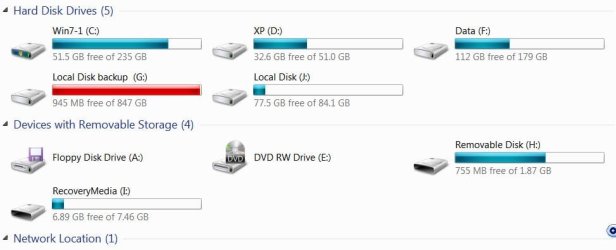
What I backed up was Disk D operating system with XP Partition. Disk C with W7 and Partition F with my data
I would like to change the Macruim to backup just C and F.

I don't really know if I can just delete what is on G and start over or if there is something else taking up so much space. Any advice appreciated.

Perhaps I should reinstall Macrium?
I am not up to par on compers.
 

Attachments
  • W7 Computer pg..JPG
    W7 Computer pg..JPG
    40.2 KB · Views: 1
  • W7 Macrium BU properties on G upload..JPG
    W7 Macrium BU properties on G upload..JPG
    48.3 KB · Views: 51
  • W7 Macrium BU Used space on G..JPG
    W7 Macrium BU Used space on G..JPG
    49.7 KB · Views: 51

My Computer

Computer type
PC/Desktop
Computer Manufacturer/Model Number
unknown
OS
Microsoft Windows 7 Ultimate 32-bit
CPU
AMD Athlon(tm) II X3 435 Processor
Motherboard
Gigabyte Technology Co., Ltd. GA-MA78LM-S2H
Memory
4.00 GB 2.75 GB
Graphics Card(s)
NVIDIA GeForce GT 220
Sound Card
(1) High Definition Audio Device (2) High Definition Audio
Hard Drives
External 931.51 GB
Fixed hard disk media, 3, 465.76 GB
Internet Speed
slow
Antivirus
avg free
Browser
internet explorer
Macrium image files have an mrimg extension. How many files do you have on the G drive with that extension?

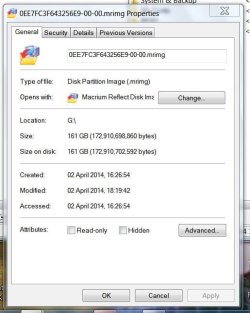
Your pictures above show just one: it's 161 GB in size and is dated April 2, 2014. But there is no indication whether it is a backup of C, D, or F. Or all 3?

I assume you have others?

It's tough to evaluate your situation without knowing how many mrimg files you have. The G drive is about 900 GB. Should it have anything on it other than Macrium backups?

If I were you, I would start over and do this:

Delete all but the most recent Macrium image file.

That should free up hundreds of GB of space on G.

Then re-evaluate.

Have you been backing up images of C, D, and F into a single image file? Or do you make separate images of each partition?

I would probably make separate images of each rather than combining them. Put them in folders named like "C image 051914" so you can keep track of them by date.

An image of C should take up about 25 GB. An image of F should take up about 50 or 60 GB. Around 80 GB for both. So you should be able to keep several images of both C and F on a 900 GB drive.

Do you have a small "system reserved" partition? You need to back it up also.
 

My Computer

Computer type
PC/Desktop
Computer Manufacturer/Model Number
Ignatz Special; 4 speed manual gearbox; factory air conditioning; one of one
OS
Windows 7 Home Premium SP1, 64-bit
CPU
Intel Skylake i5-6600K, not overclocked
Motherboard
AsRock Z170M Extreme 4, micro ATX
Memory
8 GB HyperX DDR4-2666 (2 x 4 GB)
Graphics Card(s)
none; graphics are integrated on CPU
Sound Card
onboard: Realtek ALC1150; external: USB Behringer UF0-202
Monitor(s) Displays
Dell S2340M 23 inch IPS
Screen Resolution
1600 x 900
Hard Drives
System: Crucial MX100 series SSD, 128 GB;
Data: Samsung Spinpoint 103SJ, 1 TB;
Backup: WD Caviar Green WD30EZRX-00D8PB0, 3 TB
PSU
Rosewill SilentNight 500 watt fanless, semi-modular
Case
Antec Solo II
Cooling
Noctua NH-U12S; Noctua F12 intake, Noctua S12A exhaust
Keyboard
Microsoft 200 6JH-00001 USB
Mouse
Dell or Microsoft optical wired; USB
Antivirus
Microsoft Security Essentials and Malwarebytes Premium
Browser
Pale Moon
Other Info
All fans PWM; speeds at idle: CPU circa 500 rpm; intake circa 600 rpm; exhaust circa 600 rpm; CPU temps 27 idle and 47 C load in a warm room (27 C/81 F) when running Intel Extreme Tuning Utility stress test.
Hi, Macrium image files have an mrimg extension. How many files do you have on the G drive with that extension?

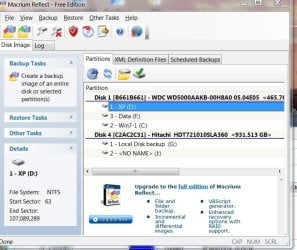
It is Disk 1, partition C, partition D (XP) and partition F (data)
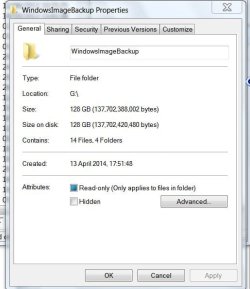
I have one copy on Disk 4 G, no others. The only other thing I have on G is Windows Image Backup 128GB, 13 April 2014.

I do not understand why the 161 GB from Macrium and the 128 GB from the WIBU show as using almost all of Disk G.?

I know I am confused on how Macrium works. What do you do with the XML DEFINITION FILES? They say MyBackup and there are 9 on the list.
 

Attachments

  • W7 Macrim page..JPG
    W7 Macrim page..JPG
    81.9 KB · Views: 1
  • W7 Disk G..JPG
    W7 Disk G..JPG
    25.6 KB · Views: 48

My Computer

Computer type
PC/Desktop
Computer Manufacturer/Model Number
unknown
OS
Microsoft Windows 7 Ultimate 32-bit
CPU
AMD Athlon(tm) II X3 435 Processor
Motherboard
Gigabyte Technology Co., Ltd. GA-MA78LM-S2H
Memory
4.00 GB 2.75 GB
Graphics Card(s)
NVIDIA GeForce GT 220
Sound Card
(1) High Definition Audio Device (2) High Definition Audio
Hard Drives
External 931.51 GB
Fixed hard disk media, 3, 465.76 GB
Internet Speed
slow
Antivirus
avg free
Browser
internet explorer
The last picture you posted includes a folder called "Patti-PC".

How large is that folder and what is its purpose?

Have you burned a Macrium recovery disk and have you confirmed that it will boot your PC?

Post a screen shot of Windows Disk Management.
 
Last edited:

My Computer

Computer type
PC/Desktop
Computer Manufacturer/Model Number
Ignatz Special; 4 speed manual gearbox; factory air conditioning; one of one
OS
Windows 7 Home Premium SP1, 64-bit
CPU
Intel Skylake i5-6600K, not overclocked
Motherboard
AsRock Z170M Extreme 4, micro ATX
Memory
8 GB HyperX DDR4-2666 (2 x 4 GB)
Graphics Card(s)
none; graphics are integrated on CPU
Sound Card
onboard: Realtek ALC1150; external: USB Behringer UF0-202
Monitor(s) Displays
Dell S2340M 23 inch IPS
Screen Resolution
1600 x 900
Hard Drives
System: Crucial MX100 series SSD, 128 GB;
Data: Samsung Spinpoint 103SJ, 1 TB;
Backup: WD Caviar Green WD30EZRX-00D8PB0, 3 TB
PSU
Rosewill SilentNight 500 watt fanless, semi-modular
Case
Antec Solo II
Cooling
Noctua NH-U12S; Noctua F12 intake, Noctua S12A exhaust
Keyboard
Microsoft 200 6JH-00001 USB
Mouse
Dell or Microsoft optical wired; USB
Antivirus
Microsoft Security Essentials and Malwarebytes Premium
Browser
Pale Moon
Other Info
All fans PWM; speeds at idle: CPU circa 500 rpm; intake circa 600 rpm; exhaust circa 600 rpm; CPU temps 27 idle and 47 C load in a warm room (27 C/81 F) when running Intel Extreme Tuning Utility stress test.
The last picture you posted includes a folder called "Patti-PC".

How large is that folder and what is its purpose? See the snap shot. It is part of Windows Image Backup
(missed the snap shop but it has 537 GB on it even though this properties snap shot shows 128 GB.)

Have you burned a Macrium recovery disk and have you confirmed that it will boot your PC? I burned a recovery disk 18-08-12nand it worked ok with W7 at that time.

Post a screen shot of Windows Disk Management.
Ok.
 

Attachments

  • W7 Macrium - Disk Management..JPG
    W7 Macrium - Disk Management..JPG
    117.8 KB · Views: 1
  • WindowsImageBackup Properties..JPG
    WindowsImageBackup Properties..JPG
    42.2 KB · Views: 40

My Computer

Computer type
PC/Desktop
Computer Manufacturer/Model Number
unknown
OS
Microsoft Windows 7 Ultimate 32-bit
CPU
AMD Athlon(tm) II X3 435 Processor
Motherboard
Gigabyte Technology Co., Ltd. GA-MA78LM-S2H
Memory
4.00 GB 2.75 GB
Graphics Card(s)
NVIDIA GeForce GT 220
Sound Card
(1) High Definition Audio Device (2) High Definition Audio
Hard Drives
External 931.51 GB
Fixed hard disk media, 3, 465.76 GB
Internet Speed
slow
Antivirus
avg free
Browser
internet explorer
Do you intend to keep Windows XP on this PC—the D partition? You say you no longer want to back it up.

What is the purpose of J partition?

Is this a home-built PC or is it a major brand such as Dell, HP, etc. I’m wondering why I don’t see a “system reserved” partition?

Did you do the original installation of XP and Windows 7 on this PC?

Are you willing or unwilling to give up on Windows Backup, which appears to be using at least 537 GB on G, possibly over 600 GB? I’m wondering why you are using it and Macrium both, rather than one or the other.
 

My Computer

Computer type
PC/Desktop
Computer Manufacturer/Model Number
Ignatz Special; 4 speed manual gearbox; factory air conditioning; one of one
OS
Windows 7 Home Premium SP1, 64-bit
CPU
Intel Skylake i5-6600K, not overclocked
Motherboard
AsRock Z170M Extreme 4, micro ATX
Memory
8 GB HyperX DDR4-2666 (2 x 4 GB)
Graphics Card(s)
none; graphics are integrated on CPU
Sound Card
onboard: Realtek ALC1150; external: USB Behringer UF0-202
Monitor(s) Displays
Dell S2340M 23 inch IPS
Screen Resolution
1600 x 900
Hard Drives
System: Crucial MX100 series SSD, 128 GB;
Data: Samsung Spinpoint 103SJ, 1 TB;
Backup: WD Caviar Green WD30EZRX-00D8PB0, 3 TB
PSU
Rosewill SilentNight 500 watt fanless, semi-modular
Case
Antec Solo II
Cooling
Noctua NH-U12S; Noctua F12 intake, Noctua S12A exhaust
Keyboard
Microsoft 200 6JH-00001 USB
Mouse
Dell or Microsoft optical wired; USB
Antivirus
Microsoft Security Essentials and Malwarebytes Premium
Browser
Pale Moon
Other Info
All fans PWM; speeds at idle: CPU circa 500 rpm; intake circa 600 rpm; exhaust circa 600 rpm; CPU temps 27 idle and 47 C load in a warm room (27 C/81 F) when running Intel Extreme Tuning Utility stress test.
Do you intend to keep Windows XP on this PC—the D partition? You say you no longer want to back it up.
I am writing a book and I have one program that scans and translates Norwegian and that program will only run on XP. When book is finished I want to delete XP.


What is the purpose of J partition?
J is for old stuff I am getting rid of. Just an extra partition on External Hard Drive.

Is this a home-built PC or is it a major brand such as Dell, HP, etc. I’m wondering why I don’t see a “system reserved” partition?
This is a home build desk top (a friend built it)

Did you do the original installation of XP and Windows 7 on this PC?
Yes

Are you willing or unwilling to give up on Windows Backup, which appears to be using at least 537 GB on G, possibly over 600 GB? I’m wondering why you are using it and Macrium both, rather than one or the other.

I am very willing to give up Windows BU. Before I got this computer I had a disastrous crash on my old one and lost a lot of material I needed. Since them I have been paranoid about losing data & my book, hence all the partitions and BU's.
I am not very proficient with computers - need step by step instruction for anything new. I never really understood Macrium and was afraid it would not work if I got infected or crashed. I read a computer Magazine and try to keep my machine up to date but feel I don't have confidence.
 

My Computer

Computer type
PC/Desktop
Computer Manufacturer/Model Number
unknown
OS
Microsoft Windows 7 Ultimate 32-bit
CPU
AMD Athlon(tm) II X3 435 Processor
Motherboard
Gigabyte Technology Co., Ltd. GA-MA78LM-S2H
Memory
4.00 GB 2.75 GB
Graphics Card(s)
NVIDIA GeForce GT 220
Sound Card
(1) High Definition Audio Device (2) High Definition Audio
Hard Drives
External 931.51 GB
Fixed hard disk media, 3, 465.76 GB
Internet Speed
slow
Antivirus
avg free
Browser
internet explorer

My Computer

Computer type
PC/Desktop
Computer Manufacturer/Model Number
Home Built Desktop By DataTech
OS
Windows 7 Ultimate X64 SP1
CPU
Intel i5-2550K, Differing ~4.4-4.8GHz No built in GPU
Motherboard
ASUS P8Z68-V PRO/GEN3
Memory
16GB G.Skill Sniper 1866MHz @ 2133MHz 2x8GB
Graphics Card(s)
ASUS GTX650TIB-DC2OC-2GD5, (650TI Boost)
Sound Card
Onboard Realtek 5-1
Monitor(s) Displays
Samsung P2570HD
Screen Resolution
1920x1080
Hard Drives
Samsung 840 Pro 256GB SSD for OS, 500GB Seagate Constellation (Enterprise drive) for Data
PSU
Corsair HX650W
Case
Inwin Dragon Rider
Cooling
Hyper 212 EVO w/two Noctua fans, push-pull, @1300 RPM
Keyboard
E-Z Eyes, bright yellow keys with large characters
Mouse
steelseries SENSEI Laser Pro Gaming
Internet Speed
48-51Mbs Mbs down, 11 Mbs up Xfinity Cable
Antivirus
Norton Internet Security 2013
Browser
IE 10, Opera, Pale Moon if needed
Other Info
4 case fans, LG BluRay-RE, ASUS DVD-RW, Mr. Fusion power supply, 1.21 gigawatts.
Read those links Britton supplied---they are quite detailed.

I would not use XML files as they apparently just confuse you. When you want to make an image, just start Macrium and walk through its steps for each partition (C and F) separately—maybe 8 or 10 mouse clicks. Just ignore the XML choices.

Here is what I would do. You get to decide if it makes sense for you.

1: Confirm that the recovery disk you made 2 years ago will boot your PC today.

2: Let us know whether it boots into a Macrium interface or into a slower Linux-based interface.

Don’t go any farther until 1 and 2 are done. I’d seriously consider making a new recovery disk, even if the current one boots the PC.

3: Give up on Windows Backup and delete those files from G.

4: Make 2 folders on G. One called “Macrium image of C, 052314”. The other called “Macrium image of F, 052314”. Adjust the date as needed.

5: Make a new Macrium image of C and store it in the “Macrium image of C, 052314” folder. Make a new image of F and store it in “Macrium image of F, 052314”.

6: Periodically, make new folders with the current date and make new images, storing them in the new folders. Maybe keep the last 2 images for each partition. Those 2 images combined should probably total less than 150. So you could store 2 of each on maybe 300 GB.

Additional comments:

Your use of separate partitions doesn’t give you any additional protection. It’s a good idea to keep Windows and data on separate partitions, but beyond that the advantages are dubious. You may as well just use a folder structure. Partitioning can be inefficient as you can never tell in advance how fast your data will grow and you can run out of space—as you have with G. If you did not have that unused 77 GB on J, it could be utilized by G. As it is, that 77 GB is not usable to store your images. The Macrium images will occupy only a relatively small percentage of G, so you needn’t do anything about this partitioning issue now. I just mention it for future reference.

You say you are paranoid about losing data. Therefore, I would also consider using something OTHER than Macrium to back up data (as opposed to Windows), such as an ordinary “file by file” backup program. There are several free versions that work well. The advantage is that your personal data is presumably very important to you as a writer, but imaging is an imperfect technology. It is possible that Macrium (as good as it is) or any other imaging program will fail at a critical time and that could mean your data backups are inaccessible.

“File by file” backups don’t have this added complication of imaging. You can ponder that and ask more questions in another thread as you see fit. Another advantage is that file by file backups can be configured to run with a single mouse click and usually take no more than a minute or two to complete, so you can do them daily or even hourly with little effort.
 

My Computer

Computer type
PC/Desktop
Computer Manufacturer/Model Number
Ignatz Special; 4 speed manual gearbox; factory air conditioning; one of one
OS
Windows 7 Home Premium SP1, 64-bit
CPU
Intel Skylake i5-6600K, not overclocked
Motherboard
AsRock Z170M Extreme 4, micro ATX
Memory
8 GB HyperX DDR4-2666 (2 x 4 GB)
Graphics Card(s)
none; graphics are integrated on CPU
Sound Card
onboard: Realtek ALC1150; external: USB Behringer UF0-202
Monitor(s) Displays
Dell S2340M 23 inch IPS
Screen Resolution
1600 x 900
Hard Drives
System: Crucial MX100 series SSD, 128 GB;
Data: Samsung Spinpoint 103SJ, 1 TB;
Backup: WD Caviar Green WD30EZRX-00D8PB0, 3 TB
PSU
Rosewill SilentNight 500 watt fanless, semi-modular
Case
Antec Solo II
Cooling
Noctua NH-U12S; Noctua F12 intake, Noctua S12A exhaust
Keyboard
Microsoft 200 6JH-00001 USB
Mouse
Dell or Microsoft optical wired; USB
Antivirus
Microsoft Security Essentials and Malwarebytes Premium
Browser
Pale Moon
Other Info
All fans PWM; speeds at idle: CPU circa 500 rpm; intake circa 600 rpm; exhaust circa 600 rpm; CPU temps 27 idle and 47 C load in a warm room (27 C/81 F) when running Intel Extreme Tuning Utility stress test.
What I do is keep all images on separate physical drives. The XML isn't needed as Ignatz said, Macrium will do restores without them. The XML method is like a shortcut to the operations. :)
 

My Computer

Computer type
PC/Desktop
Computer Manufacturer/Model Number
Home Built Desktop By DataTech
OS
Windows 7 Ultimate X64 SP1
CPU
Intel i5-2550K, Differing ~4.4-4.8GHz No built in GPU
Motherboard
ASUS P8Z68-V PRO/GEN3
Memory
16GB G.Skill Sniper 1866MHz @ 2133MHz 2x8GB
Graphics Card(s)
ASUS GTX650TIB-DC2OC-2GD5, (650TI Boost)
Sound Card
Onboard Realtek 5-1
Monitor(s) Displays
Samsung P2570HD
Screen Resolution
1920x1080
Hard Drives
Samsung 840 Pro 256GB SSD for OS, 500GB Seagate Constellation (Enterprise drive) for Data
PSU
Corsair HX650W
Case
Inwin Dragon Rider
Cooling
Hyper 212 EVO w/two Noctua fans, push-pull, @1300 RPM
Keyboard
E-Z Eyes, bright yellow keys with large characters
Mouse
steelseries SENSEI Laser Pro Gaming
Internet Speed
48-51Mbs Mbs down, 11 Mbs up Xfinity Cable
Antivirus
Norton Internet Security 2013
Browser
IE 10, Opera, Pale Moon if needed
Other Info
4 case fans, LG BluRay-RE, ASUS DVD-RW, Mr. Fusion power supply, 1.21 gigawatts.
Thanks so much for your reply and I aplogize for delay in respomse. I am not familiar with Bios, etc. so spent hours trying to figure it out. Finally got old recovery disk open in Linux interface - I thnk. proceeded to make new rescue disk.
Continued thru steps 6.
Now for an additional BU such as ordinary "file by file" tyat you mentioned. I don't know what that is?? Should I start a new threa:od?
 

My Computer

Computer type
PC/Desktop
Computer Manufacturer/Model Number
unknown
OS
Microsoft Windows 7 Ultimate 32-bit
CPU
AMD Athlon(tm) II X3 435 Processor
Motherboard
Gigabyte Technology Co., Ltd. GA-MA78LM-S2H
Memory
4.00 GB 2.75 GB
Graphics Card(s)
NVIDIA GeForce GT 220
Sound Card
(1) High Definition Audio Device (2) High Definition Audio
Hard Drives
External 931.51 GB
Fixed hard disk media, 3, 465.76 GB
Internet Speed
slow
Antivirus
avg free
Browser
internet explorer
Thank you very much!
 

My Computer

Computer type
PC/Desktop
Computer Manufacturer/Model Number
unknown
OS
Microsoft Windows 7 Ultimate 32-bit
CPU
AMD Athlon(tm) II X3 435 Processor
Motherboard
Gigabyte Technology Co., Ltd. GA-MA78LM-S2H
Memory
4.00 GB 2.75 GB
Graphics Card(s)
NVIDIA GeForce GT 220
Sound Card
(1) High Definition Audio Device (2) High Definition Audio
Hard Drives
External 931.51 GB
Fixed hard disk media, 3, 465.76 GB
Internet Speed
slow
Antivirus
avg free
Browser
internet explorer
Ignatz may have meant by "file by file" backup would be to make copies of your personal files, Videos, Music, Pictures, and Documents. Copying them to a USB stick, hard drive, or even CD/DVDs.
 

My Computer

Computer type
PC/Desktop
Computer Manufacturer/Model Number
Home Built Desktop By DataTech
OS
Windows 7 Ultimate X64 SP1
CPU
Intel i5-2550K, Differing ~4.4-4.8GHz No built in GPU
Motherboard
ASUS P8Z68-V PRO/GEN3
Memory
16GB G.Skill Sniper 1866MHz @ 2133MHz 2x8GB
Graphics Card(s)
ASUS GTX650TIB-DC2OC-2GD5, (650TI Boost)
Sound Card
Onboard Realtek 5-1
Monitor(s) Displays
Samsung P2570HD
Screen Resolution
1920x1080
Hard Drives
Samsung 840 Pro 256GB SSD for OS, 500GB Seagate Constellation (Enterprise drive) for Data
PSU
Corsair HX650W
Case
Inwin Dragon Rider
Cooling
Hyper 212 EVO w/two Noctua fans, push-pull, @1300 RPM
Keyboard
E-Z Eyes, bright yellow keys with large characters
Mouse
steelseries SENSEI Laser Pro Gaming
Internet Speed
48-51Mbs Mbs down, 11 Mbs up Xfinity Cable
Antivirus
Norton Internet Security 2013
Browser
IE 10, Opera, Pale Moon if needed
Other Info
4 case fans, LG BluRay-RE, ASUS DVD-RW, Mr. Fusion power supply, 1.21 gigawatts.
Thanks so much for your reply and I aplogize for delay in respomse. I am not familiar with Bios, etc. so spent hours trying to figure it out. Finally got old recovery disk open in Linux interface - I thnk. proceeded to make new rescue disk.
Continued thru steps 6.
Now for an additional BU such as ordinary "file by file" tyat you mentioned. I don't know what that is?? Should I start a new threa:od?

Have you confirmed that the new recovery disk boots your PC?

Are you confident you could restore an image if it came to that? You need to be able to use that Linux interface to find your Macrium image file and to select the partition to which it will be restored.

I assume you have deleted the Windows Backup files. How much free space do you currently have on G?

How much space is used by the Macrium image of C? Macrium image of F?

Maybe post another screen shot of Windows Disk Management?

"File by file" backup programs do the same thing that a manual copy with the mouse or keyboard would do. The advantage is that they normally copy only new or modified files and bypass unchanged files, so the copy procedure takes much less time than re-copying ALL files. Additionally, they can be configured to copy only certain folders, certain file extensions, etc.

Most are free. They all work similarly, but some have more intuitive interfaces than others. All of them will back up to a hard drive, which is what I use. You could also use a USB stick. DVDs are an option, but they are not highly reliable and are tough to keep track of and manage over extended periods.

Examples: Syncback, Allway Sync, FolderClone, Synchromagic, and Second Copy. You can find all of them in 10 minutes with Google.
 

My Computer

Computer type
PC/Desktop
Computer Manufacturer/Model Number
Ignatz Special; 4 speed manual gearbox; factory air conditioning; one of one
OS
Windows 7 Home Premium SP1, 64-bit
CPU
Intel Skylake i5-6600K, not overclocked
Motherboard
AsRock Z170M Extreme 4, micro ATX
Memory
8 GB HyperX DDR4-2666 (2 x 4 GB)
Graphics Card(s)
none; graphics are integrated on CPU
Sound Card
onboard: Realtek ALC1150; external: USB Behringer UF0-202
Monitor(s) Displays
Dell S2340M 23 inch IPS
Screen Resolution
1600 x 900
Hard Drives
System: Crucial MX100 series SSD, 128 GB;
Data: Samsung Spinpoint 103SJ, 1 TB;
Backup: WD Caviar Green WD30EZRX-00D8PB0, 3 TB
PSU
Rosewill SilentNight 500 watt fanless, semi-modular
Case
Antec Solo II
Cooling
Noctua NH-U12S; Noctua F12 intake, Noctua S12A exhaust
Keyboard
Microsoft 200 6JH-00001 USB
Mouse
Dell or Microsoft optical wired; USB
Antivirus
Microsoft Security Essentials and Malwarebytes Premium
Browser
Pale Moon
Other Info
All fans PWM; speeds at idle: CPU circa 500 rpm; intake circa 600 rpm; exhaust circa 600 rpm; CPU temps 27 idle and 47 C load in a warm room (27 C/81 F) when running Intel Extreme Tuning Utility stress test.

My Computer

Computer type
PC/Desktop
Computer Manufacturer/Model Number
Home Built Desktop By DataTech
OS
Windows 7 Ultimate X64 SP1
CPU
Intel i5-2550K, Differing ~4.4-4.8GHz No built in GPU
Motherboard
ASUS P8Z68-V PRO/GEN3
Memory
16GB G.Skill Sniper 1866MHz @ 2133MHz 2x8GB
Graphics Card(s)
ASUS GTX650TIB-DC2OC-2GD5, (650TI Boost)
Sound Card
Onboard Realtek 5-1
Monitor(s) Displays
Samsung P2570HD
Screen Resolution
1920x1080
Hard Drives
Samsung 840 Pro 256GB SSD for OS, 500GB Seagate Constellation (Enterprise drive) for Data
PSU
Corsair HX650W
Case
Inwin Dragon Rider
Cooling
Hyper 212 EVO w/two Noctua fans, push-pull, @1300 RPM
Keyboard
E-Z Eyes, bright yellow keys with large characters
Mouse
steelseries SENSEI Laser Pro Gaming
Internet Speed
48-51Mbs Mbs down, 11 Mbs up Xfinity Cable
Antivirus
Norton Internet Security 2013
Browser
IE 10, Opera, Pale Moon if needed
Other Info
4 case fans, LG BluRay-RE, ASUS DVD-RW, Mr. Fusion power supply, 1.21 gigawatts.
Patti:

I urge you to read this tutorial if you haven't seen it. It should help your understanding of Macrium.

http://www.sevenforums.com/tutorials/73828-imaging-free-macrium.html

You don't have to memorize it or follow it slavishly.

I would advise you to use it to help you make a "WinPE" rescue disk to replace the Linux one you have now. WinPE recovery disks are more likely to boot your PC and have the advantage of booting you into an ordinary Macrium interface as you would see if you opened Macrium from your hard drive----rather than the Linux interface of the other method which is a bit cryptic and confusing if you lack familiarity.

You make the WinPE disk in Macrium through a menu choice, just like the Linux disc. You would be required to download a rather large file. The blue tinted "Note" in the above tutorial links you to an ISO file that replaces that large download with a much smaller one.
 

My Computer

Computer type
PC/Desktop
Computer Manufacturer/Model Number
Ignatz Special; 4 speed manual gearbox; factory air conditioning; one of one
OS
Windows 7 Home Premium SP1, 64-bit
CPU
Intel Skylake i5-6600K, not overclocked
Motherboard
AsRock Z170M Extreme 4, micro ATX
Memory
8 GB HyperX DDR4-2666 (2 x 4 GB)
Graphics Card(s)
none; graphics are integrated on CPU
Sound Card
onboard: Realtek ALC1150; external: USB Behringer UF0-202
Monitor(s) Displays
Dell S2340M 23 inch IPS
Screen Resolution
1600 x 900
Hard Drives
System: Crucial MX100 series SSD, 128 GB;
Data: Samsung Spinpoint 103SJ, 1 TB;
Backup: WD Caviar Green WD30EZRX-00D8PB0, 3 TB
PSU
Rosewill SilentNight 500 watt fanless, semi-modular
Case
Antec Solo II
Cooling
Noctua NH-U12S; Noctua F12 intake, Noctua S12A exhaust
Keyboard
Microsoft 200 6JH-00001 USB
Mouse
Dell or Microsoft optical wired; USB
Antivirus
Microsoft Security Essentials and Malwarebytes Premium
Browser
Pale Moon
Other Info
All fans PWM; speeds at idle: CPU circa 500 rpm; intake circa 600 rpm; exhaust circa 600 rpm; CPU temps 27 idle and 47 C load in a warm room (27 C/81 F) when running Intel Extreme Tuning Utility stress test.
Well I am sorry to say this is all to complicated for me. I don't know the consequences of some of the boxes clicked and am afraid of doing something I can's undo.

I am going to have to give up on the Macrium, bios, etc. and get back to my book and manually save extra copies. Thank you for all your patient advice and help!:confused:
 

My Computer

Computer type
PC/Desktop
Computer Manufacturer/Model Number
unknown
OS
Microsoft Windows 7 Ultimate 32-bit
CPU
AMD Athlon(tm) II X3 435 Processor
Motherboard
Gigabyte Technology Co., Ltd. GA-MA78LM-S2H
Memory
4.00 GB 2.75 GB
Graphics Card(s)
NVIDIA GeForce GT 220
Sound Card
(1) High Definition Audio Device (2) High Definition Audio
Hard Drives
External 931.51 GB
Fixed hard disk media, 3, 465.76 GB
Internet Speed
slow
Antivirus
avg free
Browser
internet explorer

My Computer

Computer type
PC/Desktop
Computer Manufacturer/Model Number
LENOVO K450 @3.0GHZ
OS
64-bit Windows 8.1 Pro
CPU
Core(TM) i5 CPU 4330 Haswell @ 3.20GHz
Motherboard
LENOVO
Memory
12.00 GB
Graphics Card(s)
Intel(R) HD Graphics
Sound Card
Intel HD integtrated
Monitor(s) Displays
HP 25' ISP Monitor
Screen Resolution
1900/1020
Hard Drives
(1) ST1000DM003-1CH162 (2) Generic STORAGE DEVICE USB Device (3) Generic STORAGE DEVICE USB Device
Internet Speed
100mb down/10mb up
Hi, you sound very experienced. I was ok on Macrium to a point but couldn't keep up with the restore image, etc.
Let me know how you like the RX. I am elderly and don't follow complicated terms.:)
 

My Computer

Computer type
PC/Desktop
Computer Manufacturer/Model Number
unknown
OS
Microsoft Windows 7 Ultimate 32-bit
CPU
AMD Athlon(tm) II X3 435 Processor
Motherboard
Gigabyte Technology Co., Ltd. GA-MA78LM-S2H
Memory
4.00 GB 2.75 GB
Graphics Card(s)
NVIDIA GeForce GT 220
Sound Card
(1) High Definition Audio Device (2) High Definition Audio
Hard Drives
External 931.51 GB
Fixed hard disk media, 3, 465.76 GB
Internet Speed
slow
Antivirus
avg free
Browser
internet explorer
Hi Patti,

I am really liking RollBack more and more. Whereas Acronis usually takes 15 minutes or more to complete an image, Rollback does it in seconds. It gives you the opportunity to restore a snapshot before the OS loads, or continue loading Windows, and the recovery process takes less than 5 seconds. I hope you give it a shot. It's dead simple to set up, and I think you will like it! ;)
 

My Computer

Computer type
PC/Desktop
Computer Manufacturer/Model Number
LENOVO K450 @3.0GHZ
OS
64-bit Windows 8.1 Pro
CPU
Core(TM) i5 CPU 4330 Haswell @ 3.20GHz
Motherboard
LENOVO
Memory
12.00 GB
Graphics Card(s)
Intel(R) HD Graphics
Sound Card
Intel HD integtrated
Monitor(s) Displays
HP 25' ISP Monitor
Screen Resolution
1900/1020
Hard Drives
(1) ST1000DM003-1CH162 (2) Generic STORAGE DEVICE USB Device (3) Generic STORAGE DEVICE USB Device
Internet Speed
100mb down/10mb up
Back
Top