MACRIUM REFLECT - Create Bootable Rescue USB Drive

MACRIUM REFLECT - Create Bootable Rescue USB Flash Drive

How to Create a Bootable Rescue USB Flash Drive for Macrium Reflect


   Information
In order to restore a Macrium image when your Windows operating system cannot be started, you are required to boot from a rescue CD, which holds a compact Linux operating system. The Linux operating system on this rescue CD allows you to quickly browse the disks and partitions of your PC, and select the image you wish to restore.

Within Macrium reflect, there is no direct way to create a bootable USB drive, but there is a very simple workaround to create bootable rescue USB drives. This tutorial will show you how to do that, so you can forgo the stack of rescue CD's sitting on your desk. If you manage Macrium images for multiple computers, you will find this technique extremely useful.

This tutorial is based on Macrium Reflect Free Edition Version 4.2 Build 3141


:note: Requirements:

You will need the following in order to create a bootable rescue USB drive:-

1. A USB flash drive
2. YUMI Multiboot USB Creator


:note: Step 1 - Create the RESCUE ISO

Open Macrium Reflect as normal, and then from the menu, select the option Other Tasks > Create Rescue CD.

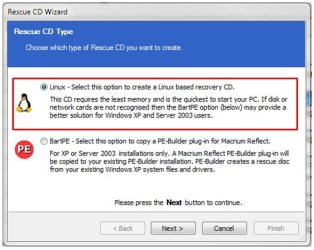
The 1st panel of the Rescue CD Wizard will be be displayed as shown below:
1.JPG

The default option is Linux. Accept that by clicking on Next, and proceeding to the 2nd panel of the Rescue CD Wizard.

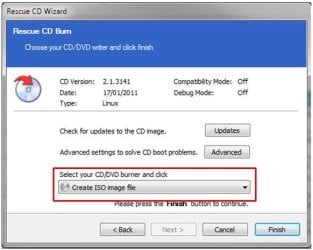
From the pull-down list, select the option Create ISO image file, as shown below:
2.JPG

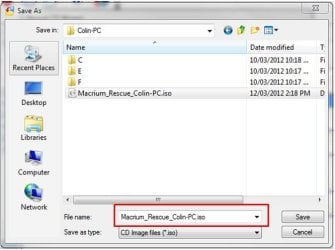
Click Finish, and now provide a name and location for the rescue ISO file that is about to be created, as shown below:
3.JPG

   Warning
Do not include spaces in the ISO name or YUMI will fail to boot from it.

Once the file has been saved, close Macrium Reflect as normal.


:note: Step 2 - Create the bootable RESCUE USB drive


Download YUMI Multiboot USB Creator to your desktop - its a single executable that requires no installation.

Insert the USB flash drive you want to use, into an available USB port on your computer.

Open YUMI by double-clicking it, and when prompted by Windows UAC, click Yes. You will be prompted to accept the Licence Agreement. Click I Agree to proceed.

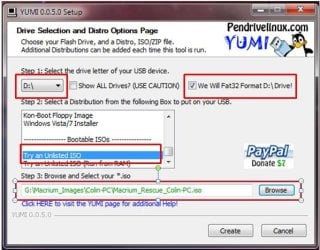
Now follow thse steps and refer to the image shown below:

1. From the drop-down list, select the letter of the USB you wish to use.

2. The USB drive is required to be formatted as FAT32. If this is not the case, check the format option, which will format the entire USB drive before copying any information to it. If the USB drive is already formatted as FAT32, ignore this option.

3. In the distribution box, scroll to the very bottom and hlighlight the Try an Unlisted ISO.

4. Click Browse to locate and select the rescue ISO you create previously.
4.JPG

5. Now click Create to create the bootable rescue USB drive.

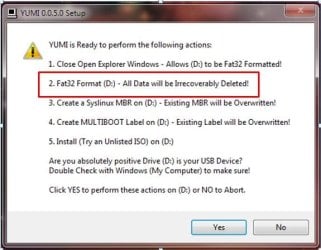
If you opted to format the USB drive, please take careful note of the warning panel that appears, and is shown below. Click Yes to proceed.
5.JPG

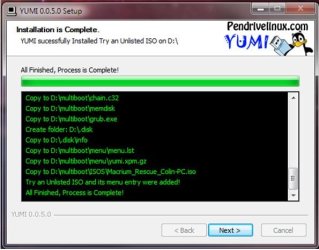
The rescue ISO file will now be copied to the USB drive. If successful, you will see the progress panel as shown below:
6.JPG

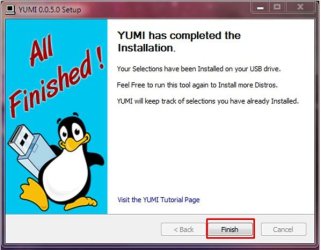
Click Next to proceed. You will be prompted if you wish to add more ISO's/Distros. Click No to close this pop-up, and then click Finish to exit YUMI.
7.JPG

You have now created a Macrium Bootable Rescue USB and can safely remove the USB drive.


:note: Step 3 - Test the bootable RESCUE USB drive


One of critical elements of imaging, is to ensure that you can boot from the rescue USB drive. In fact, the same holds true if you choose to use the traditional bootable rescue CD method.

To do this, turn off your computer, plug in your USB drive and reboot your computer as normal. During the POST screen, press the DEL key repeatedly to enter your BIOS, and then find the setting that allows you to boot from a USB drive and place it first in the device boot sequence. Alternatively, during POST keeping pressing the F8 function key to bring up the one-time boot menu, and then select the USB device from that menu.

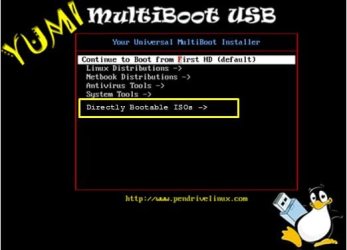
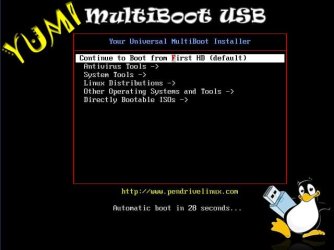
Once the PC boots from the USB device you will see the YUMI boot menu, as shown in the example below:
a.JPG

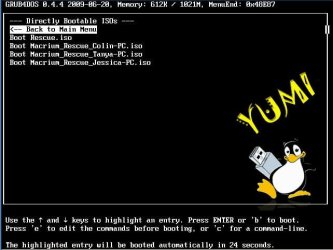
If you select the option called Directly Bootable ISO's you will then be presented with the rescue ISO you created earlier. In the example shown below, I have a choice of 4 rescue ISO files (refer to the tip below):
b.JPG

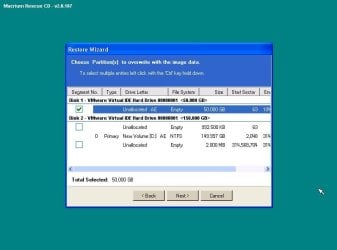
Once you select that ISO, the Linux operating system will boot the ISO, and then allow you to select the Macrium image to restore, as shown in this example below:
9.JPG

   Tip

If you manage multiple computers, you can add as many Macrium rescue ISO's as you require. I manage 4 different computers and each one's rescue item is bootable from a single USB flash drive - refer to the image above.

If you already have a YUMI multiboot USB drive with other ISO's and/or distros on it, simple add the Macrium rescue ISO's as normal. This makes for a very handy USB toolkit.


I hope you find this tutorial useful, and remember : you saw it first at Sevenforums.

Regards,
Golden

   Note
Special thanks to kado897 who provided the information for capturing the YUMI screens.


Related Tutorials


Attachments

  • 8.JPG
    8.JPG
    27.7 KB · Views: 191
Last edited:
Hi guys thanks,

This is ths ISOS folder of the usb which contains the ATI / Paragon isos.


I already reformatted the one with Macrium since it was not functioning. I repeat there is no spaces and what I have posted earlier(screenshot was the same). That same iso of Macrium is working when I use that on that same usb without YUMI.

That Macrium iso was also created from the Macrium gui. No errors during the creation and the CD version of it is functioning okay too(as well as the usb version).

@Britton30,

Okay will try that file you uploaded. Incidentally I am using a x32 system. Is that iso file for ver5 x32 system?

Thanks all ;)
 

My Computer My Computer

Computer type
PC/Desktop
Computer Manufacturer/Model Number
Custom Build
OS
Win7 Ultimate 64bit
CPU
AMD A8 5600K APU
Motherboard
Gigabyte F2A75MD3H
Memory
16gb DDR3
Graphics Card(s)
Radeon 7560
Sound Card
onboard
Monitor(s) Displays
kingston lcd 23inch wide
Hard Drives
WD 500gb (2)
WD 1TB
Antivirus
EAM + Online Armor Premium -- desktop
A pity. I really needed to see everything in its not working state. We will see what happens with Britton30's iso. We know that one works.
 

My Computer My Computer

Computer type
Laptop
Computer Manufacturer/Model Number
Hewlett-Packard/G62-107SA Notebook
OS
Microsoft Windows 7 Home Premium 64-bit Service Pack 1
CPU
Intel(R) Core(TM) i3 CPU M 330 @ 2.13GHz
Motherboard
Hewlett-Packard 1425
Memory
8 GB DDR3
Graphics Card(s)
Intel(R) HD Graphics
Sound Card
Realtek High Definition Audio
Monitor(s) Displays
Builtin
Screen Resolution
1366 x 768 x 32 bits (4294967296 colors) @ 60 Hz
Hard Drives
250 GB SATA Hard Disk Drive 7200 rpm
2TB Seagate GoFlex USB 2 Drive
1TB Iomega Prestige USB 2 Drive
1.5TB Iomega Prestige USB 2 Drive (Samsung)
2TB WD MyBook Live NAS.
Mouse
Logitech Anywhere MX
Internet Speed
152 Mbs download 10 Mbs upload
Antivirus
Norton 360
Browser
Chrome
Sorry it's the X64 version.
Has anyone uploaded a X86 (32 bit) version?
 

My Computer My Computer

Computer type
PC/Desktop
Computer Manufacturer/Model Number
Home Built Desktop By DataTech
OS
Windows 7 Ultimate X64 SP1
CPU
Intel i5-2550K, Differing ~4.4-4.8GHz No built in GPU
Motherboard
ASUS P8Z68-V PRO/GEN3
Memory
16GB G.Skill Sniper 1866MHz @ 2133MHz 2x8GB
Graphics Card(s)
ASUS GTX650TIB-DC2OC-2GD5, (650TI Boost)
Sound Card
Onboard Realtek 5-1
Monitor(s) Displays
Samsung P2570HD
Screen Resolution
1920x1080
Hard Drives
Samsung 840 Pro 256GB SSD for OS, 500GB Seagate Constellation (Enterprise drive) for Data
PSU
Corsair HX650W
Case
Inwin Dragon Rider
Cooling
Hyper 212 EVO w/two Noctua fans, push-pull, @1300 RPM
Keyboard
E-Z Eyes, bright yellow keys with large characters
Mouse
steelseries SENSEI Laser Pro Gaming
Internet Speed
48-51Mbs Mbs down, 11 Mbs up Xfinity Cable
Antivirus
Norton Internet Security 2013
Browser
IE 10, Opera, Pale Moon if needed
Other Info
4 case fans, LG BluRay-RE, ASUS DVD-RW, Mr. Fusion power supply, 1.21 gigawatts.
It shouldn't matter if your PC is 64bit capable.
 

My Computer My Computer

Computer type
Laptop
Computer Manufacturer/Model Number
Hewlett-Packard/G62-107SA Notebook
OS
Microsoft Windows 7 Home Premium 64-bit Service Pack 1
CPU
Intel(R) Core(TM) i3 CPU M 330 @ 2.13GHz
Motherboard
Hewlett-Packard 1425
Memory
8 GB DDR3
Graphics Card(s)
Intel(R) HD Graphics
Sound Card
Realtek High Definition Audio
Monitor(s) Displays
Builtin
Screen Resolution
1366 x 768 x 32 bits (4294967296 colors) @ 60 Hz
Hard Drives
250 GB SATA Hard Disk Drive 7200 rpm
2TB Seagate GoFlex USB 2 Drive
1TB Iomega Prestige USB 2 Drive
1.5TB Iomega Prestige USB 2 Drive (Samsung)
2TB WD MyBook Live NAS.
Mouse
Logitech Anywhere MX
Internet Speed
152 Mbs download 10 Mbs upload
Antivirus
Norton 360
Browser
Chrome
It shouldn't matter if your PC is 64bit capable.

Sorry for the late reply. I had conjunctivitis and it's hard to see/read..sorry there.

Can I still use Britton's x64 version on an x32 pc?
 

My Computer My Computer

Computer type
PC/Desktop
Computer Manufacturer/Model Number
Custom Build
OS
Win7 Ultimate 64bit
CPU
AMD A8 5600K APU
Motherboard
Gigabyte F2A75MD3H
Memory
16gb DDR3
Graphics Card(s)
Radeon 7560
Sound Card
onboard
Monitor(s) Displays
kingston lcd 23inch wide
Hard Drives
WD 500gb (2)
WD 1TB
Antivirus
EAM + Online Armor Premium -- desktop
Sorry to hear that.

Yes you can if the PC is 64bit capable, so you need to test that you can boot it.
 

My Computer My Computer

Computer type
Laptop
Computer Manufacturer/Model Number
Hewlett-Packard/G62-107SA Notebook
OS
Microsoft Windows 7 Home Premium 64-bit Service Pack 1
CPU
Intel(R) Core(TM) i3 CPU M 330 @ 2.13GHz
Motherboard
Hewlett-Packard 1425
Memory
8 GB DDR3
Graphics Card(s)
Intel(R) HD Graphics
Sound Card
Realtek High Definition Audio
Monitor(s) Displays
Builtin
Screen Resolution
1366 x 768 x 32 bits (4294967296 colors) @ 60 Hz
Hard Drives
250 GB SATA Hard Disk Drive 7200 rpm
2TB Seagate GoFlex USB 2 Drive
1TB Iomega Prestige USB 2 Drive
1.5TB Iomega Prestige USB 2 Drive (Samsung)
2TB WD MyBook Live NAS.
Mouse
Logitech Anywhere MX
Internet Speed
152 Mbs download 10 Mbs upload
Antivirus
Norton 360
Browser
Chrome
I hope you feel better Damien. I created a 32 bit version you can download from here: FileSwap.com : Rescue32bit.iso download free

You can use this: https://www.grc.com/securable.htm to determine if you PC is 64 bit capable. Over Maximum bit length if it says "64" you are good to go with the 64 bit WinPE iso.

I checked some P4 2.6GHz chips and they are all 32 bit, like this one: Intel Pentium 4 2.6 GHz - RK80532PG064512 (BX80532PG2600D)

And this one: Intel Pentium 4 2.6 GHz - RK80532PC064512 (BX80532PC2600D)
 

My Computer My Computer

Computer type
PC/Desktop
Computer Manufacturer/Model Number
Home Built Desktop By DataTech
OS
Windows 7 Ultimate X64 SP1
CPU
Intel i5-2550K, Differing ~4.4-4.8GHz No built in GPU
Motherboard
ASUS P8Z68-V PRO/GEN3
Memory
16GB G.Skill Sniper 1866MHz @ 2133MHz 2x8GB
Graphics Card(s)
ASUS GTX650TIB-DC2OC-2GD5, (650TI Boost)
Sound Card
Onboard Realtek 5-1
Monitor(s) Displays
Samsung P2570HD
Screen Resolution
1920x1080
Hard Drives
Samsung 840 Pro 256GB SSD for OS, 500GB Seagate Constellation (Enterprise drive) for Data
PSU
Corsair HX650W
Case
Inwin Dragon Rider
Cooling
Hyper 212 EVO w/two Noctua fans, push-pull, @1300 RPM
Keyboard
E-Z Eyes, bright yellow keys with large characters
Mouse
steelseries SENSEI Laser Pro Gaming
Internet Speed
48-51Mbs Mbs down, 11 Mbs up Xfinity Cable
Antivirus
Norton Internet Security 2013
Browser
IE 10, Opera, Pale Moon if needed
Other Info
4 case fans, LG BluRay-RE, ASUS DVD-RW, Mr. Fusion power supply, 1.21 gigawatts.
I hope you feel better Damien. I created a 32 bit version you can download from here: FileSwap.com : Rescue32bit.iso download free

You can use this: https://www.grc.com/securable.htm to determine if you PC is 64 bit capable. Over Maximum bit length if it says "64" you are good to go with the 64 bit WinPE iso.

I checked some P4 2.6GHz chips and they are all 32 bit, like this one: Intel Pentium 4 2.6 GHz - RK80532PG064512 (BX80532PG2600D)

And this one: Intel Pentium 4 2.6 GHz - RK80532PC064512 (BX80532PC2600D)

Thanks I will check it out ;)
 

My Computer My Computer

Computer type
PC/Desktop
Computer Manufacturer/Model Number
Custom Build
OS
Win7 Ultimate 64bit
CPU
AMD A8 5600K APU
Motherboard
Gigabyte F2A75MD3H
Memory
16gb DDR3
Graphics Card(s)
Radeon 7560
Sound Card
onboard
Monitor(s) Displays
kingston lcd 23inch wide
Hard Drives
WD 500gb (2)
WD 1TB
Antivirus
EAM + Online Armor Premium -- desktop
Hi guys,

I am glad to inform you that the x32 download from Britton30 did it for me!!!! Yes, yes YES! It's now working and I have backed-up and restored perfectly!

I also have upgraded to YUMI 0.0.9.6 formerly used YUMI 0.0.9.4. From the upgrade the x32 download from Britton30 worked. It would not work with the later version even with that of Britton30's.

Anyway it's working! No more worries! Thanks guys ALL OF YOU!
 

My Computer My Computer

Computer type
PC/Desktop
Computer Manufacturer/Model Number
Custom Build
OS
Win7 Ultimate 64bit
CPU
AMD A8 5600K APU
Motherboard
Gigabyte F2A75MD3H
Memory
16gb DDR3
Graphics Card(s)
Radeon 7560
Sound Card
onboard
Monitor(s) Displays
kingston lcd 23inch wide
Hard Drives
WD 500gb (2)
WD 1TB
Antivirus
EAM + Online Armor Premium -- desktop
That's good Damien.
 

My Computer My Computer

Computer type
Laptop
Computer Manufacturer/Model Number
Hewlett-Packard/G62-107SA Notebook
OS
Microsoft Windows 7 Home Premium 64-bit Service Pack 1
CPU
Intel(R) Core(TM) i3 CPU M 330 @ 2.13GHz
Motherboard
Hewlett-Packard 1425
Memory
8 GB DDR3
Graphics Card(s)
Intel(R) HD Graphics
Sound Card
Realtek High Definition Audio
Monitor(s) Displays
Builtin
Screen Resolution
1366 x 768 x 32 bits (4294967296 colors) @ 60 Hz
Hard Drives
250 GB SATA Hard Disk Drive 7200 rpm
2TB Seagate GoFlex USB 2 Drive
1TB Iomega Prestige USB 2 Drive
1.5TB Iomega Prestige USB 2 Drive (Samsung)
2TB WD MyBook Live NAS.
Mouse
Logitech Anywhere MX
Internet Speed
152 Mbs download 10 Mbs upload
Antivirus
Norton 360
Browser
Chrome
Glad you got it to work for you Damien. Odd YUMI didn't run it, that's what I use too.
 

My Computer My Computer

Computer type
PC/Desktop
Computer Manufacturer/Model Number
Home Built Desktop By DataTech
OS
Windows 7 Ultimate X64 SP1
CPU
Intel i5-2550K, Differing ~4.4-4.8GHz No built in GPU
Motherboard
ASUS P8Z68-V PRO/GEN3
Memory
16GB G.Skill Sniper 1866MHz @ 2133MHz 2x8GB
Graphics Card(s)
ASUS GTX650TIB-DC2OC-2GD5, (650TI Boost)
Sound Card
Onboard Realtek 5-1
Monitor(s) Displays
Samsung P2570HD
Screen Resolution
1920x1080
Hard Drives
Samsung 840 Pro 256GB SSD for OS, 500GB Seagate Constellation (Enterprise drive) for Data
PSU
Corsair HX650W
Case
Inwin Dragon Rider
Cooling
Hyper 212 EVO w/two Noctua fans, push-pull, @1300 RPM
Keyboard
E-Z Eyes, bright yellow keys with large characters
Mouse
steelseries SENSEI Laser Pro Gaming
Internet Speed
48-51Mbs Mbs down, 11 Mbs up Xfinity Cable
Antivirus
Norton Internet Security 2013
Browser
IE 10, Opera, Pale Moon if needed
Other Info
4 case fans, LG BluRay-RE, ASUS DVD-RW, Mr. Fusion power supply, 1.21 gigawatts.
Thank you very much Britton30 for uploading the x86 Macrium PE ISO file. I needed an x86 for one of my Dell x86 laptops, and yours works wonderful. I use whs x64 for my other Dell laptop which is x64 capable, and he always does such a great job in creating them. You guys have really been a blessing making these ISO's available to others who do not know how to create them or do not desire to download the WAIK, etc. Very much appreciated! Jim
 

My Computer My Computer

Computer Manufacturer/Model Number
Dell Inspiron E1705 laptop
OS
Windows 7 Pro 32 bit
CPU
Dual core Intel T5300 1.73GHZ
Memory
2GB RAM
Hard Drives
Samsung HM160ji 160GB
For OEM PC owners I'd have the Windows System Repair Disc ISO (I don't use the installation ISO). Also Hirens Boot CD ISO is a good one with many general utilities and you can access standalone exes.
 

My Computer My Computer

Computer type
PC/Desktop
Computer Manufacturer/Model Number
Own build
OS
Windows 7x64 Home Premium SP1
CPU
Intel i7 2600k
Motherboard
ASUS P8Z68 Deluxe
Memory
G.Skill Ripjaws (DDR3-1600) 2x4GB
Graphics Card(s)
Nvidia GeForce GTS 450; Intel HD Graphics 3000(GT2+)
Monitor(s) Displays
Dell Ultrasharp IPS panel U2311H, Samsung SyncMaster P2350
Screen Resolution
1920x1080
Hard Drives
Samsung 850 Pro SSD 256GB, Samsung SSD 840 120GB, Seagates 1TB Barracuda ST31000528AS x2
PSU
Seasonic M12II 520W
Case
Lian Li Lancool PC-K60
Cooling
Case: 1x120mm, 3x140mm CPU: Hyper 212+
Keyboard
Logitech MK520 (wireless)
Mouse
Logitech MK520
Internet Speed
6-7 Mbps
Antivirus
Norton Security Premium, Malwarebytes on 2 (MSE on 3rd PC)
Browser
FireFox
Other Info
Audio: Logitech Z523 2.1
Thank you very much Britton30 for uploading the x86 Macrium PE ISO file. I needed an x86 for one of my Dell x86 laptops, and yours works wonderful. I use whs x64 for my other Dell laptop which is x64 capable, and he always does such a great job in creating them. You guys have really been a blessing making these ISO's available to others who do not know how to create them or do not desire to download the WAIK, etc. Very much appreciated! Jim
You're quite welcome and I'm glad it was useful for you. :D
WHS did the initial upload of the WinPE iso, the WAIK d/l is a pain to be avoided, if possible.
 

My Computer My Computer

Computer type
PC/Desktop
Computer Manufacturer/Model Number
Home Built Desktop By DataTech
OS
Windows 7 Ultimate X64 SP1
CPU
Intel i5-2550K, Differing ~4.4-4.8GHz No built in GPU
Motherboard
ASUS P8Z68-V PRO/GEN3
Memory
16GB G.Skill Sniper 1866MHz @ 2133MHz 2x8GB
Graphics Card(s)
ASUS GTX650TIB-DC2OC-2GD5, (650TI Boost)
Sound Card
Onboard Realtek 5-1
Monitor(s) Displays
Samsung P2570HD
Screen Resolution
1920x1080
Hard Drives
Samsung 840 Pro 256GB SSD for OS, 500GB Seagate Constellation (Enterprise drive) for Data
PSU
Corsair HX650W
Case
Inwin Dragon Rider
Cooling
Hyper 212 EVO w/two Noctua fans, push-pull, @1300 RPM
Keyboard
E-Z Eyes, bright yellow keys with large characters
Mouse
steelseries SENSEI Laser Pro Gaming
Internet Speed
48-51Mbs Mbs down, 11 Mbs up Xfinity Cable
Antivirus
Norton Internet Security 2013
Browser
IE 10, Opera, Pale Moon if needed
Other Info
4 case fans, LG BluRay-RE, ASUS DVD-RW, Mr. Fusion power supply, 1.21 gigawatts.
Hi guys


Macrium Reflect Version 5.2.6249 has just been released and I was wondering if anyone has made the new ISO. It says there "Windows PE 4.0 available for XP, Vista and 7".

..lifted from Wilderssecurity thread

What's new? 5.2.6249:

Windows PE download optimization
The total Windows PE download size is now reduced from several GB to a few hundred MB. Required files are now automatically

obtained when downloading the Macrium Reflect installer or by accessing the Rescue Media Build Wizard.
Windows PE 4.0 available for XP, Vista and 7
It's now possible to create Windows PE 4.0 (based on Windows recovery media for all Windows Operating Systems. Windows PE 4.0

has more comrehensive hardware support than earlier versions of Windows PE.
Windows Explorer Shell Extensions
Macrium Reflect now has better integration with Windows Explorer and provides more information about image and backup files.

Please see here for more information
New uninstaller
A new uninstaller provides additional options to remove all user settings and files.
Windows PE driver search path improvements
When Windows PE starts all local drives are now scanned for missing drivers in folder '\drivers'. A new file '\drivers

\searchpaths.txt' can be edited to add additional paths, such as network shares.
MBR/UEFI Multi boot rescue DVD
Macrium Reflect now creates rescue DVD media that supports dual boot for both UEFI (GPT) and MBR on Windows 7/8/Server 2008/2012

systems. This makes the rescue media creation simpler and more comprehensive.
File and Folder maximum individual file size in the backup increased.
File and Folder backup now supports backing up individual files up to 1.6TB in size. The previous limit was 400GB.
File and Folder backup memory usage and speed.
File and Folder backups are now more memory efficient and faster for large backup sets.

Bug fixes:

Windows PE 4.0 USB 3.0 detection
Fixed error with PE 4.0 incorrectly showing some USB 3.0 devices as unsupported
Linux rescue CD error
The Linux rescue CD could restore more partitions than selected in the rescue wizard. This has been resolved.
VSS error when Windows installed on dynamic volumes
If Windows is installed on a system using MS Dynamic Volumes then VSS could fail to snapshot the MSR and/or recovery partitions.

This has been resolved.
Clone failure with 'Broken Pipe' error
The disk clone operation could fail with a 'broken pipe' read error if a cloned partition extended beyond the disk boundary. This

has been resolved.
Backup pause button crash
A program error could occur if the 'Pause' button was pressed in the final stages of backup completion. This has been resolved.
Comment in Incremental/Differential
If the backup comment text was modified in the xml then the change was not reflected in the next Incremental/Differential backup.

This has been resolved.
Image restore issue with MS Office
A disk image restore could cause a temporary repair install of MS Office when first run. This was caused by a VSS modification to

a backup registry key used by Office. This has been resolved.

Anyone tried YUMI with the new version of Macrium FREE..?
 

My Computer My Computer

Computer type
PC/Desktop
Computer Manufacturer/Model Number
Custom Build
OS
Win7 Ultimate 64bit
CPU
AMD A8 5600K APU
Motherboard
Gigabyte F2A75MD3H
Memory
16gb DDR3
Graphics Card(s)
Radeon 7560
Sound Card
onboard
Monitor(s) Displays
kingston lcd 23inch wide
Hard Drives
WD 500gb (2)
WD 1TB
Antivirus
EAM + Online Armor Premium -- desktop
Watch this post. I have the V4.0 x86 and X64 WinPE iso's created and uploaded. I am going to test each one first.
Odd each one required a d/l from MS although I have WAIK installed.
 

My Computer My Computer

Computer type
PC/Desktop
Computer Manufacturer/Model Number
Home Built Desktop By DataTech
OS
Windows 7 Ultimate X64 SP1
CPU
Intel i5-2550K, Differing ~4.4-4.8GHz No built in GPU
Motherboard
ASUS P8Z68-V PRO/GEN3
Memory
16GB G.Skill Sniper 1866MHz @ 2133MHz 2x8GB
Graphics Card(s)
ASUS GTX650TIB-DC2OC-2GD5, (650TI Boost)
Sound Card
Onboard Realtek 5-1
Monitor(s) Displays
Samsung P2570HD
Screen Resolution
1920x1080
Hard Drives
Samsung 840 Pro 256GB SSD for OS, 500GB Seagate Constellation (Enterprise drive) for Data
PSU
Corsair HX650W
Case
Inwin Dragon Rider
Cooling
Hyper 212 EVO w/two Noctua fans, push-pull, @1300 RPM
Keyboard
E-Z Eyes, bright yellow keys with large characters
Mouse
steelseries SENSEI Laser Pro Gaming
Internet Speed
48-51Mbs Mbs down, 11 Mbs up Xfinity Cable
Antivirus
Norton Internet Security 2013
Browser
IE 10, Opera, Pale Moon if needed
Other Info
4 case fans, LG BluRay-RE, ASUS DVD-RW, Mr. Fusion power supply, 1.21 gigawatts.
The DL would be for the WinPE 4 components. I didn't bother at this stage.
 

My Computer My Computer

Computer type
Laptop
Computer Manufacturer/Model Number
Hewlett-Packard/G62-107SA Notebook
OS
Microsoft Windows 7 Home Premium 64-bit Service Pack 1
CPU
Intel(R) Core(TM) i3 CPU M 330 @ 2.13GHz
Motherboard
Hewlett-Packard 1425
Memory
8 GB DDR3
Graphics Card(s)
Intel(R) HD Graphics
Sound Card
Realtek High Definition Audio
Monitor(s) Displays
Builtin
Screen Resolution
1366 x 768 x 32 bits (4294967296 colors) @ 60 Hz
Hard Drives
250 GB SATA Hard Disk Drive 7200 rpm
2TB Seagate GoFlex USB 2 Drive
1TB Iomega Prestige USB 2 Drive
1.5TB Iomega Prestige USB 2 Drive (Samsung)
2TB WD MyBook Live NAS.
Mouse
Logitech Anywhere MX
Internet Speed
152 Mbs download 10 Mbs upload
Antivirus
Norton 360
Browser
Chrome
Well whatever the V4.0 is, I can't get it to boot. I have tried it two times and it always says file not found. Sticking with the one I have made with Reflect 5.2.5828, I think.
 

My Computer My Computer

Computer type
PC/Desktop
Computer Manufacturer/Model Number
Home Built Desktop By DataTech
OS
Windows 7 Ultimate X64 SP1
CPU
Intel i5-2550K, Differing ~4.4-4.8GHz No built in GPU
Motherboard
ASUS P8Z68-V PRO/GEN3
Memory
16GB G.Skill Sniper 1866MHz @ 2133MHz 2x8GB
Graphics Card(s)
ASUS GTX650TIB-DC2OC-2GD5, (650TI Boost)
Sound Card
Onboard Realtek 5-1
Monitor(s) Displays
Samsung P2570HD
Screen Resolution
1920x1080
Hard Drives
Samsung 840 Pro 256GB SSD for OS, 500GB Seagate Constellation (Enterprise drive) for Data
PSU
Corsair HX650W
Case
Inwin Dragon Rider
Cooling
Hyper 212 EVO w/two Noctua fans, push-pull, @1300 RPM
Keyboard
E-Z Eyes, bright yellow keys with large characters
Mouse
steelseries SENSEI Laser Pro Gaming
Internet Speed
48-51Mbs Mbs down, 11 Mbs up Xfinity Cable
Antivirus
Norton Internet Security 2013
Browser
IE 10, Opera, Pale Moon if needed
Other Info
4 case fans, LG BluRay-RE, ASUS DVD-RW, Mr. Fusion power supply, 1.21 gigawatts.
i updated, rebuilt both the pe 3.1 and 4, and updated my pe and linux dvd's, and used the pe4 to update my 64gb usb stick. it booted 1st time no problem. did not use multi-boot mentioned in the above tutorial, just the macrium create usb 'burner'.
 

My Computer My Computer

Computer type
PC/Desktop
Computer Manufacturer/Model Number
Custom build Nanu by 3SX
OS
Win 7 ultimate x64 sp1
CPU
Intel i7 4 core 3770k ivy bridge o/c to 4.2ghz
Motherboard
Asus p8z77-i Deluxe
Memory
16 GB
Graphics Card(s)
Nvidia geforce GTX650
Sound Card
Realtek on mb
Monitor(s) Displays
24in. lcd/led
Screen Resolution
1920x1080
Hard Drives
128GB Kingston SSD
500GB seagate maximus xt hybrid
500GB hitachi HD
500GB external WD Passport usb3
PSU
Silverstone 450 watt
Case
Silverstone FT03 Black Fortress
Cooling
Water cooler
Keyboard
Logitech wireless kbd/mouse mk300
Mouse
Logitech wireless kbd/mouse mk300
Internet Speed
8mb adsl (actuall speed is around 6mb)
Other Info
Asus DSL-N55U wireless router
SONY BC-5850H 6X BLURAY writer
OUTPOST Security Suite
Advising the approximate size of USB stick required would aid forward planning . . .
 

My Computer My Computer

Computer type
PC/Desktop
Computer Manufacturer/Model Number
Dell
OS
Windows 7 Home Premium 64bit
CPU
3.30 gigahertz Intel Core i3-2120
Motherboard
Alienware 06G6JW A00
Back
Top