MACRIUM REFLECT - Create Bootable Rescue USB Drive

MACRIUM REFLECT - Create Bootable Rescue USB Flash Drive

How to Create a Bootable Rescue USB Flash Drive for Macrium Reflect


   Information
In order to restore a Macrium image when your Windows operating system cannot be started, you are required to boot from a rescue CD, which holds a compact Linux operating system. The Linux operating system on this rescue CD allows you to quickly browse the disks and partitions of your PC, and select the image you wish to restore.

Within Macrium reflect, there is no direct way to create a bootable USB drive, but there is a very simple workaround to create bootable rescue USB drives. This tutorial will show you how to do that, so you can forgo the stack of rescue CD's sitting on your desk. If you manage Macrium images for multiple computers, you will find this technique extremely useful.

This tutorial is based on Macrium Reflect Free Edition Version 4.2 Build 3141


:note: Requirements:

You will need the following in order to create a bootable rescue USB drive:-

1. A USB flash drive
2. YUMI Multiboot USB Creator


:note: Step 1 - Create the RESCUE ISO

Open Macrium Reflect as normal, and then from the menu, select the option Other Tasks > Create Rescue CD.

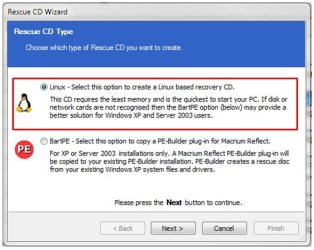
The 1st panel of the Rescue CD Wizard will be be displayed as shown below:
1.JPG

The default option is Linux. Accept that by clicking on Next, and proceeding to the 2nd panel of the Rescue CD Wizard.

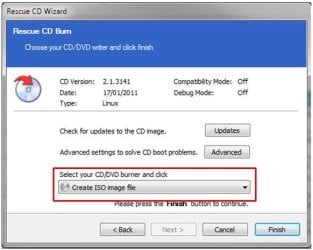
From the pull-down list, select the option Create ISO image file, as shown below:
2.JPG

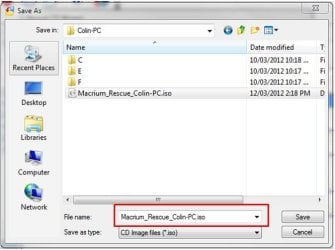
Click Finish, and now provide a name and location for the rescue ISO file that is about to be created, as shown below:
3.JPG

   Warning
Do not include spaces in the ISO name or YUMI will fail to boot from it.

Once the file has been saved, close Macrium Reflect as normal.


:note: Step 2 - Create the bootable RESCUE USB drive


Download YUMI Multiboot USB Creator to your desktop - its a single executable that requires no installation.

Insert the USB flash drive you want to use, into an available USB port on your computer.

Open YUMI by double-clicking it, and when prompted by Windows UAC, click Yes. You will be prompted to accept the Licence Agreement. Click I Agree to proceed.

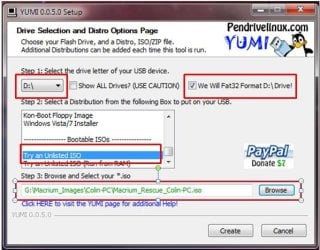
Now follow thse steps and refer to the image shown below:

1. From the drop-down list, select the letter of the USB you wish to use.

2. The USB drive is required to be formatted as FAT32. If this is not the case, check the format option, which will format the entire USB drive before copying any information to it. If the USB drive is already formatted as FAT32, ignore this option.

3. In the distribution box, scroll to the very bottom and hlighlight the Try an Unlisted ISO.

4. Click Browse to locate and select the rescue ISO you create previously.
4.JPG

5. Now click Create to create the bootable rescue USB drive.

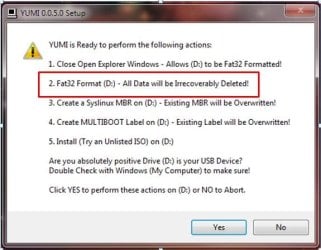
If you opted to format the USB drive, please take careful note of the warning panel that appears, and is shown below. Click Yes to proceed.
5.JPG

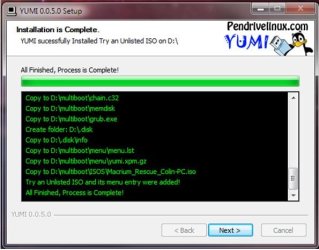
The rescue ISO file will now be copied to the USB drive. If successful, you will see the progress panel as shown below:
6.JPG

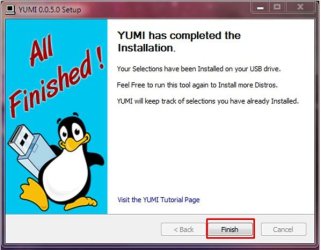
Click Next to proceed. You will be prompted if you wish to add more ISO's/Distros. Click No to close this pop-up, and then click Finish to exit YUMI.
7.JPG

You have now created a Macrium Bootable Rescue USB and can safely remove the USB drive.


:note: Step 3 - Test the bootable RESCUE USB drive


One of critical elements of imaging, is to ensure that you can boot from the rescue USB drive. In fact, the same holds true if you choose to use the traditional bootable rescue CD method.

To do this, turn off your computer, plug in your USB drive and reboot your computer as normal. During the POST screen, press the DEL key repeatedly to enter your BIOS, and then find the setting that allows you to boot from a USB drive and place it first in the device boot sequence. Alternatively, during POST keeping pressing the F8 function key to bring up the one-time boot menu, and then select the USB device from that menu.

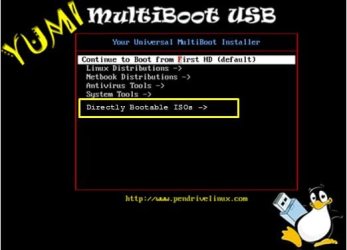
Once the PC boots from the USB device you will see the YUMI boot menu, as shown in the example below:
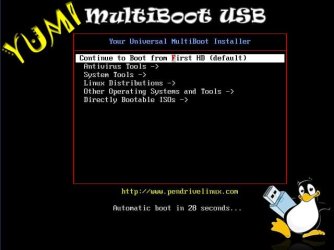
a.JPG

If you select the option called Directly Bootable ISO's you will then be presented with the rescue ISO you created earlier. In the example shown below, I have a choice of 4 rescue ISO files (refer to the tip below):
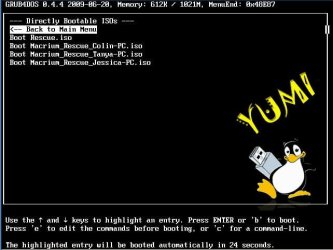
b.JPG

Once you select that ISO, the Linux operating system will boot the ISO, and then allow you to select the Macrium image to restore, as shown in this example below:
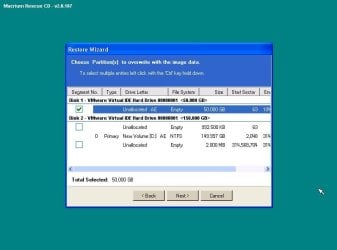
9.JPG

   Tip

If you manage multiple computers, you can add as many Macrium rescue ISO's as you require. I manage 4 different computers and each one's rescue item is bootable from a single USB flash drive - refer to the image above.

If you already have a YUMI multiboot USB drive with other ISO's and/or distros on it, simple add the Macrium rescue ISO's as normal. This makes for a very handy USB toolkit.


I hope you find this tutorial useful, and remember : you saw it first at Sevenforums.

Regards,
Golden

   Note
Special thanks to kado897 who provided the information for capturing the YUMI screens.


Related Tutorials


Attachments

  • 8.JPG
    8.JPG
    27.7 KB · Views: 191
Last edited:
Thanks to everyone for confirming my understanding of backup image types.
:thumbsup:
 

My Computer My Computer

Computer type
PC/Desktop
Computer Manufacturer/Model Number
n/a
OS
W7 Ultimate SP1, LM19.2 MATE, W10 Home 1703, W10 Pro 1703 VM, #All 64 bit
CPU
AMD Phenom II x6 1100T, 3.3 GHz
Motherboard
ASUS M4A88T-M/USB3 (AM3)
Memory
12GB DDR3 1333 G-Skill (4GB x 2), G-Skill (2GB x 2)
Graphics Card(s)
NVIDIA GeForce GTX 660
Sound Card
Realtek?
Monitor(s) Displays
Samsung S23B350
Screen Resolution
1920x1080
Hard Drives
WD Green 2TB (SATA), WD Green 3TB (SATA), WD Blue 4TB (SATA), WD Blue 6TB (SATA)
PSU
Cooler Master
Case
Antec GX300 Tower
Cooling
3x Antec TRICOOL 120mm Fans
Mouse
Wired Optical
Internet Speed
DSL
Antivirus
Avast
Browser
Pale Moon (64 bit)
Other Info
2018-12-27 Upgraded HDDs
2015-12-10 Upgraded case, graphics card, storage
2015-08-15 Upgraded motherboard & RAM
2015-07-15 Upgraded LM17.1 to LM17.2
How to add to multiboot usb?

Hi all, having a 32GB multiboot usb drive already, that works with multible .iso files - I like to add Macrium reflect rescue media .iso


I know how to add lines to syslinux cfg, but don't know what to add.

Can you help me out?

I didn't use Yumi to make the usb drive, I used Xboot(also on pendrive linux site) and didn't use Grub4dos but syslinux(Grub4dos is also on the drive, just don't know how to make use of it since majority of my .iso works better with syslinux).

JBJ
 

My Computer My Computer

Computer type
Laptop
Computer Manufacturer/Model Number
Lenovo T61
OS
Windows 7 Enterprise 32 bit

My Computer My Computer

Computer type
Laptop
Computer Manufacturer/Model Number
Hewlett-Packard/G62-107SA Notebook
OS
Microsoft Windows 7 Home Premium 64-bit Service Pack 1
CPU
Intel(R) Core(TM) i3 CPU M 330 @ 2.13GHz
Motherboard
Hewlett-Packard 1425
Memory
8 GB DDR3
Graphics Card(s)
Intel(R) HD Graphics
Sound Card
Realtek High Definition Audio
Monitor(s) Displays
Builtin
Screen Resolution
1366 x 768 x 32 bits (4294967296 colors) @ 60 Hz
Hard Drives
250 GB SATA Hard Disk Drive 7200 rpm
2TB Seagate GoFlex USB 2 Drive
1TB Iomega Prestige USB 2 Drive
1.5TB Iomega Prestige USB 2 Drive (Samsung)
2TB WD MyBook Live NAS.
Mouse
Logitech Anywhere MX
Internet Speed
152 Mbs download 10 Mbs upload
Antivirus
Norton 360
Browser
Chrome
Hi Kado, thanks for the info, I have now tried for 1 hour making an account on Reboot.pro - their system is not sending me the validation email, and its not because its ending up in spam folder - simply not working:(

When you make a multiboot what do you have in your boot->Grub4dos folder? Any chance you could upload it here?

JBJ
 

My Computer My Computer

Computer type
Laptop
Computer Manufacturer/Model Number
Lenovo T61
OS
Windows 7 Enterprise 32 bit
I don't know. As I said I've not used xboot. I would imagine that xboot would take care of that when you select the grub option.
 

My Computer My Computer

Computer type
Laptop
Computer Manufacturer/Model Number
Hewlett-Packard/G62-107SA Notebook
OS
Microsoft Windows 7 Home Premium 64-bit Service Pack 1
CPU
Intel(R) Core(TM) i3 CPU M 330 @ 2.13GHz
Motherboard
Hewlett-Packard 1425
Memory
8 GB DDR3
Graphics Card(s)
Intel(R) HD Graphics
Sound Card
Realtek High Definition Audio
Monitor(s) Displays
Builtin
Screen Resolution
1366 x 768 x 32 bits (4294967296 colors) @ 60 Hz
Hard Drives
250 GB SATA Hard Disk Drive 7200 rpm
2TB Seagate GoFlex USB 2 Drive
1TB Iomega Prestige USB 2 Drive
1.5TB Iomega Prestige USB 2 Drive (Samsung)
2TB WD MyBook Live NAS.
Mouse
Logitech Anywhere MX
Internet Speed
152 Mbs download 10 Mbs upload
Antivirus
Norton 360
Browser
Chrome
The problem is that I already have a finished, ready to use(not going to remake) usb drive. Could you or anyone else list what they have under boot->Grub4dos? Just list the name of the file and post the content - its a txt file.

Then I will figure it out myself:)

JBJ
 

My Computer My Computer

Computer type
Laptop
Computer Manufacturer/Model Number
Lenovo T61
OS
Windows 7 Enterprise 32 bit
A suggestion. Try it on another USB and copy the entries across.
 

My Computer My Computer

Computer type
Laptop
Computer Manufacturer/Model Number
Hewlett-Packard/G62-107SA Notebook
OS
Microsoft Windows 7 Home Premium 64-bit Service Pack 1
CPU
Intel(R) Core(TM) i3 CPU M 330 @ 2.13GHz
Motherboard
Hewlett-Packard 1425
Memory
8 GB DDR3
Graphics Card(s)
Intel(R) HD Graphics
Sound Card
Realtek High Definition Audio
Monitor(s) Displays
Builtin
Screen Resolution
1366 x 768 x 32 bits (4294967296 colors) @ 60 Hz
Hard Drives
250 GB SATA Hard Disk Drive 7200 rpm
2TB Seagate GoFlex USB 2 Drive
1TB Iomega Prestige USB 2 Drive
1.5TB Iomega Prestige USB 2 Drive (Samsung)
2TB WD MyBook Live NAS.
Mouse
Logitech Anywhere MX
Internet Speed
152 Mbs download 10 Mbs upload
Antivirus
Norton 360
Browser
Chrome
Hehehe, well I had thougt of that but don't have any drives to spare, Thought I could get the files here, Ok I will sacrfice one of my drives.

Has anyone tried making this drive with syslinux instead of grub4dos?

JBJ
PS Xboot is more flexible when making these drives, and also contains QEMU for testing the finished drive - there is also an option to save the finished project to an .iso file - Yumi is the newer of those 2 but lacks alot of funtionality that xboot had.

If any typo, its because i'm not wearing my contacts.
 

My Computer My Computer

Computer type
Laptop
Computer Manufacturer/Model Number
Lenovo T61
OS
Windows 7 Enterprise 32 bit
I created one myself with just Macrium. This is a zip of the USB minus the iso files to save size.
 

Attachments

My Computer My Computer

Computer type
Laptop
Computer Manufacturer/Model Number
Hewlett-Packard/G62-107SA Notebook
OS
Microsoft Windows 7 Home Premium 64-bit Service Pack 1
CPU
Intel(R) Core(TM) i3 CPU M 330 @ 2.13GHz
Motherboard
Hewlett-Packard 1425
Memory
8 GB DDR3
Graphics Card(s)
Intel(R) HD Graphics
Sound Card
Realtek High Definition Audio
Monitor(s) Displays
Builtin
Screen Resolution
1366 x 768 x 32 bits (4294967296 colors) @ 60 Hz
Hard Drives
250 GB SATA Hard Disk Drive 7200 rpm
2TB Seagate GoFlex USB 2 Drive
1TB Iomega Prestige USB 2 Drive
1.5TB Iomega Prestige USB 2 Drive (Samsung)
2TB WD MyBook Live NAS.
Mouse
Logitech Anywhere MX
Internet Speed
152 Mbs download 10 Mbs upload
Antivirus
Norton 360
Browser
Chrome
Thank you so much, I will try it out when I have time, and let you know:)

With kind regards

JBJ
 

My Computer My Computer

Computer type
Laptop
Computer Manufacturer/Model Number
Lenovo T61
OS
Windows 7 Enterprise 32 bit
You are welcome insomniacno1.
 

My Computer My Computer

Computer type
Laptop
Computer Manufacturer/Model Number
Hewlett-Packard/G62-107SA Notebook
OS
Microsoft Windows 7 Home Premium 64-bit Service Pack 1
CPU
Intel(R) Core(TM) i3 CPU M 330 @ 2.13GHz
Motherboard
Hewlett-Packard 1425
Memory
8 GB DDR3
Graphics Card(s)
Intel(R) HD Graphics
Sound Card
Realtek High Definition Audio
Monitor(s) Displays
Builtin
Screen Resolution
1366 x 768 x 32 bits (4294967296 colors) @ 60 Hz
Hard Drives
250 GB SATA Hard Disk Drive 7200 rpm
2TB Seagate GoFlex USB 2 Drive
1TB Iomega Prestige USB 2 Drive
1.5TB Iomega Prestige USB 2 Drive (Samsung)
2TB WD MyBook Live NAS.
Mouse
Logitech Anywhere MX
Internet Speed
152 Mbs download 10 Mbs upload
Antivirus
Norton 360
Browser
Chrome
So question

I have been using reflect and making seperate usb boot with a big external hd...does YUMI still work? so that I can have 8-10 images to choose from as carrying that many usb just to boot is alot i rather just have one usb with all images

thanks in advance
 

My Computer My Computer

Computer type
PC/Desktop
Computer Manufacturer/Model Number
Dells, HP, Lenovos
OS
Windows 7 64Bit
CPU
Dual Core, i3 and i5
what is 'YUMI'?

usb 3 flash drives go up to at least a terabyte, tho you may have to sell your family to afford one. a large ssd in a usb 3.x enclosure may be more economical, i use a bootable 64gb usb3 flash drive as my recovery 'disk' along with a usb3 'passport' 500gb hard drive. the 64 boots fine but is too small to hold a full image of my system drive. i may someday get a 128gb and keep an image on it as well.
 

My Computer My Computer

Computer type
PC/Desktop
Computer Manufacturer/Model Number
Custom build Nanu by 3SX
OS
Win 7 ultimate x64 sp1
CPU
Intel i7 4 core 3770k ivy bridge o/c to 4.2ghz
Motherboard
Asus p8z77-i Deluxe
Memory
16 GB
Graphics Card(s)
Nvidia geforce GTX650
Sound Card
Realtek on mb
Monitor(s) Displays
24in. lcd/led
Screen Resolution
1920x1080
Hard Drives
128GB Kingston SSD
500GB seagate maximus xt hybrid
500GB hitachi HD
500GB external WD Passport usb3
PSU
Silverstone 450 watt
Case
Silverstone FT03 Black Fortress
Cooling
Water cooler
Keyboard
Logitech wireless kbd/mouse mk300
Mouse
Logitech wireless kbd/mouse mk300
Internet Speed
8mb adsl (actuall speed is around 6mb)
Other Info
Asus DSL-N55U wireless router
SONY BC-5850H 6X BLURAY writer
OUTPOST Security Suite
I understand I can get a larger usb....my question is about yumi if it still works, so I am to understand this....we use yumi to boot on any pc then select the macrium iso to start reflect then use refelct to image the pc??? so does it matter what I install the bartpe on to use??
 

My Computer My Computer

Computer type
PC/Desktop
Computer Manufacturer/Model Number
Dells, HP, Lenovos
OS
Windows 7 64Bit
CPU
Dual Core, i3 and i5
what is 'YUMI'?

usb 3 flash drives go up to at least a terabyte, tho you may have to sell your family to afford one. a large ssd in a usb 3.x enclosure may be more economical, i use a bootable 64gb usb3 flash drive as my recovery 'disk' along with a usb3 'passport' 500gb hard drive. the 64 boots fine but is too small to hold a full image of my system drive. i may someday get a 128gb and keep an image on it as well.

Go back and read all of this thread from the beginning, which is what you should do before replying in any thread.
 

My Computer My Computer

Computer type
PC/Desktop
Computer Manufacturer/Model Number
Custom Build
OS
Win 7 Ultimate 64 bit
CPU
Intel i7-3930K
Motherboard
ASUS P9X79 WS
Memory
Kingston HyperX Genesis 32GB Kit (8x4GB Modules) 1600MHz DDR
Graphics Card(s)
MSI R7850 Twin Frozr 2GD5/OC Radeon HD 7850 2GB 256-bit GDDR
Sound Card
Asus Xonar Essence STX
Monitor(s) Displays
3x Asus VG248QE 24", Vizio 32" TV
Screen Resolution
1920 x 1080, ?
Hard Drives
Samsung 128GB 840 Pro SSD (1),
Samsung 4TB 850 EVO SSDs (4)
Samsung 4TB 850 EVO SSDs (16) external backup drives used in 2.5" hot swap bays in the computer.
PSU
Corsair HX750w
Case
Antec Two Hundred v2 (modified)
Cooling
Cooler Master GeminII S524 120mm (fan replaced with a 140mm)
Keyboard
Logitech G510s
Mouse
Logitech M525 (two in use)
Internet Speed
=< 32Mbps down, 8Mbps up
Antivirus
AVAST!, MBAM, SAS, Spybot S&D (all but MBAM free) Glary Util
Browser
IE11
Other Info
LSI 9211-8i HBA card (8 SATA III ports), 2.5" & 3.5" Hot Swap Bays, HooToo HT-CR001 PCI-E to USB 3.0 Internal Hub + 6 Slot Card Reader, and LG Model CH12LS28 BD-ROM Optical Drive. Also, ScanSnap S1500 ADF duplexing scanner, Canon 9000F flat bed scanner, Corsair SP2500 2.1 speakers, Samsung CLP 415nw laser color printer, Cyberpower PP2200SW UPS
MR image file

I created such a file of Win 7 and I see on the dir of that usb hd, it has boot and restore. Now that being said, shouldn't it be bootable and once it does, click on "Restore' should do the job?
 

My Computer My Computer

Computer type
PC/Desktop
Computer Manufacturer/Model Number
Build OEM Desktop
OS
Win 7 x64.Win 10
CPU
AMD A10 7850K
Motherboard
Asus A88X-Pro
Memory
8 gb
Graphics Card(s)
Nil
Sound Card
Nil
Monitor(s) Displays
Insignia
Screen Resolution
1376 x
Hard Drives
500 gb
Case
ABS
Keyboard
Sony
Mouse
OEM
Antivirus
Windows defender, Windows essential, Malware, autospyware
Browser
Firefox,Vivaldi
I created such a file of Win 7 and I see on the dir of that usb hd, it has boot and restore. Now that being said, shouldn't it be bootable and once it does, click on "Restore' should do the job?
Refer to Step 3 of the tutorial.
 

My Computer My Computer

Computer type
PC/Desktop
Computer Manufacturer/Model Number
Golden Mk. I.4
OS
Windows 10 Pro x64 ; Xubuntu x64
CPU
Intel i7 860 @ 2.80 GHz O/C'ed to 4.0GHz
Motherboard
Gigabyte P55A-UD3R Rev.1. Award BIOS F13
Memory
16GB Corsair Vengance DDR3 @ 661 MHz Dual Channel (9-9-9-24)
Graphics Card(s)
EVGA NVidia GTX 560 1024MB
Sound Card
Realtek Integrated
Monitor(s) Displays
Dual Samsung SyncMaster 2494HS
Screen Resolution
1920*1080 and 1920*1080
Hard Drives
1*Samsung 840 EVO 120GB SSD;
1*OCZ Vertex 2 60GB SSD;
2*Samsung F3 SpinPoint 1TB in RAID0;
1*Samsung F1 SpinPoint 1TB;
2*Western Digital 1TB External USB 3.0
1*Western Digital 500GB External USB 3.0
1*Seagate 500GB External USB 2.0
PSU
Thermaltake ToughPower QFan 750W
Case
Thermaltake Element S VK60001W2Z
Cooling
Corsair H60 Water Cooling, 2*230mm and 2*80mm case fans
Keyboard
Logitech G110
Mouse
Logitech MX518
Thanks, I found how to boot MR by setting my Bios. Now, I got as far as viewing my partitions and certainly was confused by it. First, some of the drive letters did not match the actual drive letters that I had designated. So its very intimidating to try to choose in which partition to restore it to. I would gladly include a snapshot of it, but it looks like almost impossible to do so in MR. I do see it done in the tutorial, but maybe its professionally done. BTW, I think I saw the size of my backup of win 7 set at 7gb, and yet when i did try accidentally to install into a partition that has 121 gb, i got a message that there is not enough space.
 

My Computer My Computer

Computer type
PC/Desktop
Computer Manufacturer/Model Number
Build OEM Desktop
OS
Win 7 x64.Win 10
CPU
AMD A10 7850K
Motherboard
Asus A88X-Pro
Memory
8 gb
Graphics Card(s)
Nil
Sound Card
Nil
Monitor(s) Displays
Insignia
Screen Resolution
1376 x
Hard Drives
500 gb
Case
ABS
Keyboard
Sony
Mouse
OEM
Antivirus
Windows defender, Windows essential, Malware, autospyware
Browser
Firefox,Vivaldi
Back
Top