macrium reflect format repartition

Deleted695

New member
Local time
12:47 AM
Messages
45
Macrium reflect has no "format and repartition" option like windows 7 system image recovery.
Does that mean that when I perform an error with a partition manager I have to repartition and format my drive before I can do a restore of an image (total image of all the partitions) with reflect?
With an error I mean for example that a move of a partition freeze.
 
You should not have to format a drive before you restore an image with Macrium. That will be done automatically.
 

My Computer

Computer type
PC/Desktop
Computer Manufacturer/Model Number
Ignatz Special; 4 speed manual gearbox; factory air conditioning; one of one
OS
Windows 7 Home Premium SP1, 64-bit
CPU
Intel Skylake i5-6600K, not overclocked
Motherboard
AsRock Z170M Extreme 4, micro ATX
Memory
8 GB HyperX DDR4-2666 (2 x 4 GB)
Graphics Card(s)
none; graphics are integrated on CPU
Sound Card
onboard: Realtek ALC1150; external: USB Behringer UF0-202
Monitor(s) Displays
Dell S2340M 23 inch IPS
Screen Resolution
1600 x 900
Hard Drives
System: Crucial MX100 series SSD, 128 GB;
Data: Samsung Spinpoint 103SJ, 1 TB;
Backup: WD Caviar Green WD30EZRX-00D8PB0, 3 TB
PSU
Rosewill SilentNight 500 watt fanless, semi-modular
Case
Antec Solo II
Cooling
Noctua NH-U12S; Noctua F12 intake, Noctua S12A exhaust
Keyboard
Microsoft 200 6JH-00001 USB
Mouse
Dell or Microsoft optical wired; USB
Antivirus
Microsoft Security Essentials and Malwarebytes Premium
Browser
Pale Moon
Other Info
All fans PWM; speeds at idle: CPU circa 500 rpm; intake circa 600 rpm; exhaust circa 600 rpm; CPU temps 27 idle and 47 C load in a warm room (27 C/81 F) when running Intel Extreme Tuning Utility stress test.
reflect format

Hi,
Thanks for your reply.
Does it also reformat when the drive was already formatted and there happened then something with the partitions?
 
It will reformat the partition that you have chosen as the target of the restoration.

I suppose that the drive could be physically damaged in such a way that the format will fail and therefore the restoration will fail.

I'm not sure what your drive looks like or what your problems are. If you have partition problems of some type, maybe the drive is damaged. It's hard to say without more detail or seeing a picture of Windows Disk Management.

If you have an image file, you could try to restore it and see if it completes and your PC is then bootable from that restored partition.

What does your image file represent?? What partitions are supposedly contained in the image file?
 

My Computer

Computer type
PC/Desktop
Computer Manufacturer/Model Number
Ignatz Special; 4 speed manual gearbox; factory air conditioning; one of one
OS
Windows 7 Home Premium SP1, 64-bit
CPU
Intel Skylake i5-6600K, not overclocked
Motherboard
AsRock Z170M Extreme 4, micro ATX
Memory
8 GB HyperX DDR4-2666 (2 x 4 GB)
Graphics Card(s)
none; graphics are integrated on CPU
Sound Card
onboard: Realtek ALC1150; external: USB Behringer UF0-202
Monitor(s) Displays
Dell S2340M 23 inch IPS
Screen Resolution
1600 x 900
Hard Drives
System: Crucial MX100 series SSD, 128 GB;
Data: Samsung Spinpoint 103SJ, 1 TB;
Backup: WD Caviar Green WD30EZRX-00D8PB0, 3 TB
PSU
Rosewill SilentNight 500 watt fanless, semi-modular
Case
Antec Solo II
Cooling
Noctua NH-U12S; Noctua F12 intake, Noctua S12A exhaust
Keyboard
Microsoft 200 6JH-00001 USB
Mouse
Dell or Microsoft optical wired; USB
Antivirus
Microsoft Security Essentials and Malwarebytes Premium
Browser
Pale Moon
Other Info
All fans PWM; speeds at idle: CPU circa 500 rpm; intake circa 600 rpm; exhaust circa 600 rpm; CPU temps 27 idle and 47 C load in a warm room (27 C/81 F) when running Intel Extreme Tuning Utility stress test.
image restore

I ask the question in advance of the following:
I have a laptop with 4 partitions and at the end 100 Gbyte unallocated space.
My second partition is my C: drive which I want to extend with the unallocated space but therefor I first have to move 2 partitions to the end so the unallocated space commes at the right of the C: drive
Then I can resize the c: drive
This are all critical actions therefor I would first take a total image
I asked myself I there goes something wrong with the critical actions what must I do to restore.
It seems:just following the reflect restore procedure (I must not reformat or repartition)
If reflect does not succeed to restore that does mean a format will also fail
 
You don't need to move partitions to expand C if, I say IF, you use Partition Wizard bootable disk to do the work.

You can't do it with Windows Disk Management because those other partitions are in the way.

It's certainly wise to make a Macrium image of the C partition and any other partition that may contain boot files regardless, before expanding a partition.

But you don't have to move partitions to expand.

The best thing you can do is post a screen shot of Windows Disk Management.

What partition is shown as "system" when you look at Windows Disk Management?? The C partition? Or some other partition?
 

My Computer

Computer type
PC/Desktop
Computer Manufacturer/Model Number
Ignatz Special; 4 speed manual gearbox; factory air conditioning; one of one
OS
Windows 7 Home Premium SP1, 64-bit
CPU
Intel Skylake i5-6600K, not overclocked
Motherboard
AsRock Z170M Extreme 4, micro ATX
Memory
8 GB HyperX DDR4-2666 (2 x 4 GB)
Graphics Card(s)
none; graphics are integrated on CPU
Sound Card
onboard: Realtek ALC1150; external: USB Behringer UF0-202
Monitor(s) Displays
Dell S2340M 23 inch IPS
Screen Resolution
1600 x 900
Hard Drives
System: Crucial MX100 series SSD, 128 GB;
Data: Samsung Spinpoint 103SJ, 1 TB;
Backup: WD Caviar Green WD30EZRX-00D8PB0, 3 TB
PSU
Rosewill SilentNight 500 watt fanless, semi-modular
Case
Antec Solo II
Cooling
Noctua NH-U12S; Noctua F12 intake, Noctua S12A exhaust
Keyboard
Microsoft 200 6JH-00001 USB
Mouse
Dell or Microsoft optical wired; USB
Antivirus
Microsoft Security Essentials and Malwarebytes Premium
Browser
Pale Moon
Other Info
All fans PWM; speeds at idle: CPU circa 500 rpm; intake circa 600 rpm; exhaust circa 600 rpm; CPU temps 27 idle and 47 C load in a warm room (27 C/81 F) when running Intel Extreme Tuning Utility stress test.
reflect restore

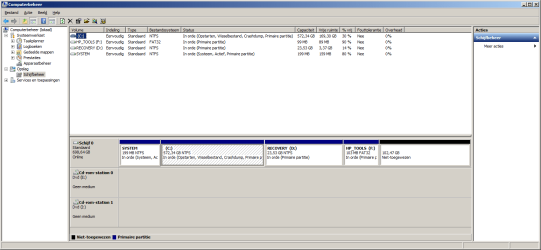
I've added a printscreen of my diskmanagement (it,s a dutch version)
My system partition is the first partition
On the internet they say extending partitions works also with non-bootable partition wizard
 
reflect restore

I forgot to add my printscreen
 

Attachments

  • diskmngmnt.png
    diskmngmnt.png
    26.7 KB · Views: 5
Be careful how you proceed here. HP is a "gem" in the way it partitions its drives. You want to add the substantial unallocated back to C: . Make it a new allocated partition will cause your HDD to become dynamic - a bad result. I would use Partition Wizard but make images of every (not unallocated) partition before using Macrium Reflect.

Once you have images of every partition you could consider this
http://www.sevenforums.com/tutorials/219487-clean-reinstall-factory-oem-windows-7-a.html
 

My Computer

Computer type
PC/Desktop
Computer Manufacturer/Model Number
Own build
OS
Windows 7x64 Home Premium SP1
CPU
Intel i7 2600k
Motherboard
ASUS P8Z68 Deluxe
Memory
G.Skill Ripjaws (DDR3-1600) 2x4GB
Graphics Card(s)
Nvidia GeForce GTS 450; Intel HD Graphics 3000(GT2+)
Monitor(s) Displays
Dell Ultrasharp IPS panel U2311H, Samsung SyncMaster P2350
Screen Resolution
1920x1080
Hard Drives
Samsung 850 Pro SSD 256GB, Samsung SSD 840 120GB, Seagates 1TB Barracuda ST31000528AS x2
PSU
Seasonic M12II 520W
Case
Lian Li Lancool PC-K60
Cooling
Case: 1x120mm, 3x140mm CPU: Hyper 212+
Keyboard
Logitech MK520 (wireless)
Mouse
Logitech MK520
Internet Speed
6-7 Mbps
Antivirus
Norton Security Premium, Malwarebytes on 2 (MSE on 3rd PC)
Browser
FireFox
Other Info
Audio: Logitech Z523 2.1
I'd agree with MJF.

You need to make an image of both "System" and "C" partitions in order to restore Windows.

But you may as well make images of all partitions. It can't hurt. All the images need to be stored on some other drive, which you may not have?

Yes, I think you can use the non-bootable version of Partition Wizard.

BEWARE of dynamic disks. They are bad news. Say no to them. DON'T attempt to simply format that unallocated space. You need to instead add that space to C.

HP unfortunately puts 4 partitions on machines at the factory. If you did a clean install, you'd have either 1 or 2 partitions and would not have the " HP Tools" or "Recovery" partitions.
 

My Computer

Computer type
PC/Desktop
Computer Manufacturer/Model Number
Ignatz Special; 4 speed manual gearbox; factory air conditioning; one of one
OS
Windows 7 Home Premium SP1, 64-bit
CPU
Intel Skylake i5-6600K, not overclocked
Motherboard
AsRock Z170M Extreme 4, micro ATX
Memory
8 GB HyperX DDR4-2666 (2 x 4 GB)
Graphics Card(s)
none; graphics are integrated on CPU
Sound Card
onboard: Realtek ALC1150; external: USB Behringer UF0-202
Monitor(s) Displays
Dell S2340M 23 inch IPS
Screen Resolution
1600 x 900
Hard Drives
System: Crucial MX100 series SSD, 128 GB;
Data: Samsung Spinpoint 103SJ, 1 TB;
Backup: WD Caviar Green WD30EZRX-00D8PB0, 3 TB
PSU
Rosewill SilentNight 500 watt fanless, semi-modular
Case
Antec Solo II
Cooling
Noctua NH-U12S; Noctua F12 intake, Noctua S12A exhaust
Keyboard
Microsoft 200 6JH-00001 USB
Mouse
Dell or Microsoft optical wired; USB
Antivirus
Microsoft Security Essentials and Malwarebytes Premium
Browser
Pale Moon
Other Info
All fans PWM; speeds at idle: CPU circa 500 rpm; intake circa 600 rpm; exhaust circa 600 rpm; CPU temps 27 idle and 47 C load in a warm room (27 C/81 F) when running Intel Extreme Tuning Utility stress test.
Hp has installed my laptop but that unallocated space is my cause: The Original disc was 640Gbyte and I have changed the disc with a 750Gbyte and restored the image of the 640Gbyte disc w/o encreasing one of the partitions at the restoration process.
I will extend the C: partition with partition wizard so I have no dynamic disc
 
Back
Top