Macrium Reflect Free vs Windows System Image

BuckSkin

New member
Power User
VIP
Local time
4:04 PM
Messages
521
I am new to a lot of this so please pardon my lack of knowledge.

I have been saving system images with whatever program is included in my Windows 7 system.

I have just downloaded (but not yet installed) Macrium Reflect FREE version 6.2.1549(08-Sep-2016)

I found out about Macrium here, but the information is for version 5

http://www.sevenforums.com/tutorials/73828-imaging-free-macrium.html?ltr=I

What will Macrium do for me that the program I am currently using does not ?

Can a novice such as I manage to use Macrium successfully ?

Thanks for reading.
 

My Computer

Computer type
PC/Desktop
Computer Manufacturer/Model Number
Dell Optiplex 780m "mini-tower"
OS
Windows 7 Pro x64
CPU
Intel Core Two Duo E8600 3.33 ghz
Motherboard
Whatever DELL put in it
Memory
8GB
Graphics Card(s)
Gigabyte Radeon R7 240
Monitor(s) Displays
HP 2159m
PSU
750 Watt Corsair CX750
Keyboard
Logitech Wireless
Mouse
Logitech Wireless
Browser
Chrome, Firefox, IE

My Computers

System One System Two

  • Computer type
    PC/Desktop
    OS
    7 X64
    CPU
    i5 8400
    Motherboard
    gigabyte b365m ds3h
    Memory
    2x8gb 3200mhz
    Hard Drives
    various
    PSU
    pure power 11 400w cm
    Case
    Coolermaster
    Cooling
    cryorig m9i
  • Computer type
    PC/Desktop
    OS
    7x64
    CPU
    g5400
    Motherboard
    ga b365m ds3h
    Memory
    8gb ddr4 2400
    PSU
    xfx pro 450w
I used to store both Windows inbuilt system images and Macrium images. For at least a year now I just make Macrium images because it is much more flexible and has compression. I still run Macrium V5 on my main PC because it works fine. I have V6 on a newer build and it works fine as well. Macrium is easy to use and they have a decent knowledge base. Here is the user guide for V6.
Macrium Reflect v6 User Guide - KnowledgeBase - Macrium Reflect Knowledgebase

I never had a problem with Windows inbuilt but others have reported problems. So I'd vote for Macrium but store images on 2 drives for security in case one fails.
 

My Computer

Computer type
PC/Desktop
Computer Manufacturer/Model Number
Own build
OS
Windows 7x64 Home Premium SP1
CPU
Intel i7 2600k
Motherboard
ASUS P8Z68 Deluxe
Memory
G.Skill Ripjaws (DDR3-1600) 2x4GB
Graphics Card(s)
Nvidia GeForce GTS 450; Intel HD Graphics 3000(GT2+)
Monitor(s) Displays
Dell Ultrasharp IPS panel U2311H, Samsung SyncMaster P2350
Screen Resolution
1920x1080
Hard Drives
Samsung 850 Pro SSD 256GB, Samsung SSD 840 120GB, Seagates 1TB Barracuda ST31000528AS x2
PSU
Seasonic M12II 520W
Case
Lian Li Lancool PC-K60
Cooling
Case: 1x120mm, 3x140mm CPU: Hyper 212+
Keyboard
Logitech MK520 (wireless)
Mouse
Logitech MK520
Internet Speed
6-7 Mbps
Antivirus
Norton Security Premium, Malwarebytes on 2 (MSE on 3rd PC)
Browser
FireFox
Other Info
Audio: Logitech Z523 2.1
What will Macrium do for me that the program I am currently using does not ?

Can a novice such as I manage to use Macrium successfully ?

It will be less confusing to you and give you more direct control over exactly what is backed up.

Yes, a novice can use Macrium--it has a more understandable interface.

Windows Backup works OK if you understand and can live within it's limitations.

You will need to make "recovery" media with Macrium and understand how to use it when a disaster strikes---if you don't, Macrium isn't of much use.

If you have never actually tried to restore an image, you might be in for an unfortunate surprise, regardless of which program you use.
 

My Computer

Computer type
PC/Desktop
Computer Manufacturer/Model Number
Ignatz Special; 4 speed manual gearbox; factory air conditioning; one of one
OS
Windows 7 Home Premium SP1, 64-bit
CPU
Intel Skylake i5-6600K, not overclocked
Motherboard
AsRock Z170M Extreme 4, micro ATX
Memory
8 GB HyperX DDR4-2666 (2 x 4 GB)
Graphics Card(s)
none; graphics are integrated on CPU
Sound Card
onboard: Realtek ALC1150; external: USB Behringer UF0-202
Monitor(s) Displays
Dell S2340M 23 inch IPS
Screen Resolution
1600 x 900
Hard Drives
System: Crucial MX100 series SSD, 128 GB;
Data: Samsung Spinpoint 103SJ, 1 TB;
Backup: WD Caviar Green WD30EZRX-00D8PB0, 3 TB
PSU
Rosewill SilentNight 500 watt fanless, semi-modular
Case
Antec Solo II
Cooling
Noctua NH-U12S; Noctua F12 intake, Noctua S12A exhaust
Keyboard
Microsoft 200 6JH-00001 USB
Mouse
Dell or Microsoft optical wired; USB
Antivirus
Microsoft Security Essentials and Malwarebytes Premium
Browser
Pale Moon
Other Info
All fans PWM; speeds at idle: CPU circa 500 rpm; intake circa 600 rpm; exhaust circa 600 rpm; CPU temps 27 idle and 47 C load in a warm room (27 C/81 F) when running Intel Extreme Tuning Utility stress test.
Thanks, everyone.

Thanks mjf for the V6 user guide link.

SIW2, does the AOMEI Backupper also require recovery media as Macrium does ?

You will need to make "recovery" media with Macrium and understand how to use it when a disaster strikes---if you don't, Macrium isn't of much use.

Does the Macrium program have a provision to make this recovery media or is it a regular Windows system repair disc or what ?

If you have never actually tried to restore an image, you might be in for an unfortunate surprise, regardless of which program you use.

Please expand on this unfortunate surprise business; I need more knots in my stomach.
 

My Computer

Computer type
PC/Desktop
Computer Manufacturer/Model Number
Dell Optiplex 780m "mini-tower"
OS
Windows 7 Pro x64
CPU
Intel Core Two Duo E8600 3.33 ghz
Motherboard
Whatever DELL put in it
Memory
8GB
Graphics Card(s)
Gigabyte Radeon R7 240
Monitor(s) Displays
HP 2159m
PSU
750 Watt Corsair CX750
Keyboard
Logitech Wireless
Mouse
Logitech Wireless
Browser
Chrome, Firefox, IE
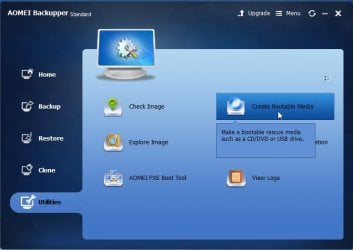
You can start the restore from within windows. However, it is important to also let it create recovery media - necessary in the event you are unable to boot into windows.

It creates bootable recovery media for you in a few seconds.

aomei-bootmedia.jpg
 

My Computers

System One System Two

  • Computer type
    PC/Desktop
    OS
    7 X64
    CPU
    i5 8400
    Motherboard
    gigabyte b365m ds3h
    Memory
    2x8gb 3200mhz
    Hard Drives
    various
    PSU
    pure power 11 400w cm
    Case
    Coolermaster
    Cooling
    cryorig m9i
  • Computer type
    PC/Desktop
    OS
    7x64
    CPU
    g5400
    Motherboard
    ga b365m ds3h
    Memory
    8gb ddr4 2400
    PSU
    xfx pro 450w
You can start the restore from within windows. However, it is important to also let it create recovery media - necessary in the event you are unable to boot into windows.

Thanks so much.

Am I correct in assuming that this recovery media need only be created the first time I use the program and that same recovery media will then work on all the system images I may create in the future ?
 

My Computer

Computer type
PC/Desktop
Computer Manufacturer/Model Number
Dell Optiplex 780m "mini-tower"
OS
Windows 7 Pro x64
CPU
Intel Core Two Duo E8600 3.33 ghz
Motherboard
Whatever DELL put in it
Memory
8GB
Graphics Card(s)
Gigabyte Radeon R7 240
Monitor(s) Displays
HP 2159m
PSU
750 Watt Corsair CX750
Keyboard
Logitech Wireless
Mouse
Logitech Wireless
Browser
Chrome, Firefox, IE
Yes.
 

My Computers

System One System Two

  • Computer type
    PC/Desktop
    OS
    7 X64
    CPU
    i5 8400
    Motherboard
    gigabyte b365m ds3h
    Memory
    2x8gb 3200mhz
    Hard Drives
    various
    PSU
    pure power 11 400w cm
    Case
    Coolermaster
    Cooling
    cryorig m9i
  • Computer type
    PC/Desktop
    OS
    7x64
    CPU
    g5400
    Motherboard
    ga b365m ds3h
    Memory
    8gb ddr4 2400
    PSU
    xfx pro 450w
It creates bootable recovery media for you in a few seconds.

I have successfully created and stored a system image with the AOMEI Backupper program.

However, when I created the bootable recovery media onto a DVD, the progress bar went to 99% and stopped; the box has several lines of text, next to last of which says "Please wait while burning disc...", followed by "Note: after completing the bootable disc, if it is unable to boot the computer, you could see FAQ to solve the problem"
My only option at the bottom of the dialogue is "cancel"
I could hear the DVD burner winding up and working and it is now silent.

The dialogue box has sort of whited over and I got a Windows pop-up saying "the program has quit responding" with the three choices, close, ???, and wait.

Since the progress bar is at 99% and the DVD burner seems to finished, would it be safe to assume that my bootable media disc is good to go ?

Thanks for reading.

On EDIT: Update: I went ahead and popped in another disc and had it create again.
This time, the progress bar stopped at 98% and the DVD tray kicked open.
Progress stayed at 98% and when I tried to close that window, I got the Windows pop-up again and had to select "close the program" to get it to close; are my experiences typical or do I have something weird going on ?
 
Last edited:

My Computer

Computer type
PC/Desktop
Computer Manufacturer/Model Number
Dell Optiplex 780m "mini-tower"
OS
Windows 7 Pro x64
CPU
Intel Core Two Duo E8600 3.33 ghz
Motherboard
Whatever DELL put in it
Memory
8GB
Graphics Card(s)
Gigabyte Radeon R7 240
Monitor(s) Displays
HP 2159m
PSU
750 Watt Corsair CX750
Keyboard
Logitech Wireless
Mouse
Logitech Wireless
Browser
Chrome, Firefox, IE
I don't use Aomei and can't help with it, but...................

Regardless of the program you use, you need to test the recovery media by confirming that it will in fact boot your PC. If it won't, the recovery disk is useless and you will be dead in the water if your hard drive is also unbootable---as it might well be.

SIW can likely help you with Aomei--or you can try Macrium.

If you have a spare hard drive, I'd certainly practice a restore so that so you know what menu choices are offered and which are correct. You don't want to have to learn that after disaster has struck and you've never even attempted a restore. Even if you don't have a spare hard drive, you should pretend your hard drive has failed and walk several steps into the recovery process as a learning experience.
 

My Computer

Computer type
PC/Desktop
Computer Manufacturer/Model Number
Ignatz Special; 4 speed manual gearbox; factory air conditioning; one of one
OS
Windows 7 Home Premium SP1, 64-bit
CPU
Intel Skylake i5-6600K, not overclocked
Motherboard
AsRock Z170M Extreme 4, micro ATX
Memory
8 GB HyperX DDR4-2666 (2 x 4 GB)
Graphics Card(s)
none; graphics are integrated on CPU
Sound Card
onboard: Realtek ALC1150; external: USB Behringer UF0-202
Monitor(s) Displays
Dell S2340M 23 inch IPS
Screen Resolution
1600 x 900
Hard Drives
System: Crucial MX100 series SSD, 128 GB;
Data: Samsung Spinpoint 103SJ, 1 TB;
Backup: WD Caviar Green WD30EZRX-00D8PB0, 3 TB
PSU
Rosewill SilentNight 500 watt fanless, semi-modular
Case
Antec Solo II
Cooling
Noctua NH-U12S; Noctua F12 intake, Noctua S12A exhaust
Keyboard
Microsoft 200 6JH-00001 USB
Mouse
Dell or Microsoft optical wired; USB
Antivirus
Microsoft Security Essentials and Malwarebytes Premium
Browser
Pale Moon
Other Info
All fans PWM; speeds at idle: CPU circa 500 rpm; intake circa 600 rpm; exhaust circa 600 rpm; CPU temps 27 idle and 47 C load in a warm room (27 C/81 F) when running Intel Extreme Tuning Utility stress test.
Strange. The dvd might be ok, you can check by seeing if it will boot.

Otherwise, you could create an iso file first. Then rt click the iso and use windows disc burner to burn it to dvd.

Alternatively, you can use my boot disc.


It creates bootable recovery media for you in a few seconds.

Since the progress bar is at 99% and the DVD burner seems to finished, would it be safe to assume that my bootable media disc is good to go ?

Thanks for reading.
 

My Computers

System One System Two

  • Computer type
    PC/Desktop
    OS
    7 X64
    CPU
    i5 8400
    Motherboard
    gigabyte b365m ds3h
    Memory
    2x8gb 3200mhz
    Hard Drives
    various
    PSU
    pure power 11 400w cm
    Case
    Coolermaster
    Cooling
    cryorig m9i
  • Computer type
    PC/Desktop
    OS
    7x64
    CPU
    g5400
    Motherboard
    ga b365m ds3h
    Memory
    8gb ddr4 2400
    PSU
    xfx pro 450w
you need to test the recovery media by confirming that it will in fact boot your PC.

you can check by seeing if it will boot.

Thanks for your patience and understanding with me and all of your help; it is greatly appreciated.

On a computer that is booting itself fine, what are the steps I need to follow to test these discs ?
 

My Computer

Computer type
PC/Desktop
Computer Manufacturer/Model Number
Dell Optiplex 780m "mini-tower"
OS
Windows 7 Pro x64
CPU
Intel Core Two Duo E8600 3.33 ghz
Motherboard
Whatever DELL put in it
Memory
8GB
Graphics Card(s)
Gigabyte Radeon R7 240
Monitor(s) Displays
HP 2159m
PSU
750 Watt Corsair CX750
Keyboard
Logitech Wireless
Mouse
Logitech Wireless
Browser
Chrome, Firefox, IE
Just pretend your computer doesn't boot, boot the DVD or USB stick you made. If you reach the first menu, you're very likely good to go :)
 

My Computer

Computer type
PC/Desktop
Computer Manufacturer/Model Number
Antec desktop; Acer Aspire laptops
OS
Windows 7 Professional 64-bit
CPU
Desktop i5; Acers i5 & i7
Memory
desktop 16GB; 1 Acer 8GB & 1 Acer 16GB
Hard Drives
1TB split into 2 equal partitions [OS and data] usable by RJS
Internet Speed
AT&T DSL
Browser
FF, GChrome, msIE
Other Info
Windows 7 Firewall, Emsisoft AM/AV, MSE [scan-only], SpywareBlaster, Ruiware/BillP combine
Just pretend your computer doesn't boot, boot the DVD or USB stick you made. If you reach the first menu, you're very likely good to go :)


Thanks and forgive me as I am not very quick yet.

I shut down the computer; with the computer off, I cannot open the DVD tray; when I press the power button, the computer immediately boots itself.

What am I missing ?
 

My Computer

Computer type
PC/Desktop
Computer Manufacturer/Model Number
Dell Optiplex 780m "mini-tower"
OS
Windows 7 Pro x64
CPU
Intel Core Two Duo E8600 3.33 ghz
Motherboard
Whatever DELL put in it
Memory
8GB
Graphics Card(s)
Gigabyte Radeon R7 240
Monitor(s) Displays
HP 2159m
PSU
750 Watt Corsair CX750
Keyboard
Logitech Wireless
Mouse
Logitech Wireless
Browser
Chrome, Firefox, IE
You need to find out what F key will cause a menu to come up that will allow you to choose the DVD drive as the first boot device.

It might be F2, F8, F12, or something else on a Dell; you can experiment till you find it. Look for the a menu choice about your DVD drive. You'll also see a choice for your hard drive.

After you discover that key, then:

Start the PC normally.

After it's running, put your recovery media in the DVD drive.

Reboot and hit that F key, tapping it repeatedly as the PC reboots. That should bring up the menu.

It might be touchy about the tapping and not give you the menu; keep trying, maybe hold the F key down throughout the boot process.

Choose the DVD choice as the boot device.

If the recovery media was made properly, the PC should boot from it and bring up your Aomei or Macrium interface, whichever you used.
 

My Computer

Computer type
PC/Desktop
Computer Manufacturer/Model Number
Ignatz Special; 4 speed manual gearbox; factory air conditioning; one of one
OS
Windows 7 Home Premium SP1, 64-bit
CPU
Intel Skylake i5-6600K, not overclocked
Motherboard
AsRock Z170M Extreme 4, micro ATX
Memory
8 GB HyperX DDR4-2666 (2 x 4 GB)
Graphics Card(s)
none; graphics are integrated on CPU
Sound Card
onboard: Realtek ALC1150; external: USB Behringer UF0-202
Monitor(s) Displays
Dell S2340M 23 inch IPS
Screen Resolution
1600 x 900
Hard Drives
System: Crucial MX100 series SSD, 128 GB;
Data: Samsung Spinpoint 103SJ, 1 TB;
Backup: WD Caviar Green WD30EZRX-00D8PB0, 3 TB
PSU
Rosewill SilentNight 500 watt fanless, semi-modular
Case
Antec Solo II
Cooling
Noctua NH-U12S; Noctua F12 intake, Noctua S12A exhaust
Keyboard
Microsoft 200 6JH-00001 USB
Mouse
Dell or Microsoft optical wired; USB
Antivirus
Microsoft Security Essentials and Malwarebytes Premium
Browser
Pale Moon
Other Info
All fans PWM; speeds at idle: CPU circa 500 rpm; intake circa 600 rpm; exhaust circa 600 rpm; CPU temps 27 idle and 47 C load in a warm room (27 C/81 F) when running Intel Extreme Tuning Utility stress test.
Restart the computer, and at the Dell logo screen tap the <F12> key multiple times to invoke the One-Time Boot Menu.

Select the Boot from DVD option ( it might say Boot from CDROM ). The dvd drive should be operational at his point, so if the dvd is already in, press Enter. Otherwise open the tray put in the dvd, close the tray , then press enter.
 

My Computers

System One System Two

  • Computer type
    PC/Desktop
    OS
    7 X64
    CPU
    i5 8400
    Motherboard
    gigabyte b365m ds3h
    Memory
    2x8gb 3200mhz
    Hard Drives
    various
    PSU
    pure power 11 400w cm
    Case
    Coolermaster
    Cooling
    cryorig m9i
  • Computer type
    PC/Desktop
    OS
    7x64
    CPU
    g5400
    Motherboard
    ga b365m ds3h
    Memory
    8gb ddr4 2400
    PSU
    xfx pro 450w
Thanks so much everyone.

I tested both of the questionable discs.

At first it said "Windows is loading files"; then, it digested that a bit and brought up the AOMEI window, at which point I X-ed away the AOMEI window and it went straight into Windows.

For what it is worth, if the DVD is not already in the tray and I then insert it, pressing ENTER does not respond; at this point it says to retry boot press F1, which I did and everything then worked.

I appreciate you guys.

After I get more confident in my new-found abilities, I will install the Macrium and see which of the two I prefer; one thing is for certain, if I can manage to use the AOMEI, just about anyone can.
 

My Computer

Computer type
PC/Desktop
Computer Manufacturer/Model Number
Dell Optiplex 780m "mini-tower"
OS
Windows 7 Pro x64
CPU
Intel Core Two Duo E8600 3.33 ghz
Motherboard
Whatever DELL put in it
Memory
8GB
Graphics Card(s)
Gigabyte Radeon R7 240
Monitor(s) Displays
HP 2159m
PSU
750 Watt Corsair CX750
Keyboard
Logitech Wireless
Mouse
Logitech Wireless
Browser
Chrome, Firefox, IE
Which ever system imaging program you use the sure fire test is to attempt a system restore to a spare HDD/SSD with all other drives disconnected (not DVD obviously). If you can boot to the "new" HDD then you should be very confident that you are covered. For Macrium the HDD/SSD only needs to be able to fit the amount of data you actually image. A major limitation of Windows inbuilt is the replacement drive needs to be at least as large as the physical drive the image was made from - eg if the source drive was say 1TB and you only used say 50GB then you would ned to restore to at least a 1TB drive when using Windows inbuilt imaging!
 

My Computer

Computer type
PC/Desktop
Computer Manufacturer/Model Number
Own build
OS
Windows 7x64 Home Premium SP1
CPU
Intel i7 2600k
Motherboard
ASUS P8Z68 Deluxe
Memory
G.Skill Ripjaws (DDR3-1600) 2x4GB
Graphics Card(s)
Nvidia GeForce GTS 450; Intel HD Graphics 3000(GT2+)
Monitor(s) Displays
Dell Ultrasharp IPS panel U2311H, Samsung SyncMaster P2350
Screen Resolution
1920x1080
Hard Drives
Samsung 850 Pro SSD 256GB, Samsung SSD 840 120GB, Seagates 1TB Barracuda ST31000528AS x2
PSU
Seasonic M12II 520W
Case
Lian Li Lancool PC-K60
Cooling
Case: 1x120mm, 3x140mm CPU: Hyper 212+
Keyboard
Logitech MK520 (wireless)
Mouse
Logitech MK520
Internet Speed
6-7 Mbps
Antivirus
Norton Security Premium, Malwarebytes on 2 (MSE on 3rd PC)
Browser
FireFox
Other Info
Audio: Logitech Z523 2.1
Which ever system imaging program you use the sure fire test is to attempt a system restore to a spare HDD/SSD with all other drives disconnected (not DVD obviously).

Do I understand correctly; open my case, disconnect the hard-drive, connect a guinea-pig hard-drive as if it were the original, and see if it will load the system image to that ?

I have four hard-drives from some old dead computers, mostly XP units, possibly one may be a Win 7; does it matter what OS had originally been on the disc ?

A major limitation of Windows inbuilt is the replacement drive needs to be at least as large as the physical drive the image was made from

That is good information to know.
 

My Computer

Computer type
PC/Desktop
Computer Manufacturer/Model Number
Dell Optiplex 780m "mini-tower"
OS
Windows 7 Pro x64
CPU
Intel Core Two Duo E8600 3.33 ghz
Motherboard
Whatever DELL put in it
Memory
8GB
Graphics Card(s)
Gigabyte Radeon R7 240
Monitor(s) Displays
HP 2159m
PSU
750 Watt Corsair CX750
Keyboard
Logitech Wireless
Mouse
Logitech Wireless
Browser
Chrome, Firefox, IE
With Macrium provided it is a sata drive with sufficient capacity to store the original data you should be fine. Disconnect all other drives - data drives etc leaving just you "guinea-pig" HDD.
Macrium also has a "drag & drop" capability - look up the user guide.
I haven't used Aomei so I can't comment on it.
 

My Computer

Computer type
PC/Desktop
Computer Manufacturer/Model Number
Own build
OS
Windows 7x64 Home Premium SP1
CPU
Intel i7 2600k
Motherboard
ASUS P8Z68 Deluxe
Memory
G.Skill Ripjaws (DDR3-1600) 2x4GB
Graphics Card(s)
Nvidia GeForce GTS 450; Intel HD Graphics 3000(GT2+)
Monitor(s) Displays
Dell Ultrasharp IPS panel U2311H, Samsung SyncMaster P2350
Screen Resolution
1920x1080
Hard Drives
Samsung 850 Pro SSD 256GB, Samsung SSD 840 120GB, Seagates 1TB Barracuda ST31000528AS x2
PSU
Seasonic M12II 520W
Case
Lian Li Lancool PC-K60
Cooling
Case: 1x120mm, 3x140mm CPU: Hyper 212+
Keyboard
Logitech MK520 (wireless)
Mouse
Logitech MK520
Internet Speed
6-7 Mbps
Antivirus
Norton Security Premium, Malwarebytes on 2 (MSE on 3rd PC)
Browser
FireFox
Other Info
Audio: Logitech Z523 2.1
Back
Top