Macrium Reflect Free vs Windows System Image

I have four hard-drives from some old dead computers, mostly XP units, possibly one may be a Win 7; does it matter what OS had originally been on the disc ?

What is on the disk should not matter at all. Whatever is on it will be wiped out by the image restoration process, so be sure to use a drive that has nothing of value to you on it.

Confirm that the drive will boot from the restored image and that it appears to be identical in functionality as the original drive.
 

My Computer

Computer type
PC/Desktop
Computer Manufacturer/Model Number
Ignatz Special; 4 speed manual gearbox; factory air conditioning; one of one
OS
Windows 7 Home Premium SP1, 64-bit
CPU
Intel Skylake i5-6600K, not overclocked
Motherboard
AsRock Z170M Extreme 4, micro ATX
Memory
8 GB HyperX DDR4-2666 (2 x 4 GB)
Graphics Card(s)
none; graphics are integrated on CPU
Sound Card
onboard: Realtek ALC1150; external: USB Behringer UF0-202
Monitor(s) Displays
Dell S2340M 23 inch IPS
Screen Resolution
1600 x 900
Hard Drives
System: Crucial MX100 series SSD, 128 GB;
Data: Samsung Spinpoint 103SJ, 1 TB;
Backup: WD Caviar Green WD30EZRX-00D8PB0, 3 TB
PSU
Rosewill SilentNight 500 watt fanless, semi-modular
Case
Antec Solo II
Cooling
Noctua NH-U12S; Noctua F12 intake, Noctua S12A exhaust
Keyboard
Microsoft 200 6JH-00001 USB
Mouse
Dell or Microsoft optical wired; USB
Antivirus
Microsoft Security Essentials and Malwarebytes Premium
Browser
Pale Moon
Other Info
All fans PWM; speeds at idle: CPU circa 500 rpm; intake circa 600 rpm; exhaust circa 600 rpm; CPU temps 27 idle and 47 C load in a warm room (27 C/81 F) when running Intel Extreme Tuning Utility stress test.
I won't be able to do this in the very near future as I have about fifty other things going on, but I am definitely going to play around with this experiment as soon as time allows.
 

My Computer

Computer type
PC/Desktop
Computer Manufacturer/Model Number
Dell Optiplex 780m "mini-tower"
OS
Windows 7 Pro x64
CPU
Intel Core Two Duo E8600 3.33 ghz
Motherboard
Whatever DELL put in it
Memory
8GB
Graphics Card(s)
Gigabyte Radeon R7 240
Monitor(s) Displays
HP 2159m
PSU
750 Watt Corsair CX750
Keyboard
Logitech Wireless
Mouse
Logitech Wireless
Browser
Chrome, Firefox, IE
If you didn't back up the system partition, make sure the restored windows partition is marked active.
 

My Computers

System One System Two

  • Computer type
    PC/Desktop
    OS
    7 X64
    CPU
    i5 8400
    Motherboard
    gigabyte b365m ds3h
    Memory
    2x8gb 3200mhz
    Hard Drives
    various
    PSU
    pure power 11 400w cm
    Case
    Coolermaster
    Cooling
    cryorig m9i
  • Computer type
    PC/Desktop
    OS
    7x64
    CPU
    g5400
    Motherboard
    ga b365m ds3h
    Memory
    8gb ddr4 2400
    PSU
    xfx pro 450w
If you didn't back up the system partition, make sure the restored windows partition is marked active.

And how do I know if it is marked active ?

Thanks.
 

My Computer

Computer type
PC/Desktop
Computer Manufacturer/Model Number
Dell Optiplex 780m "mini-tower"
OS
Windows 7 Pro x64
CPU
Intel Core Two Duo E8600 3.33 ghz
Motherboard
Whatever DELL put in it
Memory
8GB
Graphics Card(s)
Gigabyte Radeon R7 240
Monitor(s) Displays
HP 2159m
PSU
750 Watt Corsair CX750
Keyboard
Logitech Wireless
Mouse
Logitech Wireless
Browser
Chrome, Firefox, IE
It appears you are using a Dell PC that has recovery partitions etc. It may be best that you provide a system disk management screenshot (full screen) of your PC. It may be that you should image not only
"Create an image of the partition(s) required required to backup and restore windows" under Macrium
but recovery partitions as well initially
Disk Management - Post a Screen Capture Image

If you want a complete copy of your original drive then you probably need a disk the same size as your original. You can do this by cloning the whole drive or imagining each partition.
For on going imaging you just select "Create an image of the partition(s) required required to backup and restore windows". You could just try this option first on a test drive and see if you can boot. It may not give you the recovery partitions. This will include the active/system partition.

Give it a go as long as your test HDD has no valuable info on it.
 

My Computer

Computer type
PC/Desktop
Computer Manufacturer/Model Number
Own build
OS
Windows 7x64 Home Premium SP1
CPU
Intel i7 2600k
Motherboard
ASUS P8Z68 Deluxe
Memory
G.Skill Ripjaws (DDR3-1600) 2x4GB
Graphics Card(s)
Nvidia GeForce GTS 450; Intel HD Graphics 3000(GT2+)
Monitor(s) Displays
Dell Ultrasharp IPS panel U2311H, Samsung SyncMaster P2350
Screen Resolution
1920x1080
Hard Drives
Samsung 850 Pro SSD 256GB, Samsung SSD 840 120GB, Seagates 1TB Barracuda ST31000528AS x2
PSU
Seasonic M12II 520W
Case
Lian Li Lancool PC-K60
Cooling
Case: 1x120mm, 3x140mm CPU: Hyper 212+
Keyboard
Logitech MK520 (wireless)
Mouse
Logitech MK520
Internet Speed
6-7 Mbps
Antivirus
Norton Security Premium, Malwarebytes on 2 (MSE on 3rd PC)
Browser
FireFox
Other Info
Audio: Logitech Z523 2.1
D-DELL_DskMgt-2016-10-18.png

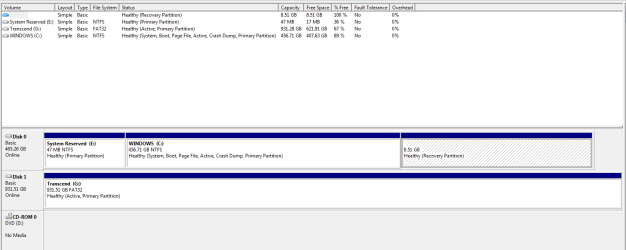
This is a shot of the DELL that I have made both Windows and AOMEI images of.

I had a look at the other identical DELL and the information is almost word-for-word the same.

That Transcend (I: ) is an external hard drive that I dis-connected prior to creating the images.

There are a few sections below those pictured that said no media or no data or somesuch, so I left them out of the shot.


On EDIT: If it is not including the restore partition in the images, would I not need to provide that volume with a letter?


EDIT again: I was wondering where all those smilies were coming from; when I typed (C-colon-) I was getting (C:)
 
Last edited:

My Computer

Computer type
PC/Desktop
Computer Manufacturer/Model Number
Dell Optiplex 780m "mini-tower"
OS
Windows 7 Pro x64
CPU
Intel Core Two Duo E8600 3.33 ghz
Motherboard
Whatever DELL put in it
Memory
8GB
Graphics Card(s)
Gigabyte Radeon R7 240
Monitor(s) Displays
HP 2159m
PSU
750 Watt Corsair CX750
Keyboard
Logitech Wireless
Mouse
Logitech Wireless
Browser
Chrome, Firefox, IE
I doubt if recovery partitions should have a drive letter.

The only thing I see wrong is that the external I drive is marked active. The only drive that should be marked active in your case would be C. You might be able to remove the active flag in Windows Disk Management--I can't recall.

You may have to use Diskpart to remove the active flag.

Here are instructions:

[How to] Make partition Active or Inactive using DISKPART › Knowledge Base

I'm not sure if the recovery partition should show as having 100% free space as it does in your pic.

You don't need to include the recovery partition in your image file UNLESS you want to be able to use that recovery partition after any image restoration--in other words, it's not needed for general operation. Any home built PC will not have a recovery partition. If you are satisfied with using Aomei for recovery, then the recovery partition is kind of superfluous.

However--maybe Dell would demand that the drive be in original condition for any warranty claim??

Or maybe there is some other reason you might want to restore to "factory" condition as opposed to some later date?

If either of those things is a possibility, then you would need to include the recovery partition. If you wanted, you could make a one-time image containing ONLY the recovery partition and thereafter just make an image of C alone.
 

My Computer

Computer type
PC/Desktop
Computer Manufacturer/Model Number
Ignatz Special; 4 speed manual gearbox; factory air conditioning; one of one
OS
Windows 7 Home Premium SP1, 64-bit
CPU
Intel Skylake i5-6600K, not overclocked
Motherboard
AsRock Z170M Extreme 4, micro ATX
Memory
8 GB HyperX DDR4-2666 (2 x 4 GB)
Graphics Card(s)
none; graphics are integrated on CPU
Sound Card
onboard: Realtek ALC1150; external: USB Behringer UF0-202
Monitor(s) Displays
Dell S2340M 23 inch IPS
Screen Resolution
1600 x 900
Hard Drives
System: Crucial MX100 series SSD, 128 GB;
Data: Samsung Spinpoint 103SJ, 1 TB;
Backup: WD Caviar Green WD30EZRX-00D8PB0, 3 TB
PSU
Rosewill SilentNight 500 watt fanless, semi-modular
Case
Antec Solo II
Cooling
Noctua NH-U12S; Noctua F12 intake, Noctua S12A exhaust
Keyboard
Microsoft 200 6JH-00001 USB
Mouse
Dell or Microsoft optical wired; USB
Antivirus
Microsoft Security Essentials and Malwarebytes Premium
Browser
Pale Moon
Other Info
All fans PWM; speeds at idle: CPU circa 500 rpm; intake circa 600 rpm; exhaust circa 600 rpm; CPU temps 27 idle and 47 C load in a warm room (27 C/81 F) when running Intel Extreme Tuning Utility stress test.
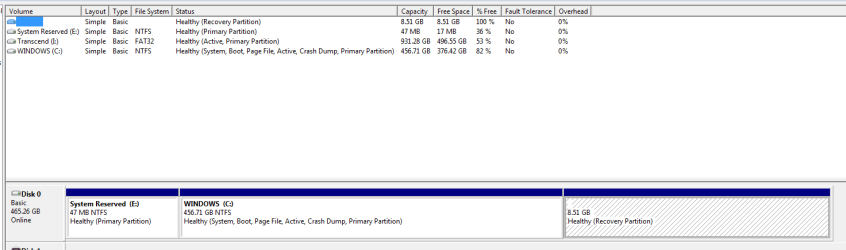
Concerning the external hard-drive, it is plugged into the same USB port that it always has been and was always letter (H: ) prior to me using EasyBCD to relocate the boot manager.
Relocating the boot manager provided the letter (E: ) to the previously unlettered System Reserve, and the external hard-drive then became (I: ) which has caused me a bit of confusion in my image editing and organizing programs.

I have no idea how or when it became marked as active; I try to always remember to disconnect it whenever poking around within the brains of this thing.


I am glad that you guys seem to know about all of this stuff as, the more I learn, the less I realize that I know....

Thanks.

On Edit: What is the significance of that drive being flagged as active ?


EDIT again: I just had a look at disk management on the other DELL and the external hard-drive connected to it is also flagged as active.
 

My Computer

Computer type
PC/Desktop
Computer Manufacturer/Model Number
Dell Optiplex 780m "mini-tower"
OS
Windows 7 Pro x64
CPU
Intel Core Two Duo E8600 3.33 ghz
Motherboard
Whatever DELL put in it
Memory
8GB
Graphics Card(s)
Gigabyte Radeon R7 240
Monitor(s) Displays
HP 2159m
PSU
750 Watt Corsair CX750
Keyboard
Logitech Wireless
Mouse
Logitech Wireless
Browser
Chrome, Firefox, IE
The active partition is normally the one from which the PC boots. I'm not sure how the external became active in your case--possibly because the backups you made with Windows Backup were stored there?
 

My Computer

Computer type
PC/Desktop
Computer Manufacturer/Model Number
Ignatz Special; 4 speed manual gearbox; factory air conditioning; one of one
OS
Windows 7 Home Premium SP1, 64-bit
CPU
Intel Skylake i5-6600K, not overclocked
Motherboard
AsRock Z170M Extreme 4, micro ATX
Memory
8 GB HyperX DDR4-2666 (2 x 4 GB)
Graphics Card(s)
none; graphics are integrated on CPU
Sound Card
onboard: Realtek ALC1150; external: USB Behringer UF0-202
Monitor(s) Displays
Dell S2340M 23 inch IPS
Screen Resolution
1600 x 900
Hard Drives
System: Crucial MX100 series SSD, 128 GB;
Data: Samsung Spinpoint 103SJ, 1 TB;
Backup: WD Caviar Green WD30EZRX-00D8PB0, 3 TB
PSU
Rosewill SilentNight 500 watt fanless, semi-modular
Case
Antec Solo II
Cooling
Noctua NH-U12S; Noctua F12 intake, Noctua S12A exhaust
Keyboard
Microsoft 200 6JH-00001 USB
Mouse
Dell or Microsoft optical wired; USB
Antivirus
Microsoft Security Essentials and Malwarebytes Premium
Browser
Pale Moon
Other Info
All fans PWM; speeds at idle: CPU circa 500 rpm; intake circa 600 rpm; exhaust circa 600 rpm; CPU temps 27 idle and 47 C load in a warm room (27 C/81 F) when running Intel Extreme Tuning Utility stress test.
The active partition is normally the one from which the PC boots. I'm not sure how the external became active in your case--possibly because the backups you made with Windows Backup were stored there?

No; the system images are stored on a separate NTSF-formatted external drive that is currently dis-connected.

On EDIT: Tomorrow, I will connect one of these drives to the other two computers, both HPs, and see whether they show as active or not.
 

My Computer

Computer type
PC/Desktop
Computer Manufacturer/Model Number
Dell Optiplex 780m "mini-tower"
OS
Windows 7 Pro x64
CPU
Intel Core Two Duo E8600 3.33 ghz
Motherboard
Whatever DELL put in it
Memory
8GB
Graphics Card(s)
Gigabyte Radeon R7 240
Monitor(s) Displays
HP 2159m
PSU
750 Watt Corsair CX750
Keyboard
Logitech Wireless
Mouse
Logitech Wireless
Browser
Chrome, Firefox, IE
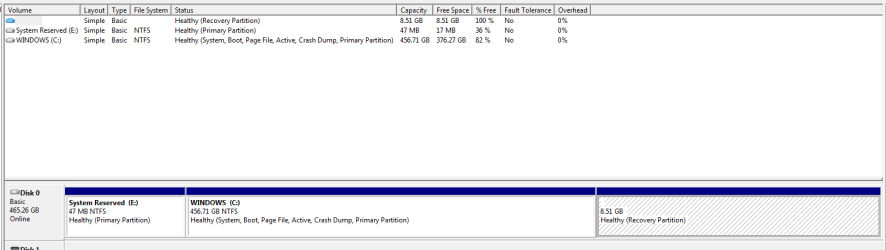
Your partition structure looks like it has been changed from the original.
The system reserved is 47MB and it should be a minimum of 100 MB. Also it isn't active and it looks like you are booting through the active drive. As commented by someone else your "Recovery" partition is empty.
If you disconnect I: I don't think your system would boot.

Simply put everything looks like it's in a bit of a mess.
I'd be backing up data on C: and getting hold of Dell system restore disks if you don't already have them. Dell used to pretty good in this area and you may even be able to get clean install disks.
 

My Computer

Computer type
PC/Desktop
Computer Manufacturer/Model Number
Own build
OS
Windows 7x64 Home Premium SP1
CPU
Intel i7 2600k
Motherboard
ASUS P8Z68 Deluxe
Memory
G.Skill Ripjaws (DDR3-1600) 2x4GB
Graphics Card(s)
Nvidia GeForce GTS 450; Intel HD Graphics 3000(GT2+)
Monitor(s) Displays
Dell Ultrasharp IPS panel U2311H, Samsung SyncMaster P2350
Screen Resolution
1920x1080
Hard Drives
Samsung 850 Pro SSD 256GB, Samsung SSD 840 120GB, Seagates 1TB Barracuda ST31000528AS x2
PSU
Seasonic M12II 520W
Case
Lian Li Lancool PC-K60
Cooling
Case: 1x120mm, 3x140mm CPU: Hyper 212+
Keyboard
Logitech MK520 (wireless)
Mouse
Logitech MK520
Internet Speed
6-7 Mbps
Antivirus
Norton Security Premium, Malwarebytes on 2 (MSE on 3rd PC)
Browser
FireFox
Other Info
Audio: Logitech Z523 2.1
"...For what it is worth, if the DVD is not already in the tray and I then insert it, pressing ENTER does not respond; at this point it says to retry boot press F1, which I did and everything then worked..."
I have the same thing over here about USB-booting; if there is no USB bootable stick in at least one usb port, then there is no choice in my desktop's F12-choose-boot-device menu.
 

My Computer

Computer type
PC/Desktop
Computer Manufacturer/Model Number
Antec desktop; Acer Aspire laptops
OS
Windows 7 Professional 64-bit
CPU
Desktop i5; Acers i5 & i7
Memory
desktop 16GB; 1 Acer 8GB & 1 Acer 16GB
Hard Drives
1TB split into 2 equal partitions [OS and data] usable by RJS
Internet Speed
AT&T DSL
Browser
FF, GChrome, msIE
Other Info
Windows 7 Firewall, Emsisoft AM/AV, MSE [scan-only], SpywareBlaster, Ruiware/BillP combine
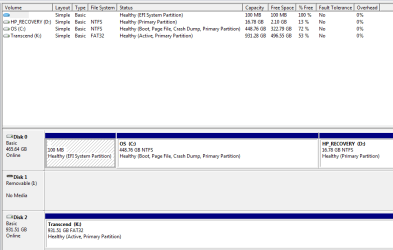
Here is disk management from the same unit posted earlier, except without the external hard-drive connected.

D-DELL_DscMgmt-2016-10-18.png

This one is the other identical Dell with a different external hard-drive connected.

C-DELL_DscMgnt-2016-10-17.png

This one is an HP G56 laptop with external hard-drive connected.

C-HPLT_DscMgmt-2016-10-18.png

This one is an HP desktop with external hard-drive connected.

D-HP_DscMgmt-2016-10-18.png

Note that in every case the external hard-drive shows as Active.
All of these computers will boot and/or restart regardless of whether any external hard-drive is connected or not.
I have no idea as to why the external hard-drives show as Active; every external hard-drive we own are identical Transcend 1TB; one of our Transcends is NTSF formatted and has only system images stored on it; the other Transcends are used for storing photo images; this Active Primary Partition business may be a Transcend thing.


Thanks for reading.
 

My Computer

Computer type
PC/Desktop
Computer Manufacturer/Model Number
Dell Optiplex 780m "mini-tower"
OS
Windows 7 Pro x64
CPU
Intel Core Two Duo E8600 3.33 ghz
Motherboard
Whatever DELL put in it
Memory
8GB
Graphics Card(s)
Gigabyte Radeon R7 240
Monitor(s) Displays
HP 2159m
PSU
750 Watt Corsair CX750
Keyboard
Logitech Wireless
Mouse
Logitech Wireless
Browser
Chrome, Firefox, IE
It should be easy enough to remove the active flag using Diskpart.
 

My Computer

Computer type
PC/Desktop
Computer Manufacturer/Model Number
Ignatz Special; 4 speed manual gearbox; factory air conditioning; one of one
OS
Windows 7 Home Premium SP1, 64-bit
CPU
Intel Skylake i5-6600K, not overclocked
Motherboard
AsRock Z170M Extreme 4, micro ATX
Memory
8 GB HyperX DDR4-2666 (2 x 4 GB)
Graphics Card(s)
none; graphics are integrated on CPU
Sound Card
onboard: Realtek ALC1150; external: USB Behringer UF0-202
Monitor(s) Displays
Dell S2340M 23 inch IPS
Screen Resolution
1600 x 900
Hard Drives
System: Crucial MX100 series SSD, 128 GB;
Data: Samsung Spinpoint 103SJ, 1 TB;
Backup: WD Caviar Green WD30EZRX-00D8PB0, 3 TB
PSU
Rosewill SilentNight 500 watt fanless, semi-modular
Case
Antec Solo II
Cooling
Noctua NH-U12S; Noctua F12 intake, Noctua S12A exhaust
Keyboard
Microsoft 200 6JH-00001 USB
Mouse
Dell or Microsoft optical wired; USB
Antivirus
Microsoft Security Essentials and Malwarebytes Premium
Browser
Pale Moon
Other Info
All fans PWM; speeds at idle: CPU circa 500 rpm; intake circa 600 rpm; exhaust circa 600 rpm; CPU temps 27 idle and 47 C load in a warm room (27 C/81 F) when running Intel Extreme Tuning Utility stress test.
It should be easy enough to remove the active flag using Diskpart.

What are the CONs of just leaving things as is ?

What are the PROs of removing the Active flag ?

Do I do this Diskpart business one time when external hard-drive X is connected to computer Y; and then the fix carry over to whichever computer hard-drive X may be connected to; or, will I have to do this on each and every computer with each external hard-drive ?

Thanks so much.
 

My Computer

Computer type
PC/Desktop
Computer Manufacturer/Model Number
Dell Optiplex 780m "mini-tower"
OS
Windows 7 Pro x64
CPU
Intel Core Two Duo E8600 3.33 ghz
Motherboard
Whatever DELL put in it
Memory
8GB
Graphics Card(s)
Gigabyte Radeon R7 240
Monitor(s) Displays
HP 2159m
PSU
750 Watt Corsair CX750
Keyboard
Logitech Wireless
Mouse
Logitech Wireless
Browser
Chrome, Firefox, IE
I should have looked more carefully. Your C: drive is system active so you are probably booting through it.
I don't know what purpose the 47 MB primary is serving and why it is labeled system reserved.
I remember once have an external marked active and it made no difference to me but I think it is best to remove the active flag.
 

My Computer

Computer type
PC/Desktop
Computer Manufacturer/Model Number
Own build
OS
Windows 7x64 Home Premium SP1
CPU
Intel i7 2600k
Motherboard
ASUS P8Z68 Deluxe
Memory
G.Skill Ripjaws (DDR3-1600) 2x4GB
Graphics Card(s)
Nvidia GeForce GTS 450; Intel HD Graphics 3000(GT2+)
Monitor(s) Displays
Dell Ultrasharp IPS panel U2311H, Samsung SyncMaster P2350
Screen Resolution
1920x1080
Hard Drives
Samsung 850 Pro SSD 256GB, Samsung SSD 840 120GB, Seagates 1TB Barracuda ST31000528AS x2
PSU
Seasonic M12II 520W
Case
Lian Li Lancool PC-K60
Cooling
Case: 1x120mm, 3x140mm CPU: Hyper 212+
Keyboard
Logitech MK520 (wireless)
Mouse
Logitech MK520
Internet Speed
6-7 Mbps
Antivirus
Norton Security Premium, Malwarebytes on 2 (MSE on 3rd PC)
Browser
FireFox
Other Info
Audio: Logitech Z523 2.1
"...For what it is worth, if the DVD is not already in the tray and I then insert it, pressing ENTER does not respond; at this point it says to retry boot press F1, which I did and everything then worked..."
I have the same thing over here about USB-booting; if there is no USB bootable stick in at least one usb port, then there is no choice in my desktop's F12-choose-boot-device menu.

Thanks; I like your Ben Franklin quote.
 

My Computer

Computer type
PC/Desktop
Computer Manufacturer/Model Number
Dell Optiplex 780m "mini-tower"
OS
Windows 7 Pro x64
CPU
Intel Core Two Duo E8600 3.33 ghz
Motherboard
Whatever DELL put in it
Memory
8GB
Graphics Card(s)
Gigabyte Radeon R7 240
Monitor(s) Displays
HP 2159m
PSU
750 Watt Corsair CX750
Keyboard
Logitech Wireless
Mouse
Logitech Wireless
Browser
Chrome, Firefox, IE
The only thing I see wrong is that the external I drive is marked active. The only drive that should be marked active in your case would be C.
You may have to use Diskpart to remove the active flag.

Well, I am most happy that we had this discussion about my external hard-drives showing up as Active.
As predicted, one of our computers decided to let that be a problem; funny thing is that it does not seem to affect any of the others at all.
I had to do a bit of detective work to make sure that was the culprit and it sure enough was.
If the external hard-drive was connected and the computer had been shut-down, upon starting it again, a black screen would say "operating system is missing".
I could click ctl-alt-del and it would then go ahead and start.
The silly thing would restart with no trouble at all.
So, I shut it down, unplugged the external hard-drive, let it sit a spell, and turned it on; minus the ext. hard-drive, it quickly booted and went right into Windows.
I gave it a few minutes, shut it down, waited a bit, and turned it on again; it fired right up and went right into Windows.
I shut it down again, re-connected the ext. hard-drive, and tried again; it stopped at the "operating system is missing" notice.
I hit ctl-alt-del and it booted into Windows.

So, I came to this thread on the hunt of the Diskpart information; then, I had to search for some instructions on how to use command lines; most of the help sites assume people know a lot more than they do.

I finally got it figured out and used Diskpart to make the external hard-drive Inactive.

Now the computer boots right up, with or without the external hard-drive.


All of that being said, I would like to know why all of our external hard-drives show as active regardless of which of our computers they get connected to.

All of our external hard-drives are identical 1-TB Transcend; and, if I have done anything that would make all of them show active, I have no idea what it would have been.


My logical reasoning mind assumes that the Diskpart change that I made only applies to that particular external hard-drive when it is connected to exactly the same USB port.

I have not yet experimented by trying any of the other USB ports to see if it remains inactive or shows as active.

Also, I doubt the fix remains with the external hard-drive when it gets connected to a different computer.

Does my reasoning seem correct ?


Thanks so much for you guys patience and understanding and all the help in getting this situation resolved.


This thread sure has wandered astray from my initial question, but that was definitely to my advantage..

Thanks for reading.
 

My Computer

Computer type
PC/Desktop
Computer Manufacturer/Model Number
Dell Optiplex 780m "mini-tower"
OS
Windows 7 Pro x64
CPU
Intel Core Two Duo E8600 3.33 ghz
Motherboard
Whatever DELL put in it
Memory
8GB
Graphics Card(s)
Gigabyte Radeon R7 240
Monitor(s) Displays
HP 2159m
PSU
750 Watt Corsair CX750
Keyboard
Logitech Wireless
Mouse
Logitech Wireless
Browser
Chrome, Firefox, IE
I think you'll just have to experiment to see what's cooking, and use the Diskpart technique you learned as required.

I do wonder if using Windows Backup is possibly the cause. For laughs, you might remove the active flag with Diskpart and then use Windows Backup to back up that particular PC to that particular external to see if that turns the external back to "active" status. It's a weird application so something like that wouldn't surprise me at all.
 

My Computer

Computer type
PC/Desktop
Computer Manufacturer/Model Number
Ignatz Special; 4 speed manual gearbox; factory air conditioning; one of one
OS
Windows 7 Home Premium SP1, 64-bit
CPU
Intel Skylake i5-6600K, not overclocked
Motherboard
AsRock Z170M Extreme 4, micro ATX
Memory
8 GB HyperX DDR4-2666 (2 x 4 GB)
Graphics Card(s)
none; graphics are integrated on CPU
Sound Card
onboard: Realtek ALC1150; external: USB Behringer UF0-202
Monitor(s) Displays
Dell S2340M 23 inch IPS
Screen Resolution
1600 x 900
Hard Drives
System: Crucial MX100 series SSD, 128 GB;
Data: Samsung Spinpoint 103SJ, 1 TB;
Backup: WD Caviar Green WD30EZRX-00D8PB0, 3 TB
PSU
Rosewill SilentNight 500 watt fanless, semi-modular
Case
Antec Solo II
Cooling
Noctua NH-U12S; Noctua F12 intake, Noctua S12A exhaust
Keyboard
Microsoft 200 6JH-00001 USB
Mouse
Dell or Microsoft optical wired; USB
Antivirus
Microsoft Security Essentials and Malwarebytes Premium
Browser
Pale Moon
Other Info
All fans PWM; speeds at idle: CPU circa 500 rpm; intake circa 600 rpm; exhaust circa 600 rpm; CPU temps 27 idle and 47 C load in a warm room (27 C/81 F) when running Intel Extreme Tuning Utility stress test.
I'd like to add to this my recent experience about using the built in windows imaging software.

Last week, I booted my Win 7 Ultimate machine and was presented with:

\windows\system32\winload.exe

Windows cant verify the digital signature of this file 0xC0000428

Running Win repair three times finally cleared the winload error but created a new issue in that
the loginui, userinit, and winlogon complain about msctf.dll missing

So I hooked up my external HD and restored the image..It was idiot proof and flawless--well except I had to get a bunch of updates, but everything was there. First time it ever happened to me and I was thrilled

Regards
 

My Computer

Computer type
PC/Desktop
Computer Manufacturer/Model Number
Clone
OS
Win 7 Professional 32 bit
CPU
AMD
Motherboard
ASUS P5QL/EPU
Memory
2 gig
Graphics Card(s)
Nvidia--what else?
Screen Resolution
1920 X 1080
Internet Speed
Wired--50 down wireless 10 down
Antivirus
NOD32
Browser
95% Firefox
Back
Top