Macrium Reflect free

trimmer

New member
Local time
6:44 PM
Messages
21
Good day, I'm using Macrium Reflect free v.5.3.7299 - It's the very last version of v.5. It was released [April 7, 2015]. I've restored my entire PC several times, Reflect worked exceptionally well. I keep #2 backups on a Toshiba Canvio 1 TB external drive. I made #2 Linux rescue DVDs, there's no need to make new backup DVDs. I put the DVD in and Macrium options come up at reboot.

I haven't kept Reflect up to date because it has no Linux rescue CD/DVD option, and I don't want Windows PE, is it? Or BartPE.? I'd like to keep it up to date.....how would I do that? Make an .ISO? If so, I don't know how I go about it. I had a slow DSL connect & downloading it was out of the question. I have a faster (DSL) connection now. I,ve read extensively, but I'm dyslexic......although, I am somewhat above average PC user.

I'm using Windows Home Premium with W 7 SP1 x64 - If this helps any: This PC was a gift, bought new in August 2010. A virus wiped it out one time (2013), besides that it's never been out of this room. Thanks in advance, best regards,
-Roy
 

My Computer My Computer

Computer type
PC/Desktop
Computer Manufacturer/Model Number
HP Pavillion p6550z CTO
OS
Windows 7 SP 1 Home Premium x64
CPU
2.90 Ghz
Motherboard
FOXCONN
Memory
4 GB
Graphics Card(s)
ATI Radeon HD 4200
Hard Drives
Western Digital
TOSHIBA External USB 3.0 USB 1TB
Antivirus
Avast free
Browser
IE 11
Ranger4 replied to this post, I got it in my email, but I don't see it here. Ranger4: You said you use Reflect v.5 full version. Do you know if the new version of Macrium have "Other Tasks" tab, and can it make a Linux rescue CD/DVD? Version 6.3.1745 is current at their website. I noticed at MajorGeeks they have version 7.0.1967. Excuse me, please......when it comes to figuring things out, and understanding, I am slow. Regards,
-Dale
 
Last edited:

My Computer My Computer

Computer type
PC/Desktop
Computer Manufacturer/Model Number
HP Pavillion p6550z CTO
OS
Windows 7 SP 1 Home Premium x64
CPU
2.90 Ghz
Motherboard
FOXCONN
Memory
4 GB
Graphics Card(s)
ATI Radeon HD 4200
Hard Drives
Western Digital
TOSHIBA External USB 3.0 USB 1TB
Antivirus
Avast free
Browser
IE 11
Hi Dale. I started to reply to your first post & then after re-reading your post I thought I was on the wrong track so I deleted my post.

I don't know if Macrium V6 or V7 have Other Tasks but I can't see why they wouldn't.

V5 can make either Win PE or Linux recovery CDs. As I had mentioned in that deleted post if you open Macrium & select Other Tasks, then select Create Rescue Media. On my version there are 2 options listed, one is Windows PE & the other is Linux. If you select the Linux option you should be able to make a rescue CD for Linux, which you can then test to make sure it works.
 

My Computer My Computer

Computer type
PC/Desktop
Computer Manufacturer/Model Number
Self built using existing case
OS
Windows 7 Home Premium 64 bit sp1
CPU
Intel i5 3570 3.4Ghz Ivy Bridge SKT 1155 quad core
Motherboard
Gigabyte Z77-HD3 SKT 1155 2xSata 3, 4x USB 3.0
Memory
G-Skill Rip Jaws 16Gb (8x2) DDR3 -1600 PC3 12800 CL 10 red
Graphics Card(s)
Gigabyte NVIDIA GT610 1Gb DDR3 810/1200 PCI-E 2.0 Silent
Sound Card
NVIDIA High Definition & Realtech High Definition Audio
Monitor(s) Displays
2 x Philips 226V4L 16:9 aspect ratio
Screen Resolution
1920 x 1080 HD
Hard Drives
Samsung 840 Pro 256gb SSD, SATA 3.
Hitachi Touro Portable 1tb, USB 3.0 HDD used for image b/ups.
PSU
Corsair VS450
Case
Codeng
Cooling
PSU fan & CPU fan
Keyboard
Logitech
Mouse
Logitech Wireless trackball M570
Internet Speed
Wireless 3G. 3mg down & 550kb up.
Antivirus
Bitdefender Internet Security 2020
Browser
Opera (Current Version) & Firefox
Other Info
MS Office 2013 Pro. Davis weather station software. MGE Nova 600 avr UPS.
I can't remember if V5 allowed one to make a Linux recovery disk in addition to Win PE or not (I'm using V6, which does not). However, there is nothing wrong with Win PE. I've used it for years with V5 and, now, V6 and it works just fine.

It will take a while to download on a slow internet connection but it is well worth the wait. Btw, I suggest using a USB thumb drive instead of a CD/DVD for the rescue media. It takes up less room in a drawer and may last even longer than burned optical media (CD/DVD). I also suggest making a spare one (you have to download Win PE only once) in case the first recovery media dies (keep in mind that all storage media is subject to sudden failure at anytime).
 

My Computer My Computer

Computer type
PC/Desktop
Computer Manufacturer/Model Number
Custom Build
OS
Win 7 Ultimate 64 bit
CPU
Intel i7-3930K
Motherboard
ASUS P9X79 WS
Memory
Kingston HyperX Genesis 32GB Kit (8x4GB Modules) 1600MHz DDR
Graphics Card(s)
MSI R7850 Twin Frozr 2GD5/OC Radeon HD 7850 2GB 256-bit GDDR
Sound Card
Asus Xonar Essence STX
Monitor(s) Displays
3x Asus VG248QE 24", Vizio 32" TV
Screen Resolution
1920 x 1080, ?
Hard Drives
Samsung 128GB 840 Pro SSD (1),
Samsung 4TB 850 EVO SSDs (4)
Samsung 4TB 850 EVO SSDs (16) external backup drives used in 2.5" hot swap bays in the computer.
PSU
Corsair HX750w
Case
Antec Two Hundred v2 (modified)
Cooling
Cooler Master GeminII S524 120mm (fan replaced with a 140mm)
Keyboard
Logitech G510s
Mouse
Logitech M525 (two in use)
Internet Speed
=< 32Mbps down, 8Mbps up
Antivirus
AVAST!, MBAM, SAS, Spybot S&D (all but MBAM free) Glary Util
Browser
IE11
Other Info
LSI 9211-8i HBA card (8 SATA III ports), 2.5" & 3.5" Hot Swap Bays, HooToo HT-CR001 PCI-E to USB 3.0 Internal Hub + 6 Slot Card Reader, and LG Model CH12LS28 BD-ROM Optical Drive. Also, ScanSnap S1500 ADF duplexing scanner, Canon 9000F flat bed scanner, Corsair SP2500 2.1 speakers, Samsung CLP 415nw laser color printer, Cyberpower PP2200SW UPS
Macrium V6.3.1745 gives options.

Maciium PE today.PNG

Jack
 

My Computer My Computer

Computer type
PC/Desktop
Computer Manufacturer/Model Number
Home made Desktop
OS
Windows 10 Pro. 64/ version 1709 Windows 7 Pro/64
CPU
Intel i7-6800K @ 4.3
Motherboard
ASUS X-99 Deluxe II
Memory
Corsair Platinum 16 gig @2400
Graphics Card(s)
EVGA GTX 1070 OC
Monitor(s) Displays
Asus 27" LED LCD/VE278Q
Screen Resolution
1920-1080 or 1280-720 HDMI
Hard Drives
INTEL SSD 730-240 Gb Sata 3.0/
PSU
EVGA Platium 1200W
Case
Phanteks Luxe Tempered Glass 8 fans/ one radiator
Cooling
XSPC/ Water Cooled CPU
Keyboard
Das 4 Professional
Mouse
Logitech M705/MX Anywhere 2-S
Internet Speed
100 mbits
Antivirus
Microsoft Security Essentials/ Malwarebytes Premium 3.0/ SAS
Browser
I.E. 11 default/Firefox/ ISP Time Warner Cable/Spectrum
Other Info
LG BluRay Burner/
Sound system-KLipsch-THX/
Icy Dock ssd Hot Swap bays.
I can't remember if V5 allowed one to make a Linux recovery disk in addition to Win PE or not (I'm using V6, which does not). However, there is nothing wrong with Win PE. I've used it for years with V5 and, now, V6 and it works just fine.
V5 does allow you to select a linux rescue ISO. I just made one then deleted it.

I have the latest V5 version on one PC and V6 on another build and I use a Win pe rescue for both. The V5 Win pe involved a larger WAIK down load and you needed to add USB 3 drivers to the Win pe (messy for those not familiar with DISM) or manually add them each time you boot the V5 Win pe. V6 pe involves a much smaller download and has native support for USB 3.

Apparently a Macrium V7 free edition is coming soon.
 

My Computer My Computer

Computer type
PC/Desktop
Computer Manufacturer/Model Number
Own build
OS
Windows 7x64 Home Premium SP1
CPU
Intel i7 2600k
Motherboard
ASUS P8Z68 Deluxe
Memory
G.Skill Ripjaws (DDR3-1600) 2x4GB
Graphics Card(s)
Nvidia GeForce GTS 450; Intel HD Graphics 3000(GT2+)
Monitor(s) Displays
Dell Ultrasharp IPS panel U2311H, Samsung SyncMaster P2350
Screen Resolution
1920x1080
Hard Drives
Samsung 850 Pro SSD 256GB, Samsung SSD 840 120GB, Seagates 1TB Barracuda ST31000528AS x2
PSU
Seasonic M12II 520W
Case
Lian Li Lancool PC-K60
Cooling
Case: 1x120mm, 3x140mm CPU: Hyper 212+
Keyboard
Logitech MK520 (wireless)
Mouse
Logitech MK520
Internet Speed
6-7 Mbps
Antivirus
Norton Security Premium, Malwarebytes on 2 (MSE on 3rd PC)
Browser
FireFox
Other Info
Audio: Logitech Z523 2.1
"...I suggest using a USB thumb drive instead of a CD/DVD for the rescue media..."
From personal experience, make at least one usb and one dvd boot of your utilities; sometimes my usb stick [which I should have boot-tested immediately after creating same] does not boot, however, the dvd does boot. Now and then, the reverse happens.
 

My Computer My Computer

Computer type
PC/Desktop
Computer Manufacturer/Model Number
Antec desktop; Acer Aspire laptops
OS
Windows 7 Professional 64-bit
CPU
Desktop i5; Acers i5 & i7
Memory
desktop 16GB; 1 Acer 8GB & 1 Acer 16GB
Hard Drives
1TB split into 2 equal partitions [OS and data] usable by RJS
Internet Speed
AT&T DSL
Browser
FF, GChrome, msIE
Other Info
Windows 7 Firewall, Emsisoft AM/AV, MSE [scan-only], SpywareBlaster, Ruiware/BillP combine
I think I'll keep Macrium v.5, Windows PE seems too complicated. I can't understand how the rescue works. If my PC won't boot to Windows, how do I access Windows PE rescue file? 'Lady Fitzgerald': Do I download "Windows PE" (rescue?) to my Toshiba Canvio external drive? Using v.5 now; I have #2 50 GB Macrium (.mrimg) files in X-Backup #1 and X-Backup #2 [folders]......all PC partitions. I only put Lynux rescue on a CD. I avoid using them when I can.

'Layback Bear': Yes, I found out I need PE 3.1 - I'm stumped on how the rescue is retrieved, if t/PC won't boot to Windows. I hope everyone can half-way get what I'm saying, regards,
-Roy
 

My Computer My Computer

Computer type
PC/Desktop
Computer Manufacturer/Model Number
HP Pavillion p6550z CTO
OS
Windows 7 SP 1 Home Premium x64
CPU
2.90 Ghz
Motherboard
FOXCONN
Memory
4 GB
Graphics Card(s)
ATI Radeon HD 4200
Hard Drives
Western Digital
TOSHIBA External USB 3.0 USB 1TB
Antivirus
Avast free
Browser
IE 11
I think I'll keep Macrium v.5, Windows PE seems too complicated. I can't understand how the rescue works. If my PC won't boot to Windows, how do I access Windows PE rescue file? 'Lady Fitzgerald': Do I download "Windows PE" (rescue?) to my Toshiba Canvio external drive? Using v.5 now; I have #2 50 GB Macrium (.mrimg) files in X-Backup #1 and X-Backup #2 [folders]......all PC partitions. I only put Lynux rescue on a CD. I avoid using them when I can.

'Layback Bear': Yes, I found out I need PE 3.1 - I'm stumped on how the rescue is retrieved, if t/PC won't boot to Windows. I hope everyone can half-way get what I'm saying, regards,
-Roy


Win PE is a separate OS from your computer's OS. It gets downloaded to your computer but then it gets installed on your rescue media. If the OS on your computer will not boot, you boot Win PE and Macrium Reflect from your rescue media, then use it to restore your OS from your image. The same thing happens if you use a Linux based rescue media.
 

My Computer My Computer

Computer type
PC/Desktop
Computer Manufacturer/Model Number
Custom Build
OS
Win 7 Ultimate 64 bit
CPU
Intel i7-3930K
Motherboard
ASUS P9X79 WS
Memory
Kingston HyperX Genesis 32GB Kit (8x4GB Modules) 1600MHz DDR
Graphics Card(s)
MSI R7850 Twin Frozr 2GD5/OC Radeon HD 7850 2GB 256-bit GDDR
Sound Card
Asus Xonar Essence STX
Monitor(s) Displays
3x Asus VG248QE 24", Vizio 32" TV
Screen Resolution
1920 x 1080, ?
Hard Drives
Samsung 128GB 840 Pro SSD (1),
Samsung 4TB 850 EVO SSDs (4)
Samsung 4TB 850 EVO SSDs (16) external backup drives used in 2.5" hot swap bays in the computer.
PSU
Corsair HX750w
Case
Antec Two Hundred v2 (modified)
Cooling
Cooler Master GeminII S524 120mm (fan replaced with a 140mm)
Keyboard
Logitech G510s
Mouse
Logitech M525 (two in use)
Internet Speed
=< 32Mbps down, 8Mbps up
Antivirus
AVAST!, MBAM, SAS, Spybot S&D (all but MBAM free) Glary Util
Browser
IE11
Other Info
LSI 9211-8i HBA card (8 SATA III ports), 2.5" & 3.5" Hot Swap Bays, HooToo HT-CR001 PCI-E to USB 3.0 Internal Hub + 6 Slot Card Reader, and LG Model CH12LS28 BD-ROM Optical Drive. Also, ScanSnap S1500 ADF duplexing scanner, Canon 9000F flat bed scanner, Corsair SP2500 2.1 speakers, Samsung CLP 415nw laser color printer, Cyberpower PP2200SW UPS
Hey, 'RolandJS' - I'll learn how Windows PE works by trial & error, that's how I usually do with all software that's a bit advanced, I call it.

'Lady Fitzgerald' - Your reply about Win PE being "a separate OS from your computer's OS" helped.... it enlighten things a bit. Like I told 'RolandJS', I'll jump into it & figure it out......that's what I did when I started using Macrium. It was pretty easy. One thing, on reboot I hit the wrong option t/first try. I choose Verbose the second time and it worked like a charm. Have a good evening, many thanks to all,
-Roy
 

My Computer My Computer

Computer type
PC/Desktop
Computer Manufacturer/Model Number
HP Pavillion p6550z CTO
OS
Windows 7 SP 1 Home Premium x64
CPU
2.90 Ghz
Motherboard
FOXCONN
Memory
4 GB
Graphics Card(s)
ATI Radeon HD 4200
Hard Drives
Western Digital
TOSHIBA External USB 3.0 USB 1TB
Antivirus
Avast free
Browser
IE 11
I think I'll keep Macrium v.5, Windows PE seems too complicated. I can't understand how the rescue works. If my PC won't boot to Windows, how do I access Windows PE rescue file? 'Lady Fitzgerald': Do I download "Windows PE" (rescue?) to my Toshiba Canvio external drive? Using v.5 now; I have #2 50 GB Macrium (.mrimg) files in X-Backup #1 and X-Backup #2 [folders]......all PC partitions. I only put Lynux rescue on a CD. I avoid using them when I can.

'Layback Bear': Yes, I found out I need PE 3.1 - I'm stumped on how the rescue is retrieved, if t/PC won't boot to Windows. I hope everyone can half-way get what I'm saying, regards,
-Roy

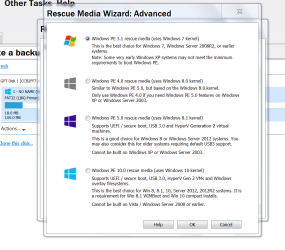
On my paid version of Macrium V5, the Create Rescue Media screen contain an Advanced button under the Windows PE section. Clicking on that shows selection options PE 3.1, PE 4.0 & PE 5.0, I use PE 5.0 as it contains USB 3.0 drivers, which I need.

You can use any of them for Windows 7 if you want to, the higher number ones contain more hardware & have more drivers etc..

I have never been able to get any USB drive to work for creating the rescue media, so I use a CD. The most important thing to do afterwards is to make sure the rescue media works.

Dale, the Rescue Disc is used to boot the computer, then it provides the ability to locate your backed up image or whatever from it's source, so you can reinstall Windows exactly as it was when you created the back up.

You would use it for example if you a hard drive failure, or the system becoming totally corrupted for some reason, or a serious virus attack. However, do not have the back up drive connected to the computer all the time as a serious virus attack can find it's way onto it & ruin the back up.
 

My Computer My Computer

Computer type
PC/Desktop
Computer Manufacturer/Model Number
Self built using existing case
OS
Windows 7 Home Premium 64 bit sp1
CPU
Intel i5 3570 3.4Ghz Ivy Bridge SKT 1155 quad core
Motherboard
Gigabyte Z77-HD3 SKT 1155 2xSata 3, 4x USB 3.0
Memory
G-Skill Rip Jaws 16Gb (8x2) DDR3 -1600 PC3 12800 CL 10 red
Graphics Card(s)
Gigabyte NVIDIA GT610 1Gb DDR3 810/1200 PCI-E 2.0 Silent
Sound Card
NVIDIA High Definition & Realtech High Definition Audio
Monitor(s) Displays
2 x Philips 226V4L 16:9 aspect ratio
Screen Resolution
1920 x 1080 HD
Hard Drives
Samsung 840 Pro 256gb SSD, SATA 3.
Hitachi Touro Portable 1tb, USB 3.0 HDD used for image b/ups.
PSU
Corsair VS450
Case
Codeng
Cooling
PSU fan & CPU fan
Keyboard
Logitech
Mouse
Logitech Wireless trackball M570
Internet Speed
Wireless 3G. 3mg down & 550kb up.
Antivirus
Bitdefender Internet Security 2020
Browser
Opera (Current Version) & Firefox
Other Info
MS Office 2013 Pro. Davis weather station software. MGE Nova 600 avr UPS.
Just another thought FWIW. :)

I've used Macrium for many years and I think it's a great product. I always save my image to an external USB drive. Pretty standard procedure, right? Until the time I needed the image and found out the external drive no longer worked. That got me thinking (a very rare thing for me to do.) Having all images on one external drive is no guarantee I can access them when needed. Likewise, relying on just one product (Macrium), no matter how great it is, there's no guarantee the rescue media will work when you need it most.

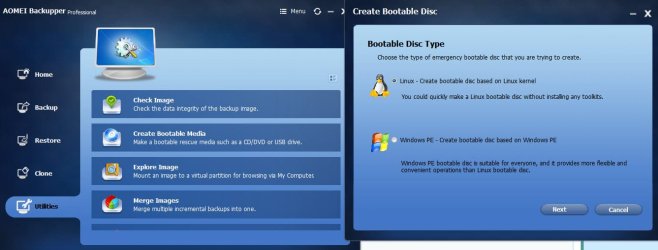
Now I used two external drives for redundancy (I'm betting both drives won't fail at the same time) and I use two different imaging programs for the same reason (Macrium Free and AOMEI.) AOMEI has been as reliable as Macrium and it offers either PE or Linux rescue media. As I said, just a thought.

Best Free Backup Software for Windows 10, Windows 8.1/8, Windows 7, Vista, XP

aomei.jpg
 

My Computer My Computer

Computer type
Laptop
Computer Manufacturer/Model Number
Sony Vaio VPCEB47GM Laptop
OS
Win 7 Pro 64-bit
CPU
Intel i5 2.4 Ghz
Memory
8GB DDR3
Graphics Card(s)
Intel HD 3000
Sound Card
IDT High Definition
Monitor(s) Displays
15.6 WGXA Anti-Glare LED
Screen Resolution
1280x800
Hard Drives
640Gb 7200rpm
Antivirus
MSE
Browser
Opera (primary) with IE9 backup
...Now I used two external drives for redundancy (I'm betting both drives won't fail at the same time)...

That's similar to what I do for the same reason. I have a set of four backup drives for each drive in my computer: two of each set I keep onsite and the other two I keep offsite (in my safe deposit box at my credit union). I once had a data drive get corrupted and corrupted one backup drive while trying to update it. I was easily able to recover within a few hours because I knew what files I had added since the previous backup and was able to copy them to another drive, then formatted the corrupted data and backup drives, repopulate the data drive from the second backup drive, copy the files I had rescued back to that data drive, then update both backup drives. Since this happened on a Saturday morning, had I had only one onsite and one offsite backup drives, I otherwise would have had to wait until Monday when I could retrieve my offsite backup, recover what I could from it, then recover the rest from my Carbonite account. I would have been down for several days instead of just several hours.

Since then, going all SSD has saved me a ton of time and space. Ferrying backup drives to and from my safe deposit box is easier, faster, and one heckuvalot easier on the old back.
 

My Computer My Computer

Computer type
PC/Desktop
Computer Manufacturer/Model Number
Custom Build
OS
Win 7 Ultimate 64 bit
CPU
Intel i7-3930K
Motherboard
ASUS P9X79 WS
Memory
Kingston HyperX Genesis 32GB Kit (8x4GB Modules) 1600MHz DDR
Graphics Card(s)
MSI R7850 Twin Frozr 2GD5/OC Radeon HD 7850 2GB 256-bit GDDR
Sound Card
Asus Xonar Essence STX
Monitor(s) Displays
3x Asus VG248QE 24", Vizio 32" TV
Screen Resolution
1920 x 1080, ?
Hard Drives
Samsung 128GB 840 Pro SSD (1),
Samsung 4TB 850 EVO SSDs (4)
Samsung 4TB 850 EVO SSDs (16) external backup drives used in 2.5" hot swap bays in the computer.
PSU
Corsair HX750w
Case
Antec Two Hundred v2 (modified)
Cooling
Cooler Master GeminII S524 120mm (fan replaced with a 140mm)
Keyboard
Logitech G510s
Mouse
Logitech M525 (two in use)
Internet Speed
=< 32Mbps down, 8Mbps up
Antivirus
AVAST!, MBAM, SAS, Spybot S&D (all but MBAM free) Glary Util
Browser
IE11
Other Info
LSI 9211-8i HBA card (8 SATA III ports), 2.5" & 3.5" Hot Swap Bays, HooToo HT-CR001 PCI-E to USB 3.0 Internal Hub + 6 Slot Card Reader, and LG Model CH12LS28 BD-ROM Optical Drive. Also, ScanSnap S1500 ADF duplexing scanner, Canon 9000F flat bed scanner, Corsair SP2500 2.1 speakers, Samsung CLP 415nw laser color printer, Cyberpower PP2200SW UPS
I always recommend storing system images on more than one ext HDD. In the past I used 2 imaging programs - Macrium and Windows inbuilt. In multiple image restores to the existing OS drive and new drives both programs have worked reliably. Windows inbuilt is limited and not in the same class as Macrium so I eventually ditched it. I rely solely on Macrium and given the large number of system images and restores I've made I don't think I need another imaging program. I put the effort in making more regular system images.

Last time I heard AOMEI was Chinese software while Macrium Reflect is developed in the UK if that makes a difference.
 

My Computer My Computer

Computer type
PC/Desktop
Computer Manufacturer/Model Number
Own build
OS
Windows 7x64 Home Premium SP1
CPU
Intel i7 2600k
Motherboard
ASUS P8Z68 Deluxe
Memory
G.Skill Ripjaws (DDR3-1600) 2x4GB
Graphics Card(s)
Nvidia GeForce GTS 450; Intel HD Graphics 3000(GT2+)
Monitor(s) Displays
Dell Ultrasharp IPS panel U2311H, Samsung SyncMaster P2350
Screen Resolution
1920x1080
Hard Drives
Samsung 850 Pro SSD 256GB, Samsung SSD 840 120GB, Seagates 1TB Barracuda ST31000528AS x2
PSU
Seasonic M12II 520W
Case
Lian Li Lancool PC-K60
Cooling
Case: 1x120mm, 3x140mm CPU: Hyper 212+
Keyboard
Logitech MK520 (wireless)
Mouse
Logitech MK520
Internet Speed
6-7 Mbps
Antivirus
Norton Security Premium, Malwarebytes on 2 (MSE on 3rd PC)
Browser
FireFox
Other Info
Audio: Logitech Z523 2.1
I always recommend storing system images on more than one ext HDD...

I agree although I go a bit farther. Since I am using a paid version of Macrium Reflect that allows me to install the Recovery Boot Menu option (when booting the computer, I can choose between Win 7 or Win PE/Macrium Reflect instead using separate rescue media), I save images to one of my internal data drives (G:) for convenience. That way, if I need to restore an image and my C: drive is still good, I don't need to use my rescue USB drive and one of my "external" backup drives. I also don't need to plug in one of my backup drives when saving an image. Normally, saving a backup to an internal drive is a very bad idea but, since my G: drive gets backed up anyway, the images also get backed up.

Each image is on either three drives—G: internal and its two onsite backups—or five drives—G: internal, its two onsite backups, and its two offsite backups—depending on when the offsite backups get updated.

My backup scheme is insanely redundant but I have data that either would be expensive and/or time consuming to replace or is flat impossible to replace.
 

My Computer My Computer

Computer type
PC/Desktop
Computer Manufacturer/Model Number
Custom Build
OS
Win 7 Ultimate 64 bit
CPU
Intel i7-3930K
Motherboard
ASUS P9X79 WS
Memory
Kingston HyperX Genesis 32GB Kit (8x4GB Modules) 1600MHz DDR
Graphics Card(s)
MSI R7850 Twin Frozr 2GD5/OC Radeon HD 7850 2GB 256-bit GDDR
Sound Card
Asus Xonar Essence STX
Monitor(s) Displays
3x Asus VG248QE 24", Vizio 32" TV
Screen Resolution
1920 x 1080, ?
Hard Drives
Samsung 128GB 840 Pro SSD (1),
Samsung 4TB 850 EVO SSDs (4)
Samsung 4TB 850 EVO SSDs (16) external backup drives used in 2.5" hot swap bays in the computer.
PSU
Corsair HX750w
Case
Antec Two Hundred v2 (modified)
Cooling
Cooler Master GeminII S524 120mm (fan replaced with a 140mm)
Keyboard
Logitech G510s
Mouse
Logitech M525 (two in use)
Internet Speed
=< 32Mbps down, 8Mbps up
Antivirus
AVAST!, MBAM, SAS, Spybot S&D (all but MBAM free) Glary Util
Browser
IE11
Other Info
LSI 9211-8i HBA card (8 SATA III ports), 2.5" & 3.5" Hot Swap Bays, HooToo HT-CR001 PCI-E to USB 3.0 Internal Hub + 6 Slot Card Reader, and LG Model CH12LS28 BD-ROM Optical Drive. Also, ScanSnap S1500 ADF duplexing scanner, Canon 9000F flat bed scanner, Corsair SP2500 2.1 speakers, Samsung CLP 415nw laser color printer, Cyberpower PP2200SW UPS
I learned from experience.
You will need a P.E. made from a MBR and a P.E. made from a UEIF computer. They are not interchangeable.
Not a big deal. Just make them and label them.

Jack
 

My Computer My Computer

Computer type
PC/Desktop
Computer Manufacturer/Model Number
Home made Desktop
OS
Windows 10 Pro. 64/ version 1709 Windows 7 Pro/64
CPU
Intel i7-6800K @ 4.3
Motherboard
ASUS X-99 Deluxe II
Memory
Corsair Platinum 16 gig @2400
Graphics Card(s)
EVGA GTX 1070 OC
Monitor(s) Displays
Asus 27" LED LCD/VE278Q
Screen Resolution
1920-1080 or 1280-720 HDMI
Hard Drives
INTEL SSD 730-240 Gb Sata 3.0/
PSU
EVGA Platium 1200W
Case
Phanteks Luxe Tempered Glass 8 fans/ one radiator
Cooling
XSPC/ Water Cooled CPU
Keyboard
Das 4 Professional
Mouse
Logitech M705/MX Anywhere 2-S
Internet Speed
100 mbits
Antivirus
Microsoft Security Essentials/ Malwarebytes Premium 3.0/ SAS
Browser
I.E. 11 default/Firefox/ ISP Time Warner Cable/Spectrum
Other Info
LG BluRay Burner/
Sound system-KLipsch-THX/
Icy Dock ssd Hot Swap bays.
I learned from experience.
You will need a P.E. made from a MBR and a P.E. made from a UEIF computer. They are not interchangeable.
Not a big deal. Just make them and label them.

Jack

True that. Although I'm currently using only MBR for my boot disks/partitions on my computer, I still make a USB recovery "disk" for each one of them just to play it safe (plus I will have one available whenever I take one of my notebooks on the road).
 

My Computer My Computer

Computer type
PC/Desktop
Computer Manufacturer/Model Number
Custom Build
OS
Win 7 Ultimate 64 bit
CPU
Intel i7-3930K
Motherboard
ASUS P9X79 WS
Memory
Kingston HyperX Genesis 32GB Kit (8x4GB Modules) 1600MHz DDR
Graphics Card(s)
MSI R7850 Twin Frozr 2GD5/OC Radeon HD 7850 2GB 256-bit GDDR
Sound Card
Asus Xonar Essence STX
Monitor(s) Displays
3x Asus VG248QE 24", Vizio 32" TV
Screen Resolution
1920 x 1080, ?
Hard Drives
Samsung 128GB 840 Pro SSD (1),
Samsung 4TB 850 EVO SSDs (4)
Samsung 4TB 850 EVO SSDs (16) external backup drives used in 2.5" hot swap bays in the computer.
PSU
Corsair HX750w
Case
Antec Two Hundred v2 (modified)
Cooling
Cooler Master GeminII S524 120mm (fan replaced with a 140mm)
Keyboard
Logitech G510s
Mouse
Logitech M525 (two in use)
Internet Speed
=< 32Mbps down, 8Mbps up
Antivirus
AVAST!, MBAM, SAS, Spybot S&D (all but MBAM free) Glary Util
Browser
IE11
Other Info
LSI 9211-8i HBA card (8 SATA III ports), 2.5" & 3.5" Hot Swap Bays, HooToo HT-CR001 PCI-E to USB 3.0 Internal Hub + 6 Slot Card Reader, and LG Model CH12LS28 BD-ROM Optical Drive. Also, ScanSnap S1500 ADF duplexing scanner, Canon 9000F flat bed scanner, Corsair SP2500 2.1 speakers, Samsung CLP 415nw laser color printer, Cyberpower PP2200SW UPS
V5 does allow you to select a linux rescue ISO. I just made one then deleted it.

I have the latest V5 version on one PC and V6 on another build and I use a Win pe rescue for both. The V5 Win pe involved a larger WAIK down load and you needed to add USB 3 drivers to the Win pe (messy for those not familiar with DISM) or manually add them each time you boot the V5 Win pe. V6 pe involves a much smaller download and has native support for USB 3.

Apparently a Macrium V7 free edition is coming soon.

Today I read that it might be in a couple of months but they have had soooo many updates to Version 7 that I might wait even longer.
 

My Computer My Computer

Computer type
PC/Desktop
Computer Manufacturer/Model Number
Home Built
OS
Windows `10 Professional 64bit
CPU
Intel i5 [email protected]
Motherboard
MSI P67A-GD55 (MS7681)
Memory
Corsair Vengeance DDR3 1600 16G
Graphics Card(s)
NVIDIA GeForce GT520 1GHz
Sound Card
Realtek High Definition Audio
Monitor(s) Displays
Haans G 241
Screen Resolution
1600X1024
Hard Drives
Crucial MX100 256GB SSD
PSU
OCZ ModXStream Modular High Performance 500 Watt
Case
Rosewill Challenger-U3
Cooling
Just Fans
Keyboard
Kensington K64338B
Mouse
Microsoft wheel mouse 1.1A
Internet Speed
240.0 Mbps
Antivirus
ESET Internet Security
Browser
Firefox
Other Info
SuperAntiSpyware-Pro
Malwarebytes (Premium)
Kerish Doctor
I let Macrium update itself, it got the Win PE (162 MB in about 25 minutes) - I deleted my oldest backup, off my Toshiba external drive. All went real well. I made a Win. PE rescue on a DVD-RW.......it was about 360 MB. I can tell you, I DO NOT LIKE counting on CD/DVDs, so, like THE dumb-ass I am, I tried to put another PE rescue on my Toshiba 1 TB drive. It scattered throughout the drive. I went to boot my PC up and it would not boot to Windows. It didn't take me long to figure out it was trying to boot from the rescue on my Toshiba external drive. I could have just unplugged it, but I put my (old) Linux rescue DVD in, and somehow Macrium v6 recognized it & restored my PC back to (before) I ever updated Macrium Reflect.

I have an 8 GB SanDisc Cruzer thumb drive, but it's old and sometimes it just fails. I have a bunch of software (3.7 GB) setups on it, like WPS Office.exe, K-Lite Codec Pack....exe's, zips, mp3s...huge exe's, etc. Just to see when and how long it takes to crash. I can reformat it because t/things I have on it are just duplicate files I already have on my Toshiba and my PCs HDD. Well, I know how to use Win PE now. My SanDisc Cruzer hasn't failed in about #5 months, I'll wipe it and keep one Win. PE rescue files (only) on it. I'll buy a new thumb drive, no problem there. I have a 2 TB external drive....but one day I was cleaning the carpet and I accidentally plugged my Creative Inspire's sub-woofer jack in it and it fried the wiring. I can put it inside my PC, it has a 'bay' w/room for #2 HDD's, other than my PCs 454 GB HDD.
Thanks very much, everyone, regards,
-Roy
 

My Computer My Computer

Computer type
PC/Desktop
Computer Manufacturer/Model Number
HP Pavillion p6550z CTO
OS
Windows 7 SP 1 Home Premium x64
CPU
2.90 Ghz
Motherboard
FOXCONN
Memory
4 GB
Graphics Card(s)
ATI Radeon HD 4200
Hard Drives
Western Digital
TOSHIBA External USB 3.0 USB 1TB
Antivirus
Avast free
Browser
IE 11
Back
Top