Solved macrium reflect not compatible with 4k drives?

Deleted695

New member
Local time
11:58 AM
Messages
45
I use macrium reflect free with a 2tbyte 512bytes/sector drive and it works.
I tried macrium reflect free on a new drive 3tbyte 4k/sector and it gave an error:
Error during the last asynchronous operation.
- Returned HRESULT = 0x8004230f
- Error text: VSS_E_UNEXPECTED_PROVIDER_ERROR
- Please re-run VSHADOW.EXE with the /tracing option to get more details
Completing the backup (BackupComplete) ...
ERROR: COM call "m_pVssObject->BackupComplete(&pAsync)" failed.
- Returned HRESULT = 0x80042301
- Error text: VSS_E_BAD_STATE

does macrium reflect free not work with 4k drives?Does this mean you can use reflect only on 2tb drives or below?
 
What were you trying to do when you encountered the error? Was it when you tried to install the software or when you tried to backup or what?

You might have better luck contacting the makers of Macrium Reflect. Here's a link to their trouble shooting section on their website: Troubleshooting - KnowledgeBase - Macrium Reflect Knowledgebase

They also have a forum that you could ask your question on.
 

My Computer

Computer type
PC/Desktop
Computer Manufacturer/Model Number
Home Built desktop, Dell G15 5511 Gaming laptop,MS Surface Pro 7 tablet
OS
W10 Pro desktop, W11 laptop, W11 Pro tablet (all 64-bit)
CPU
3.7Ghz 8700K i7, i7-11800H, i7-1065G7
Motherboard
ASUS TUF Z370-Pro Gaming in desktop
Memory
16G desktop, 16G laptop, 4G tablet
Graphics Card(s)
AMD Radeon RX580, RTX 3060, Intel Iris Plus
Sound Card
High Definition Audio (Built-in to mobo)
Monitor(s) Displays
Samsung U32J59 32" (2x), 15.6", 12"
Screen Resolution
3840x2160, 3840x2160, 1920x1080, 2160x1440
Hard Drives
500G SSD for OS; 2T, 10T & 15T HDDs for Data on Desktop, 1TB SSD laptop, 128G SSD tablet.
PSU
Corsair CX 750M
Case
Antec 100
Cooling
CM 212+
Keyboard
IBM Model M - used continuously since 1986
Mouse
Microsoft Pro IntelliMouse
Internet Speed
400M down 8M up
Antivirus
Windows Defender
Browser
FireFox
Other Info
Built my first computer (8Mhz 8088cpu, 640K RAM, 20MB HDD, 2 360K floppy drives) in 1985 and have been building them for myself, relatives and friends ever since.
maybe i have to take contact with western digital because in the reflect knowledge base there is a note some wd discs may be formatted to " windows vista compatibility" with 512e sector which gives no VSS error
the formatting would be perfomed with a wd software
 
This may shed some light on the subject:

v5: Incompatible Disk Selected (Version 5.x)
Incompatible Disk Selected - KnowledgeBase - Macrium Reflect Knowledgebase (Version 6.x)

The only situation that will not work properly is putting a saved Reflect image using 512 or 512e(mulation) sectors (saved to Drive X:\, for example) onto a 4096 byte target (C:\) drive. You can save the image but you can't actually use it when you need it.
This is why I made sure to buy an older-style 500GB WD 512 byte sector drive to save Macrium images, in order to match my 160GB WD 512 byte sector boot drive. I didn't want to take any chances with so-called "512 emulation" or 4096 byte sectors on a new drive.
 

My Computer

Computer type
PC/Desktop
Computer Manufacturer/Model Number
Self-Built
OS
Win10 Pro 64-bit
CPU
AMD Ryzen 7 3800X
Motherboard
Gigabyte X570 UD
Memory
32 GB Kingston DDR4-2666
Graphics Card(s)
MSI nVidia GT 710 (2GB)
Sound Card
Creative Audigy FX 5.1
Monitor(s) Displays
ViewSonic VG2439Smh 24"
Screen Resolution
1920x1080
Hard Drives
3xWD1TB; 1xSeagate 1TB... all spinning rust
PSU
EVGA 100-W1-0500-KR (500w)
Case
SilverStone PS10 (modified)
Cooling
CPU:AMD Wraith Prism. Case:3x Noctua 120mm
Keyboard
Compaq Professional PS/2
Mouse
Microsoft Basic Optical Mouse 2.0
Internet Speed
Fiber 1Gbit/sec down/up
Antivirus
Avast Free
Browser
FF, Chrome
Other Info
2x LG GH24NSC0 DVD burners, Mackie CR3 monitor speakers
The documentation speaks only about source and target disc but my problem is none of them: my problem is the disc where I save the image file on during the backup.
This saving gives a windows shadow copy error with a 4K disc to save.
I have no "incompatible disc selected" error.
I've tried to backup an image on the 4K drive with windows 8.1 and that works.
For me it's difficult to use a small 500Gbyte drive because de c: drive to image is 650Gbyte (450Gbyte used): so i could take only 1 image.
 

My Computer

Computer type
PC/Desktop
Computer Manufacturer/Model Number
home built
OS
Multi-Boot W7_Pro_x64 W8.1_Pro_x64 W10_Pro_x64 +Linux_VMs +Chromium_VM
CPU
AMD Athlon II x4 620
Motherboard
Gigabyte GA-MA785G-UD3H
Memory
6GB GSkill DDR2 800
Graphics Card(s)
AMD 4670 GPU + AMD 4200 IGP
Sound Card
on board Realtek ALC889A
Monitor(s) Displays
RCA 40" LCD TV, Insignia 32" LCD TV, HP 15" LCD monitor
Screen Resolution
1680 x 1050
Hard Drives
OCZ Vertex 3 120GB,
Samsung F3 1TB (3),
Several others - WD, Seagate, Hitachi, ...
PSU
Corsair 500 W
Case
Rosewill mid tower
Cooling
CM 90mm rifle
Keyboard
Gyration wireless, Logitech wireless, Dell USB wired
Mouse
Gyration wireless, Logitech wireless, V7 USB wired
Internet Speed
Spectrum - 100Mbps D / 10Mbps U
Antivirus
Avast, MBAM3, EMET, WinPatrol
Browser
Pale Moon, Firefox, IE
Other Info
2 multi-boot PC's
Mainly HTPC/Office/Gen purpose (no gaming).
Trendnet USB KVM.
LG DVD burner/Blue Ray Player.
Tray system for removable SATA backup drives.

Not currently OCd, under-volted.
I use Hybrid sleep, rarely re-boot or shutdown.

Hauppauge HD-PVR, Avermedia PCIe TV Tuner, Hauppauge PCI TV Tuner.
If the Windows Volume Shadow Service/Copy needs to be fixed, in Safe Mode with Networking, ran tweaking.com's Windows Repair (All in One), VSS checkmarked, and maybe even items #26 & 27. NoelDP brought up an excellent point in another thread about Everyone permission rights during WR's run, you'll have to search for his comment.
 

My Computer

Computer type
PC/Desktop
Computer Manufacturer/Model Number
Antec desktop; Acer Aspire laptops
OS
Windows 7 Professional 64-bit
CPU
Desktop i5; Acers i5 & i7
Memory
desktop 16GB; 1 Acer 8GB & 1 Acer 16GB
Hard Drives
1TB split into 2 equal partitions [OS and data] usable by RJS
Internet Speed
AT&T DSL
Browser
FF, GChrome, msIE
Other Info
Windows 7 Firewall, Emsisoft AM/AV, MSE [scan-only], SpywareBlaster, Ruiware/BillP combine
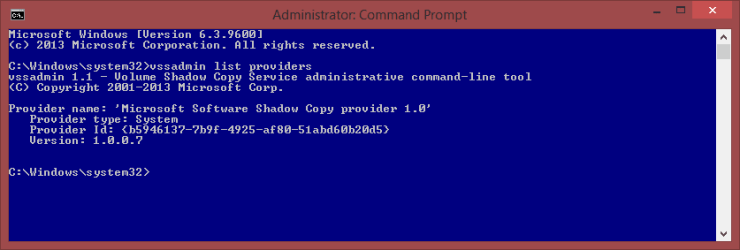
I have also only one provider: see my attached cmd screenshot.
My windows 7 home laptop macrium reflect works with a 512e drive.So i think there is nothing wrong with windows shadow copy.Maybe windows 7 SP1 shadow copy is not compatible with 4k drives.
I want to use the 4k drive because i want to keep the images on 512e drive which is full.
In the following tekst:
https://support.microsoft.com/en-us/kb/2510009
they say 4k drives are not supported in windows 7!
but the shop sellers pretends the wd drive my passport 3tb is compatible with windows 7
i can paste (little)files on the 4k drive with windows 7 file explorer
 
If the suggestion by RolandJS doesn't help, there is a lot of documentation in the Macrium Help Troubleshooting section for VSS errors.
Troubleshooting - KnowledgeBase - Macrium Reflect Knowledgebase.

From what i read there, I'm not sure if MR will work with 4K sectors.

I have a 3TB HD with 512 sectors.
I don't use USB drives, i prefer the speed of SATA.
I have removable trays so i can pop SATA bare drives in and out easily.

Maybe you can return the drive and exchange it for one with 512 sectors.
You might consider getting a HD docking station so you can use OEM bare drives for backups/offline storage.
 

My Computer

Computer type
PC/Desktop
Computer Manufacturer/Model Number
home built
OS
Multi-Boot W7_Pro_x64 W8.1_Pro_x64 W10_Pro_x64 +Linux_VMs +Chromium_VM
CPU
AMD Athlon II x4 620
Motherboard
Gigabyte GA-MA785G-UD3H
Memory
6GB GSkill DDR2 800
Graphics Card(s)
AMD 4670 GPU + AMD 4200 IGP
Sound Card
on board Realtek ALC889A
Monitor(s) Displays
RCA 40" LCD TV, Insignia 32" LCD TV, HP 15" LCD monitor
Screen Resolution
1680 x 1050
Hard Drives
OCZ Vertex 3 120GB,
Samsung F3 1TB (3),
Several others - WD, Seagate, Hitachi, ...
PSU
Corsair 500 W
Case
Rosewill mid tower
Cooling
CM 90mm rifle
Keyboard
Gyration wireless, Logitech wireless, Dell USB wired
Mouse
Gyration wireless, Logitech wireless, V7 USB wired
Internet Speed
Spectrum - 100Mbps D / 10Mbps U
Antivirus
Avast, MBAM3, EMET, WinPatrol
Browser
Pale Moon, Firefox, IE
Other Info
2 multi-boot PC's
Mainly HTPC/Office/Gen purpose (no gaming).
Trendnet USB KVM.
LG DVD burner/Blue Ray Player.
Tray system for removable SATA backup drives.

Not currently OCd, under-volted.
I use Hybrid sleep, rarely re-boot or shutdown.

Hauppauge HD-PVR, Avermedia PCIe TV Tuner, Hauppauge PCI TV Tuner.
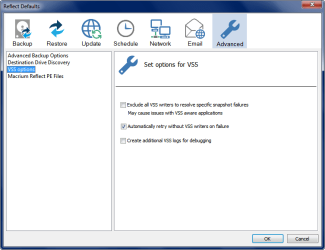
I forgot to mention, in the Macrium GUI menu click on
Other Tasks > Edit Defaults > Advanced tab > VSS options

There are some settings there you could play with and see if they help, such as "Exclude all VSS writers..."

Personally i would not trust a backup created without VSS writers until i successfully restored it.
For testing like that, i backup and restore a small partition that is not important.

MR_VSS_Options.PNG
 

My Computer

Computer type
PC/Desktop
Computer Manufacturer/Model Number
home built
OS
Multi-Boot W7_Pro_x64 W8.1_Pro_x64 W10_Pro_x64 +Linux_VMs +Chromium_VM
CPU
AMD Athlon II x4 620
Motherboard
Gigabyte GA-MA785G-UD3H
Memory
6GB GSkill DDR2 800
Graphics Card(s)
AMD 4670 GPU + AMD 4200 IGP
Sound Card
on board Realtek ALC889A
Monitor(s) Displays
RCA 40" LCD TV, Insignia 32" LCD TV, HP 15" LCD monitor
Screen Resolution
1680 x 1050
Hard Drives
OCZ Vertex 3 120GB,
Samsung F3 1TB (3),
Several others - WD, Seagate, Hitachi, ...
PSU
Corsair 500 W
Case
Rosewill mid tower
Cooling
CM 90mm rifle
Keyboard
Gyration wireless, Logitech wireless, Dell USB wired
Mouse
Gyration wireless, Logitech wireless, V7 USB wired
Internet Speed
Spectrum - 100Mbps D / 10Mbps U
Antivirus
Avast, MBAM3, EMET, WinPatrol
Browser
Pale Moon, Firefox, IE
Other Info
2 multi-boot PC's
Mainly HTPC/Office/Gen purpose (no gaming).
Trendnet USB KVM.
LG DVD burner/Blue Ray Player.
Tray system for removable SATA backup drives.

Not currently OCd, under-volted.
I use Hybrid sleep, rarely re-boot or shutdown.

Hauppauge HD-PVR, Avermedia PCIe TV Tuner, Hauppauge PCI TV Tuner.
Exculde vss writers

Hi Davide,
I saw your message about the reflect option "exclusion of vss writers" in my email box,not on the sevenforum site.
I have tried that option but i got the same Vss error as behoren from which the knowledge base says the cause is probably non-standaard sector size.
I think i am going to format to 512emulation.I've asked the needed software to western digital
 
Hi louis14,

Let me know what you find out about this.
I'm very interested in knowing, i'm looking at buying some new HD's/SSD's right now.

This 4K sector size issue is new to me, and i'd like to know what specs to look for when buying a new HD/SSD.

FOR ME, there is little value in buying a larger HD if it won't work with Macrium (or other) backup imaging programs.
 

My Computer

Computer type
PC/Desktop
Computer Manufacturer/Model Number
home built
OS
Multi-Boot W7_Pro_x64 W8.1_Pro_x64 W10_Pro_x64 +Linux_VMs +Chromium_VM
CPU
AMD Athlon II x4 620
Motherboard
Gigabyte GA-MA785G-UD3H
Memory
6GB GSkill DDR2 800
Graphics Card(s)
AMD 4670 GPU + AMD 4200 IGP
Sound Card
on board Realtek ALC889A
Monitor(s) Displays
RCA 40" LCD TV, Insignia 32" LCD TV, HP 15" LCD monitor
Screen Resolution
1680 x 1050
Hard Drives
OCZ Vertex 3 120GB,
Samsung F3 1TB (3),
Several others - WD, Seagate, Hitachi, ...
PSU
Corsair 500 W
Case
Rosewill mid tower
Cooling
CM 90mm rifle
Keyboard
Gyration wireless, Logitech wireless, Dell USB wired
Mouse
Gyration wireless, Logitech wireless, V7 USB wired
Internet Speed
Spectrum - 100Mbps D / 10Mbps U
Antivirus
Avast, MBAM3, EMET, WinPatrol
Browser
Pale Moon, Firefox, IE
Other Info
2 multi-boot PC's
Mainly HTPC/Office/Gen purpose (no gaming).
Trendnet USB KVM.
LG DVD burner/Blue Ray Player.
Tray system for removable SATA backup drives.

Not currently OCd, under-volted.
I use Hybrid sleep, rarely re-boot or shutdown.

Hauppauge HD-PVR, Avermedia PCIe TV Tuner, Hauppauge PCI TV Tuner.
Attention:i believe only western digital can format 4k nativ drive to 512e (4096bytes physical sector,512 bytes logical sector) because it needs a special firmware
 
Thanks louis14,

fyi, my 3TB HD with 512 sector size is a Seagate.
 

My Computer

Computer type
PC/Desktop
Computer Manufacturer/Model Number
home built
OS
Multi-Boot W7_Pro_x64 W8.1_Pro_x64 W10_Pro_x64 +Linux_VMs +Chromium_VM
CPU
AMD Athlon II x4 620
Motherboard
Gigabyte GA-MA785G-UD3H
Memory
6GB GSkill DDR2 800
Graphics Card(s)
AMD 4670 GPU + AMD 4200 IGP
Sound Card
on board Realtek ALC889A
Monitor(s) Displays
RCA 40" LCD TV, Insignia 32" LCD TV, HP 15" LCD monitor
Screen Resolution
1680 x 1050
Hard Drives
OCZ Vertex 3 120GB,
Samsung F3 1TB (3),
Several others - WD, Seagate, Hitachi, ...
PSU
Corsair 500 W
Case
Rosewill mid tower
Cooling
CM 90mm rifle
Keyboard
Gyration wireless, Logitech wireless, Dell USB wired
Mouse
Gyration wireless, Logitech wireless, V7 USB wired
Internet Speed
Spectrum - 100Mbps D / 10Mbps U
Antivirus
Avast, MBAM3, EMET, WinPatrol
Browser
Pale Moon, Firefox, IE
Other Info
2 multi-boot PC's
Mainly HTPC/Office/Gen purpose (no gaming).
Trendnet USB KVM.
LG DVD burner/Blue Ray Player.
Tray system for removable SATA backup drives.

Not currently OCd, under-volted.
I use Hybrid sleep, rarely re-boot or shutdown.

Hauppauge HD-PVR, Avermedia PCIe TV Tuner, Hauppauge PCI TV Tuner.
FYI. I successfully image with MR from a 512b sector drive to a WD Elements 4GB 4k sector drive and have this morning successfully restored one of those images.
 

My Computer

Computer type
Laptop
Computer Manufacturer/Model Number
Hewlett-Packard/G62-107SA Notebook
OS
Microsoft Windows 7 Home Premium 64-bit Service Pack 1
CPU
Intel(R) Core(TM) i3 CPU M 330 @ 2.13GHz
Motherboard
Hewlett-Packard 1425
Memory
8 GB DDR3
Graphics Card(s)
Intel(R) HD Graphics
Sound Card
Realtek High Definition Audio
Monitor(s) Displays
Builtin
Screen Resolution
1366 x 768 x 32 bits (4294967296 colors) @ 60 Hz
Hard Drives
250 GB SATA Hard Disk Drive 7200 rpm
2TB Seagate GoFlex USB 2 Drive
1TB Iomega Prestige USB 2 Drive
1.5TB Iomega Prestige USB 2 Drive (Samsung)
2TB WD MyBook Live NAS.
Mouse
Logitech Anywhere MX
Internet Speed
152 Mbs download 10 Mbs upload
Antivirus
Norton 360
Browser
Chrome
hi kado897,
which os do you use to backup this image?
BTW I don't know the difference between 512e and 512b
 
512b - 512 bytes
512e - 512 bytes emulated.

I use Macrium Reflect.

I think it is OK in the direction I use (c: drive is 512 backup drive 4096) but not the reverse.
 

My Computer

Computer type
Laptop
Computer Manufacturer/Model Number
Hewlett-Packard/G62-107SA Notebook
OS
Microsoft Windows 7 Home Premium 64-bit Service Pack 1
CPU
Intel(R) Core(TM) i3 CPU M 330 @ 2.13GHz
Motherboard
Hewlett-Packard 1425
Memory
8 GB DDR3
Graphics Card(s)
Intel(R) HD Graphics
Sound Card
Realtek High Definition Audio
Monitor(s) Displays
Builtin
Screen Resolution
1366 x 768 x 32 bits (4294967296 colors) @ 60 Hz
Hard Drives
250 GB SATA Hard Disk Drive 7200 rpm
2TB Seagate GoFlex USB 2 Drive
1TB Iomega Prestige USB 2 Drive
1.5TB Iomega Prestige USB 2 Drive (Samsung)
2TB WD MyBook Live NAS.
Mouse
Logitech Anywhere MX
Internet Speed
152 Mbs download 10 Mbs upload
Antivirus
Norton 360
Browser
Chrome
I've made a Back-up to an image file with reflect from a a c: 512e drive to a 4k drive drive on a Windows 8.1 computer and that succeededs but i have a Vss error in the same situation on a Windows 7 sp1 computer.
 
According to Macrium that should work. Perhaps you have a different problem. VSS is not an area I'm comfortable with.
 

My Computer

Computer type
Laptop
Computer Manufacturer/Model Number
Hewlett-Packard/G62-107SA Notebook
OS
Microsoft Windows 7 Home Premium 64-bit Service Pack 1
CPU
Intel(R) Core(TM) i3 CPU M 330 @ 2.13GHz
Motherboard
Hewlett-Packard 1425
Memory
8 GB DDR3
Graphics Card(s)
Intel(R) HD Graphics
Sound Card
Realtek High Definition Audio
Monitor(s) Displays
Builtin
Screen Resolution
1366 x 768 x 32 bits (4294967296 colors) @ 60 Hz
Hard Drives
250 GB SATA Hard Disk Drive 7200 rpm
2TB Seagate GoFlex USB 2 Drive
1TB Iomega Prestige USB 2 Drive
1.5TB Iomega Prestige USB 2 Drive (Samsung)
2TB WD MyBook Live NAS.
Mouse
Logitech Anywhere MX
Internet Speed
152 Mbs download 10 Mbs upload
Antivirus
Norton 360
Browser
Chrome
Back
Top