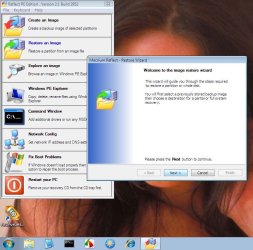
Apologies if this is an improper location for this post, I received help here before.
I recently re-formatted my vista pc to WIn7. I had posted asking about an imaging program (WIn7/Macrium) and decided to go with Macrium Free, but I just noticed I don't have the option to do an "Incremental" back up, If using the free addition. Is my only choice to do a "complete disk image" every time? Unless I'm missing something.
I printed the tutorial at Macrium's site, but the walk through screen shots don't look exactly like the program I'm using, I believe they are for the full edition.
I'm I better off to purchase the full product and schedule an "Incremental" back up to run on a regular basis?
So far using Macrium Free, I have - 1. made a "Rescue CD" in the Linux recovery environment. I'm hesitant to test this CD for fear It will screw something up, I know I need to, but don't understand exactly how to do it, or what to expect!
The instructions say to power machine completely down before using (Testing?) the "Rescue CD" ?? How am I supposed to get the disc into the tray with the machine off ? Can I insert the disc, then power down, then re-power?
what do I need to look for and where do I stop the process to just check the "Rescue CD" for a working copy, before it moves the image to my fully functional pc?
2. I went ahead and created a "Disc Image" in it's own folder on an external HD.
Thanks in advance.. for any help!
Bret
I recently re-formatted my vista pc to WIn7. I had posted asking about an imaging program (WIn7/Macrium) and decided to go with Macrium Free, but I just noticed I don't have the option to do an "Incremental" back up, If using the free addition. Is my only choice to do a "complete disk image" every time? Unless I'm missing something.
I printed the tutorial at Macrium's site, but the walk through screen shots don't look exactly like the program I'm using, I believe they are for the full edition.
I'm I better off to purchase the full product and schedule an "Incremental" back up to run on a regular basis?
So far using Macrium Free, I have - 1. made a "Rescue CD" in the Linux recovery environment. I'm hesitant to test this CD for fear It will screw something up, I know I need to, but don't understand exactly how to do it, or what to expect!
The instructions say to power machine completely down before using (Testing?) the "Rescue CD" ?? How am I supposed to get the disc into the tray with the machine off ? Can I insert the disc, then power down, then re-power?
what do I need to look for and where do I stop the process to just check the "Rescue CD" for a working copy, before it moves the image to my fully functional pc?
2. I went ahead and created a "Disc Image" in it's own folder on an external HD.
Thanks in advance.. for any help!
Bret
My Computer
- Computer type
- PC/Desktop
- Computer Manufacturer/Model Number
- Gateway GT 5676
- OS
- Windows 7 Home premium 64bit SP 1
- CPU
- AMD Phenom Quad Core 9600 2.3 GHz
- Motherboard
- 4006272R - Foxconn (Bengal) RS780 Motherboard
- Memory
- 8GB of DDR2
- Graphics Card(s)
- Integrated ATI Radeon HD 3200 video /Sapphire Radeon HD 3470
- Sound Card
- Integrated ALC888S HD codec 7.1
- Monitor(s) Displays
- 19" Samsung SyncMaster
- Screen Resolution
- 1440x900
- Hard Drives
- One Internal Samsung 500GB SSD 850EVO
One Internal 320 GB 7200 RPM SATA II hard drives
One Toshiba 1TB External
- PSU
- Ultra LSP 650W
- Case
- Gateway 5-Bay uATX Computer Case (Carbon Fiber)
- Cooling
- CPU - Arctic Cooler Freezer 64
- Keyboard
- HP
- Mouse
- Logitech Laser
- Internet Speed
- Down 54.0Mbps Up 5.8Mbps Charter (Spectrum)
- Antivirus
- avast Pro
- Browser
- FireFox 40.02