Magnifier Gadget; Getting It To Magnify-How ?

Robert11

New member
Power User
Local time
3:20 AM
Messages
542
Hello,

I'm sure I'm doing something really dumb, but cannot seem to get that Magnifier gadget that comes with W7 to work.

When I open it up, I do get the bezel that looks like a magnifier, and I can move it all over the text or a screen just fine, but nothing inside of it seems magnified.

What am I doing wrong, or not doing, please ?

Thanks,
Bob
 

My Computer My Computer

At a glance

Windows 7 64bit
OS
Windows 7 64bit
Bob, type magnifier in search
When it comes up hit the plus sign. The entire page will magnify.
 

My Computer My Computer

At a glance

Windows 10, Home Clean InstallIntel Core2 processsor Q8200(2.33Ghz 1333FSB)...6 gbATI Radeon 256MB HD3650
Computer type
PC/Desktop
Computer Manufacturer/Model Number
Dell XPS 420
OS
Windows 10, Home Clean Install
CPU
Intel Core2 processsor Q8200(2.33Ghz 1333FSB) Quad Core Tech
Motherboard
Dell
Memory
6 gb
Graphics Card(s)
ATI Radeon 256MB HD3650
Sound Card
Intergrated 7.1 Channel Audio
Monitor(s) Displays
Dell SP2009W 20"
Hard Drives
640 GB Serial ATA Hard drive
Cooling
Fan
Keyboard
Dell USB Keyboard
Mouse
Dell Premium Optical USB
Internet Speed
DSL 2.85
Put your cursor where you want the focus, then hold down the windows key on keyboard and press the + key next to backspace. Each time you press it, the screen will zoom. Windows plus the - (minus) zooms out. Winkey + = zoom in Winkey - = zoom out.
 

My Computer My Computer

At a glance

Win7 Home Premium x64 W10Pro&HomeA12 9720p 4+8 TurionII M5206GB 8GBR7
Computer type
Laptop
Computer Manufacturer/Model Number
HP 17-ak0xx, dv7 3173nr
OS
Win7 Home Premium x64 W10Pro&Home
CPU
A12 9720p 4+8 TurionII M520
Motherboard
HP 3839
Memory
6GB 8GB
Graphics Card(s)
R7
Monitor(s) Displays
24" sa550
Screen Resolution
1600x900 1920x1080
Mouse
Logitechx2
Internet Speed
120Mb/s down 12up
Mine zooms just by hitting the plus or minus
 

My Computer My Computer

At a glance

Windows 10, Home Clean InstallIntel Core2 processsor Q8200(2.33Ghz 1333FSB)...6 gbATI Radeon 256MB HD3650
Computer type
PC/Desktop
Computer Manufacturer/Model Number
Dell XPS 420
OS
Windows 10, Home Clean Install
CPU
Intel Core2 processsor Q8200(2.33Ghz 1333FSB) Quad Core Tech
Motherboard
Dell
Memory
6 gb
Graphics Card(s)
ATI Radeon 256MB HD3650
Sound Card
Intergrated 7.1 Channel Audio
Monitor(s) Displays
Dell SP2009W 20"
Hard Drives
640 GB Serial ATA Hard drive
Cooling
Fan
Keyboard
Dell USB Keyboard
Mouse
Dell Premium Optical USB
Internet Speed
DSL 2.85
Hello,

I'm sure I'm doing something really dumb, but cannot seem to get that Magnifier gadget that comes with W7 to work.

When I open it up, I do get the bezel that looks like a magnifier, and I can move it all over the text or a screen just fine, but nothing inside of it seems magnified.

What am I doing wrong, or not doing, please ?

Thanks,
Bob

The part that looks like a little magnifier-glass is an icon only, and is there to provide a place from which you can access it's settings. If you click it, you get this:
Image2.jpg

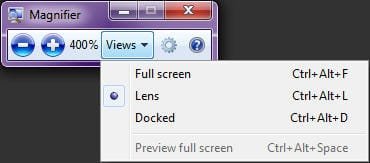
Clicking the "Views" option brings up a menu from which you can select "Full Screen", "Lens" or "Docked" options:
Image3.jpg

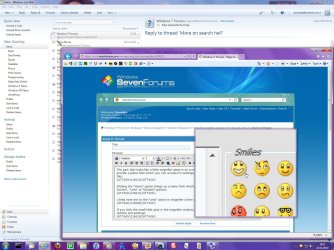
I keep mine set to the "Lens" option in magnifier (when I have it running):
Image1.jpg

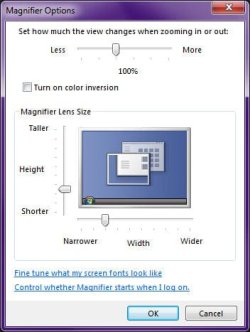
If you click the small little gear in the magnifier window, you can access other options and settings:
Image4.jpg
 

My Computer My Computer

At a glance

Windows 7 Professional 32-bit SP1AMD A4/A63.00GB EDOVMware SVGA 3D
Computer type
PC/Desktop
Computer Manufacturer/Model Number
Virtual Machine
OS
Windows 7 Professional 32-bit SP1
CPU
AMD A4/A6
Motherboard
Intel Corporation 440BX Desktop Reference Platform
Memory
3.00GB EDO
Graphics Card(s)
VMware SVGA 3D
Sound Card
High Definition Audio Device
Monitor(s) Displays
Generic Non-PnP Monitor on VMware SVGA 3D
Screen Resolution
1440x900
Hard Drives
1 x 60GB VMware Virtual SATA Hard Drive ATA Device
Antivirus
Kaspersky Total Security
Put your cursor where you want the focus, then hold down the windows key on keyboard and press the + key next to backspace. Each time you press it, the screen will zoom. Windows plus the - (minus) zooms out. Winkey + = zoom in Winkey - = zoom out.


instead of the + or - you can also use your mouse scroll wheel to zoom in and out while pressing the Ctrl key. Just FYI
 

My Computer My Computer

At a glance

Windows 8 ProfessionalAMD Phenom II X68 GBXFX ATI Radeon 4890
Computer Manufacturer/Model Number
Custom
OS
Windows 8 Professional
CPU
AMD Phenom II X6
Motherboard
ASUS
Memory
8 GB
Graphics Card(s)
XFX ATI Radeon 4890
Monitor(s) Displays
Dual 22" LCD
Screen Resolution
1680x1050
Hard Drives
PC Drives

HD0 = Crucial SSD 128gb Sata III
HD1 = 300gb (Seagate Barracuda)

NAS

HD0 = 1.5TB (Maxtor) Raid1
HD1 = 1.5TB (Maxtor) Raid1
HD2 = 1TB (Segate) Raid5
HD3 = 1TB (Segate) Raid5
HD4 = 1TB (Segate) Raid5
HD5 = 1TB (Segate) Raid5
PSU
750 watt
Mouse
Razr Mamba
Internet Speed
50 down 35 up FIOS
From OP:

Hi,

Great Forum.

Thanks for info.

Happy Thanksgiving,
Bob
 

My Computer My Computer

At a glance

Windows 7 64bit
OS
Windows 7 64bit
Same to you Bob, not too much Turkey, now.
 

My Computer My Computer

At a glance

Windows 10, Home Clean InstallIntel Core2 processsor Q8200(2.33Ghz 1333FSB)...6 gbATI Radeon 256MB HD3650
Computer type
PC/Desktop
Computer Manufacturer/Model Number
Dell XPS 420
OS
Windows 10, Home Clean Install
CPU
Intel Core2 processsor Q8200(2.33Ghz 1333FSB) Quad Core Tech
Motherboard
Dell
Memory
6 gb
Graphics Card(s)
ATI Radeon 256MB HD3650
Sound Card
Intergrated 7.1 Channel Audio
Monitor(s) Displays
Dell SP2009W 20"
Hard Drives
640 GB Serial ATA Hard drive
Cooling
Fan
Keyboard
Dell USB Keyboard
Mouse
Dell Premium Optical USB
Internet Speed
DSL 2.85
Back
Top