Windows Magnifier - No Access to Adjustments

baumgrenze

New member
Member
VIP
Local time
1:57 AM
Messages
300
Location
Charlottesville, VA
Windows Magnifier - No Access to Adjustments in Title Bar

I looked at Brink's tutorial.

Magnifier Starts at Startup - Enable or Disable - Windows 7 Help Forums

He shows a 'gear' on the Windows Magnifier that allows access to adjustments. (image)

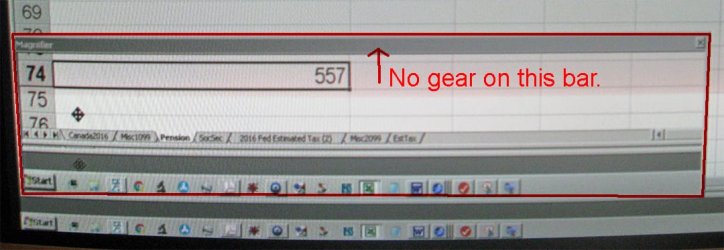
How do I get the program to show the 'gear?' What I see is an image the same size as the original, just offset. (image)

I tried a 'screen dump' and snipping and apparently the Magnifier is not captured by either. I apologize for the attached digital camera image which does show what I see when Magnifier is running. I drew a red box around the title bar and an arrow pointing to it. I've tried all the 'clicking tricks' I know to no avail.

I am in Win7/Pro x64.

DOsod

thanks
baumgrenze
 

Attachments

  • IMG_6339_Sel_Windows7Magnifier.jpg
    IMG_6339_Sel_Windows7Magnifier.jpg
    69.3 KB · Views: 1
  • SevenForumsMagnifierTutorialTitleBar.jpg
    SevenForumsMagnifierTutorialTitleBar.jpg
    22.9 KB · Views: 22
Last edited:

My Computer My Computer

At a glance

Win 7 Pro 64Intel Core 2 Quad Q6600 (2.4 GHz) Quad Core2 x Crucial 4GB Kit (2GBx2) DDR2 CT2KIT25664A...Sapphire Radeon HD 3870 PCIe 512 Mb
Computer type
PC/Desktop
Computer Manufacturer/Model Number
Custom built by GamePC/Solid Electric - Palo Alto - on 03/10/08
OS
Win 7 Pro 64
CPU
Intel Core 2 Quad Q6600 (2.4 GHz) Quad Core
Motherboard
Gigabyte GA-P35-DS3P Intel P35 ATX (rev. 2.1)
Memory
2 x Crucial 4GB Kit (2GBx2) DDR2 CT2KIT25664AA800
Graphics Card(s)
Sapphire Radeon HD 3870 PCIe 512 Mb
Sound Card
RealTek audio on MOBO + EDIROL UA-1EX
Monitor(s) Displays
Samsung S24A450BW 24" LED monitor
Screen Resolution
1600 x 1200 at 75 Hz
Hard Drives
2 Crucial 128 Gb SSD (CT128M550SSD1)
one mounted and running Win7/Pro x64
one disconnected containing only Win10/Pro upgrade - in process
1 1TB WD Caviar Black (WD1003FZEX-00MK2A0) (Data drive)
1 2TB Seagate 2TB (PN/ 9JB1N3-576 - ST2000DM001-1ER
PSU
Seasonic S12-HT 650W 80% Efficiency Power Supply
Case
Lian Li PC-B25B
Cooling
Gigabyte Silent-Pipe
Keyboard
Dell MS Comfort
Mouse
HP x4000 wireless
Internet Speed
Sonic FTTN @ 23 Mbps
Antivirus
Avast
Browser
SeaMonkey
Other Info
BIOS: Award Software International, Inc. F6 06/18/2009

System Specs - Updated on 09//16/19
Hi baumgrenze, If you go to Control Panel, Ease of Access, and Click start magnifier does the gear show up.
 

Attachments

  • Capture.3.PNG
    Capture.3.PNG
    137.2 KB · Views: 0

My Computer My Computer

At a glance

Windows 10 Pro 64 bitAMD A4-5300 APU with Radeon(tm) HD Graphics8.00 GBAMD Radeon HD 7480D
Computer type
PC/Desktop
Computer Manufacturer/Model Number
ASUS A85XM-A custom build
OS
Windows 10 Pro 64 bit
CPU
AMD A4-5300 APU with Radeon(tm) HD Graphics
Motherboard
ASUSTeK COMPUTER INC. A85XM-A
Memory
8.00 GB
Graphics Card(s)
AMD Radeon HD 7480D
Sound Card
(1) High Definition Audio Device (2) Realtek High Definiti
Monitor(s) Displays
HP W2072a 20 inch Led Backlit Monitor
Screen Resolution
1600 x 900 x 32 bits (4294967296 colors) @ 60 Hz
Hard Drives
TOSHIBA DT01ACA100 SATA Disk Device
Keyboard
Acer
Mouse
Acer
Internet Speed
varies
Antivirus
Windows Defender Antivirus
Browser
Waterfox, Edge
Hi ethel,

Thanks for the response.

No. That is how I opened the instance I photographed. The title bar is very simple, one line, dark grey, with the word Magnifier at the left and a closing X at the right (no maximizer, minimizer, etc.) I can change the size by dragging the edges.

It is pretty useless as it is since the magnification is 1.

thanks
baumgrenze
 

My Computer My Computer

At a glance

Win 7 Pro 64Intel Core 2 Quad Q6600 (2.4 GHz) Quad Core2 x Crucial 4GB Kit (2GBx2) DDR2 CT2KIT25664A...Sapphire Radeon HD 3870 PCIe 512 Mb
Computer type
PC/Desktop
Computer Manufacturer/Model Number
Custom built by GamePC/Solid Electric - Palo Alto - on 03/10/08
OS
Win 7 Pro 64
CPU
Intel Core 2 Quad Q6600 (2.4 GHz) Quad Core
Motherboard
Gigabyte GA-P35-DS3P Intel P35 ATX (rev. 2.1)
Memory
2 x Crucial 4GB Kit (2GBx2) DDR2 CT2KIT25664AA800
Graphics Card(s)
Sapphire Radeon HD 3870 PCIe 512 Mb
Sound Card
RealTek audio on MOBO + EDIROL UA-1EX
Monitor(s) Displays
Samsung S24A450BW 24" LED monitor
Screen Resolution
1600 x 1200 at 75 Hz
Hard Drives
2 Crucial 128 Gb SSD (CT128M550SSD1)
one mounted and running Win7/Pro x64
one disconnected containing only Win10/Pro upgrade - in process
1 1TB WD Caviar Black (WD1003FZEX-00MK2A0) (Data drive)
1 2TB Seagate 2TB (PN/ 9JB1N3-576 - ST2000DM001-1ER
PSU
Seasonic S12-HT 650W 80% Efficiency Power Supply
Case
Lian Li PC-B25B
Cooling
Gigabyte Silent-Pipe
Keyboard
Dell MS Comfort
Mouse
HP x4000 wireless
Internet Speed
Sonic FTTN @ 23 Mbps
Antivirus
Avast
Browser
SeaMonkey
Other Info
BIOS: Award Software International, Inc. F6 06/18/2009

System Specs - Updated on 09//16/19
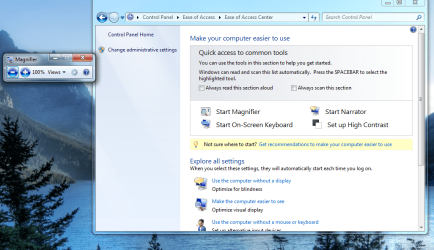
Hi again, Does it come up if you try from the Start Menu, All Programs, Accessories, Ease of Access,
Magnifier.:D
 

My Computer My Computer

At a glance

Windows 10 Pro 64 bitAMD A4-5300 APU with Radeon(tm) HD Graphics8.00 GBAMD Radeon HD 7480D
Computer type
PC/Desktop
Computer Manufacturer/Model Number
ASUS A85XM-A custom build
OS
Windows 10 Pro 64 bit
CPU
AMD A4-5300 APU with Radeon(tm) HD Graphics
Motherboard
ASUSTeK COMPUTER INC. A85XM-A
Memory
8.00 GB
Graphics Card(s)
AMD Radeon HD 7480D
Sound Card
(1) High Definition Audio Device (2) Realtek High Definiti
Monitor(s) Displays
HP W2072a 20 inch Led Backlit Monitor
Screen Resolution
1600 x 900 x 32 bits (4294967296 colors) @ 60 Hz
Hard Drives
TOSHIBA DT01ACA100 SATA Disk Device
Keyboard
Acer
Mouse
Acer
Internet Speed
varies
Antivirus
Windows Defender Antivirus
Browser
Waterfox, Edge
Hi again, Does it come up if you try from the Start Menu, All Programs, Accessories, Ease of Access,
Magnifier.:D

Sorry to be so slow in responding. If I use this approach I get the classic error drop-down error:

"There is no disk in the drive. Please insert a disk into drive\Device\Harddisk3\DR3"

It presents the options Cancel - Try Again - Continue

If I try them enough times the Magnifier opens.

I tried understanding the error message and I cannot make sense of what I find, e.g.,

https://social.technet.microsoft.co...h-hdd-is-deviceharddiskdr-?forum=winservergen

Well down in the thread is this answer, which I tried, but the result was to arcane for me to follow:


The number in the [FONT=&quot]DRx[/FONT] part at the end really does not have any special meaning. It is just a sequence number which starts at 0 and increases ever since. That means it matches the preceding [FONT=&quot]HarddiskX[/FONT] part after boot, but if you plug or unplug some drives, the number keeps increasing and naturally gets out of sync.
As for pinpointing the exact disk from a path like [FONT=&quot]\Device\Harddisk1\DR3[/FONT], this works for me:
Download WinObj from Sysinternals
Run it as administrator
Go to [FONT=&quot]\Device\HarddiskX[/FONT]
You will see individual [FONT=&quot]PartitionY[/FONT] symbolic links (to [FONT=&quot]\Device\HarddiskVolumeZ[/FONT]), note these down
Go to [FONT=&quot]\GLOBAL??[/FONT], sort by the 3rd column "SymLink"
Find the [FONT=&quot]\Device\HarddiskVolumeZ[/FONT] value you noted down in the 3rd column
You will see various names of that volume in the first column, including [FONT=&quot]HarddiskXPartitionY[/FONT], [FONT=&quot]Volume{GUID}[/FONT] and (what's probably most useful for most people) the DOS-style letter like [FONT=&quot]C:[/FONT]
Proposed as answer by QuiqueSein Tuesday, March 10, 2015 3:28 PM
Tuesday, March 03, 2015 1:54 AM

What next?

thanks
baumgrenze
 

My Computer My Computer

At a glance

Win 7 Pro 64Intel Core 2 Quad Q6600 (2.4 GHz) Quad Core2 x Crucial 4GB Kit (2GBx2) DDR2 CT2KIT25664A...Sapphire Radeon HD 3870 PCIe 512 Mb
Computer type
PC/Desktop
Computer Manufacturer/Model Number
Custom built by GamePC/Solid Electric - Palo Alto - on 03/10/08
OS
Win 7 Pro 64
CPU
Intel Core 2 Quad Q6600 (2.4 GHz) Quad Core
Motherboard
Gigabyte GA-P35-DS3P Intel P35 ATX (rev. 2.1)
Memory
2 x Crucial 4GB Kit (2GBx2) DDR2 CT2KIT25664AA800
Graphics Card(s)
Sapphire Radeon HD 3870 PCIe 512 Mb
Sound Card
RealTek audio on MOBO + EDIROL UA-1EX
Monitor(s) Displays
Samsung S24A450BW 24" LED monitor
Screen Resolution
1600 x 1200 at 75 Hz
Hard Drives
2 Crucial 128 Gb SSD (CT128M550SSD1)
one mounted and running Win7/Pro x64
one disconnected containing only Win10/Pro upgrade - in process
1 1TB WD Caviar Black (WD1003FZEX-00MK2A0) (Data drive)
1 2TB Seagate 2TB (PN/ 9JB1N3-576 - ST2000DM001-1ER
PSU
Seasonic S12-HT 650W 80% Efficiency Power Supply
Case
Lian Li PC-B25B
Cooling
Gigabyte Silent-Pipe
Keyboard
Dell MS Comfort
Mouse
HP x4000 wireless
Internet Speed
Sonic FTTN @ 23 Mbps
Antivirus
Avast
Browser
SeaMonkey
Other Info
BIOS: Award Software International, Inc. F6 06/18/2009

System Specs - Updated on 09//16/19
Hi again, I have asked for more help as I am the same as you and do not understand the way to fix this.:D
 

My Computer My Computer

At a glance

Windows 10 Pro 64 bitAMD A4-5300 APU with Radeon(tm) HD Graphics8.00 GBAMD Radeon HD 7480D
Computer type
PC/Desktop
Computer Manufacturer/Model Number
ASUS A85XM-A custom build
OS
Windows 10 Pro 64 bit
CPU
AMD A4-5300 APU with Radeon(tm) HD Graphics
Motherboard
ASUSTeK COMPUTER INC. A85XM-A
Memory
8.00 GB
Graphics Card(s)
AMD Radeon HD 7480D
Sound Card
(1) High Definition Audio Device (2) Realtek High Definiti
Monitor(s) Displays
HP W2072a 20 inch Led Backlit Monitor
Screen Resolution
1600 x 900 x 32 bits (4294967296 colors) @ 60 Hz
Hard Drives
TOSHIBA DT01ACA100 SATA Disk Device
Keyboard
Acer
Mouse
Acer
Internet Speed
varies
Antivirus
Windows Defender Antivirus
Browser
Waterfox, Edge
Hi

from an elevated command mode please run

sfc /scannow


Hopefully it will re-install the missing Settings, gear, option.

Roy
 

My Computer My Computer

At a glance

W7 home premium 32bit/W7HP 64bit/w10 tp insid...E5300 dual core3gbNvidia Geforce 7100 Nforce 630i
Computer type
PC/Desktop
Computer Manufacturer/Model Number
medionl/Aspire 6930G/acer x55a
OS
W7 home premium 32bit/W7HP 64bit/w10 tp insider ring
CPU
E5300 dual core
Motherboard
medion MS7366
Memory
3gb
Graphics Card(s)
Nvidia Geforce 7100 Nforce 630i
Monitor(s) Displays
avixc
Internet Speed
n (isp resticted to 72)
Antivirus
mse/pands
Browser
palemoon
Other Info
Belkin Fd7050 n USB using Railink RT2870 drivers, more upto date
Back
Top