Solved Mailto protocol missing

abedrax

New member
Member
Local time
7:06 AM
Messages
21
Location
Suffolk UK
Hi All

I cannot create a "mailto" shortcut that works. It appears that the mailto protocol is missing, Windows Live Mail is set as my default mail client in WLM settings, but it doe's not appear in the default program list. The only thing that shows up with any connection with WLM is "Windows Contacts"

I have been reading articles about this problem, and one suggested that a registry tweak in the "mailto" entry may repair the problem. However there is no "mailto" entry at the suggested location in the reg.

In default programs / Set program access and computer defaults / custom, I can choose WLM as my default email program, but when I return to that setting again it has reverted to "use current".

When I create a mailto shortcut it defaults it's association with Chrome, my default browser and carries a Chrome icon. I have re-installed WLM but that did nothing to resolve the problem.

Am running W7 Ultimate.


If anyone can help, it will be most appreciated.........

Thankyou for your help...Abe
 

My Computer

OS
windows 7 ultimate 64 bit
CPU
Intel Celeron E3300 2.5GHz Dual core
Motherboard
ASUS P5G41C-M LX
Memory
4GB DDR3
Graphics Card(s)
Onboard Intel G41 Express Chipset
Monitor(s) Displays
AOC 2219 22" WS
Screen Resolution
1680 x 1050
Hard Drives
Maxtor 500GB sata
Seagate 500GB Ext
Internet Speed
20MG
  • Like
Reactions: JMH
Hello Abe,

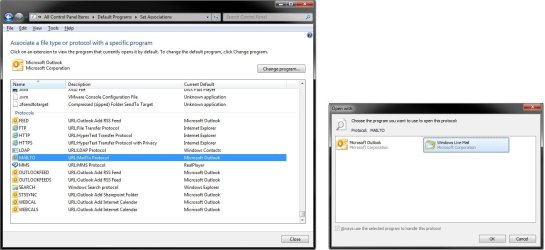
You can go into Default Programs (Set Associations option), and scroll down towards the very bottom until you see the MAILTO protocol if listed here instead (should be). From here, you can select MAILTO, click on the Change program button, and select to have MAILTO use Windows Live Mail again. :)

MAILTO.jpg

Hope this helps,
Shawn
 

My Computer

Computer type
PC/Desktop
Computer Manufacturer/Model Number
Self built custom
OS
64-bit Windows 11 Pro for Workstations
CPU
Intel i7-8700K OC'd to 5 GHz
Motherboard
ASUS ROG Maximus XI Formula Z390
Memory
64 GB (4x16GB) G.SKILL TridentZ RGB DDR4 3600 MHz
Graphics Card(s)
ASUS ROG-STRIX-GTX1080TI-O11G-GAMING
Sound Card
Integrated
Monitor(s) Displays
2 x Samsung Odyssey G7 27"
Screen Resolution
2560x1440
Hard Drives
1TB Samsung 990 PRO M.2,
4TB Samsung 990 PRO PRO M.2,
TerraMaster F8 SSD Plus NAS
PSU
Seasonic Prime Titanium 850W
Case
Thermaltake Core P3
Cooling
Corsair Hydro H115i
Keyboard
Logitech wireless K800
Mouse
Logitech MX Master 4
Internet Speed
2 Gb/s Download and 100 Mb/s Upload
Antivirus
Malwarebyte Anti-Malware Premium
Browser
Google Chrome
Other Info
Logitech Z625 speaker system,
Logitech BRIO 4K Pro webcam,
HP Color LaserJet Pro MFP M477fdn,
APC SMART-UPS RT 1000 XL - SURT1000XLI,
Galaxy S23 Plus phone
Hi Shawn

Thanks for your advice....

I have been into associate file types or protocols, but there is no "mailto" protocol. I have compared the same items on my laptop running W7 Home Premium and there are a lot more protocols mentioned including "mailto" which is associated with WLM.

I am thinking that this is an issue with my W7 Ultimate and not WLM as I have re-installed this software to no avail..

Regards.........Abe
 

My Computer

OS
windows 7 ultimate 64 bit
CPU
Intel Celeron E3300 2.5GHz Dual core
Motherboard
ASUS P5G41C-M LX
Memory
4GB DDR3
Graphics Card(s)
Onboard Intel G41 Express Chipset
Monitor(s) Displays
AOC 2219 22" WS
Screen Resolution
1680 x 1050
Hard Drives
Maxtor 500GB sata
Seagate 500GB Ext
Internet Speed
20MG
Abe,

I exported my MailTo protocol from my registry for WLM and attached it below as a REG file. If you like, you could download and merge the REG file, approve the merge (Run, Yes, Yes, OK), then restart the computer to hopefully have your MailTo back.
 

Attachments

My Computer

Computer type
PC/Desktop
Computer Manufacturer/Model Number
Self built custom
OS
64-bit Windows 11 Pro for Workstations
CPU
Intel i7-8700K OC'd to 5 GHz
Motherboard
ASUS ROG Maximus XI Formula Z390
Memory
64 GB (4x16GB) G.SKILL TridentZ RGB DDR4 3600 MHz
Graphics Card(s)
ASUS ROG-STRIX-GTX1080TI-O11G-GAMING
Sound Card
Integrated
Monitor(s) Displays
2 x Samsung Odyssey G7 27"
Screen Resolution
2560x1440
Hard Drives
1TB Samsung 990 PRO M.2,
4TB Samsung 990 PRO PRO M.2,
TerraMaster F8 SSD Plus NAS
PSU
Seasonic Prime Titanium 850W
Case
Thermaltake Core P3
Cooling
Corsair Hydro H115i
Keyboard
Logitech wireless K800
Mouse
Logitech MX Master 4
Internet Speed
2 Gb/s Download and 100 Mb/s Upload
Antivirus
Malwarebyte Anti-Malware Premium
Browser
Google Chrome
Other Info
Logitech Z625 speaker system,
Logitech BRIO 4K Pro webcam,
HP Color LaserJet Pro MFP M477fdn,
APC SMART-UPS RT 1000 XL - SURT1000XLI,
Galaxy S23 Plus phone
Thanks Shawn I'll give it a try, and get back to you.

Abe
 

My Computer

OS
windows 7 ultimate 64 bit
CPU
Intel Celeron E3300 2.5GHz Dual core
Motherboard
ASUS P5G41C-M LX
Memory
4GB DDR3
Graphics Card(s)
Onboard Intel G41 Express Chipset
Monitor(s) Displays
AOC 2219 22" WS
Screen Resolution
1680 x 1050
Hard Drives
Maxtor 500GB sata
Seagate 500GB Ext
Internet Speed
20MG
Hi Shawn

Tried the reg patch, but came up with a problem, when you try to merge it I get an error message "cannot import, error accessing the registry". I have added entries to the registry before and had no trouble, maybe I'm doing something wrong? Or maybe my Reg is corrupt?

have just realized that I do have the "mailto" entry in the reg "sorry shawn didn't scroll down far enough" but I cannot access it. Tried running regedit as admin and got this message........

"mailto cannot be opened an error is preventing this key from being opened, details: Access is denied"

Regards Abe
 
Last edited:

My Computer

OS
windows 7 ultimate 64 bit
CPU
Intel Celeron E3300 2.5GHz Dual core
Motherboard
ASUS P5G41C-M LX
Memory
4GB DDR3
Graphics Card(s)
Onboard Intel G41 Express Chipset
Monitor(s) Displays
AOC 2219 22" WS
Screen Resolution
1680 x 1050
Hard Drives
Maxtor 500GB sata
Seagate 500GB Ext
Internet Speed
20MG
What's the registry location of this mailto key?
 

My Computer

Computer type
PC/Desktop
Computer Manufacturer/Model Number
Self built custom
OS
64-bit Windows 11 Pro for Workstations
CPU
Intel i7-8700K OC'd to 5 GHz
Motherboard
ASUS ROG Maximus XI Formula Z390
Memory
64 GB (4x16GB) G.SKILL TridentZ RGB DDR4 3600 MHz
Graphics Card(s)
ASUS ROG-STRIX-GTX1080TI-O11G-GAMING
Sound Card
Integrated
Monitor(s) Displays
2 x Samsung Odyssey G7 27"
Screen Resolution
2560x1440
Hard Drives
1TB Samsung 990 PRO M.2,
4TB Samsung 990 PRO PRO M.2,
TerraMaster F8 SSD Plus NAS
PSU
Seasonic Prime Titanium 850W
Case
Thermaltake Core P3
Cooling
Corsair Hydro H115i
Keyboard
Logitech wireless K800
Mouse
Logitech MX Master 4
Internet Speed
2 Gb/s Download and 100 Mb/s Upload
Antivirus
Malwarebyte Anti-Malware Premium
Browser
Google Chrome
Other Info
Logitech Z625 speaker system,
Logitech BRIO 4K Pro webcam,
HP Color LaserJet Pro MFP M477fdn,
APC SMART-UPS RT 1000 XL - SURT1000XLI,
Galaxy S23 Plus phone
Hello Again Shawn

I think it would be a good idea to give you some background on this problem.

Since installing Win7 I have had no need to create a “mailto” short-cut, so I have no idea if this is a recent problem, or if this has been evident since win7 was installed without me knowing.

I have recently been having problems with creating URL short-cuts in as much that the short-cut would default to an IE9 short-cut and not Chrome which is my default browser. When I looked in default programs URL short-cut was associated with IE9 but the tick boxes were ticked but greyed out and could not be changed.

About two weeks ago I uninstalled IE9 and this seemed to solve that problem. It's only in the past few days that I have discovered the “mailto” short-cut problem.

After trying the patch that you so kindly sent me with no success, I decided to investigate all the “mailto” entries in the Reg. Two of the entries denied me access. I had a look at the permissions of these entries and found that I indeed did not have the right level of access. I changed the permissions of both entries and rebooted.

Now “mailto” has appeared in the list of protocols, associated with “unknown program”. I tried to change the program, but the only program that appears is Google Chrome obviously not my e-mail client, however there is no option to browse for or indeed see more programs. WLM is still not listed in default programs.

I have since done a reinstall of WLM, still with no success. I have also tried the patch again, but that tells me that access is still denied.

Thanks again for your help.........

Sorry about the wordy reply.......Abe.
 

My Computer

OS
windows 7 ultimate 64 bit
CPU
Intel Celeron E3300 2.5GHz Dual core
Motherboard
ASUS P5G41C-M LX
Memory
4GB DDR3
Graphics Card(s)
Onboard Intel G41 Express Chipset
Monitor(s) Displays
AOC 2219 22" WS
Screen Resolution
1680 x 1050
Hard Drives
Maxtor 500GB sata
Seagate 500GB Ext
Internet Speed
20MG
Abe,

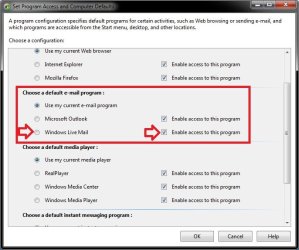
You might take a look in Set Program Access and Computer Defaults to see if you may be able to enable access and select Windows Live Mail as the default email program. Afterwards, see if you may be able to select (check) MAILTO for Windows Live Mail in Default Programs.

WLM.jpg
 

My Computer

Computer type
PC/Desktop
Computer Manufacturer/Model Number
Self built custom
OS
64-bit Windows 11 Pro for Workstations
CPU
Intel i7-8700K OC'd to 5 GHz
Motherboard
ASUS ROG Maximus XI Formula Z390
Memory
64 GB (4x16GB) G.SKILL TridentZ RGB DDR4 3600 MHz
Graphics Card(s)
ASUS ROG-STRIX-GTX1080TI-O11G-GAMING
Sound Card
Integrated
Monitor(s) Displays
2 x Samsung Odyssey G7 27"
Screen Resolution
2560x1440
Hard Drives
1TB Samsung 990 PRO M.2,
4TB Samsung 990 PRO PRO M.2,
TerraMaster F8 SSD Plus NAS
PSU
Seasonic Prime Titanium 850W
Case
Thermaltake Core P3
Cooling
Corsair Hydro H115i
Keyboard
Logitech wireless K800
Mouse
Logitech MX Master 4
Internet Speed
2 Gb/s Download and 100 Mb/s Upload
Antivirus
Malwarebyte Anti-Malware Premium
Browser
Google Chrome
Other Info
Logitech Z625 speaker system,
Logitech BRIO 4K Pro webcam,
HP Color LaserJet Pro MFP M477fdn,
APC SMART-UPS RT 1000 XL - SURT1000XLI,
Galaxy S23 Plus phone
Hi

WLM is not listed in "Set your default programs".

However it is listed in "Set program access and computer defaults" under "custom" but if I choose it, it makes no difference and when I go back into Set Program access again the "use current" is selected

Mailto appears in "Associate a file or protocol" and is associated with "Unknown program" I cannot change this program, my only option if I try to is Chrome.

Will try gpedit route and let you know

Thanks Abe
 

My Computer

OS
windows 7 ultimate 64 bit
CPU
Intel Celeron E3300 2.5GHz Dual core
Motherboard
ASUS P5G41C-M LX
Memory
4GB DDR3
Graphics Card(s)
Onboard Intel G41 Express Chipset
Monitor(s) Displays
AOC 2219 22" WS
Screen Resolution
1680 x 1050
Hard Drives
Maxtor 500GB sata
Seagate 500GB Ext
Internet Speed
20MG
Ok, it sure is being stubborn.

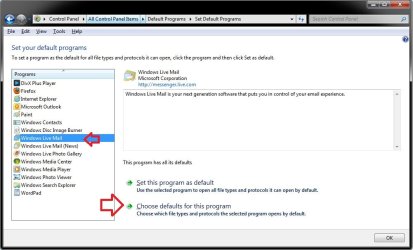
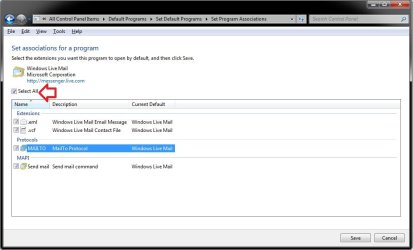
How about here:

Default1.jpg

Default2.jpg


If not, see if you may be able to use OPTION TWO in the tutorial below to add Windows Live Mail (C:\Program Files\Windows Live\Mail\wlmail.exe) to the list of available programs in "Open with" to hopefully then be able to select it in Default Programs afterwards.

http://www.sevenforums.com/tutorials/178066-open-add-program.html
 
Last edited:

My Computer

Computer type
PC/Desktop
Computer Manufacturer/Model Number
Self built custom
OS
64-bit Windows 11 Pro for Workstations
CPU
Intel i7-8700K OC'd to 5 GHz
Motherboard
ASUS ROG Maximus XI Formula Z390
Memory
64 GB (4x16GB) G.SKILL TridentZ RGB DDR4 3600 MHz
Graphics Card(s)
ASUS ROG-STRIX-GTX1080TI-O11G-GAMING
Sound Card
Integrated
Monitor(s) Displays
2 x Samsung Odyssey G7 27"
Screen Resolution
2560x1440
Hard Drives
1TB Samsung 990 PRO M.2,
4TB Samsung 990 PRO PRO M.2,
TerraMaster F8 SSD Plus NAS
PSU
Seasonic Prime Titanium 850W
Case
Thermaltake Core P3
Cooling
Corsair Hydro H115i
Keyboard
Logitech wireless K800
Mouse
Logitech MX Master 4
Internet Speed
2 Gb/s Download and 100 Mb/s Upload
Antivirus
Malwarebyte Anti-Malware Premium
Browser
Google Chrome
Other Info
Logitech Z625 speaker system,
Logitech BRIO 4K Pro webcam,
HP Color LaserJet Pro MFP M477fdn,
APC SMART-UPS RT 1000 XL - SURT1000XLI,
Galaxy S23 Plus phone
Hi Shawn

Tried the gpedit approach No joy..........

Created a mailto short-cut, then used open with, the only option available was "Internet Browser" what ever that is?

So browsed to WLM.exe and opened it...........Nothing happened.

I am at a loss with this one everywhere seems to lead to a dead end...Very frustrating.

I am thinking that this has to be a corruption of the Reg....Only way out re-install.

who knows what else will not work at some point.

Regards Abe
 

My Computer

OS
windows 7 ultimate 64 bit
CPU
Intel Celeron E3300 2.5GHz Dual core
Motherboard
ASUS P5G41C-M LX
Memory
4GB DDR3
Graphics Card(s)
Onboard Intel G41 Express Chipset
Monitor(s) Displays
AOC 2219 22" WS
Screen Resolution
1680 x 1050
Hard Drives
Maxtor 500GB sata
Seagate 500GB Ext
Internet Speed
20MG
Abe,

As a last effort to try and avoid reinstaling Windows 7, you might create a new administrator account to see how it works while logged in it. This will help you know if it's just a issue in your original account or not.
 

My Computer

Computer type
PC/Desktop
Computer Manufacturer/Model Number
Self built custom
OS
64-bit Windows 11 Pro for Workstations
CPU
Intel i7-8700K OC'd to 5 GHz
Motherboard
ASUS ROG Maximus XI Formula Z390
Memory
64 GB (4x16GB) G.SKILL TridentZ RGB DDR4 3600 MHz
Graphics Card(s)
ASUS ROG-STRIX-GTX1080TI-O11G-GAMING
Sound Card
Integrated
Monitor(s) Displays
2 x Samsung Odyssey G7 27"
Screen Resolution
2560x1440
Hard Drives
1TB Samsung 990 PRO M.2,
4TB Samsung 990 PRO PRO M.2,
TerraMaster F8 SSD Plus NAS
PSU
Seasonic Prime Titanium 850W
Case
Thermaltake Core P3
Cooling
Corsair Hydro H115i
Keyboard
Logitech wireless K800
Mouse
Logitech MX Master 4
Internet Speed
2 Gb/s Download and 100 Mb/s Upload
Antivirus
Malwarebyte Anti-Malware Premium
Browser
Google Chrome
Other Info
Logitech Z625 speaker system,
Logitech BRIO 4K Pro webcam,
HP Color LaserJet Pro MFP M477fdn,
APC SMART-UPS RT 1000 XL - SURT1000XLI,
Galaxy S23 Plus phone
Hi

Tried new account........still the same.:(

Oh well re-install here I come, just as well I saved all my drivers,accounts, bookmarks and e-mails into Dropbox. That will save a bit of time.

Thanks again for all your help.

Best wishes Abe.......

I may return?????????????
 

My Computer

OS
windows 7 ultimate 64 bit
CPU
Intel Celeron E3300 2.5GHz Dual core
Motherboard
ASUS P5G41C-M LX
Memory
4GB DDR3
Graphics Card(s)
Onboard Intel G41 Express Chipset
Monitor(s) Displays
AOC 2219 22" WS
Screen Resolution
1680 x 1050
Hard Drives
Maxtor 500GB sata
Seagate 500GB Ext
Internet Speed
20MG
Well, it was worth a shot. I hope the reinstall goes smoothly for you.
 

My Computer

Computer type
PC/Desktop
Computer Manufacturer/Model Number
Self built custom
OS
64-bit Windows 11 Pro for Workstations
CPU
Intel i7-8700K OC'd to 5 GHz
Motherboard
ASUS ROG Maximus XI Formula Z390
Memory
64 GB (4x16GB) G.SKILL TridentZ RGB DDR4 3600 MHz
Graphics Card(s)
ASUS ROG-STRIX-GTX1080TI-O11G-GAMING
Sound Card
Integrated
Monitor(s) Displays
2 x Samsung Odyssey G7 27"
Screen Resolution
2560x1440
Hard Drives
1TB Samsung 990 PRO M.2,
4TB Samsung 990 PRO PRO M.2,
TerraMaster F8 SSD Plus NAS
PSU
Seasonic Prime Titanium 850W
Case
Thermaltake Core P3
Cooling
Corsair Hydro H115i
Keyboard
Logitech wireless K800
Mouse
Logitech MX Master 4
Internet Speed
2 Gb/s Download and 100 Mb/s Upload
Antivirus
Malwarebyte Anti-Malware Premium
Browser
Google Chrome
Other Info
Logitech Z625 speaker system,
Logitech BRIO 4K Pro webcam,
HP Color LaserJet Pro MFP M477fdn,
APC SMART-UPS RT 1000 XL - SURT1000XLI,
Galaxy S23 Plus phone
...In default programs / Set program access and computer defaults / custom, I can choose WLM as my default email program, but when I return to that setting again it has reverted to "use current"...
That is normal behavior. For example, when IE shows the Page Options: "Send Page by Email" or "Send Link by Email" as greyed out (not working), doing what you said restores their functionality. This reminds me to ask if those Page options are functioning in IE. Also, if you click on [email protected] does it open a WLM new message window?
 

My Computer

Computer type
PC/Desktop
Computer Manufacturer/Model Number
OQO 2+
OS
Windows 8 Pro w/MC 32-bit
CPU
Intel Atom 1.86 GHz
Motherboard
OQO 2+
Memory
2 GB
Graphics Card(s)
Intel GMA 500
Sound Card
IDT
Monitor(s) Displays
LCD
Screen Resolution
800 x 480 (portable) 1280 x 1024 (docked)
Hard Drives
64 GB SSD
PSU
9 Ah Battery (portable) or OQO Brick (docked)
Case
Shirt Pocket Sized
Cooling
Tiny Fan
Keyboard
Slide out (portable) DiNovo Edge (docked)
Mouse
Eraser head (portable) Logitech Bluetooth (docked)
Internet Speed
WWAN or 802.11G (portable) T1 (docked)
Browser
IE 10
Other Info
DVD-RW OQO Docking Station
Abe,

I exported my MailTo protocol from my registry for WLM and attached it below as a REG file. If you like, you could download and merge the REG file, approve the merge (Run, Yes, Yes, OK), then restart the computer to hopefully have your MailTo back.

Thank you so much for that registry key! I made the mistake of messing with the MailTo protocol and the keys were damaged after that.

Sorry for bumping an old thread, but it was just what I needed. Can I ask what are the permissions for the classes_root\mailto key? I'm not sure if they are right after all the messing up. Thanks again :D
 

My Computer

Computer type
PC/Desktop
OS
Windows 7 Home Basic x64
Can I ask what are the permissions for the classes_root\mailto key?
I'm not sure I'm the best person to respond, since I sometimes mess with the permissions in the Windows folder. Also I've switched to Windows 8. But I don't think I purposely messed with that key in Regedit. I have full control for me, administrators, and system and read for restricted and all application packages.
 

My Computer

Computer type
PC/Desktop
Computer Manufacturer/Model Number
OQO 2+
OS
Windows 8 Pro w/MC 32-bit
CPU
Intel Atom 1.86 GHz
Motherboard
OQO 2+
Memory
2 GB
Graphics Card(s)
Intel GMA 500
Sound Card
IDT
Monitor(s) Displays
LCD
Screen Resolution
800 x 480 (portable) 1280 x 1024 (docked)
Hard Drives
64 GB SSD
PSU
9 Ah Battery (portable) or OQO Brick (docked)
Case
Shirt Pocket Sized
Cooling
Tiny Fan
Keyboard
Slide out (portable) DiNovo Edge (docked)
Mouse
Eraser head (portable) Logitech Bluetooth (docked)
Internet Speed
WWAN or 802.11G (portable) T1 (docked)
Browser
IE 10
Other Info
DVD-RW OQO Docking Station
Hello Bob, and welcome to Seven Forums.

I have the same default permission settings as Ron for that key.
 

My Computer

Computer type
PC/Desktop
Computer Manufacturer/Model Number
Self built custom
OS
64-bit Windows 11 Pro for Workstations
CPU
Intel i7-8700K OC'd to 5 GHz
Motherboard
ASUS ROG Maximus XI Formula Z390
Memory
64 GB (4x16GB) G.SKILL TridentZ RGB DDR4 3600 MHz
Graphics Card(s)
ASUS ROG-STRIX-GTX1080TI-O11G-GAMING
Sound Card
Integrated
Monitor(s) Displays
2 x Samsung Odyssey G7 27"
Screen Resolution
2560x1440
Hard Drives
1TB Samsung 990 PRO M.2,
4TB Samsung 990 PRO PRO M.2,
TerraMaster F8 SSD Plus NAS
PSU
Seasonic Prime Titanium 850W
Case
Thermaltake Core P3
Cooling
Corsair Hydro H115i
Keyboard
Logitech wireless K800
Mouse
Logitech MX Master 4
Internet Speed
2 Gb/s Download and 100 Mb/s Upload
Antivirus
Malwarebyte Anti-Malware Premium
Browser
Google Chrome
Other Info
Logitech Z625 speaker system,
Logitech BRIO 4K Pro webcam,
HP Color LaserJet Pro MFP M477fdn,
APC SMART-UPS RT 1000 XL - SURT1000XLI,
Galaxy S23 Plus phone
Back
Top