Make bootable iso from student d/l

How to Create a Bootable ISO from a Student Windows 7 Download


If you get the student d/l and have 3 files :


Here's how:

1. Rt click each file, Properties > Unblock>Apply>OK.
NOTE: Make sure read only boxes are clear.

2. Rt click and run as admin on the .exe. You will get a folder called expandedsetup on your dektop with these inside:

EXPANDEDSETUPCONTENTS-2009-10-22_061340.jpg
   Note

If you receive this error:

We are unable to create or save new files in the folder in which this application was downloaded. Please check the folder properties to make sure that you have security permission on the folder to write files and that the folder is not read-only.

Continue.


3. D/L this zip, extract it and copy/move oscdimg.exe into C:\Windows\system32.
View attachment oscdimg.zip
4. Assuming expandedsetup is on your Desktop:

Vista/7 users open an elevated command prompt ( rt click cmd and run as admin) and type :

Code:
Oscdimg.exe –u2 –b"C:\Users\your_username\Desktop\expandedSetup\boot\etfsboot.com" –h "C:\Users\your_username\Desktop\expandedSetup" C:\7.iso


XP users commands are:

Code:
cd /d C:\windows\system32


Code:
oscdimg -u2 -b"C:\Documents and Settings\USER\Desktop\expandedSetup\boot\etfsboot.com" -h "C:\Documents and Settings\USER\Desktop\expandedSetup" C:\7.iso


5. You can copy and paste the above into elevated cmd.

Vista/7 users- replace your_username with your actual username.

XP users - replace USER with your actual username

6. Then press enter. Xp users press enter after each of their two commands.

7. If the expandedsetup folder is not on your desktop, replace with appropriate paths.

   Tip
You may wish to copy the expandedsetup folder directly onto the root of C:

The paths will be shorter and the command will be:

Code:
Oscdimg.exe –u2 –bC:\expandedSetup\boot\etfsboot.com –h C:\expandedSetup C:\7.iso

If your folder is elsewhere, to get the paths easily, press shift and rt click on etfsboot.com - select copy as path ( paste into notepad )

Shift and rt click on expanded setup - select copy as path - paste into notepad ) Use those instead of the above.

The spacing needs to be exact.
   Warning
When the .iso is created you will get this message:

WARNING: This image contains UDF file system structures.

That is normal as you are creating the udf filesystem.


8. A) You can burn the .iso to dvd as an image with an isoburner.
View attachment isoburner.zip
OR

B) You can use the Microsoft DVD/USB tool to burn the .iso to dvd or to use the .iso to make a bootable flash drive. Download the tool:
View attachment Windows7-USB-DVD-tool.exe
   Tip
To make a copy of your Windows 7 ISO file:

1. Click the Start button, and click Windows 7 USB/DVD Download tool in the All Programs list to open the USB/DVD Download tool.
2. Click Browse and select the file in the Open dialog box.
3. Select USB to create a copy on a USB flash drive or DVD to create a copy on a DVD disk, then click Next.
4. If you are copying the file to a USB flash drive, select your USB device in the dropdown list and click Begin copying. If you are copying the file up to a DVD, click Begin burning.

Microsoft Store: Download Manager Help

   Note

Microsoft’s ISO Image for Windows 7 Now Available

There is additional information regarding the Windows 7 64-bit download process. For those customers of the Student Offer, who wish to install the 64-bit version of Windows 7, but are currently running a 32-bit Operating System, there is now an optional downloadable ISO file of Windows 7 64-bit to allow for install.

- If you have already purchased the 64-bit version of Windows 7 from the Windows 7 Student Offer Online Store, please contact Digital River at the following link: http://windows7.digitalriver.com/servlet/PromoServlet/promoID.46354000
· In the Web form select the Download Option in the drop down menu and include "64-bit Windows 7 Solution" in the first line of your problem description.


Have fun.


Last edited by a moderator:
I had some problems, but I finally got up to the product-key activation screen on the start up. However, windows tells me that my product-key is invalid? I copied it letter for letter, number for number -- it's a windows home premium 64-bit key. Edit: I just noticed that someone else is having a similar problem...wonderful.

What was your exact procedure of installation? Were you previously running Xp 32 or Vista? Or what?
 

My Computer My Computer

OS
Win 7 64bit
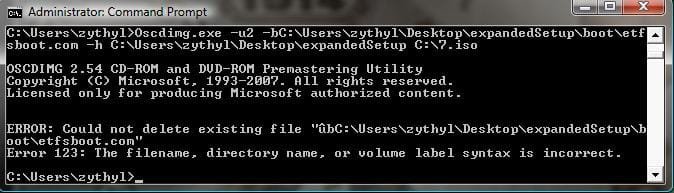
I got this error message, could you please help me

The syntax is incorrect because you included " in your command. Remove those. Follow the first page, EXCEPT, replace the directories accordingly.

For example: If you have a separate partition, for instance, you used the E: drive instead of C: drive and you extracted the Windows 7 files there, then it would be: Oscdimg.exe –u2 –b E:\expandedSetup\boot\etfsboot.com –h E:\expandedSetup E:\7.iso

The reason why the quotes are there in the tutorial is because not everyone downloaded their files to the same location.

I'm not exactly code-savy, so if my User directory is "zythyl", what exactly would I type into the command prompt?

Also, would the fact I didn't "unblock" the three student files be an issue?
 

My Computer My Computer

Computer Manufacturer/Model Number
Custom-built
OS
Windows 7
CPU
E6850
Motherboard
Gigabyte P35-S3
Memory
4GB (2GB on Virtual XP)
Graphics Card(s)
nVidia GTX260
Sound Card
Onboard
Monitor(s) Displays
Samsung 22", Dell 17"
Screen Resolution
1680x1050, 1280x1024
Hard Drives
C:\Windows - 298GB
D:\zythyl - 1.81TB
F:\zythyl-backup - 596GB
G:\ Games / Programs - 931GB
PSU
Thermaltake Toughpower 750W
Case
CoolerMaster HAF
Cooling
Fans
Keyboard
Logitech G15
Mouse
Logitech G9
Internet Speed
10Mbps
Well, it depends where you saved and extracted those files.

I'm not exactly code-savy, so if my User directory is "zythyl", what exactly would I type into the command prompt?

If you ran the executable it should've created the expandedSetup folder. Wherever that folder is, you want to use that in the command.
 

My Computer My Computer

OS
Win 7 64bit
Hi guys,

Can anyony help with this? I'm going to insatll it from boot in the next hour or so! :geek:

I've read that i shoudl not put the product key in during insall, only after if i'm doing a format install?

Thanks
Matt


Hi guys,

Been reading this forum over the last few days and its great! Thanks to the great advice here, I have managed to download Win7 Pro 32 Bit from Digital River (Student Version) and create a bootable DVD which I’m just getting ready to use and take the plunge!

Can some one please clarify if I can do an install from boot and format the current windows (Vista) drive and then install 7 pro?

Will my product key work if I format? I'm going from Vista Home Premium 32 bit to Win7 Pro 32 bit.

If i can’t format my drive what’s the best way to install to get the cleanest and freshest install, as i don’t like the sound of this Windows.old stuff.

Thanks again!
:D
 

My Computer My Computer

OS
Win 7 Pro!
Well, it depends where you saved and extracted those files.

I'm not exactly code-savy, so if my User directory is "zythyl", what exactly would I type into the command prompt?

If you ran the executable it should've created the expandedSetup folder. Wherever that folder is, you want to use that in the command.

'expandedSetup' is on the desktop. Everything else in in order.

EDIT:
Ok, trying it out now.
 

My Computer My Computer

Computer Manufacturer/Model Number
Custom-built
OS
Windows 7
CPU
E6850
Motherboard
Gigabyte P35-S3
Memory
4GB (2GB on Virtual XP)
Graphics Card(s)
nVidia GTX260
Sound Card
Onboard
Monitor(s) Displays
Samsung 22", Dell 17"
Screen Resolution
1680x1050, 1280x1024
Hard Drives
C:\Windows - 298GB
D:\zythyl - 1.81TB
F:\zythyl-backup - 596GB
G:\ Games / Programs - 931GB
PSU
Thermaltake Toughpower 750W
Case
CoolerMaster HAF
Cooling
Fans
Keyboard
Logitech G15
Mouse
Logitech G9
Internet Speed
10Mbps
I'm getting the same error. :mad:
 

Attachments

  • error2.jpg
    error2.jpg
    29.6 KB · Views: 168

My Computer My Computer

Computer Manufacturer/Model Number
Custom-built
OS
Windows 7
CPU
E6850
Motherboard
Gigabyte P35-S3
Memory
4GB (2GB on Virtual XP)
Graphics Card(s)
nVidia GTX260
Sound Card
Onboard
Monitor(s) Displays
Samsung 22", Dell 17"
Screen Resolution
1680x1050, 1280x1024
Hard Drives
C:\Windows - 298GB
D:\zythyl - 1.81TB
F:\zythyl-backup - 596GB
G:\ Games / Programs - 931GB
PSU
Thermaltake Toughpower 750W
Case
CoolerMaster HAF
Cooling
Fans
Keyboard
Logitech G15
Mouse
Logitech G9
Internet Speed
10Mbps
You shouldn't act like you aren't as annoyed as everyone else w/ the process.

Oh I am. I mean seriously, F**K Microsoft pulling this kind of pain in the ass process. I couldn't even imagine they'd create a product with the description in the FAQ "exactly the same as retail version" yet have such a severe install limitation.

On the other hand you have to admit to, alot of the people posting questions are pretty stupid and/or are posting extremely limited info such as "Help me, its broke". Many of these people shouldn't even be attempting this as the ability to type a single oscdimg.exe without screwing up the path to the files is beyond most of their abilities.
 

My Computer My Computer

OS
Windows
Move oscdimg.exe into your system 32 folder, then try again.

It doesn't matter where oscdimg.exe as long as the first line of your command points to it or is done from a directory with it installed.
 

My Computer My Computer

OS
Windows
It doesn't matter where oscdimg.exe as long as the first line of your command points to it or is done from a directory with it installed.

Well, I'm just following the steps exactly as written on the tutorial because my iso creation and overall installation went without a hitch when doing everything step by step as suggested in OP.
 

My Computer My Computer

OS
Win 7 64bit
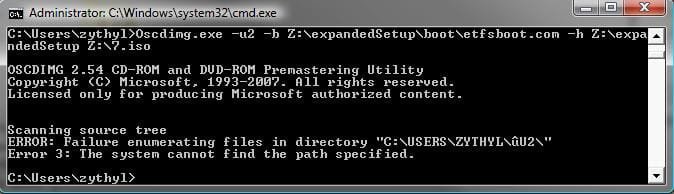
Ok this, time I tried it on a different HDD (checked the directories, they're all there) and I got THIS message:
 

Attachments

  • error3.jpg
    error3.jpg
    23.3 KB · Views: 147

My Computer My Computer

Computer Manufacturer/Model Number
Custom-built
OS
Windows 7
CPU
E6850
Motherboard
Gigabyte P35-S3
Memory
4GB (2GB on Virtual XP)
Graphics Card(s)
nVidia GTX260
Sound Card
Onboard
Monitor(s) Displays
Samsung 22", Dell 17"
Screen Resolution
1680x1050, 1280x1024
Hard Drives
C:\Windows - 298GB
D:\zythyl - 1.81TB
F:\zythyl-backup - 596GB
G:\ Games / Programs - 931GB
PSU
Thermaltake Toughpower 750W
Case
CoolerMaster HAF
Cooling
Fans
Keyboard
Logitech G15
Mouse
Logitech G9
Internet Speed
10Mbps
Ok this, time I tried it on a different HDD (checked the directories, they're all there) and I got THIS message:
Try C:\Users\<rest of line> instead
 

My Computer My Computer

Computer Manufacturer/Model Number
Compal JFT02 (Custom Build Laptop)
OS
Windows 7 Home Premium x64 - Mac OS X 10.6.4 x64
CPU
Intel Core 2 Duo T9300 2.5 GHz
Motherboard
JFT02
Memory
4GB Kingston DDR2-800
Graphics Card(s)
NVIDIA Geforce 8600M GT (512MB Model)
Sound Card
Realtek HD Audio
Monitor(s) Displays
WUXGA Standard Laptop Display
Screen Resolution
1680*1050
Hard Drives
Toshiba 320GB 5400RPM Laptop HD
PSU
Standard Laptop Power Supply
Case
Standard Laptop Case
Cooling
Standard Laptop Cooling
Keyboard
Standard Laptop 105 Key-Keyboard
Mouse
Synaptics Touchpad
Internet Speed
Verizion Online DSL 3360/864 kbs (dl/up)
Ok this, time I tried it on a different HDD (checked the directories, they're all there) and I got THIS message:
Try C:\Users\<rest of line> instead

*I feel like such an idiot*

What do you mean <rest of line>? When I open the cmd, C:\Users\zythyl> is what it comes up as...
 

My Computer My Computer

Computer Manufacturer/Model Number
Custom-built
OS
Windows 7
CPU
E6850
Motherboard
Gigabyte P35-S3
Memory
4GB (2GB on Virtual XP)
Graphics Card(s)
nVidia GTX260
Sound Card
Onboard
Monitor(s) Displays
Samsung 22", Dell 17"
Screen Resolution
1680x1050, 1280x1024
Hard Drives
C:\Windows - 298GB
D:\zythyl - 1.81TB
F:\zythyl-backup - 596GB
G:\ Games / Programs - 931GB
PSU
Thermaltake Toughpower 750W
Case
CoolerMaster HAF
Cooling
Fans
Keyboard
Logitech G15
Mouse
Logitech G9
Internet Speed
10Mbps

My Computer My Computer

Computer Manufacturer/Model Number
Compal JFT02 (Custom Build Laptop)
OS
Windows 7 Home Premium x64 - Mac OS X 10.6.4 x64
CPU
Intel Core 2 Duo T9300 2.5 GHz
Motherboard
JFT02
Memory
4GB Kingston DDR2-800
Graphics Card(s)
NVIDIA Geforce 8600M GT (512MB Model)
Sound Card
Realtek HD Audio
Monitor(s) Displays
WUXGA Standard Laptop Display
Screen Resolution
1680*1050
Hard Drives
Toshiba 320GB 5400RPM Laptop HD
PSU
Standard Laptop Power Supply
Case
Standard Laptop Case
Cooling
Standard Laptop Cooling
Keyboard
Standard Laptop 105 Key-Keyboard
Mouse
Synaptics Touchpad
Internet Speed
Verizion Online DSL 3360/864 kbs (dl/up)
Try C:\Users\<rest of line> instead

*I feel like such an idiot*

What do you mean <rest of line>? When I open the cmd, C:\Users\zythyl> is what it comes up as...
Do the command that you were doing except this time don't captilize USERS:D

For the sake of making things simpler, I moved it back to the desktop and am trying it from there.

Still no luck... output from the cmd capitlises the directory path; that's not me. :p

But grrrr... I wonder what could be going wrong. :confused:

EDIT:
Forgot to un-capitilise "User" in the first line; made no difference, same error.
 

Attachments

  • error4.jpg
    error4.jpg
    33.5 KB · Views: 98

My Computer My Computer

Computer Manufacturer/Model Number
Custom-built
OS
Windows 7
CPU
E6850
Motherboard
Gigabyte P35-S3
Memory
4GB (2GB on Virtual XP)
Graphics Card(s)
nVidia GTX260
Sound Card
Onboard
Monitor(s) Displays
Samsung 22", Dell 17"
Screen Resolution
1680x1050, 1280x1024
Hard Drives
C:\Windows - 298GB
D:\zythyl - 1.81TB
F:\zythyl-backup - 596GB
G:\ Games / Programs - 931GB
PSU
Thermaltake Toughpower 750W
Case
CoolerMaster HAF
Cooling
Fans
Keyboard
Logitech G15
Mouse
Logitech G9
Internet Speed
10Mbps
Oscdimg.exe –u2 –b"C:\Users\zythyl\Desktop\expandedSetup\boot\etfsboot.com" –h "C:\Users\zythyl\Desktop\expandedSetup" C:\7.iso

^^Is this the command your are running?
 

My Computer My Computer

Computer Manufacturer/Model Number
Compal JFT02 (Custom Build Laptop)
OS
Windows 7 Home Premium x64 - Mac OS X 10.6.4 x64
CPU
Intel Core 2 Duo T9300 2.5 GHz
Motherboard
JFT02
Memory
4GB Kingston DDR2-800
Graphics Card(s)
NVIDIA Geforce 8600M GT (512MB Model)
Sound Card
Realtek HD Audio
Monitor(s) Displays
WUXGA Standard Laptop Display
Screen Resolution
1680*1050
Hard Drives
Toshiba 320GB 5400RPM Laptop HD
PSU
Standard Laptop Power Supply
Case
Standard Laptop Case
Cooling
Standard Laptop Cooling
Keyboard
Standard Laptop 105 Key-Keyboard
Mouse
Synaptics Touchpad
Internet Speed
Verizion Online DSL 3360/864 kbs (dl/up)
Maybe the files didn't extract properly. Can you navigate to expandedSetup\boot\etfsboot.com in explorer?
 

My Computer My Computer

OS
Win 7 64bit
Oscdimg.exe –u2 –b"C:\Users\zythyl\Desktop\expandedSetup\boot\etfsboot.com" –h "C:\Users\zythyl\Desktop\expandedSetup" C:\7.iso

^^Is this the command your are running?

Yep, except I deleted all the quotation marks and put a space in between the "b" and "C"... other than that, it's identical.
 

My Computer My Computer

Computer Manufacturer/Model Number
Custom-built
OS
Windows 7
CPU
E6850
Motherboard
Gigabyte P35-S3
Memory
4GB (2GB on Virtual XP)
Graphics Card(s)
nVidia GTX260
Sound Card
Onboard
Monitor(s) Displays
Samsung 22", Dell 17"
Screen Resolution
1680x1050, 1280x1024
Hard Drives
C:\Windows - 298GB
D:\zythyl - 1.81TB
F:\zythyl-backup - 596GB
G:\ Games / Programs - 931GB
PSU
Thermaltake Toughpower 750W
Case
CoolerMaster HAF
Cooling
Fans
Keyboard
Logitech G15
Mouse
Logitech G9
Internet Speed
10Mbps
Maybe the files didn't extract properly. Can you navigate to expandedSetup\boot\etfsboot.com in explorer?

Yeah they extracted fine and I can navigate to them from C:
 

My Computer My Computer

Computer Manufacturer/Model Number
Custom-built
OS
Windows 7
CPU
E6850
Motherboard
Gigabyte P35-S3
Memory
4GB (2GB on Virtual XP)
Graphics Card(s)
nVidia GTX260
Sound Card
Onboard
Monitor(s) Displays
Samsung 22", Dell 17"
Screen Resolution
1680x1050, 1280x1024
Hard Drives
C:\Windows - 298GB
D:\zythyl - 1.81TB
F:\zythyl-backup - 596GB
G:\ Games / Programs - 931GB
PSU
Thermaltake Toughpower 750W
Case
CoolerMaster HAF
Cooling
Fans
Keyboard
Logitech G15
Mouse
Logitech G9
Internet Speed
10Mbps
Oscdimg.exe –u2 –b"C:\Users\zythyl\Desktop\expandedSetup\boot\etfsboot.com" –h "C:\Users\zythyl\Desktop\expandedSetup" C:\7.iso

^^Is this the command your are running?

Yep, except I deleted all the quotation marks and put a space in between the "b" and "C"... other than that, it's identical.
Can you run the command as I have provided-unaltered to see if it works?
 

My Computer My Computer

Computer Manufacturer/Model Number
Compal JFT02 (Custom Build Laptop)
OS
Windows 7 Home Premium x64 - Mac OS X 10.6.4 x64
CPU
Intel Core 2 Duo T9300 2.5 GHz
Motherboard
JFT02
Memory
4GB Kingston DDR2-800
Graphics Card(s)
NVIDIA Geforce 8600M GT (512MB Model)
Sound Card
Realtek HD Audio
Monitor(s) Displays
WUXGA Standard Laptop Display
Screen Resolution
1680*1050
Hard Drives
Toshiba 320GB 5400RPM Laptop HD
PSU
Standard Laptop Power Supply
Case
Standard Laptop Case
Cooling
Standard Laptop Cooling
Keyboard
Standard Laptop 105 Key-Keyboard
Mouse
Synaptics Touchpad
Internet Speed
Verizion Online DSL 3360/864 kbs (dl/up)
Back
Top