Make icon invisible

doofenshmirtz

New member
Local time
11:56 AM
Messages
13
Hi all,

Using Win 7 Home Premium 64 Bit
I added Notepad and Excel Icons to desktop and assigned shortcut keys
I would now like to make the icons invisible so as to clean up the desktop

I was able to make the text invisible with Alt + 0160
How can I make the icon invisible as well with the shortcut key still functioning

Thanks
goss
 

My Computer

OS
win 7
Thanks Mike,

Sorry if I was clear
I want to make icons invisible on a one-on-one basis, not all icons

thanks
goss
 

My Computer

OS
win 7
Thanks Mike,

Sorry if I was clear
I want to make icons invisible on a one-on-one basis, not all icons

thanks
goss

Sorry, I was still editing the post. How to make a single icon invisble is also there.

The tutorial ie9 posted seems a little more elegant! :)

Regards....Mike Connor
 

My Computer

OS
Several, including Windows 7 x64 Ultimate
When I right click the Icon, the change Icon button is ghosted out
How can I activate the button?

Thanks
goss
 

My Computer

OS
win 7
Have you installed any icon changing programs?
 

My Computer

Computer Manufacturer/Model Number
Vostro
OS
Windows 7 Ultimate (SP1)
CPU
AMD Sempron 3600+
Graphics Card(s)
ATI Radeon Xpress 1150
Screen Resolution
1200 x 800
Hard Drives
WD Scorpio Blue 500 GB

My Computer

Computer Manufacturer/Model Number
HP, Dell, Gateway, Toshiba - 4 laptops and 2 desktops
OS
Vista, Windows7, Mint Mate, Zorin, Windows 8
CPU
from 1.6GHz Duo to i7
Monitor(s) Displays
2x HP w2207
Hard Drives
5x HDD, 7x SSD, 12x Externals
Keyboard
with trackball - no mices
Mouse
Trackball mice
Internet Speed
DSL 6000
Why don't you just drag it to the recycle bin? It won't delete the program and the icon will be gone.
 

My Computer

Computer Manufacturer/Model Number
OEM - Me
OS
Windows 7 Home Premium x64
CPU
AMD Phenom II X6 1600T
Motherboard
GigaByte GZ-990FXA-UD3
Memory
16GB PC3-10700 (1342MHz)
Graphics Card(s)
ATI Radeon 5770 HD (x2) CrossFire
Sound Card
On-board RealTek chipset
Monitor(s) Displays
3x Hanns-G 1920x1080 Monitors
Screen Resolution
3x Hanns-G 1920x1080 Monitors
Hard Drives
Intel 25-V SSD 40GB: 218 MB/s AT: 0.1ms
Intel X-25M SSD 80GB: 230MB/s AT: 0.1ms
Seagate 750GB: 133 MB/s AT: 13ms (perpendicular storage)
Buffalo HD-PCTU3 1TB External drive
PSU
OCZ Stealth X Stream 750W
Case
Cheap (unknown)
Cooling
Stock
Keyboard
HP USB
Mouse
LogiTech USB
Internet Speed
1.5 Mbps - Slow - At the tail-end of a rural network
Other Info
Printer: Epson Stylus C-84
Scanner: HP 3500C Flatbed
DVD-RW: Plextor
DVD-ROM: Unknown
WEI: 7.4
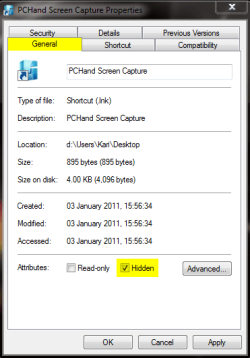
Am I missing something here? Why don't you just hide the shortcut?

Shortcut_hide.png

Kari
 

My Computer

Computer type
Laptop
Computer Manufacturer/Model Number
HP ENVY 17-1150eg
OS
Windows 10 Pro x64 EN-GB
CPU
1.6 GHz Intel Core i7-720QM Processor
Memory
6 GB
Graphics Card(s)
ATI Mobility Radeon HD 5850 Graphics
Sound Card
Beats sound system with integrated subwoofer
Monitor(s) Displays
17" laptop display, 22" LED and 32" Full HD TV through HDMI
Screen Resolution
1600*900 (1), 1920*1080 (2&3)
Hard Drives
Internal: 2 x 500 GB SATA Hard Disk Drive 7200 rpm
External: 2TB for backups, 3TB USB3 network drive for media
Cooling
As Envy runs a bit warm, I have it on a Cooler Master pad
Keyboard
Logitech diNovo Media Desktop Laser (bluetooth)
Mouse
Logitech Performance Mouse MX
Internet Speed
50/10 Mbps VDSL
Antivirus
Windows Defender 4.3.9431.0
Browser
Maxthon 3.5.2., IE11
Kari, I think you are hiding the file, not the shortcut on the desktop.
 

My Computer

Computer Manufacturer/Model Number
HP, Dell, Gateway, Toshiba - 4 laptops and 2 desktops
OS
Vista, Windows7, Mint Mate, Zorin, Windows 8
CPU
from 1.6GHz Duo to i7
Monitor(s) Displays
2x HP w2207
Hard Drives
5x HDD, 7x SSD, 12x Externals
Keyboard
with trackball - no mices
Mouse
Trackball mice
Internet Speed
DSL 6000

My Computer

Computer Manufacturer/Model Number
HP m8000n
OS
Windows 7 Ultimate x86
CPU
DualCore AMD Athlon 64 X2, 2600 MHz 5200+
Motherboard
Asus M2N68-LA (Narra)
Memory
Samsung 2GB DDR2
Graphics Card(s)
Onboard NVIDIA GeForce 6150SE nForce 430
Sound Card
Onboard nVIDIA nForce 6100-430 (MCP61P)
Monitor(s) Displays
Westinghouse 19" LED
Screen Resolution
1280x1024
Hard Drives
SATA II Seagate Barracuda 500GB
USB II WD Elements 500GB
USB II WD My Book 1TB
USB II WD My Book 2TB
PSU
Stock (HP)
Case
Stock (HP)
Cooling
Stock
Keyboard
Logitech Classic KB 200
Mouse
Standard HP opticle USB mouse
Kari, I think you are hiding the file, not the shortcut on the desktop.

No, Wolfgang. OP asks how to make an icon invisible . I did tell how in my post. The screenshot is from shortcut.

Using file properties, you can hide (= make invisible) any shortcut icon, file or folder. I do not believe he has copied the programs on desktop, rather that he has shortcuts to them.

Kari


EDIT: Let's try once again.

If I understand OP correctly, he wants to make a shortcut icon on desktop invisible, and open the program that icon opens with a keyboard shortcut.

This solution, as told in my previous post, is the easiest and simplest. It works with every type of shortcut icon whether it is a shortcut to a program or folder:

Right click the shortcut icon. Choose Properties from context menu. Click Shortcut tab, click inside Shortcut text field and assign a keyboard shortcut by pressing a shortcut key of your choice. Click General tab, select Hide, click OK.

The shortcut icon is now invisible (hidden) as OP wanted, and can be run with assigned keyboard shortcut.
 
Last edited:

My Computer

Computer type
Laptop
Computer Manufacturer/Model Number
HP ENVY 17-1150eg
OS
Windows 10 Pro x64 EN-GB
CPU
1.6 GHz Intel Core i7-720QM Processor
Memory
6 GB
Graphics Card(s)
ATI Mobility Radeon HD 5850 Graphics
Sound Card
Beats sound system with integrated subwoofer
Monitor(s) Displays
17" laptop display, 22" LED and 32" Full HD TV through HDMI
Screen Resolution
1600*900 (1), 1920*1080 (2&3)
Hard Drives
Internal: 2 x 500 GB SATA Hard Disk Drive 7200 rpm
External: 2TB for backups, 3TB USB3 network drive for media
Cooling
As Envy runs a bit warm, I have it on a Cooler Master pad
Keyboard
Logitech diNovo Media Desktop Laser (bluetooth)
Mouse
Logitech Performance Mouse MX
Internet Speed
50/10 Mbps VDSL
Antivirus
Windows Defender 4.3.9431.0
Browser
Maxthon 3.5.2., IE11
All solutions presented are viable, IMO. What works best for me is a combination of what Kari, Mike Conner & whs have suggested, with a twist.

  • My desktop icons are generally hidden via right click/View/Show icons (but I have the Desktop toolbar showing in the Taskbar)
  • I have a folder called Desktop Shortcuts in my Start Menu folder, (which contain shortcuts to the programs I use most). I have created hotkeys in all of these shortcuts' properties.
If I need other than hotkey access to the shortcuts on my desktop, I can either access them via the Desktop toolbar (through browsing the popup list or right clicking and opeing the folder for an explorer view), or click on the 'Show Desktop' item.

Also, I keep a current copy of the Desktop Shortcuts folder on a different partition, always ready when needed after a new install (or reinstall) on any machine.


James
 

My Computer

OS
Win7U 64 RTM
CPU
Q9550
Motherboard
GA-EP45-UD3R
Memory
8GB Gskill
Graphics Card(s)
ASUS|EAH4850/HTDI/1GD3/A
Sound Card
xfi Plat
Monitor(s) Displays
Dell 2405fpw
Screen Resolution
1920x1200
Hard Drives
Seagate & WD sata Drives
PSU
Antec
Case
Antec
Keyboard
MS Natural Ergonomic 4000
Mouse
Logitech MX610 USB Cordless
Sorry Kari, but it just does not want to work. I even clicked "Apply" - but the shortcut kept being visible. I also tried it on a file (new folder on desktop). That did nothing either. maybe my system is haunted.
 

My Computer

Computer Manufacturer/Model Number
HP, Dell, Gateway, Toshiba - 4 laptops and 2 desktops
OS
Vista, Windows7, Mint Mate, Zorin, Windows 8
CPU
from 1.6GHz Duo to i7
Monitor(s) Displays
2x HP w2207
Hard Drives
5x HDD, 7x SSD, 12x Externals
Keyboard
with trackball - no mices
Mouse
Trackball mice
Internet Speed
DSL 6000
Sorry Kari, but it just does not want to work. I even clicked "Apply" - but the shortcut kept being visible. I also tried it on a file (new folder on desktop). That did nothing either. maybe my system is haunted.

Could it be that you are showing hidden files and folders?
 

My Computer

Computer Manufacturer/Model Number
Vostro
OS
Windows 7 Ultimate (SP1)
CPU
AMD Sempron 3600+
Graphics Card(s)
ATI Radeon Xpress 1150
Screen Resolution
1200 x 800
Hard Drives
WD Scorpio Blue 500 GB
Sorry Kari, but it just does not want to work. I even clicked "Apply" - but the shortcut kept being visible. I also tried it on a file (new folder on desktop). That did nothing either. maybe my system is haunted.

By something invisible? :)

Regards....Mike Connor
 

My Computer

OS
Several, including Windows 7 x64 Ultimate
Whs, I can just say it works without a single problem on all my rigs. Assign a keyboard shortcut, hide the icon and that's it.

Did you refresh the desktop after hiding the icon? Check folder options so that Show hidden files and folders is not enabled.

Kari
 

My Computer

Computer type
Laptop
Computer Manufacturer/Model Number
HP ENVY 17-1150eg
OS
Windows 10 Pro x64 EN-GB
CPU
1.6 GHz Intel Core i7-720QM Processor
Memory
6 GB
Graphics Card(s)
ATI Mobility Radeon HD 5850 Graphics
Sound Card
Beats sound system with integrated subwoofer
Monitor(s) Displays
17" laptop display, 22" LED and 32" Full HD TV through HDMI
Screen Resolution
1600*900 (1), 1920*1080 (2&3)
Hard Drives
Internal: 2 x 500 GB SATA Hard Disk Drive 7200 rpm
External: 2TB for backups, 3TB USB3 network drive for media
Cooling
As Envy runs a bit warm, I have it on a Cooler Master pad
Keyboard
Logitech diNovo Media Desktop Laser (bluetooth)
Mouse
Logitech Performance Mouse MX
Internet Speed
50/10 Mbps VDSL
Antivirus
Windows Defender 4.3.9431.0
Browser
Maxthon 3.5.2., IE11
All solutions presented are viable, IMO. What works best for me is a combination of what Kari, Mike Conner & whs have suggested, with a twist.

  • My desktop icons are generally hidden via right click/View/Show icons (but I have the Desktop toolbar showing in the Taskbar)
  • I have a folder called Desktop Shortcuts in my Start Menu folder, (which contain shortcuts to the programs I use most). I have created hotkeys in all of these shortcuts' properties.
If I need other than hotkey access to the shortcuts on my desktop, I can either access them via the Desktop toolbar (through browsing the popup list or right clicking and opeing the folder for an explorer view), or click on the 'Show Desktop' item.

Also, I keep a current copy of the Desktop Shortcuts folder on a different partition, always ready when needed after a new install (or reinstall) on any machine.


James

Yep, more or less what I do as well, although I only really use the desktop folder as a sort of glorified drop box for stuff like screenshots etc.

As you can see here, the desktop on the screen is "empty", and I have a folder where I can do whatever I want with the contents;


Most people find some particular way of working which suits them, and then stick to it. Can be quite difficult to acquire new habits when one wants to do something else.

Regards....Mike Connor
 

My Computer

OS
Several, including Windows 7 x64 Ultimate
Whs, I can just say it works without a single problem on all my rigs. Assign a keyboard shortcut, hide the icon and that's it.

Did you refresh the desktop after hiding the icon? Check folder options so that Show hidden files and folders is not enabled.

Kari
Aha, now we are getting somewhere. "Show hidden files and folders" is enabled. Thanks Kari
 

My Computer

Computer Manufacturer/Model Number
HP, Dell, Gateway, Toshiba - 4 laptops and 2 desktops
OS
Vista, Windows7, Mint Mate, Zorin, Windows 8
CPU
from 1.6GHz Duo to i7
Monitor(s) Displays
2x HP w2207
Hard Drives
5x HDD, 7x SSD, 12x Externals
Keyboard
with trackball - no mices
Mouse
Trackball mice
Internet Speed
DSL 6000
Back
Top