Make my computer invincible

Mylan

New member
Local time
5:50 AM
Messages
6
Yo guys i just ordered a new computer. I'm not a computer expert at all. Its a sony vaio and i basically want to make this virus proof. I want to be able to download stuff without the fear of getting a virus or if i get one i want the computer to be able to quickly dispose of it. Is this possible??? if so tell me how thanks.
 

My Computer

Computer Manufacturer/Model Number
Sony VAIO VPC-EE23FX
OS
Windows 7
Memory
4GB DDR3 system memory
Graphics Card(s)
ATI Mobility Radeon HD 4250 graphics
Monitor(s) Displays
15.5" diagonal HD widescreen display
Hard Drives
320 gb hard drive
It's not possible...especially on a Windows computer. There are steps that you can take to make it safer
#1). Use a router to provide basic NAT firewalling
#2). Leave the built-in Windows firewall enabled
#3). Get an Antivirus application, keep it updated, scan regularly. There are several free choices.
#4). Don't download from warez sites, software sharing sites, peer to peer networks, etc. Don't use hacked or pirated software
#5). Don't visit porn sites.
 

My Computer

Computer Manufacturer/Model Number
Self-Built in July 2009
OS
Windows 7 Ultimate x64
CPU
Intel Q9550 2.83Ghz OC'd to 3.40Ghz
Motherboard
Gigabyte GA-EP45-UD3R rev. 1.1, F12 BIOS
Memory
8GB G.Skill PI DDR2-800, 4-4-4-12 timings
Graphics Card(s)
EVGA 1280MB Nvidia GeForce GTX570
Sound Card
Realtek ALC899A 8 channel onboard audio
Monitor(s) Displays
23" Acer x233H
Screen Resolution
1920x1080
Hard Drives
Intel X25-M 80GB Gen 2 SSD
Western Digital 1TB Caviar Black, 32MB cache. WD1001FALS
PSU
Corsair 620HX modular
Case
Antec P182
Cooling
stock
Keyboard
ABS M1 Mechanical
Mouse
Logitech G9 Laser Mouse
Internet Speed
15/2 cable modem
Other Info
Windows and Linux enthusiast. Logitech G35 Headset.
You can never make it invinciable, but you have the right mentality. You'll want to use a good real-time anti-virus to begin with. I recommend Microsoft Security Essentials because its free, easy to use, and rarely causes conflicts with other software. Others on the site regularly recommend Kaspersky (subscription* based) and Avira (subscription and free versions available). You should also run an on-demand anti-virus (only runs when you tell it to), like MalwareBytes (what I recommend) or Hitman Pro, both of which have subscription and free versions. Windows Firewall is pretty good, but if you have or can buy a router with a built in firewall, that would be even better. Another good idea is to back up all your data in case you get a particularly nasty virus that requires a reinstall to get rid of.

*Subscription mean a yearly fee.
 

My Computer

Computer type
Laptop
Computer Manufacturer/Model Number
Toshiba P775-S7100
OS
Windows 7 Professional SP1 64-bit
CPU
Intel Core i5-2450M @2.5 GHz
Memory
6 GB DDR3 1333MHz
Graphics Card(s)
Intel HD 3000
Monitor(s) Displays
Built-in 17.3" LED; 22" Insignia NS-L22Q-10A
Screen Resolution
1600x900; 1360x768
Hard Drives
750 GB Hitachi
1TB Seagate FreeAgent External
Internet Speed
Verizon DSL Speed(Down/Up): 3360 Kbps / 800 Kbps
Antivirus
MSE and MBAM Pro
Browser
IE10
Sandboxie, Returnil and Images.

Learn their capabilities and you will get very close to the magic 100% security even when deliberately downloading/running malware.

Defensewall and Shadow Protect are another good match up.
 

My Computer

OS
7
You can never make it invinciable, but you have the right mentality. You'll want to use a good real-time anti-virus to begin with. I recommend Microsoft Security Essentials because its free, easy to use, and rarely causes conflicts with other software. Others on the site regularly recommend Kaspersky (subscription* based) and Avira (subscription and free versions available). You should also run an on-demand anti-virus (only runs when you tell it to), like MalwareBytes (what I recommend) or Hitman Pro, both of which have subscription and free versions. Windows Firewall is pretty good, but if you have or can buy a router with a built in firewall, that would be even better. Another good idea is to back up all your data in case you get a particularly nasty virus that requires a reinstall to get rid of.

*Subscription mean a yearly fee.

If I may interrupt, is Hitman Pro free? :)
 

My Computer

Computer type
PC/Desktop
Computer Manufacturer/Model Number
Custom Built
OS
Windows 7 Ultimate x64
CPU
Intel(R) Core(TM) 2 Quad Q8200 @ 2.33 GHz
Motherboard
Asus P5KPL-AM SE Motherboard
Memory
2x2GB Kingston DDR2
Graphics Card(s)
1GB AMD Radeon HD 5450
Sound Card
VIA Technologies High Definition Audio Device
Monitor(s) Displays
Samsung SyncMaster 733NW
Screen Resolution
1440x900
Hard Drives
SEAGATE 320GB Barracuda® 7200.12, SATA 3 Gb/s, 7200 RPM, 16MB cache x 2
Case
Custom Casing
Cooling
Ice cubes from the freezer ;)
Keyboard
Generic Plug & Play Keyboard
Mouse
Optical Mouse
Internet Speed
Very slow
If I may interrupt, is Hitman Pro free? :)

On the website I linked to it specifically states that there is a free version. They even have a native 64-bit version.
 

My Computer

Computer type
Laptop
Computer Manufacturer/Model Number
Toshiba P775-S7100
OS
Windows 7 Professional SP1 64-bit
CPU
Intel Core i5-2450M @2.5 GHz
Memory
6 GB DDR3 1333MHz
Graphics Card(s)
Intel HD 3000
Monitor(s) Displays
Built-in 17.3" LED; 22" Insignia NS-L22Q-10A
Screen Resolution
1600x900; 1360x768
Hard Drives
750 GB Hitachi
1TB Seagate FreeAgent External
Internet Speed
Verizon DSL Speed(Down/Up): 3360 Kbps / 800 Kbps
Antivirus
MSE and MBAM Pro
Browser
IE10
Free version of hitman pro allows unlimted scans but only offers 30 days malware removal,if you want more after that then you have to buy.
 

My Computer

OS
Windows 7 Ultimate 64-bit
CPU
AMD Phenom II X4 955 Black Edition Quad Core 3.2GHz
Motherboard
GIGABYTE GA-870A-UD3 AM3 AMD 870
Memory
G.SKILL Ripjaws 4GB kit
Graphics Card(s)
Galaxy GeForce GTX 465
Sound Card
Onboard- Realtek
Monitor(s) Displays
Viewsonic
Screen Resolution
1650x
Hard Drives
Seagate Barracuda 1TB SATA2 300 NCQ 32MB 7200RPM
PSU
Coolermaster RS-520W....waiting for my HX750 to arrive1
Case
Coolermaster Ammo
Cooling
pretty basic- front and back fans, amd supplied heatsink
Keyboard
Saitek
Mouse
MX518
Free version of hitman pro allows unlimted scans but only offers 30 days malware removal,if you want more after that then you have to buy.

Thanks for the info. I don't use it but a couple members often recommend it, so I included in my post (wanted to provide plenty of options). I think MBAM is better anyways.
 

My Computer

Computer type
Laptop
Computer Manufacturer/Model Number
Toshiba P775-S7100
OS
Windows 7 Professional SP1 64-bit
CPU
Intel Core i5-2450M @2.5 GHz
Memory
6 GB DDR3 1333MHz
Graphics Card(s)
Intel HD 3000
Monitor(s) Displays
Built-in 17.3" LED; 22" Insignia NS-L22Q-10A
Screen Resolution
1600x900; 1360x768
Hard Drives
750 GB Hitachi
1TB Seagate FreeAgent External
Internet Speed
Verizon DSL Speed(Down/Up): 3360 Kbps / 800 Kbps
Antivirus
MSE and MBAM Pro
Browser
IE10
Welcome to the Seven Forums! Mylan

The one sure way to make any system invincible is simply to unplug everything and stash it away for a good 10yrs. or so and end up with a good clean museum piece! As far as the Microsoft Security Essentials or any program for that matter none are ever 100% fool proof where the best advice anyone can offer besides "smart browsing" as pparks1 pointed out is getting familiar with various programs as well as removal tools.

As far as the MS Security Essentials that detected a trojan manual removal was needed when first looked over here. The Windows Firewall isn't the best found since various malwares are designed to get through that. With the free av programs you also would want to consider some IE protection and not wait for the av program to remove things but be alerted to bad sites when hitting one on a web search for example.

Surprize more reputable seeming sites are guilty of dumping adwares on you then ??? other sites it would seem. The free downloads from various places may contain bugs or automatically have a new toolbar option already checked off to install. Malicious code detection for zip and rar files will help spot bugged downloads.
 

My Computers

System One System Two

  • Computer type
    PC/Desktop
    Computer Manufacturer/Model Number
    Custom builds = 2
    OS
    W7 Ultimate x64/W10 Pro x64/W11 Pro Triple Boot - Main PC W7 Remote PC Micro ATX W7 Pro x64/W11 Pro
    CPU
    AMD Phenom II X4 975 Deneb 3.6ghz - 965 2nd remote pc
    Motherboard
    Gigabyte GA-790XTA-UD4-Gigabyte GA-880GM-D2H remote pc
    Memory
    Kingston Hyper X DDR3 1600 1.5v 16gb - Hyper X Fury 8gb 2nd
    Graphics Card(s)
    MSI HD Radeon 5750 1gb - MSI HD Radeon 6450 on mini tower
    Sound Card
    Creative Labs X-Fi Xtreme Audio P - Realtek onooard 2nd case
    Monitor(s) Displays
    ASUS VW199T-P 19" HP 2082a Main-HP 2082a 20" remote pc
    Screen Resolution
    Asus 1440x900 - HP 1600x900
    Hard Drives
    WD Black 1TB HD per OS W7, W10, and pending W11 presently on 500gb OS Drive - Pending Triple 1TB HDs for Spanned Storage/backup volume
    Single 2TB external USB enclosure, single 1TB System 7 Host/Boot drive, Pending 8TB external HD for system image b
    PSU
    Corsair 750TX - primary / Corsair CX600 - second
    Case
    Antec 900-2 - SSD compatible / NZXT Vulcan mini tower
    Cooling
    Zalman CNPS9900A
    Keyboard
    AZIO L70 Backlit Letters Gaming - ONN Cordless/USB
    Mouse
    MSI DS200 Programmable, Logitech Cordless
    Internet Speed
    30mbps upgrade - primary hard wired - mini tower usb WiFi
    Antivirus
    GFI VIPRE Internet Security 2014 on W7 2016 beta on W10,
    Browser
    Cyberfox, WaterFox 64bit FF variants, FireFox x64, Pale Moon
    Other Info
    Accomdata fan cooled usb 2.0 PIDE/Sata II, III external enclosure.
    Sambient usb/eSata PATA/Sata II, III external enclosure.
  • Computer type
    PC/Desktop
    System Manufacturer/Model Number
    CUSTOM ASSEMBLY
    OS
    W7 Pro x64/W11 Pro
    CPU
    AMD Deneb 3.6ghz - 965
    Motherboard
    Gigabyte GA-880GM-D2H remote pc
    Memory
    Kingston Hyper X Fury 8gb
    Graphics Card(s)
    MSI HD Radeon 6450 DVI Output
    Sound Card
    Realtek onooard Creative or Other separate PENDING
    Monitor(s) Displays
    VIZIO 32" LCD TV Separate LCD Pending
    Screen Resolution
    1600x1080
    Hard Drives
    WD 500GB OS Host/Boot WD Green 1TB Storage/Backup
    PSU
    Corsair 600W - THERMALTAKE 600W spare case
    Case
    NZXT Vulcan mini tower
    Cooling
    Twin 120mm Top Fans - 240mm Side Cover
    Keyboard
    ONN Cordless/USB Logitech Cordless
    Mouse
    ONN USB/Cordless - Logitech Cordless
    Internet Speed
    DSL 5G
    Browser
    MS Edge, FireFox, WaterFox x64, FireFox Nightly
    Other Info
    OS Testing-Remote Access to Main TeamViewer
Surprize more reputable seeming sites are guilty of dumping adwares on you then ??? other sites it would seem. The free downloads from various places may contain bugs or automatically have a new toolbar option already checked off to install. Malicious code detection for zip and rar files will help spot bugged downloads.
This is one of the frightening trends. Today at least they have a check box. Tomorrow they will not.

Sandboxie does seem the way to go, though. I am actually thinking of using an Ubuntu Live CD and USB stick when browsing potentially unknown sites.
 

My Computer

OS
Windows 7 x64
VMs are great for taking chances while at the same time anything imported to the main OS by Cloud or other method like a dvd-rw since VMs are limited to floppy and optical drives would still prove risky.

As far as toolbars some already see the installation of the toolbar being a requirement! in order to finish the installation. I've run into that on a few occasions when looking over new freeware sites. In fact when a selection of old XP downloads never opened in zip file form were scanned a few revealed bugs hidden inside never detected by any other protections like the free versions of AVG, Avast, a few different adware/spyware removers, MS SE didn't do any better there!

The big word for downloading off even some familiar sites on occasion would be "Enter at own risk"! Poorly written utilities like system tweakers can lead to problems as well. You may think a malware struck to find out it was simply a garbage freebie stuck on a download page somewhere.

That's where IE protection can often be the largest help by filtering questionable unknown sites by flagging them if anything is detected. A firewall of course as well as an active registry guard serves to add some extra layer of protecttion. The more layers(as well as more common sense note) you have the less likely you will get struck. But even with safeguards inplace never be "overconfident" that nothing can get through!
 

My Computers

System One System Two

  • Computer type
    PC/Desktop
    Computer Manufacturer/Model Number
    Custom builds = 2
    OS
    W7 Ultimate x64/W10 Pro x64/W11 Pro Triple Boot - Main PC W7 Remote PC Micro ATX W7 Pro x64/W11 Pro
    CPU
    AMD Phenom II X4 975 Deneb 3.6ghz - 965 2nd remote pc
    Motherboard
    Gigabyte GA-790XTA-UD4-Gigabyte GA-880GM-D2H remote pc
    Memory
    Kingston Hyper X DDR3 1600 1.5v 16gb - Hyper X Fury 8gb 2nd
    Graphics Card(s)
    MSI HD Radeon 5750 1gb - MSI HD Radeon 6450 on mini tower
    Sound Card
    Creative Labs X-Fi Xtreme Audio P - Realtek onooard 2nd case
    Monitor(s) Displays
    ASUS VW199T-P 19" HP 2082a Main-HP 2082a 20" remote pc
    Screen Resolution
    Asus 1440x900 - HP 1600x900
    Hard Drives
    WD Black 1TB HD per OS W7, W10, and pending W11 presently on 500gb OS Drive - Pending Triple 1TB HDs for Spanned Storage/backup volume
    Single 2TB external USB enclosure, single 1TB System 7 Host/Boot drive, Pending 8TB external HD for system image b
    PSU
    Corsair 750TX - primary / Corsair CX600 - second
    Case
    Antec 900-2 - SSD compatible / NZXT Vulcan mini tower
    Cooling
    Zalman CNPS9900A
    Keyboard
    AZIO L70 Backlit Letters Gaming - ONN Cordless/USB
    Mouse
    MSI DS200 Programmable, Logitech Cordless
    Internet Speed
    30mbps upgrade - primary hard wired - mini tower usb WiFi
    Antivirus
    GFI VIPRE Internet Security 2014 on W7 2016 beta on W10,
    Browser
    Cyberfox, WaterFox 64bit FF variants, FireFox x64, Pale Moon
    Other Info
    Accomdata fan cooled usb 2.0 PIDE/Sata II, III external enclosure.
    Sambient usb/eSata PATA/Sata II, III external enclosure.
  • Computer type
    PC/Desktop
    System Manufacturer/Model Number
    CUSTOM ASSEMBLY
    OS
    W7 Pro x64/W11 Pro
    CPU
    AMD Deneb 3.6ghz - 965
    Motherboard
    Gigabyte GA-880GM-D2H remote pc
    Memory
    Kingston Hyper X Fury 8gb
    Graphics Card(s)
    MSI HD Radeon 6450 DVI Output
    Sound Card
    Realtek onooard Creative or Other separate PENDING
    Monitor(s) Displays
    VIZIO 32" LCD TV Separate LCD Pending
    Screen Resolution
    1600x1080
    Hard Drives
    WD 500GB OS Host/Boot WD Green 1TB Storage/Backup
    PSU
    Corsair 600W - THERMALTAKE 600W spare case
    Case
    NZXT Vulcan mini tower
    Cooling
    Twin 120mm Top Fans - 240mm Side Cover
    Keyboard
    ONN Cordless/USB Logitech Cordless
    Mouse
    ONN USB/Cordless - Logitech Cordless
    Internet Speed
    DSL 5G
    Browser
    MS Edge, FireFox, WaterFox x64, FireFox Nightly
    Other Info
    OS Testing-Remote Access to Main TeamViewer
Besides the advice already given:

Keep everything up-to date, i.e. Windows, third party applications and third party plugins.

http://www.sevenforums.com/system-security/72070-whats-best-anti-virus.html

http://www.sevenforums.com/security-basics/76173-whats-best-anti-malware.html

The information provided by Jaxryley is what you are after but all other points are important.
Free version of hitman pro allows unlimted scans but only offers 30 days malware removal,if you want *more after that then you have to buy.
Something worth mentioning as many don't realise is that Hitman Pro's 30 day trial does not start until you activate it.
Thanks for the info. I don't use it but a couple members often recommend it, so I included in my post (wanted to provide plenty of options). I think MBAM is better anyways.
MBAM and Hitman Pro both have their advantages over each other.

P.S. Night Hawk posted while I was typing. I didn't take their post into consideration.
 
Last edited:

My Computer

OS
Arch Linux 64-bit
You can never make it invinciable

Sure you can Petey7

Just stay off the internet and make sure no one ever plugs in a FD.

And don't forget the tin foil hat:roflmao:

But seriously...what the people in this thread have suggested is good, experienced advice. Follow it and you'll be as safe as you can be...the best you can hope for is to hold the bad guys off for as long as possible

EDIT - Oopsy...I forgot about DELL shipping all those motherboards with malware...guess you're right Petey7
 
Last edited:

My Computer

Computer type
PC/Desktop
Computer Manufacturer/Model Number
Dell Hell oh Well
OS
Win 7 32 Home Premium, Win 7 64 Pro, Win 8.1, Win 10
CPU
Intel Core 2 Duo 2.93GHz
Memory
Not much with my ADHD
Graphics Card(s)
ATI Radeon HD 4350
Monitor(s) Displays
24" HDTV/Monitor
Screen Resolution
Blurry after a Scotch or 2
Hard Drives
1 HDD 250 GB, 1 HDD 1 TB, 3 - 1 TB Externals
Case
Don't get on my case...man :D
Cooling
I have an Air Conditioner & Diet Pepsi
Keyboard
Saitek Cyborg
Mouse
10 yr old MS optical mouse that still works
Internet Speed
Never fast enough
Antivirus
Various
Browser
Various
Sandboxie, Returnil and Images.

Learn their capabilities and you will get very close to the magic 100% security even when deliberately downloading/running malware.

Defensewall and Shadow Protect are another good match up.


Either of the two options mentioned above are as close as you can get.
 

My Computer

Computer Manufacturer/Model Number
Averatec 6130HS-20
OS
Windows 7 Professional 32-bit (6.1, Build 7600)
CPU
Intel(R) Pentium(R) 4 3.00 GHz HT
Memory
2.0 GB
Graphics Card(s)
ATI Mobility Radeon 9600 64MB
Sound Card
Realtek AC'97 Audio
Screen Resolution
1280 x 800
Hard Drives
Seagate 96023A 60GB 7200RPM -
Seagate FreeAgentDesktop 250GB
Cooling
20 Inch Box Fan
Mouse
Targus PAWM10 Wireless Optical Laptop Mouse
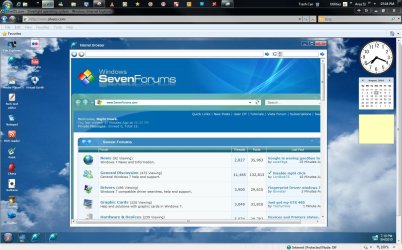
Well besides staying offline entirely there is another option of simply staying on one site by itself and using that site's own version of IE. Where? you might ask. SilveOS.com - Silverlight operating system

That's kind of the "Windows for all" site seen there with a virtual desktop and working browser as you can see! :roflmao::thumbsup:
 

Attachments

  • SF on Windows4All.jpg
    SF on Windows4All.jpg
    168.9 KB · Views: 18

My Computers

System One System Two

  • Computer type
    PC/Desktop
    Computer Manufacturer/Model Number
    Custom builds = 2
    OS
    W7 Ultimate x64/W10 Pro x64/W11 Pro Triple Boot - Main PC W7 Remote PC Micro ATX W7 Pro x64/W11 Pro
    CPU
    AMD Phenom II X4 975 Deneb 3.6ghz - 965 2nd remote pc
    Motherboard
    Gigabyte GA-790XTA-UD4-Gigabyte GA-880GM-D2H remote pc
    Memory
    Kingston Hyper X DDR3 1600 1.5v 16gb - Hyper X Fury 8gb 2nd
    Graphics Card(s)
    MSI HD Radeon 5750 1gb - MSI HD Radeon 6450 on mini tower
    Sound Card
    Creative Labs X-Fi Xtreme Audio P - Realtek onooard 2nd case
    Monitor(s) Displays
    ASUS VW199T-P 19" HP 2082a Main-HP 2082a 20" remote pc
    Screen Resolution
    Asus 1440x900 - HP 1600x900
    Hard Drives
    WD Black 1TB HD per OS W7, W10, and pending W11 presently on 500gb OS Drive - Pending Triple 1TB HDs for Spanned Storage/backup volume
    Single 2TB external USB enclosure, single 1TB System 7 Host/Boot drive, Pending 8TB external HD for system image b
    PSU
    Corsair 750TX - primary / Corsair CX600 - second
    Case
    Antec 900-2 - SSD compatible / NZXT Vulcan mini tower
    Cooling
    Zalman CNPS9900A
    Keyboard
    AZIO L70 Backlit Letters Gaming - ONN Cordless/USB
    Mouse
    MSI DS200 Programmable, Logitech Cordless
    Internet Speed
    30mbps upgrade - primary hard wired - mini tower usb WiFi
    Antivirus
    GFI VIPRE Internet Security 2014 on W7 2016 beta on W10,
    Browser
    Cyberfox, WaterFox 64bit FF variants, FireFox x64, Pale Moon
    Other Info
    Accomdata fan cooled usb 2.0 PIDE/Sata II, III external enclosure.
    Sambient usb/eSata PATA/Sata II, III external enclosure.
  • Computer type
    PC/Desktop
    System Manufacturer/Model Number
    CUSTOM ASSEMBLY
    OS
    W7 Pro x64/W11 Pro
    CPU
    AMD Deneb 3.6ghz - 965
    Motherboard
    Gigabyte GA-880GM-D2H remote pc
    Memory
    Kingston Hyper X Fury 8gb
    Graphics Card(s)
    MSI HD Radeon 6450 DVI Output
    Sound Card
    Realtek onooard Creative or Other separate PENDING
    Monitor(s) Displays
    VIZIO 32" LCD TV Separate LCD Pending
    Screen Resolution
    1600x1080
    Hard Drives
    WD 500GB OS Host/Boot WD Green 1TB Storage/Backup
    PSU
    Corsair 600W - THERMALTAKE 600W spare case
    Case
    NZXT Vulcan mini tower
    Cooling
    Twin 120mm Top Fans - 240mm Side Cover
    Keyboard
    ONN Cordless/USB Logitech Cordless
    Mouse
    ONN USB/Cordless - Logitech Cordless
    Internet Speed
    DSL 5G
    Browser
    MS Edge, FireFox, WaterFox x64, FireFox Nightly
    Other Info
    OS Testing-Remote Access to Main TeamViewer
Sandboxie, Returnil and Images.

Learn their capabilities and you will get very close to the magic 100% security even when deliberately downloading/running malware.

Defensewall and Shadow Protect are another good match up.

Ok so how would you go about learning their capabilities? I'm pretty much an all around noob lol
 

My Computer

Computer Manufacturer/Model Number
Sony VAIO VPC-EE23FX
OS
Windows 7
Memory
4GB DDR3 system memory
Graphics Card(s)
ATI Mobility Radeon HD 4250 graphics
Monitor(s) Displays
15.5" diagonal HD widescreen display
Hard Drives
320 gb hard drive
Well besides staying offline entirely there is another option of simply staying on one site by itself and using that site's own version of IE. Where? you might ask. SilveOS.com - Silverlight operating system

That's kind of the "Windows for all" site seen there with a virtual desktop and working browser as you can see! :roflmao::thumbsup:

Oh ok thats cool so by using this "virtual browser" my computer won't be able to catch a virus? and also my friend says he knows how to remove viruses how do you go about learning this technique, I think he said he uses BIOS to do this. Thanks for all the help btw guys
 

My Computer

Computer Manufacturer/Model Number
Sony VAIO VPC-EE23FX
OS
Windows 7
Memory
4GB DDR3 system memory
Graphics Card(s)
ATI Mobility Radeon HD 4250 graphics
Monitor(s) Displays
15.5" diagonal HD widescreen display
Hard Drives
320 gb hard drive
There is no way possible to make your computer 'invincible'. You may need to follow the advice of others, and just disconnect from the Internet.

Don't use the computer, put it in the box that it came in and put it in the closet. :p

That being said ... follow this guideline (even tho' your friend knows how to to remove viruses
OMG.gif


Make your Internet Explorer more secure - This
can be done by following these simple instructions:
From within Internet Explorer click on the Tools menu and then


click on Options.Click once on the Security tab Click once on the Internet icon so it becomes highlighted. Click once on the Custom Level button.
  • Change the Download signed ActiveX controls to Prompt
  • Change the Download unsigned ActiveX controls to Disable
  • Change the Initialize and script ActiveX controls not marked as
    safe to Disable
  • Change the Installation of desktop items to Prompt
  • Change the Launching programs and files in an IFRAME to
    Prompt
  • Change the Navigate sub-frames across different domains to
    Prompt
  • When all these settings have been made, click on the OK button.
  • If it prompts you as to whether or not you want to save the settings,
    press the Yes button.
  • Next press the Apply button and then the OK to exit the
    Internet Properties page.
  • Use an AntiVirus Software - It is very
    important that your computer has an anti-virus software running on your
    machine. This alone can save you a lot of trouble with malware in the
    future. See this link for a listing of some online & their stand-alone
    antivirus programs:
    Virus,
    Spyware, and Malware Protection and Removal Resources
  • Update your AntiVirus Software - It is
    imperitive that you update your Antivirus software at least once a week
    (Even more if you wish). If you do not update your antivirus software then
    it will not be able to catch any of the new variants that may come out.
  • Use a Firewall - I can not stress how
    important it is that you use a Firewall on your computer. Without a firewall
    your computer is succeptible to being hacked and taken over. I am very
    serious about this and see it happen almost every day with my clients.
    Simply using a Firewall in its default configuration can lower your risk
    greatly. For a tutorial on Firewalls and a listing of some available ones
    see the link below:
    Understanding
    and Using Firewalls
  • Visit Microsoft's Windows Update Site
    Frequently - It is important that you visit
    http://www.windowsupdate.com
    regularly. This will ensure your computer has always the latest security
    updates available installed on your computer. If there are new updates to
    install, install them immediately, reboot your computer, and revisit the
    site until there are no more critical updates.
  • Install SpywareBlaster - SpywareBlaster will
    added a large list of programs and sites into your Internet Explorer
    settings that will protect you from running and downloading known malicious
    programs. A tutorial on installing & using this product can be found here:
    Using
    SpywareBlaster to protect your computer from Spyware and
    Malware
  • Update all these programs regularly - Make
    sure you update all the programs I have listed regularly. Without regular
    updates you WILL NOT be protected when new malicious programs are
    released.
Follow this list and your potential for being infected again will
reduce dramatically.
 

My Computer

Computer type
PC/Desktop
Computer Manufacturer/Model Number
Bruce ... somewhere in his 40's
OS
Windows 7 Ultimate 32bit SP1
CPU
Intel(R) Core(TM)2 Quad CPU @ 2.40GHz, 2400 MHz
Motherboard
INTEL/D975XBX2
Memory
4 GB
Graphics Card(s)
ATI Radeon HD 2600 Pro
Monitor(s) Displays
Samsung SyncMaster 914v
Screen Resolution
1280 x 1024
Hard Drives
2/500GB each ... ST3500630AS ATA Device.
One is not connected
PSU
Rocketfish 700 W
Case
G.Skill Gigabyte Chassis
Keyboard
Standard PS/2 Keyboard
Mouse
Microsoft PS/2 Mouse
Internet Speed
DSL
Antivirus
Avira Internet Security
Browser
IE 11
Other Info
ATI HDMI Audio
Install SpywareBlaster - SpywareBlaster will
added a large list of programs and sites into your Internet Explorer
settings that will protect you from running and downloading known malicious
programs. A tutorial on installing & using this product can be found here:
Using
SpywareBlaster to protect your computer from Spyware and
Malware

Again that only points to one program when there are actually tons of so called antispyware programs. The newer updated av programs often have better malware detection for spotted and blocking adwares and spywares with some also filtering rootkits.

Remember no one program is a cure all for that type of malwares. Each program regardless of how good it may seem can still be found vulnerable. This is why multiple layers which might include a separate firewall program or a better av program with one included will often be found more effective.

If fact to insure nothing stays on any system long simply wipe the drives daily which will clear the OS and any bugs off of any system kept running. You may as well toss backups on removable media away as well since you may have unknowingly backed an infected file or a new bug posing as one.

As far as the D item of installation of desktop items that is disabled here in all four sections of IE.

The latest MS update seen monday addresses shortcut exploitation a new vulnerbility discovered by MS in more then one version of Windows. So checking for the latest security fixes can always be a plus.

As far as internal cleaning on a regular basis you may not want to remove all cobwebs since some garden variety spiders will help catch other types of bugs crawling around inside the case itself. :eek::roflmao:

Well that's what you get when leaving a case parked in a closet. By keeping it regularly maintained at least you wouldn't see that type of problem. Dust is the hardwares worst enemy there since it acts as an insulator.
 

My Computers

System One System Two

  • Computer type
    PC/Desktop
    Computer Manufacturer/Model Number
    Custom builds = 2
    OS
    W7 Ultimate x64/W10 Pro x64/W11 Pro Triple Boot - Main PC W7 Remote PC Micro ATX W7 Pro x64/W11 Pro
    CPU
    AMD Phenom II X4 975 Deneb 3.6ghz - 965 2nd remote pc
    Motherboard
    Gigabyte GA-790XTA-UD4-Gigabyte GA-880GM-D2H remote pc
    Memory
    Kingston Hyper X DDR3 1600 1.5v 16gb - Hyper X Fury 8gb 2nd
    Graphics Card(s)
    MSI HD Radeon 5750 1gb - MSI HD Radeon 6450 on mini tower
    Sound Card
    Creative Labs X-Fi Xtreme Audio P - Realtek onooard 2nd case
    Monitor(s) Displays
    ASUS VW199T-P 19" HP 2082a Main-HP 2082a 20" remote pc
    Screen Resolution
    Asus 1440x900 - HP 1600x900
    Hard Drives
    WD Black 1TB HD per OS W7, W10, and pending W11 presently on 500gb OS Drive - Pending Triple 1TB HDs for Spanned Storage/backup volume
    Single 2TB external USB enclosure, single 1TB System 7 Host/Boot drive, Pending 8TB external HD for system image b
    PSU
    Corsair 750TX - primary / Corsair CX600 - second
    Case
    Antec 900-2 - SSD compatible / NZXT Vulcan mini tower
    Cooling
    Zalman CNPS9900A
    Keyboard
    AZIO L70 Backlit Letters Gaming - ONN Cordless/USB
    Mouse
    MSI DS200 Programmable, Logitech Cordless
    Internet Speed
    30mbps upgrade - primary hard wired - mini tower usb WiFi
    Antivirus
    GFI VIPRE Internet Security 2014 on W7 2016 beta on W10,
    Browser
    Cyberfox, WaterFox 64bit FF variants, FireFox x64, Pale Moon
    Other Info
    Accomdata fan cooled usb 2.0 PIDE/Sata II, III external enclosure.
    Sambient usb/eSata PATA/Sata II, III external enclosure.
  • Computer type
    PC/Desktop
    System Manufacturer/Model Number
    CUSTOM ASSEMBLY
    OS
    W7 Pro x64/W11 Pro
    CPU
    AMD Deneb 3.6ghz - 965
    Motherboard
    Gigabyte GA-880GM-D2H remote pc
    Memory
    Kingston Hyper X Fury 8gb
    Graphics Card(s)
    MSI HD Radeon 6450 DVI Output
    Sound Card
    Realtek onooard Creative or Other separate PENDING
    Monitor(s) Displays
    VIZIO 32" LCD TV Separate LCD Pending
    Screen Resolution
    1600x1080
    Hard Drives
    WD 500GB OS Host/Boot WD Green 1TB Storage/Backup
    PSU
    Corsair 600W - THERMALTAKE 600W spare case
    Case
    NZXT Vulcan mini tower
    Cooling
    Twin 120mm Top Fans - 240mm Side Cover
    Keyboard
    ONN Cordless/USB Logitech Cordless
    Mouse
    ONN USB/Cordless - Logitech Cordless
    Internet Speed
    DSL 5G
    Browser
    MS Edge, FireFox, WaterFox x64, FireFox Nightly
    Other Info
    OS Testing-Remote Access to Main TeamViewer
Sandboxie, Returnil and Images.

Learn their capabilities and you will get very close to the magic 100% security even when deliberately downloading/running malware.

Defensewall and Shadow Protect are another good match up.

Ok so how would you go about learning their capabilities? I'm pretty much an all around noob lol
The best way is to have a bit of a read about them then try them out to see what suits you.

These apps when used as per instructions will keep you far safer than any regular AV/AM.
sandboxing & virtualization - Wilders Security Forums

Official Returnil Support Forum - Wilders Security Forums

Sandboxie - Help Topics

ssj100 Security Forums
 

My Computer

OS
7
Back
Top