Make Windows 7 bootable after motherboard swap

Make Windows 7 bootable after motherboard swap, or bootable after swapping hard drive to new machine. Software described Paragon P2P Adjust OS.


This procedure describes how to do it. Procedure can be used in case of:
  1. Download "Paragon Adaptive Restore 2010" from Paragon Adaptive Restore 2010 on my DROPBOX.
  2. Burn the ISO to CD/DVD using Windows Disc Image Burner or ImgBurn.
  3. Set CD/DVD as first boot device in BIOS.
Do the following:
  1. Boot the computer from Paragon Windows PE 3.0 based CD/DVD.
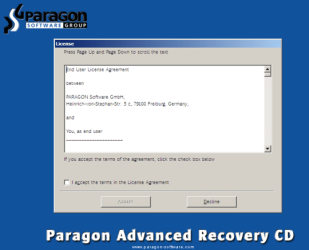
  2. Accept the end user license agreement, otherwise you are not able to use the tool.
    1.png
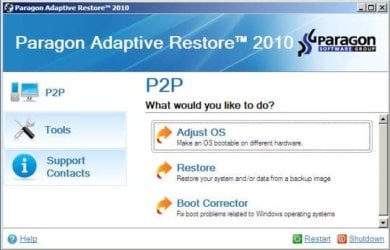
  3. Launch P2P Adjust OS.
    2.jpg
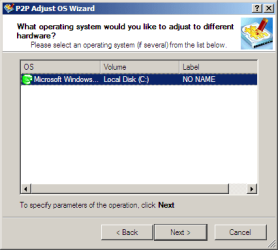
  4. Select the operating system you need to adjust to your new hardware.
    3.png
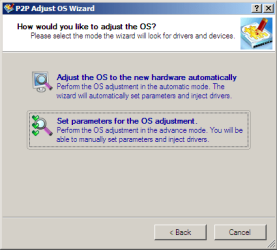
  5. Choose whether you want to add third-party drivers or not, and the way to do it.
    4.png
  6. If you chose "Adjust the OS to the new hardware automatically", the P2P Adjust OS Wizard will automatically accomplish all the necessary actions.
    5.png
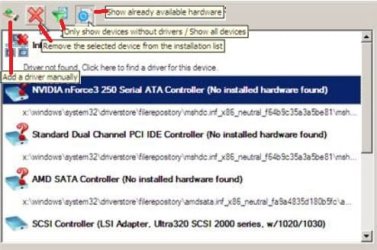
  7. The only thing that might need your interaction is to specify additional driver repository.
    6.png
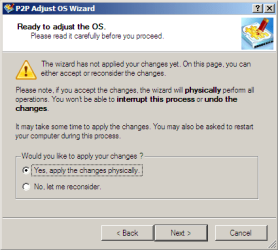
  8. At last, choose "Yes, apply the changes physically" and then restart your computer after operations are done. Do remember, you cannot interrupt the process or undo the changes.
    7.png
Compelete pdf manual: Paragon Adaptive Restore 2010 on my DROPBOX.

Just before the OS adjustment, you can additionally:
extra.JPG


   Warning
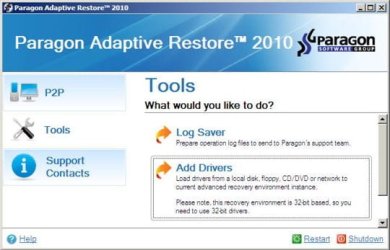
Sometimes the internal hard drive is not recognized in Paragon P2P Adjust OS due to missing SATA or RAID driver. In that case add specific drivers to Windows PE based Paragon Recovery Environment.
  1. Click to open Add Drivers dialog.
    a.jpg
  2. Browse for an .INF file of the required driver, then click the Open button to initiate the process.
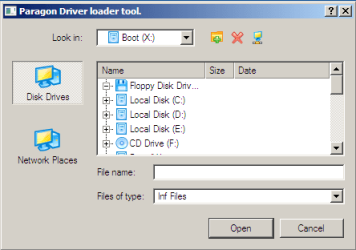
    b.png
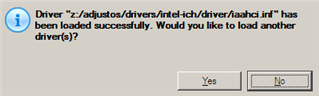
  3. Click Yes to confirm the operation.
    c.png
   Information
You can only add third-party drivers in INF file. If they are zipped, you need to unpack them before processing the steps. The Windows PE environment is 32bit-based, so you need to use 32-bit drivers for injection.
After procedure has finished succesfully and system boots fine, first check if Enable hardware auto-updating via Windows Update (Set to Automatic) is on so it will query Windows Update. After that:

  1. Uninstall Device and Device Driver for devices no longer attached to system. Uninstall associated software as well.
  2. Install all of your device drivers, then Windows Updates.
  3. Refresh your Windows Experience Index (WEI) score.
  4. When done, all you will need to do is to activate Windows 7.
After rebooting from disk, drivers should start swapping out in a cascade you can monitor by clicking on the system tray animation. Wait until all are finished before doing the requested restart. After reboot, go immediately to Check for Updates and install all Important and Optional Updates which may include critical drivers and patches for the OS to run on that hardware.

You must reactivate at the Change Product Key link on System page. If it's not present you can insert Product Key and then Activate using SLMgr Commands

On some systems you see "setup is preparing your computer for first use" on every reboot. Read this to fix that issue: Fix "Setup is Preparing Your Computer for First Use" on Every Reboot


Last edited:
can this work for windows version PRIOR to 7 as well!?
 

My Computer My Computer

At a glance

64 bit Windows 7 Ultimate
Computer type
PC/Desktop
Computer Manufacturer/Model Number
more than you can count
OS
64 bit Windows 7 Ultimate
Antivirus
Avast + Mbam
can this work for windows version PRIOR to 7 as well!?
If you did read the pdf manual you could already know the answer.

P2P Adjust OS Wizard to successfully start up a Win2K+ physical system on a different hardware platform (P2P) by allowing injection of all required drivers and the other actions crucial for this type of migration.
 

My Computer My Computer

At a glance

Microsoft Windows 7 Home Premium 64-bits 7601...Intel(R) Core(TM) i3 CPU M 370 @ 2.40GHz4,00 GBATI Mobility Radeon HD 5400 Series
Computer type
Laptop
Computer Manufacturer/Model Number
ACER ASPIRE 5742G
OS
Microsoft Windows 7 Home Premium 64-bits 7601 Multiprocessor Free Service Pack 1
CPU
Intel(R) Core(TM) i3 CPU M 370 @ 2.40GHz
Motherboard
Acer Aspire 5742G
Memory
4,00 GB
Graphics Card(s)
ATI Mobility Radeon HD 5400 Series
Sound Card
(1) AMD High Definition Audio Device (2) Realtek High Defi
Screen Resolution
1366 x 768 x 32 bits (4294967296 colors) @ 60 Hz
Hard Drives
WDC WD5000BEVT-22ZAT0
Hi there , first of all i want to thank everybody for all the great info .
I'fe read every post and all tutorials.

What i can't seem to find is that if i use this program as explained in the tutorial. Can i do a fresh windows install afterwards with the recovery disk that came with my old computer ? Because from what i understand this disk is bound to the hardware, and im building a new rig with all new components.
I will still use my old HDD though were windows 7 was originaly installed on.

Maybe someone said it already (and i dind't read properly), but just want to make sure if it's possible.

Thanks in advance !


Regards,


Frank
 

My Computer My Computer

At a glance

Windows 7 64 BitI7 4790K8 gb Kingston hyper-x blueMsi R9 290 3gb
Computer type
PC/Desktop
Computer Manufacturer/Model Number
Custom
OS
Windows 7 64 Bit
CPU
I7 4790K
Motherboard
Asus z97-p
Memory
8 gb Kingston hyper-x blue
Graphics Card(s)
Msi R9 290 3gb
It depends how the recovery disk has been programmed. You can get win7 install DVD here Windows 7 Direct Download Links, Official Disk Images from Digital River The Netherlands is also in the list.

Why use the recovery disk that came with computer????? You don't want all the bloatware that will be installed automatically! Just use the win7 install dvd I listed above. But a reinstall is only needed in case you're in trouble.

The paragon iso from this tutorial makes the win7 bootable. But you have to reactivate win7 in case you have an OEM license.
 

My Computer My Computer

At a glance

Microsoft Windows 7 Home Premium 64-bits 7601...Intel(R) Core(TM) i3 CPU M 370 @ 2.40GHz4,00 GBATI Mobility Radeon HD 5400 Series
Computer type
Laptop
Computer Manufacturer/Model Number
ACER ASPIRE 5742G
OS
Microsoft Windows 7 Home Premium 64-bits 7601 Multiprocessor Free Service Pack 1
CPU
Intel(R) Core(TM) i3 CPU M 370 @ 2.40GHz
Motherboard
Acer Aspire 5742G
Memory
4,00 GB
Graphics Card(s)
ATI Mobility Radeon HD 5400 Series
Sound Card
(1) AMD High Definition Audio Device (2) Realtek High Defi
Screen Resolution
1366 x 768 x 32 bits (4294967296 colors) @ 60 Hz
Hard Drives
WDC WD5000BEVT-22ZAT0
Tnx for you're reply. One more question , so if i need to reactivate it i can just use my old cd-key that came with the computer back then ?
Or when i want a fresh install i can use the link you provided and my old key if my recovery disk won't work ? That's 2 questions actually :p.

Thnx
 

My Computer My Computer

At a glance

Windows 7 64 BitI7 4790K8 gb Kingston hyper-x blueMsi R9 290 3gb
Computer type
PC/Desktop
Computer Manufacturer/Model Number
Custom
OS
Windows 7 64 Bit
CPU
I7 4790K
Motherboard
Asus z97-p
Memory
8 gb Kingston hyper-x blue
Graphics Card(s)
Msi R9 290 3gb
The download links have been removed by MS after 5 years. Adjust the image to boot on different hardware per this tutorial then reactivate with key on COA sticker, obviously.
 
Wow, I must say this was rather quite easy...

Ran it off a USB stick, got up to Step 8, selected "Yes, apply the changes physically"...

Took only a few seconds, and then it was done. No restarts, didn't ask for additional drivers...

After that Windows booted up "Preparing windows for the first time!" etc etc...after loading into desktop, it automatically loaded a few drivers on its own, rebooted, and then all that was left was for me to install drivers off my motherboards installation DVD.

Everything else was all unaffected, and working just fine!
 

My Computer My Computer

At a glance

Windows 7 Ultimate 64bitIntel Core i5-4690K @ 4.7ghzG-Skill Snipers DDR3-1600 8GB oc'd@ 1866eVGA GTX 770 4GB FTW
Computer type
PC/Desktop
Computer Manufacturer/Model Number
Antares
OS
Windows 7 Ultimate 64bit
CPU
Intel Core i5-4690K @ 4.7ghz
Motherboard
ASRock Z97 Extreme6
Memory
G-Skill Snipers DDR3-1600 8GB oc'd@ 1866
Graphics Card(s)
eVGA GTX 770 4GB FTW
Sound Card
Creative X-Fi Titanium Fatal1ty Professional Series PCIe
Monitor(s) Displays
Acer K272HUL HDMI 27" 1440p
Screen Resolution
2560x1440
Hard Drives
Samsung 950 Pro M.2 512GB SSD, Samsong 850 Evo M.2 500GB SSD, Western Digital WD1002FAEX 1TB 6.0GBs HDD
PSU
EVGA SuperNOVA 750 G2
Case
CM Storm Trooper
Cooling
Corsair Hydro H105 High Performance w/ Dual GT AP-15's
Keyboard
Logitech G110
Mouse
RAZER Naga HEX Wraith Red
Internet Speed
Comcast 100mpbs
Hmm...

Windows keeps loading up with the splash screen, "Setup is preparing your computer for first use!" ..and telling me I have to call MS to reactivate my Product Key on my RETAIL Windows 7 within 3 days...

:confused:
 

My Computer My Computer

At a glance

Windows 7 Ultimate 64bitIntel Core i5-4690K @ 4.7ghzG-Skill Snipers DDR3-1600 8GB oc'd@ 1866eVGA GTX 770 4GB FTW
Computer type
PC/Desktop
Computer Manufacturer/Model Number
Antares
OS
Windows 7 Ultimate 64bit
CPU
Intel Core i5-4690K @ 4.7ghz
Motherboard
ASRock Z97 Extreme6
Memory
G-Skill Snipers DDR3-1600 8GB oc'd@ 1866
Graphics Card(s)
eVGA GTX 770 4GB FTW
Sound Card
Creative X-Fi Titanium Fatal1ty Professional Series PCIe
Monitor(s) Displays
Acer K272HUL HDMI 27" 1440p
Screen Resolution
2560x1440
Hard Drives
Samsung 950 Pro M.2 512GB SSD, Samsong 850 Evo M.2 500GB SSD, Western Digital WD1002FAEX 1TB 6.0GBs HDD
PSU
EVGA SuperNOVA 750 G2
Case
CM Storm Trooper
Cooling
Corsair Hydro H105 High Performance w/ Dual GT AP-15's
Keyboard
Logitech G110
Mouse
RAZER Naga HEX Wraith Red
Internet Speed
Comcast 100mpbs

My Computer My Computer

At a glance

Microsoft Windows 7 Home Premium 64-bits 7601...Intel(R) Core(TM) i3 CPU M 370 @ 2.40GHz4,00 GBATI Mobility Radeon HD 5400 Series
Computer type
Laptop
Computer Manufacturer/Model Number
ACER ASPIRE 5742G
OS
Microsoft Windows 7 Home Premium 64-bits 7601 Multiprocessor Free Service Pack 1
CPU
Intel(R) Core(TM) i3 CPU M 370 @ 2.40GHz
Motherboard
Acer Aspire 5742G
Memory
4,00 GB
Graphics Card(s)
ATI Mobility Radeon HD 5400 Series
Sound Card
(1) AMD High Definition Audio Device (2) Realtek High Defi
Screen Resolution
1366 x 768 x 32 bits (4294967296 colors) @ 60 Hz
Hard Drives
WDC WD5000BEVT-22ZAT0
OK so I burned the iso to disc and tried to test it on reboot but it won't boot from the disc. Does the new mobo have to be installed for the boot disc to work? I'm getting ready to swap mobos and would like to use paragon.
 

My Computer My Computer

At a glance

windos 7 64biti7 4th gen.16gb ddr3nvidia geforce gtx 650Ti
Computer type
PC/Desktop
Computer Manufacturer/Model Number
custom
OS
windos 7 64bit
CPU
i7 4th gen.
Motherboard
ASROCK H97M PRO4
Memory
16gb ddr3
Graphics Card(s)
nvidia geforce gtx 650Ti
Antivirus
AVG and malwarebytes
Browser
chrome
Did you use Windows Image Burner to a fresh CD? It should boot in any PC.
 
Yes I used image burner. I unpacked the zip first before burning to CD...something that should have been mentioned with the original post. It won't boot up at all even with CD player set to boost first. Just skips it and launches Windows.
 

My Computer My Computer

At a glance

windos 7 64biti7 4th gen.16gb ddr3nvidia geforce gtx 650Ti
Computer type
PC/Desktop
Computer Manufacturer/Model Number
custom
OS
windos 7 64bit
CPU
i7 4th gen.
Motherboard
ASROCK H97M PRO4
Memory
16gb ddr3
Graphics Card(s)
nvidia geforce gtx 650Ti
Antivirus
AVG and malwarebytes
Browser
chrome
Thanks a lot, you're a lifesaver.

One more thing, I'm using dual boot (7 after XP) and after I was done with my 7 HDD I got the NTLDR missing error, so I had to plug my XP HDD (can't recall if I redid the process with this one just in case or if I was forced to though, and btw I had to provide the SATA/RAID drivers manually this time) the error persisted until I set boot order in bios to the older HDD first.
What caused this? How do I go about making the Win 7 boot not dependent on the other HDD? I need to switch the older HDD to something bigger and probably image the XP install/data to it.
 

My Computer My Computer

At a glance

Windows 7 Ultimate 32bit
Computer type
PC/Desktop
OS
Windows 7 Ultimate 32bit
snip Capture.PNG
 

My Computer My Computer

At a glance

Windows 7 Ultimate 32bit
Computer type
PC/Desktop
OS
Windows 7 Ultimate 32bit
Win7 on C is being booted by XP from Disk0.

To repair this unplug the XP drive, swap its data cable to the Win7 drive so it becomes DISK0 which is safest and becomes first HD to boot, then run Startup Repair - Run 3 Separate Times.

There is an automated method to move Bootmgr - Move to C:\ with EasyBCD - Windows 7 Forums
but it only recently became fully functional enough for me to recommend, so I dont' know if it might remove the System bootability of XP. I'll ask for the tutorial's author to consult but if you want to move ahead then I'd use the first method which has always worked in thousands of these cases we've helped with since beta.
 
I think the EasyBCD route looks the most convenient at the moment.

Thanks a lot man.
 

My Computer My Computer

At a glance

Windows 7 Ultimate 32bit
Computer type
PC/Desktop
OS
Windows 7 Ultimate 32bit
If you copied the bootmgr to C as you apparently have done as per your screenshot, there should be no dependency on disk0. But you can always double check by disconnecting disk0 and then boot.
 

My Computer My Computer

At a glance

Vista, Windows7, Mint Mate, Zorin, Windows 8from 1.6GHz Duo to i7
Computer Manufacturer/Model Number
HP, Dell, Gateway, Toshiba - 4 laptops and 2 desktops
OS
Vista, Windows7, Mint Mate, Zorin, Windows 8
CPU
from 1.6GHz Duo to i7
Monitor(s) Displays
2x HP w2207
Hard Drives
5x HDD, 7x SSD, 12x Externals
Keyboard
with trackball - no mices
Mouse
Trackball mice
Internet Speed
DSL 6000
Back
Top