Make Windows 7 bootable after motherboard swap

Make Windows 7 bootable after motherboard swap, or bootable after swapping hard drive to new machine. Software described Paragon P2P Adjust OS.


This procedure describes how to do it. Procedure can be used in case of:
  1. Download "Paragon Adaptive Restore 2010" from Paragon Adaptive Restore 2010 on my DROPBOX.
  2. Burn the ISO to CD/DVD using Windows Disc Image Burner or ImgBurn.
  3. Set CD/DVD as first boot device in BIOS.
Do the following:
  1. Boot the computer from Paragon Windows PE 3.0 based CD/DVD.
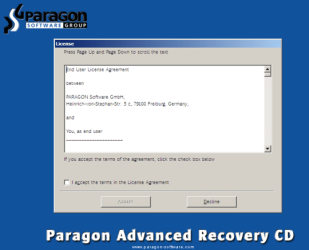
  2. Accept the end user license agreement, otherwise you are not able to use the tool.
    1.png
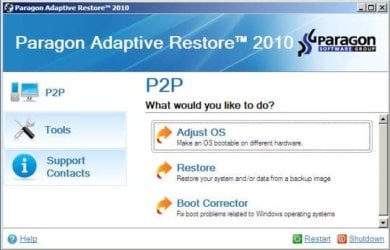
  3. Launch P2P Adjust OS.
    2.jpg
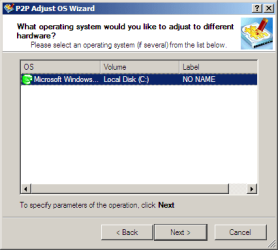
  4. Select the operating system you need to adjust to your new hardware.
    3.png
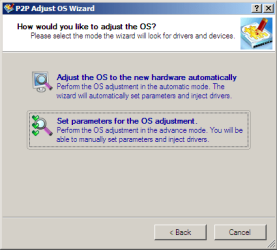
  5. Choose whether you want to add third-party drivers or not, and the way to do it.
    4.png
  6. If you chose "Adjust the OS to the new hardware automatically", the P2P Adjust OS Wizard will automatically accomplish all the necessary actions.
    5.png
  7. The only thing that might need your interaction is to specify additional driver repository.
    6.png
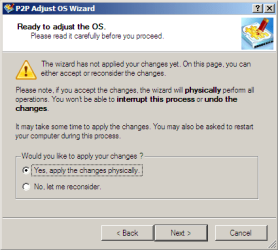
  8. At last, choose "Yes, apply the changes physically" and then restart your computer after operations are done. Do remember, you cannot interrupt the process or undo the changes.
    7.png
Compelete pdf manual: Paragon Adaptive Restore 2010 on my DROPBOX.

Just before the OS adjustment, you can additionally:
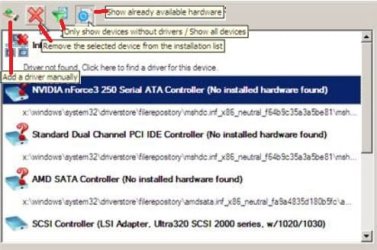
extra.JPG


   Warning
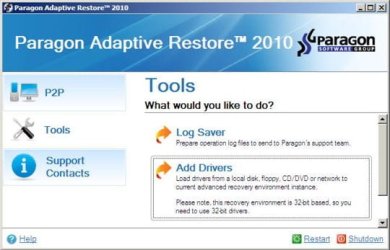
Sometimes the internal hard drive is not recognized in Paragon P2P Adjust OS due to missing SATA or RAID driver. In that case add specific drivers to Windows PE based Paragon Recovery Environment.
  1. Click to open Add Drivers dialog.
    a.jpg
  2. Browse for an .INF file of the required driver, then click the Open button to initiate the process.
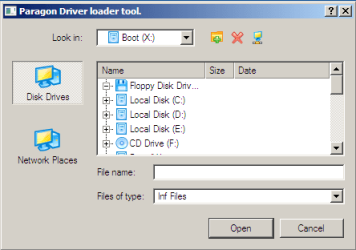
    b.png
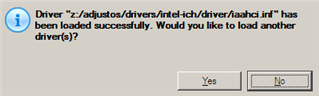
  3. Click Yes to confirm the operation.
    c.png
   Information
You can only add third-party drivers in INF file. If they are zipped, you need to unpack them before processing the steps. The Windows PE environment is 32bit-based, so you need to use 32-bit drivers for injection.
After procedure has finished succesfully and system boots fine, first check if Enable hardware auto-updating via Windows Update (Set to Automatic) is on so it will query Windows Update. After that:

  1. Uninstall Device and Device Driver for devices no longer attached to system. Uninstall associated software as well.
  2. Install all of your device drivers, then Windows Updates.
  3. Refresh your Windows Experience Index (WEI) score.
  4. When done, all you will need to do is to activate Windows 7.
After rebooting from disk, drivers should start swapping out in a cascade you can monitor by clicking on the system tray animation. Wait until all are finished before doing the requested restart. After reboot, go immediately to Check for Updates and install all Important and Optional Updates which may include critical drivers and patches for the OS to run on that hardware.

You must reactivate at the Change Product Key link on System page. If it's not present you can insert Product Key and then Activate using SLMgr Commands

On some systems you see "setup is preparing your computer for first use" on every reboot. Read this to fix that issue: Fix "Setup is Preparing Your Computer for First Use" on Every Reboot


Last edited:
C isn't System yet, Wolfgang.

Will EasyBCD do the job even though the existing BootMgr is XP?
 
Yeah right - I missed that System part. But EasyBCD should copy the bootmgr from XP also - although I have never actually done that but I see no reason why not. It's worth a try.
 

My Computer My Computer

At a glance

Vista, Windows7, Mint Mate, Zorin, Windows 8from 1.6GHz Duo to i7
Computer Manufacturer/Model Number
HP, Dell, Gateway, Toshiba - 4 laptops and 2 desktops
OS
Vista, Windows7, Mint Mate, Zorin, Windows 8
CPU
from 1.6GHz Duo to i7
Monitor(s) Displays
2x HP w2207
Hard Drives
5x HDD, 7x SSD, 12x Externals
Keyboard
with trackball - no mices
Mouse
Trackball mice
Internet Speed
DSL 6000
That would be a problem then since it's a different bootmgr and boot code for XP, which a Win7 install only updates on the XP System partition to configure a Dual Boot. It would need to write a fresh Win7 boot manager to C which I believe Easy does.

If not confirm C remains Partition Marked Active then run Startup Repair - Run 3 Separate Times.

But if it messes up XP partition it might not boot without repairs. So beware.
 
I don't think it will mess up XP. All EasyBCD does is copy.
 

My Computer My Computer

At a glance

Vista, Windows7, Mint Mate, Zorin, Windows 8from 1.6GHz Duo to i7
Computer Manufacturer/Model Number
HP, Dell, Gateway, Toshiba - 4 laptops and 2 desktops
OS
Vista, Windows7, Mint Mate, Zorin, Windows 8
CPU
from 1.6GHz Duo to i7
Monitor(s) Displays
2x HP w2207
Hard Drives
5x HDD, 7x SSD, 12x Externals
Keyboard
with trackball - no mices
Mouse
Trackball mice
Internet Speed
DSL 6000
Almost worked - starts to boot then hangs

This looked like exactly what I needed to go from a DELL XPS 8100 to a Dell Inspiron. Both with Windows 7 Pro. XPS mother board died so I put hard drive into the Inspiron and followed the instructions for the PAR process. (which are REALLY well done, right down to the screen shots)

When I boot the end result it starts to load, shows the initial Windows 7 started graphic with the 4 circling dots, then the screen goes black as it reboots. I've run Windows Startup Repair multiple times from the Windows 7 Install disk with no luck. Repair says it can't fix it and the cause could be a configuration change (ya think?) I didn't get any messages during the PAR processes beside what you documented. No prompts for extra drivers, etc. I did see the messages scroll by as it injected drivers.

any suggestions about what I've missed. I really need this to succeed as I have software on the hard drive that is no longer available and my install CD is not readable for some reason (too many scratches??)

Thanks,
Roy
 

My Computer My Computer

At a glance

Windows 7 Final Release Candidate dual booted...Pentium 4 dual core 3.06 GHz2 GBon MB
Computer Manufacturer/Model Number
eMachines T5048
OS
Windows 7 Final Release Candidate dual booted with XP Pro SP3
CPU
Pentium 4 dual core 3.06 GHz
Motherboard
n/a
Memory
2 GB
Graphics Card(s)
on MB
Sound Card
on MB - Realtek High Definition Audio
Monitor(s) Displays
SyncMaster 740N
Hard Drives
Western digital 160 GB
Western Digital 80 GB
PSU
?
Case
eMachines
Cooling
2 fans
This looked like exactly what I needed to go from a DELL XPS 8100 to a Dell Inspiron. Both with Windows 7 Pro. XPS mother board died so I put hard drive into the Inspiron and followed the instructions for the PAR process. (which are REALLY well done, right down to the screen shots)

When I boot the end result it starts to load, shows the initial Windows 7 started graphic with the 4 circling dots, then the screen goes black as it reboots. I've run Windows Startup Repair multiple times from the Windows 7 Install disk with no luck. Repair says it can't fix it and the cause could be a configuration change (ya think?) I didn't get any messages during the PAR processes beside what you documented. No prompts for extra drivers, etc. I did see the messages scroll by as it injected drivers.

any suggestions about what I've missed. I really need this to succeed as I have software on the hard drive that is no longer available and my install CD is not readable for some reason (too many scratches??)

Thanks,
Roy
Safe mode works fine? Uninstall GPU driver.
 

My Computer My Computer

At a glance

Microsoft Windows 7 Home Premium 64-bits 7601...Intel(R) Core(TM) i3 CPU M 370 @ 2.40GHz4,00 GBATI Mobility Radeon HD 5400 Series
Computer type
Laptop
Computer Manufacturer/Model Number
ACER ASPIRE 5742G
OS
Microsoft Windows 7 Home Premium 64-bits 7601 Multiprocessor Free Service Pack 1
CPU
Intel(R) Core(TM) i3 CPU M 370 @ 2.40GHz
Motherboard
Acer Aspire 5742G
Memory
4,00 GB
Graphics Card(s)
ATI Mobility Radeon HD 5400 Series
Sound Card
(1) AMD High Definition Audio Device (2) Realtek High Defi
Screen Resolution
1366 x 768 x 32 bits (4294967296 colors) @ 60 Hz
Hard Drives
WDC WD5000BEVT-22ZAT0
Unfortunately I can't boot into SAFE mode either. All options act the same, go part way then reboots.
I tried turning on bootlog but there was none produced so it may be ending before the log wold start, or (more likely) the boot fails without closing the log
 

My Computer My Computer

At a glance

Windows 7 Final Release Candidate dual booted...Pentium 4 dual core 3.06 GHz2 GBon MB
Computer Manufacturer/Model Number
eMachines T5048
OS
Windows 7 Final Release Candidate dual booted with XP Pro SP3
CPU
Pentium 4 dual core 3.06 GHz
Motherboard
n/a
Memory
2 GB
Graphics Card(s)
on MB
Sound Card
on MB - Realtek High Definition Audio
Monitor(s) Displays
SyncMaster 740N
Hard Drives
Western digital 160 GB
Western Digital 80 GB
PSU
?
Case
eMachines
Cooling
2 fans
Unfortunately I can't boot into SAFE mode either. All options act the same, go part way then reboots.
I tried turning on bootlog but there was none produced so it may be ending before the log wold start, or (more likely) the boot fails without closing the log
When exactly does it reboot?
Disable the automatic restart! How To Disable Automatic Restart on System Failure From the Advanced Boot Options Menu in Windows 7
What is the BSOD error? Stopcode and which DLL for example
 

My Computer My Computer

At a glance

Microsoft Windows 7 Home Premium 64-bits 7601...Intel(R) Core(TM) i3 CPU M 370 @ 2.40GHz4,00 GBATI Mobility Radeon HD 5400 Series
Computer type
Laptop
Computer Manufacturer/Model Number
ACER ASPIRE 5742G
OS
Microsoft Windows 7 Home Premium 64-bits 7601 Multiprocessor Free Service Pack 1
CPU
Intel(R) Core(TM) i3 CPU M 370 @ 2.40GHz
Motherboard
Acer Aspire 5742G
Memory
4,00 GB
Graphics Card(s)
ATI Mobility Radeon HD 5400 Series
Sound Card
(1) AMD High Definition Audio Device (2) Realtek High Defi
Screen Resolution
1366 x 768 x 32 bits (4294967296 colors) @ 60 Hz
Hard Drives
WDC WD5000BEVT-22ZAT0
Created an accout an register just to thank you!! :D, this worked like a charm for me! :D.. Woohoo!!. Okay, lol but yeah pretty happy about it :), cause I switched a motherboard yes an forgot (more like didnt think about it at all ) the sysprep. But naturally I wanted to keep everything etc, but yeah would always crash an the other solutions an ways I tried didnt really do much for me like the repair tool. And im perhaps not the greatest with computers, but since I reached my desktop thanks to this gem, Im pretty sure ill be able to fix any issue that might occur, and am working on uninstalling and installing my drivers at the moment, might take a bit, but so far no prompt about any w7 key or anything, even still had my background image :). Either way, this was exactly what I wanted and needed. Also well explained and easy to follow :).

Either way again, just again wanted to say thank you!!! :)). You rock, and you are awesome, period! :D.

THANK YOU!!!!!!
 

My Computer My Computer

At a glance

Windows 7 home 64 bit
Computer type
PC/Desktop
OS
Windows 7 home 64 bit
I actually used this tool to resolve some quirks when restoring an XP image onto another computer. I did the restoration twice one using the XP REPAIR install to resolve driver issues, & the 2nd time using this tool. The REPAIR install did not resolve everything, but it appears this tool nearly did.
 

My Computer My Computer

At a glance

Windows 7 Home Prem 32 bit
Computer type
PC/Desktop
OS
Windows 7 Home Prem 32 bit
Hi,

I'm about to attempt a motherboard/cpu upgrade, and plan on using Paragon to try and do it without needing to reinstall Win 7.

I'll be upgrading from my current Phenom II X6 setup (detailed in my profile) to a GA-78lmt-usb3 motherboard, with a AMD FX 6300 cpu on it.

I've made 3 back ups of all my important files, via 3 different methods, just to make damn sure I don't lose anything, and I'll also disconnect that second HDD for the duration of the upgrade process.

Now... there's just one element to all this that's confusing me, and that's the storage interface setup...

This PC, although coming to me with just one HDD in it, seems to have RAID set as the 'onboard SATA mode' when I look in the bios set up.

I've read of a few problems with the whole process of upgrading the motherboard, related to problems recognising the hard drives when the computer attempts to boot after the new hardware has been dropped in.

So... is there anything I need to do in advance to avoid such problems, or will Paragon take care of it automatically?

I'm not even sure why that setting is on RAID??? Although I've added a secondary hard drive since I got the PC, I haven't set up any RAID options, and basically... don't need it. I back up my work regularly.

So... should I just change to IDE or AHCI before I get started with the upgrade?

Any advice greatly appreciated. :)

EDIT: Just to note that I did see the instructions in the tutorial for adding drivers, but... having downloaded all the drivers from the Gigabyte site and unpacked them... they come with an installer and no sign of any .inf files???
 
Last edited:

My Computer My Computer

At a glance

Windows 7 Home Premium 64bitPhenom II X6 1035t8gb DDR3Powercolor HD7870-2 GB
Computer type
PC/Desktop
Computer Manufacturer/Model Number
Acer
OS
Windows 7 Home Premium 64bit
CPU
Phenom II X6 1035t
Motherboard
Acer 880G - SB850
Memory
8gb DDR3
Graphics Card(s)
Powercolor HD7870-2 GB
Hard Drives
1x 500gb SATA HDD (C Drive)
1x 1tb SATA HDD
Antivirus
AVG free
Browser
Maxthon
OK... I found the .inf files, but... just so I understand this correctly... it's the 32bit versions that Paragon needs, despite the OS be a 64bit version... yes?
 

My Computer My Computer

At a glance

Windows 7 Home Premium 64bitPhenom II X6 1035t8gb DDR3Powercolor HD7870-2 GB
Computer type
PC/Desktop
Computer Manufacturer/Model Number
Acer
OS
Windows 7 Home Premium 64bit
CPU
Phenom II X6 1035t
Motherboard
Acer 880G - SB850
Memory
8gb DDR3
Graphics Card(s)
Powercolor HD7870-2 GB
Hard Drives
1x 500gb SATA HDD (C Drive)
1x 1tb SATA HDD
Antivirus
AVG free
Browser
Maxthon
Some mobos have RAID as a generic SATA setting but it's strange yours has the preferred AHCI choice as an alternative.

If you're sure you don't' have two hard drives in an array then I think I would do a Clean Reinstall Windows 7
with only the target HD plugged in, deleting all partitions during the booted install.

You can try PAR to see if it will work. But to be sure I think I'd SysPrep to move HD to another computer
which is the preferred IT method that if followed carefully may be more of a sure thing.
 
Yep, the PC ony came with one hard drive in when I got it, however... I did buy it from someone else, not from a store. So, I guess it's possible the previous owner had a second drive and they set up RAID and removed the second drive before selling the PC to me.

I added my own second drive a couple of months ago, but didn't do any RAID configuration.

The options in the bios set up, under integrated peripherals > onboard SATA mode' are: RAID, Native IDE and AHCI, with it currently set on RAID.

Boot priority points to RAID ready, so... that means it's set on RAID, but not configured as such, right?

I'd like to avoid a clean install if possible, because that means I'd have to reinstall everything else, Adobe CS6, Sony Vegas and a host of other programs, plus all the accompanying MS updates... it'll take an age.
 

My Computer My Computer

At a glance

Windows 7 Home Premium 64bitPhenom II X6 1035t8gb DDR3Powercolor HD7870-2 GB
Computer type
PC/Desktop
Computer Manufacturer/Model Number
Acer
OS
Windows 7 Home Premium 64bit
CPU
Phenom II X6 1035t
Motherboard
Acer 880G - SB850
Memory
8gb DDR3
Graphics Card(s)
Powercolor HD7870-2 GB
Hard Drives
1x 500gb SATA HDD (C Drive)
1x 1tb SATA HDD
Antivirus
AVG free
Browser
Maxthon
Well, anyway... having triple saved all my important stuff... I'll try and run with the PAR option. I guess worst case scenario is that it doesn't work and I just do a full reinstall of everything.

Considering the warnings associated with RAID and sysprep failures, etc, etc... I think this is the way to go... for my circumstances, anyway.

If I can get away without reinstalling windows and/or needing to reactivate windows and all my other software that needs activation... great.

If not... hours of tedium await. ;)
 

My Computer My Computer

At a glance

Windows 7 Home Premium 64bitPhenom II X6 1035t8gb DDR3Powercolor HD7870-2 GB
Computer type
PC/Desktop
Computer Manufacturer/Model Number
Acer
OS
Windows 7 Home Premium 64bit
CPU
Phenom II X6 1035t
Motherboard
Acer 880G - SB850
Memory
8gb DDR3
Graphics Card(s)
Powercolor HD7870-2 GB
Hard Drives
1x 500gb SATA HDD (C Drive)
1x 1tb SATA HDD
Antivirus
AVG free
Browser
Maxthon
If this is still the factory install then I would most certainly choose the Clean Reinstall Windows 7
which is a vastly superior install to the factory junk install. Over 1.3+ consumers have used that tutorial without a single problem or complaint. They have the best Win7 installs in the world, and they stay that way as long as one sticks with only the tools and methods in the tutorial.

Be sure to reset BIOS to defaults and SATA controller to AHCI, install with only one hard drive present.
 
Had already started the PAR option when I came back to read your reply.

If I decide to do a clean install... there's no downside to doing so after I've let PAR do it's job, if I want the clean install experience, is there?

It's just that I have a very small window for this right now... got work deadlines, and I probably shouldn't have even tried doing this upgrade at all right now, but... it could be a few weeks before I get another 1 day window.
 

My Computer My Computer

At a glance

Windows 7 Home Premium 64bitPhenom II X6 1035t8gb DDR3Powercolor HD7870-2 GB
Computer type
PC/Desktop
Computer Manufacturer/Model Number
Acer
OS
Windows 7 Home Premium 64bit
CPU
Phenom II X6 1035t
Motherboard
Acer 880G - SB850
Memory
8gb DDR3
Graphics Card(s)
Powercolor HD7870-2 GB
Hard Drives
1x 500gb SATA HDD (C Drive)
1x 1tb SATA HDD
Antivirus
AVG free
Browser
Maxthon
Back
Top