Make Windows 7 bootable after motherboard swap

Make Windows 7 bootable after motherboard swap, or bootable after swapping hard drive to new machine. Software described Paragon P2P Adjust OS.


This procedure describes how to do it. Procedure can be used in case of:
  1. Download "Paragon Adaptive Restore 2010" from Paragon Adaptive Restore 2010 on my DROPBOX.
  2. Burn the ISO to CD/DVD using Windows Disc Image Burner or ImgBurn.
  3. Set CD/DVD as first boot device in BIOS.
Do the following:
  1. Boot the computer from Paragon Windows PE 3.0 based CD/DVD.
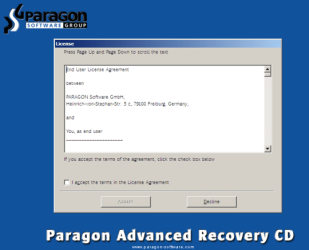
  2. Accept the end user license agreement, otherwise you are not able to use the tool.
    1.png
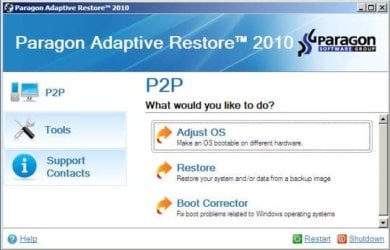
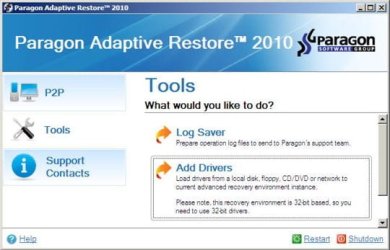
  3. Launch P2P Adjust OS.
    2.jpg
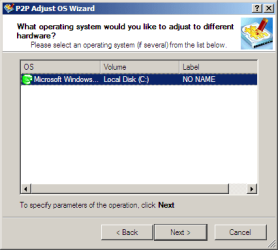
  4. Select the operating system you need to adjust to your new hardware.
    3.png
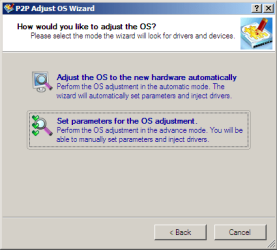
  5. Choose whether you want to add third-party drivers or not, and the way to do it.
    4.png
  6. If you chose "Adjust the OS to the new hardware automatically", the P2P Adjust OS Wizard will automatically accomplish all the necessary actions.
    5.png
  7. The only thing that might need your interaction is to specify additional driver repository.
    6.png
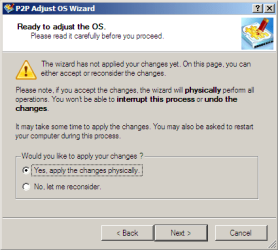
  8. At last, choose "Yes, apply the changes physically" and then restart your computer after operations are done. Do remember, you cannot interrupt the process or undo the changes.
    7.png
Compelete pdf manual: Paragon Adaptive Restore 2010 on my DROPBOX.

Just before the OS adjustment, you can additionally:
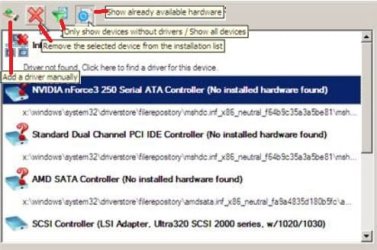
extra.JPG


   Warning
Sometimes the internal hard drive is not recognized in Paragon P2P Adjust OS due to missing SATA or RAID driver. In that case add specific drivers to Windows PE based Paragon Recovery Environment.
  1. Click to open Add Drivers dialog.
    a.jpg
  2. Browse for an .INF file of the required driver, then click the Open button to initiate the process.
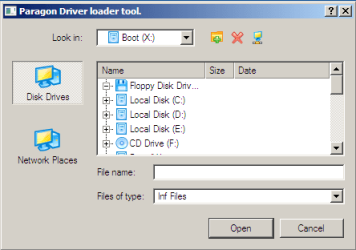
    b.png
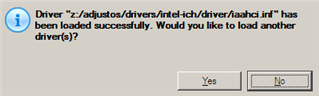
  3. Click Yes to confirm the operation.
    c.png
   Information
You can only add third-party drivers in INF file. If they are zipped, you need to unpack them before processing the steps. The Windows PE environment is 32bit-based, so you need to use 32-bit drivers for injection.
After procedure has finished succesfully and system boots fine, first check if Enable hardware auto-updating via Windows Update (Set to Automatic) is on so it will query Windows Update. After that:

  1. Uninstall Device and Device Driver for devices no longer attached to system. Uninstall associated software as well.
  2. Install all of your device drivers, then Windows Updates.
  3. Refresh your Windows Experience Index (WEI) score.
  4. When done, all you will need to do is to activate Windows 7.
After rebooting from disk, drivers should start swapping out in a cascade you can monitor by clicking on the system tray animation. Wait until all are finished before doing the requested restart. After reboot, go immediately to Check for Updates and install all Important and Optional Updates which may include critical drivers and patches for the OS to run on that hardware.

You must reactivate at the Change Product Key link on System page. If it's not present you can insert Product Key and then Activate using SLMgr Commands

On some systems you see "setup is preparing your computer for first use" on every reboot. Read this to fix that issue: Fix "Setup is Preparing Your Computer for First Use" on Every Reboot


Last edited:
The dropbox link doesn't work (error 429). Is there somewhere else I can get Paragon Adaptive Restore 2010? I haven't tried the sysprep method yet (doing it tomorrow), so I might not even need it. Just figured I'd post this on the off chance that I get a reply before then, since having two potential methods is better than one. A clean install wouldn't kill me, but I'd like to avoid it if possible.
 

My Computer My Computer

At a glance

Windows 7 Home Premium x64Intel Core i7-4790kG. Skill Ares Series 16GB (2 x 8GB) DDR3 1600EVGA GTX 980 FTW
Computer type
PC/Desktop
Computer Manufacturer/Model Number
Custom
OS
Windows 7 Home Premium x64
CPU
Intel Core i7-4790k
Motherboard
ASUS z97-AR
Memory
G. Skill Ares Series 16GB (2 x 8GB) DDR3 1600
Graphics Card(s)
EVGA GTX 980 FTW
Hard Drives
Samsung 840 PRO 250 GB SSD (OS)
3x WD 1TB 3.5" HDD
1x WD 4TB 3.5" HDD
1x WD 500GB 2.5" HDD
Antivirus
avast! Free (also Malwarebytes Home Premium)
Browser
Firefox/Chrome (latest versions)

My Computer My Computer

At a glance

Windows 7 Home Premium x64Intel Core i7-4790kG. Skill Ares Series 16GB (2 x 8GB) DDR3 1600EVGA GTX 980 FTW
Computer type
PC/Desktop
Computer Manufacturer/Model Number
Custom
OS
Windows 7 Home Premium x64
CPU
Intel Core i7-4790k
Motherboard
ASUS z97-AR
Memory
G. Skill Ares Series 16GB (2 x 8GB) DDR3 1600
Graphics Card(s)
EVGA GTX 980 FTW
Hard Drives
Samsung 840 PRO 250 GB SSD (OS)
3x WD 1TB 3.5" HDD
1x WD 4TB 3.5" HDD
1x WD 500GB 2.5" HDD
Antivirus
avast! Free (also Malwarebytes Home Premium)
Browser
Firefox/Chrome (latest versions)
I am moving a HD from an old computer to a new ASUS Z97-AR.
That drive willnot boot so I down loaded the .ISO file from post # 141
I am getting the following error.

WINDOWS BOOT MANAGER
Windows has encountered a problem communicating with a device connected to you computer.
This error can be caused by unplugging a removable storage device such as an external USB drive while the device is in use, or by faulty hardware such as a hard drive or CD-ROM that is failing. Make sure any removable storage is properly connected and restart computer.

Status: 0xc00000e9
Info: unexpected I/) error has occurred


There no external devices plugged in, Only thing connected is mouse, keyboard & monitor. I am certain that the CD is working I used it to Install Win7 on another HD

Any suggestions will be greatly appreciated.

Thanks.
Al
 

My Computer My Computer

At a glance

Windows 7 Pro 64bitIntel 4690Kkingston ddr 3PNY Nvidia GeForce 210
Computer type
PC/Desktop
Computer Manufacturer/Model Number
custom
OS
Windows 7 Pro 64bit
CPU
Intel 4690K
Motherboard
Asus Z97-AR
Memory
kingston ddr 3
Graphics Card(s)
PNY Nvidia GeForce 210
Hard Drives
PNY SSD 120G
Did you burn the PAR ISO to CD using Windows Image Burner? If so it should boot. You said you know it works because you used it to install Win7, but it is not a Win7 DVD at all, only a method as shown in tutorial to make Win7 bootable on different hard drive.

Do you get prompt to Press Any Key to Boot CD?
 
Yes, I used Windows Image Burner to burn it to CD. and verify disk option.

I used a Windows 7 Pro full install CD to install it to another HD. So I know that the CD drive is working

When I Insert the ISO I only got "Windows installing files" and I get the error message. Did not get prompt to Press Any Key to Boot CD. The drive starts loading files as if it is going to boot.

I tried with the old non bootable drive installed, and without. I still get the same error.

Appreciate you help.

Al
 

My Computer My Computer

At a glance

Windows 7 Pro 64bitIntel 4690Kkingston ddr 3PNY Nvidia GeForce 210
Computer type
PC/Desktop
Computer Manufacturer/Model Number
custom
OS
Windows 7 Pro 64bit
CPU
Intel 4690K
Motherboard
Asus Z97-AR
Memory
kingston ddr 3
Graphics Card(s)
PNY Nvidia GeForce 210
Hard Drives
PNY SSD 120G
That ISO is good so try downloading it again and burn to new CD, this time with ImgBurn at 4x speed.
 
Yes, I used Windows Image Burner to burn it to CD. and verify disk option.

I used a Windows 7 Pro full install CD to install it to another HD. So I know that the CD drive is working

When I Insert the ISO I only got "Windows installing files" and I get the error message. Did not get prompt to Press Any Key to Boot CD. The drive starts loading files as if it is going to boot.

I tried with the old non bootable drive installed, and without. I still get the same error.

Appreciate you help.

Al
But can you see the old non bootable disk if booted to win7 install dvd? Or using win7 professional that has been installed on another disk?
 

My Computer My Computer

At a glance

Microsoft Windows 7 Home Premium 64-bits 7601...Intel(R) Core(TM) i3 CPU M 370 @ 2.40GHz4,00 GBATI Mobility Radeon HD 5400 Series
Computer type
Laptop
Computer Manufacturer/Model Number
ACER ASPIRE 5742G
OS
Microsoft Windows 7 Home Premium 64-bits 7601 Multiprocessor Free Service Pack 1
CPU
Intel(R) Core(TM) i3 CPU M 370 @ 2.40GHz
Motherboard
Acer Aspire 5742G
Memory
4,00 GB
Graphics Card(s)
ATI Mobility Radeon HD 5400 Series
Sound Card
(1) AMD High Definition Audio Device (2) Realtek High Defi
Screen Resolution
1366 x 768 x 32 bits (4294967296 colors) @ 60 Hz
Hard Drives
WDC WD5000BEVT-22ZAT0
Got it working after burning with ImgBurn at 4x speed.

Thanks guys,

Al
 

My Computer My Computer

At a glance

Windows 7 Pro 64bitIntel 4690Kkingston ddr 3PNY Nvidia GeForce 210
Computer type
PC/Desktop
Computer Manufacturer/Model Number
custom
OS
Windows 7 Pro 64bit
CPU
Intel 4690K
Motherboard
Asus Z97-AR
Memory
kingston ddr 3
Graphics Card(s)
PNY Nvidia GeForce 210
Hard Drives
PNY SSD 120G
Is there a more recent version of PAR? I went to the Paragon website and found the page for it, but it doesn't seem to have any link for a software download of either shareware or purchase.
 

My Computer My Computer

At a glance

Windows 7 Ultimate x64 SP1E8400 E0 stepping @ 4.05GHz2x2GB + 2x1GB MushkineVGA GTS 250SC
Computer Manufacturer/Model Number
Custom
OS
Windows 7 Ultimate x64 SP1
CPU
E8400 E0 stepping @ 4.05GHz
Motherboard
Abit IP35-E, BIOS v.18b1
Memory
2x2GB + 2x1GB Mushkin
Graphics Card(s)
eVGA GTS 250SC
Sound Card
Onboard
Monitor(s) Displays
Sony FW900
Screen Resolution
1600x1024
Hard Drives
WD Black 1TB SATA
PSU
Corsair 550W
Case
CM Scout
Cooling
Scythe Mugen2
Keyboard
PS2
Mouse
PS2
Internet Speed
FiOS
It's included in Paragon Imaging apps I believe, but that was the only time when we had a free standalone boot disk and it has worked so well we preserved it since it was never any more than freeware in that form.
 
Got it. Thanks.
 

My Computer My Computer

At a glance

Windows 7 Ultimate x64 SP1E8400 E0 stepping @ 4.05GHz2x2GB + 2x1GB MushkineVGA GTS 250SC
Computer Manufacturer/Model Number
Custom
OS
Windows 7 Ultimate x64 SP1
CPU
E8400 E0 stepping @ 4.05GHz
Motherboard
Abit IP35-E, BIOS v.18b1
Memory
2x2GB + 2x1GB Mushkin
Graphics Card(s)
eVGA GTS 250SC
Sound Card
Onboard
Monitor(s) Displays
Sony FW900
Screen Resolution
1600x1024
Hard Drives
WD Black 1TB SATA
PSU
Corsair 550W
Case
CM Scout
Cooling
Scythe Mugen2
Keyboard
PS2
Mouse
PS2
Internet Speed
FiOS
I used it. It worked fine but after a solid day of running the drive after it got everything installed for the new Intel MB, I got the Activation required popup. I did this with a clone test drive to see what would happen before I did it for real.

What's the risk in going from an older Intel MB / CPU to a newer if I just let (a clone of my) existing drive reinstall what it had to without doing either the sysprep or PAR activity?
 

My Computer My Computer

At a glance

Windows 7 Ultimate x64 SP1E8400 E0 stepping @ 4.05GHz2x2GB + 2x1GB MushkineVGA GTS 250SC
Computer Manufacturer/Model Number
Custom
OS
Windows 7 Ultimate x64 SP1
CPU
E8400 E0 stepping @ 4.05GHz
Motherboard
Abit IP35-E, BIOS v.18b1
Memory
2x2GB + 2x1GB Mushkin
Graphics Card(s)
eVGA GTS 250SC
Sound Card
Onboard
Monitor(s) Displays
Sony FW900
Screen Resolution
1600x1024
Hard Drives
WD Black 1TB SATA
PSU
Corsair 550W
Case
CM Scout
Cooling
Scythe Mugen2
Keyboard
PS2
Mouse
PS2
Internet Speed
FiOS
It often will not work, due to a convergence of mismatched drivers, Hardware ID and Security ID. The failure is most often during the driver-loading phase when the startup animation occurs and stalls. It is these hurdles which PAR strips out, only supplying the critical storage driver needed to actually make the hard drive recognized. The rest of the drivers swap out in a cascade after it starts, from the Win7 driver store and Windows Update.

Kaktussoft may have a slightly different view of what transpires but this is what I've picked up afte using it several dozen times a year since 2010 release without a failure.

I rarely see any discussion of the Restore Image feature which will restore a Win7 backup image while making these same adjustments. The Boot Corrector has also worked for me before, although I favor confirming Partition Marked Active then running Startup Repair - Run 3 Separate Times to jumpstart any boot problems.
 
I have run Paragon 3 times and Windows repair 3 times and I still get the error

windows\system32\drivers\acpi.sys

windows failed to load because a critical system driver is missing or corrupt

any thought on how to fix this??

If I reinstalled Win7 would I lose any of my programs or other stuff

Thanks,
Al
 

My Computer My Computer

At a glance

Windows 7 Pro 64bitIntel 4690Kkingston ddr 3PNY Nvidia GeForce 210
Computer type
PC/Desktop
Computer Manufacturer/Model Number
custom
OS
Windows 7 Pro 64bit
CPU
Intel 4690K
Motherboard
Asus Z97-AR
Memory
kingston ddr 3
Graphics Card(s)
PNY Nvidia GeForce 210
Hard Drives
PNY SSD 120G
It often will not work, due to a convergence of mismatched drivers, Hardware ID and Security ID.

Well, in the case of going from a cloned disk from my recloned E8400 Core Duo to testing on my new MB it didn't appear to have worked. I just tried this after seeing that PAR worked. I started in Safe mode and it bombed out immediately... an incompatible device error. I guess in my case I'll have to use sysprep or PAR.
 

My Computer My Computer

At a glance

Windows 7 Ultimate x64 SP1E8400 E0 stepping @ 4.05GHz2x2GB + 2x1GB MushkineVGA GTS 250SC
Computer Manufacturer/Model Number
Custom
OS
Windows 7 Ultimate x64 SP1
CPU
E8400 E0 stepping @ 4.05GHz
Motherboard
Abit IP35-E, BIOS v.18b1
Memory
2x2GB + 2x1GB Mushkin
Graphics Card(s)
eVGA GTS 250SC
Sound Card
Onboard
Monitor(s) Displays
Sony FW900
Screen Resolution
1600x1024
Hard Drives
WD Black 1TB SATA
PSU
Corsair 550W
Case
CM Scout
Cooling
Scythe Mugen2
Keyboard
PS2
Mouse
PS2
Internet Speed
FiOS
So if your Motherboard has died (mine) and I have a hard drive which I want to install/move to a new system - I was recommended this as the possible only option.

It is Windows 7 64 and I just can't figure out how to make this work. I have a desktop that is Windows 7 64 and 2 laptops , 1 Windows 7 64 and 1 Windows 7 32. I think I have a hard drive enclosure somewhere if I can find it that could hook up to one of these. Is that the only way for this to work? This has just gotten my brain :banghead:
 

My Computer My Computer

At a glance

Windows 7 Ultimate x64
Computer type
Laptop
Computer Manufacturer/Model Number
Lenovo U350 Dead
OS
Windows 7 Ultimate x64
Install the hard drive into the PC where you want it or where it will fit. If you plan to have another hard drive attached then unplug it temporarily while you boot the PAR disk to follow steps in tutorial.

It will not be able to work in a EFI System so if your current install on there has an EFI System partition when you view in Disk Mgmt, you'll need to enter BIOS setup to enable CSM, Legacy BIOS, and set Legacy install to boot first.

When Win7 starts monitor swapping out all drivers from System Tray until all are ready for reboot, then at reboot Check for Updates and install all Important and Optional Updates.
 
It will not be able to work in a EFI System so if your current install on there has an EFI System partition when you view in Disk Mgmt, you'll need to enter BIOS setup to enable CSM, Legacy BIOS, and set Legacy install to boot first.

EFI system? Do you mean UEFI? That's how I ended up on this board in the first place. How to Install Windows 7 Using the "Unified Extensible Firmware Interface" (UEFI)

One thing led to another and another. Yes, my newish laptop has or will have had Windows 8. I know I have to get rid of it first but I wanted to retain the UEFI if possible since I will be running Windows 7 64 pro which is installed in the Hard Drive. I never knew this was such a nightmare. I just thought you just stuck the old Hard Drive in a new laptop and you were up and running. LOL
 

My Computer My Computer

At a glance

Windows 7 Ultimate x64
Computer type
Laptop
Computer Manufacturer/Model Number
Lenovo U350 Dead
OS
Windows 7 Ultimate x64
Did you read the tutorial?

As far as I know PAR standalone disk in tutorial doesn't work with UEFI. However various imaging apps have adaptive restore built in if you want to try to transfer an install to different hardware, and most of the latest support UEFI.
 
Back
Top