Make Windows 7 bootable after motherboard swap

Make Windows 7 bootable after motherboard swap, or bootable after swapping hard drive to new machine. Software described Paragon P2P Adjust OS.


This procedure describes how to do it. Procedure can be used in case of:
  1. Download "Paragon Adaptive Restore 2010" from Paragon Adaptive Restore 2010 on my DROPBOX.
  2. Burn the ISO to CD/DVD using Windows Disc Image Burner or ImgBurn.
  3. Set CD/DVD as first boot device in BIOS.
Do the following:
  1. Boot the computer from Paragon Windows PE 3.0 based CD/DVD.
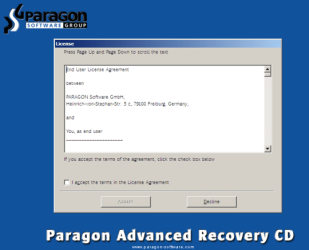
  2. Accept the end user license agreement, otherwise you are not able to use the tool.
    1.png
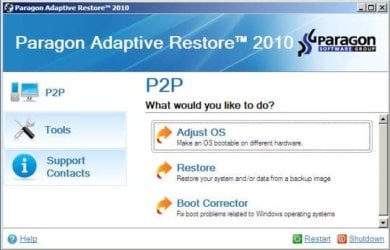
  3. Launch P2P Adjust OS.
    2.jpg
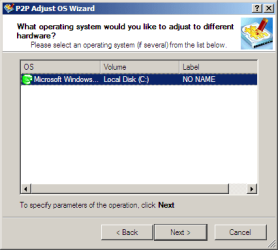
  4. Select the operating system you need to adjust to your new hardware.
    3.png
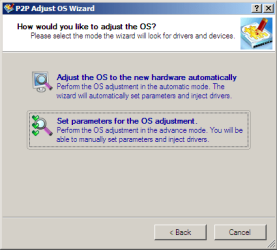
  5. Choose whether you want to add third-party drivers or not, and the way to do it.
    4.png
  6. If you chose "Adjust the OS to the new hardware automatically", the P2P Adjust OS Wizard will automatically accomplish all the necessary actions.
    5.png
  7. The only thing that might need your interaction is to specify additional driver repository.
    6.png
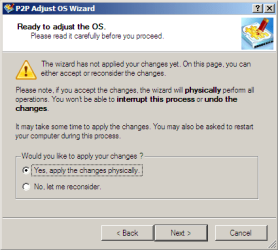
  8. At last, choose "Yes, apply the changes physically" and then restart your computer after operations are done. Do remember, you cannot interrupt the process or undo the changes.
    7.png
Compelete pdf manual: Paragon Adaptive Restore 2010 on my DROPBOX.

Just before the OS adjustment, you can additionally:
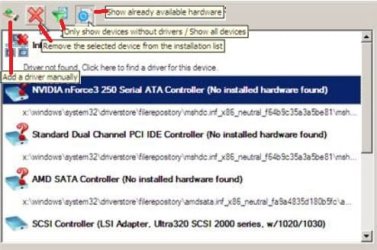
extra.JPG


   Warning
Sometimes the internal hard drive is not recognized in Paragon P2P Adjust OS due to missing SATA or RAID driver. In that case add specific drivers to Windows PE based Paragon Recovery Environment.
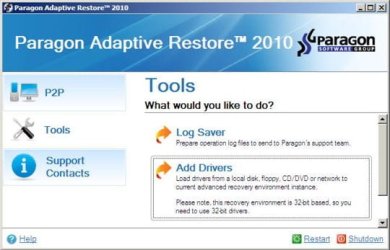
  1. Click to open Add Drivers dialog.
    a.jpg
  2. Browse for an .INF file of the required driver, then click the Open button to initiate the process.
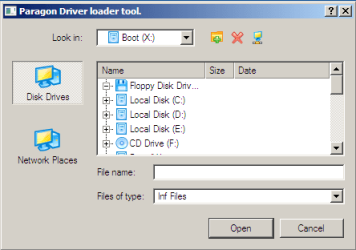
    b.png
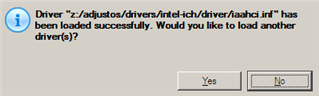
  3. Click Yes to confirm the operation.
    c.png
   Information
You can only add third-party drivers in INF file. If they are zipped, you need to unpack them before processing the steps. The Windows PE environment is 32bit-based, so you need to use 32-bit drivers for injection.
After procedure has finished succesfully and system boots fine, first check if Enable hardware auto-updating via Windows Update (Set to Automatic) is on so it will query Windows Update. After that:

  1. Uninstall Device and Device Driver for devices no longer attached to system. Uninstall associated software as well.
  2. Install all of your device drivers, then Windows Updates.
  3. Refresh your Windows Experience Index (WEI) score.
  4. When done, all you will need to do is to activate Windows 7.
After rebooting from disk, drivers should start swapping out in a cascade you can monitor by clicking on the system tray animation. Wait until all are finished before doing the requested restart. After reboot, go immediately to Check for Updates and install all Important and Optional Updates which may include critical drivers and patches for the OS to run on that hardware.

You must reactivate at the Change Product Key link on System page. If it's not present you can insert Product Key and then Activate using SLMgr Commands

On some systems you see "setup is preparing your computer for first use" on every reboot. Read this to fix that issue: Fix "Setup is Preparing Your Computer for First Use" on Every Reboot


Last edited:
Thanks so much to the OP. This worked like a charm and avoided having to do a clean reinstall. Much appreciated!
 

My Computer My Computer

At a glance

Windows 7 Home Premium 64 Bit
OS
Windows 7 Home Premium 64 Bit
Is there a way to make this bootable from a usb drive? I tried using the windows 7 usb tool; however it always fails at 99% and says "we were unable to copy your files. please check your usb device and selected iso and try again"

Had a motherboard failure and need to get back into windows. I don't mind doing a complete fresh install but I need to recover the windows key so I can reactivate it.

Using USB Pen drive it fails telling me it cannot find a configuration file it needs.

Long story short I just need to get the windows key off the hard drive but have a new motherboard as the old one has failed. How do I accomplish this?
 

My Computer My Computer

At a glance

Windows 7 Ultimate 64 Bit
OS
Windows 7 Ultimate 64 Bit
Onedrive link error to PAR

Hi,

Tried to download PAR but the Onedrive link posted in 141 is DOA. Could someone please post an alternate link?

I have a dual boot, win7 and windows server 08, each os on a different SSD, with the windows boot loader on the win7 drive.

My Dell mobo died after 5 years so I swapped it while I was at it, upgraded the processors and added a raid card. In the process I completely forgot about MS's OS copy protection. I do have the activation key...I've used it several times already on clean installs (on the same box) and don't know what the limit is...
I do have fairly recent system images/backups using windows backup to an external.

My system booted into Server 08, then windows promptly deactivated itself, and turned off the windows installer service while several updates were completing. I'm hopeful PAR can help me out of this mess I've made for myself (with the helping hand of :devil:Microsoft:devil:).
 

My Computer My Computer

At a glance

Windows 7 Ultimate x64Dual Xeon L542032GB2xNvidia 560
Computer type
PC/Desktop
Computer Manufacturer/Model Number
Dell Precision Workstation T7400
OS
Windows 7 Ultimate x64
CPU
Dual Xeon L5420
Memory
32GB
Graphics Card(s)
2xNvidia 560
Hard Drives
Intel SSD, mirrored on SAS 6, various other raid disks/volumes
Antivirus
Avira
Browser
Moz FF, Chrome
Here you go zampaz,

[REMOVED]
 
Last edited:

My Computer My Computer

At a glance

Win 10 Pro x64Intel I5-2500K @3.3GHz16GB G.Skill Ripjaws X (4x4GB)EVGA GeForce 750 Ti SC 2GB
Computer type
PC/Desktop
Computer Manufacturer/Model Number
Self Built
OS
Win 10 Pro x64
CPU
Intel I5-2500K @3.3GHz
Motherboard
Asrock P67 Extreme4
Memory
16GB G.Skill Ripjaws X (4x4GB)
Graphics Card(s)
EVGA GeForce 750 Ti SC 2GB
Sound Card
ASUS Xonar DG 5.1 Channels 24-bit 96KHz PCI Interface Sound
Monitor(s) Displays
auria eq2367
Screen Resolution
1920 x 1080
Hard Drives
250GB Samsung 850 EVO SSD
1TB WD Blue
1TB Hitachi
PSU
SeaSonic X 650W 80 Plus Gold
Case
Corsair Obsidian 750D
Cooling
Corsair H60, Three 140mm case fans
Keyboard
Logitech Wireless Keyboard K520
Mouse
Logitech Wireless Mouse M310
Internet Speed
Wave Broadband ~ 100 dn 5 up
Antivirus
Windows Defender, Malwarebytes Premium
Browser
Edge, IE11, Chrome
Other Info
Laptop specs: HP g7-1365dx /
CPU: AMD A6-3420M APU with Radeon(tm) HD Graphics /
RAM: Crucial 8Gb (2x4Gb) /
SSD: Crucial M4-CT128M4SSD2 ATA Device/ FW 000F /
GFX: AMD Radeon HD 6520G /
OS: Windows 10 Pro x64
Here you go zampaz,

Thank you very much derekimo (and OP too) :)
Downloaded, then went back to the original post to re-read...hit the DB link for the manual and it's live. Found an ISO link there as well. Based on follow-up posts and 141 not working I just ASSuMEd the links in the original post were stale.

I'll report back to the forum on how PAR handles my dual boot situation W7uX64 and WS'08 (running as a workstation).
++++Added 09-24-15
The Par solution works very well with multi-boot drives, and also with migrating from platform to platform. Have experienced no issues migrating/reactivating my windoze 7 and server 08 OS's. Although I don't anticipate using this utility very often, it's on my list of "must have" tools ranking below Clonezilla, 7-zip, magic ISO, and system explorer only because of anticipated infrequent use.
 
Last edited:

My Computer My Computer

At a glance

Windows 7 Ultimate x64Dual Xeon L542032GB2xNvidia 560
Computer type
PC/Desktop
Computer Manufacturer/Model Number
Dell Precision Workstation T7400
OS
Windows 7 Ultimate x64
CPU
Dual Xeon L5420
Memory
32GB
Graphics Card(s)
2xNvidia 560
Hard Drives
Intel SSD, mirrored on SAS 6, various other raid disks/volumes
Antivirus
Avira
Browser
Moz FF, Chrome
You're welcome, no problem, good to know the link in the OP is working.
 

My Computer My Computer

At a glance

Win 10 Pro x64Intel I5-2500K @3.3GHz16GB G.Skill Ripjaws X (4x4GB)EVGA GeForce 750 Ti SC 2GB
Computer type
PC/Desktop
Computer Manufacturer/Model Number
Self Built
OS
Win 10 Pro x64
CPU
Intel I5-2500K @3.3GHz
Motherboard
Asrock P67 Extreme4
Memory
16GB G.Skill Ripjaws X (4x4GB)
Graphics Card(s)
EVGA GeForce 750 Ti SC 2GB
Sound Card
ASUS Xonar DG 5.1 Channels 24-bit 96KHz PCI Interface Sound
Monitor(s) Displays
auria eq2367
Screen Resolution
1920 x 1080
Hard Drives
250GB Samsung 850 EVO SSD
1TB WD Blue
1TB Hitachi
PSU
SeaSonic X 650W 80 Plus Gold
Case
Corsair Obsidian 750D
Cooling
Corsair H60, Three 140mm case fans
Keyboard
Logitech Wireless Keyboard K520
Mouse
Logitech Wireless Mouse M310
Internet Speed
Wave Broadband ~ 100 dn 5 up
Antivirus
Windows Defender, Malwarebytes Premium
Browser
Edge, IE11, Chrome
Other Info
Laptop specs: HP g7-1365dx /
CPU: AMD A6-3420M APU with Radeon(tm) HD Graphics /
RAM: Crucial 8Gb (2x4Gb) /
SSD: Crucial M4-CT128M4SSD2 ATA Device/ FW 000F /
GFX: AMD Radeon HD 6520G /
OS: Windows 10 Pro x64
Paragon Rescue Kit (14) (as mentioned on page 8) has Paragon P2P Adjust if you use the Linux option instead of the WinPE option, BUT, now the option to install to a USB drive is now available with the Linux option where before it was only offered if you chose the WinPE option.
 

My Computer My Computer

At a glance

se7en x64 EnterpriseAthlon ll x36 g/b's ddr2 - 6400-800mhzAMD Radeon HD 6570
Computer type
PC/Desktop
Computer Manufacturer/Model Number
self-built GA-MA785GM-US2H
OS
se7en x64 Enterprise
CPU
Athlon ll x3
Motherboard
GA-MA785GM-US2H rev 1.1
Memory
6 g/b's ddr2 - 6400-800mhz
Graphics Card(s)
AMD Radeon HD 6570
Sound Card
int. rtk alc889a
Monitor(s) Displays
acer x2223w lcd, nec 21" lcd
Screen Resolution
1280 x 1024
Hard Drives
wd caviar black - 640
wd blue caviar 500
wd green re 320
PSU
corsair 400 and a cooler master 460 wired together
Case
old and used
Cooling
artic cooler 64 w/4 120mm case fans
Keyboard
lite-on $9 tank
Mouse
m/s mobile 3000
Internet Speed
d/load - 24.75 MB's u/load - 2.1 MB's
Antivirus
the kind that is anti-viral
Browser
ffox
Other Info
what...
THANK YOU!!!!!!!!!!!!!!!!!!!!!!!!


I can't thank you enough!
I can't give rep :( Don't know why. You just saved me a Macrium VHD file thru a VirtualBox installation. You rock.
 

My Computer My Computer

At a glance

Windows 7 Ultimate x64AMD Sempron 145, 2800 MHz (14 x 200)6 GB KingstonNVIDIA GeForce 7025 / NVIDIA nForce 630a (256...
Computer type
PC/Desktop
OS
Windows 7 Ultimate x64
CPU
AMD Sempron 145, 2800 MHz (14 x 200)
Motherboard
ASRock N68-VS3 FX (nVIDIA nForce 7025-630a, AMD K10)
Memory
6 GB Kingston
Graphics Card(s)
NVIDIA GeForce 7025 / NVIDIA nForce 630a (256 MB)
Sound Card
VIA VT1705 @ nVIDIA nForce 7025-630a (MCP68SE)
Monitor(s) Displays
LG E1941 (Analog) [18.5" LCD] (21112731)
Screen Resolution
1366x768
Hard Drives
* SAMSUNG HD161HJ SCSI Disk Device
* Toshiba Canvio 3.0 USB
Keyboard
Microsoft Wireless Desktop 800 keyboard
Mouse
Microsoft Wireless Desktop 800 mouse
Internet Speed
12mbps
Antivirus
avast!
Browser
Google Chrome
As others before, this post saved me really a lot of time and hassle .. thanks a lot !!!

and, in case you're interested : I had to re-enter the product-key, after the 2nd or 3rd reboot ..
 

My Computer My Computer

At a glance

Windows 7 Pro, 32 and 64 bit machines
Computer type
PC/Desktop
Computer Manufacturer/Model Number
Dell desktop, Acer laptops
OS
Windows 7 Pro, 32 and 64 bit machines
Antivirus
Avira Internet Security
Browser
Google, Microsoft Explorer
Hey sorry if this is been answered, but I couldn't find it via search....


Does this work for Win10 installations too? My motherboard shit the bed and I'm waiting on my replacement mobo and processor. This would be a lifesaver if it works for me.


thanks!
 

My Computer My Computer

At a glance

Windows XP Ultimate x64AMD Athlon II X2 260DDR3 1600 4GV9800 GTX+
OS
Windows XP Ultimate x64
CPU
AMD Athlon II X2 260
Motherboard
ASRock M3A770DE
Memory
DDR3 1600 4GV
Graphics Card(s)
9800 GTX+
Hard Drives
External Cavalry 1TB USB/eSATA HD
Internal Hitachi 500GB HD
PSU
Antec 430W
That particular one only works for os up to win7.

You might find win10 will adjust itself ok to the new hardware.

If not, Paragon 15 products will be able to adjust it for you. NOTE: That feature is only available in the paid paragon15 offerings.
Paragon Backup & Recovery Home - Features & System Requirements

There is also a free paragon rescue kit 14 - adjust to new hardware is included in the Linux based boot disc that comes with it. Not sure if the Rescue kit 14 supports win10 for that function.

You could test it to see. https://www.paragon-software.com/home/rk-free/


Aomei Backupper is an imaging program which includes restore to new hardware. However, you would have had to make an image first, because it performs the adjustment as part of the restore process.

It is the only imaging program to include that in the free version.
 

My Computers My Computers

  • At a glance

    7 X64i5 84002x8gb 3200mhz
    Computer type
    PC/Desktop
    OS
    7 X64
    CPU
    i5 8400
    Motherboard
    gigabyte b365m ds3h
    Memory
    2x8gb 3200mhz
    Hard Drives
    various
    PSU
    pure power 11 400w cm
    Case
    Coolermaster
    Cooling
    cryorig m9i
  • At a glance

    7x64g54008gb ddr4 2400
    Computer type
    PC/Desktop
    OS
    7x64
    CPU
    g5400
    Motherboard
    ga b365m ds3h
    Memory
    8gb ddr4 2400
    PSU
    xfx pro 450w
Does this work on Windows 10?
 

My Computer My Computer

At a glance

Microsoft Windows 7 Home Premium 64-bit Servi...AMD A10-6800K APU with Radeon(tm)™ HD Graphic...(2) G.Skill F3-12800CL10-8GBXLASUS R7 250 Series (0x6610)
Computer type
PC/Desktop
Computer Manufacturer/Model Number
Custom
OS
Microsoft Windows 7 Home Premium 64-bit Service Pack 1
CPU
AMD A10-6800K APU with Radeon(tm)™ HD Graphics 4100
Motherboard
ASRock FM2A85X Extreme4-M
Memory
(2) G.Skill F3-12800CL10-8GBXL
Graphics Card(s)
ASUS R7 250 Series (0x6610)
Sound Card
Realtek High Definition Audio
Monitor(s) Displays
Acer X213H LCD monitor, 21"
Screen Resolution
1920 x 1080 x 32 bits @ 60 Hz
Hard Drives
WD Black, 1.0TB, WDC WD1002FAEX-00Z3A0
PSU
Rosewill Quark-650
Case
Raidmax Comet SECC Steel ATX Mid Tower Computer Case
Cooling
1 x 80mm + 2 x 120mm + Stock cooler
Mouse
Gear Head Wireless Optical 5-button mouse
Internet Speed
FTTx 6000 / 1000
Antivirus
Avast! Free Antivirus 2015.10.0.2208
Browser
Google Chrome Version 40.0.2214.115
Other Info
*AMD Dual-Graphics
*Uses OpenDNS
*Uses Folding@Home
*HP 16x Super-Multi DVD Writer
*Superspeed 74-in-1 Card Reader
*Maximum overclock has not been determined.
If you upgraded a retail win-7 or 8.1 possibly jury is still out if a retail version of windows 7.. turns into a retail win-10.
Probably need to contact M$ either way and plead your case as to why you swapped mobo's.
 

My Computer My Computer

At a glance

Win-7-Pro64bit 7-H-Prem-64biti7-5930K 2nd i9-9940x both water blocked VRM'...Trident-z 3200C14 2nd Trident-z 3600C16EVGA 1080ti ftw3 2nd Titan Xp both water blocked
Computer type
PC/Desktop
Computer Manufacturer/Model Number
Custom assembled by me :}
OS
Win-7-Pro64bit 7-H-Prem-64bit
CPU
i7-5930K 2nd i9-9940x both water blocked VRM's too
Motherboard
ASUS SABERTOOTH X99 2nd ASUS x299 Apex
Memory
Trident-z 3200C14 2nd Trident-z 3600C16
Graphics Card(s)
EVGA 1080ti ftw3 2nd Titan Xp both water blocked
Sound Card
Built-in Realtek
Monitor(s) Displays
1-AOC G2460PG 24"G-Sync 144Hz/ 2nd 1-ASUS VG248QE 24" 144Hz
Screen Resolution
1920 x 1080 144Hz
Hard Drives
2-Samsung M.2 Evo & Evo Plus
2-Samsung 850 EVO 500GB SSD's/ 3-2.5 W.D. Black 1tb-&3-1tb/3-3.5 WD Black 1tb hdd's
PSU
EVGA SuperNOVA 1000-P2 2nd 1200-P2
Case
2-Corsair Obsidian Series 450D Black ATX Mid Tower
Cooling
Custom water loops
Keyboard
Logitech G710+/ 2nd Logitech G910
Mouse
2-RedDragon M901 Perdition 16400 dpi Gaming mouse = wired
Internet Speed
Comcast Ping 19ms 89.31mbps download speed 6.12mbps upload
Antivirus
Malwarebytes Pro/ Superantispyware Pro
Browser
FireFox & Pale moon
Other Info
2nd ASUS X299 Apex/Intel i9-9940x with Custom water loop/7H-Prem-x64/Corsair 450D case/Ram Trident-z 3600C16 4x8gb / Samsung970Evo plus 500gb SSD/Dual ssd EZ swap evo/PSU EVGA SuperNova 1200w-P2 80+Platinum/GPU Titan Xp /8-ML-140 on push-pull on 2-280GTX rads
Save Windows Update Time

I don't know if anyone else has addressed this, but I have found another handy use for the Paragon Adaptive Restore... I build and refurbish over 100 computer per year and waiting for all the Windows Updates (particularly for Windows 7) to download and install is a time consuming task. Here's my solution...


  1. Perform a clean, complete installation of the operation system with all patches and updates (do NOT enter the activation code.)
  2. Clone the drive to a smaller 40-80GB hard drive, label it with the Windows version and date.
  3. Next time you need to do a clean install, clone the drive you set aside to the new machine.
  4. Use Paragon Adaptive Restore to set up the new drive.
I have created image drives of most variations of Windows 7 and used this method regularly. It's much faster to clone the drive (I use Acronis 2013) than it is to wait on all the updates.


IMPORTANT! Do NOT try cloning the drives via a USB connection. This may make the new drive unbootable. I use my shop "test" computer and install both drives in it to do the cloning. Rarely ever have an issue.
 

My Computer My Computer

At a glance

Windows 7 Professional 64-Bit SP1AMD FX-835016GB DDR3MSI GeForce GTX 970
Computer type
PC/Desktop
Computer Manufacturer/Model Number
Custom Build
OS
Windows 7 Professional 64-Bit SP1
CPU
AMD FX-8350
Motherboard
MSI 970A-G46
Memory
16GB DDR3
Graphics Card(s)
MSI GeForce GTX 970
Hard Drives
Crucial CT256MX100SSD1 256GB SSD
Seagate ST2000DM001 2TB
Antivirus
Webroot
Browser
IE 11, Firefox 45.01
:) .. thanks a lot, putermaker .. I only install a few computers a year, so your post is most welcome !!

Tameer
 

My Computer My Computer

At a glance

Windows 7 Pro, 32 and 64 bit machines
Computer type
PC/Desktop
Computer Manufacturer/Model Number
Dell desktop, Acer laptops
OS
Windows 7 Pro, 32 and 64 bit machines
Antivirus
Avira Internet Security
Browser
Google, Microsoft Explorer
EDIT: Microsoft blocked my product key, regardless of the fact I have 4 "rearms" left available.
 
Last edited:

My Computer My Computer

At a glance

Windows 10 Pro x64 (UPGRADED - 10/20/2016)AMD FX 8350 (OC: 4.48GHz)14GB DDR3 Corsair VengeanceAsus AMD Radeon R9 280X 3GB
Computer type
PC/Desktop
Computer Manufacturer/Model Number
Custom Built
OS
Windows 10 Pro x64 (UPGRADED - 10/20/2016)
CPU
AMD FX 8350 (OC: 4.48GHz)
Motherboard
ASUS Crosshair V Formula-Z AM3+
Memory
14GB DDR3 Corsair Vengeance
Graphics Card(s)
Asus AMD Radeon R9 280X 3GB
Sound Card
N/A
Monitor(s) Displays
BenQ G2420HD
Screen Resolution
1920x1080
Hard Drives
Internal: 1x 500GB WD Blue SSD | 1TB WD Caviar Black | 3x 500GB WD Caviar Green
External: 500GB Seagate
PSU
Corsair AX1200i
Case
CoolerMaster HAF X
Cooling
Corsair Hydro H90 Water Cooling
Keyboard
Microsoft SideWinder X6 Keyboard
Mouse
Microsoft SideWinder X8 Mouse
Antivirus
MSE / Malwarebytes Anti-Malware
Browser
Mozilla Firefox + Google Chrome
the disc tray pops open when selecting the os and then when i choose automatic, it just sits there and nothing happens, does it take several hours for the bar to start moving?
 

My Computer My Computer

At a glance

64 bit Windows 7 Ultimate
Computer type
PC/Desktop
Computer Manufacturer/Model Number
more than you can count
OS
64 bit Windows 7 Ultimate
Antivirus
Avast + Mbam
I've been an owner of Paragon Hard Drive Manager for several years, and I've noticed the P2P Adjust feature (also called Adaptive Restore) but never used it before. Now I have a good opportunity with an installation of Win7 x64 and would like to. However, I've long wondered about MS licensing policy about this, and questions that were alluded to many times in this thread, but not really discussed. It seems I may have misunderstood what the policy is, but no poster ever really explains it here. One of the recent posters mentioned the idea that one has a certain number of reinstalls available. I've heard something like that, but I thought even so, this applies to the SAME equipment.

I assumed that if it is possible to make a P2P transfer to a new motherboard and hardware, one would need not only to reactivate the install, but that you would actually also need a new, unused Product Key for the OS. I thought that MS assigns a product key to live forevermore with a particular motherboard, and though I've heard you can call them and get them to move it if you have a failed motherboard (sort of like a special dispensation from the Pope), I didn't think it's so easy as it is made to sound in this thread.

Can anyone enlighten me about how this works and what the expected licensing and re-activation rules are for a Windows 7 OS?

Thanks,
Michael
 
Last edited:

My Computer My Computer

At a glance

Win 7 x64 ProIntel Core i74 GB
Computer type
Laptop
Computer Manufacturer/Model Number
Toshiba
OS
Win 7 x64 Pro
CPU
Intel Core i7
Memory
4 GB
Browser
IE; Chrome
Can anyone enlighten me about how this works and what the expected licensing and re-activation rules are for a Windows 7 OS?

I've wondered the same thing about Adaptive Restore and frankly don't know what licensing jams you might get into.

I've looked at Adaptive Restore, but never actually used it. It's part of a Paragon program I have, but I've never used the feature.

Here's my assumption: if you had a retail Windows license and changed motherboards, you'd be in the clear. If you had an OEM license and changed motherboards, you'd probably have to contact MS and hope they showed some mercy because OEM licenses are at least theoretically wedded to the motherboard. That's the way it would work if you did a clean install and I wouldn't think Adaptive Restore would be an exception to the rule.

Problem is---you will have trouble finding anyone on these forums who has actually used the Adaptive Restore feature. Offhand, I can't recall any discussion of it, other than in passing.

I'd like to be proven wrong as I've always been curious about how well it works in actual practice.

Maybe Paragon has a forum where you could ask the question?

I was tempted to try it a couple of months ago, but instead just carried over a hard drive with a retail Windows installation onto a new motherboard. Didn't have the nerve. I instead spent 5 or 10 hours reconfiguring the new setup--mostly drivers and display issues. I was able to avoid spending dozens of hours reinstalling and configuring a bunch of applications.
 

My Computer My Computer

At a glance

Windows 7 Home Premium SP1, 64-bitIntel Skylake i5-6600K, not overclocked8 GB HyperX DDR4-2666 (2 x 4 GB)none; graphics are integrated on CPU
Computer type
PC/Desktop
Computer Manufacturer/Model Number
Ignatz Special; 4 speed manual gearbox; factory air conditioning; one of one
OS
Windows 7 Home Premium SP1, 64-bit
CPU
Intel Skylake i5-6600K, not overclocked
Motherboard
AsRock Z170M Extreme 4, micro ATX
Memory
8 GB HyperX DDR4-2666 (2 x 4 GB)
Graphics Card(s)
none; graphics are integrated on CPU
Sound Card
onboard: Realtek ALC1150; external: USB Behringer UF0-202
Monitor(s) Displays
Dell S2340M 23 inch IPS
Screen Resolution
1600 x 900
Hard Drives
System: Crucial MX100 series SSD, 128 GB;
Data: Samsung Spinpoint 103SJ, 1 TB;
Backup: WD Caviar Green WD30EZRX-00D8PB0, 3 TB
PSU
Rosewill SilentNight 500 watt fanless, semi-modular
Case
Antec Solo II
Cooling
Noctua NH-U12S; Noctua F12 intake, Noctua S12A exhaust
Keyboard
Microsoft 200 6JH-00001 USB
Mouse
Dell or Microsoft optical wired; USB
Antivirus
Microsoft Security Essentials and Malwarebytes Premium
Browser
Pale Moon
Other Info
All fans PWM; speeds at idle: CPU circa 500 rpm; intake circa 600 rpm; exhaust circa 600 rpm; CPU temps 27 idle and 47 C load in a warm room (27 C/81 F) when running Intel Extreme Tuning Utility stress test.
Back
Top