Make Windows 7 bootable after motherboard swap

Make Windows 7 bootable after motherboard swap, or bootable after swapping hard drive to new machine. Software described Paragon P2P Adjust OS.


This procedure describes how to do it. Procedure can be used in case of:
  1. Download "Paragon Adaptive Restore 2010" from Paragon Adaptive Restore 2010 on my DROPBOX.
  2. Burn the ISO to CD/DVD using Windows Disc Image Burner or ImgBurn.
  3. Set CD/DVD as first boot device in BIOS.
Do the following:
  1. Boot the computer from Paragon Windows PE 3.0 based CD/DVD.
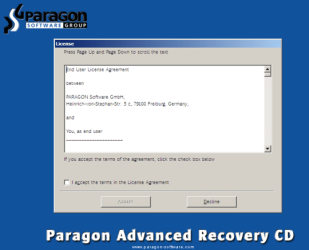
  2. Accept the end user license agreement, otherwise you are not able to use the tool.
    1.png
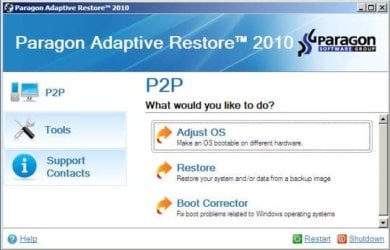
  3. Launch P2P Adjust OS.
    2.jpg
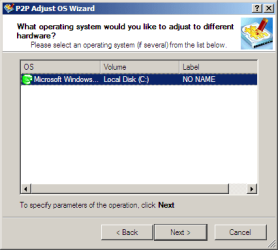
  4. Select the operating system you need to adjust to your new hardware.
    3.png
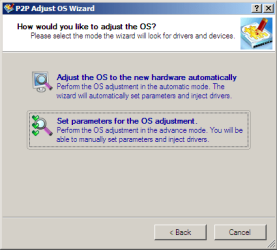
  5. Choose whether you want to add third-party drivers or not, and the way to do it.
    4.png
  6. If you chose "Adjust the OS to the new hardware automatically", the P2P Adjust OS Wizard will automatically accomplish all the necessary actions.
    5.png
  7. The only thing that might need your interaction is to specify additional driver repository.
    6.png
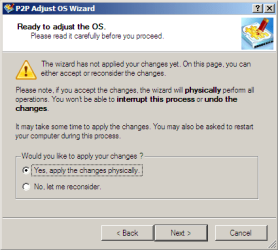
  8. At last, choose "Yes, apply the changes physically" and then restart your computer after operations are done. Do remember, you cannot interrupt the process or undo the changes.
    7.png
Compelete pdf manual: Paragon Adaptive Restore 2010 on my DROPBOX.

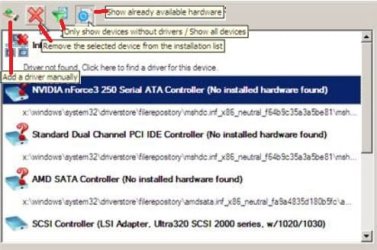
Just before the OS adjustment, you can additionally:
extra.JPG


   Warning
Sometimes the internal hard drive is not recognized in Paragon P2P Adjust OS due to missing SATA or RAID driver. In that case add specific drivers to Windows PE based Paragon Recovery Environment.
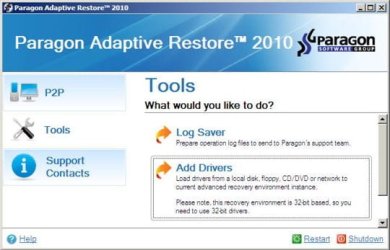
  1. Click to open Add Drivers dialog.
    a.jpg
  2. Browse for an .INF file of the required driver, then click the Open button to initiate the process.
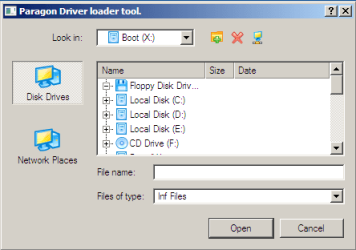
    b.png
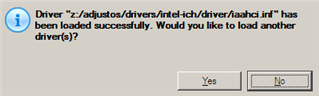
  3. Click Yes to confirm the operation.
    c.png
   Information
You can only add third-party drivers in INF file. If they are zipped, you need to unpack them before processing the steps. The Windows PE environment is 32bit-based, so you need to use 32-bit drivers for injection.
After procedure has finished succesfully and system boots fine, first check if Enable hardware auto-updating via Windows Update (Set to Automatic) is on so it will query Windows Update. After that:

  1. Uninstall Device and Device Driver for devices no longer attached to system. Uninstall associated software as well.
  2. Install all of your device drivers, then Windows Updates.
  3. Refresh your Windows Experience Index (WEI) score.
  4. When done, all you will need to do is to activate Windows 7.
After rebooting from disk, drivers should start swapping out in a cascade you can monitor by clicking on the system tray animation. Wait until all are finished before doing the requested restart. After reboot, go immediately to Check for Updates and install all Important and Optional Updates which may include critical drivers and patches for the OS to run on that hardware.

You must reactivate at the Change Product Key link on System page. If it's not present you can insert Product Key and then Activate using SLMgr Commands

On some systems you see "setup is preparing your computer for first use" on every reboot. Read this to fix that issue: Fix "Setup is Preparing Your Computer for First Use" on Every Reboot


Last edited:

My Computer My Computer

At a glance

windows 7 64 bit but died. now i'm on windows...
Computer type
Laptop
OS
windows 7 64 bit but died. now i'm on windows 10 64 bit
it doesn't give me the option to reboot into windows 7

Have you added a boot menu entry?
 

My Computers My Computers

  • At a glance

    7 X64i5 84002x8gb 3200mhz
    Computer type
    PC/Desktop
    OS
    7 X64
    CPU
    i5 8400
    Motherboard
    gigabyte b365m ds3h
    Memory
    2x8gb 3200mhz
    Hard Drives
    various
    PSU
    pure power 11 400w cm
    Case
    Coolermaster
    Cooling
    cryorig m9i
  • At a glance

    7x64g54008gb ddr4 2400
    Computer type
    PC/Desktop
    OS
    7x64
    CPU
    g5400
    Motherboard
    ga b365m ds3h
    Memory
    8gb ddr4 2400
    PSU
    xfx pro 450w
Have you added a boot menu entry?

is that soemthing different from what I have already done?

i've disabled the secure boot.

i've enable the legacy boot.

i've changed the order of the boot so that internal cd/dvd rom is the first boot device.

the computer asked me to confirm the boot device change, which I did.

now how do i add a boot menu item?
 

My Computer My Computer

At a glance

windows 7 64 bit but died. now i'm on windows...
Computer type
Laptop
OS
windows 7 64 bit but died. now i'm on windows 10 64 bit
I've tried rebooting and it doesn't give me the option to reboot into windows 7


To boot into windows 7, you need a boot menu entry that points at it.

You need a boot menu entry for each operating system (OS). Then you should be able to select which OS to boot into.

If you have OS on separate hard drives, then one way is to select which hard drive to boot from in bios. That assumes you have the necessary boot files and boot menu entry on each hard drive.

Another way is to use one hard drive to boot from. That hard drive would then need entries for both operating systems.

Try selecting the windows 7 hard drive in bios to boot from.

If your windows 7 was set up as bios boot rather than efi, then you should enable the legacy option in your bios, if you have one.
 
Last edited:

My Computers My Computers

  • At a glance

    7 X64i5 84002x8gb 3200mhz
    Computer type
    PC/Desktop
    OS
    7 X64
    CPU
    i5 8400
    Motherboard
    gigabyte b365m ds3h
    Memory
    2x8gb 3200mhz
    Hard Drives
    various
    PSU
    pure power 11 400w cm
    Case
    Coolermaster
    Cooling
    cryorig m9i
  • At a glance

    7x64g54008gb ddr4 2400
    Computer type
    PC/Desktop
    OS
    7x64
    CPU
    g5400
    Motherboard
    ga b365m ds3h
    Memory
    8gb ddr4 2400
    PSU
    xfx pro 450w
Transferring Win7 to a z390 motherboard with custom USB drivers.

I want to transfer my multiboot Win7 to a z390 motherboard. There are no official USB drivers for Win 7 for that chipset. Someone created custom USB drivers, they are available here. Without USB drivers even a mouse and keyboard won't work because there is no PS/2 port.

Will the method described in this thread work using these custom USB drivers if I point Paragon Adaptive Restore to them prior to changing the motherboard?
 

My Computer My Computer

At a glance

Windows 7 Ultimate 64 bit
Computer type
PC/Desktop
OS
Windows 7 Ultimate 64 bit
It should. How are you planning on integrating the usb drivers? Were you going to do it with paragon or dism++?
Do you have usb2 port on that mobo?
 

My Computers My Computers

  • At a glance

    7 X64i5 84002x8gb 3200mhz
    Computer type
    PC/Desktop
    OS
    7 X64
    CPU
    i5 8400
    Motherboard
    gigabyte b365m ds3h
    Memory
    2x8gb 3200mhz
    Hard Drives
    various
    PSU
    pure power 11 400w cm
    Case
    Coolermaster
    Cooling
    cryorig m9i
  • At a glance

    7x64g54008gb ddr4 2400
    Computer type
    PC/Desktop
    OS
    7x64
    CPU
    g5400
    Motherboard
    ga b365m ds3h
    Memory
    8gb ddr4 2400
    PSU
    xfx pro 450w
It should. How are you planning on integrating the usb drivers? Were you going to do it with paragon or dism++?
Do you have usb2 port on that mobo?


The motherboard I was going to buy is either GIGABYTE Z390 AORUS Ultra or Wifi.
They have USB 2.0


Yes, I was thinking of integrating the USB drivers with Paragon. I honestly don't know what
dism++ is. I haven't used Paragon either but I'm researching this subject with this great thread.

Is there a reason why this shouldn't work while people are saying that integrating these drivers into Win 7 installation ISO does work?


My Computer My Computer

At a glance

Windows 7 Ultimate 64 bit
Computer type
PC/Desktop
OS
Windows 7 Ultimate 64 bit

My Computers My Computers

  • At a glance

    7 X64i5 84002x8gb 3200mhz
    Computer type
    PC/Desktop
    OS
    7 X64
    CPU
    i5 8400
    Motherboard
    gigabyte b365m ds3h
    Memory
    2x8gb 3200mhz
    Hard Drives
    various
    PSU
    pure power 11 400w cm
    Case
    Coolermaster
    Cooling
    cryorig m9i
  • At a glance

    7x64g54008gb ddr4 2400
    Computer type
    PC/Desktop
    OS
    7x64
    CPU
    g5400
    Motherboard
    ga b365m ds3h
    Memory
    8gb ddr4 2400
    PSU
    xfx pro 450w
Thank you! You're giving me hope :)
 

My Computer My Computer

At a glance

Windows 7 Ultimate 64 bit
Computer type
PC/Desktop
OS
Windows 7 Ultimate 64 bit
It should work. Canonkong's driver mods work fine for me.

View attachment 409434


What is this? Are these the USB drivers or just the utility to integrate drivers into Win 7 install ISO?
I guess if the latter then I have no use of it since I can't do a fresh Win7 install for various reasons.
 

My Computer My Computer

At a glance

Windows 7 Ultimate 64 bit
Computer type
PC/Desktop
OS
Windows 7 Ultimate 64 bit
I honestly don't know what
dism++ is

I attached it for your edification.
 

My Computers My Computers

  • At a glance

    7 X64i5 84002x8gb 3200mhz
    Computer type
    PC/Desktop
    OS
    7 X64
    CPU
    i5 8400
    Motherboard
    gigabyte b365m ds3h
    Memory
    2x8gb 3200mhz
    Hard Drives
    various
    PSU
    pure power 11 400w cm
    Case
    Coolermaster
    Cooling
    cryorig m9i
  • At a glance

    7x64g54008gb ddr4 2400
    Computer type
    PC/Desktop
    OS
    7x64
    CPU
    g5400
    Motherboard
    ga b365m ds3h
    Memory
    8gb ddr4 2400
    PSU
    xfx pro 450w
I got the ZIP but I still didn't understand what it is.. Excuse my lame... :). Could you please briefly describe it so that I know if this is something I need?
 

My Computer My Computer

At a glance

Windows 7 Ultimate 64 bit
Computer type
PC/Desktop
OS
Windows 7 Ultimate 64 bit
You don't need it if you want to use paragon to inject the drivers.

It can be used for other things, installing/unistalling updates/drivers, backing up activation, applying/creating/mounting/servicing wim/esd images and plenty more.

If you unzip it and have a play, you will quickly see what you can do with . It is very obvious - the UI can be used by a 5yr old.
 

My Computers My Computers

  • At a glance

    7 X64i5 84002x8gb 3200mhz
    Computer type
    PC/Desktop
    OS
    7 X64
    CPU
    i5 8400
    Motherboard
    gigabyte b365m ds3h
    Memory
    2x8gb 3200mhz
    Hard Drives
    various
    PSU
    pure power 11 400w cm
    Case
    Coolermaster
    Cooling
    cryorig m9i
  • At a glance

    7x64g54008gb ddr4 2400
    Computer type
    PC/Desktop
    OS
    7x64
    CPU
    g5400
    Motherboard
    ga b365m ds3h
    Memory
    8gb ddr4 2400
    PSU
    xfx pro 450w
Alright, thanks. I'll check it out.
 

My Computer My Computer

At a glance

Windows 7 Ultimate 64 bit
Computer type
PC/Desktop
OS
Windows 7 Ultimate 64 bit
Does it make a difference if a Win7 is transferred from an Intel system to an AMD using Paragon? Or it must be same platform?

I'm considering an AMD machine instead...

Thanks.
 

My Computer My Computer

At a glance

Windows 7 Ultimate 64 bit
Computer type
PC/Desktop
OS
Windows 7 Ultimate 64 bit
Should be fine.
 

My Computers My Computers

  • At a glance

    7 X64i5 84002x8gb 3200mhz
    Computer type
    PC/Desktop
    OS
    7 X64
    CPU
    i5 8400
    Motherboard
    gigabyte b365m ds3h
    Memory
    2x8gb 3200mhz
    Hard Drives
    various
    PSU
    pure power 11 400w cm
    Case
    Coolermaster
    Cooling
    cryorig m9i
  • At a glance

    7x64g54008gb ddr4 2400
    Computer type
    PC/Desktop
    OS
    7x64
    CPU
    g5400
    Motherboard
    ga b365m ds3h
    Memory
    8gb ddr4 2400
    PSU
    xfx pro 450w
I want to transfer my multiboot Win7 to a z390 motherboard. There are no official USB drivers for Win 7 for that chipset. Someone created custom USB drivers, they are available here. Without USB drivers even a mouse and keyboard won't work because there is no PS/2 port.

Will the method described in this thread work using these custom USB drivers if I point Paragon Adaptive Restore to them prior to changing the motherboard?

Its not working.. I've spend two days trying to transfer Win 7 to an AMD hardware. Paragon doesn't recognize Canonkong's INF drivers, without them I get BSOD and restart upon booting from new hardware. My motherboard is Asrock x570 Taichi which has dual PS2 port but for some reason it doesn't work with my PS2 mouse (the mouse works on old PC)...

Also Paragon doesn't see drives over 2Tb it seems...

DISM+++ is to mount drivers into in installation ISO so it won't help me as I'm trying to transfer existing OSs, right?
 

My Computer My Computer

At a glance

Windows 7 Ultimate 64 bit
Computer type
PC/Desktop
OS
Windows 7 Ultimate 64 bit
That paragon is in 32 bit windows 7 winpe. So you probably need something more recent in 64 bit pe.

You can get the excellent O&O disk Image Pro v12 on giveaway.
Registration for your FREE license of O&O DiskImage 12

Download Archive
Maybe try use O&O to adjust to new hardware and add the drivers.


You can include dism++ in winpe or a running OS and point at any other installation to integrate drivers.

This boot media has dism++ already included
16299x64-v2.iso
 

My Computers My Computers

  • At a glance

    7 X64i5 84002x8gb 3200mhz
    Computer type
    PC/Desktop
    OS
    7 X64
    CPU
    i5 8400
    Motherboard
    gigabyte b365m ds3h
    Memory
    2x8gb 3200mhz
    Hard Drives
    various
    PSU
    pure power 11 400w cm
    Case
    Coolermaster
    Cooling
    cryorig m9i
  • At a glance

    7x64g54008gb ddr4 2400
    Computer type
    PC/Desktop
    OS
    7x64
    CPU
    g5400
    Motherboard
    ga b365m ds3h
    Memory
    8gb ddr4 2400
    PSU
    xfx pro 450w
But what difference does it make if PE is 32 or 64 bit, in regards to Paragon adjusting OS?

I still didn't understand what dism++ does. Can it integrate drivers into an image only or into existing OS into its library of drivers? I need the latter so that I can just transfer existing OS to new hardware.
 

My Computer My Computer

At a glance

Windows 7 Ultimate 64 bit
Computer type
PC/Desktop
OS
Windows 7 Ultimate 64 bit

My Computers My Computers

  • At a glance

    7 X64i5 84002x8gb 3200mhz
    Computer type
    PC/Desktop
    OS
    7 X64
    CPU
    i5 8400
    Motherboard
    gigabyte b365m ds3h
    Memory
    2x8gb 3200mhz
    Hard Drives
    various
    PSU
    pure power 11 400w cm
    Case
    Coolermaster
    Cooling
    cryorig m9i
  • At a glance

    7x64g54008gb ddr4 2400
    Computer type
    PC/Desktop
    OS
    7x64
    CPU
    g5400
    Motherboard
    ga b365m ds3h
    Memory
    8gb ddr4 2400
    PSU
    xfx pro 450w
Back
Top