Making folders look less clunky

NKfloofiepoof

New member
Local time
3:05 PM
Messages
3
I apologize if this is covered in a tutorial somewhere. I looked through most of them, but I'm honestly not sure what to call this, so I can't tell if it's already addressed.

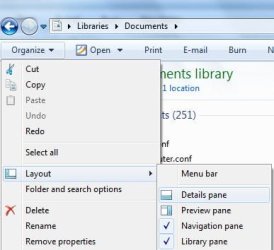
Is there any way to get rid of the big panel at the bottom of all folder views that shows how many files are in the folders? It's also where thumbnails for images show when you single-click the file. It takes up an annoying amount of screen space and is an eyesore since I've been using XP for the last 8 years, and I'd like to get rid of it if possible, but I can't find the option to (if there even is one).

Thank you in advance, and I apologize again if this was already covered somewhere and I just didn't see it.
 

My Computer

Computer Manufacturer/Model Number
Dell Alienware
OS
Windows 7 Pro 64
Memory
9 GB
Graphics Card(s)
2 GB NVidia

My Computer

Computer type
PC/Desktop
Computer Manufacturer/Model Number
Self Built
OS
Win 10 Pro x64
CPU
Intel I5-2500K @3.3GHz
Motherboard
Asrock P67 Extreme4
Memory
16GB G.Skill Ripjaws X (4x4GB)
Graphics Card(s)
EVGA GeForce 750 Ti SC 2GB
Sound Card
ASUS Xonar DG 5.1 Channels 24-bit 96KHz PCI Interface Sound
Monitor(s) Displays
auria eq2367
Screen Resolution
1920 x 1080
Hard Drives
250GB Samsung 850 EVO SSD
1TB WD Blue
1TB Hitachi
PSU
SeaSonic X 650W 80 Plus Gold
Case
Corsair Obsidian 750D
Cooling
Corsair H60, Three 140mm case fans
Keyboard
Logitech Wireless Keyboard K520
Mouse
Logitech Wireless Mouse M310
Internet Speed
Wave Broadband ~ 100 dn 5 up
Antivirus
Windows Defender, Malwarebytes Premium
Browser
Edge, IE11, Chrome
Other Info
Laptop specs: HP g7-1365dx /
CPU: AMD A6-3420M APU with Radeon(tm) HD Graphics /
RAM: Crucial 8Gb (2x4Gb) /
SSD: Crucial M4-CT128M4SSD2 ATA Device/ FW 000F /
GFX: AMD Radeon HD 6520G /
OS: Windows 10 Pro x64
I will when I get home. I'm at work now, and my home computer is the one with 7.
 

My Computer

Computer Manufacturer/Model Number
Dell Alienware
OS
Windows 7 Pro 64
Memory
9 GB
Graphics Card(s)
2 GB NVidia

My Computer

Computer type
PC/Desktop
Computer Manufacturer/Model Number
Self Built
OS
Win 10 Pro x64
CPU
Intel I5-2500K @3.3GHz
Motherboard
Asrock P67 Extreme4
Memory
16GB G.Skill Ripjaws X (4x4GB)
Graphics Card(s)
EVGA GeForce 750 Ti SC 2GB
Sound Card
ASUS Xonar DG 5.1 Channels 24-bit 96KHz PCI Interface Sound
Monitor(s) Displays
auria eq2367
Screen Resolution
1920 x 1080
Hard Drives
250GB Samsung 850 EVO SSD
1TB WD Blue
1TB Hitachi
PSU
SeaSonic X 650W 80 Plus Gold
Case
Corsair Obsidian 750D
Cooling
Corsair H60, Three 140mm case fans
Keyboard
Logitech Wireless Keyboard K520
Mouse
Logitech Wireless Mouse M310
Internet Speed
Wave Broadband ~ 100 dn 5 up
Antivirus
Windows Defender, Malwarebytes Premium
Browser
Edge, IE11, Chrome
Other Info
Laptop specs: HP g7-1365dx /
CPU: AMD A6-3420M APU with Radeon(tm) HD Graphics /
RAM: Crucial 8Gb (2x4Gb) /
SSD: Crucial M4-CT128M4SSD2 ATA Device/ FW 000F /
GFX: AMD Radeon HD 6520G /
OS: Windows 10 Pro x64
Last edited by a moderator:

My Computer

Computer Manufacturer/Model Number
Self Build
OS
Windows 7 Home Premium x64
CPU
Intel Core 2 Quad Q6600 @ 2.40GHz
Motherboard
Asus P5B-E
Memory
4Gb (2x Corsair CM2X2048-6400C5)
Graphics Card(s)
NVIDIA GeForce 9600 GT 512Mb
Sound Card
Realtek High Definition Audio Device
Monitor(s) Displays
Mirai 22" Widescreen and LG 19" Standard
Screen Resolution
1680 x 1050 and 1280 x 1024
Hard Drives
Western Digital 500Gb SATA x 2
Samsung 1Tb SATA
PSU
Hiper Modular 530W
Case
Akasa Ecplise 62 Midi
Cooling
Artic Cooling Freezer Pro 7
Keyboard
Advent Standard with Hotkeys
Mouse
PC Line PCL-FL1 Wired Laser
Internet Speed
ISP: Fast.co.uk up to 8Mb
Other Info
Netgear Router plus 5 Way LAN Switch, Samsung Ethernet Laser Printer, Epson PX650 Colour PSC, plus 2 more Desktop PCs, 3 Laptops and 2 Netbooks in same Home Network.
Ah! I found a screenshot in one of the tutorials that shows what I mean: http://www.sevenforums.com/tutorials/586-library-remove-included-folder.html?filter[2]=File Folder Settings

The second screenshot there, under "3. From the Library Properties Page" shows it. down at the very bottom of the screenshot, there's that banner I want to get rid of. The fourth screenshot shows it too. It shows the number of files in a folder or library and shows the thumbnails of image files when they're selected. I see that on every single folder on my computer, and it's very annoying and takes up a lot of unnecessary screen space, so I'd like to get rid of it if possible.

EDIT: Oops - posted this before I saw Tiffer's post.

Tiffer> I don't recall ever seeing that on my computer since I poked around at everything and turned off the Navigation Pane too, but I'll look at it when I get home. Thank you!
 
Last edited:

My Computer

Computer Manufacturer/Model Number
Dell Alienware
OS
Windows 7 Pro 64
Memory
9 GB
Graphics Card(s)
2 GB NVidia
Back
Top