Making my Win7 really fast

BDani

New member
Member
VIP
Local time
11:23 AM
Messages
146
Look I got 4GB of ram and I use win7 Pro 64bit.
I'd like to make it fast!
So I just installed the OS and my anti virus is Avira since it's awesome and takes little space.

Also I set Windows Classic as my theme which means now my WIN7 looks like Win XP.
Is that even gives anything?

anyways... I'd like to get tips.
thanks :D

Ohh and which one is better? Pro or Ultimate.
 

My Computer

Computer type
PC/Desktop
OS
Windows 8.1 Pro 64-Bit
CPU
Intel Core i5-4460 @ 3.20GHz
Motherboard
Gigabyte Technology Co., Ltd. H97-D3H-CF (SOCKET 0)
Memory
8.00GB Dual-Channel DDR3 @ 799MHz (11-11-11-28)
Graphics Card(s)
1023MB NVIDIA GeForce GTX 560 Ti (Gigabyte)
Monitor(s) Displays
SyncMaster (1920x1080@59Hz)
Screen Resolution
1980 X 1080
Hard Drives
488GB Western Digital WDC WD5000AAKS-00M9A0 ATA Device (IDE)
Welcome BDani, :D

Pro & Ultimate are very similar. I have computers running both & they do most everything I want to do.

If you fill in your computer specs, it will help us to analyze your hardware for improvements. ;)
 

Attachments

  • User_Control_Panel_Arrow.JPG
    User_Control_Panel_Arrow.JPG
    12.3 KB · Views: 1,284
  • MySystemSpecs.JPG
    MySystemSpecs.JPG
    10.2 KB · Views: 1,284

My Computer

Computer type
PC/Desktop
Computer Manufacturer/Model Number
Built them myself, Science Experiments !
OS
Win7 Enterprise, Win7 x86 (Ult 7600), Win7 x64 Ult 7600, TechNet RTM on AMD x64 (2.8Ghz)
CPU
AMD fx8350 4ghz, AMD-32 2400mhz, AMD-64 3200mhz, AMDx64 2.8G
Motherboard
SIS 755, ECS-K8M890M-M (Ult 7600), GigaByte & others
Memory
2gb, 4gb on the Ult 7600, 4gb on Technet RTM, 32gb on FX8350
Graphics Card(s)
Draw my own Graphics, several nVidia cards
Sound Card
on motherboard
Monitor(s) Displays
19" flat scr, 28" I-Inc widescr,22" Emprex Widescr, 23" Acer
Screen Resolution
1280 x 1024, 1440 x 900, 1920 x 1080
Hard Drives
6 pata Ide HD's & 2 Sata HD's
added 80gb external on Ult 7600 computer,
numerous extra 1tb, 2TB, 3Tb SATA HD's
A collection of ext HD Docks w/ HDs
PSU
430w, 550w, 600w, 700, 800, etc
Case
All Generic Full Towers
Cooling
Open Air & a few fans, some w/ colored LEDs
Keyboard
Compaq & Dell recycled from GoodWill
Mouse
Made in China Optical Wired Mouse
Internet Speed
Fast Cable InterNet
Antivirus
AVG Free on 24 different Desktops, NO Problems!
Browser
IE 8 is preferred, but use FireFox sometimes
Other Info
Linksys Routers, switches, & Hubs
Too Many USB Flash Drives to count, Biggest is 64GB !
Eight computers in my home network.
Sixteen computers at my business network.
Linked via TeamViewer !
Lots of old used spare computer parts everywhere!
Hey :D
thanks for the quick reply.
ummm where should I fill my specs?
I mean... I can't see the link :P
 

My Computer

Computer type
PC/Desktop
OS
Windows 8.1 Pro 64-Bit
CPU
Intel Core i5-4460 @ 3.20GHz
Motherboard
Gigabyte Technology Co., Ltd. H97-D3H-CF (SOCKET 0)
Memory
8.00GB Dual-Channel DDR3 @ 799MHz (11-11-11-28)
Graphics Card(s)
1023MB NVIDIA GeForce GTX 560 Ti (Gigabyte)
Monitor(s) Displays
SyncMaster (1920x1080@59Hz)
Screen Resolution
1980 X 1080
Hard Drives
488GB Western Digital WDC WD5000AAKS-00M9A0 ATA Device (IDE)
Click on My System Specs in lower left corner, then Update Your System Specs ;)
 

Attachments

  • System_Specs_Update.JPG
    System_Specs_Update.JPG
    83.7 KB · Views: 102

My Computer

Computer type
PC/Desktop
Computer Manufacturer/Model Number
Built them myself, Science Experiments !
OS
Win7 Enterprise, Win7 x86 (Ult 7600), Win7 x64 Ult 7600, TechNet RTM on AMD x64 (2.8Ghz)
CPU
AMD fx8350 4ghz, AMD-32 2400mhz, AMD-64 3200mhz, AMDx64 2.8G
Motherboard
SIS 755, ECS-K8M890M-M (Ult 7600), GigaByte & others
Memory
2gb, 4gb on the Ult 7600, 4gb on Technet RTM, 32gb on FX8350
Graphics Card(s)
Draw my own Graphics, several nVidia cards
Sound Card
on motherboard
Monitor(s) Displays
19" flat scr, 28" I-Inc widescr,22" Emprex Widescr, 23" Acer
Screen Resolution
1280 x 1024, 1440 x 900, 1920 x 1080
Hard Drives
6 pata Ide HD's & 2 Sata HD's
added 80gb external on Ult 7600 computer,
numerous extra 1tb, 2TB, 3Tb SATA HD's
A collection of ext HD Docks w/ HDs
PSU
430w, 550w, 600w, 700, 800, etc
Case
All Generic Full Towers
Cooling
Open Air & a few fans, some w/ colored LEDs
Keyboard
Compaq & Dell recycled from GoodWill
Mouse
Made in China Optical Wired Mouse
Internet Speed
Fast Cable InterNet
Antivirus
AVG Free on 24 different Desktops, NO Problems!
Browser
IE 8 is preferred, but use FireFox sometimes
Other Info
Linksys Routers, switches, & Hubs
Too Many USB Flash Drives to count, Biggest is 64GB !
Eight computers in my home network.
Sixteen computers at my business network.
Linked via TeamViewer !
Lots of old used spare computer parts everywhere!
1. Avira has lost favor and apparently has been deemed resource heavy lately. it used to be the "free darling" but MSE has surpassed it by a mile.

2. Despite what you might think, switching to the classic theme isn't a given. Leaving Aero enabled, assuming you any kind of decent graphics card, will offload the graphics work in Windows to the video card, leaving the CPU free to work on other things. This is one reason why system specs are important.

3. Pro and Ultimate aren't comparable in terms of which one is better. There's little difference between them, aside from the price, so look at those differences. Chances are, if you have to ask, you don't need them and would be fine with Pro, or even Home Premium if you don't plan to be on a domain.
 

My Computer

OS
Windows 7 Ultimate x64 SP1
CPU
Intel Core i7-2600
Motherboard
Gigabyte GA-P67A-UD3P-B3
Memory
12 GB Patriot Extreme DDR3-1333
Graphics Card(s)
Nvidia GTX 470
Monitor(s) Displays
Dell UltraSharp 2209WA
Hard Drives
OCZ Agility3 240 GB, WD5001AALS, WD7501AALS
PSU
OCZ ModStream 700W
Case
CoolerMaster HAF 912 Advanced
Cooling
CoolerMaster Hyper 212 Plus
If you look at the top of each page there's a 'User CP' link, just click that then you'll get all the options you can change down the left hand side. 1 of which is the User Specs :)
 

My Computer

Computer Manufacturer/Model Number
Compaq Desktop
OS
Windows 7 Ultimate x64
CPU
AMD Sempron Dual Core
Memory
3GB
Graphics Card(s)
NVIDIA GeForce 6150SE nForce 430
Screen Resolution
1024x768
Hard Drives
150GB Sata
updated my specs :D
Ohhh and DeaconFrost thanks for the comment.
So should I delete Avira and install MSE?
It's just the I checked at av comparatives and Avira did well there :D
according to their tests
 

My Computer

Computer type
PC/Desktop
OS
Windows 8.1 Pro 64-Bit
CPU
Intel Core i5-4460 @ 3.20GHz
Motherboard
Gigabyte Technology Co., Ltd. H97-D3H-CF (SOCKET 0)
Memory
8.00GB Dual-Channel DDR3 @ 799MHz (11-11-11-28)
Graphics Card(s)
1023MB NVIDIA GeForce GTX 560 Ti (Gigabyte)
Monitor(s) Displays
SyncMaster (1920x1080@59Hz)
Screen Resolution
1980 X 1080
Hard Drives
488GB Western Digital WDC WD5000AAKS-00M9A0 ATA Device (IDE)

updated my specs :D
Ohhh and DeaconFrost thanks for the comment.
So should I delete Avira and install MSE?
It's just the I checked at av comparatives and Avira did well there :D
according to their tests

Not to take over from DF but i'm a user of MSE and have been since it's release. It's one of the better 1's as most 'free' AV software don't give full protection ;)
 

My Computer

Computer Manufacturer/Model Number
Compaq Desktop
OS
Windows 7 Ultimate x64
CPU
AMD Sempron Dual Core
Memory
3GB
Graphics Card(s)
NVIDIA GeForce 6150SE nForce 430
Screen Resolution
1024x768
Hard Drives
150GB Sata
Ummm ok I'll give MSE a try.

Ohh and I updated my system spec's any ideas about how I can improve my memory usage or make my PC faster?
I am looking at my task manager and CPU Usage is pretty high...
Also it sais I have only 2GB RAM available... well actually 2.8-2.9 But I dont get it.. where do 1GB's of RAM go?!
 

My Computer

Computer type
PC/Desktop
OS
Windows 8.1 Pro 64-Bit
CPU
Intel Core i5-4460 @ 3.20GHz
Motherboard
Gigabyte Technology Co., Ltd. H97-D3H-CF (SOCKET 0)
Memory
8.00GB Dual-Channel DDR3 @ 799MHz (11-11-11-28)
Graphics Card(s)
1023MB NVIDIA GeForce GTX 560 Ti (Gigabyte)
Monitor(s) Displays
SyncMaster (1920x1080@59Hz)
Screen Resolution
1980 X 1080
Hard Drives
488GB Western Digital WDC WD5000AAKS-00M9A0 ATA Device (IDE)

If your CPU usages is high, look in Task manager to see what is using those resources. Your memory usage should be "high", mainly because Windows 7 will be preloading commonly used apps and running some optimizations tasks in the background...this is a good thing, especially if your system was recently installed.

As for your RAM available, where are you seeing this...in your system properties, or in a monitor somewhere?
 

My Computer

OS
Windows 7 Ultimate x64 SP1
CPU
Intel Core i7-2600
Motherboard
Gigabyte GA-P67A-UD3P-B3
Memory
12 GB Patriot Extreme DDR3-1333
Graphics Card(s)
Nvidia GTX 470
Monitor(s) Displays
Dell UltraSharp 2209WA
Hard Drives
OCZ Agility3 240 GB, WD5001AALS, WD7501AALS
PSU
OCZ ModStream 700W
Case
CoolerMaster HAF 912 Advanced
Cooling
CoolerMaster Hyper 212 Plus
Installed MSE.
Is it running the highest protection by default?

As for my RAM and CPU.
I just clicked on "Performance" in my Task Manager and there were my CPU and RAM.
CPU is now lower (4%-6%)
but RAM is still used alot!

any way to lower this?
WOW... Firefox takes like 72MB along with Skype which takes 52.
Windows Explorer takes 26,000K.
Everything else takes little space :D

Is there any way to optimize Firefox so it wont take so much space?

and another question:
I use Windows Classic as my current theme.
That means my performance is better then it would be with the regular default Windows Aero?

Sorry for asking so many question and sorry for my lame English :D
I'm not american or english or anything nearly close to it :P
 

My Computer

Computer type
PC/Desktop
OS
Windows 8.1 Pro 64-Bit
CPU
Intel Core i5-4460 @ 3.20GHz
Motherboard
Gigabyte Technology Co., Ltd. H97-D3H-CF (SOCKET 0)
Memory
8.00GB Dual-Channel DDR3 @ 799MHz (11-11-11-28)
Graphics Card(s)
1023MB NVIDIA GeForce GTX 560 Ti (Gigabyte)
Monitor(s) Displays
SyncMaster (1920x1080@59Hz)
Screen Resolution
1980 X 1080
Hard Drives
488GB Western Digital WDC WD5000AAKS-00M9A0 ATA Device (IDE)

My Computer

Computer type
Laptop
Computer Manufacturer/Model Number
Sony Vaio VPCEB47GM Laptop
OS
Win 7 Pro 64-bit
CPU
Intel i5 2.4 Ghz
Memory
8GB DDR3
Graphics Card(s)
Intel HD 3000
Sound Card
IDT High Definition
Monitor(s) Displays
15.6 WGXA Anti-Glare LED
Screen Resolution
1280x800
Hard Drives
640Gb 7200rpm
Antivirus
MSE
Browser
Opera (primary) with IE9 backup
Installed MSE.
Is it running the highest protection by default?
Yes, it is, and it will keep itself updated, too.
WOW... Firefox takes like 72MB along with Skype which takes 52.
Windows Explorer takes 26,000K.
Everything else takes little space :D

Is there any way to optimize Firefox so it wont take so much space?
That's one of the reasons why I stopped using Firefox, among many others. I got tired of memory leaks. For me, I am fine with IE. It is already there, works fine, and does the job. However, why are you worried about using 72 MB of memory for your web browser when you have 4 GB?

People need to break their old line of thinking that memory usage is bad. Would you by a 400 HP BMW and then only drive 20 mph so you use as little of the power as possible? It's been very VERY well documents that Windows 7 uses your memory efficiently, to optimize speed and performance. That's a good thing. You paid for 4 GB...let the system use it.
I use Windows Classic as my current theme.
That means my performance is better then it would be with the regular default Windows Aero?
No, just the opposite. You skipped what I said before. Aero lets the video card handle a lot of the display work, instead of the processor. If you want performance, and have a video card that is Aero capable (you do), then leave Aero enabled.


As a general suggestion, you are making assumptions based on how Windows XP ran. Forget all of that. Windows 7 is not XP, and shouldn't be treated as XP. Old ways of thinking can actually be counter productive to Windows 7 usage.
 

My Computer

OS
Windows 7 Ultimate x64 SP1
CPU
Intel Core i7-2600
Motherboard
Gigabyte GA-P67A-UD3P-B3
Memory
12 GB Patriot Extreme DDR3-1333
Graphics Card(s)
Nvidia GTX 470
Monitor(s) Displays
Dell UltraSharp 2209WA
Hard Drives
OCZ Agility3 240 GB, WD5001AALS, WD7501AALS
PSU
OCZ ModStream 700W
Case
CoolerMaster HAF 912 Advanced
Cooling
CoolerMaster Hyper 212 Plus
You might want to take a look at this tutorial on how to optimize 7. You might find that only a few things apply to your machine but every little bit helps. Your English is fine! I'm from Texas... you should hear the way they talk down here! :D

http://www.sevenforums.com/tutorials/11728-optimize-windows-7-a.html
XD
thanks man gonna check it out right now :D

Installed MSE.
Is it running the highest protection by default?
Yes, it is, and it will keep itself updated, too.
WOW... Firefox takes like 72MB along with Skype which takes 52.
Windows Explorer takes 26,000K.
Everything else takes little space :D

Is there any way to optimize Firefox so it wont take so much space?
That's one of the reasons why I stopped using Firefox, among many others. I got tired of memory leaks. For me, I am fine with IE. It is already there, works fine, and does the job. However, why are you worried about using 72 MB of memory for your web browser when you have 4 GB?

People need to break their old line of thinking that memory usage is bad. Would you by a 400 HP BMW and then only drive 20 mph so you use as little of the power as possible? It's been very VERY well documents that Windows 7 uses your memory efficiently, to optimize speed and performance. That's a good thing. You paid for 4 GB...let the system use it.
I use Windows Classic as my current theme.
That means my performance is better then it would be with the regular default Windows Aero?
No, just the opposite. You skipped what I said before. Aero lets the video card handle a lot of the display work, instead of the processor. If you want performance, and have a video card that is Aero capable (you do), then leave Aero enabled.


As a general suggestion, you are making assumptions based on how Windows XP ran. Forget all of that. Windows 7 is not XP, and shouldn't be treated as XP. Old ways of thinking can actually be counter productive to Windows 7 usage.

Alright then :D
My aero is turned on right now. (thank god cause I hated it :p)

A friend of mine said the IE is a very low security browser... Though I like him too!
I tried to use Opera but it is not compatible with forums and stuff!
everytime I want to post somthing in colors or in BOLD it writes some code ([B\] or somthing like that) unlike firefox and IE.
Also Chrome does the same and I can't figure out how to disable this code stuff.
So I use FireFox cause I really think that the new 4th version will be awesome aswell as their memory usage. (I only think that I'm not 100% sure)

thanks again for you'r support guys!
 

My Computer

Computer type
PC/Desktop
OS
Windows 8.1 Pro 64-Bit
CPU
Intel Core i5-4460 @ 3.20GHz
Motherboard
Gigabyte Technology Co., Ltd. H97-D3H-CF (SOCKET 0)
Memory
8.00GB Dual-Channel DDR3 @ 799MHz (11-11-11-28)
Graphics Card(s)
1023MB NVIDIA GeForce GTX 560 Ti (Gigabyte)
Monitor(s) Displays
SyncMaster (1920x1080@59Hz)
Screen Resolution
1980 X 1080
Hard Drives
488GB Western Digital WDC WD5000AAKS-00M9A0 ATA Device (IDE)
I'm not trying to change your mind on browsers, as everyone has their own preferences, but your friend who told you IE was low security is also going on very old information. I'm guessing this same friend was giving you tweaking advice for Windows 7? If so, find a friend who "gets with the times".

IE6 was weak on security. IE7 made great strides, and was even tested to be on the same level as Firefox at the time. IE8 improves on this, so the security argument falls apart quickly. Use the on you are comfortable with, but don't say one is more secure than the other, etc. Chrome, Firefox, and IE8 all get the job done and are safe to use.
 

My Computer

OS
Windows 7 Ultimate x64 SP1
CPU
Intel Core i7-2600
Motherboard
Gigabyte GA-P67A-UD3P-B3
Memory
12 GB Patriot Extreme DDR3-1333
Graphics Card(s)
Nvidia GTX 470
Monitor(s) Displays
Dell UltraSharp 2209WA
Hard Drives
OCZ Agility3 240 GB, WD5001AALS, WD7501AALS
PSU
OCZ ModStream 700W
Case
CoolerMaster HAF 912 Advanced
Cooling
CoolerMaster Hyper 212 Plus
Alright then :D
Here we go!
I deleted FF and I'm using IE8.

gonna wait for the full version of the 9th version to be published.

And I just wanna thank everyone who helped me here!
My available RAM is 3GB!!! since I guess the 1GB go's to the Windows requirements?
and the CPU is like 1 % which is amazing!

Graphic and Wireless card drivers are installed.
any other stuff I should do?
Ohh and I rated my computer it sais 5.9 :D


Ohhh.. and How to I remove those arrow's next to my desktop shorcuts?
 

My Computer

Computer type
PC/Desktop
OS
Windows 8.1 Pro 64-Bit
CPU
Intel Core i5-4460 @ 3.20GHz
Motherboard
Gigabyte Technology Co., Ltd. H97-D3H-CF (SOCKET 0)
Memory
8.00GB Dual-Channel DDR3 @ 799MHz (11-11-11-28)
Graphics Card(s)
1023MB NVIDIA GeForce GTX 560 Ti (Gigabyte)
Monitor(s) Displays
SyncMaster (1920x1080@59Hz)
Screen Resolution
1980 X 1080
Hard Drives
488GB Western Digital WDC WD5000AAKS-00M9A0 ATA Device (IDE)
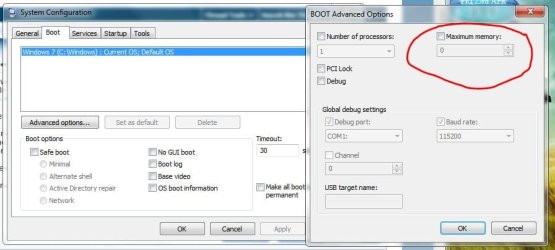
Try this :ar: Start :ar: system configuration Click on it!

Choose Boot Tab :ar: advanced options

set Maximum memory: to Zero (0) Click OK

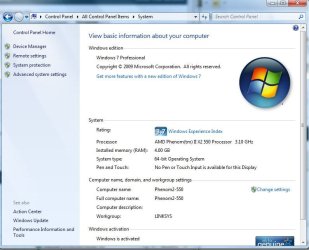
ReBoot Computer Then check memory in :ar: Control Panel :ar: System ;)
 

Attachments

  • Maximum_memory.JPG
    Maximum_memory.JPG
    51.3 KB · Views: 82
  • System_Phenom_550.JPG
    System_Phenom_550.JPG
    65.2 KB · Views: 70

My Computer

Computer type
PC/Desktop
Computer Manufacturer/Model Number
Built them myself, Science Experiments !
OS
Win7 Enterprise, Win7 x86 (Ult 7600), Win7 x64 Ult 7600, TechNet RTM on AMD x64 (2.8Ghz)
CPU
AMD fx8350 4ghz, AMD-32 2400mhz, AMD-64 3200mhz, AMDx64 2.8G
Motherboard
SIS 755, ECS-K8M890M-M (Ult 7600), GigaByte & others
Memory
2gb, 4gb on the Ult 7600, 4gb on Technet RTM, 32gb on FX8350
Graphics Card(s)
Draw my own Graphics, several nVidia cards
Sound Card
on motherboard
Monitor(s) Displays
19" flat scr, 28" I-Inc widescr,22" Emprex Widescr, 23" Acer
Screen Resolution
1280 x 1024, 1440 x 900, 1920 x 1080
Hard Drives
6 pata Ide HD's & 2 Sata HD's
added 80gb external on Ult 7600 computer,
numerous extra 1tb, 2TB, 3Tb SATA HD's
A collection of ext HD Docks w/ HDs
PSU
430w, 550w, 600w, 700, 800, etc
Case
All Generic Full Towers
Cooling
Open Air & a few fans, some w/ colored LEDs
Keyboard
Compaq & Dell recycled from GoodWill
Mouse
Made in China Optical Wired Mouse
Internet Speed
Fast Cable InterNet
Antivirus
AVG Free on 24 different Desktops, NO Problems!
Browser
IE 8 is preferred, but use FireFox sometimes
Other Info
Linksys Routers, switches, & Hubs
Too Many USB Flash Drives to count, Biggest is 64GB !
Eight computers in my home network.
Sixteen computers at my business network.
Linked via TeamViewer !
Lots of old used spare computer parts everywhere!
Is it safe?
 

My Computer

Computer type
PC/Desktop
OS
Windows 8.1 Pro 64-Bit
CPU
Intel Core i5-4460 @ 3.20GHz
Motherboard
Gigabyte Technology Co., Ltd. H97-D3H-CF (SOCKET 0)
Memory
8.00GB Dual-Channel DDR3 @ 799MHz (11-11-11-28)
Graphics Card(s)
1023MB NVIDIA GeForce GTX 560 Ti (Gigabyte)
Monitor(s) Displays
SyncMaster (1920x1080@59Hz)
Screen Resolution
1980 X 1080
Hard Drives
488GB Western Digital WDC WD5000AAKS-00M9A0 ATA Device (IDE)

My Computer

Computer type
PC/Desktop
Computer Manufacturer/Model Number
Built them myself, Science Experiments !
OS
Win7 Enterprise, Win7 x86 (Ult 7600), Win7 x64 Ult 7600, TechNet RTM on AMD x64 (2.8Ghz)
CPU
AMD fx8350 4ghz, AMD-32 2400mhz, AMD-64 3200mhz, AMDx64 2.8G
Motherboard
SIS 755, ECS-K8M890M-M (Ult 7600), GigaByte & others
Memory
2gb, 4gb on the Ult 7600, 4gb on Technet RTM, 32gb on FX8350
Graphics Card(s)
Draw my own Graphics, several nVidia cards
Sound Card
on motherboard
Monitor(s) Displays
19" flat scr, 28" I-Inc widescr,22" Emprex Widescr, 23" Acer
Screen Resolution
1280 x 1024, 1440 x 900, 1920 x 1080
Hard Drives
6 pata Ide HD's & 2 Sata HD's
added 80gb external on Ult 7600 computer,
numerous extra 1tb, 2TB, 3Tb SATA HD's
A collection of ext HD Docks w/ HDs
PSU
430w, 550w, 600w, 700, 800, etc
Case
All Generic Full Towers
Cooling
Open Air & a few fans, some w/ colored LEDs
Keyboard
Compaq & Dell recycled from GoodWill
Mouse
Made in China Optical Wired Mouse
Internet Speed
Fast Cable InterNet
Antivirus
AVG Free on 24 different Desktops, NO Problems!
Browser
IE 8 is preferred, but use FireFox sometimes
Other Info
Linksys Routers, switches, & Hubs
Too Many USB Flash Drives to count, Biggest is 64GB !
Eight computers in my home network.
Sixteen computers at my business network.
Linked via TeamViewer !
Lots of old used spare computer parts everywhere!
MY INDEX Check my specs.


My Computer

Computer Manufacturer/Model Number
Home build.
OS
Vista Ultimate 32 bit, Win 7 Pro 32 bit, Win 7 Pro 64 bit
CPU
Intel i5 CPU 750 @ 2.67 GHZ, OC 3.7 GHZ
Motherboard
Asus P7P55D
Memory
4 Gig
Graphics Card(s)
Nvidia GeForce GTS450
Monitor(s) Displays
Acer 24"
Screen Resolution
1440 x 900
Hard Drives
1000 GIG
1000 GIG
PSU
650
Case
Antec Nine Hundred Two
Internet Speed
14 MB (APPROX)
Back
Top