Manage Partitions

Sneaker741

New member
Local time
4:29 AM
Messages
28
Hi all,

I've just re-built win 7 onto a del laptop.

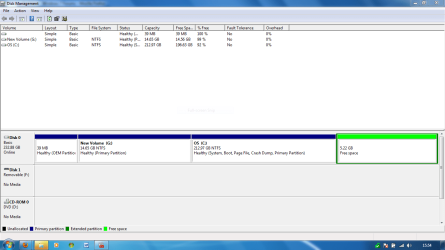
I have 3 paritions (stupidly didn't remove them on install). 1 @ 14.65 gb (old restore partition) 1@ 213gb (os) and 1@ 5 gb (empty)

I want to end up with the os as it is but merge the other 2 partitions.

I have tried extend the other 2 partions, but this option is always greyed out. I can' even extend the c drive to absorb them both and then creat a fresh new partition.

I have dried deleting volume, etc but don't seem to be able to get the result i want.

Any one any ideas?
 

My Computer

Computer Manufacturer/Model Number
Custom
OS
win 7
CPU
Phenom x3 720 (3.2)
Motherboard
ASRock M3A790GXH/128M
Memory
Corsair DHX 4 gig ddr3 1330
Graphics Card(s)
Radeon 4850x2 1gb
Sound Card
Onboard 7.1
PSU
Aztec 450
Please post back a screenshot of your full Disk Management drive map, using Snipping Tool in Start Menu, attaach file using paper clip in reply box.

Then we can give you the exact steps to do what you want.
 
Please post a screen shot of your disk management
It may be that you require a third party partition manager program as the in built windows one has limitations in merging/extending partitions
 

My Computer

Computer type
PC/Desktop
Computer Manufacturer/Model Number
Pauly Special
OS
Win7 Ultimate X64
CPU
Intel i5 3570K
Motherboard
Gigabyte Z77X-DS3H
Memory
8GB DDR3 1600
Graphics Card(s)
Onboard
Sound Card
Onboard
Screen Resolution
1280x1024
Hard Drives
Samsung 840 Evo SSD (OS)
1TB Spinner (Data)
PSU
800W Arctic
Case
Cooler Master
Cooling
3x120mm Fans
Keyboard
MS Wireless
Mouse
MS Wireless
Internet Speed
20M
Disk management screen cap attached.

appreciate your help :-)
 

Attachments

  • Capture.PNG
    Capture.PNG
    35.3 KB · Views: 67

My Computer

Computer Manufacturer/Model Number
Custom
OS
win 7
CPU
Phenom x3 720 (3.2)
Motherboard
ASRock M3A790GXH/128M
Memory
Corsair DHX 4 gig ddr3 1330
Graphics Card(s)
Radeon 4850x2 1gb
Sound Card
Onboard 7.1
PSU
Aztec 450
You should be able to extend your OS partition to consume the (green) free space leaving you with two partions (excluding the first 39MB one)
The windows disk utility will move partitions left to right but not vice versa so you cannot merge the first partition in the OS partition without using partitioning software
 

My Computer

Computer type
PC/Desktop
Computer Manufacturer/Model Number
Pauly Special
OS
Win7 Ultimate X64
CPU
Intel i5 3570K
Motherboard
Gigabyte Z77X-DS3H
Memory
8GB DDR3 1600
Graphics Card(s)
Onboard
Sound Card
Onboard
Screen Resolution
1280x1024
Hard Drives
Samsung 840 Evo SSD (OS)
1TB Spinner (Data)
PSU
800W Arctic
Case
Cooler Master
Cooling
3x120mm Fans
Keyboard
MS Wireless
Mouse
MS Wireless
Internet Speed
20M
Boot into free Partition Wizard bootable CD, select 1 for screen res, rightclick first 39mb partition>Delete, OK.

Next rightclick G>Delete, OK.

Now rightclick C:Windows7>Resize, slide left grey border all the way to the left over the deleted space from first two partitions. Now slide the right grey border to make room for any data partitions you want to the right of C. OK, Apply all steps,.

When computer restarts, Win7 should not boot. Boot into Win7 DVD Repair console, click through to Recovery Tools list to run Startup Repair up to 3 separate times to repair the MBR in Win7 which has been moved.

The only thing I'm not sure of is how the Free Space will react. It is normally created when you delete part of a logical partition, but I don't see any logical partitions. Try rightclicking on it in PW to see what your options are; you may need to convert it somehow, or perhaps it will act as unallocated space so you can include it in C resizing or use as an optional data partition to the right of C.
 
You should be able to extend your OS partition to consume the (green) free space leaving you with two partions (excluding the first 39MB one)
The windows disk utility will move partitions left to right but not vice versa so you cannot merge the first partition in the OS partition without using partitioning software

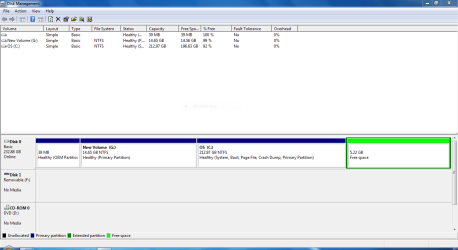
When I right click on the OS partition it has the extend volume greyed out. How can I merge with the 5 gb if I can't extend?

What then do I do with the 14 gb? Do I need 3rd party software to merge it with c:??

why won't disk management move the G: across to the right?

Sorry bit of a noob on the old disk management side of things! :cry:
 

Attachments

  • Capture1.PNG
    Capture1.PNG
    25.1 KB · Views: 11

My Computer

Computer Manufacturer/Model Number
Custom
OS
win 7
CPU
Phenom x3 720 (3.2)
Motherboard
ASRock M3A790GXH/128M
Memory
Corsair DHX 4 gig ddr3 1330
Graphics Card(s)
Radeon 4850x2 1gb
Sound Card
Onboard 7.1
PSU
Aztec 450
Boot into free Partition Wizard bootable CD, select 1 for screen res, rightclick first 39mb partition>Delete, OK.

Next rightclick G>Delete, OK.

Now rightclick C:Windows7>Resize, slide left grey border all the way to the left over the deleted space from first two partitions. Now slide the right grey border to make room for any data partitions you want to the right of C. OK, Apply all steps,.

When computer restarts, Win7 should not boot. Boot into Win7 DVD Repair console, click through to Recovery Tools list to run Startup Repair up to 3 separate times to repair the MBR in Win7 which has been moved.

The only thing I'm not sure of is how the Free Space will react. It is normally created when you delete part of a logical partition, but I don't see any logical partitions. Try rightclicking on it to see what your options are; you may need to convert it somehow, or perhaps it act as unallocated space so you can include it in C or an optional data partition to the right of C.

Sorry you replied so quick, I'll just try out your suggestions and post back, please ignore my last :-)
 

My Computer

Computer Manufacturer/Model Number
Custom
OS
win 7
CPU
Phenom x3 720 (3.2)
Motherboard
ASRock M3A790GXH/128M
Memory
Corsair DHX 4 gig ddr3 1330
Graphics Card(s)
Radeon 4850x2 1gb
Sound Card
Onboard 7.1
PSU
Aztec 450
Boot into free Partition Wizard bootable CD, select 1 for screen res, rightclick first 39mb partition>Delete, OK.

Next rightclick G>Delete, OK.

Now rightclick C:Windows7>Resize, slide left grey border all the way to the left over the deleted space from first two partitions. Now slide the right grey border to make room for any data partitions you want to the right of C. OK, Apply all steps,.

When computer restarts, Win7 should not boot. Boot into Win7 DVD Repair console, click through to Recovery Tools list to run Startup Repair up to 3 separate times to repair the MBR in Win7 which has been moved.

The only thing I'm not sure of is how the Free Space will react. It is normally created when you delete part of a logical partition, but I don't see any logical partitions. Try rightclicking on it in PW to see what your options are; you may need to convert it somehow, or perhaps it will act as unallocated space so you can include it in C resizing or use as an optional data partition to the right of C.

Hi,

cant get the Win7 DVD Repair console to appear, with dvd inserted all i get is win7 trying to re-install?
 

My Computer

Computer Manufacturer/Model Number
Custom
OS
win 7
CPU
Phenom x3 720 (3.2)
Motherboard
ASRock M3A790GXH/128M
Memory
Corsair DHX 4 gig ddr3 1330
Graphics Card(s)
Radeon 4850x2 1gb
Sound Card
Onboard 7.1
PSU
Aztec 450
Great!
all sorted
now all drves merge.
I have now shrank master drive by 20gb and created restore backup and off to create image dvd now.

thanks for the assistance!
 

My Computer

Computer Manufacturer/Model Number
Custom
OS
win 7
CPU
Phenom x3 720 (3.2)
Motherboard
ASRock M3A790GXH/128M
Memory
Corsair DHX 4 gig ddr3 1330
Graphics Card(s)
Radeon 4850x2 1gb
Sound Card
Onboard 7.1
PSU
Aztec 450
Back
Top