
many windows update errors

Sam1951

New member
Local time
11:22 AM
Messages
14
Location
Minnesota
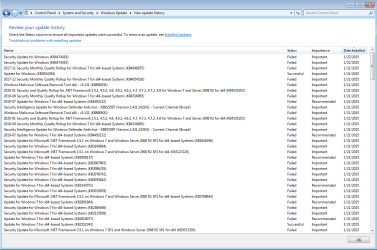
This is the same machine that would not install .NET frameworks. I installed a program called HWiNFO. It seems to install ok but won't run. The program complains about sha256 signing not supported ... install kb4474419. That fails on reboot at 87%. The error code is 80004005. That has led me into a hornets nest of update errors. I have over 100 failed updates.
sfc runs ok .... chkdsk reports no errors ... I installed root certificates (not sure if done correctly).

Found a copy of the windows 7 update troubleshooter, it couldn't fix 80070057 and said cryptographic service components are not registered
some other update failures .... 800B0109, 800B0100 more that I've forgotten. I've worked on this thing too long, now I'm totally lost and I think I need to start over. I wanted to somehow export the list of failed updates to a file but couldn't figure out how to do that (maybe not possible?) so I took a screen shot of as much as would fit on the screen.
Maybe figuring out why kb4474419 won't install? Or Windows update troubleshooter errors. I don't know..
Windows 7 Ultimate ... dual boots Linux .. Asus Prime B450M AII ... Ryzen5 1400 ... please let me know what more information you need and where to start
 

Attachments
  • Capture.PNG
    Capture.PNG
    125.2 KB · Views: 3

My Computers

System One System Two

  • Computer type
    PC/Desktop
    Computer Manufacturer/Model Number
    custom build
    OS
    Windows 7 Home Premium 64-bit SP1
    CPU
    amd fx-4350
    Motherboard
    ASRock 980DE3/U3S3
    Memory
    DDR3 16384 MBytes
    Graphics Card(s)
    NVIDIA GeForce GTX 650
    Hard Drives
    KINGSTON SA400S37120G
    Samsung SSD 870 EVO 500GB
    WD2500AAJB-00WGA0
    Antivirus
    microsoft security essentials
    Browser
    firefox
  • Computer type
    PC/Desktop
Maybe figuring out why kb4474419 won't install?

Nah get a 7 SP 1 setup and perform an inplace upgrade. You haven't installed updates for 6 years or more and basically nothing installs. Hopeless.
 

My Computer

Computer type
PC/Desktop
OS
Windows 7 Home Premium
This was a recently built machine out of some scrounged parts and some new (sort of a Frankenstein). It has SP1 (said so on the Windows 7 Ultimate box) This was a never before installed W7 copy maybe that's why it looks like no updates for 6 years. I just installed this Windows a few weeks ago when I assembled the machine. I'd rather fix it if that's possible.
If for sure impossible, what would it upgrade to?
 

My Computers

System One System Two

  • Computer type
    PC/Desktop
    Computer Manufacturer/Model Number
    custom build
    OS
    Windows 7 Home Premium 64-bit SP1
    CPU
    amd fx-4350
    Motherboard
    ASRock 980DE3/U3S3
    Memory
    DDR3 16384 MBytes
    Graphics Card(s)
    NVIDIA GeForce GTX 650
    Hard Drives
    KINGSTON SA400S37120G
    Samsung SSD 870 EVO 500GB
    WD2500AAJB-00WGA0
    Antivirus
    microsoft security essentials
    Browser
    firefox
  • Computer type
    PC/Desktop
If you upgrade Windows 7 SP 1 with itself, it upgrades to nothing, but gets rid of the horrible update history along with the failed updates as well as the successful ones. You start from scratch updatewise while preserving everything else.
 

My Computer

Computer type
PC/Desktop
OS
Windows 7 Home Premium
Cool, I'll see if I can figure out how to do that tomorrow

- - - Updated - - -

repair stopped right away:
Windows setup cannot find a location to store temporary installation files
to install Windows make sure that a partition on your boot disk has a least
829 MB of free space ..... it also lists this error # 0x80070490
I am using the original Windows 7 Ultimate install CD

- - - Updated - - -

I also made an iso out of my install disk, then extract them to a 16G thumb drive and run setup from there. ..... same error
 

My Computers

System One System Two

  • Computer type
    PC/Desktop
    Computer Manufacturer/Model Number
    custom build
    OS
    Windows 7 Home Premium 64-bit SP1
    CPU
    amd fx-4350
    Motherboard
    ASRock 980DE3/U3S3
    Memory
    DDR3 16384 MBytes
    Graphics Card(s)
    NVIDIA GeForce GTX 650
    Hard Drives
    KINGSTON SA400S37120G
    Samsung SSD 870 EVO 500GB
    WD2500AAJB-00WGA0
    Antivirus
    microsoft security essentials
    Browser
    firefox
  • Computer type
    PC/Desktop
I am finally getting back to this problem after some other things required my attention. I went back to the earliest restore point on this computer. I think it worked because my update history is blank (it seems so if I'm looking in the right place). Is there some order that I should install updates, some few critically important updates I need so I don't get into the same situation I was in before?
Or some other way to proceed from here? Dot net 4.8 is still there (again if I'm looking in the right place). All the programs I installed seem to have survived. I'm thinking I should uninstall HWiNFO, the program that wouldn't install correctly and led me down this path to all these update errors. I don't think I'll install any updates until I hear back.
 

My Computers

System One System Two

  • Computer type
    PC/Desktop
    Computer Manufacturer/Model Number
    custom build
    OS
    Windows 7 Home Premium 64-bit SP1
    CPU
    amd fx-4350
    Motherboard
    ASRock 980DE3/U3S3
    Memory
    DDR3 16384 MBytes
    Graphics Card(s)
    NVIDIA GeForce GTX 650
    Hard Drives
    KINGSTON SA400S37120G
    Samsung SSD 870 EVO 500GB
    WD2500AAJB-00WGA0
    Antivirus
    microsoft security essentials
    Browser
    firefox
  • Computer type
    PC/Desktop
I'm finally back to a windows 7 installation that works. I re-installed windows without a mouse. Got the chipset drivers and ethernet installed. Now I have a mouse and wired network. I also installed the firefox version that works with windows 7. Windows updates is set to never check. Only 3 updates are installed .....kb2685811, 2999226, 976902 ( they come with the install ). I have an install point for this configuration. I'm going to find an ssd of the same size and dd this installation (from a live session of Linux Mint) over to it so I won't have to go through the PITA of another re-install with no mouse.
Previously, I've tried an install DVD modified by 7UPv64R only including USB stuff, .NET and maybe some updates are included? That disk booted and installed but froze on reboot (4 dots circling). I've also tried including the update pack. Those disks either don't boot or freeze in the same place (I've tried so much I don't remember exactly). Anyway they didn't work. I've also tried running the Update Pack from this situation. All the changes were reverted on reboot so that didn't work (plus the mouse drivers and Lan were somehow gone after revert).
The boot mode is legacy only, xhci handoff enabled .... trusted computing, fast boot, secure boot all disabled. sfc runs without errors. I tried installing the video drivers for my GT 710 card. The computer froze on reboot. I had to revert to the restore point I made after I installed firefox. I don't have .net 4.8 yet or maybe some missing update prevents the video driver install?

My updated question then is - can I install updates manually in the right order, when do I do .net? There must be a logical way to go from here.
Again, the hardware is ASUS Prime B450M-AII 16Gig, Ryzen 5 1400, GT 710 video
 

My Computers

System One System Two

  • Computer type
    PC/Desktop
    Computer Manufacturer/Model Number
    custom build
    OS
    Windows 7 Home Premium 64-bit SP1
    CPU
    amd fx-4350
    Motherboard
    ASRock 980DE3/U3S3
    Memory
    DDR3 16384 MBytes
    Graphics Card(s)
    NVIDIA GeForce GTX 650
    Hard Drives
    KINGSTON SA400S37120G
    Samsung SSD 870 EVO 500GB
    WD2500AAJB-00WGA0
    Antivirus
    microsoft security essentials
    Browser
    firefox
  • Computer type
    PC/Desktop
Back
Top