Marvell Controller Unplugged / Reboot and Select proper Boot device

justmike

New member
Local time
3:30 AM
Messages
34
Hi guys,

I have a new PC with a SSD and 2 other drives. Using a P8P67 LE motherboard by ASUS.

I have had two black screens in a period of a month that pretty much say, "Reboot and Select proper Boot device."

I noticed when I went into BIOS, that my SSD was kicked out of the boot priority and replaced with one of my WD HDD.

So I put it back.

I restarted my computer a few times to see if it kept the settings and when Windows loaded I got:

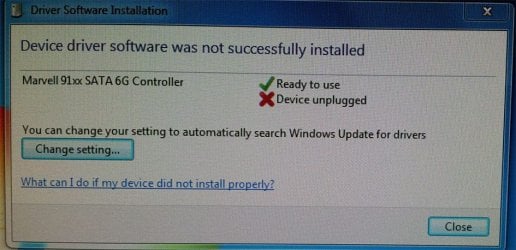
"Driver Software Installation - Device driver software was not successfully installed:
Marvell 91xx SATA 6G Controller - Device unplugged."

I restarted again and that didn't appear (actually, I have restarted many times and I have only seen that once). I opened Device Manager and it's fine.

The computer has been running great, I always boot into Windows and the black screen has never happened while I have been using the computer, only when I wake up and move the mouse to find it.

I have attached images. Is it possible that the connection to the SSD is loose? Not sure, any help will be appreciated.
 

Attachments

  • 2.jpg
    2.jpg
    38.9 KB · Views: 8
  • 1.jpg
    1.jpg
    89.1 KB · Views: 6

My Computer My Computer

Computer Manufacturer/Model Number
Custom
OS
Windows 7 Home Premium 64bit
CPU
Intel Core i7-2600 CPU @ 3.40 GHz
Motherboard
ASUS P8P67 LE
Memory
16GB
Graphics Card(s)
AMD RADEON HD 6900 Series 2GB
Sound Card
Onboard
Monitor(s) Displays
Samsung 24" SyncMaster BX2450
Screen Resolution
1920 x 1080
Hard Drives
Corsair Force Series 3 240GB SSD
WD Caviar Green EARS 2TB
PSU
Corsair HX850W
Case
Thermaltake Armor MX Plus
Cooling
Case Cooling
Keyboard
Logitech Wireless Keyboard MK710
Mouse
Logitech Marathon Mouse M705
Internet Speed
8.0 Mb/s
hi just mike ;quester12 here. I have 1 question ? are all 8 sata ports being used thats the 3.0gb sata ports . the other blue ones are for 6.0gb ports and are jmicron controller ports . I believe a simple test would be to attach your boot drive on the 3.0gb sata controller and see if it works.

I own the exact same motherboard . don't forget to reset your cmos and reset your system clock . it will help to clear up the bios and make it a clean slate .

I hope this helps

quester12
 

My Computer My Computer

Computer Manufacturer/Model Number
all custom built computers from scratch all intel boards
OS
multiple operating systems xp pro 32bit win7 64 bit pro and ultimate
CPU
all intel cpus
Motherboard
asus p8p67le p4p800 etc
Memory
kingston memory
Graphics Card(s)
ati nvidia evga xfx
Sound Card
soundblaster type or on board sound
Monitor(s) Displays
acer hp
Hard Drives
maxtor ides seagate ides and sata's western digital's
PSU
corsair ultra's pc and powercooling thermaltake's
Case
antec thermaltake cheiftec's
Cooling
cpu 's or fans various types used
are all 8 sata ports being used thats the 3.0gb sata ports . the other blue ones are for 6.0gb ports and are jmicron controller ports . I believe a simple test would be to attach your boot drive on the 3.0gb sata controller and see if it works.

I own the exact same motherboard . don't forget to reset your cmos and reset your system clock . it will help to clear up the bios and make it a clean slate .

Thanks for the reply quester12!!

I checked to see what is connected in SATA configuration:

SATA mode is set to AHCI mode
S.M.A.R.T. Status check is enabled

Sata6g_1 not present
Sata6g_2 SSD

Sata3g_1 WD HDD
Sata3g_2 not present
Sata3g_3 Blu-ray drive
Sata3g_4 WD HDD

Also, when I got the computer about a month and 3 weeks ago, I never experienced a black screen. I formatted because I was getting BSOD popping up every so often. Now, BSOD are gone and now I noticed the black screen.

It's also hard to test if something is fixed considering my first black screen happened 20 days ago and the second, today.

So would resetting the CMOS and system clock be the way to go? I was going to check for a loose cable that would be connected to the SDD, but it's too dark to do that now.
 

My Computer My Computer

Computer Manufacturer/Model Number
Custom
OS
Windows 7 Home Premium 64bit
CPU
Intel Core i7-2600 CPU @ 3.40 GHz
Motherboard
ASUS P8P67 LE
Memory
16GB
Graphics Card(s)
AMD RADEON HD 6900 Series 2GB
Sound Card
Onboard
Monitor(s) Displays
Samsung 24" SyncMaster BX2450
Screen Resolution
1920 x 1080
Hard Drives
Corsair Force Series 3 240GB SSD
WD Caviar Green EARS 2TB
PSU
Corsair HX850W
Case
Thermaltake Armor MX Plus
Cooling
Case Cooling
Keyboard
Logitech Wireless Keyboard MK710
Mouse
Logitech Marathon Mouse M705
Internet Speed
8.0 Mb/s
yes do check all wiring . after the reset go into the bios and see exactly what status is after you clear cmos. can you provide a screen print for me to see?is your ssd drive your primary containing os? any raid configurations set ? sometimes black screens happen due to mbr problems . boot problems and i remember you reformated a drive . was it origionally ntfs or fat32 or the new win7 format?
don;t worry justmike we will help you get back to the fun.
we will take it step by step if ncesssary.
remember ::: if you build it.... it might work
quester12
 

My Computer My Computer

Computer Manufacturer/Model Number
all custom built computers from scratch all intel boards
OS
multiple operating systems xp pro 32bit win7 64 bit pro and ultimate
CPU
all intel cpus
Motherboard
asus p8p67le p4p800 etc
Memory
kingston memory
Graphics Card(s)
ati nvidia evga xfx
Sound Card
soundblaster type or on board sound
Monitor(s) Displays
acer hp
Hard Drives
maxtor ides seagate ides and sata's western digital's
PSU
corsair ultra's pc and powercooling thermaltake's
Case
antec thermaltake cheiftec's
Cooling
cpu 's or fans various types used
justmike try attaching the ssd drive to the sata #2 port.see if it reads it at all.
 

My Computer My Computer

Computer Manufacturer/Model Number
all custom built computers from scratch all intel boards
OS
multiple operating systems xp pro 32bit win7 64 bit pro and ultimate
CPU
all intel cpus
Motherboard
asus p8p67le p4p800 etc
Memory
kingston memory
Graphics Card(s)
ati nvidia evga xfx
Sound Card
soundblaster type or on board sound
Monitor(s) Displays
acer hp
Hard Drives
maxtor ides seagate ides and sata's western digital's
PSU
corsair ultra's pc and powercooling thermaltake's
Case
antec thermaltake cheiftec's
Cooling
cpu 's or fans various types used
did a little more digging for ya. the 91x controllers have an issue on speed with the sata iii ssd's and also with the native quieing (ncq) and hot swapping.

I found an article in "Toms Hardware" on marvell controller.

this also should give you an idea on how solve your problem.
plz let me know if this helps
quester12
 

My Computer My Computer

Computer Manufacturer/Model Number
all custom built computers from scratch all intel boards
OS
multiple operating systems xp pro 32bit win7 64 bit pro and ultimate
CPU
all intel cpus
Motherboard
asus p8p67le p4p800 etc
Memory
kingston memory
Graphics Card(s)
ati nvidia evga xfx
Sound Card
soundblaster type or on board sound
Monitor(s) Displays
acer hp
Hard Drives
maxtor ides seagate ides and sata's western digital's
PSU
corsair ultra's pc and powercooling thermaltake's
Case
antec thermaltake cheiftec's
Cooling
cpu 's or fans various types used
yes do check all wiring

All wiring seems solid.


after the reset go into the bios and see exactly what status is after you clear cmos. can you provide a screen print for me to see?

With resetting the CMOS / and system clock, sorry if I sound like a noob in this regard, but there is no option to in the BIOS itself to do this and I don't see anything in the manual. Don't see a jumper next to the battery, is my only option removing the battery and placing it back?


is your ssd drive your primary containing os? any raid configurations set ? sometimes black screens happen due to mbr problems . boot problems and i remember you reformated a drive . was it origionally ntfs or fat32 or the new win7 format?

Yes, my SSD contains the OS. No RAID configurations that I can see in BIOS. I formatted the SSD which was originally NTFS and formatted it back to NTFS.


justmike try attaching the ssd drive to the sata #2 port.see if it reads it at all.

I did that and does recognise it. But, I would like it to be in the 6G port. When I got the computer (everything was installed), this didn't happen, so I'm pretty sure that's not the problem.


did a little more digging for ya. the 91x controllers have an issue on speed with the sata iii ssd's and also with the native quieing (ncq) and hot swapping.

I found an article in "Toms Hardware" on marvell controller.

this also should give you an idea on how solve your problem.
plz let me know if this helps
quester12

Thank you for being so attentive with this. I really appreciate it. I did a search on that and was bought to a forum. Nothing really there that addressed my problem.


To further add, when I noticed the black screen, I booted into BIOS, and I noticed in EZ-MODE, it kicked out my SSD drive and put my WD HDD there instead. I have restarted several times since then and it seems that the SSD is still there. So I'm not sure if *sometimes* it loses the setting for it when restarted?

I loaded optimised settings in BIOS (F5) although, that probably wouldn't do anything. Just strange how it never did it before and when I formatted, it started to happen. That's why I was thinking it could be some setting I'm missing considering the computer is pretty new.

Would you like me to take any screenshots in the BIOS that could be helpful?
 

My Computer My Computer

Computer Manufacturer/Model Number
Custom
OS
Windows 7 Home Premium 64bit
CPU
Intel Core i7-2600 CPU @ 3.40 GHz
Motherboard
ASUS P8P67 LE
Memory
16GB
Graphics Card(s)
AMD RADEON HD 6900 Series 2GB
Sound Card
Onboard
Monitor(s) Displays
Samsung 24" SyncMaster BX2450
Screen Resolution
1920 x 1080
Hard Drives
Corsair Force Series 3 240GB SSD
WD Caviar Green EARS 2TB
PSU
Corsair HX850W
Case
Thermaltake Armor MX Plus
Cooling
Case Cooling
Keyboard
Logitech Wireless Keyboard MK710
Mouse
Logitech Marathon Mouse M705
Internet Speed
8.0 Mb/s
yes excellent idea. show me . search " marvell controller bsod" the 9xcontroller software doesn't work and play with other drives like ssd's. it want to use the wd. what port is it in? 3g1 right. switch the two drives. see if you can access it.
 

My Computer My Computer

Computer Manufacturer/Model Number
all custom built computers from scratch all intel boards
OS
multiple operating systems xp pro 32bit win7 64 bit pro and ultimate
CPU
all intel cpus
Motherboard
asus p8p67le p4p800 etc
Memory
kingston memory
Graphics Card(s)
ati nvidia evga xfx
Sound Card
soundblaster type or on board sound
Monitor(s) Displays
acer hp
Hard Drives
maxtor ides seagate ides and sata's western digital's
PSU
corsair ultra's pc and powercooling thermaltake's
Case
antec thermaltake cheiftec's
Cooling
cpu 's or fans various types used
ok found this at this site.


Asus P8P67 PCI Simple Communications Controller missing driver. it still services the le boards.


quester12
 

My Computer My Computer

Computer Manufacturer/Model Number
all custom built computers from scratch all intel boards
OS
multiple operating systems xp pro 32bit win7 64 bit pro and ultimate
CPU
all intel cpus
Motherboard
asus p8p67le p4p800 etc
Memory
kingston memory
Graphics Card(s)
ati nvidia evga xfx
Sound Card
soundblaster type or on board sound
Monitor(s) Displays
acer hp
Hard Drives
maxtor ides seagate ides and sata's western digital's
PSU
corsair ultra's pc and powercooling thermaltake's
Case
antec thermaltake cheiftec's
Cooling
cpu 's or fans various types used
yes excellent idea. show me . search " marvell controller bsod" the 9xcontroller software doesn't work and play with other drives like ssd's. it want to use the wd. what port is it in? 3g1 right. switch the two drives. see if you can access it.

Anything you would like to see with a screenshot? I can access it, but at the loss of 6G speed.


ok found this at this site.

Asus P8P67 PCI Simple Communications Controller missing driver. it still services the le boards.

I had a search of that and been reading many forums. They seem to be experiencing BSOD a lot of the time. I don't get them any more after the format, but black screens now. Which is odd because they didn't happen before.

The thing is, I haven't seen anyone with my problem yet. Where the computer runs perfect for 20 days and then black screen, restart and it's fine. I always boot into Windows as well. So a bit puzzled.

One clue is my second image up there, when I restarted and Marvell Controller was unplugged. So when I opened the PC, I took it out and pushed it in again and made sure it was solid.

So, not sure what the problem could be. If I got rid of Marvell Controller, the problem would go I guess, but not at the loss of the speed. I mean, if it only happens once every month or so, then I'll take that if it's a fundamental flaw and no device dying. I just want to know if something is dead so I can claim it under warranty. But they said, they need to re-create the problem to know if something is faulty, but I can't re-create the problem :(
 

My Computer My Computer

Computer Manufacturer/Model Number
Custom
OS
Windows 7 Home Premium 64bit
CPU
Intel Core i7-2600 CPU @ 3.40 GHz
Motherboard
ASUS P8P67 LE
Memory
16GB
Graphics Card(s)
AMD RADEON HD 6900 Series 2GB
Sound Card
Onboard
Monitor(s) Displays
Samsung 24" SyncMaster BX2450
Screen Resolution
1920 x 1080
Hard Drives
Corsair Force Series 3 240GB SSD
WD Caviar Green EARS 2TB
PSU
Corsair HX850W
Case
Thermaltake Armor MX Plus
Cooling
Case Cooling
Keyboard
Logitech Wireless Keyboard MK710
Mouse
Logitech Marathon Mouse M705
Internet Speed
8.0 Mb/s
OH, and just to add, when I did format, I too couldn't find the PCI Simple Communications Controller, I had to download Intel Management Engine Interface to fix it from the device manager.
 

My Computer My Computer

Computer Manufacturer/Model Number
Custom
OS
Windows 7 Home Premium 64bit
CPU
Intel Core i7-2600 CPU @ 3.40 GHz
Motherboard
ASUS P8P67 LE
Memory
16GB
Graphics Card(s)
AMD RADEON HD 6900 Series 2GB
Sound Card
Onboard
Monitor(s) Displays
Samsung 24" SyncMaster BX2450
Screen Resolution
1920 x 1080
Hard Drives
Corsair Force Series 3 240GB SSD
WD Caviar Green EARS 2TB
PSU
Corsair HX850W
Case
Thermaltake Armor MX Plus
Cooling
Case Cooling
Keyboard
Logitech Wireless Keyboard MK710
Mouse
Logitech Marathon Mouse M705
Internet Speed
8.0 Mb/s
justmike who set the computer up for you?
 

My Computer My Computer

Computer Manufacturer/Model Number
all custom built computers from scratch all intel boards
OS
multiple operating systems xp pro 32bit win7 64 bit pro and ultimate
CPU
all intel cpus
Motherboard
asus p8p67le p4p800 etc
Memory
kingston memory
Graphics Card(s)
ati nvidia evga xfx
Sound Card
soundblaster type or on board sound
Monitor(s) Displays
acer hp
Hard Drives
maxtor ides seagate ides and sata's western digital's
PSU
corsair ultra's pc and powercooling thermaltake's
Case
antec thermaltake cheiftec's
Cooling
cpu 's or fans various types used
A computer company here called Centrecom.

I picked the parts and they put it together for me.

I forgot to mention, when I boot the computer up, Marvell Controller screen is the first thing I see and says no hard disk detected.

Does this mean I'm using it or no?
 

My Computer My Computer

Computer Manufacturer/Model Number
Custom
OS
Windows 7 Home Premium 64bit
CPU
Intel Core i7-2600 CPU @ 3.40 GHz
Motherboard
ASUS P8P67 LE
Memory
16GB
Graphics Card(s)
AMD RADEON HD 6900 Series 2GB
Sound Card
Onboard
Monitor(s) Displays
Samsung 24" SyncMaster BX2450
Screen Resolution
1920 x 1080
Hard Drives
Corsair Force Series 3 240GB SSD
WD Caviar Green EARS 2TB
PSU
Corsair HX850W
Case
Thermaltake Armor MX Plus
Cooling
Case Cooling
Keyboard
Logitech Wireless Keyboard MK710
Mouse
Logitech Marathon Mouse M705
Internet Speed
8.0 Mb/s
thats the problem right there. you downloaded the latest one correct?

do you have the driver from the motherboard cd . rerun that one. its a driver issue.

quester12
 

My Computer My Computer

Computer Manufacturer/Model Number
all custom built computers from scratch all intel boards
OS
multiple operating systems xp pro 32bit win7 64 bit pro and ultimate
CPU
all intel cpus
Motherboard
asus p8p67le p4p800 etc
Memory
kingston memory
Graphics Card(s)
ati nvidia evga xfx
Sound Card
soundblaster type or on board sound
Monitor(s) Displays
acer hp
Hard Drives
maxtor ides seagate ides and sata's western digital's
PSU
corsair ultra's pc and powercooling thermaltake's
Case
antec thermaltake cheiftec's
Cooling
cpu 's or fans various types used
do they have all the install software. can you go the bios screen with del key?
 

My Computer My Computer

Computer Manufacturer/Model Number
all custom built computers from scratch all intel boards
OS
multiple operating systems xp pro 32bit win7 64 bit pro and ultimate
CPU
all intel cpus
Motherboard
asus p8p67le p4p800 etc
Memory
kingston memory
Graphics Card(s)
ati nvidia evga xfx
Sound Card
soundblaster type or on board sound
Monitor(s) Displays
acer hp
Hard Drives
maxtor ides seagate ides and sata's western digital's
PSU
corsair ultra's pc and powercooling thermaltake's
Case
antec thermaltake cheiftec's
Cooling
cpu 's or fans various types used
answer are you using it . that would be a no. if the bootup says no hareware detected than the controller is passive active. like going past a fruit stand seeing oranges plums etc and bypassing the peaches cause you don't recognize that their their. it also means they can't talk to each other. ssd say i'm here controller says false alarm no one their.
 

My Computer My Computer

Computer Manufacturer/Model Number
all custom built computers from scratch all intel boards
OS
multiple operating systems xp pro 32bit win7 64 bit pro and ultimate
CPU
all intel cpus
Motherboard
asus p8p67le p4p800 etc
Memory
kingston memory
Graphics Card(s)
ati nvidia evga xfx
Sound Card
soundblaster type or on board sound
Monitor(s) Displays
acer hp
Hard Drives
maxtor ides seagate ides and sata's western digital's
PSU
corsair ultra's pc and powercooling thermaltake's
Case
antec thermaltake cheiftec's
Cooling
cpu 's or fans various types used
thats the problem right there. you downloaded the latest one correct?

do you have the driver from the motherboard cd . rerun that one. its a driver issue.

quester12

Yes, I downloaded the latest Intel Management Engine Interface to fix that problem.

I installed everything from the CD, alright, I'll re-run the CD now and see.


do they have all the install software. can you go the bios screen with del key?

Yes, I can go into BIOS with the DEL key.


answer are you using it . that would be a no. if the bootup says no hareware detected than the controller is passive active. like going past a fruit stand seeing oranges plums etc and bypassing the peaches cause you don't recognize that their their. it also means they can't talk to each other. ssd say i'm here controller says false alarm no one their.

I see, how would I know if I am using it? Go into the BIOS and see if Marvell is enabled?
 

My Computer My Computer

Computer Manufacturer/Model Number
Custom
OS
Windows 7 Home Premium 64bit
CPU
Intel Core i7-2600 CPU @ 3.40 GHz
Motherboard
ASUS P8P67 LE
Memory
16GB
Graphics Card(s)
AMD RADEON HD 6900 Series 2GB
Sound Card
Onboard
Monitor(s) Displays
Samsung 24" SyncMaster BX2450
Screen Resolution
1920 x 1080
Hard Drives
Corsair Force Series 3 240GB SSD
WD Caviar Green EARS 2TB
PSU
Corsair HX850W
Case
Thermaltake Armor MX Plus
Cooling
Case Cooling
Keyboard
Logitech Wireless Keyboard MK710
Mouse
Logitech Marathon Mouse M705
Internet Speed
8.0 Mb/s
The only thing I didn't install is Intel Rapid Storage Technology driver. Because every time I restarted when it was installed, my computer would freeze for 45 seconds. I read about it and uninstalling it fix the freezing. Apparently, I never needed it anyway and when I got the computer that was never installed.
 

My Computer My Computer

Computer Manufacturer/Model Number
Custom
OS
Windows 7 Home Premium 64bit
CPU
Intel Core i7-2600 CPU @ 3.40 GHz
Motherboard
ASUS P8P67 LE
Memory
16GB
Graphics Card(s)
AMD RADEON HD 6900 Series 2GB
Sound Card
Onboard
Monitor(s) Displays
Samsung 24" SyncMaster BX2450
Screen Resolution
1920 x 1080
Hard Drives
Corsair Force Series 3 240GB SSD
WD Caviar Green EARS 2TB
PSU
Corsair HX850W
Case
Thermaltake Armor MX Plus
Cooling
Case Cooling
Keyboard
Logitech Wireless Keyboard MK710
Mouse
Logitech Marathon Mouse M705
Internet Speed
8.0 Mb/s
I just installed the Management Engine Interface driver from the mobo CD again. I'll restart now.
 

My Computer My Computer

Computer Manufacturer/Model Number
Custom
OS
Windows 7 Home Premium 64bit
CPU
Intel Core i7-2600 CPU @ 3.40 GHz
Motherboard
ASUS P8P67 LE
Memory
16GB
Graphics Card(s)
AMD RADEON HD 6900 Series 2GB
Sound Card
Onboard
Monitor(s) Displays
Samsung 24" SyncMaster BX2450
Screen Resolution
1920 x 1080
Hard Drives
Corsair Force Series 3 240GB SSD
WD Caviar Green EARS 2TB
PSU
Corsair HX850W
Case
Thermaltake Armor MX Plus
Cooling
Case Cooling
Keyboard
Logitech Wireless Keyboard MK710
Mouse
Logitech Marathon Mouse M705
Internet Speed
8.0 Mb/s
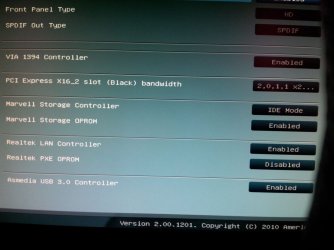
It's possible I'm using the onbaord SATA 6G for my SSD.

If you look at the pic I attached, it says Marvell Storage Controller is IDE Mode and Marvell Storage OPROM is Enabled.

But, my SATA mode is set to AHCI mode, could that be it?

Should I change the Marvell Storage Controller to AHCI or should I disable Marvell Storage OPROM?
 

Attachments

  • 3.jpg
    3.jpg
    114 KB · Views: 25

My Computer My Computer

Computer Manufacturer/Model Number
Custom
OS
Windows 7 Home Premium 64bit
CPU
Intel Core i7-2600 CPU @ 3.40 GHz
Motherboard
ASUS P8P67 LE
Memory
16GB
Graphics Card(s)
AMD RADEON HD 6900 Series 2GB
Sound Card
Onboard
Monitor(s) Displays
Samsung 24" SyncMaster BX2450
Screen Resolution
1920 x 1080
Hard Drives
Corsair Force Series 3 240GB SSD
WD Caviar Green EARS 2TB
PSU
Corsair HX850W
Case
Thermaltake Armor MX Plus
Cooling
Case Cooling
Keyboard
Logitech Wireless Keyboard MK710
Mouse
Logitech Marathon Mouse M705
Internet Speed
8.0 Mb/s
Back
Top