Master volume does not control USB speakers

nonyabus

New member
Local time
9:14 PM
Messages
10
I connected a DAC to my laptop and set it as the default device from the control panel. Now the master volume mixer does not work at all.

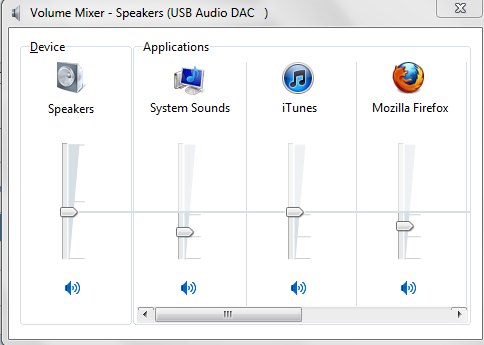
When I change change the "master volume" slider - the others (WMP, firefox, etc...) apparently change with it too but there is no effect on the actual volume. But when I change each individual mixer it does.

How do I fix the master volume so that it works as normal? Any help is appreciated.
 

My Computer

OS
Windows 7 ultimate x32
Motherboard
Intel dp35dp
Sound Card
IDT 92xx
Hi nonyabus,
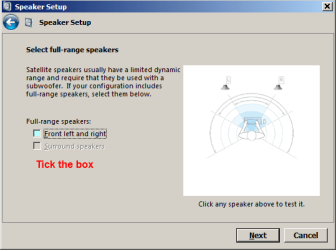
from control panel, select 'Sound' highlight speakers then 'Configure'

Capture.PNG
 

My Computer

Computer Manufacturer/Model Number
Look in my Signature.
OS
Win7 H.Prem. 32bit+SP1
I did. Still the master volume slider doesn't do anything, but all the other ones work...

vRJCQ.png


When I change the first one all the others *appear* to change with it, but there is no effect on the actual volume.
 

My Computer

OS
Windows 7 ultimate x32
Motherboard
Intel dp35dp
Sound Card
IDT 92xx
I use the volume switch on my speakers.
 

My Computer

Computer Manufacturer/Model Number
Look in my Signature.
OS
Win7 H.Prem. 32bit+SP1
I'm using headphones... no volume knob.
 

My Computer

OS
Windows 7 ultimate x32
Motherboard
Intel dp35dp
Sound Card
IDT 92xx
If their not too expensive, buy a better set.
 

My Computer

Computer Manufacturer/Model Number
Look in my Signature.
OS
Win7 H.Prem. 32bit+SP1
Are you serious... they're HD580s, and the DAC alone is 500$. Is there a real solution?
 

My Computer

OS
Windows 7 ultimate x32
Motherboard
Intel dp35dp
Sound Card
IDT 92xx
Back
Top