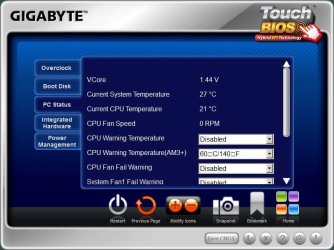
MB & CPU Temp

BigTabs

It's All About Money
Power User
VIP
Local time
6:08 PM
Messages
445
Location
Chester
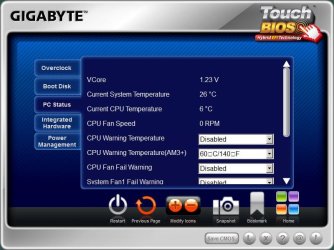
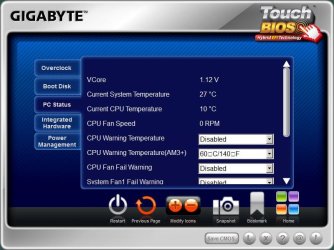
I have attached a photo's of the stats

GB & GB1 on idle AND the one named Full is full load
 

Attachments

  • GB.jpg
    GB.jpg
    61 KB · Views: 23
  • GB1.jpg
    GB1.jpg
    61 KB · Views: 21
  • Full.jpg
    Full.jpg
    61 KB · Views: 21

My Computer

Computer type
PC/Desktop
Computer Manufacturer/Model Number
Custom Build
OS
Windows 7 64 (bit)
CPU
I7 4790K
Motherboard
Asus Maximus VII Hero
Memory
8GB
Graphics Card(s)
EVGA 770 SC ACX
Monitor(s) Displays
iiyama GB2488HSU
Screen Resolution
1920*1080
Hard Drives
1TB WESTERN DIGITAL BLACK
PSU
850 EVGA Supernova G2
Case
Carbide Series® Air 540 High Airflow ATX Cube Case
Cooling
The Black Ice® GT Stealth 240, Alphacool NexXxoS UT60 280
Keyboard
STEELSERIES APEX [RAW]
Mouse
Roccat XTD
Internet Speed
30Meg
Antivirus
Bitdefender
Browser
Google Chrome
Those temps are definitely very wrong, and your system spec says your using sabertooth am3+ but that mb is from Asus, so how come your using gigabyte tools?
 

My Computer

Computer type
PC/Desktop
OS
Windows 7 Home Premium x64
CPU
Intel Core i7 860 (Lynnfield)
Motherboard
Asus P7P55D (LGA1156)
Memory
Corsair Vengeance 9,9,9,24 1600Mhz 1.50v 2x4G
Graphics Card(s)
Asus nVidia 560 GTX
Sound Card
Asus Xonar DG
Monitor(s) Displays
Acer P235H & NEC E201W
Screen Resolution
1920x1080 & 900x1600
Hard Drives
2
PSU
Corsair 650 Modular
Case
Corsair 800D
Cooling
Corsair H80 with Noctua fans
Keyboard
Ducky Shine
Mouse
tT Theron
Internet Speed
100/100
Browser
IE10
Hey BigTabs as Andreas says mate the temps are so out of whack it isn't funny!!

Check with Speccy - not an exact tool but close enough


http://www.piriform.com/speccy/download
post back the temps from this.
 

My Computer

Computer type
PC/Desktop
Computer Manufacturer/Model Number
Own build (new) Desk1 / Asus ROG Win 7 / Desk2 1st build
OS
Desk1 7 Home Prem / Desk2 10 Pro / Main lap Asus ROG 10 Pro 2 laptop Toshiba 7 Pro Asus P2520 7 & 10
CPU
Desk1 i5 3750K / Laptop i7 GTX 860M / Desk2 i5 2500
Motherboard
Desk1 Asus P877-V / Desk2 Gigabyte H67 UD3H / Laptop ?
Memory
Desk1 8GB (1866) / Desk2 16GB (1333) / Laptop 8Gb DDR3
Graphics Card(s)
Desk 1& 2NVidia GTX 650 & Laptops on board Intel
Sound Card
Desk 1 & 2 -XONAR DG Realtek High Def audio Laptop
Monitor(s) Displays
Desk 1 Benq HD 2450 / Desk2 Philips 24" / Laptop 17.5"
Screen Resolution
1920x1080 D1 & D2 & Laptop 1
Hard Drives
Desk1 Samsung 120GB 830 SSD
Asus ROG 256GB 850 Pro SSD
Desk2 Samsung 840 256 SSD
Toshiba 120GB EVO
PSU
Desk 1 Corsair HX 1050/ Laptop ? / Desk 2 Corsair HX 650
Case
Desk 1 Cooler HAF XM ? Toshiba laptop / Desk2 Coolermaster
Cooling
Fans on all Desk1 -2 Desk2 - all Coolermasters 5 Laptop ?
Keyboard
Desk 1 MS Sidewinder X6 Desk 2 MS Sidewinder X 4
Mouse
Desk 1&2 - Gigabyte MS 900 gamer - laptop - Logitec wireless
Internet Speed
ADSL2+
Other Info
One other Desktop (tester) and spare Toshba laptop both with SSD's
Running Kaspersky 2016 ISS on all machines config'd identically
Logitec audio stereo systems on each machine (x3)
Canon MG5250MFC
Router/modem TP-Link running WPA2SK
Its an AMD cpu so those temps are probably correct. AMD have some strange way of reading/ measuring temps on the cpu.
Basically the temps even out the closer it gets to 40c. Anything below 40c on an AMD cpu is incorrect but once it reaches 40c and above it will be acurate. I know i didn't explain it very well at all so here it is explained in detail.
AMD Temp Information and Guide
Try running a different monitoring software just to see if that one is showing the right readings. Do not run the 2 softwares at the same time though. I reckon they're correct though :D
I think i'll have to try and condense that guide as a few people have posted the same question in different forums recently.

Hope it helps.
 

My Computer

Computer type
PC/Desktop
Computer Manufacturer/Model Number
Custom build
OS
Win7 Home Premium x64 SP1
CPU
i7 4770k
Motherboard
Asus maximus VI Hero
Memory
8Gb Kingston HyperX Beast 2400MHz @2133MHz 11-12-11-30
Graphics Card(s)
MSI GTX 780ti Gaming Oc x2
Sound Card
Onboard ROG SupremeFX
Monitor(s) Displays
Asus VG248QE
Screen Resolution
3840X1080 144Hz
Hard Drives
Samung Evo 256Gb, OCZ Agility4 128Gb
1x1TB hitachi storage
PSU
EVGA Supernova 1000w Platinum
Case
Corsair Air 540
Cooling
Corsair H100i
Keyboard
Coolermaster Quickfire Pro
Mouse
Corsair M65 RGB
Internet Speed
74mb dwn/16up
Antivirus
MSE,Malwarebytes
Browser
Chrome
Hum G but I thought 6 and 10C were almost stone cold compared to what one usually sees thats why I asked the OP to run Speccy I know it isn't that exact but near enough.

I really don't have a lot to do with AMD stuff and am used to seeing temps run at 24 - 50C on various Intel machines. Unless you are saying that the shown temps are the temps above 40C?:confused:
 

My Computer

Computer type
PC/Desktop
Computer Manufacturer/Model Number
Own build (new) Desk1 / Asus ROG Win 7 / Desk2 1st build
OS
Desk1 7 Home Prem / Desk2 10 Pro / Main lap Asus ROG 10 Pro 2 laptop Toshiba 7 Pro Asus P2520 7 & 10
CPU
Desk1 i5 3750K / Laptop i7 GTX 860M / Desk2 i5 2500
Motherboard
Desk1 Asus P877-V / Desk2 Gigabyte H67 UD3H / Laptop ?
Memory
Desk1 8GB (1866) / Desk2 16GB (1333) / Laptop 8Gb DDR3
Graphics Card(s)
Desk 1& 2NVidia GTX 650 & Laptops on board Intel
Sound Card
Desk 1 & 2 -XONAR DG Realtek High Def audio Laptop
Monitor(s) Displays
Desk 1 Benq HD 2450 / Desk2 Philips 24" / Laptop 17.5"
Screen Resolution
1920x1080 D1 & D2 & Laptop 1
Hard Drives
Desk1 Samsung 120GB 830 SSD
Asus ROG 256GB 850 Pro SSD
Desk2 Samsung 840 256 SSD
Toshiba 120GB EVO
PSU
Desk 1 Corsair HX 1050/ Laptop ? / Desk 2 Corsair HX 650
Case
Desk 1 Cooler HAF XM ? Toshiba laptop / Desk2 Coolermaster
Cooling
Fans on all Desk1 -2 Desk2 - all Coolermasters 5 Laptop ?
Keyboard
Desk 1 MS Sidewinder X6 Desk 2 MS Sidewinder X 4
Mouse
Desk 1&2 - Gigabyte MS 900 gamer - laptop - Logitec wireless
Internet Speed
ADSL2+
Other Info
One other Desktop (tester) and spare Toshba laptop both with SSD's
Running Kaspersky 2016 ISS on all machines config'd identically
Logitec audio stereo systems on each machine (x3)
Canon MG5250MFC
Router/modem TP-Link running WPA2SK
Hum G but I thought 6 and 10C were almost stone cold compared to what one usually sees thats why I asked the OP to run Speccy I know it isn't that exact but near enough.

I really don't have a lot to do with AMD stuff and am used to seeing temps run at 24 - 50C on various Intel machines. Unless you are saying that the shown temps are the temps above 40C?:confused:

6°C is 42.8°F, and 10°C is 50°F.

These sensors are only designed to be accurate at higher temperatures for the safety of the CPU. When the actual temperature gets above 40°C, the sensors are able to be more and more accurate. If the temperature can get within just a few degrees of the maximum, the sensors are 100% accurate. So, these sensors are not useful for idle temperatures at all.
 

My Computer

Computer type
PC/Desktop
Its an AMD cpu so those temps are probably correct. AMD have some strange way of reading/ measuring temps on the cpu.
Basically the temps even out the closer it gets to 40c. Anything below 40c on an AMD cpu is incorrect but once it reaches 40c and above it will be acurate. I know i didn't explain it very well at all so here it is explained in detail.
AMD Temp Information and Guide
Try running a different monitoring software just to see if that one is showing the right readings. Do not run the 2 softwares at the same time though. I reckon they're correct though :D
I think i'll have to try and condense that guide as a few people have posted the same question in different forums recently.

Hope it helps.

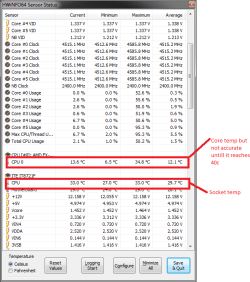
that would be correct AMD doesn't heat up like a intel chip this is a snip of what im running at and i am overclocked @4.75 mine are correct in Bios and here so i would assume he is with in spec it is just wierd vs intel because they burn at a much higher rate 50 to 80' on full load mine on full load maxes out at 53c also take into consideration the wattage of the chip the more wattage has less of a high heat tolerance compared to a 95 w intel that can go up to the 80's with out shutting down
 

Attachments

  • amd.PNG
    amd.PNG
    16.2 KB · Views: 10

My Computer

Computer type
PC/Desktop
Computer Manufacturer/Model Number
CoreI7-6700K MrFingerIII Special Builds
OS
Windows 10 Home Premium 64bit sp1
CPU
Intel I7-6700K @ 4.6 Ghz 1.344 volts everyday OC
Motherboard
Asrock Fatality K6 Z170 Socket 1151
Memory
32GB G-Skill TridentZ 3200mhz 16-18-18-38 DDR4
Graphics Card(s)
Sli Gigabyte Windforce GTX 980 G1
Sound Card
AC97 Creative Rage Tactic 3D Headphones Bluetooth
Monitor(s) Displays
27" Asus ROG Swift PG278Q G-Sync 48" Vizio Smart HD TV
Screen Resolution
2560x1440p 27"- 48" Currently Gaming at 2560x1440p Res 2K
Hard Drives
250GB Samsung Evo840SSD Seagate baracuda 500 GB WD Mybook 500Gb 1TB Seagate Barracuda
PSU
HX1050w Corsair Silver 80plus certified crosfire/sli
Case
Enthod Pro Full Tower
Cooling
Corsair H110i GT 280 mm High Performance WaterBlock
Keyboard
Logitech wireless keyboard
Mouse
Logitech wireless mouse
Internet Speed
Cox Cable 100+ mb
Antivirus
WebRoot Spysweeper with Antivirus
Browser
IE-10, Chrome, Opera
Other Info
My Other Rig is a AMD FX8320E @4.6Ghz 16GB Ballistic Sport Ram
Mobo Asrock Fatality 990FX 120GB OCZ SSD 1TB Seagate Barracuda Corsair H75 Cooling PSU Corsair CX750
GPU GTX Gigabyte 970G1
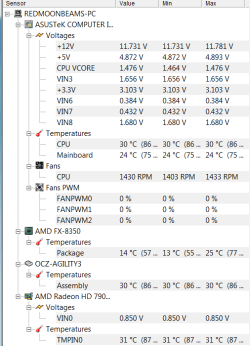
Those temperatures are only possible if the temperature of the liquid going through your block is lower than that. 14°C is 57.2°F. 13°C is 55.4°F. 25°C is 77°F.

As has been stated, the sensors are useless for temperatures this low.
 

My Computer

Computer type
PC/Desktop
Might try installing RealTemp 3.70 as many of us trust it's reading. Then stress your system for several minutes. I have found that my particular water cooler needs about 5-10 minutes at least to show an increase in temps from 0% load to 100% load. Also, unless you are just testing and interested in the numbers, the idle temps don't mean much.....you just want your load temps in check.
 

My Computer

Computer type
PC/Desktop
Computer Manufacturer/Model Number
Custom Built
OS
Windows 7 Professional 64bit SP1
CPU
Intel Core i5-3570K @ 4.5GHz
Motherboard
Asus Sabertooth Z77
Memory
Corsair Vengeance 16GB (4x4) @1866MHz CL 9-9-9-24 1T
Graphics Card(s)
EVGA GTX 750 Ti FTW
Sound Card
Onboard Audio
Monitor(s) Displays
Dell S2309W
Screen Resolution
1920x1080
Hard Drives
Samsung 830 128GB SSD - OS
(4) Seagate 5TB HDD
(1) Seagate 2TB HDD
PSU
Seasonic X750 80+ Gold Full Modular
Case
Antec Eleven Hundred Super Mid Tower
Cooling
Intel Liquid Cooler
Keyboard
Max Nighthawk X8 Mechanical keyboard
Mouse
Mionix Naos 7000
Internet Speed
50 Mbps Down / 10 Mbps Up
Antivirus
Microsoft Security Essentials/Malwarebytes Anti-Malware
Browser
Chrome/Firefox
Other Info
Klipsch ProMedia 2.1's
Asus RT-N66R Wireless Router

My Computer

Computer type
PC/Desktop
Thanks, I forgot to add the link for RealTemp. And I'm not aware of it having a problem with AMD, that's unfortunate.
 

My Computer

Computer type
PC/Desktop
Computer Manufacturer/Model Number
Custom Built
OS
Windows 7 Professional 64bit SP1
CPU
Intel Core i5-3570K @ 4.5GHz
Motherboard
Asus Sabertooth Z77
Memory
Corsair Vengeance 16GB (4x4) @1866MHz CL 9-9-9-24 1T
Graphics Card(s)
EVGA GTX 750 Ti FTW
Sound Card
Onboard Audio
Monitor(s) Displays
Dell S2309W
Screen Resolution
1920x1080
Hard Drives
Samsung 830 128GB SSD - OS
(4) Seagate 5TB HDD
(1) Seagate 2TB HDD
PSU
Seasonic X750 80+ Gold Full Modular
Case
Antec Eleven Hundred Super Mid Tower
Cooling
Intel Liquid Cooler
Keyboard
Max Nighthawk X8 Mechanical keyboard
Mouse
Mionix Naos 7000
Internet Speed
50 Mbps Down / 10 Mbps Up
Antivirus
Microsoft Security Essentials/Malwarebytes Anti-Malware
Browser
Chrome/Firefox
Other Info
Klipsch ProMedia 2.1's
Asus RT-N66R Wireless Router
Well, I'm not 100% sure, so I feel that it's definitely worth trying - especially since it's just a portable program. It's just that I recommended Real Temp to an AMD user over a year ago on Overclock.net and I ended up needing to find something else to recommend for some reason. I don't remember why, but I think it's because it wasn't working perfectly or something.
 

My Computer

Computer type
PC/Desktop
Gotcha
 

My Computer

Computer type
PC/Desktop
Computer Manufacturer/Model Number
Custom Built
OS
Windows 7 Professional 64bit SP1
CPU
Intel Core i5-3570K @ 4.5GHz
Motherboard
Asus Sabertooth Z77
Memory
Corsair Vengeance 16GB (4x4) @1866MHz CL 9-9-9-24 1T
Graphics Card(s)
EVGA GTX 750 Ti FTW
Sound Card
Onboard Audio
Monitor(s) Displays
Dell S2309W
Screen Resolution
1920x1080
Hard Drives
Samsung 830 128GB SSD - OS
(4) Seagate 5TB HDD
(1) Seagate 2TB HDD
PSU
Seasonic X750 80+ Gold Full Modular
Case
Antec Eleven Hundred Super Mid Tower
Cooling
Intel Liquid Cooler
Keyboard
Max Nighthawk X8 Mechanical keyboard
Mouse
Mionix Naos 7000
Internet Speed
50 Mbps Down / 10 Mbps Up
Antivirus
Microsoft Security Essentials/Malwarebytes Anti-Malware
Browser
Chrome/Firefox
Other Info
Klipsch ProMedia 2.1's
Asus RT-N66R Wireless Router
Well, I'm not 100% sure, so I feel that it's definitely worth trying - especially since it's just a portable program. It's just that I recommended Real Temp to an AMD user over a year ago on Overclock.net and I ended up needing to find something else to recommend for some reason. I don't remember why, but I think it's because it wasn't working perfectly or something.

That is why i would recomend core temp or HWmonitor the two true honest readings i have seen
 

My Computer

Computer type
PC/Desktop
Computer Manufacturer/Model Number
CoreI7-6700K MrFingerIII Special Builds
OS
Windows 10 Home Premium 64bit sp1
CPU
Intel I7-6700K @ 4.6 Ghz 1.344 volts everyday OC
Motherboard
Asrock Fatality K6 Z170 Socket 1151
Memory
32GB G-Skill TridentZ 3200mhz 16-18-18-38 DDR4
Graphics Card(s)
Sli Gigabyte Windforce GTX 980 G1
Sound Card
AC97 Creative Rage Tactic 3D Headphones Bluetooth
Monitor(s) Displays
27" Asus ROG Swift PG278Q G-Sync 48" Vizio Smart HD TV
Screen Resolution
2560x1440p 27"- 48" Currently Gaming at 2560x1440p Res 2K
Hard Drives
250GB Samsung Evo840SSD Seagate baracuda 500 GB WD Mybook 500Gb 1TB Seagate Barracuda
PSU
HX1050w Corsair Silver 80plus certified crosfire/sli
Case
Enthod Pro Full Tower
Cooling
Corsair H110i GT 280 mm High Performance WaterBlock
Keyboard
Logitech wireless keyboard
Mouse
Logitech wireless mouse
Internet Speed
Cox Cable 100+ mb
Antivirus
WebRoot Spysweeper with Antivirus
Browser
IE-10, Chrome, Opera
Other Info
My Other Rig is a AMD FX8320E @4.6Ghz 16GB Ballistic Sport Ram
Mobo Asrock Fatality 990FX 120GB OCZ SSD 1TB Seagate Barracuda Corsair H75 Cooling PSU Corsair CX750
GPU GTX Gigabyte 970G1
+1 HWmonitor, Core temp, HWINFO or Aida64 are all dead on from what i've seen :thumbsup:
 

My Computer

Computer type
PC/Desktop
Computer Manufacturer/Model Number
Custom build
OS
Win7 Home Premium x64 SP1
CPU
i7 4770k
Motherboard
Asus maximus VI Hero
Memory
8Gb Kingston HyperX Beast 2400MHz @2133MHz 11-12-11-30
Graphics Card(s)
MSI GTX 780ti Gaming Oc x2
Sound Card
Onboard ROG SupremeFX
Monitor(s) Displays
Asus VG248QE
Screen Resolution
3840X1080 144Hz
Hard Drives
Samung Evo 256Gb, OCZ Agility4 128Gb
1x1TB hitachi storage
PSU
EVGA Supernova 1000w Platinum
Case
Corsair Air 540
Cooling
Corsair H100i
Keyboard
Coolermaster Quickfire Pro
Mouse
Corsair M65 RGB
Internet Speed
74mb dwn/16up
Antivirus
MSE,Malwarebytes
Browser
Chrome
This was off Speccy which i was told to download i would like to say sorry for late post as iv been busy and held up


Operating System
Microsoft Windows 7 Ultimate 64-bit SP1
CPU
AMD FX-8350 11 °C
Vishera 32nm Technology
RAM
8.00 GB Dual-Channel DDR3 @ 674MHz (9-9-9-24)
Motherboard
Gigabyte Technology Co., Ltd. GA-990FXA-UD5 (Socket M2) 29 °C
Graphics
HTX-22HDX (1920x1080@60Hz)
AMD Radeon HD 7800 Series
Hard Drives
119GB KINGSTON SNV425S2128GB ATA Device (SSD) 32 °C
932GB Seagate ST31000524AS ATA Device (SATA) 27 °C
Optical Drives
ATAPI iHAS624 B ATA Device
Audio
AMD High Definition Audio Device

CPU
AMD FX-8350
Cores 8
Threads 8
Name AMD FX-8350
Code Name Vishera
Package Socket AM3+ (942)
Technology 32nm
Specification AMD FX-8350 Eight-Core Processor
Family F
Extended Family 15
Model 2
Extended Model 2
Stepping 0
Revision OR-C0
Instructions MMX (+), SSE, SSE2, SSE3, SSSE3, SSE4.1, SSE4.2, SSE4A, AMD 64
Virtualization Supported, Enabled
Hyperthreading Not supported
Bus Speed 201.6 MHz
Rated Bus Speed 2621.2 MHz
Stock Core Speed 4000 MHz
Stock Bus Speed 200 MHz
Average Temperature 12 °C
Caches
L1 Data Cache Size 8 x 16 KBytes
L1 Instructions Cache Size 4 x 64 KBytes
L2 Unified Cache Size 4 x 2048 KBytes
L3 Unified Cache Size 8192 KBytes
Core 0
Core 1
Core 2
Core 3
Core 4
Core 5
Core 6
Core 7
 

My Computer

Computer type
PC/Desktop
Computer Manufacturer/Model Number
Custom Build
OS
Windows 7 64 (bit)
CPU
I7 4790K
Motherboard
Asus Maximus VII Hero
Memory
8GB
Graphics Card(s)
EVGA 770 SC ACX
Monitor(s) Displays
iiyama GB2488HSU
Screen Resolution
1920*1080
Hard Drives
1TB WESTERN DIGITAL BLACK
PSU
850 EVGA Supernova G2
Case
Carbide Series® Air 540 High Airflow ATX Cube Case
Cooling
The Black Ice® GT Stealth 240, Alphacool NexXxoS UT60 280
Keyboard
STEELSERIES APEX [RAW]
Mouse
Roccat XTD
Internet Speed
30Meg
Antivirus
Bitdefender
Browser
Google Chrome
It might be worth restarting and going into the BIOS to see what temperatures are shown.
 

My Computer

Computer type
PC/Desktop
OS
w7 ult 64 and w7 hp 64 X 2 mint 64 8.1 64 10wtp 64
It might be worth restarting and going into the BIOS to see what temperatures are shown.
Good idea tinmar as the AMD's I read somewhere the other day have some weird temp sensing set up.
 

My Computer

Computer type
PC/Desktop
Computer Manufacturer/Model Number
Own build (new) Desk1 / Asus ROG Win 7 / Desk2 1st build
OS
Desk1 7 Home Prem / Desk2 10 Pro / Main lap Asus ROG 10 Pro 2 laptop Toshiba 7 Pro Asus P2520 7 & 10
CPU
Desk1 i5 3750K / Laptop i7 GTX 860M / Desk2 i5 2500
Motherboard
Desk1 Asus P877-V / Desk2 Gigabyte H67 UD3H / Laptop ?
Memory
Desk1 8GB (1866) / Desk2 16GB (1333) / Laptop 8Gb DDR3
Graphics Card(s)
Desk 1& 2NVidia GTX 650 & Laptops on board Intel
Sound Card
Desk 1 & 2 -XONAR DG Realtek High Def audio Laptop
Monitor(s) Displays
Desk 1 Benq HD 2450 / Desk2 Philips 24" / Laptop 17.5"
Screen Resolution
1920x1080 D1 & D2 & Laptop 1
Hard Drives
Desk1 Samsung 120GB 830 SSD
Asus ROG 256GB 850 Pro SSD
Desk2 Samsung 840 256 SSD
Toshiba 120GB EVO
PSU
Desk 1 Corsair HX 1050/ Laptop ? / Desk 2 Corsair HX 650
Case
Desk 1 Cooler HAF XM ? Toshiba laptop / Desk2 Coolermaster
Cooling
Fans on all Desk1 -2 Desk2 - all Coolermasters 5 Laptop ?
Keyboard
Desk 1 MS Sidewinder X6 Desk 2 MS Sidewinder X 4
Mouse
Desk 1&2 - Gigabyte MS 900 gamer - laptop - Logitec wireless
Internet Speed
ADSL2+
Other Info
One other Desktop (tester) and spare Toshba laptop both with SSD's
Running Kaspersky 2016 ISS on all machines config'd identically
Logitec audio stereo systems on each machine (x3)
Canon MG5250MFC
Router/modem TP-Link running WPA2SK
Just remember that when the BIOS is running, there's a small load on the system due to keeping the BIOS running.
 

My Computer

Computer type
PC/Desktop
There's nothing wrong with your temps and speccy is showing correct numbers. Check my first post for explanation.
 

Attachments

  • HWINFO.png
    HWINFO.png
    19 KB · Views: 4

My Computer

Computer type
PC/Desktop
Computer Manufacturer/Model Number
Custom build
OS
Win7 Home Premium x64 SP1
CPU
i7 4770k
Motherboard
Asus maximus VI Hero
Memory
8Gb Kingston HyperX Beast 2400MHz @2133MHz 11-12-11-30
Graphics Card(s)
MSI GTX 780ti Gaming Oc x2
Sound Card
Onboard ROG SupremeFX
Monitor(s) Displays
Asus VG248QE
Screen Resolution
3840X1080 144Hz
Hard Drives
Samung Evo 256Gb, OCZ Agility4 128Gb
1x1TB hitachi storage
PSU
EVGA Supernova 1000w Platinum
Case
Corsair Air 540
Cooling
Corsair H100i
Keyboard
Coolermaster Quickfire Pro
Mouse
Corsair M65 RGB
Internet Speed
74mb dwn/16up
Antivirus
MSE,Malwarebytes
Browser
Chrome
Back
Top