Solved MBR Error, After Booting in IDE (Accident)

TheHighRoad

New member
Local time
7:52 PM
Messages
14
Hello,

While I accomplished so much successfully setting up my computer in AHCI earlier, I now blew it all.

I had the SMART command failure error with my SSD, and received a new BIOS from my motherboard manufacturer. I applied it and "Loaded Optimized Defaults" in the BIOS as your supposed to. Stupid me, that means the motherboard activates IDE mode, but I installed Windows in AHCI mode.

So... I switched it back to AHCI after booting into IDE by accident and now I'm getting MBR Error. Is there any way to repair this? I have been trying to repair it through the Windows Install disk, using bootsec & command prompt to no avail.

Likely because where the screen pops up that says: "Use recovery tools that can help fix problems starting Windows. Select an operating system to repair" There's no option to select. So I elected to "Load Drivers" using iaAHCI.inf [Intel ICH10R] from the Intel RST installer (I extracted it on my Laptop). It still doesn't recognize it.
-->This is all pertaining to image 3. on the guide on the link HERE

If I HAVE to install Windows again, I have 2 storage drives installed as well, do I take them out to prevent them from being formatted? They are holding My Documents/My Pictures/My Music/My Videos etc.

Thanks!
 

My Computer My Computer

Computer type
PC/Desktop
OS
W 7 Professional x64
Hello again.


You shouldn't have to reinstall, have a look at this tutorial at the link below, it shows how to enable AHCI after the OS has been installed and be sure to post back with any further questions you may have and to keep us informed.


AHCI : Enable in Windows 7 / Vista
 

My Computer My Computer

Computer Manufacturer/Model Number
* BFK Customs *
OS
W 7 64-bit Ultimate
CPU
Intel Q9550 Yorkfield
Motherboard
ASUS P5Q Pro
Memory
8GB Dominator 8500C5D
Graphics Card(s)
ATI : XFX 5870
Sound Card
Realtek HD Audio 7-1
Monitor(s) Displays
1x 47" LCD HDMI & 3x 26" LCD HDMI
Screen Resolution
1920x1080P & 1920x1200
Hard Drives
1x 80GB Intel X25-M G2 SSD : 1x 500GB & 1x 640GB WD Caviar Black(s)
PSU
Corsair 620HX
Case
Cooler Master RC-690
Cooling
Tuniq Tower 120, 2x 140mm and 3x 120mm case fans
Keyboard
Microsoft 500
Mouse
Razer Diamondback 3G
Internet Speed
14 Mb/s
Other Info
1x Koutech 3Gb/s SATA HDD Hot Swap Rack
I have no idea how this happened but I am delighted in how it turned out :D

I corrupted my IDE MBR through the whole process as well. I used the WinRE environment using BootRec.exe and all of the commands systematically (bootsect.exe was unsuccessful, but may have set the grounds for the unexplained success I got in the end). bootrec /RebuildBcd didn't seem to work, it said "number of Windows partitions: 0" or something to that effect but it did say successful [Also the drive naming scheme was all messed up F: was my Windows HDD, C: my backup]. I came back later and unplugged all of my HDDs in a last ditch effort except my SSD. Instead of the: MBR Error staring me in the face Windows booted for seemingly no apparent reason. I shut down because I'm getting all these critical errors "Drive D:\ missing" etc, and replug everything. Windows boots. I check the registry to prepare to switch over to AHCI, hex value was ALREADY 0. Hmm, I switch to AHCI in BIOS, boot, and to my utmost surprise everything is back to normal and the SMART command failure is gone due to the alpha BIOS Gigabyte provided me with!

It didn't work when I did this last night... oh well.

Thanks!
 
Last edited:

My Computer My Computer

Computer type
PC/Desktop
OS
W 7 Professional x64
Good to see it's all sorted and thanks for the update.
 

My Computer My Computer

Computer Manufacturer/Model Number
* BFK Customs *
OS
W 7 64-bit Ultimate
CPU
Intel Q9550 Yorkfield
Motherboard
ASUS P5Q Pro
Memory
8GB Dominator 8500C5D
Graphics Card(s)
ATI : XFX 5870
Sound Card
Realtek HD Audio 7-1
Monitor(s) Displays
1x 47" LCD HDMI & 3x 26" LCD HDMI
Screen Resolution
1920x1080P & 1920x1200
Hard Drives
1x 80GB Intel X25-M G2 SSD : 1x 500GB & 1x 640GB WD Caviar Black(s)
PSU
Corsair 620HX
Case
Cooler Master RC-690
Cooling
Tuniq Tower 120, 2x 140mm and 3x 120mm case fans
Keyboard
Microsoft 500
Mouse
Razer Diamondback 3G
Internet Speed
14 Mb/s
Other Info
1x Koutech 3Gb/s SATA HDD Hot Swap Rack
Bare Foot Kid rides again. Good work big "GUY." Another happy customer here on the Sevens. . .:thumbsup:
 

My Computer My Computer

Computer Manufacturer/Model Number
HP Pavilion a4302f
OS
Win 7 Pro x64, VM Win XP, Win7 Pro Sandbox, Kubuntu 11
CPU
AMD Athlon(tm) II X4 640 @ 3.0 Gbz
Memory
12GB 1066MHz DDR3 SDRAM - 2x4GB, 2x2GB
Graphics Card(s)
ATI Radeon HD 4350 HD Graphics/Audio with 512MB
Sound Card
Realtek High Definition Audio
Monitor(s) Displays
1. Dell 23" SP2307, 2. Mitsublishi 40" HDTV, Hannspree 25"
Screen Resolution
1. 2048x1152, 2. 1920-1080, 3. 1920x1200
Hard Drives
Int: 1 120 Gig SSD i
1 - 2.5" 500 USB External HDD
1 -1 Tb USB External HDD
Case
Mid Tower
Cooling
Standard Fans - 5 fans (very quiet)
Keyboard
Microsoft Wireless 2000
Mouse
Microsoft Wireless Mouse 5000
Internet Speed
10 Mbit (realistically 500 Kbit - 1.2 Mbit)
Other Info
Speakers - Bose Desktop (Excellent Sound)
1 external CD|DVD\Blue-ray Recorders/Players (Sony)
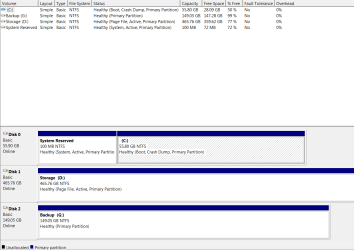
Please post back a screenshot of your full Disk Management drive map, using Snipping Tool in Start Menu, so we can make sure it is configured correctly now to avoid future problems.

For future reference, all of the bootrec, bootsect and other MBR fixes are automated in Win7 Startup Repair.
 
Here it is, I do believe everything is in order. I still don't understand how it fixed itself.

"..............MBR Error"
or
"MBR Error"

Is all I was getting since last night as I messed with the Win7 system recovery command prompt. The problem continued this evening, then it magically disappeared a few hours later... not that I'm complaining!
 

Attachments

  • Untitled.png
    Untitled.png
    18.7 KB · Views: 71

My Computer My Computer

Computer type
PC/Desktop
OS
W 7 Professional x64

My Computer My Computer

Computer Manufacturer/Model Number
* BFK Customs *
OS
W 7 64-bit Ultimate
CPU
Intel Q9550 Yorkfield
Motherboard
ASUS P5Q Pro
Memory
8GB Dominator 8500C5D
Graphics Card(s)
ATI : XFX 5870
Sound Card
Realtek HD Audio 7-1
Monitor(s) Displays
1x 47" LCD HDMI & 3x 26" LCD HDMI
Screen Resolution
1920x1080P & 1920x1200
Hard Drives
1x 80GB Intel X25-M G2 SSD : 1x 500GB & 1x 640GB WD Caviar Black(s)
PSU
Corsair 620HX
Case
Cooler Master RC-690
Cooling
Tuniq Tower 120, 2x 140mm and 3x 120mm case fans
Keyboard
Microsoft 500
Mouse
Razer Diamondback 3G
Internet Speed
14 Mb/s
Other Info
1x Koutech 3Gb/s SATA HDD Hot Swap Rack
Just as a clarification, you do not need to run Startup Repair 3 times.

Removing the Active flag from your data drive is merely a precaution since we see many cases here where the System boot files are derailed during install or repair because an incorrect partition is marked Active.
 
Back
Top