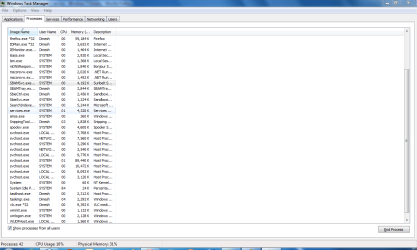
Mcafee on access scanner service

gohardsupreme

New member
Local time
12:59 PM
Messages
133
I know this program is supposed to be monitoring all my files and such to prevent viruses and malware but it eats up alot of resources, sometimes causing mt cpu to hit 100%. is it safe to turn it off and is that even possible?
 

My Computer

Computer Manufacturer/Model Number
Gateway T-1628
OS
windows 7 home premium sp1 x86
CPU
AMD Turion 64 x2 Mobile Technology 2.0 GHz
Motherboard
GATEWAY (Socket M2/S1G1) ATI RS690/RS690M Chipset
Memory
3gb DDR2 RAM
Graphics Card(s)
ATI Radeon x1200 series
Sound Card
SigmaTel High Def audio
Monitor(s) Displays
Generic PnP Monitor
Screen Resolution
1280x800
Hard Drives
250gb Western Digital
Welcome,

Yes, turn it off
In its place use Microsoft Security Essentials and Malwarebytes. Less resources used and they are really good.

http://www.malwarebytes.org/mbam.php

These two pieces of software are used by many of the members, in addition to myself.

All you need is a firewall, anti virus and malwarebytes, everything else in Mcafee, is not needed.

To turn if off, go to search type in msconfig, go to the start up tab, untick mcafee. Turn off the computer, boot up and now it is not on. If you no longer want it you can uninstall, now, from the control panel in programs

If you want to know how to maintain your computer, just post and I will be very happy to help.
 

My Computer

Computer type
PC/Desktop
Computer Manufacturer/Model Number
Dell XPS 420
OS
Windows 10, Home Clean Install
CPU
Intel Core2 processsor Q8200(2.33Ghz 1333FSB) Quad Core Tech
Motherboard
Dell
Memory
6 gb
Graphics Card(s)
ATI Radeon 256MB HD3650
Sound Card
Intergrated 7.1 Channel Audio
Monitor(s) Displays
Dell SP2009W 20"
Hard Drives
640 GB Serial ATA Hard drive
Cooling
Fan
Keyboard
Dell USB Keyboard
Mouse
Dell Premium Optical USB
Internet Speed
DSL 2.85
thanks. ive been using malwarebytes for a while now and when my current mcafee subscription runs out i dont plan to renew it. Does turing off mcafee completely disable it or just turn off the on access scanner service?
 

My Computer

Computer Manufacturer/Model Number
Gateway T-1628
OS
windows 7 home premium sp1 x86
CPU
AMD Turion 64 x2 Mobile Technology 2.0 GHz
Motherboard
GATEWAY (Socket M2/S1G1) ATI RS690/RS690M Chipset
Memory
3gb DDR2 RAM
Graphics Card(s)
ATI Radeon x1200 series
Sound Card
SigmaTel High Def audio
Monitor(s) Displays
Generic PnP Monitor
Screen Resolution
1280x800
Hard Drives
250gb Western Digital
If you turn it off, its off completely. Go to MS config, if there if it is only listed once, off is OFF.

If you use it until your subscription is up, you are using something you are not happy with and it cost you X dollars

If you uninstall, use something that you like (as Microsoft Security Essentials) it still costs you X dollars and you are better off. Your choice.
 

My Computer

Computer type
PC/Desktop
Computer Manufacturer/Model Number
Dell XPS 420
OS
Windows 10, Home Clean Install
CPU
Intel Core2 processsor Q8200(2.33Ghz 1333FSB) Quad Core Tech
Motherboard
Dell
Memory
6 gb
Graphics Card(s)
ATI Radeon 256MB HD3650
Sound Card
Intergrated 7.1 Channel Audio
Monitor(s) Displays
Dell SP2009W 20"
Hard Drives
640 GB Serial ATA Hard drive
Cooling
Fan
Keyboard
Dell USB Keyboard
Mouse
Dell Premium Optical USB
Internet Speed
DSL 2.85
Congratulations on using MalwareBytes Antimalware this is an excellent program for scanning and ridding your system of many problems.

Yes, use Microsoft Security Essentials. Here's the procedure which even my non-techie wife followed and she is delighted:

Download Microsoft Security Essentials.

Disconnect for the Internet.

Use Control Panel | Programs and Features | Click on McAffee | Choose Uninstall.

After uninstall is finished, restart your computer.

Ignore all of those dire warnings about having no protection.

Install Microsoft Security Essentials.

Let MSE scan.

Go back online and click on Microsoft Security Essentials update tab.

AFter the update, doo a "quick" scan.

MSE is very unobtrusive but still I prefer to control when scans are run and when updates are run. With MSE you can choose when. Your Real Time Protection will always be active (unless you purposely disable such).

karl
 

My Computer

Computer Manufacturer/Model Number
Toshiba Satellite S875D-S7239 laptop
OS
MS Windows 7 Ultimate SP1 64-bit
CPU
AMD A10-4600M
Motherboard
AMD Pumori (Socket FT1)
Memory
6.00 GB Dual-Channel DDR3 @ 798MHz (11-11-12-28)
Graphics Card(s)
AMD Radeon HD 7660G
Sound Card
High Definition Audio Device
Monitor(s) Displays
Generic PnP Monitor (1600x900@60Hz)
Screen Resolution
1600x900@60Hz
Hard Drives
SSD 119GB Corsair CSSD-V128GB2 ATA Device
Keyboard
Standard PS/2 Keyboard
Mouse
HP Wireless Optical Mobile Mouse Model FHA-3410
Internet Speed
What the local pub, local coffee shop offers.
Other Info
Optical Drive:MATSHITA BD-CMB UJ160B ATA Device


Also have an Asus ha1002xp netbook with Win 7 Ultimate installed.
Great post Karl, but you forgot the most important part. Mcafee has a fee to buy plus an annual fee. MSE is FREE. Hard to believe but FREE.

Now, I realize I forgot that too. Its FREE
 

My Computer

Computer type
PC/Desktop
Computer Manufacturer/Model Number
Dell XPS 420
OS
Windows 10, Home Clean Install
CPU
Intel Core2 processsor Q8200(2.33Ghz 1333FSB) Quad Core Tech
Motherboard
Dell
Memory
6 gb
Graphics Card(s)
ATI Radeon 256MB HD3650
Sound Card
Intergrated 7.1 Channel Audio
Monitor(s) Displays
Dell SP2009W 20"
Hard Drives
640 GB Serial ATA Hard drive
Cooling
Fan
Keyboard
Dell USB Keyboard
Mouse
Dell Premium Optical USB
Internet Speed
DSL 2.85
thanks for the help guys
 

My Computer

Computer Manufacturer/Model Number
Gateway T-1628
OS
windows 7 home premium sp1 x86
CPU
AMD Turion 64 x2 Mobile Technology 2.0 GHz
Motherboard
GATEWAY (Socket M2/S1G1) ATI RS690/RS690M Chipset
Memory
3gb DDR2 RAM
Graphics Card(s)
ATI Radeon x1200 series
Sound Card
SigmaTel High Def audio
Monitor(s) Displays
Generic PnP Monitor
Screen Resolution
1280x800
Hard Drives
250gb Western Digital
Hi there, Mcafee is high on RAM and CPU whereas MSE is high on RAM.
If you need a paid AV, go for Vipre or Norton, whereas Avast is the best free AV out there.
 

My Computer

Computer Manufacturer/Model Number
Samsung NP530U4B-S02IN
OS
Windows® 8 Pro (64-bit)
CPU
Intel® Core™ i5 Processor 2467M (1.60GHz, 3MB L3 Cache)
Motherboard
Samsung Electronics
Memory
6GB DDR3 System Memory at 1,333MHz (on BD 4GB + 2GB x 1)
Graphics Card(s)
AMD Radeon™ HD7550M 1GB DDR3 (Ext. Graphic)
Sound Card
Realtek High Definition Audio
Monitor(s) Displays
35.56cm (14.0) SuperBright 300nit HD LED Display
Screen Resolution
1366x768
Hard Drives
1TB S-ATA II Hard Drive (5400RPM) with ExpressCache 16GB SSD
Internet Speed
sucks
Antivirus
Microsoft Security Essentials
Browser
Google Chrome (Sync enabled)
Dinesh, I'd be interested in knowing what technical lab has come to these conclusions.

I would like to go read the article.

Karl
 

My Computer

Computer Manufacturer/Model Number
Toshiba Satellite S875D-S7239 laptop
OS
MS Windows 7 Ultimate SP1 64-bit
CPU
AMD A10-4600M
Motherboard
AMD Pumori (Socket FT1)
Memory
6.00 GB Dual-Channel DDR3 @ 798MHz (11-11-12-28)
Graphics Card(s)
AMD Radeon HD 7660G
Sound Card
High Definition Audio Device
Monitor(s) Displays
Generic PnP Monitor (1600x900@60Hz)
Screen Resolution
1600x900@60Hz
Hard Drives
SSD 119GB Corsair CSSD-V128GB2 ATA Device
Keyboard
Standard PS/2 Keyboard
Mouse
HP Wireless Optical Mobile Mouse Model FHA-3410
Internet Speed
What the local pub, local coffee shop offers.
Other Info
Optical Drive:MATSHITA BD-CMB UJ160B ATA Device


Also have an Asus ha1002xp netbook with Win 7 Ultimate installed.
Well I have installed Avast and Vipre at the moment. Earlier I had installed Mcafee and it uses around 60-80 MB RAM while idle and more than 200 MB RAM during a scan. Its also high on CPU. If you play a full screen game while its scanning, you'll feel that the game is lagging.

MSE is high on RAM. But its good at CPU usage. So if you have more than 3-4 GB RAM, go for MSE.


Avast and Vipre are lot better as they use around 4-8 MB RAM during idle and 18-20 MB RAM..

Avast mem usage: 7 MB.
avsat.PNG

Vipre mem usage: 6MB.
vipre.PNG

Hope this helps you choose your best. :)
Dinesh.
 

My Computer

Computer Manufacturer/Model Number
Samsung NP530U4B-S02IN
OS
Windows® 8 Pro (64-bit)
CPU
Intel® Core™ i5 Processor 2467M (1.60GHz, 3MB L3 Cache)
Motherboard
Samsung Electronics
Memory
6GB DDR3 System Memory at 1,333MHz (on BD 4GB + 2GB x 1)
Graphics Card(s)
AMD Radeon™ HD7550M 1GB DDR3 (Ext. Graphic)
Sound Card
Realtek High Definition Audio
Monitor(s) Displays
35.56cm (14.0) SuperBright 300nit HD LED Display
Screen Resolution
1366x768
Hard Drives
1TB S-ATA II Hard Drive (5400RPM) with ExpressCache 16GB SSD
Internet Speed
sucks
Antivirus
Microsoft Security Essentials
Browser
Google Chrome (Sync enabled)
When will McAfee take the road where Symantec went? :(
 

My Computer

Computer Manufacturer/Model Number
Neo Vivid V2121
OS
Windows 7 Ultimate 32-bit Version 6.1 (build 7600.16385)
CPU
Intel Pentium Dual CPU T2390 @ 1.86GHz
Motherboard
SiS M720SR
Graphics Card(s)
SiS Mirage 3 Graphics SiS627 series
Sound Card
Built-in
Monitor(s) Displays
Generic PnP Monitor
Screen Resolution
1280x800
Hard Drives
Fujitsu MHZ2160BH G1 ATA Device 160GB
Keyboard
Standard PS/2 Keyboard
Mouse
Synaptics PS/2 Port Pointing Device
When will McAfee take the road where Symantec went? :(

I do not think they will. So many users do not particpate in our Forum, they like the bells and whistles of Mcafee. Did you know many ISP offer Mcafee free with their service. I think that says something.
 

My Computer

Computer type
PC/Desktop
Computer Manufacturer/Model Number
Dell XPS 420
OS
Windows 10, Home Clean Install
CPU
Intel Core2 processsor Q8200(2.33Ghz 1333FSB) Quad Core Tech
Motherboard
Dell
Memory
6 gb
Graphics Card(s)
ATI Radeon 256MB HD3650
Sound Card
Intergrated 7.1 Channel Audio
Monitor(s) Displays
Dell SP2009W 20"
Hard Drives
640 GB Serial ATA Hard drive
Cooling
Fan
Keyboard
Dell USB Keyboard
Mouse
Dell Premium Optical USB
Internet Speed
DSL 2.85
When will McAfee take the road where Symantec went? :(

I do not think they will. So many users do not particpate in our Forum, they like the bells and whistles of Mcafee. Did you know many ISP offer Mcafee free with their service. I think that says something.

The AV engine of McAfee is quite impressive but all the other features and the hit on system performance is not good at all. When will they learn? :sarc:

P.S. I'm saying all this because I'm stuck with McAfee right now for a year. :cry:
 

My Computer

Computer Manufacturer/Model Number
Neo Vivid V2121
OS
Windows 7 Ultimate 32-bit Version 6.1 (build 7600.16385)
CPU
Intel Pentium Dual CPU T2390 @ 1.86GHz
Motherboard
SiS M720SR
Graphics Card(s)
SiS Mirage 3 Graphics SiS627 series
Sound Card
Built-in
Monitor(s) Displays
Generic PnP Monitor
Screen Resolution
1280x800
Hard Drives
Fujitsu MHZ2160BH G1 ATA Device 160GB
Keyboard
Standard PS/2 Keyboard
Mouse
Synaptics PS/2 Port Pointing Device
Thanks for the info on Microsoft Essentials. McAfee nearly killed my system with their latest patch today and took 100% CPU utilization every 10 minutes rendering the laptop unusable at all.

McAfee should be labeled as a virus, what a POS.

Great post, thanks.
 

My Computer

OS
Windows 7
Thanks for the info on Microsoft Essentials. McAfee nearly killed my system with their latest patch today and took 100% CPU utilization every 10 minutes rendering the laptop unusable at all.

McAfee should be labeled as a virus, what a POS.

Great post, thanks.

I understand where you are coming from. mcafee is not good and probably after that bad update, mcafee will lose many customers.
 

My Computer

Computer Manufacturer/Model Number
Samsung NP530U4B-S02IN
OS
Windows® 8 Pro (64-bit)
CPU
Intel® Core™ i5 Processor 2467M (1.60GHz, 3MB L3 Cache)
Motherboard
Samsung Electronics
Memory
6GB DDR3 System Memory at 1,333MHz (on BD 4GB + 2GB x 1)
Graphics Card(s)
AMD Radeon™ HD7550M 1GB DDR3 (Ext. Graphic)
Sound Card
Realtek High Definition Audio
Monitor(s) Displays
35.56cm (14.0) SuperBright 300nit HD LED Display
Screen Resolution
1366x768
Hard Drives
1TB S-ATA II Hard Drive (5400RPM) with ExpressCache 16GB SSD
Internet Speed
sucks
Antivirus
Microsoft Security Essentials
Browser
Google Chrome (Sync enabled)
Back
Top