Media Center- Setup Movie Library

How to Setup a Media Center Movie Library in Windows 7

   Information
This tutorial will show how to manage your movie library in Media Center, including poster images & full synopsis information.
   Note
Windows Media Center is not available in Windows 7 Starter and Windows 7 Home Basic editions.


The N and KN editions of Windows 7 have all the features that normally come with each individual Windows 7 edition, except for Windows Media Player 12 and related programs, such as Windows Media Center or Windows DVD Maker.

The N editions of Windows 7 allow you to choose your own media player and software required to manage and play CDs, DVDs, and other digital media files. If you choose to use Windows Media Player 12, downloading it, along with related software, is free. Download Media Feature Pack for Windows 7 N with Service Pack 1 and Windows 7 KN with Service Pack 1 (KB968211) from Official Microsoft Download Center

Examples: With & without poster information.
7 Example Media Center (Movies without posters).PNG8 Example Media Center (Movies with posters).png

Before you start:
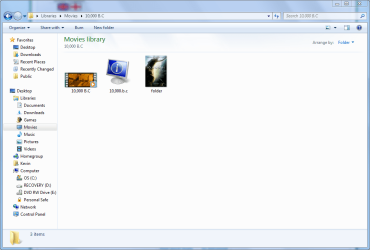
NOTE: Special thanks to DemonSeed for the file2folder batch file. 1. Click on the Download button below to download the file2folder.zip file and extract the file2folder.bat file to the drive containing your movie files (e.g. G:\MOVIES). Run the file which will create directories based on the movie file name (e.g. Babylon A.D.avi will have the directory Babylon A.D created) and the movie file moved to the directory.

2. Search for & download a file for the movie you would like as a poster and save it in the movie folder and name it folder.jpg. Do this for each movie.
   Warning
I would advise at least 2GB of memory as due to the size of the folder.jpg files there is a lot of memory used. You could (like me) resize all folder.jpg files to a width of 300 pixels & maintain aspect ratio.


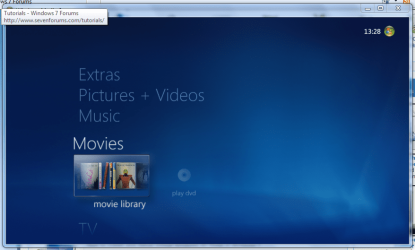
Here's How: 1. Run Media Center and navigate to Movies 1 Media Center (Start Page).PNG
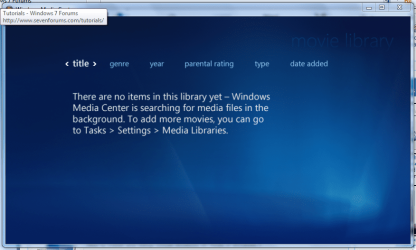
2. Open movie library, you should notice no movies shown 2 Media Center (Movie Library - Empty).PNG
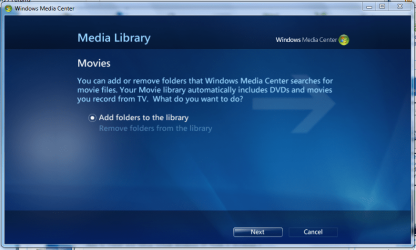
3. Right-Click within the inner (empty area) and select Manage Library, you will be shown the 'Add folders' wizard. Select 'Add folders to the library' and click next 3 Media Center (Add folder to library).PNG
4. Select the location where your drive with the videos is stored, and click on next. 4 Media Center (Folder Selection 1).PNG
5. Navigate to the folder where your videos are stored (e.g. G:\MOVIES), and click next. 5 Media Center (Select Folder).PNG
6. On the final screen select 'Yes, use these locations' and click finish 6 Media Center (Finish Selection).PNG


Now your folder is added, Media Center will show the Video folders (with posters if you downloaded an image file for each movie).

   Note
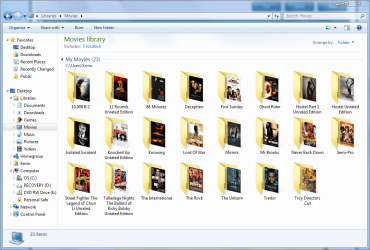
If you wish to include metadata you will need to download Yammm. The meta data will download the DVDID.XML file which will allow for Media Center to download full synopsis information for each movie
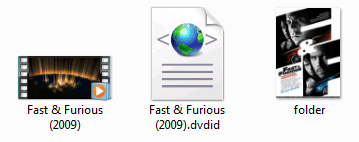

Example folder view.PNG

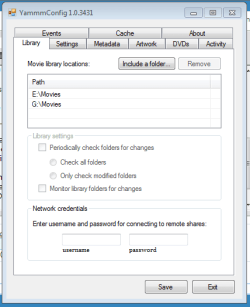
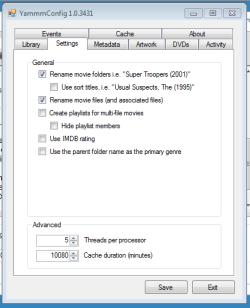
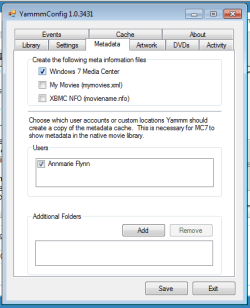
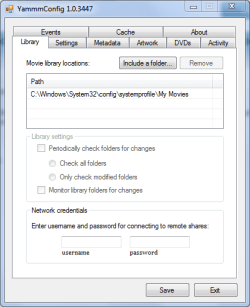
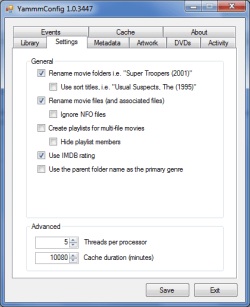
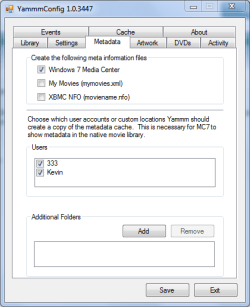
Recommended Yammm settings
1 yammm paths.PNG2 yammm settings.PNG
3 yammm metadata.PNG
   Note
These setting will automatically rename folders/files, download folder.jpg & DVDID.XML files for Media Center to read from.


Update

The Yammm application has been updated to include Image Resizing
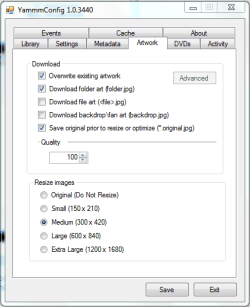
Yammm (Artwork).PNG

This will allow Media Center to use less memory when rendering folder images.

   Tip
It's recommended that you use a setting of 92 Quality & 300x420 medium size as this will greatly reduce the amount of memory used by 7MC when viewing a large movie library


Update 2: More Synopsis

I thought i'd include an example of how the DVDID.XML file works.

1, Full synopsis information Movie Library (Full Synopsis).PNG
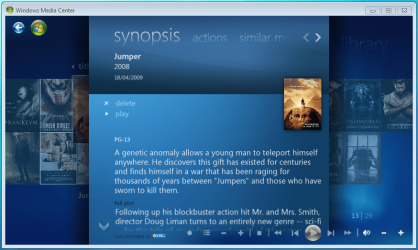
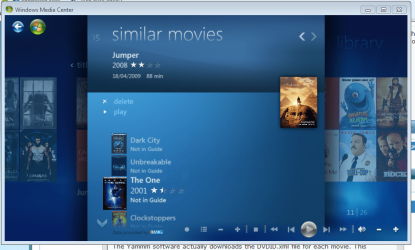
2, Similar Movies shown, with posters Movie Library (Similar Movies).PNG
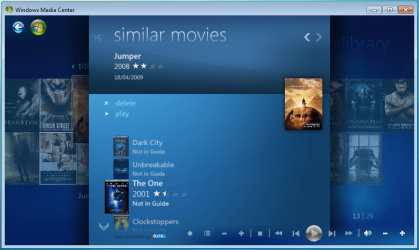
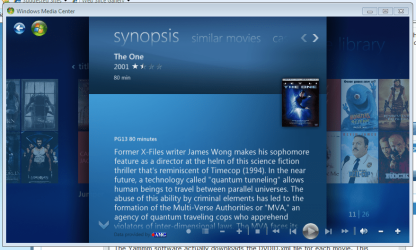
3, Click the similar movie to get full details of that movie Movie Library (Similar Movies - Synopsis).PNG
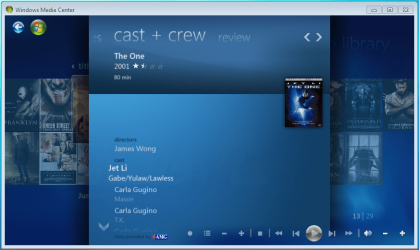
4, Cast & Crew information Movie Library (Cast & Crew).PNG
5, Click on a name to see a fimography (film list) relating to that actor/director Movie Library (Cast & Crew - Filmography).PNG

Enjoy
 

Attachments

  • file2folder.zip
    file2folder.zip
    230 bytes · Views: 22,835
  • synopsis.PNG
    synopsis.PNG
    127.1 KB · Views: 85
  • similar movies.PNG
    similar movies.PNG
    131.5 KB · Views: 66
  • similar movies detail.PNG
    similar movies detail.PNG
    140 KB · Views: 60
Last edited by a moderator:
It can sometimes take a while. I've noticed that not all movies have cast & crew/similar movies details.
 

My Computer My Computer

At a glance

Windows 7 Ultimate x64AMD Sempron Dual Core3GBNVIDIA GeForce 6150SE nForce 430
Computer Manufacturer/Model Number
Compaq Desktop
OS
Windows 7 Ultimate x64
CPU
AMD Sempron Dual Core
Memory
3GB
Graphics Card(s)
NVIDIA GeForce 6150SE nForce 430
Screen Resolution
1024x768
Hard Drives
150GB Sata
Orbital Shark, do you have blu-ray movies in your movie library and are you able to launch a blu-ray player?
 

My Computer My Computer

At a glance

Windows 7 Ultimate x64Intel i7 9206GB 1333MhzPowercolor 1GB Radeon HD4850
OS
Windows 7 Ultimate x64
CPU
Intel i7 920
Motherboard
MSI x58 Eclipse Platinum
Memory
6GB 1333Mhz
Graphics Card(s)
Powercolor 1GB Radeon HD4850
Sound Card
Xonar HDAV 1.3 Deluxe
Monitor(s) Displays
Panasonic AE1000U
Hard Drives
Seagate 7200.11 1.5TB
Case
Zalman HD160 Plus
Cooling
Zalman CNPS9500 AT
Hello ego4th, welcome to the forums.

Unfortunately i don't have any Blu-Ray movies but i'm sure someone may be able to assist in your queery.


Jeff
 

My Computer My Computer

At a glance

Windows 7 Ultimate x64AMD Sempron Dual Core3GBNVIDIA GeForce 6150SE nForce 430
Computer Manufacturer/Model Number
Compaq Desktop
OS
Windows 7 Ultimate x64
CPU
AMD Sempron Dual Core
Memory
3GB
Graphics Card(s)
NVIDIA GeForce 6150SE nForce 430
Screen Resolution
1024x768
Hard Drives
150GB Sata
i have bluray wmv hd rips in my library they play fine, dunno about playing an actual bluray disk though
 

My Computer My Computer

At a glance

windows 7 X64amd phenom II x4 9408GBintegrated radeon hd3300
Computer Manufacturer/Model Number
TripOG - Kwamathon
OS
windows 7 X64
CPU
amd phenom II x4 940
Motherboard
GIGABYTE GA-MA790GP-UD4H
Memory
8GB
Graphics Card(s)
integrated radeon hd3300
Sound Card
Realtek ALC889A
Monitor(s) Displays
ASUS VH222H
Screen Resolution
1920 x 1080
Hard Drives
PQI DK9320GD3R000A03
Internet Speed
30Mbps down / 2Mbps up
Great tutorial Orbital Shark :) +rep
 

My Computer My Computer

At a glance

Windows 7 Home Premium SP1 64-bitIntel™ Core™ i7 920 2.66 ghzOCZ 6gb (triple 2gb) ddr3-1333 (Gold Edition)Nvidia 9800 GT 1GB - x2 SLI
OS
Windows 7 Home Premium SP1 64-bit
CPU
Intel™ Core™ i7 920 2.66 ghz
Motherboard
Asus P6T Deluxe V2
Memory
OCZ 6gb (triple 2gb) ddr3-1333 (Gold Edition)
Graphics Card(s)
Nvidia 9800 GT 1GB - x2 SLI
Sound Card
On board
Monitor(s) Displays
19" LCD Wide Screen / Built-in TV Tuner
Screen Resolution
1440x900
Hard Drives
250 GB Maxtor
+
1 TB Seagate
PSU
Corsair GX 800 (800watts)
Case
Thermaltake Level 10 GT
Cooling
Antec Kuhler 920
Mouse
CM Storm Sentinel Advanced
Internet Speed
1MBps
Hey Shark I think i'm lost.

I followed the steps, got the program options set up as they should and have it pathed correctly to my movie folder but I have no DVDID.XML in my movie folders. Does the program download them all for me or do i need to find them for each movie I have?

-stang
 

My Computer My Computer

At a glance

Windows 7 Build 7229 x86Intel Core 2 Duo T7250 (2.0GHz/800Mhz FSB 2M ...4.00 GB DDR2, 667MHz 2 Dimm128MB NVIDIA GeForce 8400M G
Computer Manufacturer/Model Number
Dell XPS M1530
OS
Windows 7 Build 7229 x86
CPU
Intel Core 2 Duo T7250 (2.0GHz/800Mhz FSB 2M L2 Cache)
Memory
4.00 GB DDR2, 667MHz 2 Dimm
Graphics Card(s)
128MB NVIDIA GeForce 8400M G
Sound Card
SigmaTel High Definition Audio
Monitor(s) Displays
15.4 inch Wide Screen WSXGA+ TrueLife; 31.5'" HDTV
Screen Resolution
1680 X 1050
Hard Drives
200G 7200RPM SATA Hard Drive Free Fall Sensor
Keyboard
Logitech Cordless Desktop MX5500 Revolution Bluetooth
Mouse
Logitech Cordless Desktop MX5500 Revolution Bluetooth
Internet Speed
100 mbps
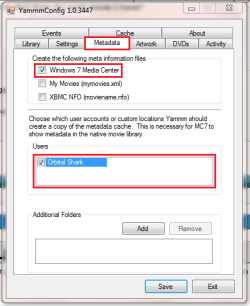
Hi mustangman, you need to make sure that the 'Windows 7 Media Center' metadata option is selected as well as the User checkbox selected

Set it up like the image below & you should be ok
Capture.PNG
 

My Computer My Computer

At a glance

Windows 7 Ultimate x64AMD Sempron Dual Core3GBNVIDIA GeForce 6150SE nForce 430
Computer Manufacturer/Model Number
Compaq Desktop
OS
Windows 7 Ultimate x64
CPU
AMD Sempron Dual Core
Memory
3GB
Graphics Card(s)
NVIDIA GeForce 6150SE nForce 430
Screen Resolution
1024x768
Hard Drives
150GB Sata
Damn quick response! Am i paying you? lol.
Ya mines the same I just got 2 users.
I'm still getting no synopsis or info for my movies in MediaCenter.
-stang
 

Attachments

  • Capture.PNG
    Capture.PNG
    12.3 KB · Views: 575

My Computer My Computer

At a glance

Windows 7 Build 7229 x86Intel Core 2 Duo T7250 (2.0GHz/800Mhz FSB 2M ...4.00 GB DDR2, 667MHz 2 Dimm128MB NVIDIA GeForce 8400M G
Computer Manufacturer/Model Number
Dell XPS M1530
OS
Windows 7 Build 7229 x86
CPU
Intel Core 2 Duo T7250 (2.0GHz/800Mhz FSB 2M L2 Cache)
Memory
4.00 GB DDR2, 667MHz 2 Dimm
Graphics Card(s)
128MB NVIDIA GeForce 8400M G
Sound Card
SigmaTel High Definition Audio
Monitor(s) Displays
15.4 inch Wide Screen WSXGA+ TrueLife; 31.5'" HDTV
Screen Resolution
1680 X 1050
Hard Drives
200G 7200RPM SATA Hard Drive Free Fall Sensor
Keyboard
Logitech Cordless Desktop MX5500 Revolution Bluetooth
Mouse
Logitech Cordless Desktop MX5500 Revolution Bluetooth
Internet Speed
100 mbps
Do you have all the movie files in seperate folders? You need to have the folders named correctly too E.G. Fast & Furious (2009), Iron Man, The Day The Earth Stood Still (2008).
 

My Computer My Computer

At a glance

Windows 7 Ultimate x64AMD Sempron Dual Core3GBNVIDIA GeForce 6150SE nForce 430
Computer Manufacturer/Model Number
Compaq Desktop
OS
Windows 7 Ultimate x64
CPU
AMD Sempron Dual Core
Memory
3GB
Graphics Card(s)
NVIDIA GeForce 6150SE nForce 430
Screen Resolution
1024x768
Hard Drives
150GB Sata
Heres what my movie layout looks like.

-stang
 

Attachments

  • Capture.PNG
    Capture.PNG
    96.7 KB · Views: 945

My Computer My Computer

At a glance

Windows 7 Build 7229 x86Intel Core 2 Duo T7250 (2.0GHz/800Mhz FSB 2M ...4.00 GB DDR2, 667MHz 2 Dimm128MB NVIDIA GeForce 8400M G
Computer Manufacturer/Model Number
Dell XPS M1530
OS
Windows 7 Build 7229 x86
CPU
Intel Core 2 Duo T7250 (2.0GHz/800Mhz FSB 2M L2 Cache)
Memory
4.00 GB DDR2, 667MHz 2 Dimm
Graphics Card(s)
128MB NVIDIA GeForce 8400M G
Sound Card
SigmaTel High Definition Audio
Monitor(s) Displays
15.4 inch Wide Screen WSXGA+ TrueLife; 31.5'" HDTV
Screen Resolution
1680 X 1050
Hard Drives
200G 7200RPM SATA Hard Drive Free Fall Sensor
Keyboard
Logitech Cordless Desktop MX5500 Revolution Bluetooth
Mouse
Logitech Cordless Desktop MX5500 Revolution Bluetooth
Internet Speed
100 mbps
Strange :confused:

1 thing you could try is to restart the service. Type 'services' into the start menu & press enter, then scroll to the bottom & highlight 'Yammm' then click 'restart' & see what happens.
 

My Computer My Computer

At a glance

Windows 7 Ultimate x64AMD Sempron Dual Core3GBNVIDIA GeForce 6150SE nForce 430
Computer Manufacturer/Model Number
Compaq Desktop
OS
Windows 7 Ultimate x64
CPU
AMD Sempron Dual Core
Memory
3GB
Graphics Card(s)
NVIDIA GeForce 6150SE nForce 430
Screen Resolution
1024x768
Hard Drives
150GB Sata
The only problem is that its not showing up on the restart. I restarted my computer and windows media player still has nothing added. Once again, do I need to manually add the info for each movie or does the program automatically do it?

-stang
 

My Computer My Computer

At a glance

Windows 7 Build 7229 x86Intel Core 2 Duo T7250 (2.0GHz/800Mhz FSB 2M ...4.00 GB DDR2, 667MHz 2 Dimm128MB NVIDIA GeForce 8400M G
Computer Manufacturer/Model Number
Dell XPS M1530
OS
Windows 7 Build 7229 x86
CPU
Intel Core 2 Duo T7250 (2.0GHz/800Mhz FSB 2M L2 Cache)
Memory
4.00 GB DDR2, 667MHz 2 Dimm
Graphics Card(s)
128MB NVIDIA GeForce 8400M G
Sound Card
SigmaTel High Definition Audio
Monitor(s) Displays
15.4 inch Wide Screen WSXGA+ TrueLife; 31.5'" HDTV
Screen Resolution
1680 X 1050
Hard Drives
200G 7200RPM SATA Hard Drive Free Fall Sensor
Keyboard
Logitech Cordless Desktop MX5500 Revolution Bluetooth
Mouse
Logitech Cordless Desktop MX5500 Revolution Bluetooth
Internet Speed
100 mbps
Before putting your attention on Media Center, what are the current contents of just 1 movie folder?
 

My Computer My Computer

At a glance

Windows 7 Ultimate x64AMD Sempron Dual Core3GBNVIDIA GeForce 6150SE nForce 430
Computer Manufacturer/Model Number
Compaq Desktop
OS
Windows 7 Ultimate x64
CPU
AMD Sempron Dual Core
Memory
3GB
Graphics Card(s)
NVIDIA GeForce 6150SE nForce 430
Screen Resolution
1024x768
Hard Drives
150GB Sata
Here they are
-stang
 

Attachments

  • Capture.PNG
    Capture.PNG
    44.1 KB · Views: 672

My Computer My Computer

At a glance

Windows 7 Build 7229 x86Intel Core 2 Duo T7250 (2.0GHz/800Mhz FSB 2M ...4.00 GB DDR2, 667MHz 2 Dimm128MB NVIDIA GeForce 8400M G
Computer Manufacturer/Model Number
Dell XPS M1530
OS
Windows 7 Build 7229 x86
CPU
Intel Core 2 Duo T7250 (2.0GHz/800Mhz FSB 2M L2 Cache)
Memory
4.00 GB DDR2, 667MHz 2 Dimm
Graphics Card(s)
128MB NVIDIA GeForce 8400M G
Sound Card
SigmaTel High Definition Audio
Monitor(s) Displays
15.4 inch Wide Screen WSXGA+ TrueLife; 31.5'" HDTV
Screen Resolution
1680 X 1050
Hard Drives
200G 7200RPM SATA Hard Drive Free Fall Sensor
Keyboard
Logitech Cordless Desktop MX5500 Revolution Bluetooth
Mouse
Logitech Cordless Desktop MX5500 Revolution Bluetooth
Internet Speed
100 mbps
Sorry, went to bed :p

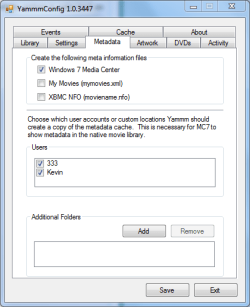
It's only downloading an NFO files which is not going to show any Synopsis information. Can you post a screenshot of the following settings please?

Library
Settings
Metadata

Cheers
 

My Computer My Computer

At a glance

Windows 7 Ultimate x64AMD Sempron Dual Core3GBNVIDIA GeForce 6150SE nForce 430
Computer Manufacturer/Model Number
Compaq Desktop
OS
Windows 7 Ultimate x64
CPU
AMD Sempron Dual Core
Memory
3GB
Graphics Card(s)
NVIDIA GeForce 6150SE nForce 430
Screen Resolution
1024x768
Hard Drives
150GB Sata
Heres ur requested shots.

-stang
 

Attachments

  • 1.PNG
    1.PNG
    13.3 KB · Views: 430
  • 2.PNG
    2.PNG
    12.5 KB · Views: 395
  • 3.PNG
    3.PNG
    12.6 KB · Views: 398

My Computer My Computer

At a glance

Windows 7 Build 7229 x86Intel Core 2 Duo T7250 (2.0GHz/800Mhz FSB 2M ...4.00 GB DDR2, 667MHz 2 Dimm128MB NVIDIA GeForce 8400M G
Computer Manufacturer/Model Number
Dell XPS M1530
OS
Windows 7 Build 7229 x86
CPU
Intel Core 2 Duo T7250 (2.0GHz/800Mhz FSB 2M L2 Cache)
Memory
4.00 GB DDR2, 667MHz 2 Dimm
Graphics Card(s)
128MB NVIDIA GeForce 8400M G
Sound Card
SigmaTel High Definition Audio
Monitor(s) Displays
15.4 inch Wide Screen WSXGA+ TrueLife; 31.5'" HDTV
Screen Resolution
1680 X 1050
Hard Drives
200G 7200RPM SATA Hard Drive Free Fall Sensor
Keyboard
Logitech Cordless Desktop MX5500 Revolution Bluetooth
Mouse
Logitech Cordless Desktop MX5500 Revolution Bluetooth
Internet Speed
100 mbps
Hi, sorry for the late reply (7600 leak & all that :p)

I would look to move your movie location. You could try the http://www.sevenforums.com/tutorials/1911-take-ownership-shortcut.html to take ownership of your 'My Movies' folder.

It could be that as Windows/System32 is a system folder (normally owned by TrustedInstaller), Windows is halting all attempts by Yammm to automatically download new data
 

My Computer My Computer

At a glance

Windows 7 Ultimate x64AMD Sempron Dual Core3GBNVIDIA GeForce 6150SE nForce 430
Computer Manufacturer/Model Number
Compaq Desktop
OS
Windows 7 Ultimate x64
CPU
AMD Sempron Dual Core
Memory
3GB
Graphics Card(s)
NVIDIA GeForce 6150SE nForce 430
Screen Resolution
1024x768
Hard Drives
150GB Sata
Good news Shark!

All i did was delete all directories that WMC accessed for movies, then added them back in and took ownership of my movies folder and the program works perfectly. Thanks again for the help +1

-stang
 

My Computer My Computer

At a glance

Windows 7 Build 7229 x86Intel Core 2 Duo T7250 (2.0GHz/800Mhz FSB 2M ...4.00 GB DDR2, 667MHz 2 Dimm128MB NVIDIA GeForce 8400M G
Computer Manufacturer/Model Number
Dell XPS M1530
OS
Windows 7 Build 7229 x86
CPU
Intel Core 2 Duo T7250 (2.0GHz/800Mhz FSB 2M L2 Cache)
Memory
4.00 GB DDR2, 667MHz 2 Dimm
Graphics Card(s)
128MB NVIDIA GeForce 8400M G
Sound Card
SigmaTel High Definition Audio
Monitor(s) Displays
15.4 inch Wide Screen WSXGA+ TrueLife; 31.5'" HDTV
Screen Resolution
1680 X 1050
Hard Drives
200G 7200RPM SATA Hard Drive Free Fall Sensor
Keyboard
Logitech Cordless Desktop MX5500 Revolution Bluetooth
Mouse
Logitech Cordless Desktop MX5500 Revolution Bluetooth
Internet Speed
100 mbps
Excellent mate, good work :D
 

My Computer My Computer

At a glance

Windows 7 Ultimate x64AMD Sempron Dual Core3GBNVIDIA GeForce 6150SE nForce 430
Computer Manufacturer/Model Number
Compaq Desktop
OS
Windows 7 Ultimate x64
CPU
AMD Sempron Dual Core
Memory
3GB
Graphics Card(s)
NVIDIA GeForce 6150SE nForce 430
Screen Resolution
1024x768
Hard Drives
150GB Sata
awesome....just awesome...i love it...many thanks bro.
 
Last edited:

My Computer My Computer

At a glance

Windows 7
OS
Windows 7
Back
Top