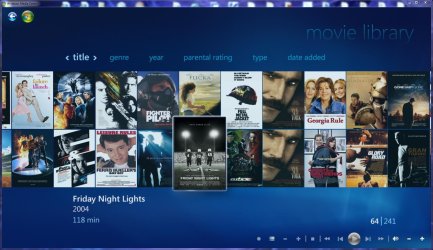
Media Center- Setup Movie Library

How to Setup a Media Center Movie Library in Windows 7

   Information
This tutorial will show how to manage your movie library in Media Center, including poster images & full synopsis information.
   Note
Windows Media Center is not available in Windows 7 Starter and Windows 7 Home Basic editions.


The N and KN editions of Windows 7 have all the features that normally come with each individual Windows 7 edition, except for Windows Media Player 12 and related programs, such as Windows Media Center or Windows DVD Maker.

The N editions of Windows 7 allow you to choose your own media player and software required to manage and play CDs, DVDs, and other digital media files. If you choose to use Windows Media Player 12, downloading it, along with related software, is free. Download Media Feature Pack for Windows 7 N with Service Pack 1 and Windows 7 KN with Service Pack 1 (KB968211) from Official Microsoft Download Center

Examples: With & without poster information.
7 Example Media Center (Movies without posters).PNG8 Example Media Center (Movies with posters).png

Before you start:
NOTE: Special thanks to DemonSeed for the file2folder batch file. 1. Click on the Download button below to download the file2folder.zip file and extract the file2folder.bat file to the drive containing your movie files (e.g. G:\MOVIES). Run the file which will create directories based on the movie file name (e.g. Babylon A.D.avi will have the directory Babylon A.D created) and the movie file moved to the directory.

2. Search for & download a file for the movie you would like as a poster and save it in the movie folder and name it folder.jpg. Do this for each movie.
   Warning
I would advise at least 2GB of memory as due to the size of the folder.jpg files there is a lot of memory used. You could (like me) resize all folder.jpg files to a width of 300 pixels & maintain aspect ratio.


Here's How: 1. Run Media Center and navigate to Movies 1 Media Center (Start Page).PNG
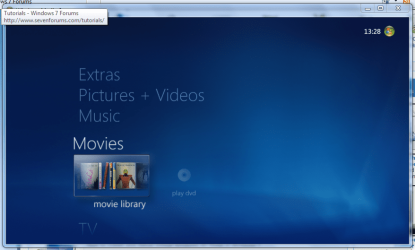
2. Open movie library, you should notice no movies shown 2 Media Center (Movie Library - Empty).PNG
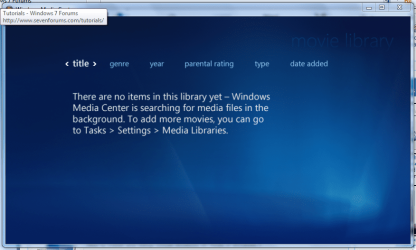
3. Right-Click within the inner (empty area) and select Manage Library, you will be shown the 'Add folders' wizard. Select 'Add folders to the library' and click next 3 Media Center (Add folder to library).PNG
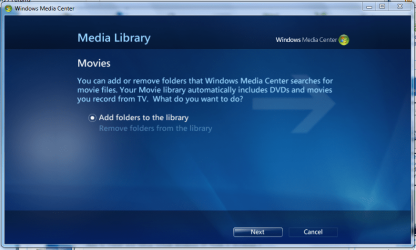
4. Select the location where your drive with the videos is stored, and click on next. 4 Media Center (Folder Selection 1).PNG
5. Navigate to the folder where your videos are stored (e.g. G:\MOVIES), and click next. 5 Media Center (Select Folder).PNG
6. On the final screen select 'Yes, use these locations' and click finish 6 Media Center (Finish Selection).PNG


Now your folder is added, Media Center will show the Video folders (with posters if you downloaded an image file for each movie).

   Note
If you wish to include metadata you will need to download Yammm. The meta data will download the DVDID.XML file which will allow for Media Center to download full synopsis information for each movie
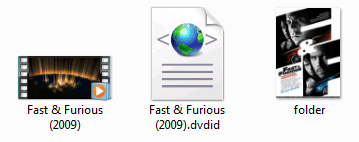

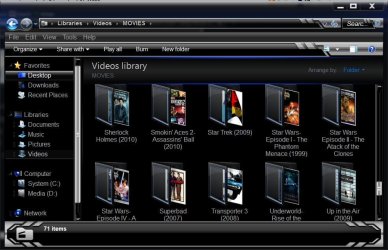
Example folder view.PNG

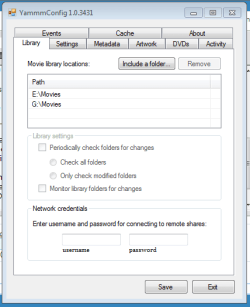
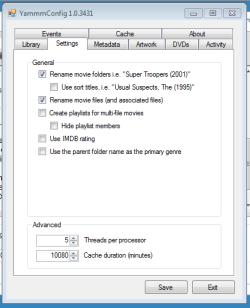
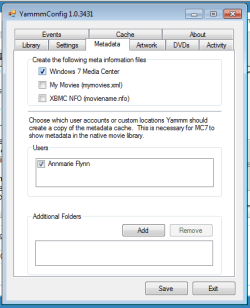
Recommended Yammm settings
1 yammm paths.PNG2 yammm settings.PNG
3 yammm metadata.PNG
   Note
These setting will automatically rename folders/files, download folder.jpg & DVDID.XML files for Media Center to read from.


Update

The Yammm application has been updated to include Image Resizing
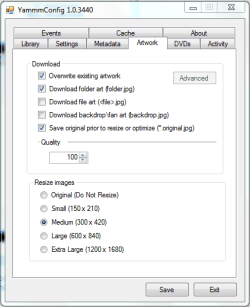
Yammm (Artwork).PNG

This will allow Media Center to use less memory when rendering folder images.

   Tip
It's recommended that you use a setting of 92 Quality & 300x420 medium size as this will greatly reduce the amount of memory used by 7MC when viewing a large movie library


Update 2: More Synopsis

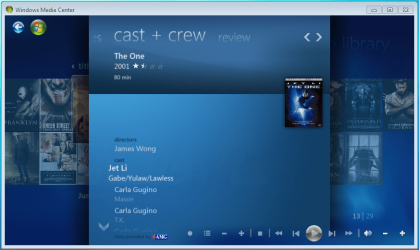
I thought i'd include an example of how the DVDID.XML file works.

1, Full synopsis information Movie Library (Full Synopsis).PNG
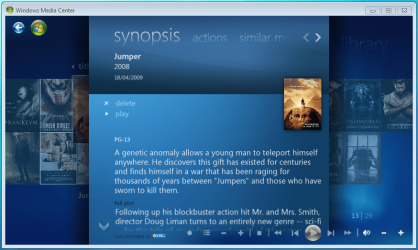
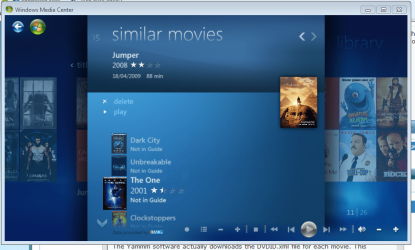
2, Similar Movies shown, with posters Movie Library (Similar Movies).PNG
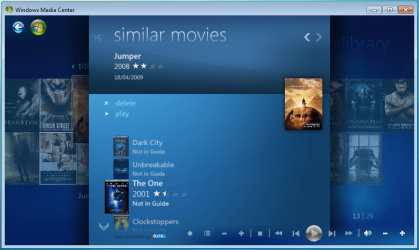
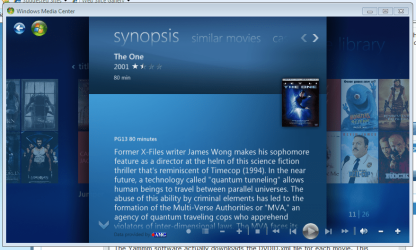
3, Click the similar movie to get full details of that movie Movie Library (Similar Movies - Synopsis).PNG
4, Cast & Crew information Movie Library (Cast & Crew).PNG
5, Click on a name to see a fimography (film list) relating to that actor/director Movie Library (Cast & Crew - Filmography).PNG

Enjoy
 

Attachments

  • file2folder.zip
    file2folder.zip
    230 bytes · Views: 22,835
  • synopsis.PNG
    synopsis.PNG
    127.1 KB · Views: 85
  • similar movies.PNG
    similar movies.PNG
    131.5 KB · Views: 66
  • similar movies detail.PNG
    similar movies detail.PNG
    140 KB · Views: 60
Last edited by a moderator:
what kind of insanity is this!!!

is this the only way to put folders in there? to make and compile a script in EVERY FOLDER!

well someone needs to figure out a reg hack or tweak so we can enable folders cuz right now i have over 15000 videos showing up in my videos livrary like im ever going to btoher to navigate that, well ill just stick to VLC until sherlock gets on this one
Ok, first off. If you're going to insult someone's work, better learn how to spell your words. It makes you look like a bigger idiot than you already are. If you can't figure out how YAMMM works, don't use it. I use it fine, I have no beef or quarrel's with it. It does EXACTLY what I need it to do. Why don't you explain what kind of problems your having, because it looks like a rant to me, which is unacceptable.
 

My Computer My Computer

At a glance

Windows 8 64bit ProfessionalIntel Q9400 Quad Core 2.66GhzG.Skill 4GB DDR3-1600NVidia GeForce 560GTX
Computer type
PC/Desktop
Computer Manufacturer/Model Number
Custom Built
OS
Windows 8 64bit Professional
CPU
Intel Q9400 Quad Core 2.66Ghz
Motherboard
Gigabyte
Memory
G.Skill 4GB DDR3-1600
Graphics Card(s)
NVidia GeForce 560GTX
Sound Card
On-board
Monitor(s) Displays
24" LCD
Screen Resolution
1920x1080
Hard Drives
160GB WD
WD Caviar Black 640GB
WD 500GB
WD 1TB
WD 1TB
PSU
Cooler Master 1300W Silent Pro
Case
Sunbeam Transformer Black
Cooling
Fans
Keyboard
Logitech G15 (Original Screen + 18G Keys)
Mouse
Logitech MX518
Internet Speed
10mbit up/down Fiber Optic
Browser
FireFox / Chrome
Other Info
SF is amazing!
what kind of insanity is this!!!

is this the only way to put folders in there? to make and compile a script in EVERY FOLDER!

well someone needs to figure out a reg hack or tweak so we can enable folders cuz right now i have over 15000 videos showing up in my videos livrary like im ever going to btoher to navigate that, well ill just stick to VLC until sherlock gets on this one

Let me try and understand your problem. Do you currently have all your movies in the Win7 Movies Library?

If so, that's the issue. I had the same problem and I just created a new folder and moved all my movies to that folder. Then just point Media Center in that direction. Trust me... YAMMM is an awesome program, it just doesnt work with the movies in the Movie Library.
 

My Computer My Computer

At a glance

Windows 7 Ultimate 64 bit Steve Ballmer Signa...Intel Core 2 Quad - Q9550 - 2.83GHz stock - O...4GB DDR2 800MHz (PC6400) OCZ ReaperNvidia GE Force 8800 GTS
Computer Manufacturer/Model Number
Homebrew PC - "Alpha_Dawg"
OS
Windows 7 Ultimate 64 bit Steve Ballmer Signature Edition
CPU
Intel Core 2 Quad - Q9550 - 2.83GHz stock - OC'd to 3.6GHz
Motherboard
Gigabyte EP45-UD3P
Memory
4GB DDR2 800MHz (PC6400) OCZ Reaper
Graphics Card(s)
Nvidia GE Force 8800 GTS
Sound Card
Asus Xonar DX
Monitor(s) Displays
Samsung SyncMaster 2333HD
Screen Resolution
1920 x 1080
Hard Drives
WD Caviar Black 750GB - 7200RPM - 32MB cache
WD Caviar Green 1.5TB - 5400RPM - 64MB cache
WD Caviar Green 2.0TB - 5400RPM - 64MB cache
PSU
PC Power & Cooling Silencer 750
Case
Gigabyte 3D Aurora
Cooling
Case is Air - 5ea. 120mm fans (mix of Arctic and Xigmatec)
Keyboard
MS Natural Wireless KB
Mouse
MS Wireless Mouse
Internet Speed
50 mbps down/5 mbps up
Other Info
AVerMedia - AVerTVHD G2 Dual Tuner Card
include your movies folder to videos library
Capture.JPG
use file2folder:
Capture4.JPG
and give the path to WMC and YAMM, use the recommended settings and you are done.
It works for me just fine
cheers
 

My Computer My Computer

At a glance

Windows 7 Ultimate x32DualCore Intel Pentium E2200, 2218 MHz (11 x ...2 GB DDR2-800 DDR2 SDRAMnVIDIA GeForce 9500GT 1GB
Computer Manufacturer/Model Number
Micro-Star International/MS-7529
OS
Windows 7 Ultimate x32
CPU
DualCore Intel Pentium E2200, 2218 MHz (11 x 202)
Motherboard
MSI G31M3 V2 (MS-7529) (2 PCI, 1 PCI-E x16,2 DDR2 DIMM)
Memory
2 GB DDR2-800 DDR2 SDRAM
Graphics Card(s)
nVIDIA GeForce 9500GT 1GB
Sound Card
Realtek ALC888/1200 @ Intel 82801GB ICH7
Monitor(s) Displays
Samsung SyncMaster 2253BW (Digital) 22'' LCD
Screen Resolution
1680x1050
Hard Drives
SAMSUNG HD322IJ ATA Device (298 GB , IDE)
Hi there guys, my first post here, I only became aware of the forum when a friend emailed me a link to this tutorial and very good it was. I'd been wanting something to make my films a little more fun to navigate for while now. My only problem is that when I go into my movies folder in WMC all the pictures appear fine but after around 20 seconds or so they all dissapear again and then 5 mins or so later they return and stay. This obviously is rather annoying but as I'm new to the whole media database thing I'm unsure of why it's happening. I've been using the Yammm software.

Anyone have any ideas on why thid might be happening, once again thanks to orbital shark for the tutorial. :D
 

My Computer My Computer

At a glance

Windows 7 Professional 64-bitIntel i7 92012GB OCZ Gold 1600ATI Sapphire HD4670
OS
Windows 7 Professional 64-bit
CPU
Intel i7 920
Motherboard
Gigabyte EX58-UD5
Memory
12GB OCZ Gold 1600
Graphics Card(s)
ATI Sapphire HD4670
Sound Card
Focusrite Liquid Saffire 56
PSU
Be Quiet 650w Dark Power Pro
Case
Lian Li PC-A10
Try using YAMMM's built in ability to shrink the images sizes... if the jpg's are all large that may be the issue.
 

My Computer My Computer

At a glance

Windows 7 Ultimate 64 bit Steve Ballmer Signa...Intel Core 2 Quad - Q9550 - 2.83GHz stock - O...4GB DDR2 800MHz (PC6400) OCZ ReaperNvidia GE Force 8800 GTS
Computer Manufacturer/Model Number
Homebrew PC - "Alpha_Dawg"
OS
Windows 7 Ultimate 64 bit Steve Ballmer Signature Edition
CPU
Intel Core 2 Quad - Q9550 - 2.83GHz stock - OC'd to 3.6GHz
Motherboard
Gigabyte EP45-UD3P
Memory
4GB DDR2 800MHz (PC6400) OCZ Reaper
Graphics Card(s)
Nvidia GE Force 8800 GTS
Sound Card
Asus Xonar DX
Monitor(s) Displays
Samsung SyncMaster 2333HD
Screen Resolution
1920 x 1080
Hard Drives
WD Caviar Black 750GB - 7200RPM - 32MB cache
WD Caviar Green 1.5TB - 5400RPM - 64MB cache
WD Caviar Green 2.0TB - 5400RPM - 64MB cache
PSU
PC Power & Cooling Silencer 750
Case
Gigabyte 3D Aurora
Cooling
Case is Air - 5ea. 120mm fans (mix of Arctic and Xigmatec)
Keyboard
MS Natural Wireless KB
Mouse
MS Wireless Mouse
Internet Speed
50 mbps down/5 mbps up
Other Info
AVerMedia - AVerTVHD G2 Dual Tuner Card
Hi Darryl, thanks for the reply. I have already used the shrink feature on the medium setting and 92 quality. The average image size is around 100k. I find it odd though that pictures all appear straight away when I first enter WMC but then dissapear. I also have a system that should be cabable of displaying thumbs very quickly, in windows explorer for example the images appear instantly and stay there for me. Any other ideas guys?

I also can't get WMC to display any more than the basic synopsis info, so no cast crew, similiar movies etc. I also got Yammm to download the background art but it won't display it when I select a film.
 

My Computer My Computer

At a glance

Windows 7 Professional 64-bitIntel i7 92012GB OCZ Gold 1600ATI Sapphire HD4670
OS
Windows 7 Professional 64-bit
CPU
Intel i7 920
Motherboard
Gigabyte EX58-UD5
Memory
12GB OCZ Gold 1600
Graphics Card(s)
ATI Sapphire HD4670
Sound Card
Focusrite Liquid Saffire 56
PSU
Be Quiet 650w Dark Power Pro
Case
Lian Li PC-A10
Just curious if anyone has been able to get YAMM to work over a networked storage drive? I keep my movies in a /video/movienamefolder setup on another machine on my net, yamm wouldn't let me choose network directories, but i could map the drive then pick it on the local computer, no errors in the event logs, but yamm doesn't seem to want to work with it like this:(

And i can write to the mapped drive/dirs no problem

Thanks guys
 

My Computer My Computer

At a glance

win7
OS
win7
Yammm only works w/ UNC paths. If you can't select it from the Folder Open dialog then you can manually edit the config file. Replace the mapped drive w/ the UNC Path. Also make sure that you have explicit remote credentials configured in the Library tab.

1- Open %ProgramData%\Yammm\Yammm.config in notepad
2- Find the Folder tag and make it look similar to <Folder>\\WHS01\Videos\Movies</Folder>
3- Save the file
 

My Computer My Computer

At a glance

6x W2K8 R2 (x64), 6x W7 7600 (x64), 2x Gentoo...Core2 Duo E8400 3.0GhzCorsair DDR-800 4GB RAMEVGA NVidia GeForce GT240
Computer Manufacturer/Model Number
My HTPC
OS
6x W2K8 R2 (x64), 6x W7 7600 (x64), 2x Gentoo (x64), 1x Ubuntu 9.04 (x64), 1x pfSense (FreeBSD)
CPU
Core2 Duo E8400 3.0Ghz
Motherboard
ASUS P5E-VM
Memory
Corsair DDR-800 4GB RAM
Graphics Card(s)
EVGA NVidia GeForce GT240
Screen Resolution
1080p
Hard Drives
OCZ Vertex 60GB (C:\D: System\Apps)
WD 1TB x1 (G: Temp\Recorded TV)
WD 2TB x8 (On Server)
PSU
Corsair HX520w
Case
Antec Fusion Max
Cooling
Passive Thermalright HR-1 CPU Heatsink w/ Nexus Fan
Actually got it working... when i first setup yamm it wouldn't let me choose any network shares.. tonight it worked perfect:) thanks much! great program
 

My Computer My Computer

At a glance

win7
OS
win7
what kind of insanity is this!!!

is this the only way to put folders in there? to make and compile a script in EVERY FOLDER!

well someone needs to figure out a reg hack or tweak so we can enable folders cuz right now i have over 15000 videos showing up in my videos livrary like im ever going to btoher to navigate that, well ill just stick to VLC until sherlock gets on this one
Ok, first off. If you're going to insult someone's work, better learn how to spell your words. It makes you look like a bigger idiot than you already are. If you can't figure out how YAMMM works, don't use it. I use it fine, I have no beef or quarrel's with it. It does EXACTLY what I need it to do. Why don't you explain what kind of problems your having, because it looks like a rant to me, which is unacceptable.

Wow! Sorry. I was NOT insulting the work of the OP. In fact great work providing a tutorial on how to navigate through this new mess and make it so we can organize our libraries again.

My problem is I would like to view folders again, also I cant figure out how YAMMM works and would like to.

Let me put the insult where it belongs on the M$ team for fixing something that wasnt broken.
 

My Computer My Computer

At a glance

Windows 7 Ultimate x64
Computer type
PC/Desktop
OS
Windows 7 Ultimate x64
The folders view is still available under "Video Library". The Movie Library is the evolved DVD Gallery from Vista Media Center, which also did not have a folder view.

Any Yammm questions feel free to ask. Some of the internals have changed greatly in v2 but I'll have a separate post for that when available.
 

My Computer My Computer

At a glance

6x W2K8 R2 (x64), 6x W7 7600 (x64), 2x Gentoo...Core2 Duo E8400 3.0GhzCorsair DDR-800 4GB RAMEVGA NVidia GeForce GT240
Computer Manufacturer/Model Number
My HTPC
OS
6x W2K8 R2 (x64), 6x W7 7600 (x64), 2x Gentoo (x64), 1x Ubuntu 9.04 (x64), 1x pfSense (FreeBSD)
CPU
Core2 Duo E8400 3.0Ghz
Motherboard
ASUS P5E-VM
Memory
Corsair DDR-800 4GB RAM
Graphics Card(s)
EVGA NVidia GeForce GT240
Screen Resolution
1080p
Hard Drives
OCZ Vertex 60GB (C:\D: System\Apps)
WD 1TB x1 (G: Temp\Recorded TV)
WD 2TB x8 (On Server)
PSU
Corsair HX520w
Case
Antec Fusion Max
Cooling
Passive Thermalright HR-1 CPU Heatsink w/ Nexus Fan
windows media center doesnt show all the thumbnails of the video, sometimes showing all, sometimes showing only 1, even though all are from the same folder with the same folder.jpg thumbnail, why is it so?
 

Attachments

  • Capture.JPG
    Capture.JPG
    88.2 KB · Views: 484

My Computer My Computer

At a glance

windows 7 ultimate
OS
windows 7 ultimate
windows media center doesnt show all the thumbnails of the video, sometimes showing all, sometimes showing only 1, even though all are from the same folder with the same folder.jpg thumbnail, why is it so?

Since they are in the same folder there is a race condition to access the image file that can occur. If Media Center errors on accessing the image or it takes too long it skips it.
 

My Computer My Computer

At a glance

6x W2K8 R2 (x64), 6x W7 7600 (x64), 2x Gentoo...Core2 Duo E8400 3.0GhzCorsair DDR-800 4GB RAMEVGA NVidia GeForce GT240
Computer Manufacturer/Model Number
My HTPC
OS
6x W2K8 R2 (x64), 6x W7 7600 (x64), 2x Gentoo (x64), 1x Ubuntu 9.04 (x64), 1x pfSense (FreeBSD)
CPU
Core2 Duo E8400 3.0Ghz
Motherboard
ASUS P5E-VM
Memory
Corsair DDR-800 4GB RAM
Graphics Card(s)
EVGA NVidia GeForce GT240
Screen Resolution
1080p
Hard Drives
OCZ Vertex 60GB (C:\D: System\Apps)
WD 1TB x1 (G: Temp\Recorded TV)
WD 2TB x8 (On Server)
PSU
Corsair HX520w
Case
Antec Fusion Max
Cooling
Passive Thermalright HR-1 CPU Heatsink w/ Nexus Fan
Since they are in the same folder there is a race condition to access the image file that can occur. If Media Center errors on accessing the image or it takes too long it skips it.

so what are the possible solutions?
 

My Computer My Computer

At a glance

windows 7 ultimate
OS
windows 7 ultimate
so what are the possible solutions?

1- put them in their own folder. for episodes it isn't a very good solution.

2- remove them from the Movie Library and use Video Library (or another 3rd party like Media Browser, OML, ...)
 

My Computer My Computer

At a glance

6x W2K8 R2 (x64), 6x W7 7600 (x64), 2x Gentoo...Core2 Duo E8400 3.0GhzCorsair DDR-800 4GB RAMEVGA NVidia GeForce GT240
Computer Manufacturer/Model Number
My HTPC
OS
6x W2K8 R2 (x64), 6x W7 7600 (x64), 2x Gentoo (x64), 1x Ubuntu 9.04 (x64), 1x pfSense (FreeBSD)
CPU
Core2 Duo E8400 3.0Ghz
Motherboard
ASUS P5E-VM
Memory
Corsair DDR-800 4GB RAM
Graphics Card(s)
EVGA NVidia GeForce GT240
Screen Resolution
1080p
Hard Drives
OCZ Vertex 60GB (C:\D: System\Apps)
WD 1TB x1 (G: Temp\Recorded TV)
WD 2TB x8 (On Server)
PSU
Corsair HX520w
Case
Antec Fusion Max
Cooling
Passive Thermalright HR-1 CPU Heatsink w/ Nexus Fan
thanks.
but is there any tutorials that i can read up about setting up media browser coz i cant seem to get it working, after including the folder in my media collection.
 

My Computer My Computer

At a glance

windows 7 ultimate
OS
windows 7 ultimate
thanks.
but is there any tutorials that i can read up about setting up media browser coz i cant seem to get it working, after including the folder in my media collection.

Is that english? LOL!
 

My Computer My Computer

At a glance

Windows 7 Ultimate 64 bit Steve Ballmer Signa...Intel Core 2 Quad - Q9550 - 2.83GHz stock - O...4GB DDR2 800MHz (PC6400) OCZ ReaperNvidia GE Force 8800 GTS
Computer Manufacturer/Model Number
Homebrew PC - "Alpha_Dawg"
OS
Windows 7 Ultimate 64 bit Steve Ballmer Signature Edition
CPU
Intel Core 2 Quad - Q9550 - 2.83GHz stock - OC'd to 3.6GHz
Motherboard
Gigabyte EP45-UD3P
Memory
4GB DDR2 800MHz (PC6400) OCZ Reaper
Graphics Card(s)
Nvidia GE Force 8800 GTS
Sound Card
Asus Xonar DX
Monitor(s) Displays
Samsung SyncMaster 2333HD
Screen Resolution
1920 x 1080
Hard Drives
WD Caviar Black 750GB - 7200RPM - 32MB cache
WD Caviar Green 1.5TB - 5400RPM - 64MB cache
WD Caviar Green 2.0TB - 5400RPM - 64MB cache
PSU
PC Power & Cooling Silencer 750
Case
Gigabyte 3D Aurora
Cooling
Case is Air - 5ea. 120mm fans (mix of Arctic and Xigmatec)
Keyboard
MS Natural Wireless KB
Mouse
MS Wireless Mouse
Internet Speed
50 mbps down/5 mbps up
Other Info
AVerMedia - AVerTVHD G2 Dual Tuner Card
thanks.
but is there any tutorials that i can read up about setting up media browser coz i cant seem to get it working, after including the folder in my media collection.

Have you read this ??
 

My Computer My Computer

At a glance

Windows 7Atom 3304GbNvidia ION
Computer Manufacturer/Model Number
AsRock ION330
OS
Windows 7
CPU
Atom 330
Motherboard
ASRock ION
Memory
4Gb
Graphics Card(s)
Nvidia ION
Sound Card
Nvidia ION
Monitor(s) Displays
42" Pioneer Plasma
Screen Resolution
1920 x 1080
Hard Drives
300Gb SATA internal, and 2Tb in NAS on LAN.
PSU
Standard
Case
ASRock
Cooling
ASRock
Keyboard
Basic
Mouse
Basic
Internet Speed
50 Mb/s
Other Info
6" 4"", top lip, and walks about a lot !!
Great tutorial.
My Movies is on an external 500GB hard drive. I downloaded the Yammm but nothing is happening.
My movies are AVI in 5 folders (Action,Comedy,Drama,Family and Horror.
I only use the Media Center on my Xbox 360.

Do I need file2folder to put each movie in it's own folder first ?
 

My Computer My Computer

At a glance

Win7
OS
Win7
Great tutorial.
My Movies is on an external 500GB hard drive. I downloaded the Yammm but nothing is happening.
My movies are AVI in 5 folders (Action,Comedy,Drama,Family and Horror.
I only use the Media Center on my Xbox 360.

Do I need file2folder to put each movie in it's own folder first ?

Perhaps mikenho can comment on this but I believe you do... otherwise the meta data and images would all end up in the same folder which wont work.

Also, have you set the folder path(s) through the YAMMM config?

Furthermore, no need to catagorize your folders as you have...just lump em all in a folder called movies or similar. Once you have all the meta data, WMC will allow you to sort by title, genre, year, parental rating, type, and date added.

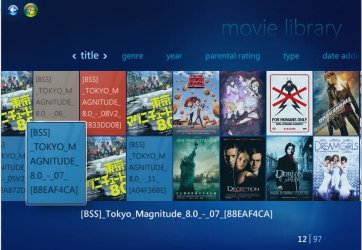
This should be your result in WMC:
WMC Movies.jpg
 

My Computer My Computer

At a glance

Windows 7 Ultimate 64 bit Steve Ballmer Signa...Intel Core 2 Quad - Q9550 - 2.83GHz stock - O...4GB DDR2 800MHz (PC6400) OCZ ReaperNvidia GE Force 8800 GTS
Computer Manufacturer/Model Number
Homebrew PC - "Alpha_Dawg"
OS
Windows 7 Ultimate 64 bit Steve Ballmer Signature Edition
CPU
Intel Core 2 Quad - Q9550 - 2.83GHz stock - OC'd to 3.6GHz
Motherboard
Gigabyte EP45-UD3P
Memory
4GB DDR2 800MHz (PC6400) OCZ Reaper
Graphics Card(s)
Nvidia GE Force 8800 GTS
Sound Card
Asus Xonar DX
Monitor(s) Displays
Samsung SyncMaster 2333HD
Screen Resolution
1920 x 1080
Hard Drives
WD Caviar Black 750GB - 7200RPM - 32MB cache
WD Caviar Green 1.5TB - 5400RPM - 64MB cache
WD Caviar Green 2.0TB - 5400RPM - 64MB cache
PSU
PC Power & Cooling Silencer 750
Case
Gigabyte 3D Aurora
Cooling
Case is Air - 5ea. 120mm fans (mix of Arctic and Xigmatec)
Keyboard
MS Natural Wireless KB
Mouse
MS Wireless Mouse
Internet Speed
50 mbps down/5 mbps up
Other Info
AVerMedia - AVerTVHD G2 Dual Tuner Card
Back
Top