Media Center won't stop waking computer!

edilee012

New member
Member
VIP
Local time
2:19 PM
Messages
131
When I first installed 7 back at it's release I had this very same problem and was told how to turn off the auto update options in Media Center and had no further problems with it waking the PC sometimes more than once a week. I have since re-installed 7 a few months back and as part of my initial personalizing I went into MC and turned those options off but it continues to wake my PC randomly to do updates at 6:51am. Here is the entry in the Event Viewer regarding to this action ((there was some text anomolies I removed that were unicode that would not save properly in notepad, they were just question marks(?) where spaces were in the sleep and wake time lines))

"The system has resumed from sleep.
Sleep Time: 2010-10-24T05:33:53.365000000Z
Wake Time: 2010-10-24T10:51:01.610000000Z
Wake Source: Timer - Windows will execute '\Microsoft\Windows\Media Center\mcupdate_scheduled' scheduled task that requested waking the computer."

Why does it insist on waking the PC even though I have MC set to not update? I do not use MC but once in a while (like maybe once every 3-4 months) so having it update TV listings is not needed.
 

My Computer My Computer

At a glance

Win7 64AMD Phenom X4 9950 2.6ghz8 gigs Corsair2 X Nvidia Geforce 8800 GTS (G92) 512 in SLI
Computer Manufacturer/Model Number
Custom Asus
OS
Win7 64
CPU
AMD Phenom X4 9950 2.6ghz
Motherboard
Asus Crosshair
Memory
8 gigs Corsair
Graphics Card(s)
2 X Nvidia Geforce 8800 GTS (G92) 512 in SLI
Sound Card
Onboard
Monitor(s) Displays
Samsung 22 inch
Screen Resolution
1920 X 1080
Hard Drives
WD 1 TB, WD 500 Gig, WD 320 Gig
PSU
Thermaltake 850 watt
Case
Raidmax
Cooling
Zalman 9700
Keyboard
Microsoft
Mouse
Logitech MX 518
Internet Speed
25 mbps
Turn off the windows media center extender service and disable it. (windows key> type "sevices.msc"> right click on the service and select properties to get to the right menu)
Or better yet.. remove media center as a windows feature. That option can be found in programs and features in the control panel. IMO media center is bloatware that shouldn't be installed unless you plan to use your computer as a cable box/dvd player/game console with a large screen TV as a monitor
 
That service is already disabled which is what is confusing me to as why it still wakes the PC to update itself even though I have all that disabled. I am going to just uninstall it and the problem will be solved.
 

My Computer My Computer

At a glance

Win7 64AMD Phenom X4 9950 2.6ghz8 gigs Corsair2 X Nvidia Geforce 8800 GTS (G92) 512 in SLI
Computer Manufacturer/Model Number
Custom Asus
OS
Win7 64
CPU
AMD Phenom X4 9950 2.6ghz
Motherboard
Asus Crosshair
Memory
8 gigs Corsair
Graphics Card(s)
2 X Nvidia Geforce 8800 GTS (G92) 512 in SLI
Sound Card
Onboard
Monitor(s) Displays
Samsung 22 inch
Screen Resolution
1920 X 1080
Hard Drives
WD 1 TB, WD 500 Gig, WD 320 Gig
PSU
Thermaltake 850 watt
Case
Raidmax
Cooling
Zalman 9700
Keyboard
Microsoft
Mouse
Logitech MX 518
Internet Speed
25 mbps
Last edited:

My Computer My Computer

At a glance

64-bit Windows 11 Pro for WorkstationsIntel i7-8700K OC'd to 5 GHz64 GB (4x16GB) G.SKILL TridentZ RGB DDR4 3600...ASUS ROG-STRIX-GTX1080TI-O11G-GAMING
Computer type
PC/Desktop
Computer Manufacturer/Model Number
Self built custom
OS
64-bit Windows 11 Pro for Workstations
CPU
Intel i7-8700K OC'd to 5 GHz
Motherboard
ASUS ROG Maximus XI Formula Z390
Memory
64 GB (4x16GB) G.SKILL TridentZ RGB DDR4 3600 MHz
Graphics Card(s)
ASUS ROG-STRIX-GTX1080TI-O11G-GAMING
Sound Card
Integrated
Monitor(s) Displays
2 x Samsung Odyssey G7 27"
Screen Resolution
2560x1440
Hard Drives
1TB Samsung 990 PRO M.2,
4TB Samsung 990 PRO PRO M.2,
TerraMaster F8 SSD Plus NAS
PSU
Seasonic Prime Titanium 850W
Case
Thermaltake Core P3
Cooling
Corsair Hydro H115i
Keyboard
Logitech wireless K800
Mouse
Logitech MX Master 4
Internet Speed
2 Gb/s Download and 100 Mb/s Upload
Antivirus
Malwarebyte Anti-Malware Premium
Browser
Google Chrome
Other Info
Logitech Z625 speaker system,
Logitech BRIO 4K Pro webcam,
HP Color LaserJet Pro MFP M477fdn,
APC SMART-UPS RT 1000 XL - SURT1000XLI,
Galaxy S23 Plus phone
Thanks...that was what I was looking for! I re-installed it and changed that setting. I do use MC for watching Netflix movies from time to time so this way it will still be there if I want to use it for that.
 

My Computer My Computer

At a glance

Win7 64AMD Phenom X4 9950 2.6ghz8 gigs Corsair2 X Nvidia Geforce 8800 GTS (G92) 512 in SLI
Computer Manufacturer/Model Number
Custom Asus
OS
Win7 64
CPU
AMD Phenom X4 9950 2.6ghz
Motherboard
Asus Crosshair
Memory
8 gigs Corsair
Graphics Card(s)
2 X Nvidia Geforce 8800 GTS (G92) 512 in SLI
Sound Card
Onboard
Monitor(s) Displays
Samsung 22 inch
Screen Resolution
1920 X 1080
Hard Drives
WD 1 TB, WD 500 Gig, WD 320 Gig
PSU
Thermaltake 850 watt
Case
Raidmax
Cooling
Zalman 9700
Keyboard
Microsoft
Mouse
Logitech MX 518
Internet Speed
25 mbps
You're most welcome. :)
 

My Computer My Computer

At a glance

64-bit Windows 11 Pro for WorkstationsIntel i7-8700K OC'd to 5 GHz64 GB (4x16GB) G.SKILL TridentZ RGB DDR4 3600...ASUS ROG-STRIX-GTX1080TI-O11G-GAMING
Computer type
PC/Desktop
Computer Manufacturer/Model Number
Self built custom
OS
64-bit Windows 11 Pro for Workstations
CPU
Intel i7-8700K OC'd to 5 GHz
Motherboard
ASUS ROG Maximus XI Formula Z390
Memory
64 GB (4x16GB) G.SKILL TridentZ RGB DDR4 3600 MHz
Graphics Card(s)
ASUS ROG-STRIX-GTX1080TI-O11G-GAMING
Sound Card
Integrated
Monitor(s) Displays
2 x Samsung Odyssey G7 27"
Screen Resolution
2560x1440
Hard Drives
1TB Samsung 990 PRO M.2,
4TB Samsung 990 PRO PRO M.2,
TerraMaster F8 SSD Plus NAS
PSU
Seasonic Prime Titanium 850W
Case
Thermaltake Core P3
Cooling
Corsair Hydro H115i
Keyboard
Logitech wireless K800
Mouse
Logitech MX Master 4
Internet Speed
2 Gb/s Download and 100 Mb/s Upload
Antivirus
Malwarebyte Anti-Malware Premium
Browser
Google Chrome
Other Info
Logitech Z625 speaker system,
Logitech BRIO 4K Pro webcam,
HP Color LaserJet Pro MFP M477fdn,
APC SMART-UPS RT 1000 XL - SURT1000XLI,
Galaxy S23 Plus phone
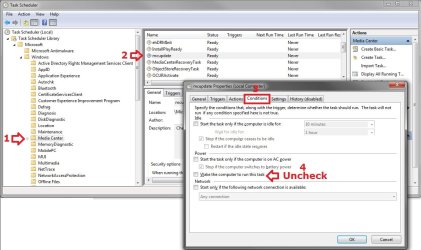
If the Library Tree is not visible in the Task Scheduler, select View, Customize, and then add checkbox to Console Tree.
 

My Computer My Computer

At a glance

Windows 7 Ultimate x64Intel DuoCore P8600 @ 2.40 GHz6.0 GB
Computer Manufacturer/Model Number
Dell Studio XPS 1640
OS
Windows 7 Ultimate x64
CPU
Intel DuoCore P8600 @ 2.40 GHz
Memory
6.0 GB
THANK YOU!

This problem appeared on win8.1 with the update from 8 to 8.1 and I have been searching for a solution for over a year.

It appears that on win8 computers that had media center installed, the 8.1 update either added or modified this task scheduler event with the "wake" box under "conditions" checked.

In addition to waking the computer up from sleep and hibernation, the setting also defeated the sleep and hibernation timers so that the computer would never go into either sleep or hibernation mode... not a trivial issue for this box that is located in an equipment closet with no AC vent.

Thank you, Thank you, Thank you! This is a huge find for me.

Beverly Howard
 

My Computer My Computer

At a glance

XPPro
Computer Manufacturer/Model Number
Fujitsu T4215
OS
XPPro
Back
Top