
media player not playing clear veideos

magicboy

New member
Member
Local time
12:34 AM
Messages
33
Hello, I am trying to play the video that comes with windows 7, the wildlife one. But whenever I play it it's unclear and everything seems to be red outlines and dull. It's also like this for other videos aswell. I just tried installing windows seven shark codecs but that didn't help. Thanks.
 

My Computer My Computer

Computer Manufacturer/Model Number
Custom Built
OS
windows 7 64 bit
CPU
AMD Athlon II X4 620 2.6GHz AM3
Motherboard
Gigabyte GA-MA770T-UD3P AMD 770 Socket AM3 6 Channel Audio O
Memory
Kingston 4GB (2x2GB) DDR3 1333MHz i5 Memory Kit CL9 1.5V
Graphics Card(s)
ASUS HD 4670 512MB DDR3 DVI VGA HDMI Out PCI-E Graphics Card
Sound Card
Mobo intregrated
Monitor(s) Displays
Yuraku
Hard Drives
Western Digital WD5000AAKS 500GB SATAII 7200RPM 16MB Cache - OEM Caviar Blue
PSU
Coolermaster eXtreme Power 460W PSU
Case
Coolermaster Elite 330 Case
Keyboard
logitech
Mouse
logitech
Other Info
Wireless adapter - Zoom Wireless-G USB Adapter model 4410B
Try VLC player ?
 

My Computer My Computer

OS
window's 7
CPU
core 2 quad
Motherboard
gigabyte
Memory
2gb corsair
Graphics Card(s)
ati hd4850
Monitor(s) Displays
lg
Screen Resolution
1600 X 900
Case
power logic
Other Info
none of the spec above is accurate
It's just doing the exact same thing in that as well, Thanks for replying
 

My Computer My Computer

Computer Manufacturer/Model Number
Custom Built
OS
windows 7 64 bit
CPU
AMD Athlon II X4 620 2.6GHz AM3
Motherboard
Gigabyte GA-MA770T-UD3P AMD 770 Socket AM3 6 Channel Audio O
Memory
Kingston 4GB (2x2GB) DDR3 1333MHz i5 Memory Kit CL9 1.5V
Graphics Card(s)
ASUS HD 4670 512MB DDR3 DVI VGA HDMI Out PCI-E Graphics Card
Sound Card
Mobo intregrated
Monitor(s) Displays
Yuraku
Hard Drives
Western Digital WD5000AAKS 500GB SATAII 7200RPM 16MB Cache - OEM Caviar Blue
PSU
Coolermaster eXtreme Power 460W PSU
Case
Coolermaster Elite 330 Case
Keyboard
logitech
Mouse
logitech
Other Info
Wireless adapter - Zoom Wireless-G USB Adapter model 4410B
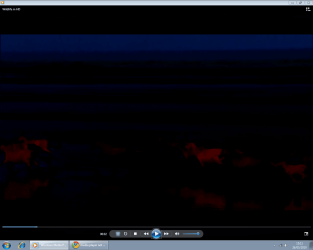
could you post a screenshoot of the video
 

My Computer My Computer

OS
window's 7
CPU
core 2 quad
Motherboard
gigabyte
Memory
2gb corsair
Graphics Card(s)
ati hd4850
Monitor(s) Displays
lg
Screen Resolution
1600 X 900
Case
power logic
Other Info
none of the spec above is accurate
here it is
 

Attachments

  • screenshot of wmp.png
    screenshot of wmp.png
    88.1 KB · Views: 31

My Computer My Computer

Computer Manufacturer/Model Number
Custom Built
OS
windows 7 64 bit
CPU
AMD Athlon II X4 620 2.6GHz AM3
Motherboard
Gigabyte GA-MA770T-UD3P AMD 770 Socket AM3 6 Channel Audio O
Memory
Kingston 4GB (2x2GB) DDR3 1333MHz i5 Memory Kit CL9 1.5V
Graphics Card(s)
ASUS HD 4670 512MB DDR3 DVI VGA HDMI Out PCI-E Graphics Card
Sound Card
Mobo intregrated
Monitor(s) Displays
Yuraku
Hard Drives
Western Digital WD5000AAKS 500GB SATAII 7200RPM 16MB Cache - OEM Caviar Blue
PSU
Coolermaster eXtreme Power 460W PSU
Case
Coolermaster Elite 330 Case
Keyboard
logitech
Mouse
logitech
Other Info
Wireless adapter - Zoom Wireless-G USB Adapter model 4410B
thanks for the snip. a several solution for you

1.Check for video card driver updates from your vendor, and/or DirectX updates from WindowsUpdate.
2.If that doesn't help, turn down your hardware acceleration.
3.Open WMP's Tools:Options:Performance:Advanced menu dialog. First try turning off overlays, and then if that does not help, turn off the Video Mixing Renderer.

hope this helps :)
 

My Computer My Computer

OS
window's 7
CPU
core 2 quad
Motherboard
gigabyte
Memory
2gb corsair
Graphics Card(s)
ati hd4850
Monitor(s) Displays
lg
Screen Resolution
1600 X 900
Case
power logic
Other Info
none of the spec above is accurate
Thanks while I was trying to find driver settings I came across something called asus splendid and turned that off, It seems to of done the trick thanks for ponting me in the right direction
 

My Computer My Computer

Computer Manufacturer/Model Number
Custom Built
OS
windows 7 64 bit
CPU
AMD Athlon II X4 620 2.6GHz AM3
Motherboard
Gigabyte GA-MA770T-UD3P AMD 770 Socket AM3 6 Channel Audio O
Memory
Kingston 4GB (2x2GB) DDR3 1333MHz i5 Memory Kit CL9 1.5V
Graphics Card(s)
ASUS HD 4670 512MB DDR3 DVI VGA HDMI Out PCI-E Graphics Card
Sound Card
Mobo intregrated
Monitor(s) Displays
Yuraku
Hard Drives
Western Digital WD5000AAKS 500GB SATAII 7200RPM 16MB Cache - OEM Caviar Blue
PSU
Coolermaster eXtreme Power 460W PSU
Case
Coolermaster Elite 330 Case
Keyboard
logitech
Mouse
logitech
Other Info
Wireless adapter - Zoom Wireless-G USB Adapter model 4410B
Thanks while I was trying to find driver settings I came across something called asus splendid and turned that off, It seems to of done the trick thanks for ponting me in the right direction

I'm happy it works out well on you. Cheers mate :D
 

My Computer My Computer

OS
window's 7
CPU
core 2 quad
Motherboard
gigabyte
Memory
2gb corsair
Graphics Card(s)
ati hd4850
Monitor(s) Displays
lg
Screen Resolution
1600 X 900
Case
power logic
Other Info
none of the spec above is accurate
From asus website "Splendid Video Enhancement analyze the video data, and fine-tune the properties according to human's perceptive favor. Video will then be output through ASUS VGA Cards, and of course, the result is made more vivid, lively and Splendid!! Go for Splendid, bring each pixel come to life."

Engrish aside, it soulds like it was doing the exact opposite.

ASUS UnSplended!
 

My Computer My Computer

Computer Manufacturer/Model Number
Scratch built
OS
Windows 7 x64 Ultimate
CPU
i7 960
Motherboard
Asus P6X58D
Memory
12 Gig Corsair Dominator
Graphics Card(s)
Nvidia 480
Sound Card
Maudio Delta 44 + breakout box
Monitor(s) Displays
Dell UltraSharp U2410 24in and Samsung 21 dual monitors
Screen Resolution
1920x1200 and 1280x1024
Hard Drives
Primary: Intel X-25M G2 160G SSD
Secondary: Segate baracuda 1.0 TB
HDs in AHCI mode.
PSU
Corasair TX850
Case
Cooler Master HAF
Cooling
Corsair H50
Keyboard
Logitech G15 + N52 game pad
Mouse
Logitech MX518
Internet Speed
15kbs down 4.5kbps up
Other Info
WEI 7.6
CPU & RAM 7.6
Graphics 7.9
Hard disk 7.7
Back
Top