Running that snake oil from Norton is gonna mess your system up, and that's what
might have happened here.
Couple of things (actually a lot of things). Don't EVER mess with the registry. You do not need to "optimize" or any of this. If you're computer savvy you can add, delete and modify keys, but you never want to take a hatchet using some "optimizer" program and go in there and mess around with things. The Windows registry is like a SQL database for websites. The chief difference is that while you can optimize an SQL database, you really can't do that in a manner that won't guarantee a potential mess up for something that may rear its ugly head one day. Even with SQL database optimization you wanna make sure you have a backup, many backups. There is an old tool out there that was used in the Windows 98 and XP days to compact the registry. I bet Norton et al ripped the code off. It probably still works today since the overall mechanics behind the Windows registry is largely the same as it was back then. But this sort of thing now-a-days is not needed in the advent of fast CPUs, fast RAM and fast hard drives.
About defragging. I hope your hard drive isn't flashed-based, i.e an SSD or NVMe. You never, EVER defrag a flash-based hard drive. Be it a USB stick, SD card, SSD, or NVMe. It's simply not needed due to that type of technology and if you do you'll inadvertently increase unnecessary writes to a drive that has a finite write ability.
This goes for so-called data eraser programs that rewrite over data numerous times. With flashed based mediums there's a special way to clean the data on those. Typically you'd want to use the manufacture's wiping software since they know what's needed to get the job done on their hardware. But I don't think that's a guarantee either. All depends on their research and development acumen. A third-party software called Parted Magic claims to do it. I've that for flashed-based sanitation is with the increase of a micro volt or two on the hard drive that zeros out the data. This may or may not be manufacturer specific. If the drive won't be used again, just open it up and drill a hole in the center of all of the memory chips and chuck in the trash. Data is now sanitized. If the flashed based hard drive will be reused, then research is in order. I'd be apt to first encrypted the drive using Vera Crypt or the now defunct, but still usable Truecrypt, and then use something like Parted Magic or the manufacture's hard drive wiper program. After that you have to bring on a don't trust but verify attitude and use some recovery software on the drive and see if any data can be retrieved. Even then, if you're not a hard drive forensic expert you may think that just because the data looks all messed up, it can in theory be put back together. This is why I use full disk encryption from the start right after I install Windows. After I install Windows I bring my data onto the drive and install programs and what not. Now everything is encrypted from the jump and there's no flash memory of it in clear text to go off off.
Free space deletion is also snake oil. Based on what I just said, even if you somehow manage to wipe free space without the possibility of data retrieval (that's what wiping free space is all about), you still have your full unencrypted drive for the taking. Even on a fully encrypted drive, wiping free space means nothing. The data that was sent to the recycle bin and sent to free space is already in encrypted form so no need to wipe free space at all. You'd only use a wipe free space option on a drive that already had data and now you want to encrypt the drive. This option is given to you using Truecrypt or Veracrypt. But consideration must be used if it's a flashed based drive since you'll increase writes to the drive. If the drive is new you most certainly don't have to wipe free space. There shouldn't be any data on it from the get go. If you're think wiping free space is some how a computer performance booster, it isn't. It is exactly as I described. In fact, the snake oil wipe free space option in everybody's favorite Ccleaner is just that. It's not needed and in my testing I was still able to recover deleted data after wiping free space. I can also tell you the FBI et al has waaaay better programs for data retrieval. Even on broken hard drives. You know those "black boxes" (they're orange) from aircraft? If the data has been tainted, the NTSB or other agency can go in and use forensics to retrieve that data. And that's just the NTSB. So there you go.
Boot optimization sounds like straight up snake oil as well. What is this program optimizing is what I'd like to know. I wouldn't let any program fiddle with my stuff behind my back unless I know what it's doing. That way you then know if something happens you can retrace your steps to figure out the cause. In this case you don't exactly know what "optimizations" are being done to reverse what's been done in case of a mess up.
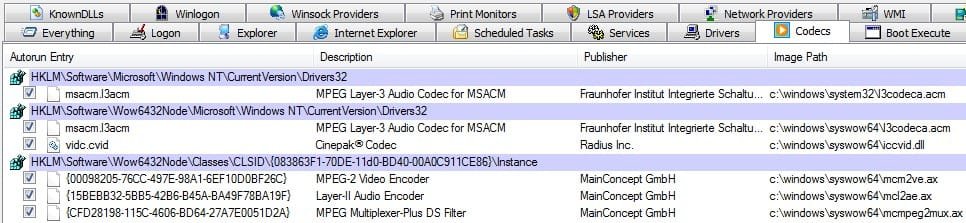
Now about the issue at hand. Yes, you're indeed correct in that YouTube and what not now use HTML5 to render video. Flash is now dead so thank the silicon God for that. There are no third party vulnerable plagued plug-ins required. Now I don't know if a Codec is required for HTML5 playback or not. But what you can do now is run a nice little program I always mention here called Autoruns. Now look under the Codecs tab and your results
[should be comparable to mine from the screenshot here. I have never needed to install any third party Codecs and I can play HTML5 content from YouTube and even on my own website where I can upload MP4 videos that'll render in HTML5. (You'll see the acronym GbmH which is the same as an LLC (Limited Liability Company) here in the U.S.) The MainConcept Codecs I have there may have been part of some software I installed. You should have at least four which I think is by default in Windows 7.
Autoruns for Windows - Windows Sysinternals | Microsoft Docs
Now if you're wanting to optimize anything, Autoruns would be the better way in the department of control of startups. Never use MSConfig for this. That's for PC diagnostics only. You do need to know what you're doing and not just willy nilly disable or even delete something you shouldn't or don't know about. It would be wise to either create a system restore point and/or create a full disk clone of the computer before you mess with a value you're not sure about. The other great thing is that you can right click and select the Virus Total option to scan the SHA256 hash of the file at Virus Total to see if it's been classified as malware. Just accept the terms and from there on out you can right click and scan. The general consensus is four hits and you toss, but it also depends on what you have there. Things like game hacks, process injectors and other stuff look malicious but may not be. So that could be a double edge sword if some coder codes a game hack that looks malicious, says it's going to be a false positive, but he added some code there to create a reverse shell on your computer. Again, don't trust but verify applies so you'd want source code. Moving on. LOL
Please download Chrome portable and try a YouTube video. Does it work? You've already stated Firefox does work so lets see if Chromium code works.
Google Chrome Portable (web browser) | PortableApps.com
Off topic, but Chrome, Firefox et al are not your friends. If you never have to use an extension (add-on) in a browser, check out UnGoogled Chromium which is at Github. The rule here is to never connect a Google account (why would anyone do that?!) or use an add-on in Ungoogled Chromium. Once you do the gig is up. If you're willing to put up with some cumbersomeness, then try the niche browser Pale Moon. It's what I've been using for years, but websites can throw a hissy fit with it largely due to Pale Moon's user agent and perhaps lack of Google website code crap rendering ability I know nothing of other than a lot of websites are using it which is dumb as all sin. The othe other might be browser metrics the website sees. In the case of trying to solve a Google reCAPTCHA in Pale Moon, it'll be next to impossible due to the sheer blatant discrimination to other browsers that are now Chromium centric like, Firefox, Chrome, Edge and I think Safari. Google thinks they own the web is what it amounts to. Gone are the days of using what ever browser you'd like. I go back to the days of Phoenix, the Mozilla Suite and Netscape Navigator ( God, I loved Netscape Navigator. LOL). Websites want you to use Firefox, Chrome, Edge or Safari. Brave I don't think is all it's cracked up to be, but it's an interesting take on things. On my tablet and phone I use the DuckDuckGo browser and Brave browser for what ever it's worth. Smart devices already have telemetry on you by their inherit nature so I'm mostly not using those browsers to mitigate that. It's to help cut back a little on telemetry and mostly Ads.
Anyway, there's a lot I could go over. The overall theme here is don't trust but verify. If a product says it'll optimize this or that on your PC or smart device, I wouldn't trust it. You don't know what it does and any damage it can do. If a company says they built this browser with privacy and security in mind, well, I know from my own research that is blatantly false. In the case of Firefox there's a ton of telemetry pouring out of it. Chrome the same way. Brave I have to check which I'm not in the mood to do right now. Pale Moon doesn't. Only on very first launch with its mega crap home page full of fluff. You can change the home page to "blank" and then subsequent browser launching will not have any telemetry. It simply doesn't exist and is not needed. The only thing is that Pale Moon partnered with DuckDuckGo so if you use that search engine in Pale Moon, Pale Moon gets a little revenue. Have to pay the bills somehow... Now if you add add-ons and what not to Pale Moon, now those will probably create telemetry beyond the virgin browser.
(Click to enlarge).