
MediaBrowser

So Lets get some feed Back on Media Browser


  • Total voters
    137
Just put MC in windowed mode (not full screen) then press Print Screen button on your keyboard. Then open Paint, Ctrl-V to paste the screen into paint. Then you can crop it to the MC screen.
 

My Computer My Computer

Computer Manufacturer/Model Number
Custom Built Rig BY ME "My Baby"
OS
7 Ultimate x64
CPU
AMD Athlon 64X2 4600+ 2.51Ghz
Motherboard
ASUS M2N-E SLI
Memory
6GB DDR2 900 Kingston
Graphics Card(s)
2x BFG Nvidia 9600 GT-OC
Sound Card
SoundBlaster XF-I
Monitor(s) Displays
19"acer, 22"acer, 19"acer, 48" HITACHI HDTV
Screen Resolution
1400x900, 1680x1050, 1400x900, 1920x1080
Hard Drives
Seagate 500GB Sata
Seagate 500GB Sata
Seagate 500GB Sata
Seagate 500GB Sata
Seagate 320 Sata (Primary)
Western Digital 500GB IDE
Western Digital 300GB IDE
Maxter 720 Sata (USB)
PSU
BFG 800 Watt SLI Power Supply
Case
Game Master
Cooling
Thermotake
Keyboard
Logitech (Bluetooth)
Mouse
Logitech (Bluetooth)
Internet Speed
Turbo Cable
Other Info
ATI 650HD TV Tuner X2,
Samsung (Light scribe) DVD-R,
Sony (Dual Layer) DVD-R
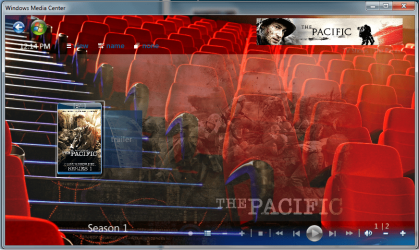
try making a folder in your Series folder called Trailers or Trailer, cant remember which :sarc:, and drop the trailer inside. Scratch all that.... Found a link for you :D

Have a look at this and see if it wont get you where your wanting to go.
 

My Computer My Computer

Computer Manufacturer/Model Number
Custom Built Rig BY ME "My Baby"
OS
7 Ultimate x64
CPU
AMD Athlon 64X2 4600+ 2.51Ghz
Motherboard
ASUS M2N-E SLI
Memory
6GB DDR2 900 Kingston
Graphics Card(s)
2x BFG Nvidia 9600 GT-OC
Sound Card
SoundBlaster XF-I
Monitor(s) Displays
19"acer, 22"acer, 19"acer, 48" HITACHI HDTV
Screen Resolution
1400x900, 1680x1050, 1400x900, 1920x1080
Hard Drives
Seagate 500GB Sata
Seagate 500GB Sata
Seagate 500GB Sata
Seagate 500GB Sata
Seagate 320 Sata (Primary)
Western Digital 500GB IDE
Western Digital 300GB IDE
Maxter 720 Sata (USB)
PSU
BFG 800 Watt SLI Power Supply
Case
Game Master
Cooling
Thermotake
Keyboard
Logitech (Bluetooth)
Mouse
Logitech (Bluetooth)
Internet Speed
Turbo Cable
Other Info
ATI 650HD TV Tuner X2,
Samsung (Light scribe) DVD-R,
Sony (Dual Layer) DVD-R
that's strange.... didn't notice that at first..... ummmmm

Go through all the settings, in the config tool and in MB, and see if you can find the Transparent background setting. I know it was there, but I'm thinking it was maybe removed a while ago... But have a look for it anyway, if you find it, turn it off.

If that doesnt fix it, then start messing with the Tired backdrop settings that are in the MB config inside MB (not the tool)

I dont use the default theme (ever) so I'm not totally sure what could be causing that to happen.
But if you get it sorted, please post your results. It could help others. :)
 

My Computer My Computer

Computer Manufacturer/Model Number
Custom Built Rig BY ME "My Baby"
OS
7 Ultimate x64
CPU
AMD Athlon 64X2 4600+ 2.51Ghz
Motherboard
ASUS M2N-E SLI
Memory
6GB DDR2 900 Kingston
Graphics Card(s)
2x BFG Nvidia 9600 GT-OC
Sound Card
SoundBlaster XF-I
Monitor(s) Displays
19"acer, 22"acer, 19"acer, 48" HITACHI HDTV
Screen Resolution
1400x900, 1680x1050, 1400x900, 1920x1080
Hard Drives
Seagate 500GB Sata
Seagate 500GB Sata
Seagate 500GB Sata
Seagate 500GB Sata
Seagate 320 Sata (Primary)
Western Digital 500GB IDE
Western Digital 300GB IDE
Maxter 720 Sata (USB)
PSU
BFG 800 Watt SLI Power Supply
Case
Game Master
Cooling
Thermotake
Keyboard
Logitech (Bluetooth)
Mouse
Logitech (Bluetooth)
Internet Speed
Turbo Cable
Other Info
ATI 650HD TV Tuner X2,
Samsung (Light scribe) DVD-R,
Sony (Dual Layer) DVD-R
Maybe I am missing something but why go through all this trouble when XBMC and Boxee have all of this functionality already built in and they're free?
 

My Computer My Computer

Computer Manufacturer/Model Number
Built myself
OS
Vista, Ubuntu, Win7
CPU
Quadcore - lapped and massively overclocked :)
Motherboard
ASUS
Memory
8gb
Graphics Card(s)
nVidia
Sound Card
Onboard
Monitor(s) Displays
24" Dell
Screen Resolution
1920x1200
Hard Drives
1. 300gb raptor
2. 1tb Hitachi 7200rpm
3. 1tb WD green drive
PSU
Antec
Case
Antec
Cooling
Thermaltake and lots of fans
Keyboard
MS
Mouse
IBM
Internet Speed
30k
Other Info
This is my working machine but my HTPC is similar just toned down.
This is free also. I have never played with the other 2 so I can't say which is better. All I know is I LOVE MB! :D
 

My Computer My Computer

Computer Manufacturer/Model Number
Custom Built Rig BY ME "My Baby"
OS
7 Ultimate x64
CPU
AMD Athlon 64X2 4600+ 2.51Ghz
Motherboard
ASUS M2N-E SLI
Memory
6GB DDR2 900 Kingston
Graphics Card(s)
2x BFG Nvidia 9600 GT-OC
Sound Card
SoundBlaster XF-I
Monitor(s) Displays
19"acer, 22"acer, 19"acer, 48" HITACHI HDTV
Screen Resolution
1400x900, 1680x1050, 1400x900, 1920x1080
Hard Drives
Seagate 500GB Sata
Seagate 500GB Sata
Seagate 500GB Sata
Seagate 500GB Sata
Seagate 320 Sata (Primary)
Western Digital 500GB IDE
Western Digital 300GB IDE
Maxter 720 Sata (USB)
PSU
BFG 800 Watt SLI Power Supply
Case
Game Master
Cooling
Thermotake
Keyboard
Logitech (Bluetooth)
Mouse
Logitech (Bluetooth)
Internet Speed
Turbo Cable
Other Info
ATI 650HD TV Tuner X2,
Samsung (Light scribe) DVD-R,
Sony (Dual Layer) DVD-R
Maybe I am missing something but why go through all this trouble when XBMC and Boxee have all of this functionality already built in and they're free?

I have used all 3 products, and I find Media Browser (MB) the best of them, especially when you have either Media Center Master or Meta</browser> partnered with it.

XBMC originated under Linux, and ported to WIndows, and although it is good, XBMC does not yet support hardware acceleration under Windows, unless that's changed recently.

BOXEE is something totally different. It brings together the online video environment and your local video environment into one app. I'm still messing with it, but I still prefer MB at the moment.

Everyone to their own - if we were all alike, what a dull place this would be :sleepy:
 

My Computer My Computer

Computer Manufacturer/Model Number
AsRock ION330
OS
Windows 7
CPU
Atom 330
Motherboard
ASRock ION
Memory
4Gb
Graphics Card(s)
Nvidia ION
Sound Card
Nvidia ION
Monitor(s) Displays
42" Pioneer Plasma
Screen Resolution
1920 x 1080
Hard Drives
300Gb SATA internal, and 2Tb in NAS on LAN.
PSU
Standard
Case
ASRock
Cooling
ASRock
Keyboard
Basic
Mouse
Basic
Internet Speed
50 Mb/s
Other Info
6" 4"", top lip, and walks about a lot !!
Just put MC in windowed mode (not full screen) then press Print Screen button on your keyboard. Then open Paint, Ctrl-V to paste the screen into paint. Then you can crop it to the MC screen.

If you have Windows 7 (or Vista I believe), use the SNIPPING TOOL.
 

My Computer My Computer

Computer Manufacturer/Model Number
AsRock ION330
OS
Windows 7
CPU
Atom 330
Motherboard
ASRock ION
Memory
4Gb
Graphics Card(s)
Nvidia ION
Sound Card
Nvidia ION
Monitor(s) Displays
42" Pioneer Plasma
Screen Resolution
1920 x 1080
Hard Drives
300Gb SATA internal, and 2Tb in NAS on LAN.
PSU
Standard
Case
ASRock
Cooling
ASRock
Keyboard
Basic
Mouse
Basic
Internet Speed
50 Mb/s
Other Info
6" 4"", top lip, and walks about a lot !!
Just put MC in windowed mode (not full screen) then press Print Screen button on your keyboard. Then open Paint, Ctrl-V to paste the screen into paint. Then you can crop it to the MC screen.

If you have Windows 7 (or Vista I believe), use the SNIPPING TOOL.
lol Yeah that will work too. I always forget about that thing. I use Snag-It for everything, so am always forgetting about the built in tools.
 

My Computer My Computer

Computer Manufacturer/Model Number
Custom Built Rig BY ME "My Baby"
OS
7 Ultimate x64
CPU
AMD Athlon 64X2 4600+ 2.51Ghz
Motherboard
ASUS M2N-E SLI
Memory
6GB DDR2 900 Kingston
Graphics Card(s)
2x BFG Nvidia 9600 GT-OC
Sound Card
SoundBlaster XF-I
Monitor(s) Displays
19"acer, 22"acer, 19"acer, 48" HITACHI HDTV
Screen Resolution
1400x900, 1680x1050, 1400x900, 1920x1080
Hard Drives
Seagate 500GB Sata
Seagate 500GB Sata
Seagate 500GB Sata
Seagate 500GB Sata
Seagate 320 Sata (Primary)
Western Digital 500GB IDE
Western Digital 300GB IDE
Maxter 720 Sata (USB)
PSU
BFG 800 Watt SLI Power Supply
Case
Game Master
Cooling
Thermotake
Keyboard
Logitech (Bluetooth)
Mouse
Logitech (Bluetooth)
Internet Speed
Turbo Cable
Other Info
ATI 650HD TV Tuner X2,
Samsung (Light scribe) DVD-R,
Sony (Dual Layer) DVD-R
Just put MC in windowed mode (not full screen) then press Print Screen button on your keyboard. Then open Paint, Ctrl-V to paste the screen into paint. Then you can crop it to the MC screen.

If you have Windows 7 (or Vista I believe), use the SNIPPING TOOL.
lol Yeah that will work too. I always forget about that thing. I use Snag-It for everything, so am always forgetting about the built in tools.

I think the SNIPPING TOOL is one of the best features that MS has built-in for a while !!
 

My Computer My Computer

Computer Manufacturer/Model Number
AsRock ION330
OS
Windows 7
CPU
Atom 330
Motherboard
ASRock ION
Memory
4Gb
Graphics Card(s)
Nvidia ION
Sound Card
Nvidia ION
Monitor(s) Displays
42" Pioneer Plasma
Screen Resolution
1920 x 1080
Hard Drives
300Gb SATA internal, and 2Tb in NAS on LAN.
PSU
Standard
Case
ASRock
Cooling
ASRock
Keyboard
Basic
Mouse
Basic
Internet Speed
50 Mb/s
Other Info
6" 4"", top lip, and walks about a lot !!
Well... after playing with WMC for a week on Win7, I have to say... whoa! Quite the improvement over Vista! It worked with my Dual Tuner Hauppauge card instantly, saw my MP4s (I couldn't get Vista to see these for the life of me!) right away and has been rock solid on recordings.

Adding in Media Browser has improved it greatly.

I have no installed the XBMC, Boxee and Hulu extensions and get the best of all worlds in one shot. Plus, the wife likes the ease of using WMC.
 

My Computer My Computer

Computer Manufacturer/Model Number
Built myself
OS
Vista, Ubuntu, Win7
CPU
Quadcore - lapped and massively overclocked :)
Motherboard
ASUS
Memory
8gb
Graphics Card(s)
nVidia
Sound Card
Onboard
Monitor(s) Displays
24" Dell
Screen Resolution
1920x1200
Hard Drives
1. 300gb raptor
2. 1tb Hitachi 7200rpm
3. 1tb WD green drive
PSU
Antec
Case
Antec
Cooling
Thermaltake and lots of fans
Keyboard
MS
Mouse
IBM
Internet Speed
30k
Other Info
This is my working machine but my HTPC is similar just toned down.
Glad you like the improvements of wmp, and good to see you using MB. Now stick media center master in there as well and really enjoy wmp. Media center master will download your trailers and edit your xml file so that MB can play the trailer for it. And, if you are like me that cannot watch movies without subs or captions, media center master will find subs as well.
 

My Computer My Computer

Computer Manufacturer/Model Number
Gigabyte
OS
Windows 7 Ultimate
CPU
Intel Core(TM)2 Quad- Q9550, 2.83GHz
Motherboard
G31M-ES2L
Memory
4GB
Graphics Card(s)
ATI Radeon HD4600
Sound Card
On Board:
Monitor(s) Displays
Acer AL2223W, Acer AL1916
Screen Resolution
1680 x 1050, 1280 x 1024
Hard Drives
160GB
350GB
250GB
250GB
PSU
600W
Case
Cooler Master
Keyboard
Microsoft Laser 6000
Mouse
Logitech Optical Trackman
Internet Speed
1.5MB
Other Info
I am also running a quasar gamatron flux capacitor with twin pulse tronic phasers......jk, I have no such stuff.
Zaaaayyyy whats up man! long time no see :D
 

My Computer My Computer

Computer Manufacturer/Model Number
Custom Built Rig BY ME "My Baby"
OS
7 Ultimate x64
CPU
AMD Athlon 64X2 4600+ 2.51Ghz
Motherboard
ASUS M2N-E SLI
Memory
6GB DDR2 900 Kingston
Graphics Card(s)
2x BFG Nvidia 9600 GT-OC
Sound Card
SoundBlaster XF-I
Monitor(s) Displays
19"acer, 22"acer, 19"acer, 48" HITACHI HDTV
Screen Resolution
1400x900, 1680x1050, 1400x900, 1920x1080
Hard Drives
Seagate 500GB Sata
Seagate 500GB Sata
Seagate 500GB Sata
Seagate 500GB Sata
Seagate 320 Sata (Primary)
Western Digital 500GB IDE
Western Digital 300GB IDE
Maxter 720 Sata (USB)
PSU
BFG 800 Watt SLI Power Supply
Case
Game Master
Cooling
Thermotake
Keyboard
Logitech (Bluetooth)
Mouse
Logitech (Bluetooth)
Internet Speed
Turbo Cable
Other Info
ATI 650HD TV Tuner X2,
Samsung (Light scribe) DVD-R,
Sony (Dual Layer) DVD-R
Yea I was on a Mac using Plex and then when I moved to a PC format I was using XBMC and Boxee because I never thought much about Media Center after trying it in Vista. Windows 7 has brought things up to a whole new level.

Had never heard of Media Center Master before but I am off to research it.

BTW... "I wanna be an airborne ranger, live a life of sex and danger. Etc" Yes... I was part of that too so kudos to you. :)
 

My Computer My Computer

Computer Manufacturer/Model Number
Built myself
OS
Vista, Ubuntu, Win7
CPU
Quadcore - lapped and massively overclocked :)
Motherboard
ASUS
Memory
8gb
Graphics Card(s)
nVidia
Sound Card
Onboard
Monitor(s) Displays
24" Dell
Screen Resolution
1920x1200
Hard Drives
1. 300gb raptor
2. 1tb Hitachi 7200rpm
3. 1tb WD green drive
PSU
Antec
Case
Antec
Cooling
Thermaltake and lots of fans
Keyboard
MS
Mouse
IBM
Internet Speed
30k
Other Info
This is my working machine but my HTPC is similar just toned down.
What's up Demon, thanks for the shout out. I see you still holding down the fort with MB, keep up the great work man. Atomic thanks for the shout out as well, yeah that was\is a great time of my life, miss it like crazy, but, got to move to something different.....got old, hehehehe. Yeah check out that media center master, you will like it. Ask the guys around here (Demonseed), he\they can vouch for it.
 

My Computer My Computer

Computer Manufacturer/Model Number
Gigabyte
OS
Windows 7 Ultimate
CPU
Intel Core(TM)2 Quad- Q9550, 2.83GHz
Motherboard
G31M-ES2L
Memory
4GB
Graphics Card(s)
ATI Radeon HD4600
Sound Card
On Board:
Monitor(s) Displays
Acer AL2223W, Acer AL1916
Screen Resolution
1680 x 1050, 1280 x 1024
Hard Drives
160GB
350GB
250GB
250GB
PSU
600W
Case
Cooler Master
Keyboard
Microsoft Laser 6000
Mouse
Logitech Optical Trackman
Internet Speed
1.5MB
Other Info
I am also running a quasar gamatron flux capacitor with twin pulse tronic phasers......jk, I have no such stuff.
Hi

I have a few questions regarding mediabrowser, and would appreciate any help:

1. Is there a way of launching an external application once i am in mediabrowser ?

2. Is there a way of hiding or getting rid of the "Music" button in mediabrowser, so that it only gives an option of "Movies" and "TV Series" ?

3. If i wanted to launch mediabrowser from within another application, what path would i enter into the other application for it to go straight to mediabrowser instead of windows media center (i have got the mediabrowser shortcut on my desktop, and it works fine, but when i point the other application to the shortcut it opens up windows music center).

4. Where would i find the application that is in the first post that automatically builds folders for my movie files. (The link does not seem to work).

Thanks for any help i get.
Cliff
 

My Computer My Computer

OS
windows 7
This app should DO what you want in order to customize your start menu.
To setup a Windows shortcut to launch directly Media Browser for example you would create a shortcut to “C:\Windows\ehome\ehshell.exe” and then insert the following command-line switch afterwards: “/entrypoint:{CE32C570-4BEC-4aeb-AD1D-CF47B91DE0B2}\{FC9ABCCC-36CB-47ac-8BAB-03E8EF5F6F22}”. So you are not confused, create shortcut, and paste this exact string that is between the quotation marks, (you do not need the quotation marks): "C:\Windows\ehome\ehshell.exe /entrypoint:{CE32C570-4BEC-4aeb-AD1D-CF47B91DE0B2}\{FC9ABCCC-36CB-47ac-8BAB-03E8EF5F6F22}" If you want more tips, I frequent this site A LOT.
Hope this helps
 

My Computer My Computer

Computer Manufacturer/Model Number
Gigabyte
OS
Windows 7 Ultimate
CPU
Intel Core(TM)2 Quad- Q9550, 2.83GHz
Motherboard
G31M-ES2L
Memory
4GB
Graphics Card(s)
ATI Radeon HD4600
Sound Card
On Board:
Monitor(s) Displays
Acer AL2223W, Acer AL1916
Screen Resolution
1680 x 1050, 1280 x 1024
Hard Drives
160GB
350GB
250GB
250GB
PSU
600W
Case
Cooler Master
Keyboard
Microsoft Laser 6000
Mouse
Logitech Optical Trackman
Internet Speed
1.5MB
Other Info
I am also running a quasar gamatron flux capacitor with twin pulse tronic phasers......jk, I have no such stuff.
Hi Zay

Thank u for your reply :D

At the moment i have used media center studio to launch external apps from media center. Please tell me is it possible to launch external apps once i am in "mediabrowser" ?

In your first post u had a program that created individual folders for all my movie files, please tell me how to get that program as the link is not working.

When i use the line c:\windows\ehome\ehshell.exe /entrypoint:{ce32c570-4bec-4aeb-ad1d-cf47b91de0b2}\{fc9abccc-36cb-47ac-8bab-03e8ef5f6f22} in my shortcut, and click the shortcut, it works correctly and goes directly into mediabrowser, but the program i am using to to launch mediabrowser is looking for a regular path name... any idea what path i could use ?

Thanks again
Cliff
 

My Computer My Computer

OS
windows 7
Here is a link to the file2folder script. As to launching an external app, I think I saw something about that somewhere, Let me do some more research and I will get back to you. On your other issue of an actual path for MB, I could be wrong, but I don't think there is one, because MB functions off an XML.config file, and not an exe. Like I said I could be wrong, hopefully someone else can share a better response that I. If I am wrong, I apologize.
EDIT: Ok found this article, I have not tried it, but it seemed to work. Make sure to read the whole thing so you get the right code to use. This is for launching your app from within MCE. Oh talk to mikinho, I think he actually wrote an app that does that.On second thought, the media center launcher can do just that, launch other apps from within mce. Hope I helped you out.
Maximize MCE after external program and Change Icons - The Green Button
 

My Computer My Computer

Computer Manufacturer/Model Number
Gigabyte
OS
Windows 7 Ultimate
CPU
Intel Core(TM)2 Quad- Q9550, 2.83GHz
Motherboard
G31M-ES2L
Memory
4GB
Graphics Card(s)
ATI Radeon HD4600
Sound Card
On Board:
Monitor(s) Displays
Acer AL2223W, Acer AL1916
Screen Resolution
1680 x 1050, 1280 x 1024
Hard Drives
160GB
350GB
250GB
250GB
PSU
600W
Case
Cooler Master
Keyboard
Microsoft Laser 6000
Mouse
Logitech Optical Trackman
Internet Speed
1.5MB
Other Info
I am also running a quasar gamatron flux capacitor with twin pulse tronic phasers......jk, I have no such stuff.
Back
Top