
MediaBrowser

So Lets get some feed Back on Media Browser


  • Total voters
    137
Yeah, I see exactly what your saying.

Yes, you would install MB on all your HTPC's and then point them all to your server where the media is stored. In the case of have 3 clients you should setup your collection with local metadata so you dont have to collect web info 3 times per movie. You can even setup MB with a shared cache so things like Playstate, Display settings, watched/unwatched are all global and will update across all clients when something is done from any room.
 

My Computer My Computer

Computer Manufacturer/Model Number
Custom Built Rig BY ME "My Baby"
OS
7 Ultimate x64
CPU
AMD Athlon 64X2 4600+ 2.51Ghz
Motherboard
ASUS M2N-E SLI
Memory
6GB DDR2 900 Kingston
Graphics Card(s)
2x BFG Nvidia 9600 GT-OC
Sound Card
SoundBlaster XF-I
Monitor(s) Displays
19"acer, 22"acer, 19"acer, 48" HITACHI HDTV
Screen Resolution
1400x900, 1680x1050, 1400x900, 1920x1080
Hard Drives
Seagate 500GB Sata
Seagate 500GB Sata
Seagate 500GB Sata
Seagate 500GB Sata
Seagate 320 Sata (Primary)
Western Digital 500GB IDE
Western Digital 300GB IDE
Maxter 720 Sata (USB)
PSU
BFG 800 Watt SLI Power Supply
Case
Game Master
Cooling
Thermotake
Keyboard
Logitech (Bluetooth)
Mouse
Logitech (Bluetooth)
Internet Speed
Turbo Cable
Other Info
ATI 650HD TV Tuner X2,
Samsung (Light scribe) DVD-R,
Sony (Dual Layer) DVD-R
Yeah, I see exactly what your saying.

Yes, you would install MB on all your HTPC's and then point them all to your server where the media is stored. In the case of have 3 clients you should setup your collection with local metadata so you dont have to collect web info 3 times per movie. You can even setup MB with a shared cache so things like Playstate, Display settings, watched/unwatched are all global and will update across all clients when something is done from any room.

Thank you for your response DemonSeed. I was up in the air on staying with My Movies versus moving to MB. But if I can get MB configured properly it seems like its going to work well.
 

My Computer My Computer

OS
Windows 7 Ultimate 64-bit
CPU
Intel Q6600
Motherboard
Intel D975xbx2
Yeah, I see exactly what your saying.

Yes, you would install MB on all your HTPC's and then point them all to your server where the media is stored. In the case of have 3 clients you should setup your collection with local metadata so you dont have to collect web info 3 times per movie. You can even setup MB with a shared cache so things like Playstate, Display settings, watched/unwatched are all global and will update across all clients when something is done from any room.

Could you explain how to do that, or post a link to instructions please? I just built a HTPC for the living room. I have most of my media files organized on various large harddrives in the bedroom PC. They are networked. I set up Media Browser for the first time and it downloaded the images for the directories for TV series and so on. Next time I went to use Media Browser a few days later, all the images were gone. I could hit the record button to force reload, but it seems like if I restart, all the images and metadata disappears until manual reload. Thanks!
 

My Computer My Computer

OS
W7 Pro x64
CPU
AMD|A64 X2 5400+ 2.8G
Motherboard
ASUS M3A78-EM AM2+ 780G
Memory
1Gx2|OCZ DII1066OCZ2N10662GK R
Graphics Card(s)
onboard Radeon 3200HD
Sound Card
M-Audio Revolution 7.1
Monitor(s) Displays
Dell 30" 3007wfp-HC
Hard Drives
320G WD3200AAKS
1T WD10EACS
1.5T SAMSUNG HD154UI
PSU
SEASONIC|SS-550HT 550W
Case
ANTEC|SOLO BK/SIL
Cooling
Scythe Ninja 2
This link is the one stop shop for anything you would want to learn about MB :p
Media Browser Community Tracker

LOTS of great info there. Just take your time and take it all in.
If you still need any help after your done studying, I'll be happy to lend a hand.
 
Last edited:

My Computer My Computer

Computer Manufacturer/Model Number
Custom Built Rig BY ME "My Baby"
OS
7 Ultimate x64
CPU
AMD Athlon 64X2 4600+ 2.51Ghz
Motherboard
ASUS M2N-E SLI
Memory
6GB DDR2 900 Kingston
Graphics Card(s)
2x BFG Nvidia 9600 GT-OC
Sound Card
SoundBlaster XF-I
Monitor(s) Displays
19"acer, 22"acer, 19"acer, 48" HITACHI HDTV
Screen Resolution
1400x900, 1680x1050, 1400x900, 1920x1080
Hard Drives
Seagate 500GB Sata
Seagate 500GB Sata
Seagate 500GB Sata
Seagate 500GB Sata
Seagate 320 Sata (Primary)
Western Digital 500GB IDE
Western Digital 300GB IDE
Maxter 720 Sata (USB)
PSU
BFG 800 Watt SLI Power Supply
Case
Game Master
Cooling
Thermotake
Keyboard
Logitech (Bluetooth)
Mouse
Logitech (Bluetooth)
Internet Speed
Turbo Cable
Other Info
ATI 650HD TV Tuner X2,
Samsung (Light scribe) DVD-R,
Sony (Dual Layer) DVD-R
Removing Fox Intros

Hi

Please could someone help me with a script to remove all the fox intros from my movies, as well as removing the nimber from the movie ? I have them labelled intro 01 and movie 02.

Much Apppreciated
Thanks
 

My Computer My Computer

OS
windows 7
Hi

Please could someone help me with a script to remove all the fox intros from my movies, as well as removing the nimber from the movie ? I have them labelled intro 01 and movie 02.

Much Apppreciated
Thanks
Mikinho and Zay are my go to guys for those kind of things. Might be worth a try pm'ing one or both of them and asking for help.
 

My Computer My Computer

Computer Manufacturer/Model Number
Custom Built Rig BY ME "My Baby"
OS
7 Ultimate x64
CPU
AMD Athlon 64X2 4600+ 2.51Ghz
Motherboard
ASUS M2N-E SLI
Memory
6GB DDR2 900 Kingston
Graphics Card(s)
2x BFG Nvidia 9600 GT-OC
Sound Card
SoundBlaster XF-I
Monitor(s) Displays
19"acer, 22"acer, 19"acer, 48" HITACHI HDTV
Screen Resolution
1400x900, 1680x1050, 1400x900, 1920x1080
Hard Drives
Seagate 500GB Sata
Seagate 500GB Sata
Seagate 500GB Sata
Seagate 500GB Sata
Seagate 320 Sata (Primary)
Western Digital 500GB IDE
Western Digital 300GB IDE
Maxter 720 Sata (USB)
PSU
BFG 800 Watt SLI Power Supply
Case
Game Master
Cooling
Thermotake
Keyboard
Logitech (Bluetooth)
Mouse
Logitech (Bluetooth)
Internet Speed
Turbo Cable
Other Info
ATI 650HD TV Tuner X2,
Samsung (Light scribe) DVD-R,
Sony (Dual Layer) DVD-R
Thank u Demonseed.

Also please tell me do u know of a way to have my boxsets displayed amongst my movies, as well as have my fox intro in all my movies?

Thank You
 

My Computer My Computer

OS
windows 7
The way to display your boxsets is to have a folder ie Matrix, put your Matrix boxset icon in it and call it folder then have the film folders inside as sub folders each one in their own folder with poster named folder also.
that way when you browse through your movies you will see the boxset icon then upon clicking the icon that will open up to show the three movies and the posters . i recomend using the coverart plugin for dvd cases .
i bought it recently and it works perfectly,
And looks Amazing.
 

My Computer My Computer

Computer Manufacturer/Model Number
Hewlett packard/p6512uk
OS
Microsoft Windows 7 Home Premium 64-bit 7600
CPU
IIx4 amd athelon 635 processor
Motherboard
FOXCONN 2AA9
Memory
2x2gb
Graphics Card(s)
ati radeon HD 5450
Sound Card
(1) Realtek High Definition Audio (2) AMD High Definition
Monitor(s) Displays
samsung lcd tv 32"
Screen Resolution
1360x 768
Hard Drives
(1) WDC WD10 01FAES-60Z2A0 SATA Disk Device (2) Maxtor OneTouch USB Device (3) ST310003 33AS USB Device (4) WD My Book 1111 USB Device
PSU
?
Cooling
air!
Keyboard
wireless hp
Mouse
wireless Hp,optical
Internet Speed
1.10mb/s
Antivirus
MSE
Browser
Firefox
Thank u Demonseed.

Also please tell me do u know of a way to have my boxsets displayed amongst my movies, as well as have my fox intro in all my movies?

Thank You
Yep, what boohbah said! I also replied to your Q&A on the CT with a nice breakdown of how everything should be set up.
 

My Computer My Computer

Computer Manufacturer/Model Number
Custom Built Rig BY ME "My Baby"
OS
7 Ultimate x64
CPU
AMD Athlon 64X2 4600+ 2.51Ghz
Motherboard
ASUS M2N-E SLI
Memory
6GB DDR2 900 Kingston
Graphics Card(s)
2x BFG Nvidia 9600 GT-OC
Sound Card
SoundBlaster XF-I
Monitor(s) Displays
19"acer, 22"acer, 19"acer, 48" HITACHI HDTV
Screen Resolution
1400x900, 1680x1050, 1400x900, 1920x1080
Hard Drives
Seagate 500GB Sata
Seagate 500GB Sata
Seagate 500GB Sata
Seagate 500GB Sata
Seagate 320 Sata (Primary)
Western Digital 500GB IDE
Western Digital 300GB IDE
Maxter 720 Sata (USB)
PSU
BFG 800 Watt SLI Power Supply
Case
Game Master
Cooling
Thermotake
Keyboard
Logitech (Bluetooth)
Mouse
Logitech (Bluetooth)
Internet Speed
Turbo Cable
Other Info
ATI 650HD TV Tuner X2,
Samsung (Light scribe) DVD-R,
Sony (Dual Layer) DVD-R
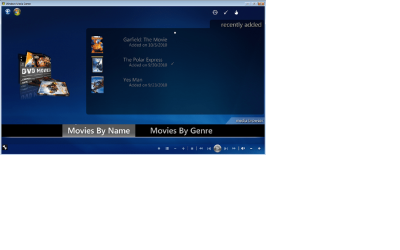
So I am plugging away here on getting MB setup and configured / working the way I want it to. So far so good. I am able to get cover art for the movies. Was able to change the theme and input a few icons for my Music / DVD library buttons. Though I tried to create a "By Genre" category based on the Knowledge articles on MB website, but when I try sort the library is does the whole library not just the by genre buttons....if that makes sense. Im probably not explaining it correctly. any who thats not the point of this so i will continue before i go in a different direction with this.

What I am looking at doing is creating a separate Library for Kids movies for my daughter. So that way in her bedroom I only want her to be able to watch certain movies. I would imagine that this could be done through the parental controls somehow. Just haven't played around with them at this moment in time. My thoughts though are to create a separate Directory on my Server / storage Labeled Kids Movies or whatever. So that way on our living room TV, i will be able to point to both my general directory as well as the kids movies for playback there. And in her bedroom I will only point MB to the Kids directory. Thus eliminating any chance for her to get to the other movies. What do you think? Is this the best way to do this? If not how would you recommend me setting it up?

Any thoughts are great appreciated. Thanks in advance.
 

My Computer My Computer

OS
Windows 7 Ultimate 64-bit
CPU
Intel Q6600
Motherboard
Intel D975xbx2
I agree 100% with you and your setup choice. If you have 0 intention of the kids ever being able to access the main movie collection from the bed room, the way your wanting to set it up would be perfect.

As for the genre setup, it should not be changing all the other tabs when you index one of them. Can you show me how you have it setup and I may be able to pick out what you have done wrong.
Show me your folder and vf setup as well as your mb settings inside mb.
 

My Computer My Computer

Computer Manufacturer/Model Number
Custom Built Rig BY ME "My Baby"
OS
7 Ultimate x64
CPU
AMD Athlon 64X2 4600+ 2.51Ghz
Motherboard
ASUS M2N-E SLI
Memory
6GB DDR2 900 Kingston
Graphics Card(s)
2x BFG Nvidia 9600 GT-OC
Sound Card
SoundBlaster XF-I
Monitor(s) Displays
19"acer, 22"acer, 19"acer, 48" HITACHI HDTV
Screen Resolution
1400x900, 1680x1050, 1400x900, 1920x1080
Hard Drives
Seagate 500GB Sata
Seagate 500GB Sata
Seagate 500GB Sata
Seagate 500GB Sata
Seagate 320 Sata (Primary)
Western Digital 500GB IDE
Western Digital 300GB IDE
Maxter 720 Sata (USB)
PSU
BFG 800 Watt SLI Power Supply
Case
Game Master
Cooling
Thermotake
Keyboard
Logitech (Bluetooth)
Mouse
Logitech (Bluetooth)
Internet Speed
Turbo Cable
Other Info
ATI 650HD TV Tuner X2,
Samsung (Light scribe) DVD-R,
Sony (Dual Layer) DVD-R
Thanks for the fast response DemonSeed. You have been extremely help with this project.


How would you like me to provide the information? Screen shots? I haven't had to provide that type of information on here yet and just want to make sure that I am doing it correctly.

"If you have 0 intention of the kids ever being able to access the main movie collection from the bed room, the way your wanting to set it up would be perfect."

If later down the road I did want to have access in the bed room couldn't I just expand the library across the multiple folders that hold my movies? Just as I am doing in the Living room? I know that it would eliminate a strictly Kids library in the bedroom but that still would be possible correct?
 

My Computer My Computer

OS
Windows 7 Ultimate 64-bit
CPU
Intel Q6600
Motherboard
Intel D975xbx2
How would you like me to provide the information? Screen shots? I haven't had to provide that type of information on here yet and just want to make sure that I am doing it correctly.

Yeah a screen shot of the MB settings and maybe even upload your vf's related to the genre's found in C:\ProgramData\MediaBrowser\Startup
Then that should be all I need to help.

If later down the road I did want to have access in the bed room couldn't I just expand the library across the multiple folders that hold my movies? Just as I am doing in the Living room? I know that it would eliminate a strictly Kids library in the bedroom but that still would be possible correct?
Yes, you can later add the other locations to the kids room.
Plus you can enable the parental control options to further control what your kids can/can't watch.
 

My Computer My Computer

Computer Manufacturer/Model Number
Custom Built Rig BY ME "My Baby"
OS
7 Ultimate x64
CPU
AMD Athlon 64X2 4600+ 2.51Ghz
Motherboard
ASUS M2N-E SLI
Memory
6GB DDR2 900 Kingston
Graphics Card(s)
2x BFG Nvidia 9600 GT-OC
Sound Card
SoundBlaster XF-I
Monitor(s) Displays
19"acer, 22"acer, 19"acer, 48" HITACHI HDTV
Screen Resolution
1400x900, 1680x1050, 1400x900, 1920x1080
Hard Drives
Seagate 500GB Sata
Seagate 500GB Sata
Seagate 500GB Sata
Seagate 500GB Sata
Seagate 320 Sata (Primary)
Western Digital 500GB IDE
Western Digital 300GB IDE
Maxter 720 Sata (USB)
PSU
BFG 800 Watt SLI Power Supply
Case
Game Master
Cooling
Thermotake
Keyboard
Logitech (Bluetooth)
Mouse
Logitech (Bluetooth)
Internet Speed
Turbo Cable
Other Info
ATI 650HD TV Tuner X2,
Samsung (Light scribe) DVD-R,
Sony (Dual Layer) DVD-R
Thank you. i will upload ASAP. I am at work. Every once in awhile I am acutally required to do a few things...... but today should be a good day for this boss's will be out the office in about a half hour. I have the Server here with me which also makes this nice.
 

My Computer My Computer

OS
Windows 7 Ultimate 64-bit
CPU
Intel Q6600
Motherboard
Intel D975xbx2
:D Okay! Not sure how much longer I'll be home, but if I dont get right back to you, I'll get you as soon as I'm back home.
 

My Computer My Computer

Computer Manufacturer/Model Number
Custom Built Rig BY ME "My Baby"
OS
7 Ultimate x64
CPU
AMD Athlon 64X2 4600+ 2.51Ghz
Motherboard
ASUS M2N-E SLI
Memory
6GB DDR2 900 Kingston
Graphics Card(s)
2x BFG Nvidia 9600 GT-OC
Sound Card
SoundBlaster XF-I
Monitor(s) Displays
19"acer, 22"acer, 19"acer, 48" HITACHI HDTV
Screen Resolution
1400x900, 1680x1050, 1400x900, 1920x1080
Hard Drives
Seagate 500GB Sata
Seagate 500GB Sata
Seagate 500GB Sata
Seagate 500GB Sata
Seagate 320 Sata (Primary)
Western Digital 500GB IDE
Western Digital 300GB IDE
Maxter 720 Sata (USB)
PSU
BFG 800 Watt SLI Power Supply
Case
Game Master
Cooling
Thermotake
Keyboard
Logitech (Bluetooth)
Mouse
Logitech (Bluetooth)
Internet Speed
Turbo Cable
Other Info
ATI 650HD TV Tuner X2,
Samsung (Light scribe) DVD-R,
Sony (Dual Layer) DVD-R

I had to change the file extension on the .vf in order to upload it. I just changed it to .doc.

I think I may know where I am going wrong but not positive. I attached a screen shot of where I am trying to make the change at. Basically at the Main menu within MB. Is this the wrong spot? Do i need to go into the Movies by Genre library and make the change in there? If so how is that done. Once I get into that Library I do not see a place to adjust the settings for MB. I only get the MCE setting options.

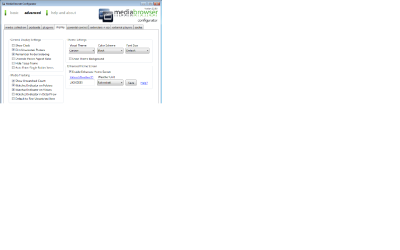
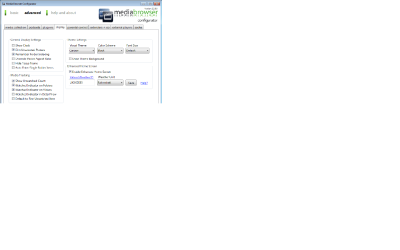
I also attached my MB collection settings and Display settings screen shots. If you need any other tabs please let me know.

Again thanks for all help.
 

Attachments

  • MCE MB Main menu.png
    MCE MB Main menu.png
    71.9 KB · Views: 25
  • MB Media Colletion Settings.png
    MB Media Colletion Settings.png
    25.7 KB · Views: 13
  • MB Media Display Settings.png
    MB Media Display Settings.png
    25.7 KB · Views: 9
  • Movies By Name.doc
    Movies By Name.doc
    154 bytes · Views: 7

My Computer My Computer

OS
Windows 7 Ultimate 64-bit
CPU
Intel Q6600
Motherboard
Intel D975xbx2
Ahh, you told me all I needed in you last statement.

To set the genre index, go into the collection then press the config button that pulls up the view options. There you'll find the index settings. Index to the view you want and done.

Make sure to have to config options to remember index state.
 

My Computer My Computer

Computer Manufacturer/Model Number
Custom Built Rig BY ME "My Baby"
OS
7 Ultimate x64
CPU
AMD Athlon 64X2 4600+ 2.51Ghz
Motherboard
ASUS M2N-E SLI
Memory
6GB DDR2 900 Kingston
Graphics Card(s)
2x BFG Nvidia 9600 GT-OC
Sound Card
SoundBlaster XF-I
Monitor(s) Displays
19"acer, 22"acer, 19"acer, 48" HITACHI HDTV
Screen Resolution
1400x900, 1680x1050, 1400x900, 1920x1080
Hard Drives
Seagate 500GB Sata
Seagate 500GB Sata
Seagate 500GB Sata
Seagate 500GB Sata
Seagate 320 Sata (Primary)
Western Digital 500GB IDE
Western Digital 300GB IDE
Maxter 720 Sata (USB)
PSU
BFG 800 Watt SLI Power Supply
Case
Game Master
Cooling
Thermotake
Keyboard
Logitech (Bluetooth)
Mouse
Logitech (Bluetooth)
Internet Speed
Turbo Cable
Other Info
ATI 650HD TV Tuner X2,
Samsung (Light scribe) DVD-R,
Sony (Dual Layer) DVD-R
Thank You for the help DemonSeed. got it working now.

What my other problem was in that I am using the Carbon Theme, and by default the settings buttons is not available within my different Index. So I had to configure the carbon theme to show the settings buttons. Once I found that I was able to do the above as you stated.

Now this poses a new questions. The Icons that come up with in my Movies by Genre Index are plain/blank images. Is it possible to change that? I know I have read somewhere about adding images for certian Genres. I just don't know if that applies to the way I am doing it. I have attached the photo of it.
 

Attachments

  • Movie by Genre main.png
    Movie by Genre main.png
    71.1 KB · Views: 7

My Computer My Computer

OS
Windows 7 Ultimate 64-bit
CPU
Intel Q6600
Motherboard
Intel D975xbx2

My Computer My Computer

Computer Manufacturer/Model Number
Custom Built Rig BY ME "My Baby"
OS
7 Ultimate x64
CPU
AMD Athlon 64X2 4600+ 2.51Ghz
Motherboard
ASUS M2N-E SLI
Memory
6GB DDR2 900 Kingston
Graphics Card(s)
2x BFG Nvidia 9600 GT-OC
Sound Card
SoundBlaster XF-I
Monitor(s) Displays
19"acer, 22"acer, 19"acer, 48" HITACHI HDTV
Screen Resolution
1400x900, 1680x1050, 1400x900, 1920x1080
Hard Drives
Seagate 500GB Sata
Seagate 500GB Sata
Seagate 500GB Sata
Seagate 500GB Sata
Seagate 320 Sata (Primary)
Western Digital 500GB IDE
Western Digital 300GB IDE
Maxter 720 Sata (USB)
PSU
BFG 800 Watt SLI Power Supply
Case
Game Master
Cooling
Thermotake
Keyboard
Logitech (Bluetooth)
Mouse
Logitech (Bluetooth)
Internet Speed
Turbo Cable
Other Info
ATI 650HD TV Tuner X2,
Samsung (Light scribe) DVD-R,
Sony (Dual Layer) DVD-R
Back
Top