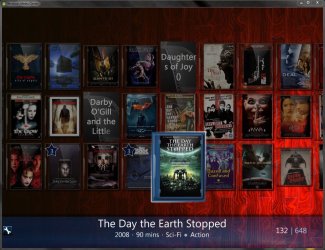
MediaBrowser

So Lets get some feed Back on Media Browser


  • Total voters
    137
xbox

playing around with all kinds of converters have noticed that converting to mp4= smaller file size better thumbnails and fixes problems with MKV jiters and green blocks. files also play better im WMP.

now here is new question!!

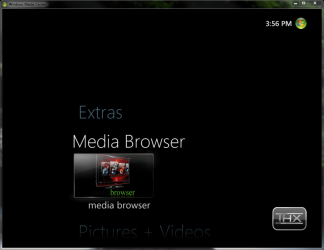
finished configuring kids xbox last night can play movies from media center but would like to access MB as the movie files are better to see. IE(dexter season 3 in WMC it shows all episodes on mian screen but in MB I have just one icon for season three and when click on that i see each episode. much better than WMC. but when I try to go to the xbox mc extras and click on MB gives me acces path denied WHY??
 

My Computer

Computer Manufacturer/Model Number
home built
OS
windows 7 7000
CPU
I 920
Motherboard
gygabyte ga-58-ud4p
Memory
12 gb ocz gold
Graphics Card(s)
2 4870x2
Sound Card
realtek
Monitor(s) Displays
acer 243w
Screen Resolution
1900 x 1200
Hard Drives
4 1tb driver in raid 10
2 1.5 tb in raid 1
PSU
1300w
Case
A+
Cooling
water cooled
found it

needed to go to program data/media browser and add share permision to that folder.. yes it works..

but now xbox can't play mkv files but works fine on mp4. time to start coverting... only 256 files to convert lets see how long this takes
 

My Computer

Computer Manufacturer/Model Number
home built
OS
windows 7 7000
CPU
I 920
Motherboard
gygabyte ga-58-ud4p
Memory
12 gb ocz gold
Graphics Card(s)
2 4870x2
Sound Card
realtek
Monitor(s) Displays
acer 243w
Screen Resolution
1900 x 1200
Hard Drives
4 1tb driver in raid 10
2 1.5 tb in raid 1
PSU
1300w
Case
A+
Cooling
water cooled
Why not try a batch converter?
 

My Computer

Computer Manufacturer/Model Number
Gigabyte
OS
Windows 7 Ultimate
CPU
Intel Core(TM)2 Quad- Q9550, 2.83GHz
Motherboard
G31M-ES2L
Memory
4GB
Graphics Card(s)
ATI Radeon HD4600
Sound Card
On Board:
Monitor(s) Displays
Acer AL2223W, Acer AL1916
Screen Resolution
1680 x 1050, 1280 x 1024
Hard Drives
160GB
350GB
250GB
250GB
PSU
600W
Case
Cooler Master
Keyboard
Microsoft Laser 6000
Mouse
Logitech Optical Trackman
Internet Speed
1.5MB
Other Info
I am also running a quasar gamatron flux capacitor with twin pulse tronic phasers......jk, I have no such stuff.
I was thinking the same thing but didnt know of one to guide you to.
 

My Computer

Computer Manufacturer/Model Number
Custom Built Rig BY ME "My Baby"
OS
7 Ultimate x64
CPU
AMD Athlon 64X2 4600+ 2.51Ghz
Motherboard
ASUS M2N-E SLI
Memory
6GB DDR2 900 Kingston
Graphics Card(s)
2x BFG Nvidia 9600 GT-OC
Sound Card
SoundBlaster XF-I
Monitor(s) Displays
19"acer, 22"acer, 19"acer, 48" HITACHI HDTV
Screen Resolution
1400x900, 1680x1050, 1400x900, 1920x1080
Hard Drives
Seagate 500GB Sata
Seagate 500GB Sata
Seagate 500GB Sata
Seagate 500GB Sata
Seagate 320 Sata (Primary)
Western Digital 500GB IDE
Western Digital 300GB IDE
Maxter 720 Sata (USB)
PSU
BFG 800 Watt SLI Power Supply
Case
Game Master
Cooling
Thermotake
Keyboard
Logitech (Bluetooth)
Mouse
Logitech (Bluetooth)
Internet Speed
Turbo Cable
Other Info
ATI 650HD TV Tuner X2,
Samsung (Light scribe) DVD-R,
Sony (Dual Layer) DVD-R
don't no what a batch converter is but i did do a search *.mkv and transfered all mkv to aimersoft mkv converter. i tried a bunch of programs this was the only i could find that was fast and didn't cause win7 7127 x64 not to crash. so far have converted 126 files in 4 hours have 142 more to go. then have to replace the converted file with the ones in my video folders. I set up a folder for each artist and placed a .jpg in each folder to view in MB. sofar so good knock on wood. all 4 cores have been runing at 50+% temps still at 38c while i'am waiting gives me some time to read on customizing MB. let you know how it goes

Thanks for all the help so far..
 

My Computer

Computer Manufacturer/Model Number
home built
OS
windows 7 7000
CPU
I 920
Motherboard
gygabyte ga-58-ud4p
Memory
12 gb ocz gold
Graphics Card(s)
2 4870x2
Sound Card
realtek
Monitor(s) Displays
acer 243w
Screen Resolution
1900 x 1200
Hard Drives
4 1tb driver in raid 10
2 1.5 tb in raid 1
PSU
1300w
Case
A+
Cooling
water cooled

My Computer

Computer Manufacturer/Model Number
Custom Built Rig BY ME "My Baby"
OS
7 Ultimate x64
CPU
AMD Athlon 64X2 4600+ 2.51Ghz
Motherboard
ASUS M2N-E SLI
Memory
6GB DDR2 900 Kingston
Graphics Card(s)
2x BFG Nvidia 9600 GT-OC
Sound Card
SoundBlaster XF-I
Monitor(s) Displays
19"acer, 22"acer, 19"acer, 48" HITACHI HDTV
Screen Resolution
1400x900, 1680x1050, 1400x900, 1920x1080
Hard Drives
Seagate 500GB Sata
Seagate 500GB Sata
Seagate 500GB Sata
Seagate 500GB Sata
Seagate 320 Sata (Primary)
Western Digital 500GB IDE
Western Digital 300GB IDE
Maxter 720 Sata (USB)
PSU
BFG 800 Watt SLI Power Supply
Case
Game Master
Cooling
Thermotake
Keyboard
Logitech (Bluetooth)
Mouse
Logitech (Bluetooth)
Internet Speed
Turbo Cable
Other Info
ATI 650HD TV Tuner X2,
Samsung (Light scribe) DVD-R,
Sony (Dual Layer) DVD-R
there settings that you can set to place new file with the old one and to remove all the old files after its finished converting.
 

My Computer

Computer Manufacturer/Model Number
Custom Built Rig BY ME "My Baby"
OS
7 Ultimate x64
CPU
AMD Athlon 64X2 4600+ 2.51Ghz
Motherboard
ASUS M2N-E SLI
Memory
6GB DDR2 900 Kingston
Graphics Card(s)
2x BFG Nvidia 9600 GT-OC
Sound Card
SoundBlaster XF-I
Monitor(s) Displays
19"acer, 22"acer, 19"acer, 48" HITACHI HDTV
Screen Resolution
1400x900, 1680x1050, 1400x900, 1920x1080
Hard Drives
Seagate 500GB Sata
Seagate 500GB Sata
Seagate 500GB Sata
Seagate 500GB Sata
Seagate 320 Sata (Primary)
Western Digital 500GB IDE
Western Digital 300GB IDE
Maxter 720 Sata (USB)
PSU
BFG 800 Watt SLI Power Supply
Case
Game Master
Cooling
Thermotake
Keyboard
Logitech (Bluetooth)
Mouse
Logitech (Bluetooth)
Internet Speed
Turbo Cable
Other Info
ATI 650HD TV Tuner X2,
Samsung (Light scribe) DVD-R,
Sony (Dual Layer) DVD-R
I've been using Winavi for a couple of years now & it has batch conversion options too :p
 

My Computer

Computer Manufacturer/Model Number
Compaq Desktop
OS
Windows 7 Ultimate x64
CPU
AMD Sempron Dual Core
Memory
3GB
Graphics Card(s)
NVIDIA GeForce 6150SE nForce 430
Screen Resolution
1024x768
Hard Drives
150GB Sata
Thanks to Tyborg and everyone at the Media Browser Forum my Media Browser now has a complete total look that I love!

What do you think?


total%20look.png
total%20look2.png
 

My Computer

Computer Manufacturer/Model Number
Custom Built Rig BY ME "My Baby"
OS
7 Ultimate x64
CPU
AMD Athlon 64X2 4600+ 2.51Ghz
Motherboard
ASUS M2N-E SLI
Memory
6GB DDR2 900 Kingston
Graphics Card(s)
2x BFG Nvidia 9600 GT-OC
Sound Card
SoundBlaster XF-I
Monitor(s) Displays
19"acer, 22"acer, 19"acer, 48" HITACHI HDTV
Screen Resolution
1400x900, 1680x1050, 1400x900, 1920x1080
Hard Drives
Seagate 500GB Sata
Seagate 500GB Sata
Seagate 500GB Sata
Seagate 500GB Sata
Seagate 320 Sata (Primary)
Western Digital 500GB IDE
Western Digital 300GB IDE
Maxter 720 Sata (USB)
PSU
BFG 800 Watt SLI Power Supply
Case
Game Master
Cooling
Thermotake
Keyboard
Logitech (Bluetooth)
Mouse
Logitech (Bluetooth)
Internet Speed
Turbo Cable
Other Info
ATI 650HD TV Tuner X2,
Samsung (Light scribe) DVD-R,
Sony (Dual Layer) DVD-R
Here's mine, but I have to ask why do I get the blue behind my folders when theya are highlighted? I could have sworn I installed MediaBrowser2.0.11.NoOutline.

I see yours are clear throught to the backdrop, and your bottom area looks clear black, not blue like mine. I do have the black version installed as well.

Any sugestions . I'm thinking I was supposed to move the .dll file in the NoOutline zip file somewhere, but I never did.

Thinking I will have to remove MB and re install again not sure.

Thanks, t41

Sorry for double posting here and MB forum - link for soultion as provided by Demonseed - Media Browser BBS • View topic - TIP: Add Transparency Around Selected Icon

Thanks man
 

Attachments

  • question.JPG
    question.JPG
    109.3 KB · Views: 27
  • nice.JPG
    nice.JPG
    185.8 KB · Views: 25
  • black.PNG
    black.PNG
    42.6 KB · Views: 16
Last edited:

My Computer

Computer Manufacturer/Model Number
dell optiplex - 2003
OS
windows7 7600 x86
CPU
itel pentium 4
Memory
3.00 GB
Graphics Card(s)
diamond radion x1050
Sound Card
SoundMax
Monitor(s) Displays
dell 2408wfp dell e172fp
Screen Resolution
1920 x 1200 1280 x 1024
Hard Drives
2 - 80 GB internals WD
1 - 01 TB ext
2 - 750 GB ext
1- 500 GB ext
all running on system no problems
Keyboard
old logitech cordless
Mouse
logitech wireless
Internet Speed
16 / 4
Other Info
networked into my sbs2003 server running sp1 still
it's a wonder I could even get windows 7 to connect to it

My Computer

Computer Manufacturer/Model Number
Custom Built Rig BY ME "My Baby"
OS
7 Ultimate x64
CPU
AMD Athlon 64X2 4600+ 2.51Ghz
Motherboard
ASUS M2N-E SLI
Memory
6GB DDR2 900 Kingston
Graphics Card(s)
2x BFG Nvidia 9600 GT-OC
Sound Card
SoundBlaster XF-I
Monitor(s) Displays
19"acer, 22"acer, 19"acer, 48" HITACHI HDTV
Screen Resolution
1400x900, 1680x1050, 1400x900, 1920x1080
Hard Drives
Seagate 500GB Sata
Seagate 500GB Sata
Seagate 500GB Sata
Seagate 500GB Sata
Seagate 320 Sata (Primary)
Western Digital 500GB IDE
Western Digital 300GB IDE
Maxter 720 Sata (USB)
PSU
BFG 800 Watt SLI Power Supply
Case
Game Master
Cooling
Thermotake
Keyboard
Logitech (Bluetooth)
Mouse
Logitech (Bluetooth)
Internet Speed
Turbo Cable
Other Info
ATI 650HD TV Tuner X2,
Samsung (Light scribe) DVD-R,
Sony (Dual Layer) DVD-R
Here's my new MB look as shown with entire desktop
 

Attachments

  • tits.JPG
    tits.JPG
    334.2 KB · Views: 57

My Computer

Computer Manufacturer/Model Number
dell optiplex - 2003
OS
windows7 7600 x86
CPU
itel pentium 4
Memory
3.00 GB
Graphics Card(s)
diamond radion x1050
Sound Card
SoundMax
Monitor(s) Displays
dell 2408wfp dell e172fp
Screen Resolution
1920 x 1200 1280 x 1024
Hard Drives
2 - 80 GB internals WD
1 - 01 TB ext
2 - 750 GB ext
1- 500 GB ext
all running on system no problems
Keyboard
old logitech cordless
Mouse
logitech wireless
Internet Speed
16 / 4
Other Info
networked into my sbs2003 server running sp1 still
it's a wonder I could even get windows 7 to connect to it
Hi Guys anyone out there know if it is possible to catalog my DVD Movies in Media Browser without being on the Hard Drive in other words they are all on DVD Discs.
I made folders with the name of each movie on them but it doesn't seem to show the Icon and backdrop
Cheers
 

My Computer

OS
Windows 7 Build 7100
Hi Guys anyone out there know if it is possible to catalog my DVD Movies in Media Browser without being on the Hard Drive in other words they are all on DVD Discs.
I made folders with the name of each movie on them but it doesn't seem to show the Icon and backdrop
Cheers
You can place a txt in the folders name it after the movie i.e. Wall-E.txt then remove .txt and replace with .avi and MB will think there is a movie there and fetch all the data.
 

My Computer

Computer Manufacturer/Model Number
Custom Built Rig BY ME "My Baby"
OS
7 Ultimate x64
CPU
AMD Athlon 64X2 4600+ 2.51Ghz
Motherboard
ASUS M2N-E SLI
Memory
6GB DDR2 900 Kingston
Graphics Card(s)
2x BFG Nvidia 9600 GT-OC
Sound Card
SoundBlaster XF-I
Monitor(s) Displays
19"acer, 22"acer, 19"acer, 48" HITACHI HDTV
Screen Resolution
1400x900, 1680x1050, 1400x900, 1920x1080
Hard Drives
Seagate 500GB Sata
Seagate 500GB Sata
Seagate 500GB Sata
Seagate 500GB Sata
Seagate 320 Sata (Primary)
Western Digital 500GB IDE
Western Digital 300GB IDE
Maxter 720 Sata (USB)
PSU
BFG 800 Watt SLI Power Supply
Case
Game Master
Cooling
Thermotake
Keyboard
Logitech (Bluetooth)
Mouse
Logitech (Bluetooth)
Internet Speed
Turbo Cable
Other Info
ATI 650HD TV Tuner X2,
Samsung (Light scribe) DVD-R,
Sony (Dual Layer) DVD-R
It does work. Keep playing with it. I'm not sure how it is your setting it up but I do know for sure that that will work. Double check that you are pointing MB to the folder with the dummies inside. You can also use the meta browser to scrape the info and MB will show that.
 

My Computer

Computer Manufacturer/Model Number
Custom Built Rig BY ME "My Baby"
OS
7 Ultimate x64
CPU
AMD Athlon 64X2 4600+ 2.51Ghz
Motherboard
ASUS M2N-E SLI
Memory
6GB DDR2 900 Kingston
Graphics Card(s)
2x BFG Nvidia 9600 GT-OC
Sound Card
SoundBlaster XF-I
Monitor(s) Displays
19"acer, 22"acer, 19"acer, 48" HITACHI HDTV
Screen Resolution
1400x900, 1680x1050, 1400x900, 1920x1080
Hard Drives
Seagate 500GB Sata
Seagate 500GB Sata
Seagate 500GB Sata
Seagate 500GB Sata
Seagate 320 Sata (Primary)
Western Digital 500GB IDE
Western Digital 300GB IDE
Maxter 720 Sata (USB)
PSU
BFG 800 Watt SLI Power Supply
Case
Game Master
Cooling
Thermotake
Keyboard
Logitech (Bluetooth)
Mouse
Logitech (Bluetooth)
Internet Speed
Turbo Cable
Other Info
ATI 650HD TV Tuner X2,
Samsung (Light scribe) DVD-R,
Sony (Dual Layer) DVD-R
why not run a batch file to convert all text files in the one follder to .avi files and run metabrowser?
Not sure how to make the batch file - if open the revert batch file and see how it was made and maybe you can copy it and remake a new one to do this. It's over my head. Just a suggestion. I need to do same thing as well.
 

My Computer

Computer Manufacturer/Model Number
dell optiplex - 2003
OS
windows7 7600 x86
CPU
itel pentium 4
Memory
3.00 GB
Graphics Card(s)
diamond radion x1050
Sound Card
SoundMax
Monitor(s) Displays
dell 2408wfp dell e172fp
Screen Resolution
1920 x 1200 1280 x 1024
Hard Drives
2 - 80 GB internals WD
1 - 01 TB ext
2 - 750 GB ext
1- 500 GB ext
all running on system no problems
Keyboard
old logitech cordless
Mouse
logitech wireless
Internet Speed
16 / 4
Other Info
networked into my sbs2003 server running sp1 still
it's a wonder I could even get windows 7 to connect to it
Ok got it to work if I have it in the DVD Movie folder only but when it is in the DVD Folder then in a Drama Folder it doesn't recognize it weird.
Also I have put folders like Prison Break and Lost in there own folders in the TV Series folder which has the icon but cant get Lost or Prison Break to come up with a icon same with the drama folder. Please Help
I hope all this makes sense.
 

My Computer

OS
Windows 7 Build 7100
Yea you cant have multiple levels of folders. If you want to do a genre folder first do all of your movies in the DVD folder and after you get it all set up, then setup a genre folder withe the genres inside then add a shortcut for the movies to each corresponding genre listing.
then point MB the the parent genre folder.
Now I hope that makes scene.
 

My Computer

Computer Manufacturer/Model Number
Custom Built Rig BY ME "My Baby"
OS
7 Ultimate x64
CPU
AMD Athlon 64X2 4600+ 2.51Ghz
Motherboard
ASUS M2N-E SLI
Memory
6GB DDR2 900 Kingston
Graphics Card(s)
2x BFG Nvidia 9600 GT-OC
Sound Card
SoundBlaster XF-I
Monitor(s) Displays
19"acer, 22"acer, 19"acer, 48" HITACHI HDTV
Screen Resolution
1400x900, 1680x1050, 1400x900, 1920x1080
Hard Drives
Seagate 500GB Sata
Seagate 500GB Sata
Seagate 500GB Sata
Seagate 500GB Sata
Seagate 320 Sata (Primary)
Western Digital 500GB IDE
Western Digital 300GB IDE
Maxter 720 Sata (USB)
PSU
BFG 800 Watt SLI Power Supply
Case
Game Master
Cooling
Thermotake
Keyboard
Logitech (Bluetooth)
Mouse
Logitech (Bluetooth)
Internet Speed
Turbo Cable
Other Info
ATI 650HD TV Tuner X2,
Samsung (Light scribe) DVD-R,
Sony (Dual Layer) DVD-R
Yes I figured out you can not have folders in folders but I'm lost what you said after that do I put all my DVD files in the DVD Folder then do I make say a Drama, Action, Family and Comedy folders for a example then drag them into those appropriate categories and make a shortcut from each folder to where? Am I close?
Sorry to be a pain
 

My Computer

OS
Windows 7 Build 7100
Back
Top