Memory and CPU Settings

Pantz

New member
Member
VIP
Local time
11:51 PM
Messages
318
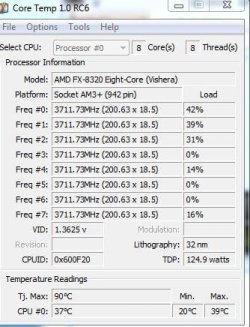
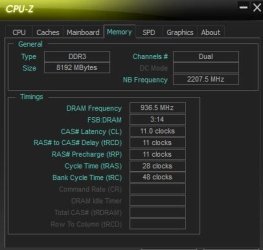
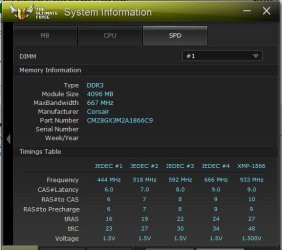
Hello Every one, well after a year of running my current Memory at default, 1333MHz, i thought i would make full use of the memories potential, and bump it up a little to 1600, and then maybe 1866, i went into the bios and change the memory settings from Auto to 1600, and i noticed that Each Stick is running at Different settings ? is this normal ? most other motherboard settings are mostly at Auto settings or Default setting from when i first installed the board and memory a year ago,

i would like to run the memory at its recommended settings if possible, and also lock down the CPU to maybe 4MHZ any suggestions would be welcomed

Thanks in advance
 

Attachments
  • memory.JPG
    memory.JPG
    40.1 KB · Views: 26
  • CPU.JPG
    CPU.JPG
    40.3 KB · Views: 26

My Computer

Computer type
PC/Desktop
Computer Manufacturer/Model Number
Personal build
OS
Genuine windows 7X64
CPU
AMD 8320 FX Processor
Motherboard
Asus Sabertoothe 990 FX R2.0 AM2+/AM2 AMD MB
Memory
8 Gigs Corsair Vengance DDR3 1886 MHZ
Graphics Card(s)
EVGA GTX 750 Ti FTW
Sound Card
On board
Monitor(s) Displays
ASUS VE247H 24 inch
Screen Resolution
HDMI
Hard Drives
Samsung 120GB 2.5-inch SSD 840 SATA III
PSU
Corsair 750 Watts
Case
Gigabyte case
Cooling
Zellman CNPS 10 Extreme
Internet Speed
50megs
Antivirus
AVG Free
Pantz mate I have an Asus board with EUFI and just set mine in the BIOS and am running mine at 2400MHz I don't see any difference in the running of each stick (2 x 4GB) mind you mine a re matched pair and it leaves me thinking what have you got fitted? a matched set or just different brands (I doubt this though) and even if you have a matched set are one of the sticks going bad and in view of that running a memtest would be the way to go albeit tediously long.
MEMTEST
http://www.sevenforums.com/tutorials/105647-ram-test-memtest86.html this one you will need to make a bootable disk set the BIOS to optical (or USB if preferred) boot the machine and let it run for at LEAST 8 passes unless the errors come up straight away. Takes a fair time to complete and some leave it running overnight.
If you do get errors and have more than one stick then you will need to test each one separately and maybe even in the separate slots.
Now 8 PASSES must be done and the latest memtest link is this Memtest86+ - Advanced Memory Diagnostic Tool
 

My Computer

Computer type
PC/Desktop
Computer Manufacturer/Model Number
Own build (new) Desk1 / Asus ROG Win 7 / Desk2 1st build
OS
Desk1 7 Home Prem / Desk2 10 Pro / Main lap Asus ROG 10 Pro 2 laptop Toshiba 7 Pro Asus P2520 7 & 10
CPU
Desk1 i5 3750K / Laptop i7 GTX 860M / Desk2 i5 2500
Motherboard
Desk1 Asus P877-V / Desk2 Gigabyte H67 UD3H / Laptop ?
Memory
Desk1 8GB (1866) / Desk2 16GB (1333) / Laptop 8Gb DDR3
Graphics Card(s)
Desk 1& 2NVidia GTX 650 & Laptops on board Intel
Sound Card
Desk 1 & 2 -XONAR DG Realtek High Def audio Laptop
Monitor(s) Displays
Desk 1 Benq HD 2450 / Desk2 Philips 24" / Laptop 17.5"
Screen Resolution
1920x1080 D1 & D2 & Laptop 1
Hard Drives
Desk1 Samsung 120GB 830 SSD
Asus ROG 256GB 850 Pro SSD
Desk2 Samsung 840 256 SSD
Toshiba 120GB EVO
PSU
Desk 1 Corsair HX 1050/ Laptop ? / Desk 2 Corsair HX 650
Case
Desk 1 Cooler HAF XM ? Toshiba laptop / Desk2 Coolermaster
Cooling
Fans on all Desk1 -2 Desk2 - all Coolermasters 5 Laptop ?
Keyboard
Desk 1 MS Sidewinder X6 Desk 2 MS Sidewinder X 4
Mouse
Desk 1&2 - Gigabyte MS 900 gamer - laptop - Logitec wireless
Internet Speed
ADSL2+
Other Info
One other Desktop (tester) and spare Toshba laptop both with SSD's
Running Kaspersky 2016 ISS on all machines config'd identically
Logitec audio stereo systems on each machine (x3)
Canon MG5250MFC
Router/modem TP-Link running WPA2SK
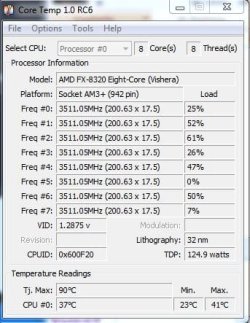
Thanks for your reply ICI, i finally figured out how to get my RAM to run at 1866 Mhz. and my CPU is now at Default Setting, 3.5 MHz
 

Attachments

  • RAM.JPG
    RAM.JPG
    26.9 KB · Views: 7
  • default.JPG
    default.JPG
    42.1 KB · Views: 7

My Computer

Computer type
PC/Desktop
Computer Manufacturer/Model Number
Personal build
OS
Genuine windows 7X64
CPU
AMD 8320 FX Processor
Motherboard
Asus Sabertoothe 990 FX R2.0 AM2+/AM2 AMD MB
Memory
8 Gigs Corsair Vengance DDR3 1886 MHZ
Graphics Card(s)
EVGA GTX 750 Ti FTW
Sound Card
On board
Monitor(s) Displays
ASUS VE247H 24 inch
Screen Resolution
HDMI
Hard Drives
Samsung 120GB 2.5-inch SSD 840 SATA III
PSU
Corsair 750 Watts
Case
Gigabyte case
Cooling
Zellman CNPS 10 Extreme
Internet Speed
50megs
Antivirus
AVG Free
That's good going mate:)
 

My Computer

Computer type
PC/Desktop
Computer Manufacturer/Model Number
Own build (new) Desk1 / Asus ROG Win 7 / Desk2 1st build
OS
Desk1 7 Home Prem / Desk2 10 Pro / Main lap Asus ROG 10 Pro 2 laptop Toshiba 7 Pro Asus P2520 7 & 10
CPU
Desk1 i5 3750K / Laptop i7 GTX 860M / Desk2 i5 2500
Motherboard
Desk1 Asus P877-V / Desk2 Gigabyte H67 UD3H / Laptop ?
Memory
Desk1 8GB (1866) / Desk2 16GB (1333) / Laptop 8Gb DDR3
Graphics Card(s)
Desk 1& 2NVidia GTX 650 & Laptops on board Intel
Sound Card
Desk 1 & 2 -XONAR DG Realtek High Def audio Laptop
Monitor(s) Displays
Desk 1 Benq HD 2450 / Desk2 Philips 24" / Laptop 17.5"
Screen Resolution
1920x1080 D1 & D2 & Laptop 1
Hard Drives
Desk1 Samsung 120GB 830 SSD
Asus ROG 256GB 850 Pro SSD
Desk2 Samsung 840 256 SSD
Toshiba 120GB EVO
PSU
Desk 1 Corsair HX 1050/ Laptop ? / Desk 2 Corsair HX 650
Case
Desk 1 Cooler HAF XM ? Toshiba laptop / Desk2 Coolermaster
Cooling
Fans on all Desk1 -2 Desk2 - all Coolermasters 5 Laptop ?
Keyboard
Desk 1 MS Sidewinder X6 Desk 2 MS Sidewinder X 4
Mouse
Desk 1&2 - Gigabyte MS 900 gamer - laptop - Logitec wireless
Internet Speed
ADSL2+
Other Info
One other Desktop (tester) and spare Toshba laptop both with SSD's
Running Kaspersky 2016 ISS on all machines config'd identically
Logitec audio stereo systems on each machine (x3)
Canon MG5250MFC
Router/modem TP-Link running WPA2SK
Back
Top